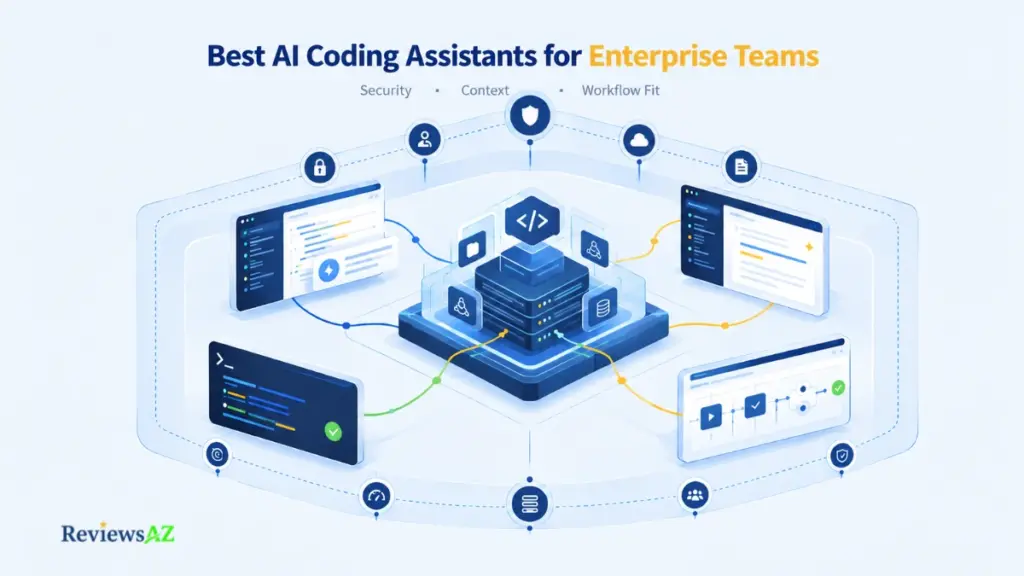
Best AI Coding Assistants for Enterprise Teams: 10 Tools Compared for Security, Context, and Workflow Fit

A developer demo takes ten minutes to impress. Choosing among the best AI coding assistants for enterprise teams gets decided later, in the security, legal, IT, and finance reviews, and a tool that wins the room can still lose the approval.
The wider field of AI code assistants for software development rewards individual speed. Enterprise buying rewards something else. One engineer’s favorite tool touches one repository, while a rollout touches proprietary code, access policies, review queues, and a bill that behaves very differently under per-seat and per-use pricing.
That is why this list is not ranked by autocomplete quality or brand popularity. It uses a declared, weighted methodology covering governance, repository context, workflow surface, deployment control, integrations, cost mechanics, and maturity. The weights are editorial judgment rather than scores, and nothing here was tested hands-on. The comparison table labels the evidence behind each tool, so you can see which claims still need a vendor’s written answer.
What most buyers need to settle is which operating model their organization can scale responsibly. Ten tools follow, each placed by the constraint it solves best, then the vendor questions to send and a pilot design for two or three finalists.
For enterprise teams, the right AI coding assistant depends on the organization’s operating model, security posture, and appetite for agentic execution. Start with tools that fit your existing IDE and source-control environment, then narrow by documented data controls, deployment boundaries, context needs, and cost predictability before running a controlled pilot.
How We Ranked These Tools for Enterprise Use
A tool can be the most productive choice for one developer and a poor standard for several hundred. Most lists only answer the first question.
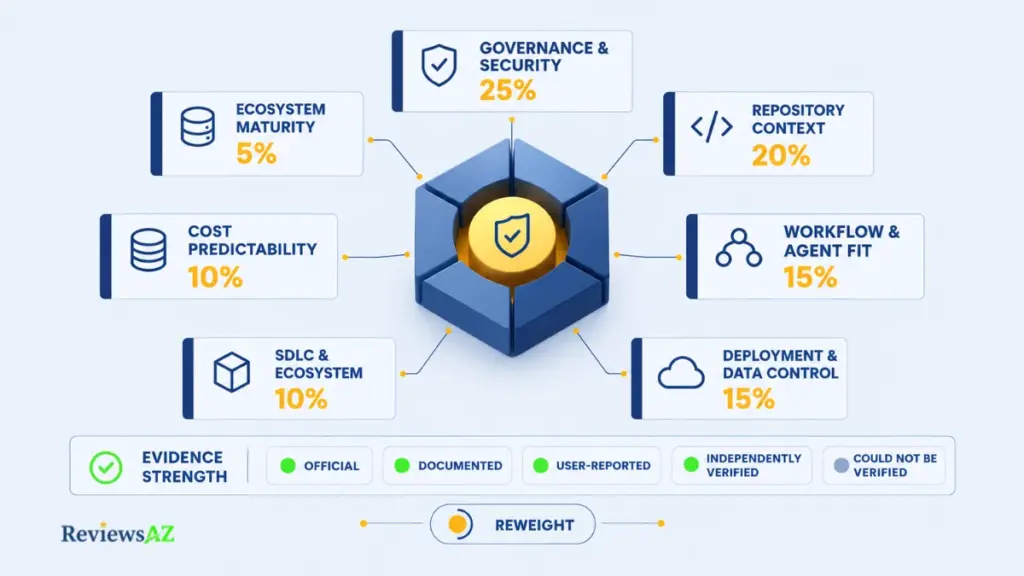
An enterprise-ready AI coding assistant is one whose data handling, access controls, deployment options, and costs can be verified and defended in front of security, legal, IT, and finance, not just praised by the engineers who use it. That definition drives every placement here. The governance side borrows its logic from the NIST AI Risk Management Framework, which organizes AI risk work around four functions (govern, map, measure, and manage) rather than a single approval checkbox.
The Seven Weighted Criteria and What Each Measures
The weights reflect editorial judgment about how enterprise buying works. They explain the order of the list. They are not product scores, and no numeric score is published for any tool.
- Governance, security, and administration, 25%. This covers SSO/SAML, SCIM provisioning, audit logs, policy controls, and documented data handling. It carries the highest weight because security review is a gate an enterprise rollout cannot skip.
- Repository context and multi-file reasoning, 20%. This measures how a tool gathers and uses codebase context beyond the open file. Weak context can show up as cross-service breakage, missed dependencies, and additional review rework.
- Workflow, IDE, terminal, and agent fit, 15%. This looks at where the tool operates and how well it fits the team’s existing habits. A tool that conflicts with the organization’s editor or development workflow can create adoption friction even when its capabilities are strong.
- Deployment and data control, 15%. This covers SaaS, VPC, on-premises, and air-gapped options, along with relevant data residency considerations. For regulated teams, these boundaries can determine whether a tool is usable at all.
- SDLC and ecosystem integration, 10%. This measures connections across source control, CI/CD, ticketing, and MCP-enabled workflows. A tool that sits outside the existing delivery pipeline can introduce manual handoffs that an enterprise rollout would rather avoid.
- Cost predictability and administration, 10%. This considers seat versus usage billing, spend limits, and reporting. Heavy agent use can move the bill faster than headcount does, so the pricing model matters as much as the headline seat price.
- Ecosystem maturity and rollout confidence, 5%. This covers product stability, support, and the status of major transitions. Renames, acquisitions, and end-of-support dates can affect migration planning even when the underlying capabilities remain relevant.
Here is how the weights become an order. A criterion moves a tool up only when the capability is documented and relevant to the operating model it serves. An undocumented strength earns nothing. A documented capability matters most when it matches the teams being evaluated. Each entry below explains in a sentence why it sits where it does.
Your weights will differ. A bank may weigh deployment control far above workflow fit, while a product startup may do the opposite. Reweight the criteria with your own security and finance leads before trusting our order. It is a hypothesis to test rather than a verdict.ty and finance leads before trusting our order, which is a hypothesis to test rather than a verdict.
Evidence Origin and Certainty Labels
The comparison table labels evidence field by field, using five labels:
- Officially Supported: stated by the vendor.
- Documented Capability: confirmed in technical documentation.
- User-Reported: observed by practitioners and nothing more.
- Independently Verified: corroborated by a neutral source.
- Could Not Be Verified: no current, reliable source found.
Editorial judgments, including the weights and the fit statements, are tagged Strategic Assumption. Certainty never exceeds the source: a retention policy repeated across three vendor-owned pages is still Officially Supported, not Independently Verified.
What the Ranking Does Not Claim
It makes no claim of hands-on testing, benchmark superiority, or measured productivity gains, and it is a snapshot, checked on October 1, 2026. Prices, product names, ownership, and support dates in this category shift fast, so treat the order as a working list that gets rechecked on each update. Above all, it is not a verdict for your organization, because a single hard constraint can reorder everything.
Assistants vs. Agents: Which Surface and Control Model Does Your Team Need?
Picture a developer asking for a dependency upgrade. An assistant proposes the edit and waits for approval. An agent updates the lockfile, runs the build, and pushes a branch, and each of those steps needs its own permission decision. Teams that review both products with one checklist tend to miss that difference.
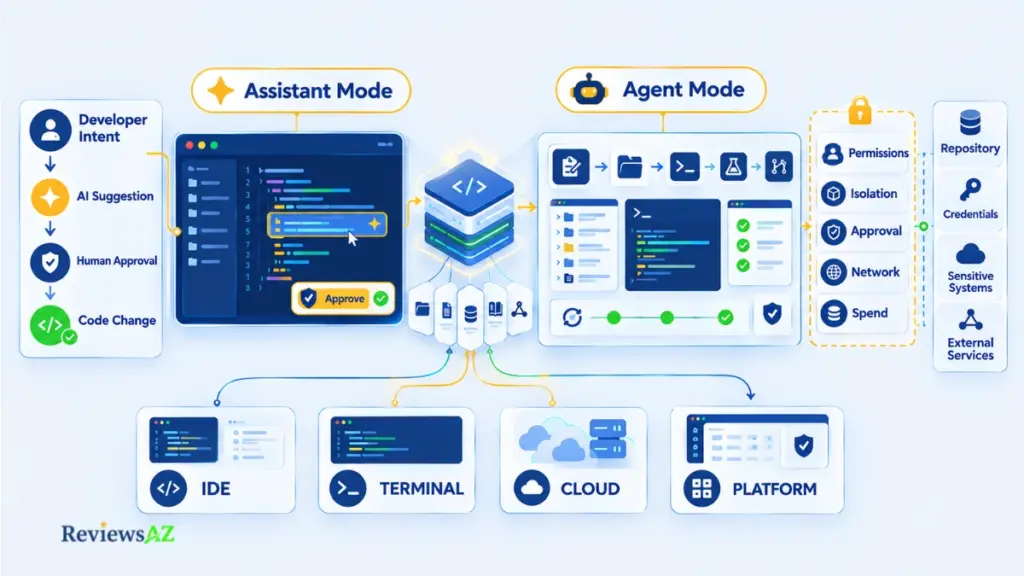
An AI coding assistant suggests code while a developer approves every edit. An AI coding agent takes a task and acts on it, editing files, running commands, and often opening a pull request. Choose an assistant for inline help and an agent for delegated work, and expect agents to demand stricter permissions, isolation, and spend controls.
Inline Assistance Versus Delegated Execution
The wider category of AI coding agents splits into four working surfaces: IDE-first, terminal-first, cloud or fleet agents, and IDE platforms. They recur in the entries below. Many products span more than one, so a label describes how you plan to use a tool, not what the vendor sells.
Why Agent Permissions Change the Control Model
An assistant’s worst case is a bad suggestion that a person accepts. An agent’s worst case is an action: a changed file, an executed command, a connection to another system through MCP. Approval gates and execution isolation exist for that reason, and code execution sandboxing contains those actions. An agent that can run code is not automatically isolated, though. Review agents by what they can touch (files, commands, credentials, network), not by what they can suggest.
Constraint-Based Decision Path
- Inline help in a standardized editor? Start with an IDE-first assistant.
- Multi-file tasks from the developer’s own shell? Look at terminal-first agents.
- Work that runs unattended or in parallel? Look at cloud agents, and rank isolation and spend ceilings first.
- Several agents to supervise from one place? Consider an IDE platform.
With the surfaces defined, the ranking can start where most enterprises already live: on GitHub.
1. GitHub Copilot: Best for GitHub-Centered Enterprise Rollouts
When source control, pull requests, and CI already live on GitHub, adoption friction becomes part of the buying decision. Copilot leads on governance and workflow evidence, the two criteria that carry the most weight here, but it does not lead on context, which could not be verified. That makes its position a Strategic Assumption, not a claim that it is the strongest tool in absolute terms. Our GitHub Copilot enterprise review goes deeper.
- What it is: GitHub’s AI coding assistant, spanning code completions, chat, CLI, and a cloud agent.
- Best for: Organizations that have standardized on GitHub for source control and development workflows.
- Key strength: Seats, policies, and budgets can be managed within GitHub’s organization and enterprise structure, which reduces administrative friction for GitHub-centered teams.
- Key limitation: Chat and agent usage is metered, so spending can follow developer behavior rather than headcount alone.
- Pricing model: A seat fee plus pooled AI credits. GitHub lists Business at $19 per user per month with 1,900 credits and Enterprise at $39 with 3,900 credits. Enterprise requires GitHub Enterprise Cloud. These are published list prices from GitHub Docs, checked October 1, 2026.
- Best fit: Organizations already operating on GitHub Enterprise Cloud that want one centrally governed coding standard.
- Not ideal if: Your source control is not GitHub, your policy requires private or air-gapped deployment, or finance cannot accommodate metered agent usage.
Where GitHub-Centered Integration Matters
The rollout follows an administrative hierarchy that GitHub organizations already use. With GitHub Enterprise Cloud, an enterprise owner must enable Copilot for an organization before that organization’s owner can assign seats. Enterprise is sold only on GitHub Enterprise Cloud, so that subscription needs to be part of the budget as well. The figures above come from GitHub’s seats and billing page.
Enterprise Administration, Policies, and Usage Controls
The billing model matters more here than the seat price alone. Chat, the CLI, the cloud agent, Spaces, and third-party coding agents consume AI credits, while code completions and next edit suggestions do not. Credits are pooled, so 100 Business users share 190,000 credits instead of holding 100 separate balances, and unused credits expire each month.
Watch for: extra usage is switched on by default. That can undermine budgets built around the seat price alone. An administrator has to turn off the AI credits paid usage policy to prevent overage, so set organization-level budgets before the first agent-heavy week.
On IP protection, GitHub’s materials describe an indemnity for Business and Enterprise, although not for individual plans. Some guides still say the duplicate-detection filter must be enabled. Microsoft’s commitment page says that, as of April 3, 2026, no additional mitigations are required for GitHub offerings. Read the contract language carefully, because a vendor commitment is not the same as a legal conclusion.
2. Cursor: Best for AI-Native Editor Workflows
If your developers are already asking for Cursor, that tells you something about adoption potential. It does not, by itself, prove that the organization is ready to standardize on it. Cursor ranks second because its AI-native workflow is a clear strength and its enterprise controls are documented, while the need to introduce a separate editor standard and the lack of documented detail about its context architecture create important trade-offs.
Cursor Versus Copilot: What the Enterprise Decision Actually Is
Forget whose suggestions look sharper. The more important question is whether your organization is prepared to standardize on a separate editor with its own administration, billing, and device policies. Copilot extends tools that IT may already manage, while Cursor introduces another desktop environment. Our Cursor vs GitHub Copilot comparison covers the head-to-head decision, and the Cursor enterprise IDE review covers the product in more depth.
- Workflow surface: Cursor is a dedicated AI-native editor, while GitHub Copilot works inside existing editors and the GitHub environment.
- Administration: Cursor provides a team dashboard, SSO, enforced Privacy Mode, and MDM device policies. GitHub Copilot uses GitHub’s organization and enterprise administration structure for seat assignment and policy management.
- Cost mechanics: Cursor combines a seat price with metered usage beyond the included allowance. GitHub Copilot combines a seat price with pooled AI credits, while code completions are not metered in the same way.
- What it is: An AI-first code editor with agent and codebase-aware features.
- Best for: Teams that are willing to standardize on a dedicated AI editor and make that environment part of the development workflow.
- Key strength: Teams can enforce Privacy Mode and SSO at the organization level, with deeper administration available on Enterprise.
- Key limitation: Cursor introduces another desktop standard, and usage can vary with model choice rather than following a simple fixed seat cost.
- Pricing model: Self-serve Teams plans are $40 per user per month for Standard and $120 for Premium. Enterprise pricing is custom. Cursor documentation, checked October 1, 2026.
- Best fit: Editor-flexible organizations whose developers are comfortable working in an AI-native environment.
- Not ideal if: You cannot introduce another editor, or finance requires a straightforward flat per-seat bill.
Team Controls, Privacy, and Usage Economics
Teams and Enterprise are not interchangeable. Both provide SAML/OIDC SSO and organization-wide Privacy Mode enforcement, with Enterprise adding SCIM, pooled usage, and per-member spend limits. Teams provides team-wide limits.
Common mistake: choosing the plan based only on whether SSO is available. Write down the controls your security and finance teams actually require, such as SCIM, pooled usage, or per-member limits, and match those requirements to the plan before starting the pilot.
Cost also depends on how developers use the product. Third-party model requests carry a Cursor Token Rate of $0.25 per million tokens on top of model API pricing. Cursor says most models operate under zero-data-retention agreements, while some fall outside those agreements and require administrator approval.
Repository context is another area where the documentation boundary matters. Cursor provides codebase-aware features, but this article does not make a claim about the specific indexing design behind them. That is a question to verify with the vendor if repository context is a major factor in your decision.
3. Claude Code: Best for Terminal-First Agentic Engineering Teams
Once a tool can act rather than merely suggest, the important question becomes what it is allowed to do. Claude Code puts that issue at the center of an enterprise evaluation. It ranks third because its permission controls are among the best documented here, although its terminal-first workflow narrows the range of teams it suits and its public Enterprise seat price could not be verified.
What a Terminal-First Agent Changes
Claude Code runs in the developer’s terminal, so governance does not center on an editor that IT manages. It shifts toward device policy, managed settings, and permission rules. Managed settings can reach machines through server delivery or files on disk, and developers can extend those permission lists without removing entries set by administrators.
The Claude Code vs Cursor comparison covers the terminal versus IDE trade-off, while the enterprise review of Claude Code looks more closely at the product itself.
Permissions, Review Gates, and Usage Economics
Admins can make managed settings the only source of permission rules and disable the setting that allows permission prompts to be skipped. Before approving a rollout, four questions should be answered clearly:
- Which commands and tools can run without asking?
- Can developers override managed policies?
- Is sandboxing enabled, and which actions does it cover?
- What is the spend ceiling for each team?
Read before the security review: retention depends on the product surface and plan. Claude Code documents a 30-day standard retention period under commercial terms, while qualified Enterprise accounts can use zero data retention. Claude Enterprise chat and project retention is a separate control, and Claude Code also keeps local session transcripts in plaintext for 30 days by default.
The Enterprise seat fee covers access, while usage is billed separately at API rates. That means token consumption can become the main cost driver, especially for teams using Claude Code heavily. Older seat-based plans with usage allowances still exist, so confirm which commercial model applies to your contract and budget on expected consumption rather than the seat line alone.
Claude Code Enterprise Fit at a Glance
- What it is: Anthropic’s terminal-based coding agent, available as part of Claude Enterprise.
- Best for: Terminal-first teams that already have clear permission, review, and device-management practices.
- Key strength: Managed policies can be enforced centrally, while developers can extend them without weakening administrator-defined rules.
- Key limitation: Usage is billed separately at API rates, so spending can rise with activity rather than staying tied to headcount.
- Pricing model: A seat fee provides access and usage is billed separately at API rates. The exact public Enterprise seat price could not be verified from an official current page. Anthropic documentation, checked October 1, 2026.
- Best fit: CLI-centric organizations that manage developer devices and want delegated coding work under explicit permission controls.
- Not ideal if: Developers work mainly in a GUI editor, devices are not centrally managed, or finance cannot accommodate metered usage.
For enterprise teams, Claude Code makes the most sense when terminal-based delegation already fits the engineering culture and device controls are mature enough to support it. Its permission model is a strength, but that advantage only matters when the organization can govern the environment around the agent.
4. OpenAI Codex: Best for Managed Agentic Coding Across Enterprise Workspaces
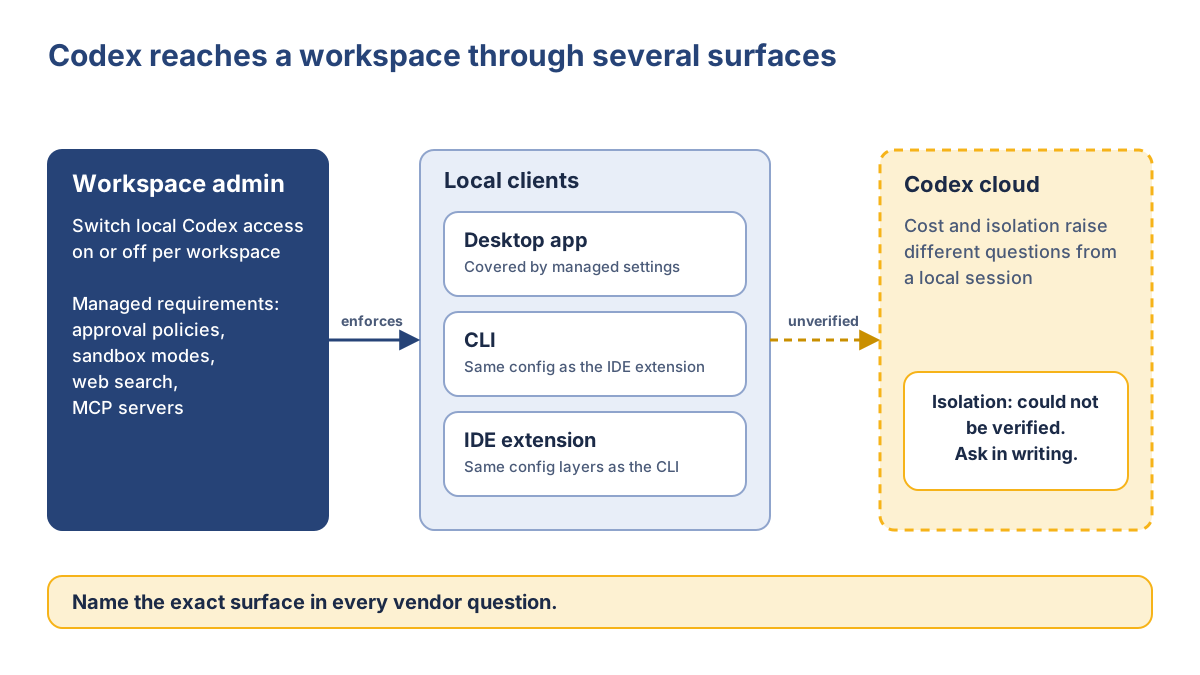
Before Codex can be compared, it has to be defined: which Codex? OpenAI’s documentation now describes a desktop app, a CLI, an IDE extension, and Codex cloud. This entry evaluates Codex as an agent inside ChatGPT Business and Enterprise workspaces, not the separate API, and our OpenAI Codex review gives the wider picture. It ranks fourth because its admin controls are documented for local clients, while its range of surfaces and the lack of verified cloud-isolation details create additional procurement questions.
Codex at a Glance
- What it is: OpenAI’s coding agent, available through a desktop app, CLI, IDE extension, and cloud.
- Best for: Organizations that want to manage agent access through ChatGPT Business or Enterprise workspaces.
- Key strength: Local Codex clients support admin-enforceable approval, sandbox, and MCP rules, giving organizations a defined control layer for agent execution.
- Key limitation: Codex spans several surfaces and billing models, so the right governance and cost model depends on how the organization plans to use it.
- Pricing model: Standard ChatGPT Business seats include Codex within usage limits. Codex-only seats use token-based billing, while Enterprise pricing is custom. OpenAI pages, checked October 1, 2026.
- Best fit: Teams that want delegated coding tasks under centrally managed guardrails and already operate through ChatGPT workspaces.
- Not ideal if: You need one simple pricing structure across every Codex surface, or you are considering a new Business workspace specifically for Codex-only seats.
Current Codex Surface and Enterprise Access
The CLI and IDE extension share one configuration system, while admin-managed settings cover the desktop app, CLI, and IDE extension. Administrators can also switch local Codex access off at the workspace level. A blocked user receives an unauthorized response rather than gaining access through a local override.
The important procurement detail is simple: do not review “Codex” as though it were one uniform product. A local CLI session and a cloud task can involve different cost, approval, and isolation questions, so identify the exact surface in every security and purchasing discussion.
Usage, Workspaces, and Execution Boundaries
Codex-only seats are billed according to token consumption, while standard Business seats include Codex within usage limits. On June 24, 2026, OpenAI stopped offering new Codex-only seats to new Business plans and to Business workspaces that had not previously added one. Existing arrangements were not affected. Because this is a time-bound product decision, confirm the current availability and billing path before procurement.
Execution controls are documented for local clients. Managed requirements can restrict approval policies, sandbox modes, web search, and MCP servers, and they can also block settings that would remove approvals or sandboxing. Cloud execution is a different question, and its isolation could not be verified here, so that point should be addressed explicitly with OpenAI before rollout.
For enterprise teams, Codex is most compelling when delegated agent work can be managed through a defined workspace and local execution policies. The trade-off is that the product spans several surfaces, so a sound evaluation must separate local controls, cloud execution, and the billing model rather than treating them as one package.
5. Devin Desktop: Best for Managing Local and Cloud Agent Workflows
In procurement, a product’s name can have practical consequences. A transition can change the documentation, pricing, support paths, and internal references that an IT team has already built around a tool. Devin Desktop is a current example. It ranks fifth because its orchestration model is distinctive, but the available security documentation focuses on hosted sessions rather than the local paths used by Desktop.
What Devin Desktop Is Now
Cognition announced Devin Desktop on June 2, 2026 as the next generation of Windsurf. It retains Windsurf’s IDE foundation, and Cognition says that existing plans, pricing, extensions, and settings carry over, including legacy Windsurf Enterprise plans. The bigger change is the default workflow: an Agent Command Center brings local and cloud agents, pull requests, and shared context into one place. Windsurf for JetBrains remains available for download. The Devin Desktop review covers the transition in greater depth.
Devin Desktop at a Glance
- What it is: Cognition’s agent-management IDE, built on the Windsurf foundation.
- Best for: Teams that want to delegate work across several agents and review the results from a shared workspace.
- Key strength: A single surface for local agents, cloud agents, and ACP-compatible agents, making orchestration easier to manage.
- Key limitation: The available security documentation is centered on Devin’s hosted sessions rather than Desktop’s local execution paths.
- Pricing model: Self-serve plans include Free, Pro at $20 per month, and Max at $200 per month. Teams is listed at $80 per month plus $40 per month for each full seat. Enterprise is handled through sales and billed in ACUs, according to Cognition’s April 2026 announcement. Pricing checked October 1, 2026.
- Best fit: Organizations moving beyond pair programming toward workflows built around agent delegation, coordination, and review.
- Not ideal if: You want a single assistant inside a stable editor, or you need clearly documented data-handling paths for local agents.
Local + Cloud Agent Orchestration and Oversight
Devin Desktop is designed around delegation rather than one-to-one assistance. Spaces let agents share context, while ACP support allows compatible third-party agents to work alongside Devin. For hosted Devin sessions, Cognition documents isolated machines, multi-tenant cloud deployment, and a dedicated single-tenant VPC for Enterprise customers. It also states that customer data and code are not used for training by default.
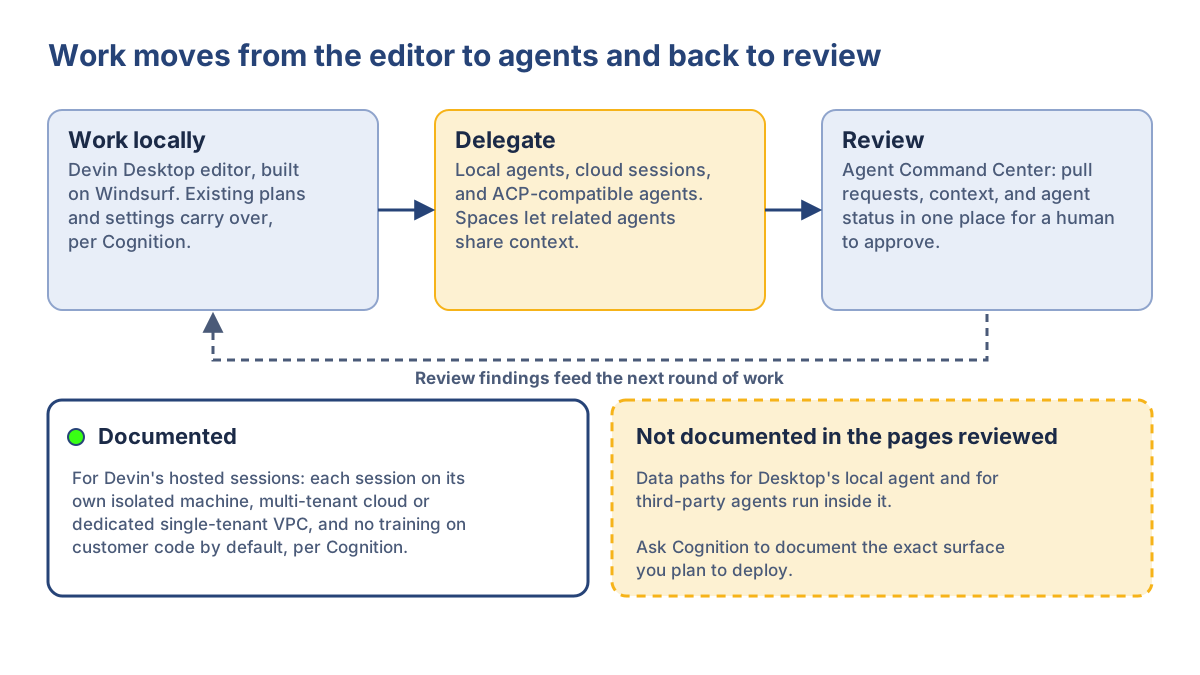
Documented enterprise isolation. Cognition documents isolated machines for Devin cloud sessions and offers Enterprise customers a dedicated single-tenant VPC. These controls are documented for hosted sessions, so confirm whether the same data-handling and execution controls apply to Desktop’s local agent and third-party agents running within it.
Bottom Line for Enterprise Teams
Devin Desktop is a strong fit for organizations that see coding agents as a coordinated workflow rather than a single assistant. Its main advantage is orchestration across local and cloud work, while the main procurement question is how clearly its security model applies to every execution path you plan to use.
6. Augment Code: Best for Complex Repository and Cross-Service Context
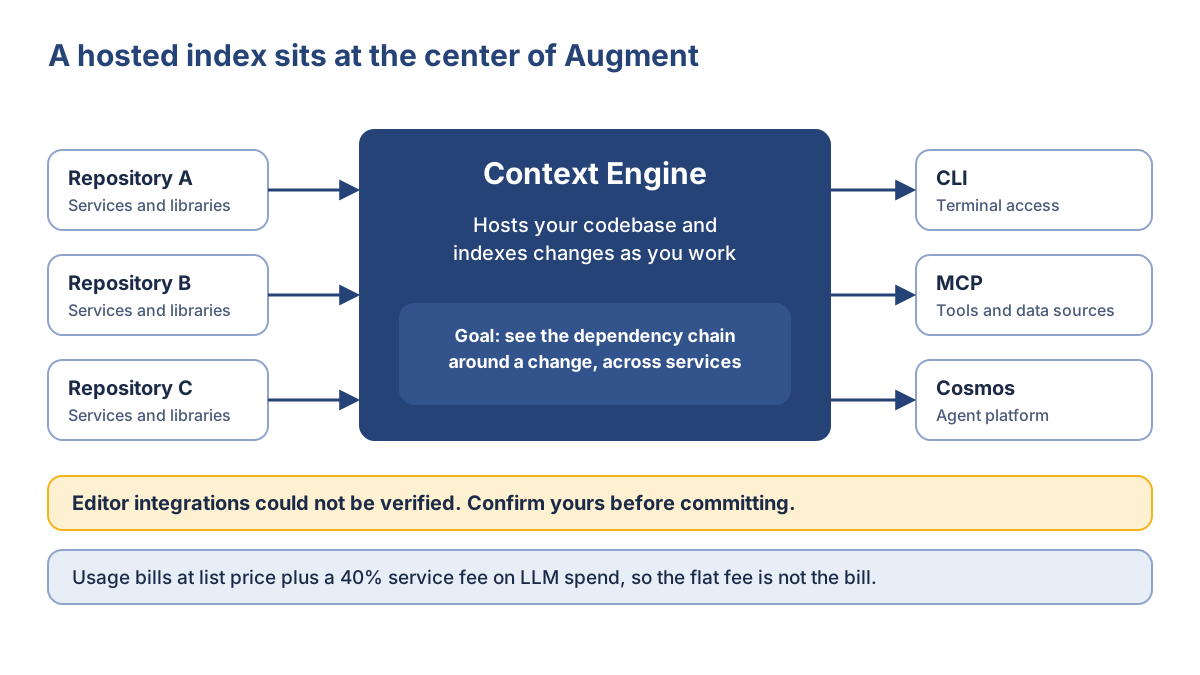
A change that touches several services can fail when an assistant understands the file it edited but misses the dependencies around it. Augment Code is built around that problem. It ranks sixth overall and leads on the context criterion because its hosted Context Engine is documented as a core part of the product. The trade-off is a less predictable usage bill and stronger Enterprise-only controls.
Augment Code at a Glance
- What it is: A context-first coding platform built around a hosted Context Engine, CLI, and Cosmos agent platform.
- Best for: Teams working on large repositories or changes that regularly cross services and dependencies.
- Key strength: Hosted indexing is central to the product, giving repository context a more explicit role than in tools where the indexing approach is not documented.
- Key limitation: Usage costs can move beyond the plan price, and dedicated support is reserved for Enterprise customers.
- Pricing model: Standard is $20 per month and Business is $100 for up to 50 seats, with pooled usage included. Additional LLM usage is billed at the model provider’s list price plus a 40% service fee, with compute charged separately. Enterprise pricing is custom.
- Best fit: Organizations where repository context is a bigger constraint than editor choice.
- Not ideal if: Finance needs a highly predictable monthly bill, or the team needs dedicated support without moving to Enterprise.
Context Engine and Large-Repository Fit
Augment’s documentation describes the Context Engine as a hosted service that indexes the codebase and updates as changes are made. That makes repository context the center of the workflow rather than a secondary feature. The CLI, MCP connections, and Cosmos sit around that context layer. Vendor performance claims were not used to determine its ranking.
Pricing and Enterprise Controls
Standard costs $20 per month and Business $100, each covering up to 50 seats with pooled usage included. Beyond that allowance, LLM usage is billed at the provider’s list price plus a 40% service fee, with compute charged separately. Enterprise pricing is custom and adds controls such as SSO, OIDC, SCIM, CMEK, and dedicated support. Pricing checked October 1, 2026.
That makes Augment more attractive when repository context is the main bottleneck, but less appealing when finance needs a predictable monthly bill. Paid plans exclude AI training on customer data, according to Augment.
7. Gemini Code Assist Enterprise: Best for Google Cloud Teams
Gemini Code Assist Enterprise earns its place on the list because of the ecosystem around it. Its strongest fit is for organizations already invested in Google Cloud, where its IDE integrations, private-repository customization, and related cloud services add more value than they would in a neutral multi-cloud environment.
Gemini Code Assist Enterprise at a Glance
- What it is: Google’s enterprise coding assistant with IDE plugins, agent mode, and Gemini CLI.
- Best for: Engineering teams already aligned with Google Cloud.
- Key strength: Private-repository customization combined with Google Cloud integrations.
- Key limitation: Its value is narrower outside the Google Cloud ecosystem, while Google’s developer tooling continues to evolve around Antigravity.
- Pricing model: Per-user licensing billed hourly at $0.073972603 on a monthly commitment or $0.061643836 on a 12-month commitment. Pricing checked October 1, 2026.
- Best fit: Google Cloud teams that want centralized administration, repository customization, and cloud-specific integrations.
- Not ideal if: Most of your engineering stack sits outside Google Cloud.
Google Cloud and IDE Workflow Fit
Admins assign licenses through Google Cloud, while developers use an IDE plugin connected to a Google Cloud project. Enterprise also integrates with services such as Firebase, BigQuery, Apigee, and Google’s database tooling. That makes the fit strongest for teams already building and operating within Google Cloud; the advantage is less compelling in a mostly multi-cloud environment.
Code Customization and Pricing
Code customization can index private repositories so suggestions reflect internal libraries, and Google states that this does not allow Gemini to broadly train on that code. Agent mode replaced the older tool syntax in October 2025. Google also lists Gemini Code Assist among its indemnified generative AI services, but the contractual terms still determine what that protection covers.
The pricing unit is easy to misread because Google bills by the hour rather than publishing a simple monthly seat figure. On a 730-hour month, the published rates work out to roughly $54 or $45 per user, depending on the commitment term. Use the hourly rate when comparing plans, rather than treating it as a separate usage charge.
For enterprise teams, Gemini Code Assist Enterprise makes the most sense when Google Cloud is already part of the operating model. Its advantage comes from ecosystem fit and customization, not from being a universal choice for every development environment.
8. Tabnine: Best for Privacy-Sensitive Deployments
Tabnine remains relevant mainly for organizations that need more control over where a coding assistant runs. Its documentation covers SaaS, private VPC, on-premises, and air-gapped deployment, giving it a distinct place in an enterprise shortlist.
Tabnine at a Glance
- What it is: An enterprise coding platform with completions, chat, and agentic features.
- Best for: Regulated or IP-sensitive teams with strict deployment requirements.
- Key strength: Multiple private deployment options, including on-premises and air-gapped environments.
- Key limitation: Private deployments shift more infrastructure work to the customer.
- Pricing model: No current public enterprise price could be verified after Tricentis acquired Tabnine on July 30, 2026.
- Best fit: Teams that put deployment control and data locality ahead of broader cloud-agent features.
Private Deployment Trade-offs
Tabnine documents four deployment paths, from managed SaaS to fully air-gapped installation. Greater isolation also means greater operational responsibility, especially for on-premises and air-gapped environments that depend on customer-managed infrastructure.
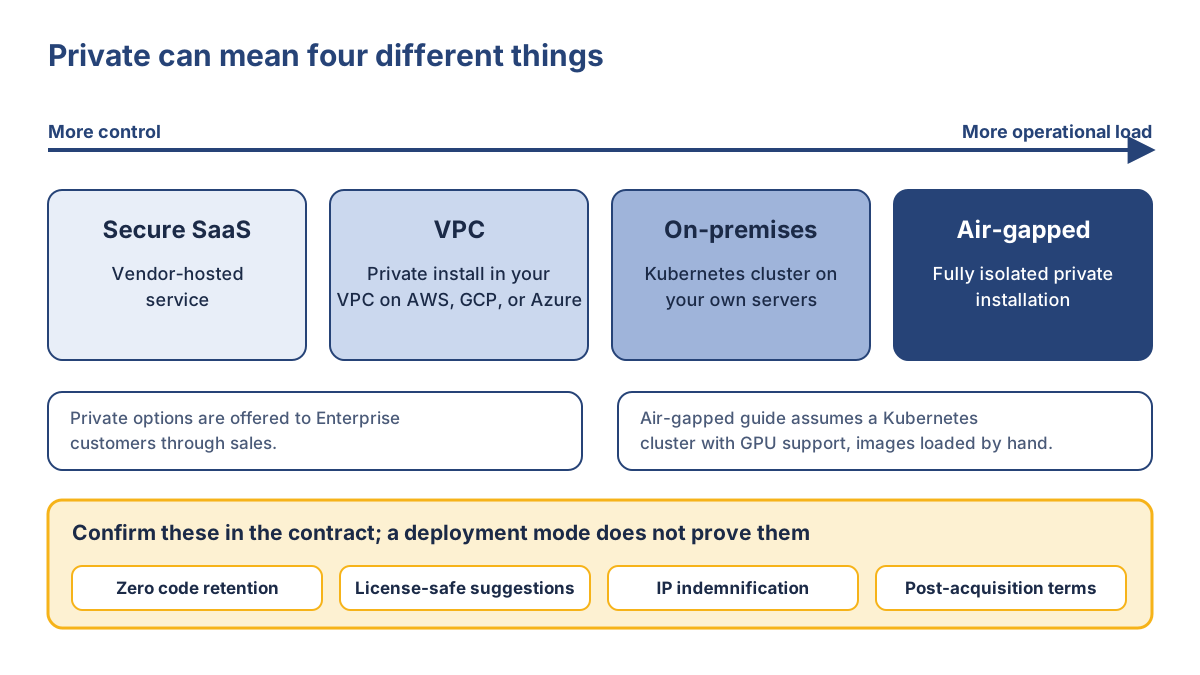
Because ownership changed in July 2026, confirm current pricing, support terms, and roadmap commitments with Tricentis. Retention, license safety, and IP indemnification should also be verified contractually. For teams with strict deployment requirements, Tabnine is one of the few entries worth putting on the shortlist before the security review narrows the field.
9. Kiro: Best for AWS-Aligned Teams
Kiro stays relevant mainly for AWS-focused organizations, particularly teams planning around the transition from Amazon Q Developer. Its place on this list reflects that ecosystem fit and the migration timeline rather than a claim about coding quality.
Kiro and the Amazon Q Developer Transition
On April 30, 2026, AWS announced that Amazon Q Developer IDE plugins and paid subscriptions will reach end of support on April 30, 2027, with Kiro as the named successor. Existing customers keep access until then, and the Q CLI was rebranded to Kiro.
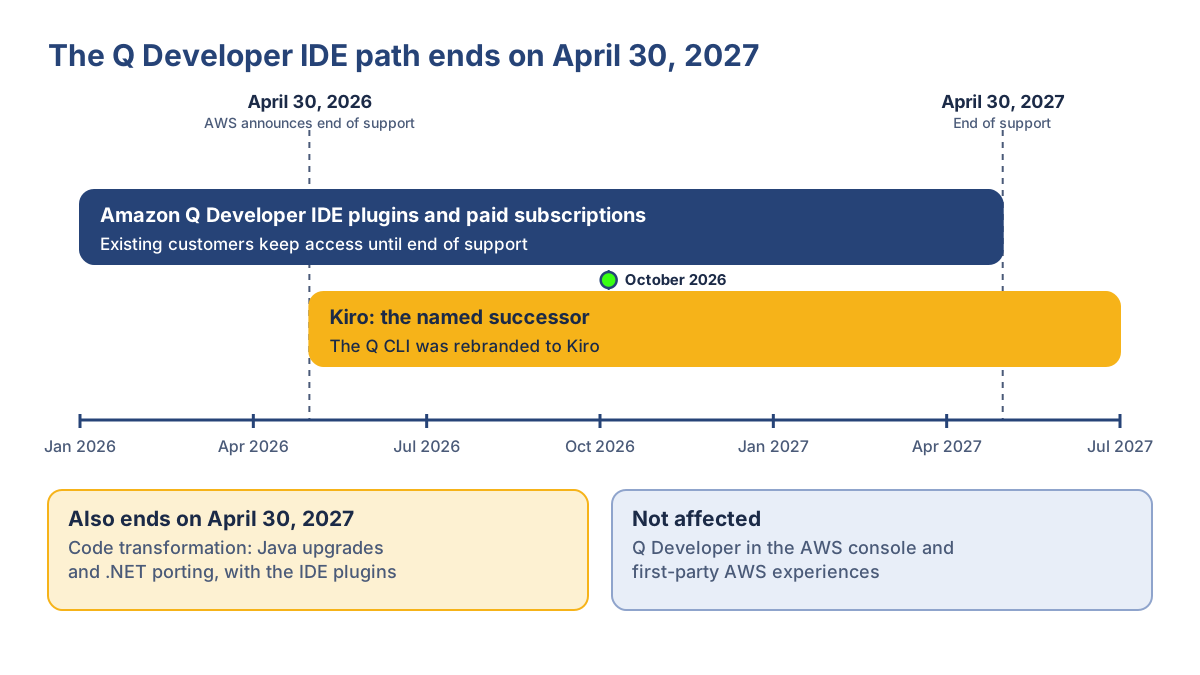
The transition does not mean all Amazon Q services are ending. The IDE plugins, paid subscriptions, and code transformation features are affected, while Q Developer remains available in the AWS console and other first-party AWS experiences. Teams should inventory the Q surfaces they actually use before planning the move.
Kiro at a Glance
- What it is: AWS’s spec-driven agentic IDE and CLI, positioned as the successor to Amazon Q Developer’s IDE path.
- Best for: AWS-aligned organizations planning agentic development workflows.
- Key strength: AWS IAM Identity Center support, MCP, and availability in AWS GovCloud.
- Key limitation: Its advantage narrows outside AWS, and the Q Developer transition creates a defined migration deadline.
- Pricing model: Pro $20, Pro+ $40, Pro Max $100, and Power $200 per user per month, with included credits and optional overage. Enterprise uses the same per-user tier structure. Pricing checked October 1, 2026.
- Best fit: AWS teams that want structured, spec-driven agent workflows.
- Not ideal if: Your engineering environment is not centered on AWS or you need to preserve the existing Q Developer IDE workflow.
AWS Ecosystem Fit and Governance
Kiro supports structured specifications and MCP, with enterprise authentication through AWS IAM Identity Center or providers such as Okta and Microsoft Entra ID. Its console and profile are available in US East (N. Virginia), Europe (Frankfurt), and AWS GovCloud (US). GovCloud pricing is roughly 20% higher.
For an AWS-centered organization, that alignment is the main reason to consider Kiro. For teams outside that ecosystem, there is less justification for adding another platform simply for the agent workflow.
10. JetBrains AI Enterprise: Best for JetBrains Teams
JetBrains AI Enterprise is mainly a fit question: if your developers already work across IntelliJ IDEA, PyCharm, Rider, or other JetBrains IDEs, the platform can add centralized AI management without introducing another editor. Its place at the end of the list reflects that narrower ecosystem fit and an Enterprise credit allowance that is not publicly stated.
JetBrains AI Enterprise at a Glance
- What it is: JetBrains’ organization-level AI plan, delivered through IDE Services.
- Best for: Organizations already standardized on JetBrains IDEs.
- Key strength: Native IDE integration with centralized access management and support for approved model providers.
- Key limitation: Its value drops in mixed-editor environments, and the Enterprise credit allowance is undisclosed.
- Pricing model: $60 per user per month when billed annually ($720 per year), with pooled credits and no top-ups. Pricing checked October 1, 2026.
- Best fit: JetBrains-standardized teams that want centralized AI administration.
- Not ideal if: Developers use several competing editors or finance needs a clearly published usage cap.
JetBrains Ecosystem and Enterprise Management
AI Enterprise is managed through IDE Services, with organization-level access controls, approved model providers, and support for BYOK and local models. JetBrains Air adds policy, auditability, and cost management, although some features are still rolling out. Credits are pooled, but the Enterprise allowance is not publicly stated, so confirm it before the pilot.
For teams already standardized on JetBrains, the main benefit is simple: they can add centralized AI controls without changing the editor their developers already use.
How These Ten Tools Differ
The ten tools serve different enterprise operating models rather than one common use case. GitHub Copilot fits organizations already centered on GitHub, Cursor suits teams willing to adopt an AI-native editor, and Claude Code targets terminal-first engineering. Codex and Devin Desktop focus more on delegated agent work, while Augment puts repository context at the center.
The remaining tools are more specialized. Gemini Code Assist Enterprise is strongest in Google Cloud environments, Tabnine stands out for private deployment options, Kiro is closely tied to AWS, and JetBrains AI Enterprise fits organizations already standardized on JetBrains IDEs. These distinctions are more useful in procurement than a long feature matrix because they show where each product actually fits.
One point remains consistent across the list: a documented feature is not automatically an enterprise-ready control. Retention, deployment, execution isolation, identity management, and usage costs still need to be checked against the exact plan and surface your organization intends to deploy. The comparison of Cursor, Claude Code, Codex, and GitHub Copilot covers the four tools most often evaluated head to head.
Where the Facts Come From
- GitHub Copilot: GitHub Docs on seats, billing, and AI credits, and Microsoft’s Customer Copyright Commitment page (October 1, 2026).
- Cursor: Cursor documentation on pricing, models, and privacy (October 1, 2026).
- Claude Code: Anthropic documentation on Claude Code data usage, Enterprise retention controls, and Enterprise billing (October 1, 2026).
- OpenAI Codex: OpenAI’s Codex announcements and help center, plus the Codex documentation (October 1, 2026).
- Devin Desktop: Devin’s pricing and FAQ page (October 1, 2026) and Cognition’s announcements.
- Augment Code: Augment’s pricing page (October 1, 2026).
- Gemini Code Assist: Google Cloud documentation, with hourly rates from a pricing page copy and recent guides in agreement (October 1, 2026).
- Tabnine: Tabnine’s documentation, its July 30, 2026 announcement, and Tricentis’s acquisition release. Current pricing could not be verified.
- Kiro: Kiro and AWS documentation (October 1, 2026).
- JetBrains: JetBrains licensing documentation and the September 22, 2026 JetBrains Air announcement (October 1, 2026).
Also Considered and Exclusions
Amazon Q Developer and Windsurf have no separate entries because their relevant transitions are already covered: Amazon Q Developer’s IDE path is moving to Kiro, while Windsurf became Devin Desktop. Individual and consumer plans remain outside the scope because this comparison focuses on organization-level licensing. Self-hosted and open-source alternatives are addressed separately in the security discussion.
The important comparison is not which tool has the longest feature list. It is which operating model your organization can support, govern, and afford.
Security, Privacy, and Governance: What to Verify Before Any Rollout
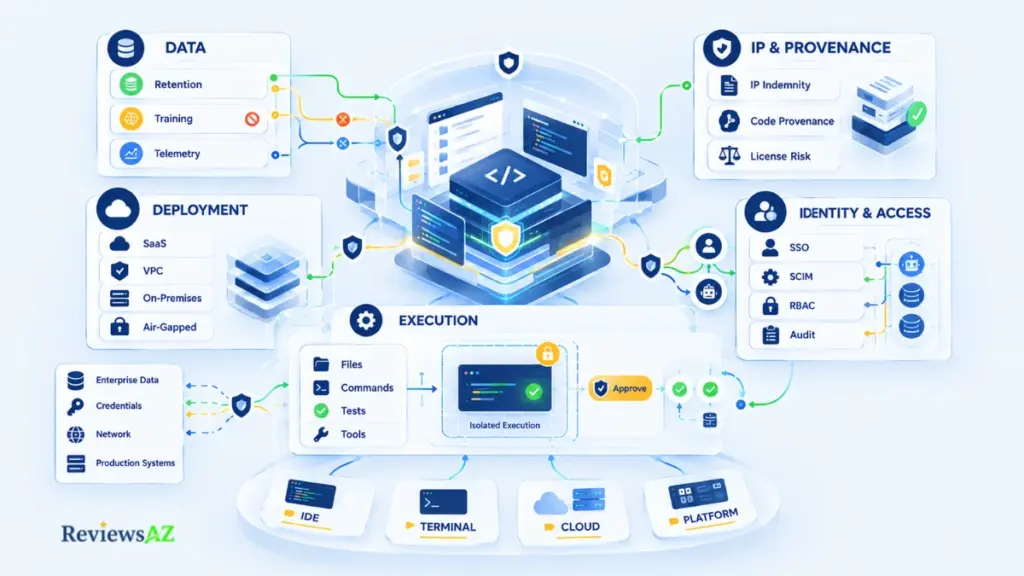
Before an enterprise approves an AI coding assistant, four questions matter most: what leaves the development environment, where it can be retained, what the agent can do, and what contractual protections apply. Vendor certifications can support a review, but they do not answer those questions on their own.
- Data Handling, Retention, and Training. Retention, model training, and telemetry are separate issues, and the answer can vary by vendor, plan, and surface. Claude Code documents 30-day standard retention, with zero retention available to qualified Enterprise accounts. Cursor has exceptions to its zero-data-retention arrangements, while Cognition says customer code is not used for training by default and Augment excludes AI training on paid plans. After an acquisition such as Tabnine’s, confirm that the terms you reviewed still apply. SOC 2 Type II does not establish a retention period, data residency, or indemnity scope, so ask for those terms directly.
- Deployment, Residency, and Execution Isolation. Deployment determines where code can run, while isolation determines what the agent can do there. Tabnine documents SaaS, VPC, on-premises, and air-gapped options; Devin documents a dedicated VPC for hosted sessions; and Kiro names specific AWS regions. Do not assume that an agent capable of running code is automatically sandboxed. In the documentation reviewed, Devin documents isolation for hosted sessions and Codex documents admin-set sandbox modes for local clients. Ask what the agent can access, execute, and connect to, especially when it can process issues, web content, or MCP output. For private deployment alternatives, see our guide to open-source AI coding assistants for private deployment.
- Identity, Audit, and Agent Permissions. Enterprise identity controls are usually easier to find in vendor documentation than agent-level permissions. Augment lists SSO, OIDC, and SCIM; Kiro uses AWS IAM Identity Center; and Claude Code lets administrators enforce permission rules that developers can extend but not remove. During review, confirm what is logged, which credentials an agent receives, and how those permissions behave when MCP connects the agent to internal systems. AI-generated SQL adds another validation layer, covered in our guide to the risks and limitations of AI-generated SQL.
- IP Indemnification, Provenance, and License Risk. These are related but distinct questions. Indemnification defines what claims a vendor may cover, provenance concerns whether generated code matches existing code, and license risk concerns the obligations that may follow. GitHub Copilot and Gemini Code Assist have vendor indemnity programs, but indemnification does not prove code provenance or remove licensing obligations.
- Vendor Review Questions. Before approval, ask the vendor to document what leaves the development environment, how long it is retained, whether training is excluded, which deployment regions apply, and what the agent can execute. Also confirm identity and audit controls, isolation and approval gates, credential handling for MCP connections, the scope of any IP indemnification, and how you will be notified of changes to pricing, plans, ownership, or support. Written answers should form part of the security and procurement record.
A vendor that cannot answer these questions clearly in writing has not finished the enterprise security conversation. Security should narrow the shortlist before the pilot, because a tool that looks strong on features is still the wrong choice if its data path, execution boundary, or contractual protections do not meet the organization’s requirements.
Best AI Coding Assistants by Team Role
The right fit depends on what is slowing the team down. Use the paths below to narrow the field, then apply the security, deployment, and cost checks before choosing the tools for a pilot.
- Platform and DevEx. If the main challenge is policy and spend across GitHub organizations, GitHub Copilot is a natural starting point. Claude Code makes more sense when control over developer machines matters most, while Cursor Enterprise is worth considering when usage limits and member-level controls are important.
- Frontend and Full-Stack. The existing editor standard should drive the choice. Teams already working in GitHub have a straightforward path with Copilot, teams open to an AI-native editor can consider Cursor, and JetBrains-standardized organizations may have a better fit with JetBrains AI Enterprise.
- Backend and Distributed Systems. Context becomes more important as changes cross services and dependencies. Augment Code is particularly relevant because its hosted Context Engine is central to the product, while Claude Code and Devin Desktop are alternatives when terminal work or delegated agents matter more.
- Data Engineering and SQL. The data platform is often the deciding factor. Gemini Code Assist Enterprise fits most naturally when development already relies on Google Cloud services such as BigQuery and Google’s database tooling. For more specialized database workflows, see our guides to AI database tools for backend developers and AI coding assistants for SQL workflows, including the best AI SQL tools.
- Regulated and Privacy-Sensitive Teams. Deployment requirements can narrow the field quickly. Tabnine is relevant when on-premises or air-gapped deployment is essential, Devin offers a dedicated VPC for hosted sessions, and Kiro provides AWS GovCloud availability. Each still requires written confirmation of the data path, execution controls, and contractual terms.
These are starting points, not fixed assignments. A hard requirement such as air-gapped deployment, terminal-first development, or strict cost control can outweigh a tool’s overall position in the ranking.
Common Enterprise Rollout Mistakes
Buying the right license is not the same as deploying the right operating model. Procurement, security review, and developer adoption are one system, so a weakness in one phase surfaces as a failure in another.
| Mistake | Corrective action |
|---|---|
| Autocomplete-only choice | Weigh governance and cost too |
| Unmapped data path | Map what leaves and what runs |
| Standardizing early | Pilot two or three finalists |
| Counting activity | Track outcomes |
| Missing transitions and metering | Record status and set budgets |
Choosing by Autocomplete Quality Alone
A strong demo hides governance, deployment, and cost gaps, so weigh those beside suggestion quality. Ask which of your non-negotiables the tool would fail even if developers loved it.
Ignoring the Data Path and Execution Boundary
An unmapped data path invites shadow AI: developers adopt unapproved tools before policy catches up. Before approval, document what leaves the environment, where it is retained, and what the agent can execute. Can you draw that path for the exact surface you will deploy?
Standardizing Before a Representative Pilot
A tool that shines on a greenfield demo repository may struggle on your largest legacy one. Test two or three finalists on real repositories across different roles, and check that the pilot included your hardest codebase and a skeptical team.
Measuring Activity Instead of Outcomes
Suggestion counts and logins show use, not value. Compare developer productivity signals such as cycle time, review effort, and escaped defects against a baseline recorded first. Decide before the pilot starts what result would change your decision.
Overlooking Product Transitions and Usage Economics
The tools in this list changed under buyers within months: Codex-only seats closed to new Business plans on June 24, 2026, Augment replaced its credit tiers, Tabnine changed owners on July 30, 2026, and Amazon Q Developer’s IDE path reaches end of support on April 30, 2027. Record product status and billing model at purchase, and set budgets and usage alerts before launch. Two questions deserve answers in advance: what does a month cost if usage doubles, and what is the exit plan if the product is renamed, sold, or retired?
How to Run a 2–3 Tool Enterprise Pilot
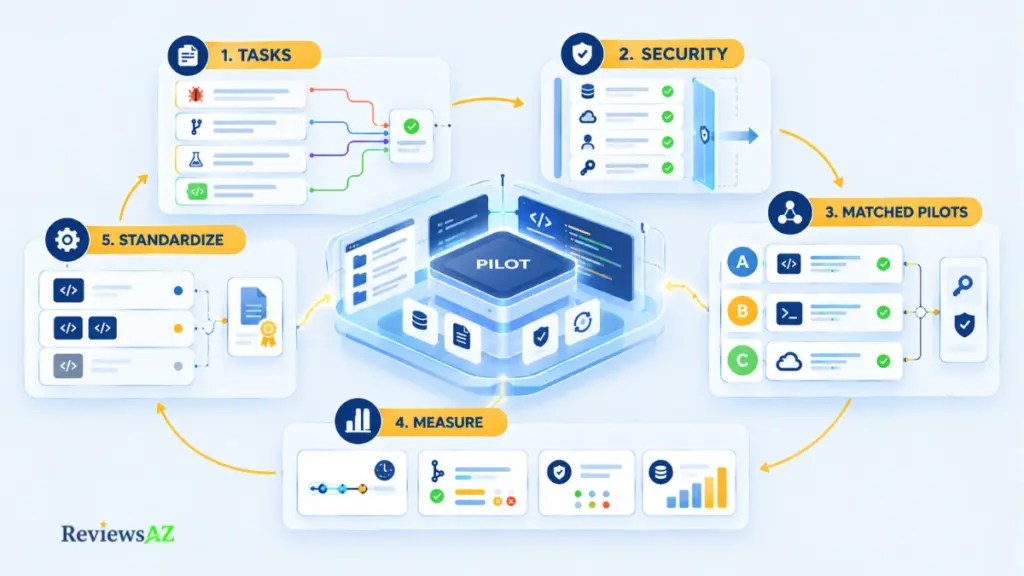
A pilot should answer a procurement question, not simply prove that AI is useful. Keep it small, measurable, and reversible, with the final output written as a decision record rather than a winner badge.
- Define Representative Tasks and Acceptance Criteria. Use real work rather than demo tasks: a bug fix, a multi-file change, a test-writing task, and one task from the hardest repository in scope. Agree on the acceptance criteria before anyone starts using a tool.
- Lock Security and Deployment Constraints First. Remove any candidate that fails a hard requirement before it touches production code. Check deployment mode, retention terms, identity controls, and agent permissions, and require the vendor answers from the security review in writing.
- Test Two or Three Candidates in Matched Workflows. Give each finalist comparable teams, repositories, and task types for the same evaluation period, including at least one skeptical group. Matching matters because a looser permission setup can make an agent look faster without making it the safer choice.
- Measure Time, Rework, Quality, and Spend. Track pull-request lead time, acceptance and rework, security and quality findings, and spend predictability. Use your own baseline rather than targets taken from vendor marketing, especially where usage-based pricing can move the cost beyond the seat price.
- Record the Decision and Guardrails. Document the selected tool and plan, the teams and repositories it covers, the permission, retention, and deployment settings, the monthly spend ceiling and alert owner, the review date, and the condition that would trigger a reversal. The result may be one tool, different tools by team, or no standard yet.
A useful pilot should leave security, legal, finance, and engineering with the same decision record and a clear reason for keeping or rejecting each finalist.
Related Posts:
Cline Review
Aider Review
FAQ: Choosing AI Coding Assistants for Enterprise Teams
Picking a coding assistant is easy. Knowing which one your enterprise can actually approve, govern, and afford is the harder part. The Best AI Coding Assistants for Enterprise Teams are not determined by one feature or one ranking, so the questions below focus on the decisions that still need a clear answer: who fits which environment, what happens to proprietary code, where agents can act, which protections are contractual, and how to run a pilot without letting usage costs or product changes catch you off guard.
Which AI coding assistant is best for enterprise teams?
No tool wins universally. Under this article’s weighting, GitHub Copilot is the current working lead for GitHub-centered organizations, because governance and workflow evidence carry the most weight. Terminal-first teams, Google Cloud shops, JetBrains shops, and air-gapped environments each point elsewhere, so treat the ranking as a hypothesis for a pilot. Details are current as of October 2026.
What should enterprises evaluate before standardizing on an AI coding assistant?
Seven things: governance and administration, repository context, workflow surface, deployment and data control, integrations, cost mechanics, and product maturity. Verify retention, training, execution isolation, and indemnification in writing, since certifications do not establish them, then test two or three finalists on real repositories. The weights are editorial judgment, so adjust them to your own priorities.
Do AI coding assistants train on a company’s proprietary code?
It depends on the vendor, plan, and surface, and training is separate from retention and telemetry. Augment says paid plans exclude AI training, and Cognition says it does not train on customer code by default. Cursor and Claude Code publish retention terms with exceptions. Confirm each in your contract for every surface you plan to use.
How do GitHub Copilot and Cursor differ for enterprise teams?
Copilot extends editors and GitHub that IT already manages, with seats assigned through GitHub organizations and AI credits pooled across the billing account. Cursor is a dedicated AI-native editor with its own admin dashboard, SSO, and enforced Privacy Mode, and its Teams and Enterprise plans differ on controls such as SCIM. Both add metered usage on top of seat prices, as checked on October 1, 2026.
Can enterprise teams use terminal-based AI coding agents such as Claude Code or Codex safely?
Safety depends on controls, not on the interface. Claude Code supports managed permission rules that developers can extend but not remove, and Codex supports admin-set approval and sandbox policies on local clients. Neither makes isolation automatic, so confirm what each can execute and where cloud execution runs. Codex’s cloud isolation could not be verified; ask in writing.
Which AI coding assistants support private, self-hosted, or air-gapped deployments?
Tabnine documents SaaS, VPC, on-premises, and air-gapped private installation for Enterprise customers, though Tricentis acquired it on July 30, 2026, so confirm current terms. Devin offers a dedicated single-tenant VPC for hosted sessions, and Kiro is available in AWS GovCloud (US). Several others are vendor-hosted, and no other fully air-gapped option could be verified.
How should an enterprise pilot AI coding assistants and control usage-based costs?
Pilot two or three finalists on matched, real tasks with security constraints locked first, and measure pull-request lead time, acceptance and rework, finding density, and spend predictability. Set organization-level budgets and usage alerts before launch, because most tools here layer metered usage on a seat or flat fee. Copilot, for example, enables extra usage by default.
Final Decision: Choosing the Best AI Coding Assistants for Enterprise Teams
The best AI coding assistants for enterprise teams are not one winner. They are the tools whose operating model your organization can verify and defend. Under this article’s declared weighting, GitHub Copilot is the current working lead, because governance and workflow evidence carry the most weight. That is editorial synthesis, not a product fact, and it reflects details checked in October 2026.
Read the order as conditional fits:
- GitHub Copilot: GitHub-centered organizations.
- Cursor: AI-native editor workflows.
- Claude Code: terminal-first agentic teams.
- OpenAI Codex and Devin Desktop: managed agent delegation.
- Augment Code: complex repository context.
- Gemini Code Assist Enterprise: Google Cloud-aligned environments.
- Tabnine: privacy-sensitive or air-gapped deployment, with its new ownership to check.
- Kiro: AWS-aligned, spec-driven teams.
- JetBrains AI Enterprise: JetBrains-standardized organizations.
One hard constraint can reorder all of it. Strict deployment isolation can outweigh ecosystem breadth, a terminal-first culture can put agent control ahead of IDE reach, and a large multi-service repository can justify weighting context more heavily. For usage-heavy agents, spend controls can matter more than the nominal seat price.
By the time you close this page, you should be holding six things:
- two or three shortlisted tools
- one defined pilot task set
- the vendor-question checklist, sent
- an approval boundary for agent permissions
- a spend ceiling with named alert owners
- a review date for the decision record
Run the smallest pilot that can tell those candidates apart on your real constraints, and write down what would make you reverse the result.