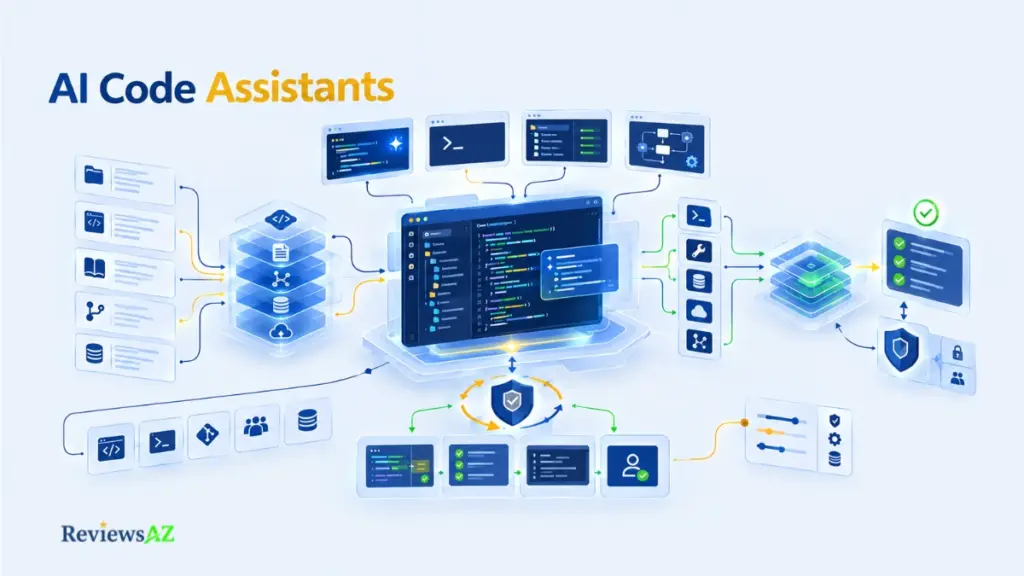
AI Code Assistants: Types, Workflows, and How to Choose the Right Tool

Is a tool that finishes the line you’re typing the same kind of product as one that edits a dozen files and runs commands in your terminal? Marketing pages file both under one label: AI code assistants. In daily use they hardly feel related.
The category now mixes editor extensions, AI-native IDEs, terminal agents, and cloud-based agents, and a single product can play several of those roles depending on how you switch it on. So the name on the box says very little. What matters is the operating mode: what the tool can see, what it is allowed to change, and who approves the result.
This guide maps the territory by workflow rather than hype, and it doesn’t crown a winner. By the end you’ll have a working mental model, a set of criteria for weighing the trade-offs, and a clear idea of which specialist page to read next.
What Is an AI Code Assistant?
An AI code assistant is a software tool that wraps a large language model in coding-specific context, tools, and an interface, so the model can help you read, write, change, and check code inside your actual workflow.
The wrapper is the important part. The model supplies the language ability; the product decides which code the model sees, which actions it can take, and how you review the outcome.
IBM’s overview of AI coding assistants describes the category the same way: LLM-based products combined with tools, workflows, retrieval, and interfaces. It also notes that “assistant” and “agent” overlap in practice.
AI Code Assistants vs. General AI Chat
Paste a function into a general chatbot and you may get a useful answer. But the chatbot knows only what you pasted. It can’t search your repository, read the file next door, or run the test you forgot to mention.
Coding-focused products close some of that gap. Depending on the tool, they pull in surrounding files, work inside your editor, or call external tools. How far any given product goes is a question for its own documentation.
What Makes a Coding Tool More Than Autocomplete
Completion predicts what comes next. Useful, but only one capability.
The wider group of AI coding tools also explains unfamiliar code, proposes edits across several files, drafts tests, and in some cases runs commands and reports back. That last ability is where the relationship between you and the tool starts to change.
Assistant vs. Agent: What Actually Changes?
“Assistant” and “agent” are not two boxes to sort products into. Assistant describes a relationship: a tool that helps a person do the work. Agent describes an architecture: a system that can plan steps, use tools, and act with some independence. One product can be both.
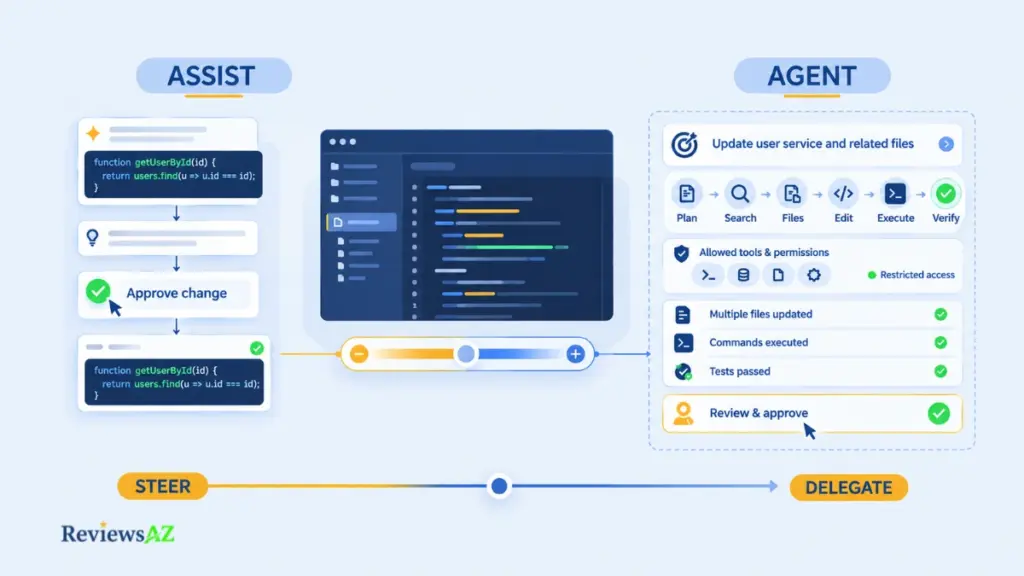
IBM draws the same line, treating assistant as a term about the relationship with the user and agent as an architectural dimension that often overlaps with it. GitHub’s and Cursor’s current documentation point in the same direction: Copilot documents chat, plan, and agent modes alongside completion, and Cursor documents agents that can act well beyond suggestion.
Assistive Interaction vs. Agentic Execution
In assistive mode, you drive. The tool suggests a completion, answers a question, or drafts a function, and every step passes through you.
In agentic mode, you hand over a goal. The tool works out the steps, searches the codebase, edits several files, and may run terminal commands along the way. Cursor’s documentation describes agents that do this locally or in the cloud, and GitHub’s Copilot documentation covers assistive and agentic capabilities inside one product.
Same product, both ends of the spectrum, depending on the mode.
Human-in-the-Loop vs. Delegated Work
The sharper question is where you sit. Approve each suggestion as it appears and you are steering. Approve only the finished result and you have delegated.
Delegation saves attention, but the effort moves rather than vanishes: instead of checking a line, you review a multi-file change you never watched being built, sometimes after commands have already run. The trade tends to pay off when the task, the tests, and the rollback path are defined up front; that reading is this guide’s own analysis, not a measured result, and the same applies to the other judgment calls ahead.
The high-autonomy end of the spectrum has its own deep-dive in AI Coding Agents; here the goal is only to draw the conceptual line.
Common mistake: trusting the label. A tool sold as an assistant may edit files and run commands, and one sold as an agent may ask for approval at every step. Labels reflect positioning. Permissions and execution behavior live in settings and documentation, so read those before assuming what a tool will do unattended.
The Main Operating Models of AI Code Assistants
Most conversations about AI coding tools start with product names. A more useful starting point is where the work happens: in your editor, in a terminal, or in the background while you do something else.
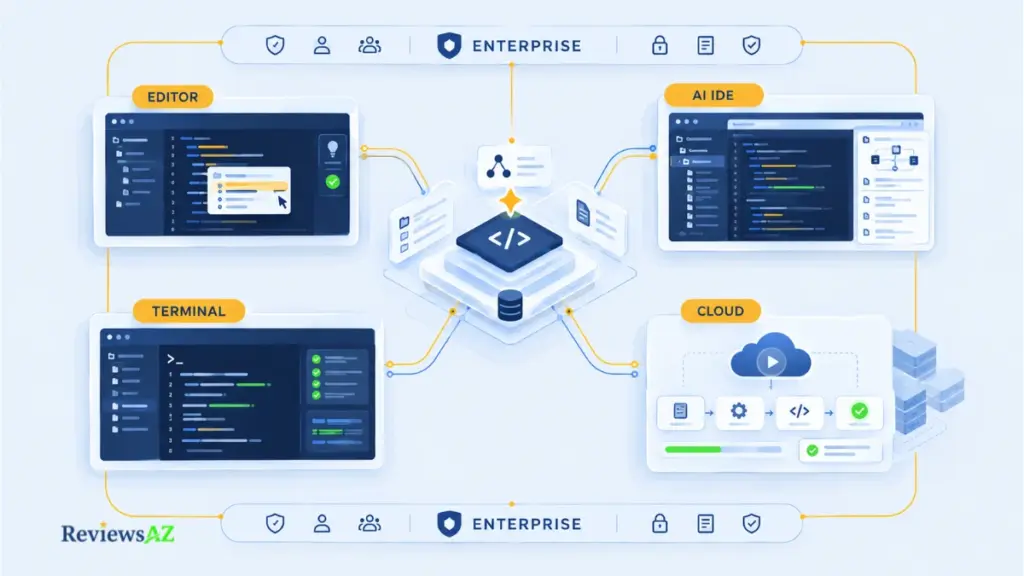
That gives four dominant operating models, with an enterprise layer cutting across all of them. They describe a typical workflow, not a tier, and the lanes overlap.
| Operating model | Where the work happens | Who holds the pen |
|---|---|---|
| Inline completion and editor extensions | Inside your existing editor | You, suggestion by suggestion |
| AI-native IDE | Inside an editor built around the model | Shared: you steer, the agent edits |
| Terminal and CLI agent | The command line, against a repository | The tool acts within permissions you set |
| Asynchronous and cloud agent | Away from your editor, in the background | The agent works, you review the result |
| Enterprise layer (across all four) | Wherever the other models run | Your organization sets the boundaries |
Because products span lanes, a list of names hides what matters. Decide where you want the work to happen and who approves it, then check which products support that mode. Five lanes, in the order most developers move through them:
- Inline completion and editor extensions. Start where most developers already are. GitHub Copilot anchors this lane, and as noted above it is no longer autocomplete-only. The lane is wider than one product: JetBrains AI Assistant works inside JetBrains IDEs, Visual Studio Code hosts a large extension ecosystem, Cline runs agentic tasks inside the editor, and Continue.dev offers an open, customizable assistant with a route to local models. The appeal is low friction (keep your editor, keep your habits), though repository-level depth varies by product, so verify it rather than assume it. When Copilot doesn’t fit, GitHub Copilot Alternatives maps the neighboring options.
- AI-native IDE workflows. Push past a plugin and you reach a different lane entirely. Cursor builds the whole editor around the model, and because its agents can also run in the cloud, it reaches into the background-agent lane too. The trade-off is adopting an editor, not a feature: that pays off when most of your work spans several files and you’re willing to switch environments, and pays less when your team has standardized elsewhere. Windsurf competes here, and Cursor vs Windsurf takes the two head to head, while Cursor Alternatives widens the field.
- Terminal and CLI agent workflows. Some developers would rather skip the IDE question altogether. Claude Code is the terminal-first example of an agentic workflow, and Aider is an open, terminal-first tool built on a similar idea: point it at a repository from the command line. Terminal agents suit people who live in the shell or want explicit control over what the tool may run, at the cost of a less visual review experience, since you inspect changes through diffs and your usual version-control tools. Anyone weighing a switch can start with Claude Code Alternatives.
- Asynchronous and cloud-based coding agents. Take the terminal model one step further and the editor disappears entirely. Some agents work outside your editor altogether: you describe a task, the agent runs on its own, and you return to a result. Devin Desktop is a representative example of that autonomous, asynchronous style, and Codex is another agentic option. Many tools in this space offer more than one way to run, so check the mode you would actually use. Review burden bites hardest here, because you evaluate finished work you never watched being built.
- Where enterprise platforms fit. Layer a fifth question over the four above: who controls this, and what can it touch? Enterprise is not a fifth type; it’s a layer that any of the four models can arrive with, in the form of admin controls, policy settings, or contract terms. Several products live mainly in this conversation because of what they’re attached to rather than a single operating mode: Amazon Q Developer sits close to AWS’s own services; Gemini Code Assist is built around Google’s models and its Cloud and Workspace ecosystem; Tabnine markets itself on private, self-hosted deployment for teams that can’t send code externally; and Sourcegraph Cody builds on Sourcegraph’s existing code-search platform. Each also plugs into enterprise plans from the tools named above. Comparing them is mostly a deployment and governance exercise, so it waits for the security section, and each positioning point deserves re-checking against the vendor’s current documentation before it’s repeated as fact.
All four models share a dependency that product comparisons rarely mention: deciding which parts of your codebase the model actually sees. That is where tools differ most.
How Code-Aware Context Actually Works
Rename a function that twelve files call, and a tool that finds eleven of them has just written a bug that compiles.
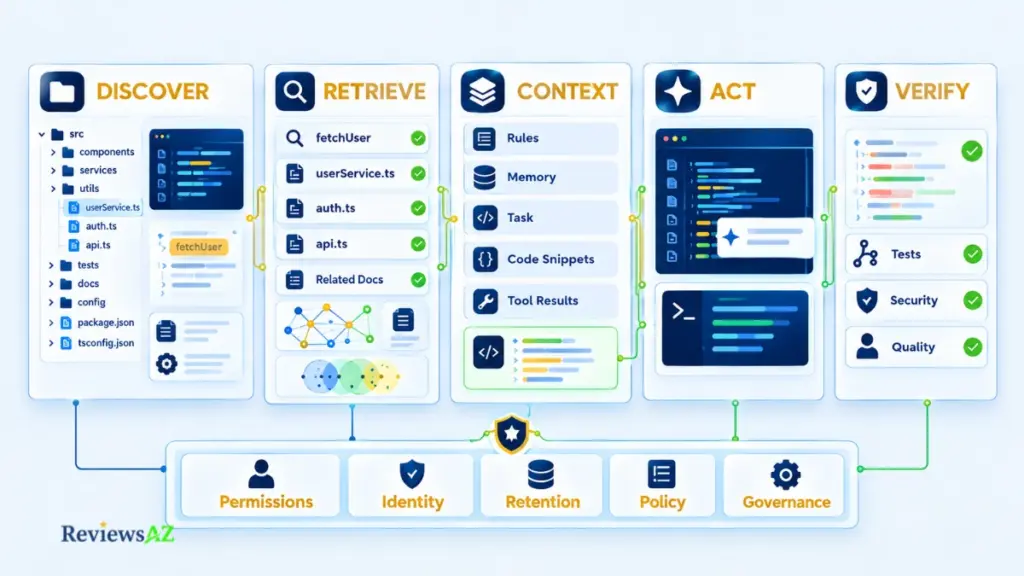
An assistant doesn’t have to load your entire repository into the model’s context to be useful, and most don’t try to for every task. Something still decides what actually reaches the prompt, and tools generally work through four stages, though which stages a given product runs is a documentation question, not an assumption.
- Discover: locate candidate files, symbols, and documentation.
- Retrieve: rank and select the most relevant pieces.
- Assemble: combine snippets, rules, and the task into one prompt.
- Act and verify: propose or make changes, then check them.
Repository Search and Retrieval
The simplest layer is search: file names, text matches, references to a symbol. It is blunt, and often enough for exact identifiers. Some tools also build an index so they don’t rescan everything on each request. Cursor’s documentation describes a local codebase search index; that is one product’s design, not a category rule.
Access is permission. Context is what actually lands in the prompt for this task. A tool can reach your whole repository and still see only a fraction of it.
Structural Context: Symbols, ASTs, and LSP Signals
An abstract syntax tree (AST) is the parsed structure of code. The Language Server Protocol (LSP) is how editors ask language servers where a symbol is defined and where it is used. Signals like these can separate a real function call from a string that merely matches.
Whether a given assistant uses them is something only its documentation can settle. Without that documentation the claim can’t be confirmed, so this guide doesn’t make it for any tool.
Semantic Retrieval and RAG
Retrieval-augmented generation (RAG) means fetching relevant material first, then letting the model answer with it in view. Semantic retrieval matches on meaning rather than exact words, usually through vector representations, so a query about “login check” can surface authentication middleware even when neither word appears in it.
IBM lists vector retrieval and RAG among the common components of these tools. The catch is that matching by meaning can miss an exact identifier that plain search finds instantly, which makes the two better seen as complements than rivals.
Rules, Memory, Tool Calls, and Prompt Assembly
Rules are standing instructions such as “follow our error-handling pattern.” Memory carries notes between sessions. Tool calls let the model ask the product to search, read a file, or run tests, and the Model Context Protocol (MCP) is one way to connect outside tools; the security section returns to what that access implies. IBM lists rules, memory, tools, and MCP among the common components as well.
Prompt assembly then packs everything into a single request. A rough sketch, not any vendor’s actual format:
prompt = rules + memory + task
       + retrieved_snippets("fetchUser")
       + tool_results(search, tests)
Details differ by product, and the documentation for tools such as Codex, Cursor, and Continue.dev is where they live.
Why Context Can Still Drift or Saturate
Context windows are finite, so a long task forces choices about what to keep. Details compete for space, and summaries carried across a long session can preserve assumptions that stopped being true an hour ago.
A concrete version of that: a session that starts by debugging a payments module and drifts, an hour later, into an unrelated logging fix can carry payment-specific assumptions into logging code if the running summary compresses detail instead of dropping what no longer applies.
When output goes wrong, ask what the tool saw before asking how capable the model is.
What Developers Actually Use AI Code Assistants For
A test fails in a module nobody has opened in a year, and the fix is due tomorrow. Whether an assistant helps or wastes an hour depends less on the product than on the kind of task.
Developers use AI code assistants for completing and explaining code, refactoring across files, drafting tests and documentation, writing SQL and backend code, and prototyping or learning. Results vary by task, tool, and review discipline, so no universal productivity gain can be claimed.
Code Completion, Explanation, and Pair Programming
Completion is the entry point: the tool predicts the next line or block as you type. Explanation is the quieter upgrade. Paste in an unfamiliar function, ask what it does, and you get a reading of it faster than tracing it by hand.
The pair programming comparison holds, up to a point. A human partner shares your intent; the tool only sees what it was given.
Multi-File Refactoring and Bug Fixing
Completion and explanation stay close to a single file. Refactoring moves the ground: renaming a function used across modules, or changing a signature and fixing every caller, takes more than the file you have open. That is agent-mode territory, covered above.
The risk to plan for is code that is almost right: it compiles, reads well, and hides a subtle break. Several small, reviewable changes are safer than one sweeping diff.
Testing, Documentation, and Review Preparation
Refactoring and testing sit close together for a reason: both ask a tool to reason about behavior it didn’t write. Unit test generation is a natural fit here, and so are docstrings, changelog notes, and pull-request descriptions.
One trap is worth spelling out. A test written from the code tends to mirror what the code currently does, bugs included, so a passing test proves little unless it would fail on wrong behavior. Ask for edge cases and failure cases explicitly, and treat the output as a first draft.
SQL and Database Workflows
Move from application code to the database layer and the context problem returns in a sharper form. Picture adding a column and backfilling it: the tool can’t write correct SQL for tables it has never seen, and without your schema it guesses names and types.
An AI coding assistant for SQL works best when it has the schema, the target database, and the constraint you care about. Support for specific databases varies by product. Whether you still need to learn SQL yourself is a separate argument, taken up in Do You Still Need to Learn SQL in the Age of AI?
Can you trust SQL that looks right? Not until it has run against a copy of your real schema, with the query plan read and a rollback confirmed. Generated queries can reference the wrong column, lock a large table, or skip the way back.
Backend and API Development
The schema problem in SQL extends past the database itself. Backend work overall is heavy on patterns: endpoints, validation, serialization, data-access code. Assistants draft that boilerplate quickly, especially when project rules spell out your conventions. Authentication, error handling, and anything touching money deserve slower review, since a familiar-looking pattern can still be wrong for your system. Readers working close to the database can continue with Best AI DB Tools for Backend Devs.
Learning and Prototyping
Step away from production code entirely and the calculus changes again. As a learning aid, an assistant is a patient explainer, though copying answers you can’t explain builds a weak foundation. As a prototyping tool, speed is the point, and throwaway prototypes carry the least risk. Promoting one to production without review carries the most.
For budget-conscious learners, Free AI Coding Assistants is the place to start.
How to Evaluate AI Code Assistants: Capability, Quality, Cost, and Workflow Fit
How do you compare AI code assistants when the tools don’t even agree on what they are? A completion plugin and a background agent cannot share a useful scorecard built on speed alone.
A better approach is to compare the properties that shape the workflow. Five criteria carry most of the weight: context, autonomy, quality, integration, and cost. The right balance depends on how you work, which is why there is no useful winner column here. Nor should the whole decision collapse into one number, whether that number is a benchmark score or a monthly price. Each can hide the task mix, model configuration, seat count, or real usage behind it.
1. Context and Repository Reach
Start with what the tool can actually see for your task. That might mean one file, a set of open tabs, an entire repository, or several repositories, depending on the product and its configuration.
Repository reach is not the same thing as retrieval quality. A tool may be able to access a large codebase while still selecting the wrong pieces of it for the task. A practical way to expose that difference is to give the assistant a change that touches files far from the one you have open and see whether the relevant context can be found.
Look for documented details about indexing, repository reach, and any stated limits. Where the vendor does not explain those boundaries clearly, treat the capability as unconfirmed rather than assuming broad access means broad understanding.
2. Autonomy, Permissions, and Reviewability
Three questions matter here: what can the tool change, what can it run, and how clearly can you inspect what it did?
An assistant that only suggests a completion creates a different review burden from one that edits several files or executes terminal commands. Look for granular approval controls and changes that arrive as readable diffs, so you can see the effect before accepting it.
The important trade-off is not simply capability versus convenience. More autonomy can also mean larger changes arriving after less visible intermediate work. A tool with stronger execution abilities but weaker review controls can leave you with more to verify at once.
3. Quality, Verification, and Benchmark Limits
A benchmark score answers a narrower question than many comparisons imply. It usually tells you how one tool, model, configuration, and workflow performed on a fixed set of tasks under defined conditions.
Imagine a benchmark reports that a tool correctly completes a certain share of a test set. That figure describes performance on those particular tasks, in that language and framework, using that grading method. It does not automatically tell you how the same system will behave in a decade-old codebase with unusual naming, missing documentation, or unfamiliar conventions. It also does not show how much manual cleanup was still needed before a change was safe to merge.
Vendor-published figures should therefore be treated as vendor claims, not independent verification. Look at the benchmark methodology, compare independent evaluations where available, and avoid carrying a number forward without a current source. For a deeper treatment of how these measurements should be read, see AI Coding Assistant Benchmark.
Most importantly, separate generated output from verified output. Code that looks clean or passes a narrow test is not automatically proof that the underlying behavior is correct.
4. Integration, Models, and Developer Experience
Where does the tool actually live in your workflow? It may work in an editor, terminal, browser, CI pipeline, or across several of them. The practical question is not only what the tool can do, but whether it fits the environment where you already spend your time.
Model choice matters too. Some tools offer multiple models or modes, while others constrain the options. Those details can change, so current availability should be checked when you make the decision rather than treated as permanent product behavior.
There is also a less obvious cost to integration: switching environments. A technically capable tool can still create friction if using it means abandoning established habits or moving work into a place your team does not use.
For product-level comparisons, the relevant workflows are covered in Cursor vs GitHub Copilot, which looks at IDE-native versus extension-based work, Claude Code vs Cursor, which compares terminal-first and IDE-first approaches, and Cursor vs Claude Code vs Codex vs GitHub Copilot, which places all four models side by side.
5. Pricing, Usage, and Cost Control
Pricing for AI coding assistants differs in kind, not just in amount. Before comparing monthly prices, identify how the tool actually bills for use.
- Seat-based subscriptions: a fixed fee per user.
- Usage or credit pools: an allowance that decreases as you work.
- API or token billing: charges based on model consumption.
- Enterprise contracts: custom terms negotiated for the organization.
- Free tiers: limited access that still requires separate attention to data and privacy terms.
Usage-based billing deserves particular attention when agent runs become longer or more complex. Monthly cost can become harder to predict, so check for spend caps, alerts, and administrative controls rather than looking only at the advertised entry price.
Promotional rates should also be treated as temporary unless the vendor documents them as standard pricing. Because plans and usage models change, current details belong on the vendor’s official pricing page and in AI Coding Assistant Pricing Comparison.
The useful comparison is therefore not which tool looks strongest on paper. It is whether the tool can reach the context your task requires, operate within permissions you can accept, produce changes you can verify, fit the workflow you already use, and remain predictable enough to justify its cost.
Security, Privacy, Permissions, and Verification
Your team likes the tool. Then security asks three questions: where does the code go, who can read the prompts, and what is the agent allowed to run? The product page rarely answers any of them in a form you can forward.
The useful frame is a boundary map of every place your code, prompts, and credentials can travel. Five questions, one per subsection below, trace it: what leaves the machine, what the tool may do unasked, what is retained or logged, what outside systems it reaches, and how its output is checked. Treat every claim tied to a specific vendor as one to verify against that vendor’s current documentation rather than as settled fact, since this guide deliberately stays at the level of what to check rather than what a named product currently promises.
Code and Prompt Data Flows
A single request can touch your editor, a vendor service, a separate model provider, and connected tools. Whether code leaves your machine depends on the product, the mode, and the plan.
Local setups can shrink that boundary. Ollama, for one, runs open models on your own hardware, and assistants such as Continue.dev can point at them; the guides to Local AI Coding Assistants and Open Source AI Coding Assistants cover those routes.
Two caveats. “Local” can describe only the interface while the model stays remote, and even a fully local stack needs its network behavior checked. A claim of “zero data leakage” is only as good as the architecture behind it, so treat it as something to test rather than accept.
Permissions, Sandboxing, and Human Approval
Data flow answers where code goes. The next question is what the tool may do once it’s there. Agent permissions are the practical center of that risk: can the tool read only the open file or the whole repository, write files, run shell commands, reach the network?
Two design choices matter most: whether approval happens per action or per task, and whether execution runs in a sandbox that limits the damage. Start with the narrowest permissions that let a task finish, then widen them deliberately. What a given product offers sits in its documentation.
Retention, Training Opt-Outs, and Telemetry
Permissions govern what a tool can do; retention governs what happens to what it saw. Three questions get bundled together here and shouldn’t be. Is your data retained, and for how long? Is it used to train models, and can you opt out? What code telemetry is collected about how you use the tool? Each can have a different answer, and each can change by plan.
The authoritative place to look is the vendor’s own security and privacy documentation, read at the time you decide, never a competitor’s summary.
Plan tiers aren’t contracts. A paid or team plan does not automatically carry the data controls of an enterprise agreement. Retention, training, and audit terms may sit in different documents. Check the terms for the exact plan you’ll buy, and get any stronger commitment in writing.
What an enterprise agreement typically adds on top of a team plan is governance infrastructure rather than a single toggle: role-based access so not every seat has the same reach, audit logs that record what an agent touched and when, single sign-on and provisioning tied to your identity provider, and sometimes a choice of data region. Which of these a given vendor actually offers, and at what tier, is exactly what Best AI Coding Assistants for Enterprise Teams is built to track.
Connectors, MCP, and External Tool Access
Retention covers what a vendor keeps. Connectors widen what the assistant can reach beyond your own code in the first place. The Model Context Protocol (MCP) is a way to connect AI applications to outside tools and data, and each connector widens what the assistant can read and do: tickets, databases, chat, deployment systems.
That reach cuts both ways. If the tool reads text written by someone outside your team, such as an issue comment or a web page, that text can try to steer the model. This class of risk is usually called prompt injection, and it grows with every connector. Protocol details belong to the official MCP specification. Scope connectors narrowly, and prefer read-only access until a need is proven.
Quality Gates, Security Analysis, and Human Review
Even when the data boundary holds, the output still has to be right. SonarSource’s “trust but verify” framing is a useful market signal: the conversation has moved from whether AI can write code to how teams verify what it wrote. It is a commercial source, so read it as a signal, not proof.
The gates themselves are familiar: tests, static and security analysis, pull-request review, CI checks. AI-generated changes should pass through the same gates as any other, with human review as the last one. A team that can’t say who reviews what, what the agent may touch, and how a bad change gets reversed isn’t ready to delegate, however good the tool.
How to Choose the Right AI Code Assistant for Your Workflow
Which AI code assistant is best for developers? The question hides three others: best at what, for whom, and under which constraints. Change any one and the answer changes with it.
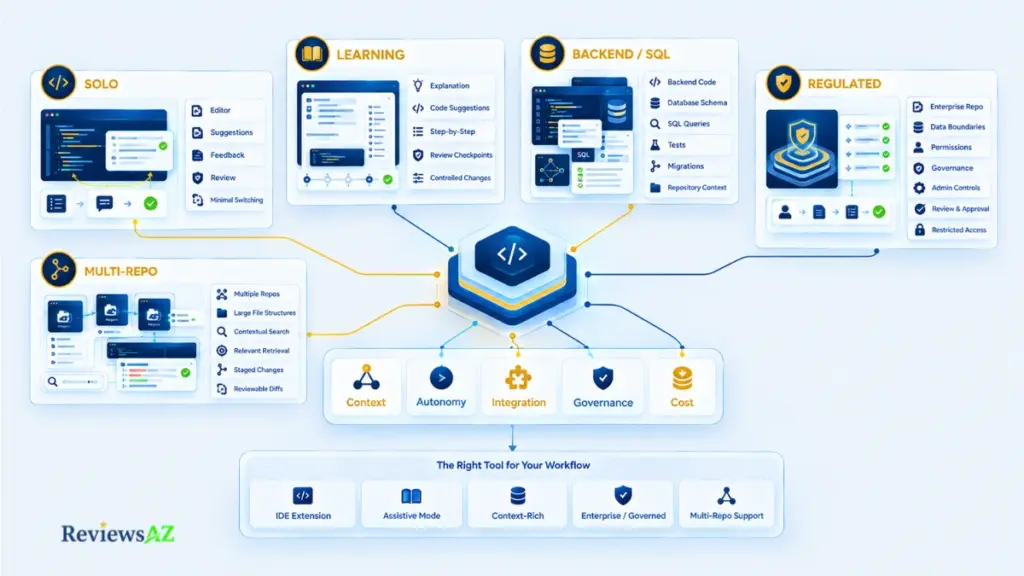
The best AI code assistant for developers is the operating model whose context reach, autonomy, integration, governance, and cost match how you actually work. Match the workflow first, then evaluate specific products inside that lane. No single tool suits every reader, and this guide does not rank one.
Size the choice to the work you do every week, not the hardest task you might someday face. The second path buys autonomy and cost you rarely use, plus review effort you always pay. Pick the lightest mode that removes your real bottleneck and step up only when a specific task demands it.
Solo Developers and Fast Iteration
When you are the only reviewer, approval is cheap. Editor extensions and AI-native IDE workflows keep the loop tight, and a terminal agent fits if you already live in the shell. A mode that removes switching tends to stick better than one that adds it, simply because friction is what makes a new habit fall apart early.
Skip an agent-heavy setup if you wouldn’t review its multi-file changes carefully, or if a client or employer restricts where your code may go.
Fit test: the tool lives where you already work, and you can read every change before it lands.
Beginners and Learning Workflows
An AI coding assistant for beginners should teach as it helps. That favors assistive modes, where every suggestion passes through you, and explanation over generation. Free tiers are common; check their data terms first, as the pricing and security sections explain.
The real risk is accepting code you can’t evaluate. If you couldn’t explain a change to someone else, don’t merge it. High-autonomy agents can wait until you can judge what they produce, and judging it takes skills the agent can’t supply.
Green light when: every suggestion is small enough to understand, and the plan won’t hinge on usage you can’t predict.
Backend, SQL, and Data-Heavy Development
Here context decides everything. A tool that can see your schema, conventions, and tests will outperform a stronger tool that can’t, so look for documented ways to give it that access. Database support also varies by product; confirm it in the vendor’s documentation.
Validation matters as much as generation, because queries and migrations need a run against real schemas and a reversible plan. Delegating migrations to a tool with production access and loose approvals is the clearest case of when not to choose an agent.
Ready to trust it when: the tool reaches your schema safely, and every change can be tested and reversed before production.
Security-Conscious and Regulated Teams
The enterprise layer applies here. Look for enterprise AI coding assistants with documented data handling, admin controls, and permission scoping, or a local or self-hosted approach whose complete data path you can verify. Governance outweighs raw capability: a tool your security team can’t approve delivers nothing, however good its demos look.
Don’t pick a model until the team can define review, permissions, testing, and rollback. Without them, autonomy is a liability.
Clear to proceed if: the vendor documents its data path for your exact plan, and your team owns the approval boundary.
Large Repositories and Multi-Repo Workflows
Scale stresses retrieval, not just model quality. Check whether the tool documents how it indexes and searches, and whether it can work across more than one repository. A large context window isn’t the same as good context, since a bigger window still has to be filled with the right material.
Sweeping multi-file changes get riskier when you can’t review the whole diff; smaller, staged changes keep failures visible.
You’re set if: retrieval reaches the files that matter, and each change stays small enough to review.
| Workflow | Evaluate first | Watch for | When not to choose it |
|---|---|---|---|
| Solo, fast iteration | Editor extension or AI-native IDE | Review discipline on larger changes | When code-location rules limit tool choice |
| Beginner, learning | Assistive, suggestion-by-suggestion mode | Accepting code you cannot explain | High-autonomy agents you cannot judge |
| Backend and SQL | Tools with schema and test access | Unvalidated queries and migrations | Loose approvals near production data |
| Regulated team | Enterprise-governed or verified local setups | Plan-level versus contract-level controls | No defined review and rollback boundary |
| Large or multi-repo | Documented retrieval across repositories | Context-window size mistaken for quality | Sweeping changes you cannot fully review |
Related Posts:
AI-Generated SQL Risks and Limitations
Best AI SQL Tools
Frequently Asked Questions
Choosing an AI code assistant raises practical questions that product pages do not always answer clearly. Which operating model fits your workflow, how much autonomy makes sense, and how should you think about security, pricing, context, and verification? The questions below address the points that matter most before you choose a tool.
What is an AI code assistant, exactly?
It’s a coding tool built around a large language model, with the code context, tools, and interface that let the model help inside your real workflow. What separates it from a chatbot is what the product supplies: which files the model sees, which actions it may take, and how you review the results. Capability ranges from inline completion to multi-file edits, depending on the tool and mode.
What is the difference between an AI code assistant and an AI coding agent?
Assistant describes how a tool relates to you: it helps while you stay in charge. Agent describes how it’s built: it can plan steps, call tools, and act with some independence. The labels overlap, and one product can work in both modes, so judge a tool by the permissions and execution behavior it actually has, not by what it’s called.
How do AI code assistants understand a codebase?
Not by reading the whole repository at once. The product finds candidate files, retrieves the most relevant pieces, and packs them, along with rules and tool results, into the prompt. Methods differ: some tools document a local search index, others may add semantic retrieval. Whether a specific tool uses structural signals like syntax trees is only known if its documentation says so.
Are AI code assistants safe to use with proprietary or enterprise code?
It depends on the tool, the mode, and the plan. Find out where code and prompts travel, what is retained, whether data trains models, what telemetry is collected, and what the agent may run. Read the vendor’s terms for the exact plan you’ll buy, since team and enterprise terms can differ, and test any claim of zero data leakage rather than trusting it.
Can AI coding assistants run locally or offline?
Often, with caveats. Open models can run on your own hardware, and some assistants can connect to them, so the model call can stay local. But “local” sometimes describes only the interface while the model stays remote, and any setup needs its network behavior checked. Local models can also trade capability for control, so try them on your own tasks.
How should you compare AI coding assistant pricing and usage models?
Start with the billing type: per-seat subscription, usage or credit pool, API or token billing, enterprise contract, or free tier. Then estimate cost at your expected usage rather than the entry tier, since long agent runs can make usage-based bills hard to predict. Ask about spend caps and admin controls, and confirm current plans on the vendor’s official pricing page.
Do AI code assistants replace developers, or change how developers work?
The evidence in this guide supports a narrower claim: they change how developers work. Effort shifts from typing toward specifying, reviewing, and verifying. These tools can draft code, but people still own the outcome, along with review, testing, and rollback decisions. No universal productivity figure is claimed here, because results vary by task, tool, and review discipline.
Final Decision: There’s No Universal Winner, Only the Right Lane
What’s most useful to take from this guide is negative: no single AI code assistant wins across every workflow. What exists instead are operating models, each fitting some work and missing on other work.
A starting map:
- Inline, low-friction assistance: editor extensions and assistive IDE workflows.
- Repository-aware editing and integrated feature work: AI-native IDE workflows.
- Terminal-centric automation with explicit tool control: CLI agent workflows.
- Delegated or asynchronous tasks: cloud and background agents.
- Strict data sovereignty: local or self-hosted setups, but only where the full data path is independently verified.
Hold off on agents if your team can’t define human review, permissions, tests, and rollback boundaries. A tool earns a deeper look only when your workflow has a measurable bottleneck that its documented capabilities actually address.
Before comparing products, write down the one slow, repetitive, or error-prone step you want gone, and how you’d know it improved. Then take that step to the comparison, pricing, benchmark, and enterprise pages linked above.