Cursor vs Claude Code vs Codex vs GitHub Copilot: A Workflow-First Comparison

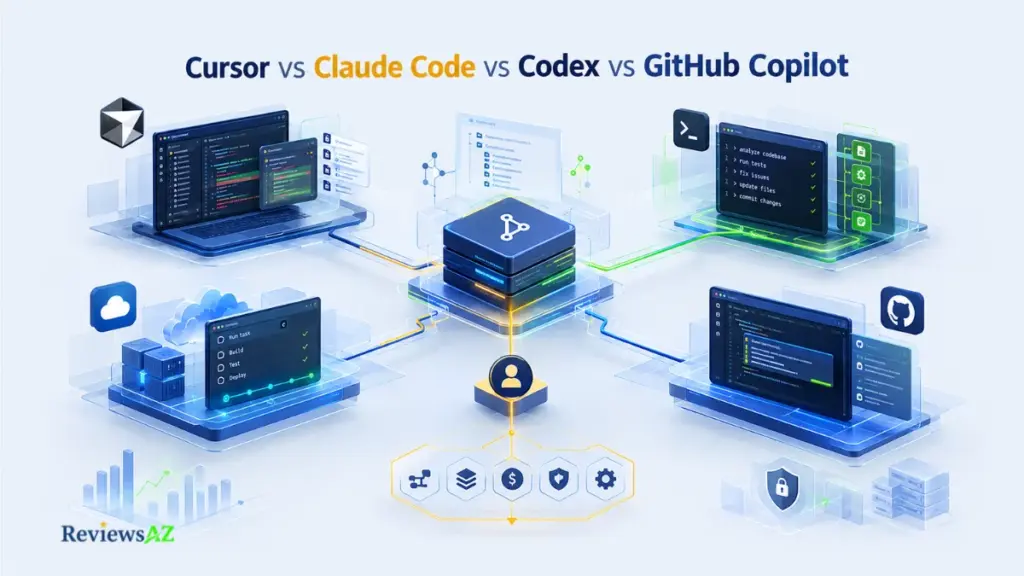
Ask ten developers which of these four tools is “the best,” and you’ll get ten different answers. Not because they disagree about quality, but because Cursor vs Claude Code vs Codex vs GitHub Copilot isn’t really one comparison. It’s four different working models sharing the same shelf label.
One is built around an AI-native editor. Another lives in your terminal and treats the repository as its workspace. A third is designed for delegated, multi-surface execution. The fourth extends the IDE and GitHub workflow you probably already use. They can all “write code,” but they don’t work the same way, and they don’t fail the same way either.
That distinction matters more than any feature list. A technically capable tool can still be the wrong choice if it fights your editor, your team’s constraints, or your budget’s shape. A weaker-sounding tool can be the right one simply because it fits how you actually work. Model choice, agent permissions, context handling, and pricing mechanics all shift the answer further, which is why comparisons that stop at “who scores higher on a benchmark” tend to mislead more than they help.
This comparison works in a different order. It starts with workflow architecture: where the work happens, who’s in control, what the editor or terminal demands of you. Only then does it move into capability, context reliability, benchmark evidence, real-world cost, and data governance. Along the way, it separates what each vendor claims, what the documentation actually shows, what users report, and what’s independently verifiable, so you’re not left guessing which parts to trust.
By the end, you’ll have a working four-way decision matrix, a grounded way to read SWE-bench-style results, a realistic view of what each tool costs at actual usage levels, a clear privacy and governance comparison, and a conditional path to the real question underneath all of this: which tool, or which combination of tools, fits the way you build software.
Where Each Tool Fits: A Practical Starting Point
These are starting points, not final judgments. The sections below put that first impression into context by looking at all four tools against the same practical criteria.
Initial Fit:
- Cursor: IDE-first, interactive development where AI lives inside your editing flow
- Claude Code: terminal-first, repository-wide agentic work
- Codex: current OpenAI-native app/CLI/IDE/cloud agent workflows, where verified
- GitHub Copilot: GitHub- and IDE-centered team workflows
Biggest Strength: Cursor’s edge is an AI-native editor workflow. Claude Code’s is terminal-native agent execution. Codex’s is a multi-surface delegation model. Copilot’s is broad reach across IDE, GitHub, and CLI. The source behind each claim, whether vendor documentation, independent testing, or user reports, is labeled explicitly as the article unpacks it.
Biggest Limitation: There’s no shared weakness here. Each tool trades off differently: workflow friction, cost predictability, interface rigidity, autonomy versus control, dependence on a specific model, or governance complexity. No universal flaw is assumed. Each one is evidenced separately below.
Key Decision: Start with your workflow and hard constraints: editor, environment, task scope. Only after that does it make sense to weigh autonomy, context reliability, verification effort, cost mechanics, and governance. This box gives you the starting point; the decision matrix later in the article brings those factors together.
Pricing / Current Status: Pricing and included usage on all four products change frequently. What follows reflects a September 26, 2026 verification snapshot. Treat it as a research baseline, not a live price list, and check official pricing pages before making a purchasing decision.
One Important Caveat: A benchmark score on its own tells you less than it seems to. The same tool can post different numbers depending on which underlying model, harness, and scaffold it was run with, so any score in this article is paired with its model, variant, date, and source, or marked as unverifiable.
What to Compare: Criteria That Matter in Real Coding Workflows
The four products can solve overlapping tasks while exposing fundamentally different working models. Comparing them by feature list alone tends to produce a misleading verdict. Before any tool gets evaluated, it’s worth fixing the actual comparison unit: not “which one writes better code,” but which criteria decide whether a tool fits a given developer’s workflow at all.
Fair comparison criteria: workflow model, autonomy, context, verification, failure modes, cost, governance, ecosystem fit
A fair four-way comparison rests on the same dimensions for every product. How the tool integrates into a working session. How much it acts on its own versus waits for approval. How reliably it understands the surrounding codebase. How much verification effort it demands afterward. Where it tends to break down under real workloads. What it actually costs at sustained usage. How it handles source code and credentials. How well it fits an existing editor or team setup. Skipping any one of these tends to bias the comparison toward whichever tool happens to be strongest on the dimensions left in.
Product vs underlying model: what belongs to the tool and what belongs to the selected model/harness
A meaningful comparison also has to separate the product from the model running underneath it. Several of these tools let you swap the underlying model. A capability or limitation can belong to that model choice, not to the product itself. Conflating the two is one of the more common ways benchmark claims get misread later in this article.
Hard constraints first: editor, terminal, GitHub, team policy, or existing ecosystem commitments
Some decisions get made before capability even enters the picture. A JetBrains-only shop, a terminal-averse team, an existing GitHub-centered review process, or a security policy that restricts agent permissions can eliminate an option outright, regardless of how it performs elsewhere. Establishing this early avoids the common mistake of ranking tools abstractly, then discovering a hard constraint rules the “winner” out anyway, a distinction covered further in AI code assistants.
Agentic Capabilities vs Code Completion
Not long ago, “AI coding assistant” meant one thing: inline suggestions that completed your next few lines. That description no longer covers what these four tools do. Code completion split into two very different categories: passive suggestion and active execution. The four products sit at different points on that spectrum.
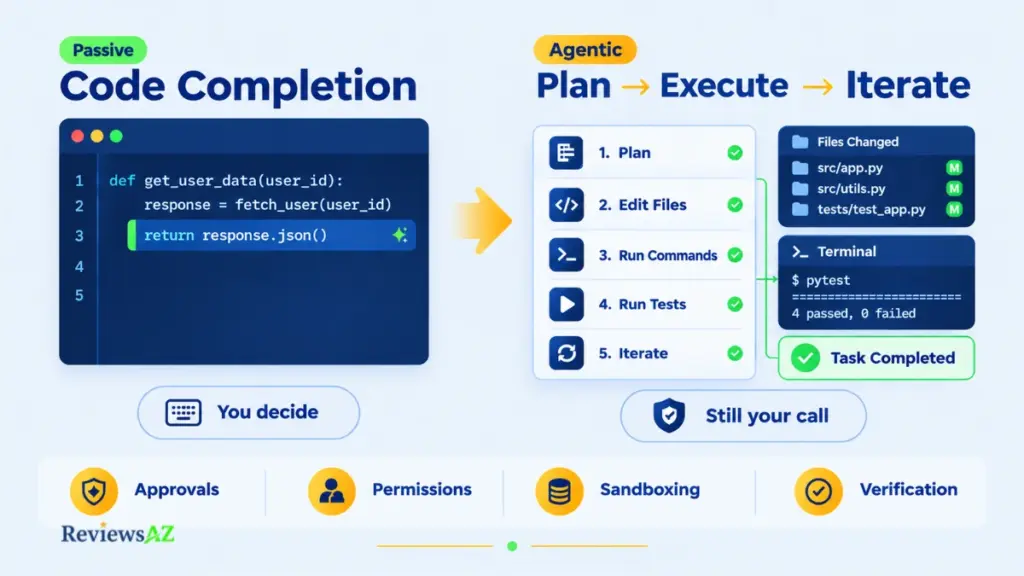
Inline completion and next-edit assistance
At the simpler end, a tool watches what you’re typing and predicts the next token, line, or edit, accepted with a keystroke, rejected by continuing to type. This is still the backbone of daily coding assistance across all four products, and it remains genuinely useful precisely because it stays passive. Nothing happens without you accepting it.
Agentic planning, file edits, commands, tests, and iteration
Agentic mode is a different animal. Instead of suggesting one edit at a time, the tool can plan a multi-step task, open and modify several files, run terminal commands, execute tests, read the output, and adjust its own next move, iterating toward a goal with limited back-and-forth. This is the layer that separates AI coding agents from earlier-generation completion tools. It’s also where most of the real capability differences between Cursor, Claude Code, Codex, and GitHub Copilot actually show up, since each implements planning, tool access, and iteration differently.
Why this matters: approval prompts feel like a complete safety net, but they’re only one layer of it. Confirming a file edit or a command tells you the agent asked before acting; it doesn’t tell you the result was correct. That gap between “approved” and “verified” is exactly what the privacy and governance section returns to later.
Human approval, permission scopes, and verification burden
Agentic capability isn’t the same as unrestricted control. Every product in this comparison layers some form of approval step, permission scope, or sandboxing around what an agent can do on its own, whether that’s confirming file edits, gating command execution, or restricting network and credential access. How granular that control is, and how much it actually gets used in practice, differs enough between tools to matter for anyone weighing autonomy against oversight.
“Agentic” describes a capability tier, not a guarantee of safety or correctness.
IDE, CLI & Terminal Integration
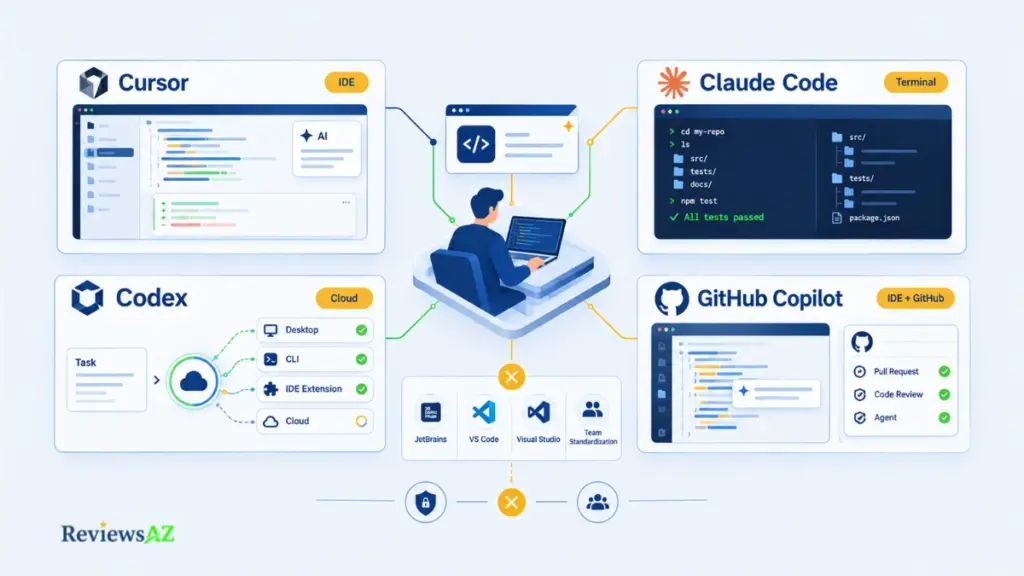
Where the work actually happens is one of the fastest ways to eliminate options before capability even matters. These four tools don’t share a single primary surface. They split cleanly between editor-native, terminal-native, and multi-surface delegation, and that split alone can decide the shortlist for many teams.
At a glance:
- Cursor: primary environment is its own AI-first code editor (VS Code-based); cloud agents available for delegated work.
- Claude Code: primary environment is the terminal, editor-agnostic; managed and background workflows extend it further.
- Codex: spans desktop app, CLI, IDE extension, and cloud/web surfaces rather than one fixed environment.
- GitHub Copilot: works inside your existing IDE plus GitHub; cloud and agent workflows layer on top.
Cursor: AI-first editor workflow
Cursor’s model puts the AI experience inside its own editor rather than layering it onto one you already use. That’s a genuine strength for developers who want deep, codebase-aware editing and multi-file agent work without switching contexts, and a genuine friction point for anyone with no intention of migrating away from their current editor. The Cursor Review covers its editing model, terminal integration, and cloud agents in more depth than fits here.
Claude Code: terminal-first agent workflow
Claude Code takes the opposite starting point. The terminal is the primary interface, and the agent operates against the repository directly rather than through a dedicated editor UI. This suits developers and teams already comfortable working command-line-first, and it sidesteps editor lock-in entirely, though it asks more of anyone who prefers a fully visual workflow. Permissions, sandboxing, and its broader IDE/desktop/web surfaces are detailed in the Claude Code Review.
Codex: current desktop, CLI, IDE, and cloud surfaces where officially supported
Codex spans several current entry points: desktop app, CLI, an IDE extension, and cloud/web surfaces, rather than anchoring to one. That breadth makes it easier to slot into different workflows without a single fixed environment. It also means its fit depends heavily on which surface a given team actually adopts, since capabilities aren’t identical across all of them. The Codex Review covers these current surfaces and workflow differences in more depth.
GitHub Copilot: IDE, GitHub, CLI, and agent surfaces
Copilot’s advantage is that it doesn’t ask you to change anything about where you already work. It extends your existing IDE and GitHub-centered process, with agent features, CLI access, and code review layered on top. For GitHub-centered teams, that continuity is the whole appeal. The GitHub Copilot Review goes deeper into its current agent mode, CLI, and review mechanics.
Hard editor constraints: JetBrains, VS Code, Visual Studio, and team standardization
A JetBrains-only team, a Visual Studio-locked codebase, or an organizational standardization policy can rule out an otherwise strong tool immediately, before autonomy, context, or pricing ever enter the conversation. A hard editor requirement is allowed to eliminate an option outright. Treating it as a minor inconvenience instead of a gate is where a lot of tool-adoption decisions go wrong.
Context Window & Codebase Understanding
A bigger context window sounds like it should mean better codebase understanding. It doesn’t automatically work that way, and conflating the two is one of the more common ways buyers misjudge these tools.
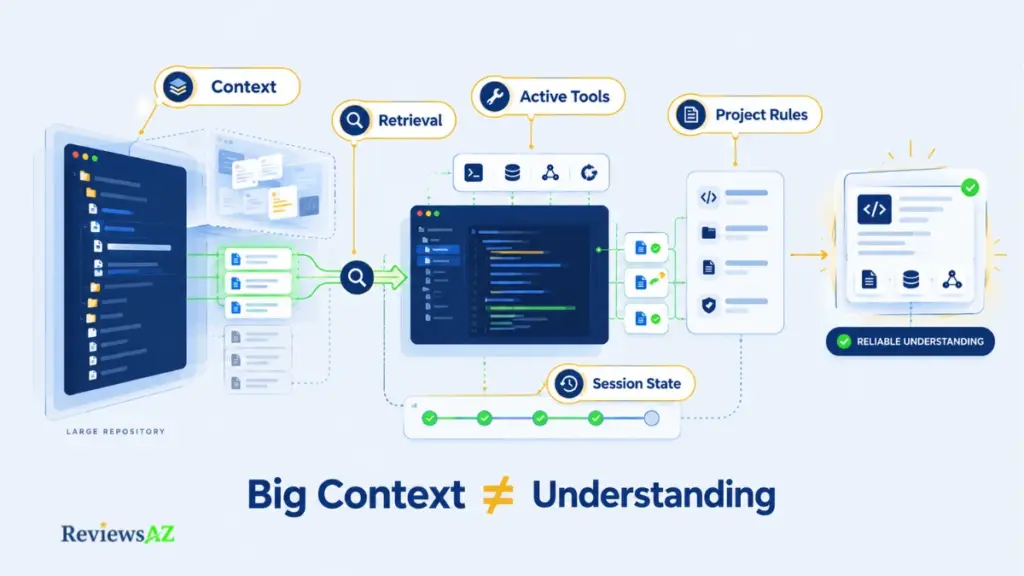
Context window vs retrieval/indexing vs active tool use
“Understanding the codebase” is really three separate mechanisms stacked together: how much raw text a model can hold in a single pass, how effectively the tool retrieves and indexes relevant files from a large repository, and how much it can actively read, search, or re-check files mid-task using tool calls rather than relying on what’s already loaded. A tool can be strong on one of these and weak on another. A single “context window” number, on its own, tells you very little.
Why the largest context number does not automatically produce the best codebase understanding
A large window can still perform poorly if retrieval surfaces the wrong files, if relevance ranking is weak, or if the model’s attention degrades across very long inputs, an effect sometimes described as models paying less attention to information buried in the middle of a long context. A smaller window paired with strong retrieval and active file search can outperform a larger one that simply stuffs more text in. Precise thresholds for where this breaks down vary by model, surface, and repository structure. Any specific file-count claim not backed by current official documentation should be treated as Could Not Be Verified rather than assumed.
Common mistake: treating context-window size as a proxy for codebase understanding. It isn’t. Retrieval quality and active tool use usually decide the outcome more than the raw number on a spec sheet.
Project instructions, repository structure, memory, and repeated-task consistency
Beyond raw retrieval, these tools differ in how they hold onto standing instructions across a session: project-level guidance, coding conventions, or repository structure that shouldn’t need to be re-explained every time. Consistency here matters for repeated or long-running tasks. A tool that “forgets” project conventions between steps creates rework, even if its single-shot answers look fine in isolation.
Real codebase understanding is layered: raw context window capacity, retrieval and indexing quality, active tool use, standing project instructions, and session state across a multi-step task. Each layer can fail independently.
Context degradation and verification burden on large refactors
On large, multi-file refactors, even strong context handling tends to show wear over time. Earlier decisions get re-litigated, edits drift from the original plan, or the model re-reads files it should already remember. The practical implication is a rising verification burden as task size grows. The further a task extends, the more a developer needs to check the model’s own account of what it did against what actually changed in the repository, rather than trusting a clean summary at face value.
Performance & Benchmark Results (SWE-bench)
Ask which of these four tools “wins” on benchmarks, and the honest answer is: it depends on which model, which harness, and which day you’re looking at. That’s not evasiveness. It’s how SWE-bench-style evaluation actually works, and understanding that is more useful than memorizing a leaderboard snapshot that will be outdated within months.
What SWE-bench measures
SWE-bench evaluates whether a model, or a model paired with an agent scaffold, can resolve real, verified GitHub issues by generating a patch that passes the project’s own test suite. It’s a meaningful signal of real-world code-fixing capability, closer to actual engineering work than synthetic coding puzzles. It also measures one narrow slice of what these products do: issue-resolution accuracy, not editor experience, workflow fit, cost, or day-to-day friction.
The benchmark itself isn’t a single fixed test. Verified is a human-filtered subset designed to remove unsolvable or ambiguous tasks. Other variants and successors extend or adjust the task set over time. A score on “SWE-bench” without naming which variant it comes from is close to meaningless for comparison purposes. Verified and other splits aren’t interchangeable, and mixing them produces an apples-to-oranges result.
Why the same tool can appear with different scores across sources
This is where most public comparisons quietly mislead readers. The same underlying model can post different scores depending on the agent scaffold or harness wrapped around it, the exact benchmark split used, and when the run was performed, since models and scaffolds both get updated. A responsible reading of any benchmark claim attaches four things to it: model, benchmark split, harness or scaffold, and date. Official leaderboard listings from the SWE-bench project are the mandatory reference point for checking these details. A vendor blog post citing “our score” without that context can’t be taken as directly comparable to another vendor’s number. Any score arriving without that attribution should be treated as unverified.
What benchmark performance does not tell you about daily workflow friction
Even a strong, well-attributed benchmark score doesn’t capture what it feels like to use a tool for eight hours a day. How often it edits the wrong file. How much a developer needs to re-verify its own account of what changed. How it behaves when a task runs long. How disruptive its failure modes are mid-task. A high issue-resolution rate on a controlled benchmark and a low-friction daily workflow are related but genuinely separate things, which is the gap the next section addresses directly.
Benchmark ≠ whole product. A leaderboard number is real evidence, but it’s evidence about one narrow task, run under specific conditions, not a verdict on which tool fits your actual workflow.
Failure Modes & Operational Friction Under Real Workloads
Benchmarks measure success on a controlled task. Real work shows where a tool stumbles once it runs longer, spans more files, or touches something you can’t undo. No hands-on testing was done for this comparison, so each point below is labeled by where it comes from: Documented for vendor design and documentation, User-Reported for patterns users describe across independent sources.
- Context drift on long tasks (User-Reported). On a long, multi-step run, a model can lose an earlier decision, reread files it already went through, or drift away from the plan. It has more to do with how long the task runs than with any one product, and it tends to show up sooner when many small steps go by without a checkpoint.
- Wrong-file edits and invented references (User-Reported). Users describe agents that build more than the task needed, edit a file next to the right one, call functions that don’t exist, or assume things about the codebase they never checked. Any tool-using agent can do this, so it isn’t one vendor’s flaw.
- Terminal loops and destructive actions (Documented). An agent that runs commands can repeat a failing command over and over, or take an action you can’t easily undo, like deleting files or force-pushing. Permission and sandbox systems exist for this, but a prompt only helps if the person reading it knows what they’re approving.
- Indexing and retrieval lag (User-Reported). Large codebases take time to index. In an IDE-first tool the delay interrupts your editing. In a terminal-first agent it looks like a stall in the middle of a task.
- Cost that outgrows the task (User-Reported). A quick fix can grow into a bigger run with more files, more iterations, and more tool calls. With usage-based pricing that growth lands on the bill, so the entry price says little about what you’ll pay.
The same problems look different depending on where the work happens. In an IDE-first tool you tend to see trouble forming in the diff. A terminal-first or delegated agent tends to fail quietly, so the checking has to happen before you merge.
Pricing Models & Usage Costs
Verification snapshot: September 26, 2026. Pricing and included usage change frequently across all four products. Treat the figures below as a planning-stage anchor, and re-verify official pricing pages before making any purchasing decision.
“$20 a month” and “$20 a month” don’t buy the same thing when the underlying usage mechanics differ. What actually decides cost is included usage, overage handling, and how model selection interacts with your plan, not the number on the pricing page.
Entry-tier pricing and current access model
- Cursor: Hobby (free), Pro ($20/month), Pro+ ($60/month), Ultra ($200/month), Teams Standard ($40/user/month), Teams Premium ($120/user/month), and custom Enterprise pricing. Usage is metered through plan- and model-specific pools, and additional usage can apply beyond what’s included.
- GitHub Copilot: Free, Pro ($10/user/month), Pro+ ($39/user/month), Max ($100/user/month), Business ($19/user/month), and Enterprise ($39/user/month). Code completion and next-edit suggestions are unlimited on paid plans; AI Credits are consumed separately by chat, agent mode, code review, cloud agent, and Copilot CLI use.
- Codex: currently included across ChatGPT plans rather than sold as a standalone product, with usage limits that vary by plan and access through desktop, CLI, IDE extension, and web entry points. There isn’t a simple, isolated monthly Codex price to quote. Current OpenAI plan documentation is the only reliable source for what a given plan actually includes.
- Claude Code: spans multiple plan and workflow surfaces, including local usage and separately priced managed code-review economics. Specific current prices, included usage, and permission defaults should be checked against current Anthropic documentation rather than assumed from older model names or figures, since those change often enough that carrying over a past number risks quoting something already outdated.
Realistic usage economics: light, regular, and heavy agentic workloads
Sticker price only describes the entry point. A developer doing occasional inline completion barely touches most plans’ limits. The same developer running multi-file agentic tasks, repeated test iterations, or long delegated jobs can burn through included usage far faster, sometimes fast enough that the “cheap” entry tier stops being realistic within the first week. Usage-based products bill for the run a task actually became, not the one it started as. A broader cross-market view of how these usage mechanics compare is covered in AI coding assistant pricing comparison.
Credits, rate limits, overage, and model-selection effects
Two variables complicate a clean comparison. Which underlying model a plan lets you select changes consumption. A more capable model typically draws down usage or credits faster than a lighter one, so two users on the “same” plan can have very different effective costs depending on model choice. Overage mechanics also differ: some products throttle or degrade service once included usage runs out, others allow metered additional usage at extra cost. The difference matters for anyone trying to budget predictably rather than reactively.
Workload-based TCO for a solo developer and a 10-developer team
Billing units aren’t normalized across these four products. One measures usage pools, another AI Credits, another ties to a broader subscription plan. Building one exact side-by-side dollar total would require assumptions specific enough to mislead more than they inform. A more honest way to model total cost is by workload tier and predictability:
- Light, IDE-heavy usage (mostly completion, occasional agent tasks): entry-tier plans on any of the four are usually adequate; overage risk is low.
- Regular agentic use (daily multi-file tasks, moderate iteration): mid-tier plans become the realistic baseline; overage exposure starts to matter, especially where model selection pushes toward heavier models.
- Heavy or delegated workloads (long-running agent tasks, frequent iteration, larger codebases): top-tier or enterprise plans, or metered overage, become likely; administrative and review overhead, someone verifying what the agent actually did, becomes a real cost on top of the subscription itself.
For a 10-developer team, the same tiers apply per seat, but administrative overhead compounds. Someone still has to review agentic output, manage permissions, and reconcile actual usage against the plan chosen, a cost that doesn’t show up on the pricing page at all.
Privacy, Security & Data Handling
Every one of these tools eventually asks something similar: how much of your source code, and how much control over your environment, are you willing to hand to an AI system? The honest comparison isn’t “secure vs. insecure.” None of the four is simply one or the other. It’s about where data actually travels, what happens to it afterward, and who can see or govern that path.
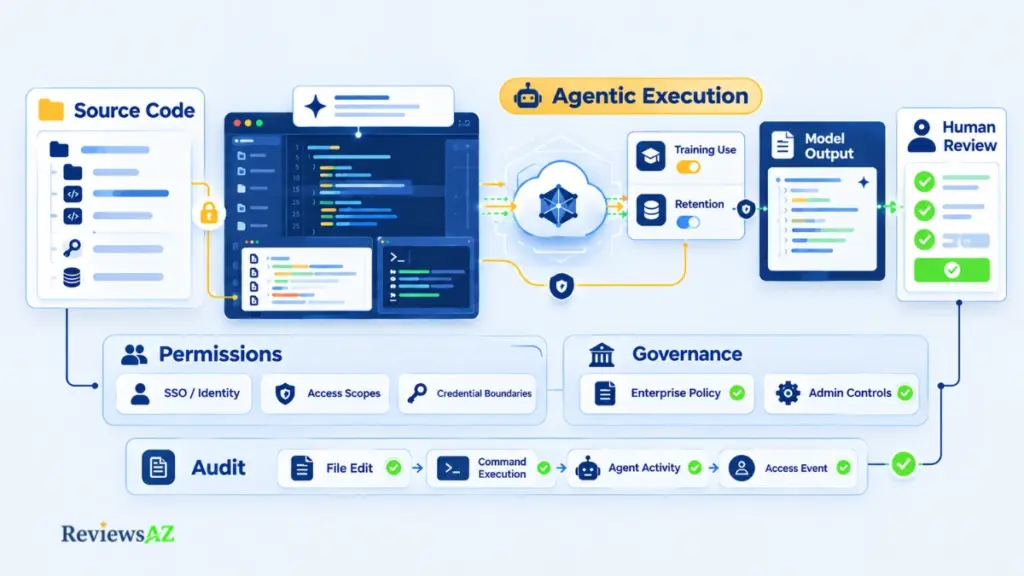
What data leaves the local development environment
By nature of what they do, all four tools send code context to a cloud-hosted model to generate suggestions or agentic actions. That’s unavoidable given how the underlying models work. What differs is scope and mechanism: how much surrounding code gets sent per request, whether indexing or retrieval creates a persistent remote representation of the repository, and whether cloud or background agent features change that data path compared with purely local, interactive use. These specifics are documented differently by each vendor and shift as products evolve, so current official documentation, not a general impression of “cloud AI tools,” is the only reliable source.
Training use, retention, and privacy controls
Whether your code can be used to train underlying models, how long it’s retained, and what opt-out or enterprise-grade controls exist are policy questions, not technical ones, and vendors state them differently depending on plan tier. A free or individual plan and a paid enterprise plan from the same vendor can carry materially different training and retention terms. Treat any specific claim here as Officially Supported, stated in vendor policy, unless independently verified. A UI label like “your code stays private” describes a policy commitment, not a technical guarantee that’s been externally audited.
Enterprise identity, governance, and auditability
Team and enterprise tiers typically add controls that individual plans don’t: SSO/SCIM identity management, audit logs of agent actions, admin-level visibility into usage and permissions, and policy controls over which features, like cloud agents or broader tool access, are enabled at all. For an organization evaluating these tools, this layer often matters as much as the model’s capability. A highly capable agent with no audit trail is a harder sell to a security team than a slightly less capable one with full visibility into what it did and when.
Human approval is one layer, not the whole security model
A permission gate before a file edit or command execution is a real control, but it sits alongside data-in-transit handling, retention policy, credential scoping, and audit logging as just one layer among several. Treating “it asks before doing anything risky” as the whole security story undersells what actually needs evaluating, especially for a team subject to compliance requirements that go well beyond whether a human clicked approve. Don’t infer residency, training, or retention behavior from a UI description alone. Verify those specifics against current official privacy and security documentation for each product.
Important: A permission prompt is not the whole security model. Approval before a file edit or command only confirms that the agent asked before acting. It does not verify what the action changed, what data left the environment, how long that data is retained, or what the audit trail records. Check those controls separately.
How Cursor, Claude Code, Codex, and GitHub Copilot Work
The surfaces are covered above. Day to day, what differs is where you watch the work, how you review it, and what ends up on your plate. These profiles follow each product’s documented design, not hands-on testing.
Cursor. Primary orientation: the editor. You start a task in the same window where the code lives, and changes typically appear as edits in files you’re already looking at, so review happens in place. Long tasks stay tied to an open session unless you hand them to a cloud agent. The judgment call left to you is when to stop iterating in the editor and delegate instead.
Claude Code. Primary orientation: the terminal and the repository. You describe the task in a session, the agent reads files and runs commands, and you review through command output and the version-control diff. Permission prompts become the main interaction, so what you allow it to run shapes the day more than any editor setting does. With no editor holding state for you, standing project instructions carry more weight.
Codex. Primary orientation: delegation. You hand a task to one surface and review the result afterward, so the bottleneck moves from writing code to reviewing a finished change. That suits well-specified tasks and is less comfortable when you’d want to steer midway. The experience varies by surface, and the Codex Review goes into the current ones and their permissions.
GitHub Copilot. Primary orientation: the IDE you already use, plus GitHub. Completion stays in the editor, chat and agent mode sit alongside it, and review can extend into pull requests and the CLI. Little about your setup changes, which is the point. Its agent features arrived as additions to an extension model rather than a starting design, so teams that mainly want deep delegation should test that layer specifically.
Key Differences & Trade-offs
Line up everything covered so far, and the real differences aren’t features. They’re seven trade-off axes that actually decide fit.
- Autonomy vs control and verification burden. More autonomous agentic execution buys speed on multi-step tasks, at the cost of a heavier verification habit; someone has to check what actually happened, not just approve the request to do it. Claude Code and Codex lean toward deeper delegation. Cursor and Copilot let you dial autonomy up or down more granularly within an editor-centered flow.
- Editor flow vs terminal/cloud flow. This is the hard-constraint axis revisited. Cursor commits you to its own editor, Copilot extends the one you already use, Claude Code lives in the terminal independent of any editor, and Codex spans multiple surfaces rather than anchoring to one. There’s no universal winner. It depends entirely on whether your team’s constraint is “must stay in our current IDE” or “terminal-first is fine.”
- Context depth vs context reliability. A large context window and reliable repository understanding aren’t the same guarantee, as this comparison covered earlier. Some products lean on raw window size, others on active retrieval and tool use to compensate for it. Which mechanism matters more depends on the task: long single-file work and repo-wide refactors stress this differently. Three axes in, and the pattern is already clear. None of these differences are “better” in the abstract. Each cuts a different way depending on what you’re actually building.
- Model flexibility vs platform/ecosystem fit. Products that let you select or switch underlying models add flexibility, but they also add the product-vs-model conflation risk flagged earlier: a capability swing can come from the model choice, not the tool. Products more tightly bound to one ecosystem, Copilot to GitHub, Codex to the ChatGPT/OpenAI surface, trade that flexibility for tighter integration with an existing workflow.
- Predictable spend vs usage-linked economics. Every one of these products ties cost to usage in some form: credits, metered pools, or plan-linked limits. “Predictable spend” is relative, not absolute. A steady, moderate usage pattern is far more predictable on any of the four than a spiky, delegation-heavy one.
- Ecosystem, extensibility, and team constraints. Extensibility here means documented integration points, MCP support, CI/CD hooks, IDE/plugin surfaces, not community size or popularity, which isn’t a defensible comparison criterion on its own. Team constraints, JetBrains-only, GitHub-centered, existing enterprise agreements, often matter more than raw extensibility for which tool a team can actually adopt.
- Failure tolerance and operational friction. Terminal-native and delegated agents concentrate risk around command execution and long-running drift. Editor-centered tools concentrate it around wrong-file edits and interrupted flow. Which failure mode your team can absorb more comfortably, silent background risk or visible in-editor interruption, is the deciding factor.
The trade-offs rarely point to one universal winner. They point to which axis matters most for a specific workflow. The editor-versus-terminal tension gets more direct, two-way treatment in Claude Code vs Cursor; the overlapping editor-centered comparison appears in Cursor vs GitHub Copilot.
Cursor vs Claude Code vs Codex vs GitHub Copilot: Best Use Cases
Enough synthesis. Here’s where the comparison turns into named scenarios you can actually match against your own setup, anti-use cases included.
Cursor for Interactive Development
If your work is mostly interactive, editing, refactoring, and iterating with the model inside your active coding session, Cursor’s AI-native editor is built specifically for this pattern.
Claude Code for Repository-Wide Work
For repository-wide tasks driven from the command line, automated refactors, CI-adjacent scripting, or work where a GUI adds friction rather than value, Claude Code’s terminal-native model fits the shape of the job directly.
Codex for Delegated, Multi-Surface Workflows
When the goal is handing off a task and checking back later rather than staying in the loop step-by-step, Codex’s multi-surface delegation model is built around that pattern, provided the surface you adopt actually supports the workflow you need.
GitHub Copilot for GitHub-Centered Teams
Teams whose review process, issue tracking, and collaboration already run through GitHub get the least disruptive fit from GitHub Copilot, since it extends that existing process rather than asking for a parallel one.
Editor Constraints, Including JetBrains-Only Teams
A JetBrains-only team faces a genuine hard constraint. Cursor requires its own editor, ruling it out immediately regardless of capability. Claude Code’s terminal-native, editor-agnostic model sidesteps this constraint entirely, and GitHub Copilot’s broader IDE support may also apply depending on current JetBrains integration. Current official supported-surface documentation is the only reliable way to confirm this before committing.
SQL, Schema, Migration, and Backend Work
Backend and database work rewards precision and repository-wide consistency over speed, since a subtly wrong migration is far costlier than a subtly wrong UI tweak. This favors tools with strong repository-level context and iterative verification (running a migration, checking the result, adjusting) over pure inline completion. None of the four treats SQL or database work as a dedicated, separately marketed capability. It’s covered as general coding competence, so the meaningful comparison point is how well each tool’s agentic loop supports test-and-verify cycles on schema-sensitive changes.
Anti-Use Cases
Cursor is a poor fit for terminal-first teams or database-only workflows where an AI-native editor adds friction without adding value. Claude Code is a poor fit for teams that specifically want a GUI-first experience and have no interest in a terminal-native foundation. Codex is a poor fit when the core requirement is a tightly integrated, editor-first experience the currently adopted surface doesn’t provide. GitHub Copilot is a poor fit when a workflow depends on a specialized, deep agent surface or economics its current plan structure can’t support within budget.
None of these are permanent verdicts. They’re conditions tied to a specific constraint, and they can shift as each product’s surfaces and plans evolve.
Can You Use More Than One? The Multi-Tool Stack Pattern
The question underneath a lot of this comparison isn’t really which one tool wins. It’s whether you need one at all, or whether a complementary pair actually serves your workflow better.
A recognizable pattern reported across development teams pairs an editor-embedded tool like Cursor or GitHub Copilot for interactive, in-flow editing with a terminal-native or delegated agent like Claude Code or Codex for repository-wide, long-running, or automation-adjacent work. This isn’t a documented “best practice” from any vendor. It’s a User-Reported pattern worth taking seriously precisely because it maps onto a real gap: no single tool here is simultaneously the best in-editor experience and the best terminal-native delegation engine.
When a second tool earns its place: Use a second tool when it covers a distinct part of the workflow, such as interactive editing on one side and terminal-native or delegated execution on the other. If both tools do essentially the same job, the extra subscription usually adds cost and context-switching without adding much value.
Running two subscriptions means two separate usage-based cost curves to track, and, as covered in the pricing section, combined spend can climb faster than either tool alone would suggest. It also means two separate permission and data-handling models to govern rather than one, a real administrative cost for a team, not just an individual budgeting concern.
If your workflow genuinely fits inside one operating model, fully editor-centered, fully terminal-native, or fully GitHub-centered, adding a second tool mostly adds overhead without a matching workflow gain. Stacking is a rational option only when each tool adds distinct workflow value that the other genuinely can’t cover. See Claude Code vs Cursor for a closer look at how this specific editor-plus-terminal pairing plays out in practice.
Decision Matrix: Which Tool Fits Your Workflow?
Everything up to this point has been evidence-gathering. Here’s where it resolves into an actual answer, organized by what actually drives your workflow rather than by which tool sounds best.
Start here: does a hard constraint already decide it for you?
- JetBrains-only, no VS Code migration possible: Cursor is eliminated immediately, regardless of capability. Claude Code (editor-agnostic) or GitHub Copilot (subject to current JetBrains support) remain viable.
- Organizational policy locks you into GitHub-centered review: GitHub Copilot is more suitable, since it extends that process rather than introducing a parallel one.
- No hard constraint applies: proceed to workflow priority below.
Once the hard constraints are out of the way, the four workflows look like this:
| Tool | Best Fit |
|---|---|
| Cursor | Interactive, AI-native IDE work where editing, chat, and agentic changes stay in one session |
| Claude Code | Terminal-native, repository-wide, and CI-oriented agentic work |
| Codex | Long-running or delegated work across supported desktop, CLI, IDE, and cloud surfaces |
| GitHub Copilot | GitHub-centered teams that want AI assistance inside their existing IDE and collaboration workflow |
If your priority is interactive IDE work, Cursor is a stronger fit. Its AI-native editor keeps completion, chat, and agentic edits inside one active session, which is exactly what interactive, in-flow development rewards.
If your priority is terminal-native repo-wide work, Claude Code is better suited. Its terminal-first, editor-agnostic model treats the repository itself as the workspace, without asking you to route work through a GUI.
If your priority is long-running or parallel agent delegation, Codex is more suitable, provided the specific surface you adopt actually supports that workflow, since surfaces aren’t identical.
If your priority is GitHub-centered team adoption, GitHub Copilot is the stronger fit for teams whose existing review and collaboration process already runs through GitHub.
Apply the constraint first, capability second. A technically strong tool that violates a hard requirement, such as editor lock-in, security policy, or an existing plan commitment, should be avoided regardless of how it performs on the criteria above. This is the single most common mistake in tool-adoption decisions.
Stacking an editor-centered tool with a terminal-native or delegated agent is worth it only when each covers genuinely distinct ground in your workflow, not as a default upgrade. If your work already fits cleanly inside one operating model, a single tool is still the cleaner choice.
None of this produces one universal winner, and that’s not an evasive answer. Different workflows genuinely produce different best-fit outcomes here.
Workflow fit can justify a complementary second tool, but only when duplication and total cost remain reasonable.
Related Posts:
How to Generate SQL Queries with AI
Best AI DB Tools for Backend Devs
Frequently Asked Questions
Most people get to the end of a comparison like this with one question still open: what happens when it meets my own setup? Around Cursor vs Claude Code vs Codex vs GitHub Copilot, the same handful of doubts keep coming up, from editor lock-in to what a heavy month really costs. Here are seven of them, each with a short answer you can act on.
Can I use Cursor, Claude Code, Codex, and GitHub Copilot as a two-tool or multi-tool stack?
Yes. Pairing an editor-centered tool (Cursor or Copilot) with a terminal-native or delegated agent (Claude Code or Codex) is a recognized user pattern, since no single tool here covers both interactive editing and repository-wide delegation equally well. It only makes sense when each tool covers genuinely distinct ground, not overlapping capability.
Which of these tools should a JetBrains-only team consider first?
Claude Code is the most straightforward starting point, since its terminal-native, editor-agnostic model doesn’t depend on JetBrains support at all. GitHub Copilot may also apply depending on current JetBrains integration, while Cursor is eliminated outright because it requires its own dedicated editor. Check current supported-surface documentation before deciding.
How much can the real monthly cost differ from the advertised entry price?
Substantially. Usage-based billing means a task that starts small can expand into a much larger agentic run, consuming credits or usage pools far faster than the entry-tier price implies. The gap grows with workload intensity: light, occasional use stays close to the sticker price, while heavy agentic use often doesn’t.
How should SWE-bench results be interpreted when comparing AI coding tools?
Only alongside the model, benchmark split, harness or scaffold, and date behind the score. Without those four elements, a number isn’t comparable across tools. The same underlying model can post different scores under different scaffolds, so a headline score alone, per the official SWE-bench project, shouldn’t be read as a settled ranking.
Where do Cursor, Claude Code, Codex, and GitHub Copilot tend to fail under demanding workloads?
Common, user-reported friction includes context loss on long tasks, wrong-file edits, stuck command loops, and cost surprises when agentic work expands beyond scope. Which failure mode shows up depends on operating model: editor-centered tools tend to interrupt visible flow, while terminal-native or delegated agents tend to fail more silently.
What should developers check about privacy, security, and source-code data handling?
Training-use policy, data retention terms, and whether cloud or background agent features change the data path beyond local, interactive use, since these differ by plan tier even within the same vendor. A UI privacy label is a policy statement, not an independently verified guarantee, so current official documentation is the only reliable source.
Is one tool enough, or does a complementary editor-plus-agent stack make more sense?
For most single-workflow developers, one tool that matches their primary operating model is enough. A two-tool stack becomes rational specifically when your work genuinely spans both interactive editing and terminal-native or delegated execution. Otherwise, a second subscription mostly adds cost and administrative overhead without a matching workflow gain.
Final Decision: Which Tool Actually Fits Your Workflow?
Strip away the marketing and the leaderboard chasing, and the real question isn’t which of these four tools is “best.” It’s which one fits the actual shape of your work after the hard constraints, operating model, agency level, context reliability, benchmark evidence, failure modes, economics, and governance requirements are weighed together rather than cherry-picked one at a time.
Two different questions are worth separating here: completeness and fit. A product can cover more of the AI-assisted development lifecycle, including completion, agentic execution, repository context, test and command execution, delegated work, code review, integrations, and team controls, without being the right choice for your specific workflow. Breadth and fit aren’t the same axis. Conflating them is exactly how “most complete” claims get mistaken for “best for you” claims.
A hard constraint, such as a JetBrains-only stack, a GitHub-locked review process, or an organizational security policy, should eliminate options before capability ever enters the conversation. From there, your primary workflow points toward one operating model over another. Task shape narrows it further. Interactive editing and repo-wide refactoring reward different strengths than long-running delegated work. Economics test whether your actual usage pattern fits the pricing mechanism you’d be signing up for, not the entry-tier number on the page. Governance determines whether the data path, permissions, and audit trail meet what your team or your compliance obligations actually require. Finally, there is the second-tool question: does a complementary pairing add distinct workflow value, or just duplicate spend?
- Cursor: Better suited to AI-native, editor-centered development where staying inside one integrated session matters more than terminal flexibility. Avoid it if your team can’t adopt its editor.
- Claude Code: A stronger fit for terminal-native, repository-level, or CI-oriented agentic work. Avoid it if your workflow specifically needs a GUI-first environment.
- Codex: More suitable when OpenAI or ChatGPT-native access and multi-surface delegation create concrete value. Avoid it where a tightly integrated editor experience is the non-negotiable requirement.
- GitHub Copilot: Worth considering when preserving existing IDE and GitHub habits matters more than adopting a specialized agent-first tool. Avoid it if your priority need exceeds what its current plan structure supports.
None of these are settled rankings. Different workflows genuinely produce different best-fit answers here, and no amount of feature comparison changes that. What does change the outcome is which constraint, task shape, and economics actually apply to you. Running your own situation through that sequence, rather than a leaderboard, is the real answer this comparison set out to provide.