Cursor vs GitHub Copilot: Which AI Coding Assistant Fits Your Workflow in 2026?

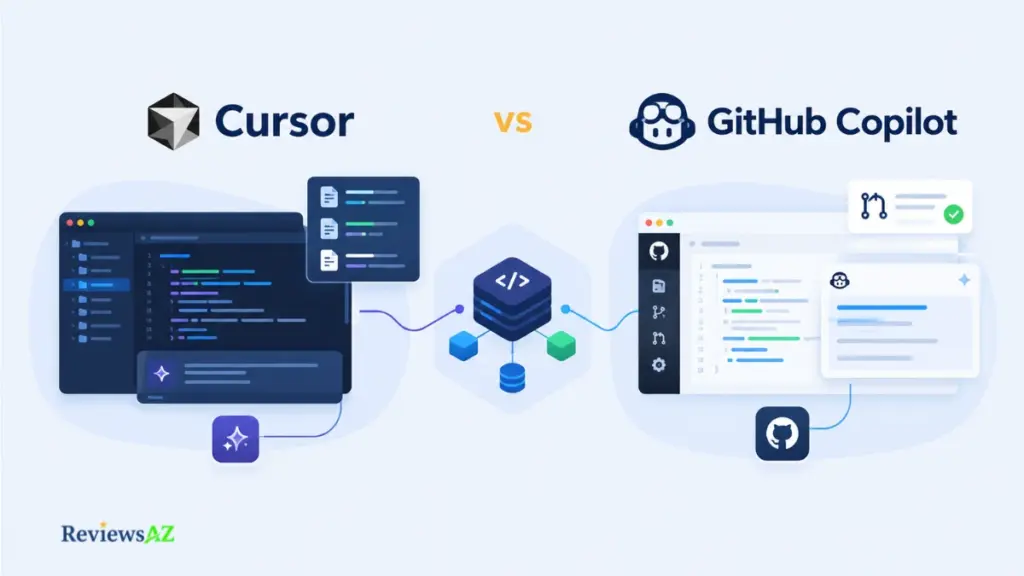
The harder question about Cursor vs GitHub Copilot was never really whether either tool can write working code. Both can, comfortably. What’s actually at stake is how much of your development loop you’re willing to hand over, and where you want that handover to physically happen.
Cursor answers that by rebuilding the editor around AI. GitHub Copilot answers it by threading AI through the editor you already trust. Two years ago that split was clean. It isn’t anymore.
Cursor now reaches into JetBrains through its agent. Copilot now reviews pull requests, runs terminal commands, and edits across files on its own. So a comparison built on last year’s feature list will quietly mislead you, not because the facts were wrong when written, but because the ground moved.
None of that settles which tool writes “better” code in some abstract sense. It settles something more useful: which one fits the environment you’re actually going to work in tomorrow morning, with your repository, your review habits, and your team’s tolerance for change.
What follows separates what each underlying model can do from what the surrounding product actually makes practical, then walks through architecture, context, agents, models, cost, and governance with the evidence boundaries kept visible throughout.
Quick Summary: Cursor vs GitHub Copilot
Before getting into the details, here’s the short version of where the two products differ most. These are the factors that matter most when you move from comparing features to choosing a tool for real development work.
- Best fit: Cursor suits developers who want an AI-first editor, deep project context, and agent-heavy multi-file workflows. GitHub Copilot suits developers who value existing-IDE continuity, broad environment support, and deep GitHub integration.
- Biggest strength: Cursor tightly integrates AI, project context, and agent workflows into the editor. Copilot combines broad IDE support with GitHub-native development and enterprise administration.
- Biggest limitation: Cursor can introduce migration friction when developers or teams need to change editors. Copilot’s advanced capabilities can vary by surface, plan, and model.
- Key decision factors: editor commitment, task mix, repository context, agent autonomy, model flexibility, usage economics, security, governance, and review burden.
- Pricing: Cursor starts at $20/month for Pro, while GitHub Copilot starts at $10/month for Pro. Their usage systems differ, so subscription price alone does not show the likely cost of an agent-heavy workflow.
- Evidence caveat: no original hands-on benchmark sits behind this comparison, so there is no universal speed or accuracy winner established here. Results can vary with the model, repository, task, client, network, and configuration.
What Are Cursor and GitHub Copilot Actually Optimized For?
Before any feature comparison means anything, answer this: what are you actually adopting? A development environment built around AI, or an AI layer stitched into the environment you already have?
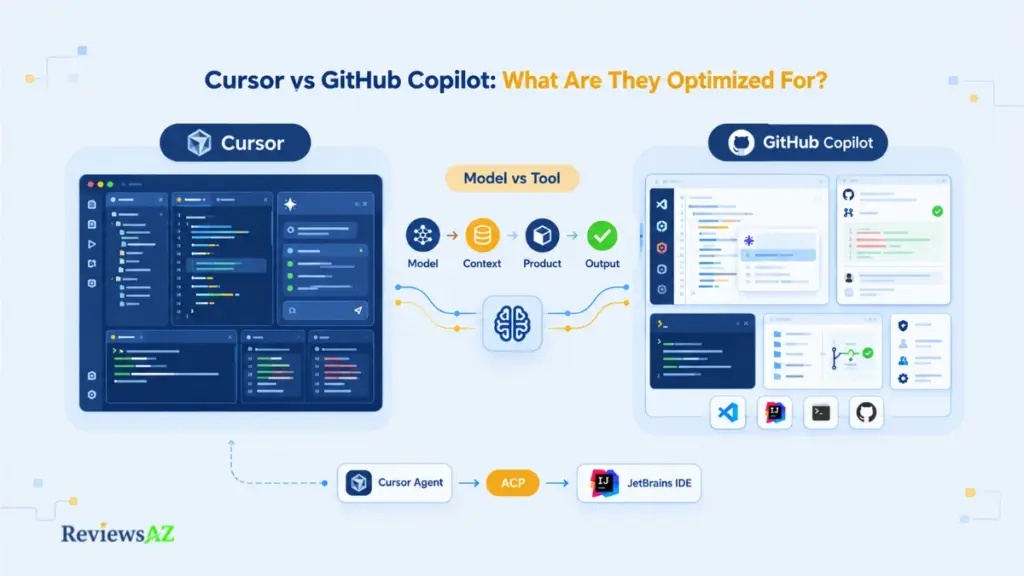
That difference becomes visible long before a developer asks an agent to modify code. It affects extensions, keybindings, terminals, debugging, repository access, team standardization, and the mental model developers build around their tools.
Cursor as an AI-first editor built on the VS Code codebase
Cursor runs on the VS Code codebase, but “VS Code with an AI plugin” undersells what’s actually going on. Agent behavior, chat, and codebase context sit at the center of how the editor is meant to be used, not stapled onto a workflow that existed before them.
Our Cursor Review goes deeper into the editor itself. The point that matters here: choosing Cursor is choosing an editor, not installing a feature.
GitHub Copilot as an integrated assistant across supported environments and GitHub
GitHub documents Copilot support across major environments including Visual Studio Code, Visual Studio, JetBrains IDEs, Eclipse, and Xcode. The GitHub Copilot feature matrix shows how Copilot features vary across these supported environments. Copilot also extends into GitHub.com, GitHub CLI, the GitHub Copilot app, pull requests, and agentic workflows.
Our GitHub Copilot Review unpacks that environment coverage. Copilot’s core appeal is continuity.
Why the product layer can change the model’s practical value
Here’s where most comparisons quietly fall apart. They treat the model as the only variable that matters, as if Cursor and Copilot were just two windows onto the same brain.
They aren’t. How a product retrieves context, decides when to act without asking, and presents its own suggestions can make one model feel sharp in one tool and sluggish in another. Call it the model-vs-tool distinction. It resurfaces in autocomplete, in agent behavior, in pricing, and it’s the single idea worth keeping in your back pocket for the rest of this comparison.
Key insight: a model doesn’t have a fixed “personality” across products. The same model can look brilliant inside one tool and mediocre inside another, purely because of what context it was given and how its output was handled afterward. Judge the engineering around the model, not the model wearing a product’s logo.
The picture has changed for JetBrains users, however. Cursor’s Agent Client Protocol allows the Cursor agent to work from JetBrains IDEs such as IntelliJ IDEA, PyCharm, and WebStorm. The agent can read project files, edit them, and run terminal commands while the developer remains in the JetBrains environment.
That makes the old statement “using Cursor means leaving JetBrains” too broad. The more accurate statement is that the full Cursor editor remains one experience, while ACP provides access to Cursor’s agent from another editor.
Autocomplete Quality & Speed: What Can We Actually Conclude?
A suggestion that lands instantly and needs three corrections afterward didn’t save you time. It just moved the cost from typing to editing. Call that gap the correction tax: the hidden minutes a fast-but-imprecise suggestion quietly charges you after the fact.
Both Cursor and GitHub Copilot now offer advanced completion and next-edit features. That makes a simple “A is faster than B” statement difficult to defend without controlling the model, client, repository, and task.
Inline completion and next-edit behavior
Cursor’s Tab can predict related edits within the file and, when appropriate, across related files. Copilot’s inline suggestions and next-edit features are documented across its supported editor surfaces.
The behavior itself is well documented on both sides. A like-for-like speed or accuracy comparison isn’t, by either vendor.
Suggestion relevance and acceptance friction
Volume is a vanity metric here. Ten suggestions you reject cost more attention than three you accept without touching.
The more interesting difference is how the prediction fits into the workflow. A traditional inline suggestion mainly extends what the developer is already typing. A next-edit system can anticipate a related change and move the developer toward the next place they are likely to edit.
Latency and responsiveness
Latency depends on the active model, the serving infrastructure behind it, network conditions, and the editor surface in use. Not on the product alone. Neither company publishes a fixed millisecond figure holding across every plan and environment.
Any specific latency number you find elsewhere is a snapshot of one configuration, on one day, under one network. Nothing permanent about it.
What a fair benchmark would need to control
Hold the model constant. Same tasks. Same editor. Same network conditions on both sides. Almost none of the comparisons circulating online bother doing this consistently, which is exactly why so many of them quietly contradict each other.
A useful benchmark should hold the major variables constant. Use the same model where the products allow it. Use comparable repositories and tasks. Keep the network environment as similar as possible. Measure not only response time but also acceptance rate, correction time, rework, test outcomes, and how much generated code survives subsequent changes.
Model-vs-tool attribution
A perceived speed or quality edge often traces back to whichever model happened to be active during testing, not to the product’s engineering. Before crediting either tool with being smarter or faster, check which model actually produced the comparison you’re reading. That single detail usually explains more variance than the product itself.
Vendor accuracy claims deserve the same suspicion. A number published by the company that built the product describes its best-case conditions, not a neutral result. File it under documented, not independently verified, until a reproducible third-party benchmark exists. Our AI Coding Assistant Benchmark page covers what that would actually require.
So when does completion quality stop being the interesting question? Right around the moment a tool stops suggesting single lines and starts editing across files without being asked line by line.
Agentic Coding & Multi-file Editing: How Much Work Can They Delegate?
Picture a change that touches a route handler, a validation schema, two related components, and their tests. “Autocomplete with extra steps” stops being an honest description of what’s happening the moment you’re in that territory.
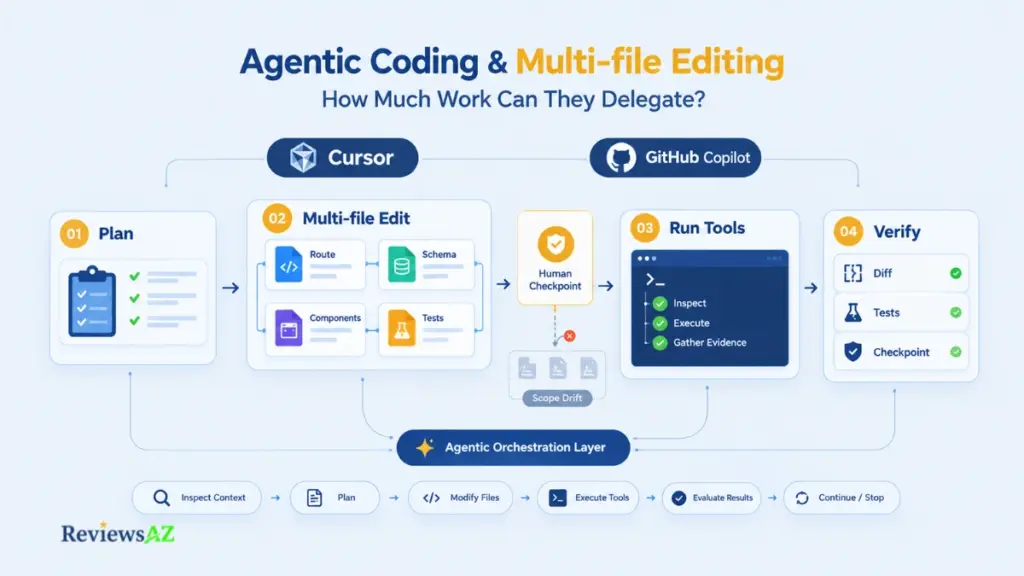
Agent behavior in both products is a spectrum, not a switch: plan the task, gather context, edit files, run tools, verify the result. Where each tool sits on that spectrum, and how visibly, is the real comparison.
Planning and task delegation
Cursor’s agent can inspect the workspace, formulate a plan, edit files, use tools, and continue iterating based on the results. GitHub Copilot’s agent mode can similarly plan multi-step tasks, edit files, invoke tools, and iterate when additional work is required.
Planning is where autonomy actually begins. A tool that jumps straight to edits without showing its plan hands you less to review before any damage is already done.
Multi-file edits and refactoring scope
There is no useful universal “maximum number of files” figure for either product. Repository structure, task complexity, context availability, model choice, and tool permissions all matter.
Neither company publishes a “handles up to N files” ceiling. Treat any specific number you encounter online as somebody’s guess, not policy.
Terminal and tool execution
That changes the nature of agentic coding. The agent is no longer only generating text. It can gather evidence from the environment and use that evidence to decide what to do next.
Before you approve anything: check what permissions you’re actually granting when an agent asks to run terminal commands. Read that scope before it runs, not after something breaks. Broader execution rights mean a broader blast radius the moment a step goes sideways.
Verification loops and human checkpoints
More autonomy means more that needs checking afterward. A three-line suggestion is easy to eyeball in passing. A twelve-file agentic refactor is not, and that gap is exactly where review discipline needs to tighten rather than relax.
Neither tool replaces diff review, test runs, or a rollback plan. What changes is the surface area you’re now reviewing per task, and it’s larger than it used to be.
Where agentic drift begins
Agentic drift is what happens when a task’s scope quietly expands past what was actually asked for. An extra file gets touched. An assumption gets made without confirmation. A “fix” reaches further than intended.
Drift is therefore not a defect unique to Cursor or GitHub Copilot. It is a consequence of delegating more decisions to an agent. The strongest protection is explicit scope plus frequent checkpoints. The goal is not to stop the agent from acting. It is to stop a reasonable first step from turning into an unnecessary repository-wide rewrite. Our AI Coding Agents hub goes deeper on this.
Codebase Context & Indexing: How Does Each Tool Build Useful Context?
An assistant can produce code that compiles cleanly and still be wrong, because it missed a local utility function, an existing convention, a dependency version, or what actually changed on your current branch an hour ago.
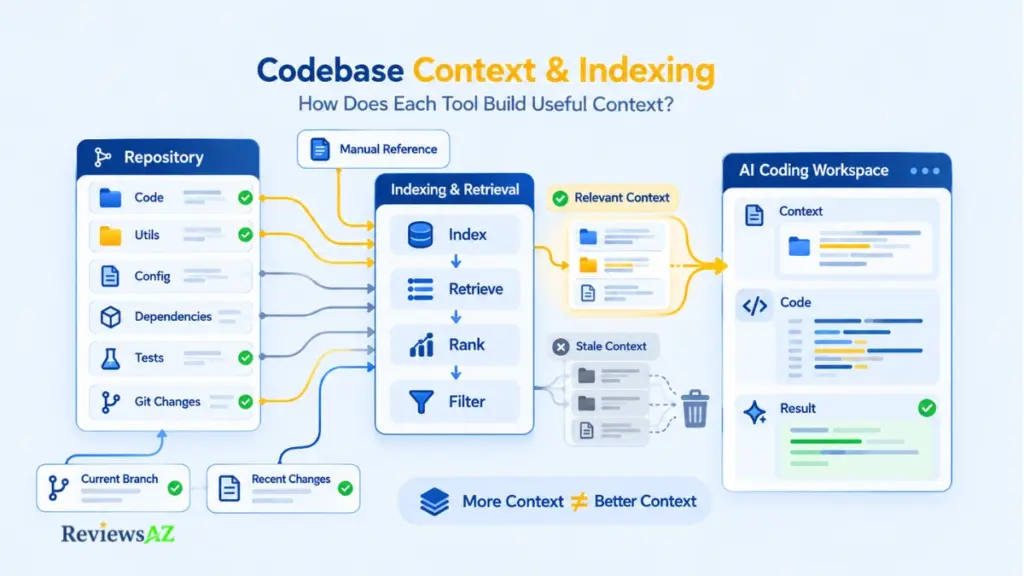
Repository understanding comes down to retrieval quality, relevance, and freshness. Not context-window size. A bigger window doesn’t automatically mean the tool understands your codebase better; it just means it can hold more of it, useful or not.
Indexing and semantic retrieval
That difference matters because “repository context” is not one feature. The real questions are what gets retrieved, when it gets retrieved, how fresh it is, and whether the developer can correct the retrieval when it misses something important.
Indexing quality beats indexing size every time. A well-filtered handful of relevant files outperforms a dump of the entire repository.
Workspace and file references
The most practical workflow is therefore a combination of automatic retrieval and deliberate references. Let the tool find useful context, then narrow or correct that context when the task calls for it.
Treat manual references as normal practice, not a workaround for when automatic context fails you.
Repository-scale context and freshness
Freshness, whether the tool reflects your current branch state, recent commits, and in-progress changes, is documented differently across both products and can shift with plan tier. Neither vendor publishes a fixed repository-size threshold where context quality suddenly falls apart.
Any specific file-count or line-count limit floating around elsewhere is an approximation at best.
Stale or irrelevant context isn’t harmless just because it retrieved something. It’s often worse than missing context, since a confidently wrong suggestion built on outdated assumptions can slip past a quick glance and land in production. Confirm referenced context actually matches your current code state before accepting agent-driven changes.
Large-codebase failure modes
The code may compile while bypassing an existing abstraction. A new helper may duplicate functionality that already exists. A test may be modified because the generated implementation conflicts with an undocumented behavior that the test was protecting. These are context failures more than coding failures.
Neither tool removes the need for a human to confirm that retrieved context is the right context. That step gets more important as repository size grows, not less.
IDE Integration / Forked IDE vs Extension: What Does the Workflow Commit You To?
Developers accumulate language servers, debugger settings, extensions, keybindings, remote-development configurations, Git integrations, snippets, and habits. Teams also build documentation and support practices around those choices.
Cursor asks you to adopt its own editor as your primary environment. GitHub Copilot integrates into the IDEs you already use, VS Code, JetBrains, Visual Studio, Neovim, without asking you to move. That architectural fork is often the real switching cost hiding underneath this entire comparison.
Cursor’s AI-first editor foundation and ACP-supported agent surfaces
Cursor’s core experience lives inside its own editor, built on the VS Code codebase but extended around agentic workflows as a first-class part of the design. Our Cursor Review covers this in more depth.
As noted earlier, Cursor’s agent is also reachable through ACP-supported environments, JetBrains included. That extends reach beyond the desktop editor, but it’s an agent surface, not a full replication of the desktop experience with all its native features.
GitHub Copilot across supported IDEs and GitHub
GitHub supports Copilot across major IDE families and has extended it into GitHub.com, the CLI, code review, and agentic applications.
This breadth is Copilot’s structural advantage. It doesn’t ask you to leave your current editor to get AI assistance inside it.
Extension compatibility and environment continuity
Because Cursor is based on VS Code, many familiar concepts and extensions can carry over. That does not mean every extension, enterprise integration, licensing dependency, or remote-development workflow will behave exactly as it does in Microsoft’s distribution.
GitHub Copilot sidesteps this question almost entirely by installing into your existing setup rather than asking you to build a new one.
Switching cost and team standardization
For one developer, trying Cursor is a low-stakes afternoon. For a team, standardizing on it means everyone absorbs the migration cost on the same day. That’s a different calculation entirely.
The bigger cost is rarely the interface itself. It’s re-establishing extension parity, syncing team-wide settings, and rebuilding the muscle memory that took months to form the first time around. Budget for that adjustment period before assuming Cursor’s AI advantages outweigh what it costs to get there.
Copilot’s IDE-agnostic model sidesteps this calculation entirely. That makes it a more practical fit for teams that prioritize existing-IDE continuity and GitHub integration.
Editor commitment settles one half of the equation. What’s actually generating your code behind that editor is a separate question, and it’s next.
Supported AI Models / LLM Switching: How Much Does Model Choice Matter?
If your preferred model changes tomorrow, does the product you picked still make sense? That question matters more than most comparisons admit, since neither tool locks you into a single provider.
Cursor and GitHub Copilot both support choosing between multiple models, though access, routing, and plan-level constraints differ. The exact lineup on both sides shifts often enough that naming a specific model here would date this section within months.
Model availability and selection
Cursor documents access to models from providers including OpenAI, Anthropic, and Google, alongside models developed by Cursor’s own team, with selection depending on plan and context. GitHub Copilot documents a comparable multi-provider approach across its own tiers, rather than tying developers to one default model family.
Why We Don’t List Specific Model Versions: Model availability changes quickly across both products. That’s why this comparison focuses on the providers and selection mechanics rather than naming specific model versions that may change or disappear. Check the current official documentation before choosing a product based on access to any particular model.
Per-task versus plan and surface constraints
A model may be available in chat but not in a particular autocomplete workflow. Another may require a higher subscription tier. Enterprise administrators may also restrict the models available to employees.
When comparing models, ask four questions: Is the model available? Where is it available? Which plan provides access? How is its usage billed?
Auto-routing versus explicit selection
Both products offer some form of automatic model selection alongside the option to choose explicitly. Auto-routing trades control for convenience. Explicit selection trades convenience for predictability. Neither wins outright; it comes down to whether you value consistency or optimization more for a given task.
Choosing a product because it currently offers your favorite model is a bet on that availability holding steady, and model lineups shift independently of a product’s own roadmap. Evaluate the selection mechanics and flexibility, not today’s specific list.
Attributing model performance fairly
The same principle raised earlier applies directly here: if a specific model impressed you inside one tool, that says more about the model than about the tool’s engineering behind it.
A fairer question is which product gives you more control over model choice, more transparency about what’s actually running, and less friction when you want to switch. Our Claude Code vs Cursor breakdown looks at this from a single-model angle.
Pricing, AI Credits & Usage Limits: The Real Cost of Cursor vs GitHub Copilot
The cheapest subscription headline can quietly become the more expensive workflow, if you burn through model or agent capacity faster than your plan accounts for.
Cursor and GitHub Copilot both scale pricing by tier, but they meter usage differently. Cursor pairs a subscription with included model-usage pools plus on-demand usage. Copilot layers monthly AI-credit allowances on top of its subscription tiers. Comparing sticker prices alone misses most of the actual cost picture.
Current individual and team plan structure
Prices below reflect current official vendor pages, verified 2026-09-22. Pricing and usage mechanics shift often enough to warrant a re-check before publication.
| Tier | Cursor | GitHub Copilot |
|---|---|---|
| Free / entry | Hobby — Free | Free |
| Individual | Pro — $20/mo | Pro — $10/mo |
| Higher individual | Pro+ — $60/mo | Pro+ — $39/mo |
| Top individual | Ultra — $200/mo | Max — $100/mo |
| Team / Business | Teams Standard — $40/user/mo | Business — $19/user/mo |
| Enterprise | Custom | Enterprise — $39/user/mo |
One tier doesn’t appear in the table above on purpose: Cursor’s Teams Premium sits at $120/user/mo, but Copilot’s lineup doesn’t have a matching tier between Business and Enterprise. Pairing them row-by-row would suggest an equivalence that isn’t really there, so it’s worth noting separately instead.
The individual prices are only a starting point. Cursor’s paid plans combine subscription pricing with included model-usage pools and additional usage. GitHub Copilot combines subscription pricing with monthly AI Credit allowances. Those systems are not directly interchangeable, so a simple “$10 versus $20” comparison can be misleading.
Cursor’s included usage pools and on-demand usage
Cursor’s paid plans include a pool of model usage, with additional usage available on-demand beyond that pool. Heavier agent workflows, larger context requests, and more capable models drain that pool faster than plain autocomplete ever would.
Two developers on the identical Cursor plan can land on meaningfully different effective costs, purely based on how agent-heavy their daily work happens to be.
GitHub Copilot’s AI-credit model and included allowances
This also explains why older Copilot comparisons can be confusing. GitHub’s current documentation uses AI Credits for advanced model-powered features, replacing older terminology centered around premium requests. Code completions and next-edit suggestions remain unlimited for paid plans and are not billed in AI Credits.
Older “fast request” terminology tied to earlier Copilot pricing shouldn’t be assumed to still apply. Check current billing documentation for the terminology actually in effect at the time you’re reading this.
Heavy agent usage and marginal cost
A single delegated task may involve several model calls, repeated context retrieval, tool execution, file edits, retries, and verification. Longer and more complex interactions, agent features, and more expensive models can therefore consume more of the available allowance than simple completion.
A developer relying mainly on autocomplete may barely notice metering at all. Someone running agent workflows across a large codebase all day should model marginal cost carefully before committing to a plan.
Worth remembering: “included usage” and “AI credits” both describe metered allowances, not bottomless resources. Heavy agent use, large context requests, and premium model access can burn through that allowance well before the billing cycle ends.
Team cost controls
Team and enterprise tiers on both sides add administrative visibility into usage, though the specific controls, spend limits, per-seat allocation, usage reporting, differ by plan and vendor. Teams standardizing on either tool should scrutinize usage governance as carefully as the subscription price itself.
For a broader view of how these numbers stack up against other AI coding tools, see our AI coding assistant pricing comparison.
The useful calculation is therefore not “What is the monthly seat price?” It is “How much of this product’s metered capability will our actual workflow consume?”
Security, Privacy & Enterprise Controls: What Should a Team Verify?
An AI coding tool can be technically excellent and still fail procurement, because its data handling, retention policy, or administrative controls don’t match what the organization actually requires.
An enterprise team does not only need to know whether a product has a privacy mode. It needs to know what is stored, where information is processed, which providers receive it, whether it is used for training, who can change the settings, and which contractual protections apply.
Data handling and privacy modes
Cursor provides Privacy Mode for individual users and organizations. When Privacy Mode is enabled, Cursor states that customer data is not used for training by Cursor or its model providers, subject to documented exceptions. The company outlines its current privacy and security controls on its Cursor Security page.
Privacy-positive signal: When Cursor’s Privacy Mode is enabled, Cursor states that customer data is not used for training by Cursor or its model providers, subject to documented exceptions.
The important enterprise question is therefore not “Does this product have privacy mode?” It is “What exactly does privacy mode cover for the model and workflow we plan to use?”
Training and data-use policies
Whether your code trains the underlying models is governed by plan-specific policy on both sides, and this is precisely the kind of detail that shifts as products evolve. What applies to a free or individual plan doesn’t necessarily apply to a Business or Enterprise plan from the same vendor. GitHub, for instance, states that Business and Enterprise plan data isn’t used to train its AI models, a commitment that doesn’t automatically extend to individual or free-tier usage.
Confirm the policy against the plan tier you’re actually evaluating, not a general statement about the product as a whole.
Administrative controls, SSO, audit visibility, and model governance
Cursor’s current enterprise materials document SSO and SCIM, compliance logging, MDM deployment, repository and model controls, MCP access controls, audit logs, service accounts, and AI code tracking. GitHub also provides organization and enterprise policies for model availability and Copilot feature access, while existing GitHub identity and administration systems can be used to govern seats and permissions.
A privacy setting should not be interpreted as evidence that every product surface has identical data flows. Cloud agents, third-party models, BYOK, code review, CLI workflows, and external tools can introduce different processing paths.
IP and copyright considerations
Both vendors address intellectual property and copyright considerations related to AI-generated code in their official trust and legal documentation. These are legal commitments, not marketing language, and deserve verification through the vendor’s actual legal or trust center pages rather than secondary summaries.
Organizations with strict IP requirements should treat this as a mandatory verification step before rollout, not an assumption inherited from general AI-tool reputation.
What to verify before enterprise rollout
Confirm the training and data-use policy for the specific plan being purchased. Confirm what privacy mode actually covers. Confirm which administrative and audit controls are included, and how model access is governed for the team.
None of this should be inferred from general product reputation. Enterprise procurement decisions deserve current, plan-specific documentation, checked directly against official sources.
SQL, Backend, and Data Workflows: Where Do General Coding Assistants Fit?
A backend change rarely stays contained to application code. It touches schema assumptions, a migration script, and, more often than not, a query that needs to actually perform under real data volume, not just return the right answer on a small test table.
A change that starts in application code can quickly involve a migration, ORM definitions, validation logic, SQL, tests, and production performance considerations. Cursor and GitHub Copilot can help across that chain, but neither should be mistaken for a database system simply because it can write SQL.
Writing and refactoring SQL with a general coding assistant
Both tools can generate and refactor SQL queries, translate requirements into query logic, and assist with ORM-related code as part of their broader coding capabilities. Neither is purpose-built around database schemas the way a specialized database tool would be.
Give the assistant the relevant schema, existing query patterns, application code, and database conventions, and the task becomes much better grounded.
Query optimization and context requirements
An AI model can reason about joins, filters, indexes, aggregation, pagination, and common optimization patterns. It cannot automatically know the actual distribution of values in your production database, the selectivity of an index, current workload concurrency, cache behavior, or the execution history of a query unless that information is supplied.
Our guide on how to optimize SQL queries using AI goes deeper on what that context requirement actually involves.
AI-generated SQL risks and validation
A missing function may cause a clear application error. A query that joins the wrong table or filters the wrong column can return a perfectly valid result set while still producing the wrong answer.
For performance-sensitive queries, inspect execution plans. For migrations and destructive operations, test in a controlled environment before production. For changes that affect permissions, financial records, or large datasets, add explicit human review. Our breakdown of AI-generated SQL risks and limitations covers this in more depth.
When a specialized AI database tool is more appropriate
For schema-heavy work, complex optimization at scale, or workflows centered specifically on database administration, a dedicated AI database tool is likely to offer deeper, purpose-built context than a general coding assistant ever will. Our guide to the best AI database tools for backend developers covers that category directly.
Cursor and GitHub Copilot are strong general-purpose assistants for backend work embedded in a broader codebase. They aren’t a replacement for that specialized layer when the database work itself is the primary task rather than a supporting piece of it.
Key Differences at a Glance: Which Trade-offs Matter by Workflow?
Everything above reduces to a handful of trade-offs. Here they are side by side, with no new argument introduced.
| Criterion | Cursor | GitHub Copilot |
|---|---|---|
| Core architecture | AI-first editor built on VS Code codebase | AI assistance layer across existing IDEs and GitHub |
| Autocomplete & next-edit | Documented inline completion and next-edit prediction | Documented inline completion and next-edit features |
| Agentic coding | Composer/Agent with deep multi-file planning and execution | Coding agent with multi-file edits and GitHub-native execution |
| Codebase context | Native semantic indexing built into the editor | Repository-aware context varying by surface and plan |
| IDE integration | Own editor; ACP-supported agent reach into JetBrains | Broad native support across VS Code, JetBrains, Visual Studio, Neovim |
| Model selection | Multiple providers with plan-based access and auto-routing | Multiple providers with plan-based access and auto-routing |
| Pricing & usage | Subscription + included usage pool + on-demand usage | Subscription + monthly AI-credit allowances |
| Security & governance | Privacy mode and enterprise controls, plan-dependent | Privacy commitments and enterprise controls, plan-dependent |
| Best-fit signal | Agent-heavy, AI-native workflows willing to switch editors | Existing-IDE and GitHub-centric teams avoiding migration cost |
What changes for individuals, teams, and enterprise users
For an individual developer, this table works mostly as a preference filter: how much editor change you’ll tolerate against how much you value native GitHub integration.
For teams and enterprises, three rows carry disproportionate weight: IDE integration, pricing and usage, and security and governance. A feature advantage elsewhere rarely offsets a mismatch on any of those three at organizational scale.
The table consolidates the trade-offs without crowning a winner, because the right answer depends on which rows matter most inside your own walls. That’s exactly what the next two sections help you avoid getting wrong.
Common Comparison Mistakes: What Feature Checklists Miss
A comparison can get every individual fact right and still lead to the wrong decision. The problem is usually not the facts themselves, but the way they’re interpreted.
With Cursor and GitHub Copilot, that can happen in several predictable ways: attributing performance to the model rather than the tool, confusing speed with productivity, treating more context as better context, overlooking migration and review costs, misreading usage terminology, or taking vendor benchmarks at face value.
These mistakes are easy to make because feature checklists rarely capture how a tool behaves in an actual development workflow. That is where the comparison needs more than a list of features—it needs the right context for interpreting them. Here are the six mistakes worth avoiding.
- Mistaking model quality for tool quality: This theme has run through the entire comparison for a reason, and it bears repeating just once more here: credit the model, not the logo it happens to be running under.
- Treating autocomplete speed as total productivity: A fast suggestion that needs heavy editing doesn’t save the time its latency implies. Total time saved includes the correction tax mentioned earlier, not just how quickly text appears on screen.
- Confusing large context with useful context: A bigger context window sounds like an advantage until it retrieves the wrong files anyway. Relevance and freshness matter more than raw capacity, as covered earlier.
- Ignoring migration and review cost: Editor-switching friction and the added review burden of agentic, multi-file changes are real operating costs. Leaving them out of the math understates what adopting either tool actually requires from a team.
- Reading “unlimited” or credit language too literally: Included usage, credit allowances, and on-demand pricing all describe metered systems, not unlimited ones. Assuming otherwise leads directly to unplanned costs once usage scales up.
- Treating vendor benchmarks as neutral evidence: A number published by the company that built the product reflects its best-case conditions, not an independent test. Weigh vendor performance claims accordingly until a reproducible third-party benchmark actually exists.
Avoiding these six errors won’t tell you which tool to choose. It just makes sure whatever choice you land on is based on your actual workflow, which is exactly where the decision gates ahead can help.
Best Fit by Development Workflow: Decision Gates Before You Choose
Two developers can have access to the exact same models and still land on opposite, equally rational choices, because their environments, tasks, and constraints differ. Neither one is wrong for it.
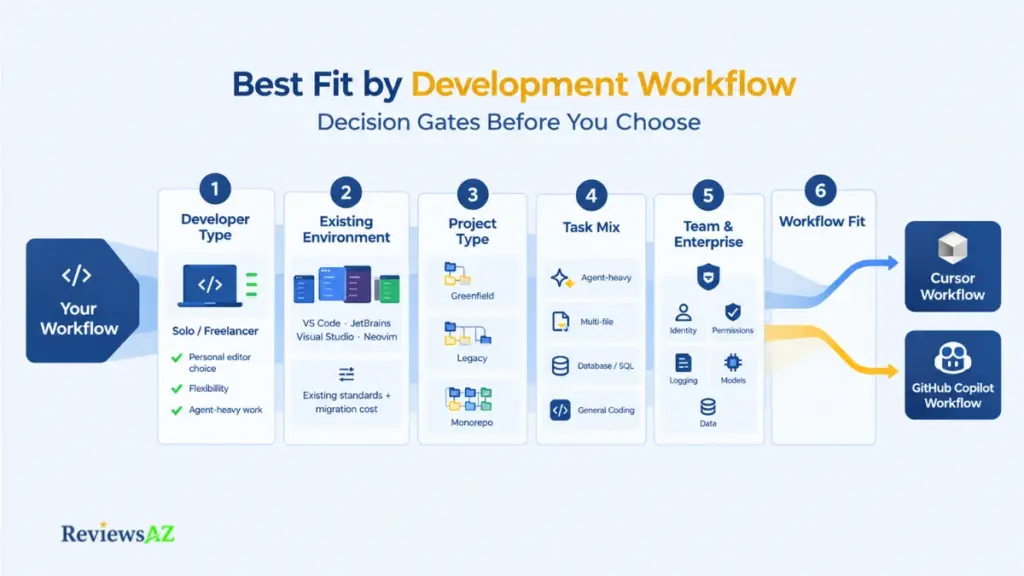
The gates below turn everything covered so far into a practical filter. Work through them in order. Each one narrows things further.
- For solo developers and freelancers: If you’re free to pick your own editor and your work leans agent-heavy and multi-file, Cursor’s AI-first workflow is worth the migration effort. If your task mix is lighter, or you’re simply happy where you are, GitHub Copilot delivers strong assistance without asking you to change anything at all.
- For existing-IDE teams: Teams with established conventions in VS Code, JetBrains, Visual Studio, or Neovim face a real standardization cost moving to Cursor collectively. GitHub Copilot is more practical here. It adds capability without asking the whole team to absorb a shared migration on the same timeline.
- For greenfield, legacy, and monorepo work: Greenfield development often reduces the cost of adopting a new workflow because there are fewer historical conventions to preserve. Legacy code presents the opposite challenge. Important rules may exist only in tests, helper functions, old integrations, or developer experience accumulated over years. Monorepos introduce another issue: the correct change may depend on relationships spread across packages and services. As the codebase grows, repository retrieval and context control therefore become more important.
- For backend and SQL-heavy developers: The distinction appears when database operations become the primary job. Developers spending most of their time on schema analysis, database tuning, operational telemetry, or database administration may get more value from purpose-built database tooling.
- For enterprise engineering teams: Identify the data-handling requirements, identity model, allowed providers, logging expectations, model restrictions, agent permissions, and contractual requirements. Then compare products against those conditions.
- When using both tools is rational: That arrangement also creates costs: another subscription, another set of settings, another workflow to maintain, and more cognitive overhead. Using both makes sense only when the difference between the workflows solves a real problem rather than adding another tool to the stack.
One thing team size alone won’t answer: a five-person team on a complex legacy monorepo has different needs than a five-person team building something from scratch. Project complexity and task mix matter more than headcount when working through these gates.
Run your own environment through these six gates before deciding. The right answer was never which tool is objectively better. It’s which one fits the workflow you actually have, not the one you wish you had.
Frequently Asked Questions
A Cursor vs GitHub Copilot comparison comes down to more than a simple winner. The real differences often appear in the details: IDE fit, codebase context, agent usage, pricing, privacy, and the kinds of work each tool handles best. These questions cover those practical details and fill in the gaps that can be easy to miss in the main comparison.
Which is better for developers who want to stay in their existing IDE: Cursor or GitHub Copilot?
GitHub Copilot is the more practical choice for existing-IDE continuity, since it integrates into VS Code, JetBrains, Visual Studio, and Neovim without requiring an editor change. Cursor requires adopting its own AI-first editor as your primary environment, though its agent is also reachable through ACP-supported JetBrains environments.
Does Cursor provide deeper codebase context and multi-file editing than GitHub Copilot?
Cursor’s semantic indexing is built natively into its editor, while GitHub Copilot’s repository-aware context varies by surface and plan. Both support multi-file editing through agent workflows. Neither vendor publishes a controlled benchmark proving deeper context translates into measurably better real-world accuracy.
How do Cursor and GitHub Copilot compare on AI credits, pricing, and usage limits?
Cursor combines a subscription with an included model-usage pool plus on-demand usage; GitHub Copilot layers monthly AI-credit allowances on top of its subscription tiers. Both meter usage rather than offering unlimited access, and heavier agent workflows consume allowances faster than simple autocomplete.
Can you switch AI models in Cursor and GitHub Copilot, and why does that matter?
Yes, both support multiple models with plan-based access and auto-routing options. Model choice matters because perceived speed or quality differences often come from which model is active, not from the product’s own engineering, a distinction worth checking before crediting either tool with an advantage.
Are Cursor and GitHub Copilot suitable for enterprise code and privacy-sensitive projects?
Both document privacy modes and enterprise-level administrative controls, including SSO, audit logging, and model governance. These commitments vary by plan tier, so enterprise teams should verify the specific training/data-use policy and controls tied to the plan they intend to purchase, not the product generally.
Can Cursor or GitHub Copilot help with SQL and backend development?
Both function as competent general-purpose assistants for SQL and backend code, including query writing and refactoring. Neither is a dedicated database specialist tool, so schema-heavy optimization work still benefits from a specialized AI database tool and careful validation of generated queries.
Is it reasonable to use Cursor and GitHub Copilot together?
For some workflows, yes. A common pattern is using GitHub Copilot for daily work inside an existing IDE and Cursor for specific projects where agent-heavy, multi-file tasks justify a separate environment. This works best when task mix genuinely varies enough to justify maintaining two tools.
Related Posts:
AI Coding Assistant for SQL
Do You Still Need to Learn SQL in the Age of AI?
Final Decision: Which Should You Choose?
There’s no absolute winner here, and pretending otherwise would misrepresent what the evidence actually supports. The right choice depends on which decision gates matter most inside your specific environment.
Cursor is better for AI-native, agent-heavy, multi-file workflows, worth the migration effort when your daily work leans toward delegated, multi-file tasks and you’re free to change editors. GitHub Copilot is better suited to existing-IDE and GitHub-centric workflows, the more practical pick when standardization cost, environment continuity, or GitHub-native integration outweigh editor-level AI depth.
Paying for a higher tier on either side is worth it only when your actual usage, agent intensity, model access, context needs, genuinely matches what that tier unlocks. It isn’t worth it if the tool’s editor model, usage economics, or governance controls clash with your team’s existing environment or requirements.
Before deciding, run your own workflow through the six gates covered above: editor commitment, task mix, context needs, model flexibility, usage economics, and governance. Then verify current pricing, models, and security controls directly against official documentation. Both products move fast enough that yesterday’s comparison shouldn’t decide today’s purchase.
For deeper coverage of either product individually, see our Cursor Review and GitHub Copilot Review, or explore the broader AI Code Assistants category for options beyond these two.