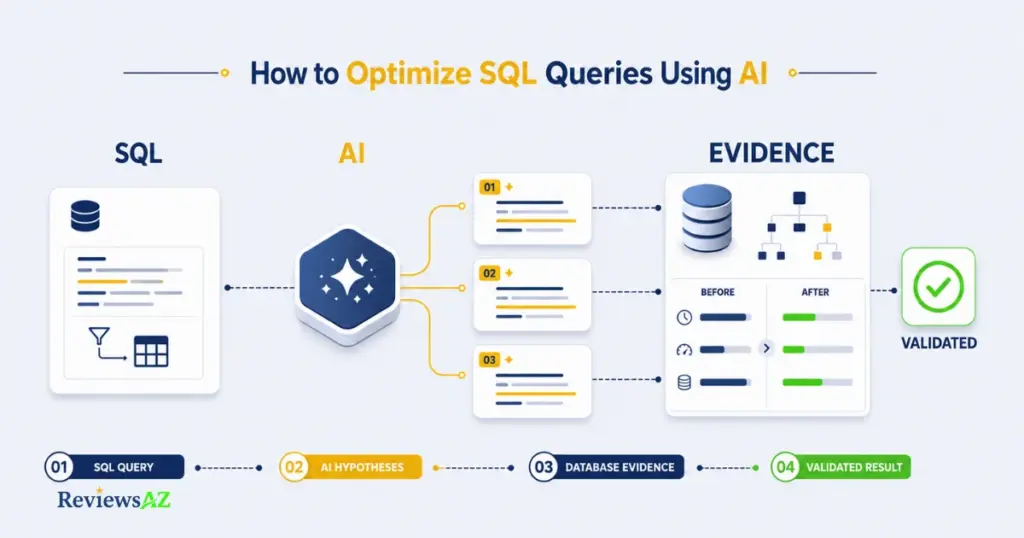
How to Optimize SQL Queries Using AI: A Practical, Evidence-Based Guide

SQL optimization becomes much harder when a query looks better but does not actually run better. How to Optimize SQL Queries Using AI starts with an uncomfortable contradiction: a rewrite can look cleaner while the database does the same work or even more to run it. That gap between how a query reads and how it actually performs is why a cleaner-looking rewrite is not automatic proof of improvement.
Query text is only one part of database performance. The real cost may come from execution plans, indexing, parameter-sensitive behavior, data distribution, or workload conditions that no SQL rewrite alone will fix. AI is useful here, but mainly as a way to generate and challenge optimization hypotheses—not as an oracle whose suggestions get trusted on sight.
This guide shows how to optimize SQL queries using AI without skipping the step that actually matters: validation. That means giving AI enough context to reason usefully, working through a repeatable process, and checking each candidate change against execution-plan and workload evidence before you keep it, test it further, or reject it.
By the end, you’ll have a workflow you can reuse on the next slow query, along with a practical rule for deciding when an AI suggestion has earned adoption and when it hasn’t.
Before You Ask AI to Optimize a SQL Query
A query can run without throwing a single error and still be the wrong thing to optimize first. The text might look fine while the slowdown comes from somewhere else entirely: a poor cardinality estimate, an unsuitable or missing index, parameter-sensitive behavior, stale statistics, or a workload that changed after the query was written. None of that is visible from SQL text alone.
Most AI tools work from what you give them. Feed one a bare query and it can still produce a plausible rewrite. A cleaner-looking query and a faster query are not the same thing, and figuring out what is actually slow is where a useful optimization session starts.
A few things are worth establishing before you write a prompt:
- A real baseline: how long the query takes, how often it runs, and under what representative conditions—not just an impression that it “feels slow.”
- The current plan: whether the execution plan already points toward a cost driver, such as an unexpectedly large scan or a substantial estimate-versus-actual row difference.
- The database engine and dialect: SQL Server, PostgreSQL, MySQL, and other systems differ in syntax, index structures, plan behavior, and optimizer features.
- The workload: whether the query serves reporting, transactional work, analytics, or a mixed workload changes what counts as a good optimization.
- Possible non-SQL root causes: statistics, data distribution, parameter-sensitive plans, locking, or resource pressure may matter more than the query text.
Once that framing is clear, the next question is how to actually phrase the request. How to Generate SQL Queries with AI can cover the prompt-building basics. After you get an answer back, AI-Generated SQL Risks and Limitations is the more relevant companion when you need to decide how much trust the output deserves.
What to Give AI Before It Optimizes a Query
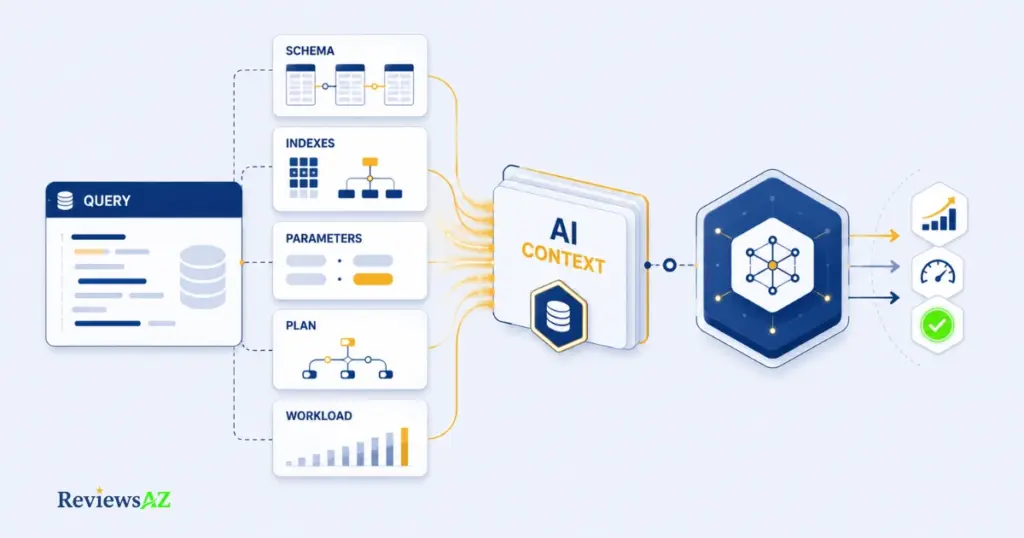
Useful AI-assisted SQL tuning rarely starts with a naked query pasted into a chat window. It starts with a context packet: the relevant schema, execution-plan evidence, parameters, and workload information that let the model reason about your environment instead of guessing at generic SQL patterns.
A practical minimum input packet usually includes:
- The exact query and the tables it touches
- Relevant schema details, including column types, keys, and existing indexes
- Constraints that can affect query behavior, such as unique or foreign-key constraints
- Representative parameter values, plus skewed or extreme values when parameter sensitivity is part of the problem
- The current estimated or actual execution plan
- Workload context, including frequency, concurrency, and whether the workload is read-heavy, write-heavy, or mixed
Common mistake: assuming SQL Server syntax by default. Every prompt should name the database engine and, when relevant, its version because SQL dialects, index capabilities, and optimizer behavior differ. Also avoid sending unrelated tables or sensitive data merely to give the model “more context”; extra context is useful only when it can change the analysis.
Schema, Indexes, and Relevant Constraints
AI can’t infer what it isn’t shown. A query that looks unindexed may actually have a covering index the model never saw, or a constraint that changes how the optimizer can reason about the data. Share the schema slice the query actually depends on rather than the whole database.
Representative Parameters and Execution-Plan Evidence
A query tuned against one parameter value can behave very differently with another. In SQL Server, for example, parameter sniffing can contribute to plan instability; other database systems have their own forms of parameter-sensitive plan behavior. That is why representative parameters should travel with the plan evidence whenever parameter sensitivity is relevant.
Workload Context: Reads, Writes, Frequency, and Concurrency
The same index suggestion can help a reporting query and quietly increase write cost on a transactional table. State how often the query runs, what kind of workload surrounds it, and whether concurrency or locking matters before asking for changes.
Database-Specific Diagnostics Without Losing the General Method
The method stays consistent across engines even though the diagnostics do not.
| Diagnostic step | SQL Server | PostgreSQL | MySQL |
|---|---|---|---|
| View an execution plan | Estimated or Actual Execution Plan | EXPLAIN / EXPLAIN ANALYZE | EXPLAIN / EXPLAIN ANALYZE |
| Runtime evidence | Actual-plan runtime data plus statistics such as logical reads and CPU time | EXPLAIN ANALYZE runtime information | EXPLAIN ANALYZE estimated-versus-actual iterator information |
Give AI the engine-specific form of this evidence and make the dialect explicit. The optimization logic can stay general while the syntax and diagnostic details remain engine-aware.
How to Optimize SQL Queries Using AI: A Practical Workflow
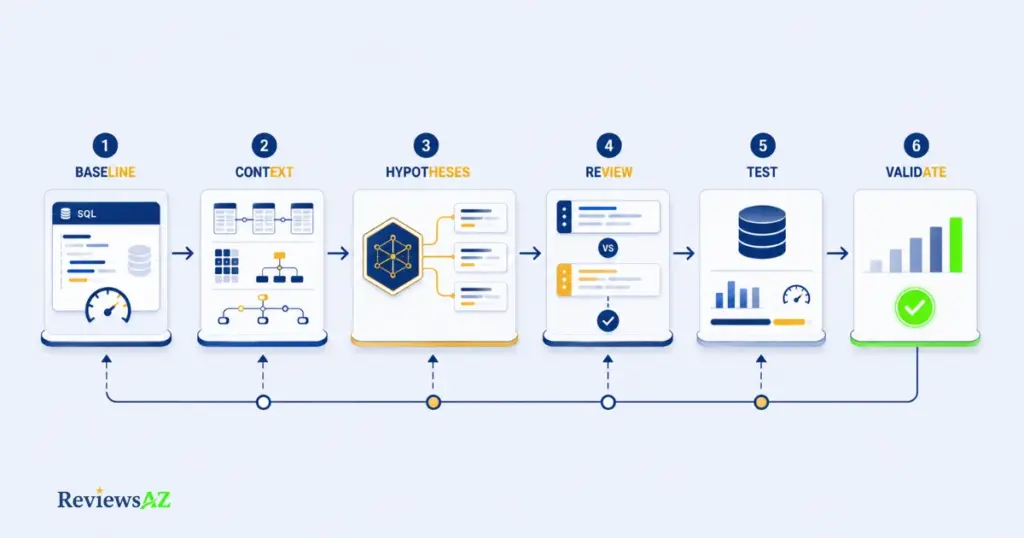
Take one query running against an orders table. If it feeds a nightly reporting dashboard, throughput and plan stability may matter most. If the same shape of query feeds a checkout flow, concurrency and lock behavior become more important. Same SQL pattern, different risk profile. That’s why one repeatable loop is more useful than a separate workflow for every case.
- Establish the baseline. Record current runtime, frequency, relevant plan information, and the conditions under which you measured it. A baseline is what gives the later comparison meaning.
- Build the context-aware prompt. Include the schema, indexes, representative parameters, plan evidence, workload notes, and database dialect. A thin prompt can produce a plausible answer; a well-built prompt gives you a candidate you can actually investigate.
- Ask AI for candidate changes plus trade-offs, not a single rewrite.
“Given this schema, execution plan, and parameter set, suggest two or three alternative approaches to this query. For each, explain the likely trade-offs in reads, writes, CPU, or concurrency, and state what you cannot determine from the information given.”
- Interrogate the execution-plan reasoning.
“Explain which part of the execution plan supports this suggestion, and what would change your recommendation if the actual row count differs materially from the estimate.”
If the answer can’t connect its recommendation to observable plan evidence, the suggestion remains a hypothesis.
- Adapt the workflow to the workload. The evidence loop stays the same; what changes is what you prioritize.
| Workload | Useful context to supply | Validation emphasis | Common trap |
|---|---|---|---|
| Transactional / backend | Concurrency, lock patterns, write frequency | Regression under representative concurrent writes | An index helps reads but increases write cost |
| Reporting / dashboard | Data volume, refresh schedule, representative result size | Plan stability and throughput at realistic scale | Optimizing for a tiny test dataset |
| Analytics / warehouse | Partitioning, aggregation patterns, scan volume | Throughput and resource use on realistic workloads | Ignoring the cost of repeated large joins or scans |
- Test one meaningful variable at a time and re-validate. Change the query, the index, or the hint deliberately rather than changing everything simultaneously. You want to know what caused the observed difference.
Why this matters: AI can propose a rewrite that reads more elegantly while doing the same work underneath—or more. The following example illustrates a potentially useful reduction in data returned, but it does not prove a performance gain.
-- Before: application requests every column
SELECT *
FROM orders
WHERE customer_id = @id
  AND status = 'pending';

-- After: only when these are the columns the application actually needs
SELECT order_id, order_date, total
FROM orders
WHERE customer_id = @id
  AND status = 'pending';
Reducing the projected columns can reduce data read or returned in some plans, but the effect depends on the table structure, indexes, storage engine, and execution plan. The application must also be able to use the narrower result safely.
That is why the right follow-up is not, “Does this SQL look cleaner?” It is:
“Compare the execution plans for these two versions. Identify any change in access path, estimated and actual rows, logical reads, or other relevant resource usage, and explain what cannot be concluded from the available evidence.”
A final review prompt is useful once a candidate looks promising:
“Given the original and revised query plans, what conditions—such as a different parameter value, data distribution, or higher concurrency—could make the revised version worse?”
Monitor for plan or workload regression after adoption, and record why the change was accepted, not just that it was. A short note with the baseline, evidence, date, and decision is enough to give the next review a useful starting point.
How to Validate an AI-Optimized Query
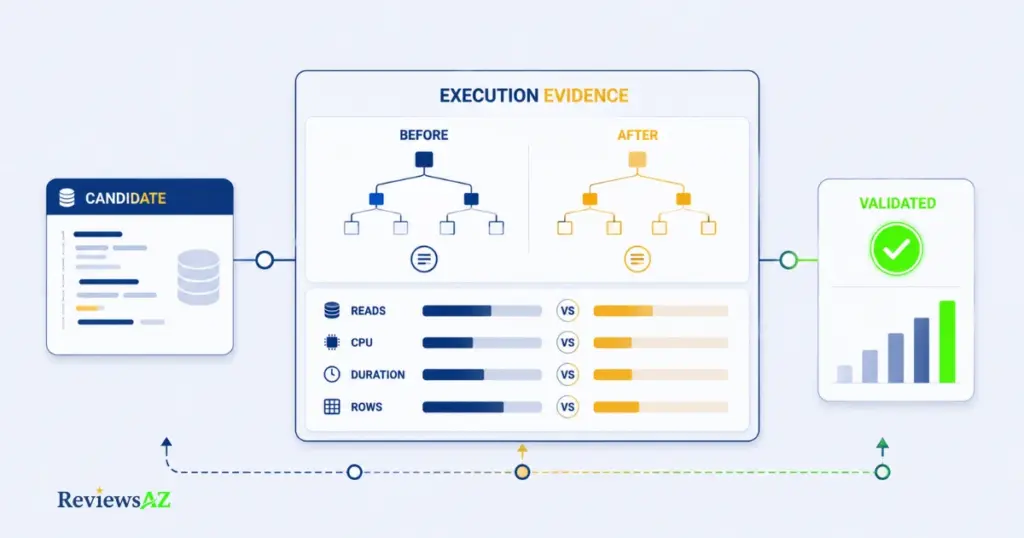
Did the query actually get better, or did the SQL simply become more elegant? That question is the entire point of this stage.
| Check | What it tells you | Where to look |
|---|---|---|
| Estimated vs. actual plan | Whether optimizer assumptions align with observed execution | Execution-plan tooling for your database engine |
| Logical reads, CPU, duration, and rows | Whether resource use or execution time actually changed | Engine-specific execution statistics |
| Representative workload behavior | Whether an isolated win survives realistic conditions | Load, concurrency, or production-like testing |
| Keep, test further, reject, or monitor | The decision itself, including uncertainty | A short documented outcome |
Estimated vs. Actual Plans
An estimated plan describes what the optimizer expects before execution, while an actual plan includes execution context and runtime information where the engine provides it. Microsoft’s documentation on execution plans explains this distinction for SQL Server, while PostgreSQL’s EXPLAIN and EXPLAIN ANALYZE similarly separate planner estimates from observed execution. A change that only alters the estimated plan, without a measurable improvement in the executed workload, is not enough to call the optimization a win.
Validation rule: Use actual execution results and comparable before and after measurements as the acceptance gate. An estimated plan change alone does not establish that the optimization improved performance.
Compare Logical Reads, CPU, Duration, and Rows
A single faster run is not enough to establish a durable performance gain. Compare the original and revised versions under equivalent conditions and look at more than elapsed time. Logical reads, CPU time, duration, and returned row counts can help distinguish a meaningful change from a difference caused by the environment or execution conditions.
Check Regression Under Representative Workload
A candidate that wins in isolation can lose under concurrency. An index that speeds up one query can increase write cost on the same table. A rewrite that helps one parameter value can behave differently when data distribution or workload shape changes. Representative testing is what turns a promising candidate into evidence.
Keep, Test Further, Reject, and Monitor
The decision should follow the evidence, not how convincing the rewrite sounds.
-- Before: the original projection
SELECT *
FROM orders
WHERE customer_id = @id;

-- After: candidate projection change, only if the application needs these columns
SELECT order_id, order_date, total
FROM orders
WHERE customer_id = @id;

-- Accept only if the revised query preserves the required result
-- and the measured evidence is better under representative conditions.
Faster once is not the same as durable. Data volume grows, statistics change, and workload patterns shift. Keep the candidate, test it further, reject it, or monitor it based on the evidence above rather than closing the book after one favorable run.
Common Mistakes When Optimizing SQL With AI
The most dangerous mistake in AI-assisted SQL optimization is rarely a syntactically bad rewrite. It is changing the query, index, or hint before proving what is actually slow.
- Blind trust in a plausible rewrite. AI can produce SQL that reads cleanly and still performs no better. Treat every suggestion as a hypothesis until execution evidence supports it.
- Index overuse. An index that helps one query can increase write cost or duplicate existing coverage. Check the workload-wide trade-off before adding it.
- Acting on stale or mismatched statistics. If optimizer estimates are based on an outdated picture of the data, a rewrite may be aimed at the wrong problem.
- Applying query hints without understanding the trade-off. Hints can constrain optimizer choices. A hint that helps one workload condition can become a liability as data or workload patterns change.
- Ignoring result-shape equivalence. A query can appear “faster” because it returns fewer columns or fewer rows than the original. Performance comparisons are meaningful only when the revised query still satisfies the same functional requirement.
Skipping the evidence gate in favor of speed is the thread running through all five. Production query safety depends less on how sophisticated a suggestion sounds and more on whether someone checked it against the right evidence before it shipped.
AI SQL Optimization Tools
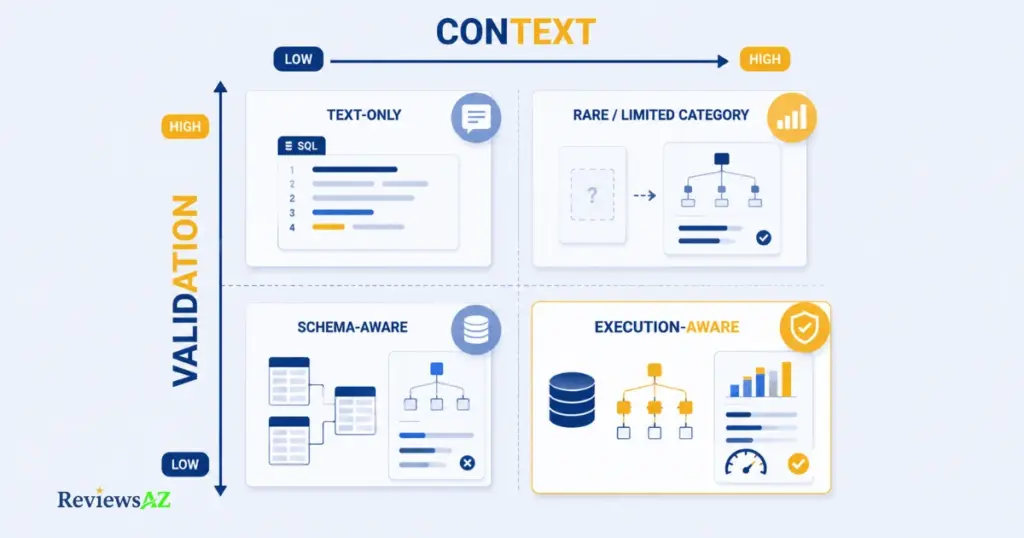
An AI tool is useful for SQL optimization because of what it can see and help you reason about, not simply because it can rewrite a query. Two tools that both describe themselves as AI SQL optimizers can differ substantially in how much database context they access and whether they help you validate a suggestion.
A useful way to assess a tool is on two dimensions: context access and validation depth.
| Lower validation depth | Higher validation depth | |
|---|---|---|
| Lower context access | Text-based rewriters that mainly see the SQL string | Tools that can inspect some plan evidence but still rely heavily on manual interpretation |
| Higher context access | Schema-aware assistants that can ground suggestions in database structure but do not prove performance | Execution-aware tools that can access plans or runtime context and support before/after investigation |
Text-Based AI Rewriters
These generate alternative SQL from the query text alone. They can be useful for readability, restructuring, and exploring possibilities. Performance claims from this category remain unverified until you check the resulting SQL against the actual database.
Context-Aware Database Assistants and IDE Tools
These can use schema information and, in some products, additional database context from an IDE or database client. That extra context can make suggestions more grounded, but validation depth still varies. Confirm the current capabilities from the vendor’s documentation rather than inferring them from the product label.
Execution-Aware vs. Text-Only Optimization
The more useful dividing line is not brand or interface. It is whether the tool can reason from actual execution evidence and help you compare states before and after a change.
- Context access does not guarantee validation support.
- A tool that reads plans but leaves interpretation and testing to you is still only part of the evidence loop.
- “AI-powered optimizer” is a marketing label, not a technical specification.
- Database support and current capabilities should be checked against official documentation before you rely on a feature.
Best AI SQL Tools can be the next step when you are ready to compare options. Named reviews such as AI2SQL, SQLAI, and AI2SQL vs SQLAI make more sense once you have a concrete workflow or selection question to answer.
Related Posts:
Do You Still Need to Learn SQL in the Age of AI?
Best AI DB Tools for Backend Devs
AI SQL Tools for Non-Technical Users
Frequently Asked Questions
Beyond the workflow itself, a few practical decisions tend to come up once you actually try to put How to Optimize SQL Queries Using AI into practice: how much context is genuinely enough, when a suggestion has earned trust, and where the risk actually sits once a change reaches production. The answers below cover exactly that ground.
Can AI optimize SQL queries without access to the database?
It can suggest surface-level rewrites from query text alone, but it cannot establish the actual bottleneck without more context. Execution plans, schema details, parameters, and workload evidence make the analysis more grounded.
What information should I give an AI tool to optimize a SQL query?
At minimum: the query, relevant schema and indexes, representative parameters, the current execution plan, workload context, and the database engine or dialect. Include extreme or skewed parameter values when parameter sensitivity is part of the problem.
Can AI interpret an SQL execution plan?
Some tools can analyze plan output when you provide it, but interpretation quality varies with the tool and the context available. Treat the explanation as a useful hypothesis and confirm it against the database’s own runtime evidence.
How do I know whether an AI-optimized query is actually faster?
Compare the original and revised versions under equivalent, representative conditions and look at duration alongside logical reads, CPU, plan behavior, and result correctness. One favorable run is a data point, not proof of a durable gain.
Should I add an index because an AI tool recommends it?
Not automatically. Check existing indexes, write frequency, storage cost, and workload-wide effects before accepting the recommendation. An index that helps a read path can create costs elsewhere.
Is AI-generated SQL optimization safe for production databases?
It can be used safely when candidate changes are reviewed, tested, and validated against representative evidence before deployment. The risk rises when a suggestion is applied directly because it sounds convincing or makes the SQL look cleaner.
What are the best AI SQL optimization tools for different workloads?
The right tool depends on how much relevant database context it can access and how much of the validation loop it supports. For more consequential workloads, execution evidence and before/after comparison matter more than the claim that a tool is “AI-powered.”
When an AI-Optimized Query Is Ready to Keep
The decision this guide has been building toward is simple to state and easy to skip in practice: use AI to generate and interrogate optimization hypotheses, then accept a change only after evidence shows that it improves the intended workload without unacceptable trade-offs.
Keep it when the revised query preserves the required result, the evidence improves under representative conditions, and the trade-offs are understood.
Test further when the signal is promising but the evidence is too limited, the workload is variable, or parameter-sensitive behavior has not been ruled out.
Reject it when the apparent gain comes only from a changed result shape, a lucky run, or a recommendation that cannot be connected to the actual bottleneck.
Monitor it after adoption when the workload, data volume, or plan behavior can change over time.
AI expands the space of hypotheses worth considering. It does not decide adoption. Database evidence does. A suggestion that skips that gate, however well reasoned it sounds, remains unproven until the execution evidence says otherwise.