AI SQL Tools for Non-Technical Users: Choose the Right Workflow

You need one number out of the company database. You don’t write SQL, and you’re not about to learn it just to answer one question. That’s the gap AI SQL tools for non-technical users are supposed to close, yet most guides on the topic are written for developers and DBAs, not for someone who’s never opened a query editor.
The real bottleneck was never SQL syntax. It’s getting from a business question to an answer you can trust, fast enough to actually use it. Half the time, that means waiting on a developer. The other half, it means asking a general-purpose chatbot for a query you have no way to verify yourself.
None of this requires learning SQL syntax first. What matters is how these tools turn plain English into a working query, where the accuracy and security trade-offs really sit, and which interaction model fits your role: visible SQL, a conversational answer, or a dashboard. What follows is a practical decision model, a short list of tools built specifically for non-coders, and a clear sense of when this category isn’t the right answer at all.
Who Actually Needs an AI SQL Tool (and Who Doesn’t)
Not everyone who’s ever waited on a developer for a report actually needs an AI SQL tool. Some people need one badly. Others just need to ask their existing dashboard a better question, or send one clearer message to whoever already has access. Every recommendation later in this guide assumes you belong in the first group.
What counts as “non-technical” here
It doesn’t mean unfamiliar with data. It means you’ve never written SQL, have no plan to learn it, and have no reliable way to check whether a generated query is actually correct. If you can read a spreadsheet but couldn’t tell a JOIN from a WHERE clause, this guide is for you. That covers a wide range of roles:
- Product managers pulling usage numbers before a roadmap meeting
- Marketing and operations leads tracking campaign or process performance
- Support managers checking ticket volume or category trends
- Founders and sales leads who want a straight answer without scheduling time with an analyst
The kinds of questions this actually solves
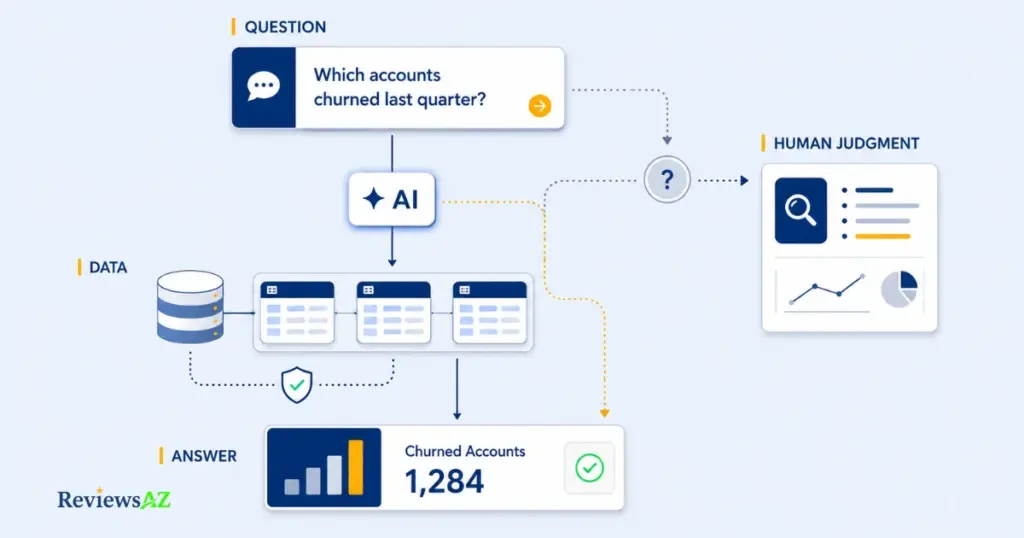
AI SQL tools for non-technical users are built for repeatable, business-specific questions with a clear, checkable answer sitting in a database somewhere: how many signups came from a campaign last month, which accounts churned last quarter, what the top-selling products were by region. None of that is difficult for someone who already knows SQL. The friction was always the handoff between the person who knows what to ask and the person who knows how to query it.
Good fit when:
- The question is repeatable, not a one-time deep dive
- The underlying data is reasonably structured and documented
- Someone can validate what the answer actually means for the business
Not a good fit when:
- The question requires causal analysis, not retrieval
- Data quality or schema documentation is unknown or unreliable
- The answer depends on judgment specific to your business, not just the numbers
Common mistake: treating “non-technical” as “no judgment required.” A tool can remove the SQL work. It can’t define your metric for you, and it won’t flag a question that was ambiguous to begin with.
When you still need a developer or analyst
These tools aren’t a replacement for a data team, and assuming otherwise is an easy mistake to make early on. Open-ended strategic questions, anything touching upstream data quality, or a request that requires judgment about why a number moved: that still belongs with a human analyst. A poorly documented database schema will trip up any AI tool before you even get to comparing products. And if your role is increasingly built around ad-hoc querying, the more honest question worth settling first is whether you should just learn a little SQL rather than routing around it, a question covered in Do You Still Need to Learn SQL in the Age of AI.
How AI SQL Tools Turn Plain English Into a Working Query
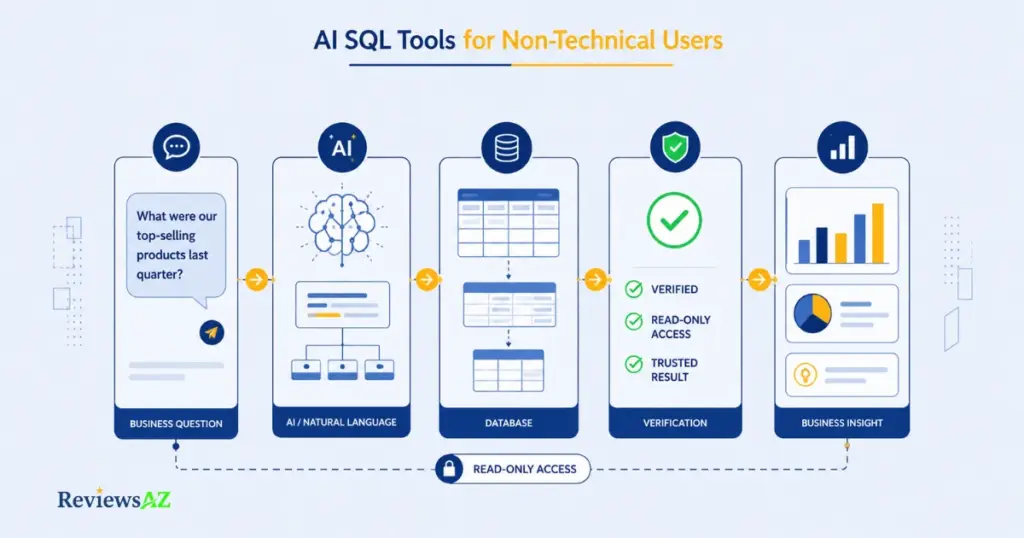
Text-to-SQL AI lets you type a question in plain English, “how many orders came from California last month,” and get back a working query, often with a formatted answer, without writing any code yourself. Underneath, the same basic sequence happens every time:
- Understand the question. The system parses what you’re actually asking.
- Pull in the relevant schema. It identifies the tables, columns, and relationships that matter.
- Generate the SQL. The model turns the question and schema context into a query.
- Return or validate the result. Depending on the product, you see the SQL, the answer, a chart, or some mix of the three.
Step two is where most quick, ChatGPT-generated SQL falls apart. Without your actual schema, a general-purpose model is pattern-matching against generic assumptions about what a “customers” table probably contains, not what yours actually does, so it guesses at column names, relationships, or business logic it was never shown.
Key insight: correct syntax and correct business meaning are two different checks. A query can run without errors and still return the wrong number.
Tools built specifically for this use case connect to your actual schema before generating anything. Anything that skips that step is guessing, however confident the output looks. What Is Text-to-SQL AI and How Does It Work covers the mechanism in more depth.
No-Code SQL Tools and Chatting With Your Database Aren’t the Same Thing
“No-code SQL tool” and “chat with your database” sound like the same product. The difference between them changes what you can actually trust from the output.
Some tools take your plain-English question, generate the SQL, and show it to you before running anything, or let you run it and see exactly what was executed. AI2SQL works this way, keeping the generated query visible and editable rather than hidden behind a chat bubble. Draxlr follows the same pattern. A visible query is something you, a colleague, or an analyst can sanity-check before the number goes into a report, even if you can’t read SQL fluently yourself.
Other tools skip that step. You ask a question, the tool runs it behind the scenes, and you get a conversational answer with no SQL shown. AskYourDatabase leans toward this experience, prioritizing a direct answer over transparency into how it got there.
| Shows the SQL | Best when | |
|---|---|---|
| Visible/editable query (AI2SQL, Draxlr) | Yes | You or a teammate can review before acting on the number |
| Conversational answer (AskYourDatabase) | No | Speed matters more than inspectability, low-stakes question |
Seeing the query only helps if someone actually reads it. What matters more for a conversational tool is how it behaves when your question is ambiguous, whether it asks for clarification or just returns a confident-looking guess. A chat-with-your-database walkthrough and the individual AI2SQL and AskYourDatabase reviews go deeper into each model if either fits your situation.
What These Tools Actually Do for Non-Technical Business Teams
A support lead gets asked, once a week, how many tickets came in about the new checkout flow. Before an AI SQL tool, that means pinging an analyst and waiting. With one in place, the same person types the question and gets an answer in the time it takes to make coffee.
Every role that touches customer or product data fields some version of this request: a founder wanting weekly signups, a marketing lead wanting campaign attribution, a sales lead wanting pipeline counts by stage. None of these questions are complicated for someone who already knows SQL.
The Real Friction: The friction was never the complexity of the query. It was that the person who needed the answer and the person who could write it were two different people.
What these tools don’t do is replace the thinking that comes after the number. If ticket volume on checkout doubled, the AI can confirm that it doubled. It can’t tell you whether that’s a bug, a pricing change, or a marketing campaign that drove more traffic to a broken flow. One vendor has published case material describing customers using instant access this way to ask more follow-up questions, not fewer, worth noting as a vendor-reported account rather than something independently verified here.
Can You Trust the SQL an AI Writes? Accuracy and Data Security
No amount of polish in the interface tells you whether the query underneath is right, and most comparisons of these tools treat that as a footnote instead of the main event.
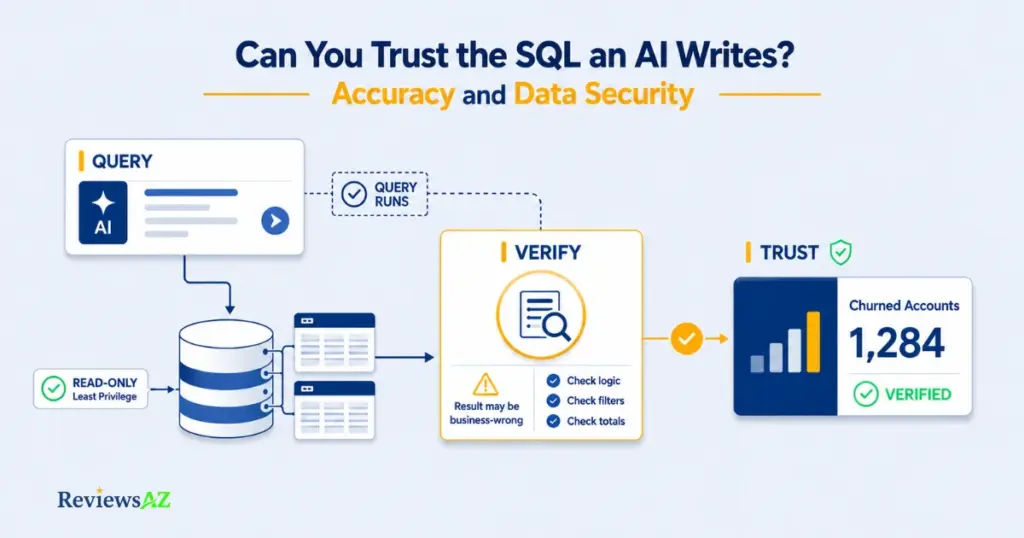
The scenario from earlier, a query that runs cleanly and still answers the wrong question, happens when a join hits the wrong tables, a filter uses the wrong date range, or the query counts something adjacent to what was actually asked. Vendors publish their own accuracy figures for query generation, but those numbers come from each company’s own testing methodology, not independent verification, and no hands-on testing was performed for this article. Published percentages aren’t directly comparable across vendors for that reason. The Spider text-to-SQL benchmark and the OWASP GenAI LLM Top 10 are useful reference points on where these systems commonly go wrong.
Warning: never connect an AI SQL tool to a real database with write or delete permissions. Read-only, least-privilege access is the non-negotiable baseline, in line with Microsoft’s own guidance on least-privilege access control. Treat this as a product-selection criterion, not a checkbox handled after signing up.
A tool given your actual schema is protected from one specific failure: guessing at structure it’s never seen. It isn’t protected from misunderstanding intent. Schema awareness tells the AI what a “customers” table contains, not what you meant by “active” customers if your business defines that differently than the column name suggests.
Before connecting any tool to a real database, check:
- Read-only permissions, with no write or delete access granted
- Least-privilege scoping, limited to the tables actually needed
- What of your schema the tool can see, and whether that’s more than necessary
- Whether the generated query is visible to you before or after it runs
- Whether the vendor documents how it handles and stores your data
AI-Generated SQL Risks and Limitations breaks down where these failures tend to show up in more detail.
From a Single Query to an Automated AI Dashboard
A number in a chat window is useful once. A number that updates itself on a dashboard, or lands in Slack every Monday morning, is useful every week without asking again.
Some tools stop at the single answer: you ask, you get a query and a result, done. Genuinely enough for a one-off question. Not enough if you’re re-asking for the same three numbers every week.
BlazeSQL is built around the other end of the workflow, aiming at business teams who want a repeatable report rather than a one-time query. Whether a given plan includes scheduling, alerts, or dashboard-sharing varies by pricing tier, so it’s worth checking a tool’s own features page before assuming a demo reflects your plan.
One tool frequently listed in this category needs a correction rather than a recommendation. Per Cloudflare’s own announcement, the company acquired Outerbase in April 2025 and shut down its standalone hosted cloud service on October 15, 2025, folding the query-editor and data-explorer features into the Cloudflare developer dashboard. The open-source project can still be self-hosted, but that assumes exactly the technical setup this guide is trying to help you avoid. Outerbase isn’t treated as an active, non-technical-friendly option here for that reason; its current form is a developer-facing Cloudflare feature, not a standalone signup.
The Best-Fit AI SQL Tools for Non-Technical Users
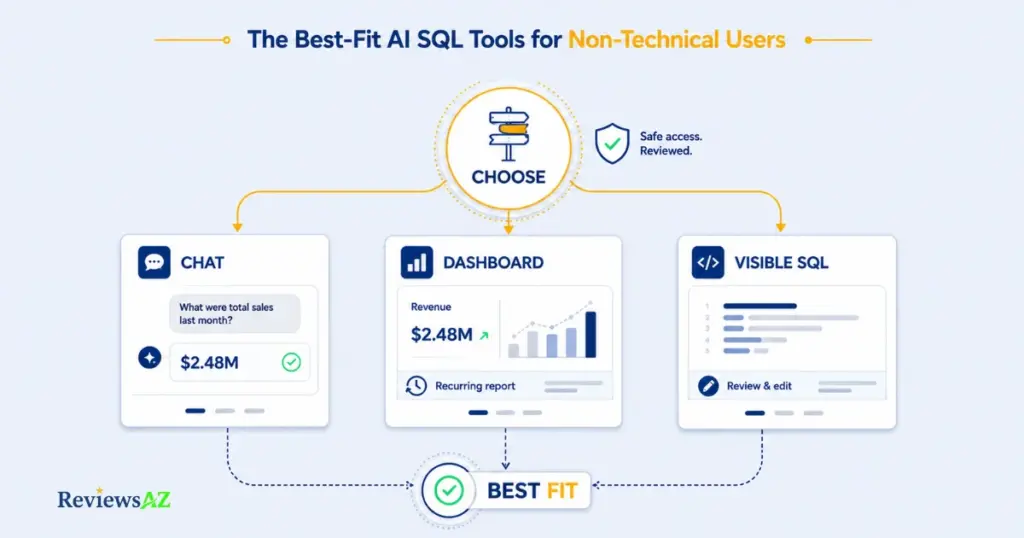
Choose the workflow before you choose the product. No single tool wins for everyone. The right pick depends on which trade-off matters more to you: speed, transparency, dashboards, or fixing what a general-purpose chatbot already gets wrong.
This shortlist stays deliberately narrow: three tools built specifically for a no-code, non-technical workflow. If your team also includes someone comfortable writing or reviewing SQL directly, or you want the fuller picture across the category, including tools aimed at data analysts and engineers, Best AI SQL Tools covers the space end to end.
Decision point: the best-fit product is the one that matches the job you actually have and gives you a review-and-permission model you can operate day to day, not the one with the longest feature list on its homepage.
If speed matters more than inspecting the query, AskYourDatabase’s chat-first model fits low-stakes, repeatable questions where a wrong answer is easy to catch on its face. It’s a weaker fit if a teammate needs to check the underlying query before it goes into a report.
If your team fields the same three or four questions on a recurring cadence, BlazeSQL leans toward dashboards and recurring reports rather than one-off answers. It’s more setup than a single question justifies.
If your team already leans on a general-purpose chatbot, AI2SQL and Text2SQL.ai exist specifically to fix what that generic usage gets wrong: no schema awareness, no visible query, no consistency between attempts. Both keep the generated SQL visible. A direct side-by-side sits in a separate AI2SQL vs ChatGPT for SQL comparison for readers weighing that exact question.
| Your situation | Best-fit tool | Interaction model | Watch for |
|---|---|---|---|
| Want speed, don’t need to see the SQL | AskYourDatabase | Conversational answer | How it handles an ambiguous question before you trust the answer |
| Need recurring reports or dashboards | BlazeSQL | Query + dashboard | Scheduling, sharing, and dashboard features can vary by pricing tier |
| Already using a chatbot for SQL, want it fixed | AI2SQL / Text2SQL.ai | Visible/editable SQL | Whether it actually removes manual schema-supplying, not just wraps the same prompt |
The category itself is shifting toward AI-assisted querying built directly into database platforms rather than bolted on as a separate layer. Cloudflare folding Outerbase’s tooling into its own dashboard is one visible sign of that consolidation, though it points toward more developer-integrated tooling rather than more standalone non-technical options.
When an AI SQL Tool Isn’t the Right Fit
A few situations call for something other than an AI SQL tool, even a well-matched one:
- The real question is “why,” not “what.” If revenue dropped and you need to know why, that’s analysis requiring a person to weigh context the tool doesn’t have, not a retrieval problem.
- Your data isn’t governed. If nobody trusts the source tables or the metric definitions, an AI interface on top won’t fix the underlying problem.
- A governed BI platform is already in place. Adding a separate AI SQL tool on top of Power BI, Tableau, or Looker can create a second, ungoverned source of numbers that doesn’t match what leadership already trusts.
- Compliance or data residency rules apply. Strict requirements can rule out a cloud-hosted tool entirely, a check worth making before evaluating any specific product, not after.
- Developers are already on staff. Workflow-automation platforms like n8n, or a custom AI agent wired into the stack, can go further than an off-the-shelf tool, at the cost of setup time and ongoing maintenance a smaller team may not want. For a technical team that needs deeper SQL control, Best AI SQL Tools for Data Analysts is the more relevant next step.
Related Posts:
How to Generate SQL Queries with AI
Best AI DB Tools for Backend Devs
Outerbase Review
Frequently Asked Questions
These are the questions that come up most once the conversation about AI SQL tools for non-technical users moves from “is this possible” to “can I actually trust it.” The answers below cover the specific concerns non-technical users raise, from ChatGPT’s limits to what read-only access really protects.
Do I need to know SQL to use an AI SQL tool?
Not for most conversational or no-code workflows. You still need to know what question you’re asking, what a reasonable answer looks like, and how much you’re trusting the tool to get right without you checking it.
What’s the difference between Text-to-SQL and chatting with a database?
Text-to-SQL is the mechanism: turning a plain-English question into an actual SQL query. Chatting with a database is a user experience built on top of that mechanism, one that often hides the query and hands you a conversational answer instead. The practical difference is how much of the process stays visible for review.
Is ChatGPT good enough for writing SQL, or do I need a dedicated tool?
ChatGPT can draft SQL, and that’s fine for learning or one-off syntax help. It doesn’t have an ongoing connection to your actual database schema, so you’d need to supply that context yourself every time. A dedicated tool connects to your real schema first, which is the reason this category exists separately from a generic prompt.
Is it safe to connect an AI SQL tool to my company’s real database?
Treat read-only, least-privilege access as the non-negotiable baseline. Beyond that, check the tool’s permission model, credential handling, and current documentation before connecting production data. Read-only is a starting control, not a full compliance guarantee.
How accurate are AI-generated SQL queries, really?
It varies by vendor, schema quality, and how ambiguous the question is. Published accuracy figures are typically vendor-reported using each company’s own testing methodology, so they aren’t directly comparable across products. A query that runs without an error confirms correct syntax, nothing about whether it answered the right business question.
What’s the difference between an AI SQL tool and a full BI platform like Power BI or Tableau?
A BI platform is a broader analytics environment where AI-assisted querying is often one feature among many, usually built with an existing data team in mind. The tools covered here are built specifically for a non-technical user going from question to answer without that layer of setup. If a governed BI platform is already in place, a separate AI SQL tool may add less value than a demo suggests.
Can these tools work with the specific database I use PostgreSQL, MySQL, Snowflake, BigQuery?
Database support varies by tool and sometimes by pricing tier. Confirm on the tool’s current official site for your specific database and plan before signing up, rather than assuming an older comparison article still applies.
The Right Fit, in One Answer
If you’re a non-technical business user who needs repeatable answers from a database, start with a schema-aware, conversational or no-code tool, and treat read-only, least-privilege access as a condition of using it at all.
AskYourDatabase fits someone fielding the same handful of questions weekly who wants a chat-first experience with no SQL in view. BlazeSQL fits a team that wants those answers turning into recurring dashboards without manual re-asking. AI2SQL or Text2SQL.ai fit a team already leaning on a chatbot for SQL and wanting the same habit done properly, with real schema awareness and a checkable query.
None of these fit the situations covered above: a governed BI platform already in place, an open-ended “why” question, or strict compliance constraints.
The tool matters less than the habit built around it: know what schema it’s working from, keep it on read-only access, and treat a fast answer as a starting point for judgment, not a replacement for it. Before connecting anything to a real database, test the workflow on a small, non-sensitive dataset, ask it one deliberately ambiguous question, and see whether it asks for clarification or just returns a confident guess. Then confirm the business definition of the metric you actually care about matches what the tool assumes.