BlazeSQL Review (2026): Is It the Best AI SQL Generator and Data Analyst?

In this BlazeSQL review, we look at whether waiting three days for a data analyst to answer one SQL question is still necessary — because for most teams without an in-house SQL expert, that’s exactly what happens, and it’s the exact gap BlazeSQL claims to close.
This review breaks down what BlazeSQL actually does, based on its official technical documentation and a pattern analysis of dozens of verified user reviews on G2 across real-world use cases — from simple lookups to multi-table joins and ambiguous business questions.
It’s built for a wide range of users: SQL beginners, business analysts, non-technical business users, data teams, and developers who’d rather skip repetitive query writing. If you’re trying to decide whether BlazeSQL deserves a spot in your stack, this is what the evidence actually shows.
Quick verdict: BlazeSQL reliably handles standard joins and aggregations and adds genuine data-analyst capabilities — dashboards, reporting, proactive insights — beyond simple SQL generation. It gets shakier on deeply nested or ambiguous queries, where its own documentation admits the limits. For teams with reasonably documented schemas, it’s a strong pick; for chaotic, undocumented databases, expect some manual cleanup.
What Is BlazeSQL?
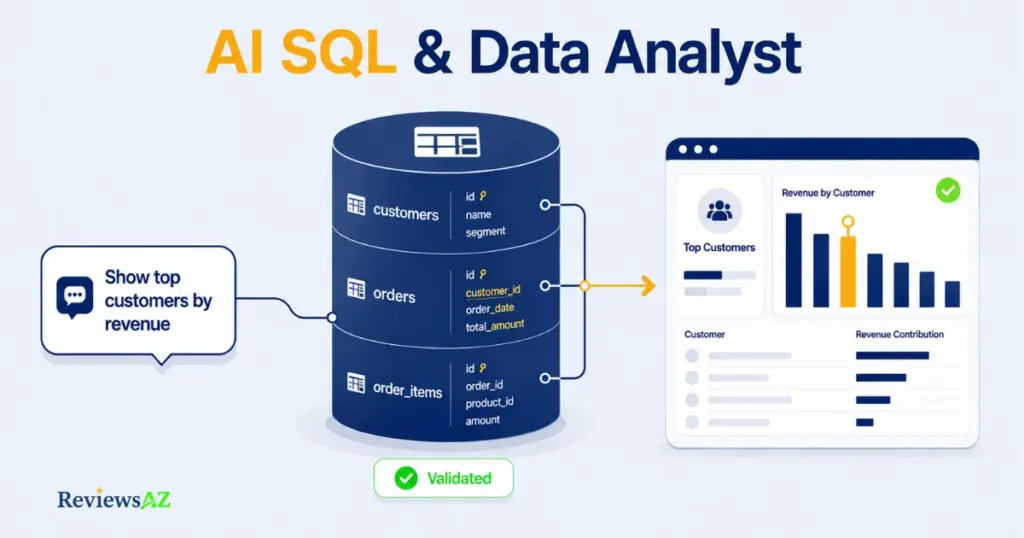
BlazeSQL is an AI data analyst that connects directly to your SQL database, turns plain-English questions into working SQL queries, and builds dashboards from the results — without anyone on your team writing a line of code.
That’s the short version. The more useful distinction is what it’s not: it isn’t a generic AI chatbot you paste queries into, and it isn’t a traditional BI tool that just visualizes data someone already pulled. It sits in between — reading your schema, generating the SQL itself, running it, and handing back charts or a dashboard ready to share.
It connects to the databases most teams already run on — PostgreSQL, MySQL, Snowflake, BigQuery, SQL Server, and several others — and is positioned for two audiences at once: people who don’t know SQL and want answers, and people who do know SQL and want to stop writing the repetitive kind. It’s not the only text-to-SQL AI tool on the market, either — see our full breakdown of AI SQL Generators for how it stacks up against the rest of the category.
Who Is BlazeSQL For?
Based on how BlazeSQL is built and who actually uses it, five groups get real value from it:
- SQL beginners — people who’ve never written a query but need answers from a database regularly.
- Analysts — comfortable with SQL, but tired of writing the same joins and aggregations by hand.
- Business users — marketing, sales, or ops staff who need a number now and don’t want to file a ticket.
- Data teams — looking to offload repetitive ad-hoc requests so they can focus on higher-value work.
- Developers and technical users — who want a faster first draft of a query, not a replacement for their own judgment.
That range only matters if the evaluation actually holds up for each group. So the rest of this review is built around four questions: Does it work as advertised? (features vs. reality), Is it accurate? (real-world query performance), Is it safe? (what happens to your data), and Is it worth the price? (value against the alternatives). Every section from here answers one of those directly.
BlazeSQL Features: What Does It Actually Offer?
Strip away the marketing language, and BlazeSQL’s feature set breaks down into three real jobs: understanding your database, generating and running queries against it, and turning the results into something shareable.
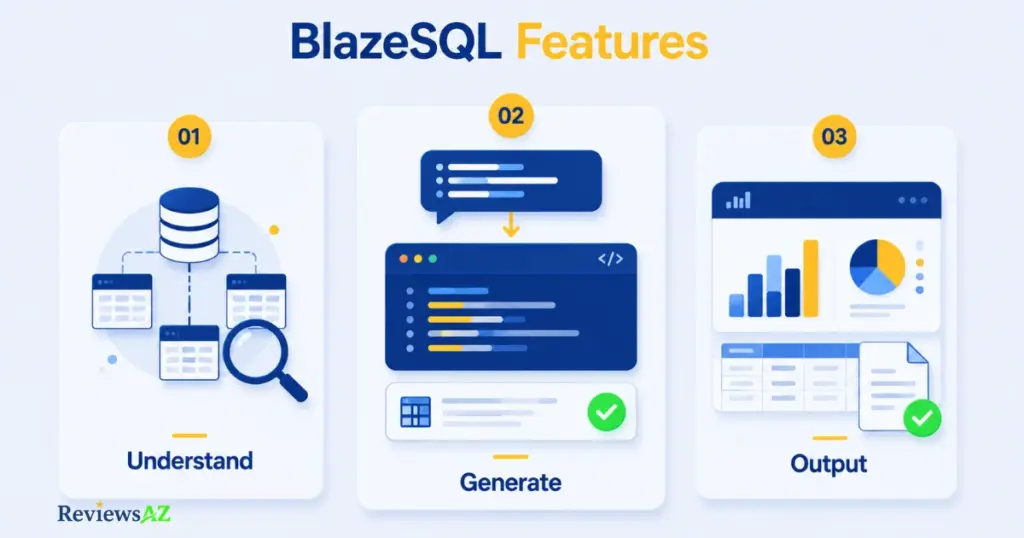
Understanding your data. BlazeSQL only reads metadata — table names, column names, data types, and key relationships — never the actual rows stored in your database. To handle schemas with hundreds of tables without overwhelming the AI’s context window, it uses a retrieval-based (RAG) architecture that first figures out which tables are actually relevant to your question, then passes only those to the query-generation step. Optionally, it can also sample encrypted, distinct values from text columns — product categories or country names, for example — which helps it write more accurate WHERE clauses without ever touching full row data. You can sharpen accuracy further with Knowledge Notes: manually added definitions for business terms, metrics, or table relationships the AI wouldn’t otherwise infer.
Generating and running queries. There’s no manual database schema upload involved — once connected, you ask a question in plain English and BlazeSQL writes the SQL, executes it, and returns the result directly, no copy-pasting into a separate tool. (For a broader look at how this works across different tools, see our guide on how to generate SQL queries with AI.) It connects directly to PostgreSQL, MySQL, MariaDB, SQL Server, Snowflake, BigQuery, Redshift, Databricks, Amazon Athena, ClickHouse, and a few others. For self-hosted databases like PostgreSQL and MySQL, connections run through static IP addresses that IT teams can whitelist in their firewall — a detail that matters more than it sounds for companies with strict network security policies. Cloud warehouses like Snowflake and BigQuery connect through their own native authentication instead. Each database connection is capped at 300 tables to keep the AI focused and queries fast.
Turning results into output. Query results can go straight into drag-and-drop dashboards, get scheduled as weekly reports, or trigger BlazeSQL’s more autonomous mode — where it researches context on its own and compiles a PDF or interactive report from a single high-level question. There’s also a Slack integration for pulling answers without leaving a channel, and an API for teams that want to embed or white-label the whole thing inside their own product.
Common mistake to avoid: Assuming BlazeSQL will instantly understand company-specific logic — like how “net revenue” is calculated — without any setup. Without a Knowledge Note defining it, the AI can only go by column names, and that’s where queries start looking right but answering the wrong question.
All of that explains what BlazeSQL is supposed to do. The more useful question — and the one most reviews skip — is whether it actually holds up once real schemas and real ambiguity get involved.
BlazeSQL Hands-On Test: What Can It Actually Do?
Here’s what actually happens once you connect a database, based on BlazeSQL’s own documented workflow and the patterns that show up again and again across independently verified user reviews.
Setup follows three steps: enter your database credentials, select which tables to include, and start asking questions. BlazeSQL’s own materials put this at under a minute, and that lines up with what reviewers consistently report — multiple G2 reviewers, across roles as different as DevOps engineers and marketing managers, describe connecting a database and getting a first working query within “a few minutes,” not hours.
From there, the tool offers two distinct modes. Non-technical users get a chat interface where they type a question and receive an answer, a chart, or both — no SQL ever visible unless they ask for it. Technical users get the same chat, but with the generated SQL shown and editable before it runs, so a developer can sanity-check or tweak a query instead of trusting it blindly. Several reviewers specifically call out this transparency — being able to see and adjust the SQL, rather than treating the AI as a black box — as one of the more valuable parts of the experience.
What’s more interesting is how BlazeSQL behaves when a question is genuinely ambiguous. Rather than guessing silently, it’s built to stop and ask for clarification when a term could map to more than one column or table — say, a question about “top customers” when both a customer table and a separate orders table each have a plausible candidate field. That’s a meaningfully different design choice than tools that just pick an interpretation and return an answer that looks confident but might be wrong.
The tool also improves with use rather than staying static. Knowledge Notes and manual corrections feed back into how it interprets future questions on the same schema, and reviewers who’ve used it for months tend to report fewer awkward query rewrites over time than reviewers who tried it for a single session.
Common mistake to avoid: Judging BlazeSQL’s usefulness from a five-minute test with an undocumented, messy schema. The onboarding is fast, but query quality compounds — a schema with clear naming and a few Knowledge Notes in place will consistently outperform a first impression on a database nobody has cleaned up.
That covers how it behaves in practice. The harder question — the one that actually determines whether it belongs in a real workflow — is how accurate the SQL it generates really is.
How Accurate Is BlazeSQL? Real-World SQL Tests
Any AI SQL tool that hands you a single accuracy percentage should make you suspicious. BlazeSQL’s own technical blog admits as much: models that hit 85%+ on clean academic benchmarks routinely collapse to 10–20% accuracy on messy, real enterprise databases. The honest answer to “how accurate is it” isn’t a number — it’s “it depends on how well your schema is documented.”
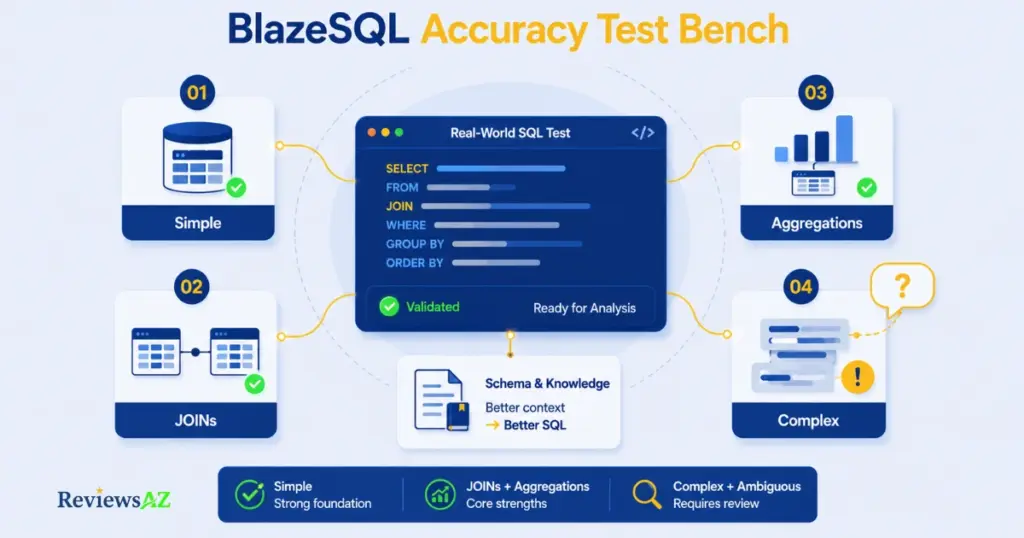
Simple lookups and single-table queries are where every tool in this category performs well, BlazeSQL included — this is the easy 90% of use cases nobody needs a review to confirm.
JOINs hold up reliably as long as foreign key relationships are clearly defined in the schema. BlazeSQL auto-generates short, readable table aliases (FROM orders AS o JOIN customers AS c) rather than dumping unreadable multi-table SQL, which makes it easier to spot a wrong join at a glance instead of trusting it blindly.
Aggregations — SUM, AVG, COUNT with GROUP BY/HAVING — are consistently where G2 reviewers report the strongest results, including for date-based rollups like monthly revenue growth. This lines up with the broader industry pattern for retrieval-augmented (RAG) approaches, which BlazeSQL uses: solid on standard aggregation logic once the schema is reasonably clean.
Complex queries — nested subqueries, nonstandard business logic, nonstandard column naming — are where accuracy visibly softens. This isn’t unique to BlazeSQL; it’s the single most consistent complaint across nearly every G2 review, regardless of the reviewer’s role: “complex queries sometimes need manual refinement” shows up from DevOps engineers, freelance accountants, and senior developers alike. BlazeSQL does support window functions (ROW_NUMBER(), RANK(), LAG/LEAD) for running totals and period comparisons, but expect to double-check the output rather than paste it straight into a board report.
Ambiguous questions are the real test of whether a tool is being honest with you. This is where BlazeSQL’s design choice matters most: rather than silently guessing when a term could map to two different columns, it’s built to stop and ask for clarification. That’s a meaningfully safer failure mode than a tool that confidently returns gross revenue when you actually meant net revenue — a query that runs perfectly and is simply wrong, which BlazeSQL’s own research calls the most dangerous kind of NL2SQL error, because it looks like success.
Common mistake to avoid: Treating a single “wrong answer” as proof the tool is unreliable. Semantic accuracy on ambiguous business logic compounds with every Knowledge Note and correction you add — a fresh, undocumented connection and a schema with three months of corrections behind it are not comparable tests.
Put simply: BlazeSQL earns its keep on the queries that eat up the most everyday time — joins and aggregations — while complex and ambiguous requests still need a human in the loop. Whether that’s a dealbreaker depends entirely on what you’re actually asking it to do, which is exactly what the next section digs into.
Data Analysis & Dashboards
Short answer: BlazeSQL is both — but the “data analyst” part shows up more in what it does after the query than in the query itself. A pure SQL generator stops once it hands you a result set. BlazeSQL keeps going: it turns that result into AI generated dashboards and graphs with two clicks — no design work required — and drops it onto a dashboard (see our guide on how to build SQL dashboards without coding if you want the full walkthrough) — and, in its more autonomous mode, can research context on its own and compile a full PDF or interactive report from a single high-level question, without you specifying which tables or metrics to pull.
That autonomous layer is the real differentiator. Ask a narrow SQL tool “how did delivery performance look this quarter” and you get nothing without a precise query. Ask BlazeSQL the same thing, and it can pull relevant benchmarks, query the data, and package both a summary and a shareable report — closer to what G2 categorizes under continuous pattern detection and multi-step reasoning than plain query generation. It also proactively surfaces insights on a schedule, sending relevant findings without anyone asking a question first.
Where it’s more modest is dashboard depth. Reviewers are consistent on this: the charts and dashboards are genuinely useful for quick, shareable visuals, but customization — chart types, styling, layout control — is noticeably lighter than dedicated BI platforms like Tableau or Power BI. More than one reviewer mentioned exporting data elsewhere for polished, client-facing presentations.
Common mistake to avoid: Expecting BlazeSQL’s dashboards to replace a mature BI platform outright. It’s built to get a usable chart or report in front of you in seconds, not to compete with Tableau on visualization depth — treat it as a fast analysis layer, not a design tool.
So the honest positioning is this: for exploratory analysis, proactive monitoring, and getting from question to insight without waiting on anyone, BlazeSQL earns the “data analyst” label. For polished, presentation-ready dashboards, it’s a starting point — not the finish line.
BlazeSQL Review: Key Pros and Cons & Pricing
Everything so far explains what BlazeSQL does well and where it struggles. The pricing question is separate: does that trade-off actually make financial sense for your team?
| Pros | Cons |
|---|---|
| Fast onboarding — most reviewers report a working connection within minutes | No permanent free plan, only a 14-day trial — recurring cost from day one |
| Strong, reliable results on standard joins and aggregations | Complex, nested queries still need manual review and correction |
| Editable SQL for technical users — not a black box | Dashboard customization is basic next to Tableau or Power BI |
| Autonomous reporting and proactive weekly insights, beyond plain query generation | Cloud-only deployment for the core product; no on-premise option |
| Metadata-only schema access, with a fully local desktop mode | Team pricing scales fast once you pass the included seats |
For individuals, BlazeSQL runs two tiers. Pro is $150/month and covers the core AI Data Analyst, graphs and dashboards, the desktop app with a private database connection, and the knowledge base. Advanced is $250/month and adds AI-generated reporting emails, Python-capable analytics, and public or embeddable dashboards.
For teams, the structure is different — and this is where it’s worth slowing down before you budget. Blaze Team starts at $400/month, includes 3 users, and adds $50 for each additional user, plus shared dashboards, specialized support, and a no-code chatbot — with a 14-day free trial to test it first. Blaze Team Advanced jumps to $800/month, still includes 3 users but charges $75 per extra seat, and adds “dynamic integration” — connecting BlazeSQL to essentially any external tool or data source beyond standard databases. Above that sits Blaze Enterprise, custom-priced with dedicated support and infrastructure, aimed at organizations with compliance or scale requirements the standard tiers don’t cover.
On value: a solo analyst or small business at $150–$250/month is paying roughly what one contractor invoice might cost for unlimited monthly queries, which several G2 reviewers describe as reasonable given the time saved. Teams need to do the seat math more carefully — a 6-person team on Blaze Team lands at $550/month ($400 + 3 extra seats × $50), which is still competitive against enterprise BI licensing, but the jump to Team Advanced at $800 base is a real budget decision, not an easy upgrade. For occasional users who query a database only a few times a month at any tier, one G2 reviewer — a CTO — put it plainly: the pricing is easier to defend for daily users than for light, occasional use.
Data Security & Privacy
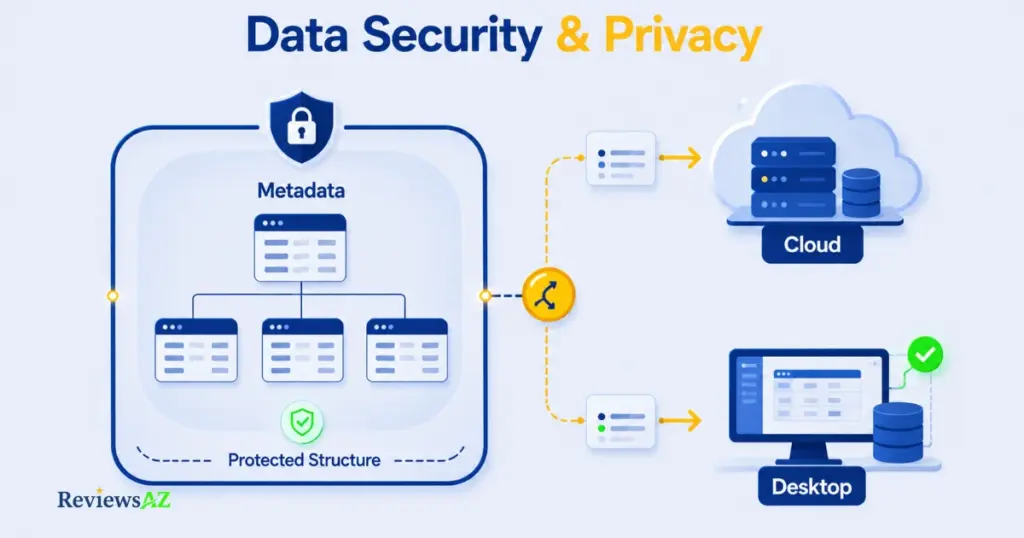
The most common misconception about BlazeSQL — and AI SQL tools generally — is that connecting a database means uploading it. That’s not how BlazeSQL is built, but the details of what actually gets sent matter more than a blanket “it’s private” claim.
By default, BlazeSQL only reads metadata: table names, column names, data types, and key relationships. Your actual rows — customer records, transaction values, whatever lives inside the tables — are never sent to generate a query. The AI writes SQL based on structure alone, not content.
Where it gets more nuanced is execution. In the standard cloud version, the generated query runs and the results do pass through BlazeSQL’s servers to render your chart or answer. For teams with stricter requirements, the desktop app changes that: queries execute locally, and results travel directly from your database to your machine, never touching BlazeSQL’s infrastructure. That distinction — cloud convenience versus desktop isolation — is the real decision point, not “is it safe” in the abstract.
On the compliance side, BlazeSQL layers in role-based access control, SSO, and two-factor authentication for enterprise use, plus encryption for stored credentials and metadata. Self-hosted databases like PostgreSQL and MySQL connect through static IPs your IT team can whitelist directly in the firewall, rather than opening a database to the open internet. None of your questions or schema data are used to train BlazeSQL’s underlying AI models.
That said, it’s worth naming the trade-off some reviewers flag directly: the standard setup is cloud-only, with database credentials managed on BlazeSQL’s servers rather than self-hosted. For most SMBs that’s a non-issue. For organizations under strict data residency or on-premise mandates, it’s a real constraint — no self-hosted deployment exists, so the desktop app’s local execution is the closest available option, not a full on-premise equivalent.
Common mistake to avoid: Assuming “desktop version” and “cloud version” behave identically on privacy. They don’t. If data residency is a hard requirement for your team, verify which mode you’re actually running before connecting a production database — not after.
BlazeSQL vs ChatGPT for SQL
This comparison only makes sense once you frame it correctly: ChatGPT is a general-purpose assistant that happens to be good at writing SQL syntax. BlazeSQL is a connected tool built specifically to read your actual schema, run the query, and hand back a result. They’re not really competing for the same job — but plenty of people default to ChatGPT out of habit, so it’s worth being precise about where that habit breaks down.
| Criteria | BlazeSQL | ChatGPT |
|---|---|---|
| SQL generation | Generates and runs it directly against your live database | Writes syntactically correct SQL, but blind — it has no idea if your table or column names actually exist |
| Schema understanding | Reads real metadata automatically via direct connection | Only knows what you manually paste in, and forgets it once the context resets |
| Data analysis | Executes queries, analyzes results, can generate autonomous reports | Can reason about data you paste in, but can’t query anything itself |
| Visualization | Built-in dashboards and charts from real query results | None natively — you’d export elsewhere to visualize |
| Complex queries | Solid on joins/aggregations; asks for clarification on ambiguous logic | Can draft complex SQL, but has no way to verify it runs correctly on your actual data |
| Ease of use | Connect once, then ask questions in plain English indefinitely | Requires re-explaining your schema in every new conversation |
| Privacy | Metadata-only by default, with a fully local desktop mode | Depends entirely on what you choose to paste — full control, but also full manual responsibility |
| Cost | $150–$250/month (individuals), starting $400/month (teams) | Free tier available; ChatGPT Plus around $20/month for general use |
| Best use case | Recurring, real database work across a team | One-off syntax help or learning SQL concepts |
The honest takeaway: if you’re occasionally stuck on SQL syntax and don’t mind copy-pasting a query to test it yourself, ChatGPT’s low cost is hard to beat. If you’re running the same kinds of questions against a real, live database every week — and want someone on your team without SQL skills to do the same — that’s precisely the gap BlazeSQL is built to close, not ChatGPT. For a deeper look at how it stacks up against a more directly comparable tool, see our AI2SQL vs BlazeSQL comparison.
What to Know Before Buying BlazeSQL
Before you start a trial, a few things from this review are worth having in one place:
- Your schema quality determines your results. A clean, well-documented database with clear foreign keys will outperform a messy one from day one — and a few Knowledge Notes closes most of that gap fast.
- Complex queries still need a human check. Nested logic and undocumented business terms are where every AI SQL tool, BlazeSQL included, needs a second look before you trust the output.
- Cloud is the default; desktop is the private option. If data residency is a hard requirement, confirm you’re running the desktop app before connecting production data — not after.
- There’s no free tier, only a trial. Budget for it as a recurring cost from the start, not a one-time purchase.
- Team pricing rewards planning ahead. Map your actual seat count before subscribing — the jump from Team to Team Advanced is a real budget decision, not a minor upgrade.
- Dashboards are fast, not polished. If client-facing, presentation-grade visuals are the goal, plan to export into a dedicated BI tool rather than relying on BlazeSQL alone.
None of these are dealbreakers on their own — they’re the kind of details that determine whether BlazeSQL feels like a great fit or a mismatch for how your team actually works.
FAQ
Is BlazeSQL worth it?
For teams that query a database regularly, yes — it consistently saves time on standard joins and aggregations, and the autonomous reporting goes beyond what a plain SQL generator offers. For occasional, light use, the monthly cost is harder to justify against a free alternative.
Is BlazeSQL free?
No. There’s no permanent free tier, only a 14-day free trial. Individual plans start at $150/month, and team plans start at $400/month.
Is BlazeSQL safe?
By default, it reads only your database’s metadata — table and column structure — never actual row data, and never uses your data to train its AI models. For stricter privacy needs, the desktop app runs queries locally instead of through the cloud.
Can BlazeSQL generate SQL?
Yes. It writes and runs SQL from plain-English questions, handling standard joins, aggregations, and window functions reliably. Complex, nested queries may still need manual review.
Can BlazeSQL analyze data?
Yes, beyond just generating SQL — it can build dashboards, schedule automated reports, and in its autonomous mode, research context and compile a report from a single high-level question without manual query-writing.
Is BlazeSQL better than ChatGPT?
For recurring work against a real, live database, yes — BlazeSQL connects directly and executes queries, while ChatGPT requires manually pasting schema and data each time. For occasional SQL syntax help, ChatGPT’s lower cost makes it the more practical choice.
Who should use BlazeSQL?
SQL beginners who need answers without writing queries, analysts tired of repetitive query work, business users who need fast numbers, data teams offloading ad-hoc requests, and developers who want a faster first draft of a query.
Final Verdict: Is BlazeSQL Worth It?
Back to the question in the title: BlazeSQL is a strong choice for teams that query a real database regularly and want more than syntax help — but it’s not necessarily the best option for someone who just needs occasional SQL assistance or presentation-ready dashboards out of the box.
Where it earns its price: standard joins and aggregations run reliably, the autonomous reporting genuinely goes beyond what a plain SQL generator does, and the metadata-only approach (with a fully local desktop mode) makes it a reasonable fit even for teams with real privacy concerns. Complex, ambiguous logic still needs a human check — but the tool is honest about that limit rather than pretending otherwise, which says more about its reliability than a marketing number would.
If you’re a non-technical business user or a data team drowning in ad-hoc requests, this is close to the best tool available for that exact problem. If you’re a developer who writes SQL daily and rarely gets stuck, or a business that needs polished, client-facing dashboards without exporting elsewhere, BlazeSQL is useful but not essential — ChatGPT covers the first case for less, and a dedicated BI tool covers the second better. If you’re still comparing options, our Best AI SQL Tools roundup is the right next stop.