AI2SQL vs BlazeSQL: Which AI SQL Tool Actually Fits Your Workflow in 2026?

Two landing pages, two demo videos, and you still can’t tell which tool actually solves your problem. If that’s where you are with AI2SQL vs BlazeSQL, it’s a fair place to be stuck. Both promise to turn plain English into working SQL, and both describe accuracy, security, and ease of use in nearly identical language.
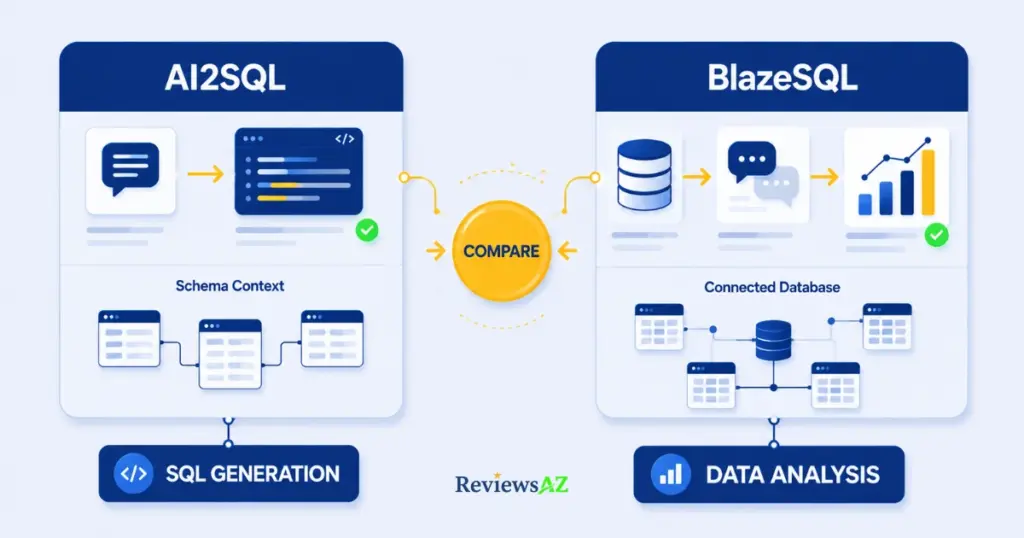
The confusion usually clears the moment you stop comparing feature lists and compare what each tool is built to do. AI2SQL is an AI SQL query generator: a dedicated tool for writing, fixing, and translating SQL across dialects. Describe what you need, and it hands you SQL you can run, fix, or drop into your own workflow. BlazeSQL takes a different route. It connects to your live database and behaves more like a conversational data analyst, answering questions and returning results, often with a chart attached, without you ever opening a query editor.
The real question isn’t which tool has more AI features. It’s whether you need a focused SQL generator or a broader AI-powered data analysis workflow. That single distinction decides pricing, who each tool is built for, how much database access it asks for, and whether it fits a developer’s day or a product manager’s.
This guide walks through that distinction: how each tool connects to your data, how they handle complex joins and SQL dialects, what you’re paying for at each tier, and how they treat your database’s privacy. For the wider field, our guide to the best AI SQL tools for developers covers where these two rank among the rest.
AI2SQL vs BlazeSQL at a Glance
| If you care most about… | Better fit |
|---|---|
| Lowest possible entry price | AI2SQL (plans start at $9/month) |
| A live database connection from day one, out of the box | BlazeSQL (connects directly on every plan) |
| Built-in dashboards and shareable charts | BlazeSQL |
| Generating a query to paste into your own SQL editor or IDE | AI2SQL |
| Fixing, optimizing, or explaining SQL you already wrote | AI2SQL |
| Non-technical teammates asking questions in plain English | BlazeSQL |
| Connecting AI agents (Cursor, Claude) through a governed endpoint | AI2SQL, via its MCP server |
| Automated, recurring reports with no one asking first | BlazeSQL’s autonomous mode |
Multiple rows applying to you is common, and usually means you belong in the “consider both” camp we return to at the end. Otherwise, the sections below explain why each tool wins the rows it wins, starting with what these two products actually are.
Quick Answer: Need the one-line version? Pick AI2SQL if you write SQL yourself and just want it faster. Pick BlazeSQL if you want the finished answer, not the query.
AI2SQL vs BlazeSQL: What Each Tool Actually Is
Type “revenue by region last quarter” into both tools, and you’ll get two different kinds of results. AI2SQL, a text-to-SQL AI tool at its core, hands back a query written against your schema, or fixes one you already had that was broken or slow. It also explains queries you didn’t write, useful when you inherit someone else’s report. What it doesn’t do is run that query on its own dashboard: you take the SQL and use it in your own client, IDE, or reporting tool. Its MCP server extends this further, letting AI agents like Cursor or Claude query a governed, read-only endpoint directly, positioning AI2SQL as infrastructure other AI tools plug into.
BlazeSQL runs the same request differently. It writes the SQL, executes it against your live connection, and hands back an answer: a number, a table, or a chart, without you touching a query editor. In autonomous mode, one high-level question can trigger it to research context on its own and compile a full report, and scheduled dashboards mean insights can land in your inbox before anyone asks.
AI2SQL answers “what’s the correct query for this?” BlazeSQL answers “what does this data actually tell me?” One hands you the query; the other hands you the finished answer. Which you need depends on whether your bottleneck is writing SQL or making sense of what it returns.
Schema & Database Integration: How AI2SQL and BlazeSQL Work With Your Data
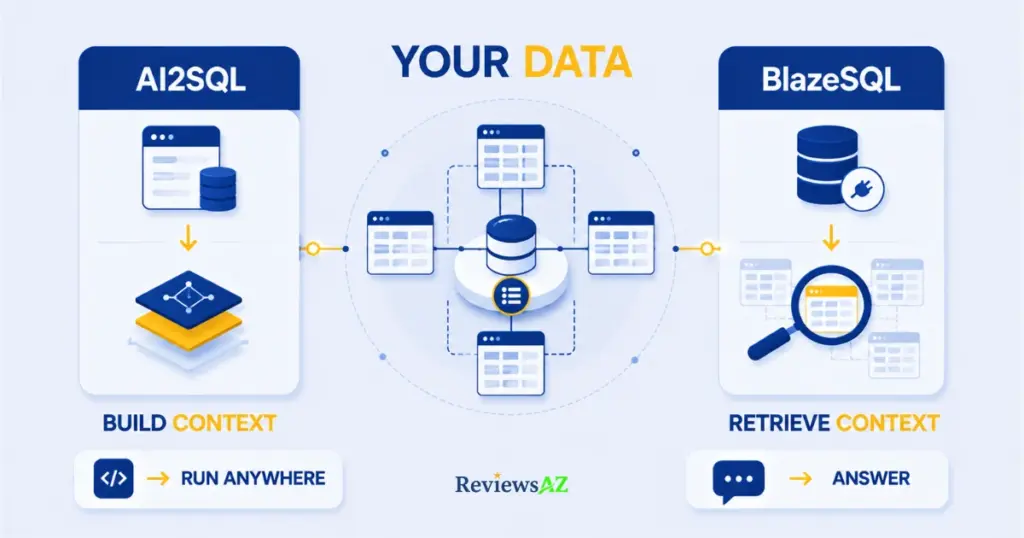
Neither tool fits the simple label “one connects, one doesn’t.” AI2SQL supports two paths in: upload a CSV or SQL file so it works from your real table structure, or use its Database Connectors for live, read-only links to MySQL, PostgreSQL, SQL Server, Snowflake, BigQuery, MongoDB, and Oracle. Which databases you get depends on your plan. Start covers SQL, MySQL, and PostgreSQL; Pro adds Oracle, MongoDB, and BigQuery; Business adds MariaDB, Redshift, and SnowSQL. AI2SQL builds a semantic layer from your actual tables, columns, and business terms before generating anything, which is why its output tends to reference real column names.
BlazeSQL skips the upload step. Enter credentials, pick your tables, and start asking questions: no schema to paste, no DDL to copy. It reads only metadata under the hood, table names, columns, data types, and relationships, never your actual rows. For databases with hundreds of tables, a retrieval-based (RAG) approach first identifies which tables are relevant before generating SQL, keeping things fast without dumping the entire schema into context at once. Each connection is capped at 300 tables. Knowledge Notes let you manually define business terms the AI wouldn’t otherwise infer.
For anyone who’d rather not think about schemas, BlazeSQL’s setup is the more hands-off experience: connect once, ask questions from day one. AI2SQL asks a little more upfront on the free tier, a file to upload or a database to connect, but that also means no live credentials just to test a query. Architecturally, the difference is where “context” comes from: AI2SQL’s semantic layer improves with clean naming, while BlazeSQL’s table retrieval is built to scale across wide warehouses. If your database runs 300+ tables, check that connection cap against your actual schema before committing; it’s a real limit, not a soft recommendation.
The workflow follows from this. AI2SQL fits an existing pipeline: generate or fix a query, run it wherever you already work. BlazeSQL replaces that middle step entirely, which is convenient if you want answers rather than queries, but also puts its live connection closer to production by default.
Accuracy & Complex SQL: JOINs, Subqueries, Aggregations & SQL Dialects
A single-table “show me last month’s signups” query makes any AI SQL tool look sharp. What separates them is a second table, a nested condition, or a dialect quirk the model has to reason through.
Simple queries are a non-issue for either tool, reliable enough on single-table lookups that it’s not worth dwelling on.
Multi-table JOINs: BlazeSQL is documented to hold up well when foreign keys are clearly defined, and it auto-generates short, readable table aliases so a wrong join is easier to spot. AI2SQL’s own limitations page is upfront that accuracy drops as joins and nesting stack up, since every added table widens the model’s guess. Neither tool is unique in this; it’s a structural limit of the category. BlazeSQL’s live connection lets it verify a join actually runs, where AI2SQL hands you the query and trusts you to run it.
Aggregations (SUM, AVG, COUNT with GROUP BY and HAVING) are listed as one of BlazeSQL’s strongest areas, including date-based rollups like monthly revenue growth, plus window functions (ROW_NUMBER, RANK, LAG/LEAD) for running totals. AI2SQL doesn’t publish an equivalent breakdown, so the fair comparison is architectural: BlazeSQL’s strength comes from executing and verifying against live data, while AI2SQL’s output quality depends heavily on how clearly your schema names its columns.
Nested subqueries and ambiguous logic ask for a human in the loop either way, just differently. AI2SQL’s documented weak spot is deeply nested queries and unusual join logic. BlazeSQL takes a different failure mode: rather than silently guessing when a term maps to more than one column, it stops and asks for clarification, arguably safer than a confidently wrong query.
SQL dialects split along the same line as database access. AI2SQL’s coverage is tier-gated (MySQL and PostgreSQL from Start, Oracle/MongoDB/BigQuery from Pro, MariaDB/Redshift/SnowSQL from Business), while BlazeSQL connects more broadly out of the gate, including Databricks, Amazon Athena, and ClickHouse. Check your specific platform against each tool’s current connector list before assuming coverage.
Query debugging is where the two stop being comparable. AI2SQL has dedicated Fix and Optimize tools for a broken or slow query. BlazeSQL’s editing applies to the SQL it just generated, not to inherited code from somewhere else.
If your pain is not knowing whether a number is right, BlazeSQL’s live execution helps more. If your pain is broken SQL someone else wrote, AI2SQL’s tools solve a problem BlazeSQL isn’t built for. Neither has published independently verifiable benchmarks, so review complex joins yourself regardless of which tool generated them.
Feature Comparison: AI2SQL vs BlazeSQL by What You’re Actually Trying to Do
A checkmark next to “dashboards” doesn’t say whether that dashboard is any good. So here’s what each tool offers, grouped by the job it solves.
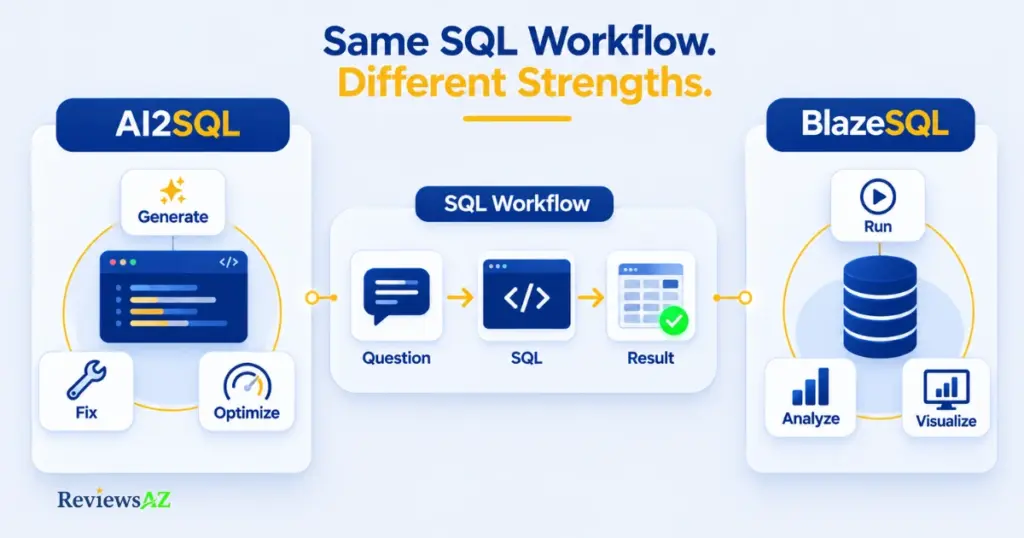
AI2SQL Features
SQL Generation. Describe what you need, and AI2SQL returns a query matched to your connected schema or uploaded file.
Query Debugging. AI2SQL’s most distinctive feature set. Fix SQL Errors corrects a broken query. Optimize SQL flags missing indexes or inefficient joins. Explain SQL turns a query into a plain-English breakdown, handy for auditing undocumented legacy reports.
Database Connectivity. SQL File Import for teams that prefer uploading over connecting live, or Database Connectors for a live, read-only link, with which databases available gated by plan tier.
Developer Workflow. The MCP Server, a feature most reviews skip, lets AI agents (Cursor, Claude, custom tools) query your database through a governed, read-only endpoint. The Desktop App (Business tier) keeps execution local. API Integration is also Business-tier.
The honest gap: no dedicated export or scheduled-reporting feature. The output is the query and, in-browser, the result.
BlazeSQL Features
SQL Generation. BlazeSQL writes the SQL, runs it, and returns the result directly. Technical users can see and edit the SQL before it runs; non-technical users can skip straight to the answer.
Database Connectivity. Connects to PostgreSQL, MySQL, MariaDB, SQL Server, Snowflake, BigQuery, Redshift, Databricks, Athena, ClickHouse, and more. Self-hosted databases connect through whitelisted static IPs; cloud warehouses authenticate natively. Each connection is capped at 300 tables.
Data Analysis. Knowledge Notes define business terms manually. Autonomous mode can take one high-level question and compile findings without you specifying tables. It also surfaces insights on a schedule, unprompted.
Visualization & Dashboards. Query results become drag-and-drop dashboards in a couple of clicks. The Advanced tier adds public or embeddable dashboards.
Export / Reporting. Recurring scheduled reports, and Advanced adds AI-generated reporting emails.
Developer Workflow. A Slack integration and an API for teams that want to embed or white-label the tool.
The reverse is true here too: no standalone tool for fixing SQL written elsewhere, only editing what BlazeSQL itself just generated.
The pattern holds across both lists: AI2SQL clusters around generating and correcting SQL, BlazeSQL clusters around what happens after the query runs. Neither list is longer because one tool is “more finished”; they’re optimized for different points in the same workflow.
Pricing & Value: What Are You Actually Paying For?
AI2SQL starts at $9 a month. BlazeSQL starts at $150. That gap alone says something before you compare a single feature: these are two different products, not two versions of one.
AI2SQL Pricing
| Plan | Price | Query Limit | Table Limit | Key Additions |
|---|---|---|---|---|
| Start | $9/mo | 100 queries/mo | 10 tables | SQL File Upload, ER Diagrams, Chat Support |
| Pro | $24/mo | 300 queries/mo | 50 tables | Database Connectors, Oracle/MongoDB/BigQuery |
| Business | $39/mo | 1,000 queries/mo | Unlimited | API, Desktop App, MariaDB/Redshift/SnowSQL |
| Enterprise | Custom | Custom | Custom | Fine-tuning, custom model training, on-premise |
Every tier includes a 7-day free trial, no credit card required.
BlazeSQL Pricing
| Plan | Price | Who It’s For | Key Additions |
|---|---|---|---|
| Pro | $150/mo | Individuals | AI Data Analyst, dashboards, desktop app, knowledge base |
| Advanced | $250/mo | Individuals | AI reporting emails, Python-capable analytics, public dashboards |
| Blaze Team | $400/mo (3 seats, +$50/seat) | Teams | Shared dashboards, specialized support, no-code chatbot |
| Blaze Team Advanced | $800/mo (3 seats, +$75/seat) | Teams | Dynamic integration with external tools/data sources |
| Blaze Enterprise | Custom | Organizations | Dedicated support and infrastructure |
No permanent free tier, only a 14-day trial. Budget it as a recurring cost, not a one-time purchase.
Value for Developers
A developer who occasionally wants a faster draft or a quick fix justifies AI2SQL’s $9-$24 range easily. Paying $150+ for BlazeSQL to solve that same problem is a harder sell, since daily SQL writers rarely need a conversational layer between them and their database. BlazeSQL earns its price in reverse: governed AI-agent access with dashboards attached, not just query generation.
Value for Analysts
Here the price gap makes more sense. An analyst spending real hours weekly on joins, aggregations, and then building a chart elsewhere is exactly who BlazeSQL’s $150-$250/month is built for, collapsing that process into one conversation. One useful way to frame the $150-$250 range: it’s in the ballpark of a single contractor invoice, but for unlimited monthly use. The question isn’t whether $150 is a lot for software, it’s whether $150 beats what the manual version currently costs in time. For occasional query help rather than a full workflow, AI2SQL’s lower tiers cover the generation part for a fraction of the cost, just without dashboards.
Team & Enterprise Considerations
A 6-person team on Blaze Team lands at $550/month, still competitive against enterprise BI licensing, though Team Advanced’s $800 base is a real budget jump worth mapping against your actual seat count. AI2SQL’s Business tier ($39/month) is priced around usage and features rather than named seats; both companies move to custom pricing at Enterprise for fine-tuning or on-premise deployment.
Watch the ceilings, not just the entry price. AI2SQL’s query caps (100/300/1,000 monthly) can push a heavy user toward the next tier fast. BlazeSQL’s constraint is seats and its 300-table cap, not query volume, so the two tools hit upgrade triggers from opposite directions. Both offer a free way to test this: AI2SQL’s 7-day trial and BlazeSQL’s 14-day trial.
Data Privacy & Security: How Each Tool Handles Your Database
“Your data is safe with us” is marketing copy. What actually happens to your credentials, schema, and results once you connect a live database is the only version of this question worth answering, without the phrase “zero-data-retention” unless a vendor has documented exactly what that means.
Database Credentials & Access
AI2SQL connects read-only by default through sqlGuard, which blocks INSERT, UPDATE, DELETE, and other write statements at the gateway level. A badly-formed query can return a wrong result, never a corrupted table. Credentials are encrypted, and every query is logged.
BlazeSQL layers in role-based access control, SSO, and two-factor authentication for enterprise use. Self-hosted databases connect through IT-whitelisted static IPs rather than an open internet connection; cloud warehouses authenticate natively.
Schema Transmission & What Actually Gets Sent
Both tools are more conservative than “AI connected to your database” implies. AI2SQL builds its semantic layer from schema and business terms, not row data. BlazeSQL reads only metadata by default, table and column names, data types, key relationships, never your actual rows, though it can optionally sample encrypted, distinct text values to sharpen filtering.
Query & Result Handling
Here the two genuinely diverge in a detail most comparisons skip. AI2SQL hands you the query; where you run it and where the result lives happens outside AI2SQL, unless you’re using its API or agent gateway. BlazeSQL’s cloud version runs the query, and results pass through its servers to render your answer. Neither approach is unsafe, but conflating them is how teams get surprised later.
Cloud vs. Local Execution
Both offer a desktop path that avoids cloud servers entirely. AI2SQL’s desktop app processes everything locally, nothing routed through its servers. BlazeSQL’s desktop app works the same way: queries execute locally, results travel straight to your machine. That distinction, cloud convenience versus desktop isolation, is the real decision point, not a single yes-or-no “is it safe.”
✓ Why This Matters: If an AI tool touching your production database is a hard no for your team, this is the detail that changes the calculus: both AI2SQL and BlazeSQL offer a desktop app that keeps queries and results entirely on your machine, cloud convenience aside.
Enterprise Considerations
Neither company publishes a specific compliance certification we could independently confirm. AI2SQL is based in the U.S. (Florida); we found no published detail on additional regional data centers, worth a direct question to their support team. BlazeSQL’s standard setup is cloud-only with no self-hosted deployment option, so its desktop app is the closest alternative, not a full on-premise equivalent. Both state customer data isn’t used to train their models, but “read-only” alone doesn’t satisfy data residency or retention requirements regulated industries typically need reviewed separately.
If an AI tool touching production makes you uneasy regardless of promises, both desktop apps solve that directly. For regulated industries, confirm data residency, retention, and audit-logging requirements directly with the vendor. For a vendor-neutral primer on the broader risk category, the OWASP SQL Injection Prevention Cheat Sheet is a solid independent reference.
AI2SQL vs BlazeSQL: Which Is Better for Your Role?
A developer, an analyst, and a product manager asking the same question here get three different answers.
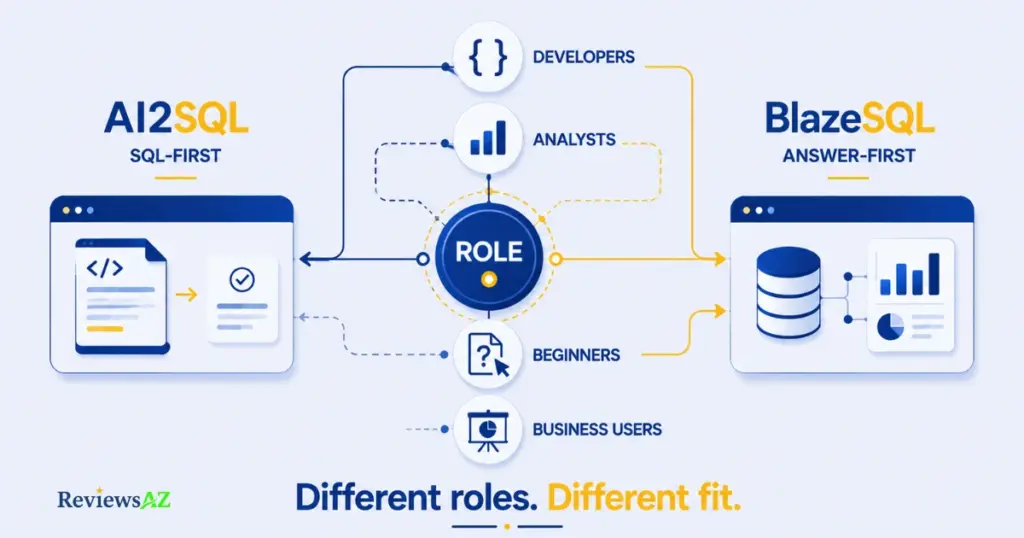
AI2SQL vs BlazeSQL for Developers
A developer who rarely gets stuck writing SQL still benefits from AI2SQL’s Fix, Optimize, and Explain tools for untangling inherited queries or catching a missing index, at $9-$24 a month, cheap enough to keep around without a budget conversation. Its MCP server matters if your team already runs agents like Cursor or Claude against real work and wants that access governed. BlazeSQL is a harder sell here directly; its dashboards and conversational access solve problems a SQL-fluent developer usually doesn’t have. Where it helps is indirectly, by taking ad-hoc “can you pull this number” requests off a developer’s plate entirely.
AI2SQL vs BlazeSQL for Data Analysts
This one’s close, and depends on which half of the job is slow. If it’s writing the query (joins, aggregations, syntax you know but don’t want to retype), AI2SQL handles that directly. If it’s everything after, building a chart, packaging a report, rerunning next week, BlazeSQL collapses that into the same conversation that generated the SQL. An analyst running occasional one-off queries overpays for BlazeSQL’s $150+ entry price; one rebuilding the same dashboard every Monday is exactly who that price is built for.
AI2SQL vs BlazeSQL for Beginners
For someone who’s never written a WHERE clause, the experience gap matters more than the price gap. BlazeSQL’s chat interface never requires SQL to appear unless you ask, and its ask-when-ambiguous behavior is a genuine safety net against a confidently wrong number. AI2SQL still expects some comfort connecting a database or reading query output, though its $9 Start plan is a cheap way to find out if that’s a dealbreaker.
AI2SQL vs BlazeSQL for Product Managers & Business Users
This group needs a number on their own timeline without a data-team ticket. BlazeSQL is built for exactly that: an answer in plain English and a chart ready for a slide deck, the query staying out of view. AI2SQL serves the same need at a much lower price for a PM comfortable reading a generated query, but stops at the SQL; turning that into a chart is a separate step elsewhere.
AI2SQL wins on cost and on tasks that end at “give me correct SQL.” BlazeSQL wins when the job doesn’t end at the query. Getting this wrong usually comes down to the wrong assumption about which of those two jobs you actually have.
Common Decision Errors When Choosing Between AI2SQL and BlazeSQL
Here are six of the most common mistakes when choosing between AI SQL tools like these.
Choosing Based on Feature Count Instead of Workflow Fit
BlazeSQL’s feature list is longer: dashboards, autonomous reporting, Slack integration. That doesn’t make it better for a developer who just needs a faster query draft. A generator with five features you’ll actually use every week beats an analytics platform with fifteen you won’t.
Assuming Both Tools Solve the Same Problem
Walk in assuming AI2SQL and BlazeSQL are interchangeable, just priced differently, and you’ll pick on price alone, which tells you nothing about whether you need a query or a finished answer. They’re not competing for the same job.
Comparing Pricing Without Considering Usage
AI2SQL’s $9 plan looks like the obvious budget pick until you’re the analyst burning through 100 queries in a busy week. BlazeSQL’s $400 team plan looks expensive until divided across six people who’d otherwise pay an analyst’s hourly rate for the same joins. Model your actual monthly volume, not the sticker price.
Ignoring Database Connectivity Requirements
AI2SQL’s access is tier-gated (Oracle, MongoDB, and BigQuery need Pro; Snowflake or Redshift need Business). BlazeSQL’s list is broader but caps each connection at 300 tables. Check either limit against your actual stack, not the marketing page’s general claim.
⚠ Common Mistake: Assuming your AI2SQL plan already includes the database you need. Snowflake and Redshift aren’t available until the Business tier ($39/month), even though the tool markets broad database support. Check the tier requirement before assuming it’ll connect on day one.
Assuming AI-Generated SQL Is Automatically Accurate
Both tools get shakier on nested subqueries and ambiguous logic, a limit of the entire category, not a flaw unique to either. A clean-looking query isn’t automatically a correct one. Verify anything complex before it reaches a stakeholder.
Choosing a Tool Without Testing Complex Queries
A five-minute trial with a single-table query makes either tool look great and proves little. Before paying, try it on a query that’s actually messy: several joins, an ambiguous or badly-named column, the kind of logic that trips up most generators.
AI2SQL vs BlazeSQL: Which Should You Choose?
Choose AI2SQL if…
- You already know SQL and mainly want a faster draft, or help fixing queries you or someone else wrote.
- Budget matters more than built-in visualization: $9/month versus $150/month for a genuinely different scope of tool.
- You want the query to stay under your control, run in your own client, script, or reporting tool.
- Your team is connecting AI agents to your database and wants that access governed through a dedicated endpoint.
- You’d rather test on a low-commitment plan first: the $9 tier and 7-day trial make that cheap.
Choose BlazeSQL if…
- You need answers, not queries: a result, a chart, or a report without opening a query editor.
- Non-technical teammates need self-service access without filing a ticket every time.
- Dashboards and recurring reports are core to the job, not a nice-to-have.
- You’re pricing this for a team, and seat-based cost pencils out against current analyst hours.
- You want a live connection that verifies a query runs correctly, not just one that looks right.
Consider both if…
You might be solving two different problems, not choosing between two versions of one tool. Plenty of technical teams run AI2SQL for developers who want fast generation and debugging, while pointing non-technical stakeholders at BlazeSQL for self-service dashboards. That’s not indecision; it’s matching each tool to the job it’s built for. If your team includes both profiles, running both isn’t overkill.
Related Articles:
AI2SQL vs Text2SQL.ai
AI2SQL vs ChatGPT for SQL
Frequently Asked Questions
Which is better for SQL generation?
AI2SQL, if generation is the whole job: built specifically around writing, fixing, and explaining queries, at a lower price than BlazeSQL’s entry tier. BlazeSQL also generates SQL, but as one step in a larger workflow that runs the query and returns a result.
Which is better for data analysis?
BlazeSQL. It executes the query, builds dashboards, and in autonomous mode can compile a report from one high-level question. AI2SQL stops at the query.
Which is easier for beginners?
BlazeSQL, mainly for its ask-when-ambiguous behavior instead of confidently returning a wrong number. AI2SQL expects more comfort connecting a database or reading output, though its $9 plan is a low-risk test.
Which is better for developers?
AI2SQL, for fixing, drafting, or an MCP-governed way to connect AI agents to a database. BlazeSQL’s dashboards solve problems most SQL-fluent developers don’t personally have, though it’s useful for offloading non-technical requests.
How do their database connections differ?
AI2SQL offers a manually uploaded schema or live, tier-gated Database Connectors. BlazeSQL connects live from the start on every plan, reading only metadata, capped at 300 tables per connection.
Which offers better value?
Depends on usage. AI2SQL’s $9-$39 range wins on occasional help. BlazeSQL’s $150+ pricing is often justified by the hours it replaces for a team or heavy analyst, comparable to a single contractor invoice for unlimited monthly use.
Is AI-generated SQL accurate?
Documented as reliable on simple queries and standard joins for both. Accuracy softens on deeply nested subqueries and ambiguous logic for both, a category-wide limitation. Review complex, AI-generated SQL yourself before it touches anything that matters.
Conclusion: If Your Priority Is X, Choose AI2SQL — If It’s Y, Choose BlazeSQL
It was never really about which tool has more AI features. It’s about whether your bottleneck is writing SQL or making sense of what SQL returns.
If your priority is a focused, affordable SQL generator that fixes broken queries and explains inherited SQL, choose AI2SQL. At $9-$39 a month, it’s built for people who already think in tables and joins and just want that thinking to go faster.
If your priority is a live, conversational data analyst that connects directly to your database and lets non-technical teammates self-serve, choose BlazeSQL. At $150 and up, it’s priced for the hours it replaces.
Not sure yet? That’s a legitimate answer. AI2SQL’s 7-day trial needs no credit card; BlazeSQL’s 14-day trial gives enough time to connect a real schema. Test each against your messiest real query, not a clean demo.
Still comparing options? Our AI SQL Generators hub covers the wider category, and our Best AI SQL Tools roundup ranks the top picks by use case.