AI2SQL vs ChatGPT for SQL: Hands-On Tests on the Same Database Schema (2026)

You paste a ChatGPT-generated SQL query into your client. It runs — for about two seconds — before your database throws back column "signup_source" does not exist. You never asked for a fake column. ChatGPT just guessed one.
That single failure is usually why people end up typing “AI2SQL vs ChatGPT for SQL” into Google in the first place. Not out of idle curiosity, but because a query that looked correct simply wasn’t.
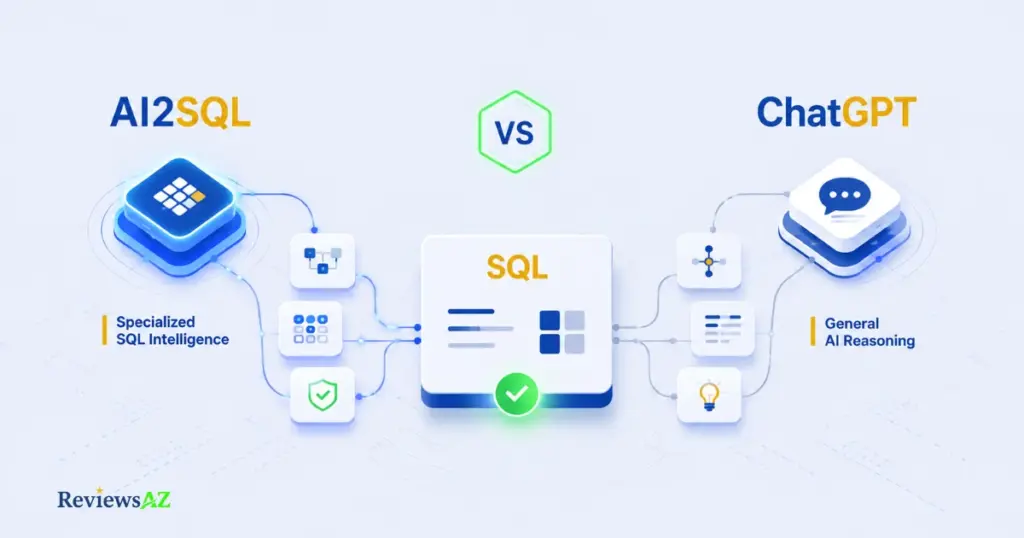
AI2SQL is a schema-aware SQL generator built specifically for database work, while ChatGPT is a general-purpose model that writes SQL as one of many skills — and that difference shows up the moment your schema gets complicated.
Instead of another feature checklist, this guide runs both tools against the same database schema — from a simple single-table lookup to a multi-table join with a window function — so you can see exactly where each one holds up, and where it starts to break down.
Whether you’re a data analyst who mostly needs a clean SELECT statement or a backend developer wiring up a production report, the same schema test tells a different story depending on what you’re actually asking it to do.
What Is ChatGPT for SQL, and What Is AI2SQL?
ChatGPT is OpenAI’s general-purpose language model, and SQL generation is one small slice of what it can do — alongside writing emails, debugging Python, or explaining a recipe. It has no connection to your database. When you ask it for a query, it’s pattern-matching against SQL it has seen before, not reading your actual tables.
AI2SQL is a purpose-built SQL generator that converts plain-English requests into working queries, with the option to import or connect your real database schema first. Instead of guessing your table and column names, it can read them directly — which is the single biggest structural difference between the two tools. (If you want a closer look at AI2SQL on its own, outside this comparison, read our full AI2SQL Review.)
Common mistake: assuming that because ChatGPT writes confident, well-formatted SQL, it must know your database. It doesn’t — it’s producing text that looks like a correct query based on common naming conventions, not one it has verified against your schema. Always treat ChatGPT’s table and column names as suggestions until you check them against your actual database.
Neither description tells you which tool is better for your situation — that depends entirely on what you’re asking each one to do, which is exactly what the schema test in the next section is built to show.
Selection Criteria: What Actually Matters Before You Pick One
Most comparisons jump straight to a feature table. That’s backwards. Before any feature matters, it helps to know who’s asking — because a data analyst pulling a quick report and a backend engineer wiring SQL into production code are judging the exact same tool on almost opposite grounds.
A beginner cares whether the tool understands their tables at all. A specialist cares whether it survives contact with a genuinely messy schema. Both are valid questions. They just point toward different answers.
| Comparison Criterion | What a Beginner Looks At | What a Specialist Looks At |
|---|---|---|
| Schema Integration | Does the tool understand my tables easily? | Can it connect a complex database schema automatically via API? |
| Accuracy & Joins | Does it output correct, simple SELECT statements? | How does it handle multiple inner/outer joins and subqueries? |
| Pricing & Value | Is there a free trial or a cheaper plan? | Does the ROI on developer productivity justify the subscription? |
| Data Privacy & Security | Is my data safe? | Is my company’s schema data used to train the underlying models? |
Notice that “accuracy” means something different depending on who’s asking. A correct SELECT * FROM customers is a low bar for a specialist and a real win for someone who’s never written SQL before. That’s why a single accuracy score, the kind most comparisons hand you, doesn’t actually answer either reader’s question.
Common mistake: picking a tool based on an overall “winner” verdict without checking which row of this table actually applies to your work. A tool that wins on beginner-friendly simple queries can still lose badly once you introduce a five-table join — and the reverse is just as true.
These four criteria are exactly what the hands-on test in the next section is built around. Instead of scoring each tool in the abstract, we’ll run both against the same schema and check the result against this table, row by row.
Hands-On Test: Same Schema, Two Business Questions
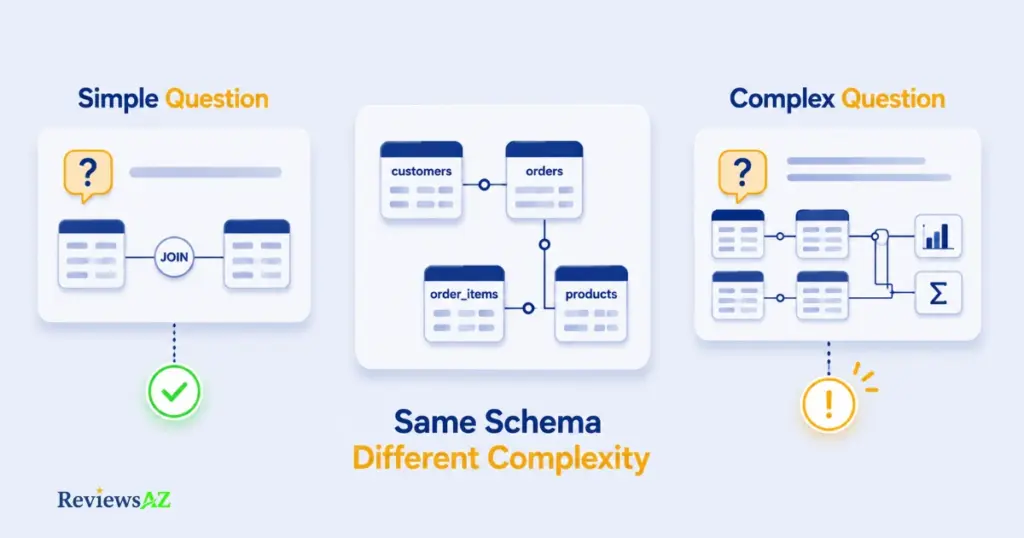
Here’s the schema every example in this article uses:
customers(customer_id, name, email, region, signup_date)
orders(order_id, customer_id, order_date, status, total_amount)
order_items(order_item_id, order_id, product_id, quantity, unit_price)
products(product_id, name, category, price)
Test 1: The Simple Question
“Show me all customers who placed an order in the last 30 days.”
Without the schema pasted into the conversation, ChatGPT has to guess. A common guess looks like this:
-- ChatGPT, no schema provided
SELECT DISTINCT c.customer_name, c.email
FROM customers c
JOIN orders o ON c.customer_id = o.customer_id
WHERE o.order_date >= CURRENT_DATE - INTERVAL '30 days';

-- Problem: the column is "name", not "customer_name".
-- Close, but it fails on the first run.
AI2SQL, with the schema imported, doesn’t need to guess:
-- AI2SQL, schema connected
SELECT DISTINCT c.name, c.email
FROM customers c
JOIN orders o ON c.customer_id = o.customer_id
WHERE o.order_date >= CURRENT_DATE - INTERVAL '30 days';
For a query this simple, the gap is small — one wrong column name, a five-second fix. This is the range where a lot of comparisons stop testing, which is exactly why the verdict “they’re basically the same” shows up so often.
Test 2: The Question That Actually Separates Them
“For each product category, show total revenue and rank the categories by revenue, but only count customers who placed more than two orders.”
This needs a join across all four tables, an aggregation, a HAVING-style customer filter, and a ranking window function — the exact combination the selection-criteria table flagged as where specialists start paying attention.
-- ChatGPT, no schema provided
-- Tends to either flatten the logic incorrectly (filtering
-- customers by order COUNT in the wrong clause) or invent a
-- "category_revenue" column that doesn't exist in this schema.
SELECT category, SUM(total_amount) AS revenue,
       RANK() OVER (ORDER BY SUM(total_amount) DESC) AS rank
FROM orders
WHERE customer_id IN (
    SELECT customer_id FROM orders GROUP BY customer_id HAVING COUNT(*) > 2
)
GROUP BY category;
-- Problem: "category" doesn't exist on the orders table —
-- it lives on products, three joins away.
-- AI2SQL, schema connected
SELECT p.category,
SUM(oi.quantity * oi.unit_price) AS revenue,
RANK() OVER (ORDER BY SUM(oi.quantity * oi.unit_price) DESC) AS revenue_rank
FROM customers c
JOIN orders o ON c.customer_id = o.customer_id
JOIN order_items oi ON o.order_id = oi.order_id
JOIN products p ON oi.product_id = p.product_id
WHERE c.customer_id IN (
SELECT customer_id FROM orders GROUP BY customer_id HAVING COUNT(*) > 2
)
GROUP BY p.category
ORDER BY revenue DESC;This is where the accuracy gap actually widens. The single-table guess that worked well enough in Test 1 falls apart once revenue depends on a column three joins away — and a tool that has never seen your schema has no way to know that.
Common mistake: judging an AI SQL tool by a simple query and assuming that performance holds at scale. It doesn’t. The failure mode isn’t “SQL that doesn’t work” — it’s SQL that runs without error but references the wrong table, silently producing a number that looks plausible and is wrong.
That silent-wrongness problem, more than any feature checklist, is the real dividing line between “good enough for prototyping” and “safe to run against production data.”
Schema Integration & Database Support
Notice something about the two AI2SQL queries in the last section? They never guessed. Not because AI2SQL is smarter in some general sense — because it wasn’t guessing in the first place. It already had the schema.
ChatGPT relies on whatever schema you paste into the conversation, manually, every session — while AI2SQL can import or connect to your actual database once and reuse that context for every query afterward. That single workflow difference is what produced the wrong column names in Test 1 and Test 2.
The manual-paste workflow isn’t just slower — it’s fragile. Every new ChatGPT conversation starts from zero. If your schema has 40 tables, you’re either pasting all of it every time (burning context window space you need for the actual query logic) or pasting a partial schema and hoping the AI doesn’t need the tables you left out.
| Approach | ChatGPT | AI2SQL |
|---|---|---|
| Schema source | Manual paste, every conversation | DDL import, CSV upload, or direct connection |
| Persistence | Lost when the chat ends | Saved and reused across sessions |
| Large schemas (40+ tables) | Competes with query logic for context window space | Handled outside the prompt, not inside it |
| Database dialects supported | Generic ANSI SQL by default; correct dialect only if you specify it every time | MySQL, PostgreSQL, SQL Server, MariaDB, SQLite, Snowflake, and BigQuery, selected explicitly per query |
Common mistake: assuming that pasting your
CREATE TABLEstatements once “fixes” ChatGPT’s schema problem for good. It only fixes it for that one conversation. Start a new chat tomorrow to ask a follow-up question, and you’re pasting the same schema again — or ChatGPT is quietly filling gaps with its best guess.
Dialect matters here too, and it’s easy to underestimate. A date filter that works in PostgreSQL can fail outright in MySQL, and neither looks obviously wrong until you actually run it. Naming the database once, up front, closes most of that gap — but only if the tool you’re using actually holds onto that context instead of defaulting back to generic syntax midway through a longer conversation.
None of this makes ChatGPT unusable for schema-aware work. It makes it a tool that requires you to do the schema-management job yourself, every time, instead of doing it once. If schema handling turns out to be the deciding factor for you, it’s worth widening the search beyond just these two — our roundup of AI SQL generators breaks down how several other tools handle the same schema-connection problem.
Accuracy, Joins & Complex Queries
Why does the gap between the two tools widen specifically at joins and window functions, rather than showing up evenly across every query type?
Because a single-table SELECT only requires knowing one thing: the table’s column names. A four-table join requires knowing which columns exist, which tables they belong to, and how those tables relate to each other — three separate facts that have to be correct simultaneously. Miss any one, and the query either errors out or, worse, runs and returns a wrong number.
That “runs but wrong” failure mode is the one worth worrying about. A syntax error is annoying but harmless — you see it immediately. A query that silently joins on the wrong key, or aggregates before filtering instead of after, can produce a revenue figure that’s off by thousands and still look completely normal in a spreadsheet.
| Query Type | Where Accuracy Typically Breaks Down |
|---|---|
| Single-table SELECT | Rare — mostly column-name mismatches, as in Test 1 |
| Two-table JOIN | Occasional — wrong join key or missed foreign key |
| Multi-table JOIN + aggregation | Common without schema awareness — as in Test 2 |
| Window functions, CTEs, nested subqueries | Most sensitive to schema and dialect gaps combined |
SQL dialect compounds this. A RANK() window function is standard ANSI SQL and behaves consistently across most databases — but the moment you add dialect-specific syntax, like MySQL’s LIMIT ... OFFSET versus SQL Server’s TOP and OFFSET/FETCH, a tool that doesn’t know which database you’re targeting has to guess a default, and that default isn’t always the one you’re running.
Common mistake: treating a query that runs without an error message as a query that’s correct. It isn’t the same thing. The only real test of accuracy is checking the output against numbers you already know — total row counts, a known customer’s order history, a category total you can verify by hand — not just whether the database accepted the syntax.
This is also where query readability starts to matter as much as correctness. A working query that’s hard to read is a maintenance cost later — the next person debugging it (often you, in three months) has to reverse-engineer the logic before they can trust it, let alone fix it.
The practical takeaway isn’t “ChatGPT is inaccurate.” It’s that accuracy without schema awareness has a ceiling, and that ceiling gets lower the more your query depends on relationships between tables rather than the contents of a single one.
Ease of Use & Workflow for Each Type of User
Picture two people opening their laptop with the same goal: get a number out of the database before a 10am meeting.
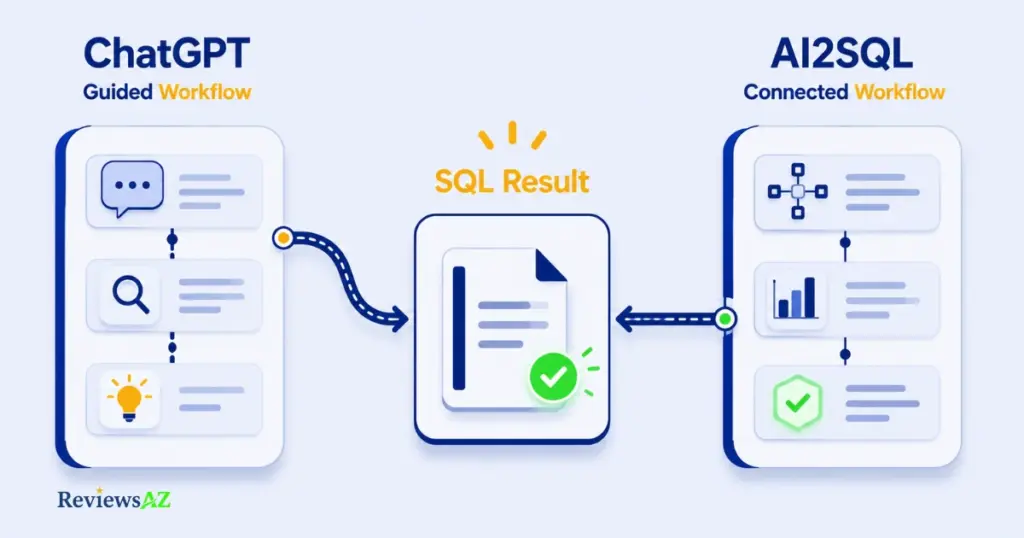
The first has never written SQL. They know what they want in plain English but wouldn’t recognize a broken join if it stared back at them. The second writes SQL daily, already knows the schema by heart, and just wants the fastest path from question to query.
Those are very different jobs, and the two tools serve them differently.
For someone new to SQL, ChatGPT’s conversational format is genuinely comfortable — you can ask a follow-up in plain language, get an explanation of what the query does, and ask “why” without feeling like you’re operating specialized software. The tradeoff is that nothing catches you when the schema guess is wrong; you either already know enough to spot the mistake, or you don’t.
AI2SQL’s onboarding asks a bit more upfront — importing or connecting your schema before you can generate anything meaningful, with a bit of a learning curve if you’ve never connected a database to an outside tool before — but that one-time setup is also what removes the guessing later. For a beginner who’s willing to spend five minutes connecting a schema, every query afterward starts from accurate ground truth instead of a plausible guess.
For a developer or DBA, the calculus shifts. Copy-pasting a query into a SQL editor, running it, and fixing the inevitable column mismatch is a workflow they can execute quickly — the friction is real but familiar. What AI2SQL removes isn’t difficulty, it’s repetition: the schema-paste step that ChatGPT requires every single session disappears entirely once it’s connected once.
Common mistake: assuming “easier to use” means the same thing for both audiences. For a beginner, ease of use means the tool explains itself in plain language. For a specialist, it means the tool gets out of the way and stops asking for context it should already have.
Neither workflow is objectively faster in isolation — it depends on how often you’re asking, and how complex your schema already is. A one-off simple query barely benefits from a schema connection. A dozen queries a week against the same 40-table schema is where that one-time setup starts paying for itself.
Pricing & Value: What You’re Actually Paying For
ChatGPT Plus costs $20 a month flat. AI2SQL’s Pro plan, its most popular tier, costs $19 a month — nearly the same price, for a fundamentally different product. That near-identical number is exactly why pricing alone won’t settle this comparison; the value question is about what each dollar buys, not which number is smaller.
| Plan | ChatGPT | AI2SQL |
|---|---|---|
| Free tier | Free — limited messages, older/default model, ads in some regions | No free plan; free trial only |
| Entry paid tier | Go — $8/mo, still ad-supported, no advanced reasoning | Start — $9/mo ($7/mo billed annually): 100 SQL queries/month, basic SQL generation, syntax fixing |
| Most popular tier | Plus — $20/mo: full model access, no ads, Deep Research, Agent Mode | Pro — $19/mo ($14/mo billed annually): unlimited queries, advanced AI model, query optimization, database connectors, desktop app |
| Team tier | Business — $20/user/mo annual ($25 monthly), 2-seat minimum, SSO, training-data exclusion | Team — $39/mo ($29/mo billed annually): 5 users included, shared query library, role-based access control |
On the surface, $19–20 a month looks like a wash. It isn’t, once you factor in what each subscription is actually for. ChatGPT Plus buys a general-purpose assistant that happens to write SQL competently — the same $20 also covers writing emails, debugging Python, and drafting a report. AI2SQL Pro buys unlimited, schema-aware SQL generation and nothing else. Comparing them dollar-for-dollar only makes sense if SQL is genuinely the only thing you’re evaluating either tool for.
That’s where return on investment matters more than the sticker price. Go back to Test 2 from the hands-on comparison: a wrong category reference that runs without error and quietly returns a misleading revenue number. If that number ends up in a report someone acts on, the cost isn’t $19 — it’s the time spent tracing the error back, plus whatever decision got made on bad data in the meantime.
Common mistake: comparing the two tools purely by monthly price without weighing how often schema-related errors cost you debugging time. A $19/month tool that removes recurring schema mistakes can be cheaper in practice than a free one that requires manual verification on every complex query.
For a data analyst running a handful of simple queries a week, ChatGPT Plus’s $20 — which you may already be paying for other reasons — is hard to beat on value; the schema risk is low at that level of complexity. For a developer or team running frequent, complex queries against a real production schema, AI2SQL’s Pro or Team tier is priced to compete directly with the time cost of catching ChatGPT’s schema guesses by hand, query after query.
Data Privacy & Security
If you’re pasting real database schema — table names, column names, sometimes sample data — into either tool, the question isn’t “is my data safe” in the abstract. It’s “who can see this, and does it end up training a model I don’t control?”
The two tools handle that question differently by default, and the difference is worth checking against your own plan, not assuming.
On a personal ChatGPT account — Free, Plus, or Pro — conversation data is used to help train OpenAI’s models by default. That includes anything you paste into a prompt, schema included. You can turn this off under Settings → Data Controls → “Improve the model for everyone,” but it’s an opt-out, not an opt-in — the default is on. ChatGPT Business and Enterprise plans reverse that default: inputs and outputs aren’t used for training unless you explicitly enable it.
AI2SQL’s stated security measures center on encrypting data in transit and connections handled per authenticated user session, hosted on Microsoft Azure’s infrastructure. Its enterprise-tier marketing also references role-based access controls, audit trails, and private or on-premises deployment options for organizations that need them. Neither company’s publicly available documentation lists a specific third-party security certification like SOC 2 by name — if that’s a hard requirement for your organization, confirm current certification status directly with sales before connecting a production database to either tool.
| ChatGPT (Free/Plus/Pro) | ChatGPT (Business/Enterprise) | AI2SQL | |
|---|---|---|---|
| Trains on your inputs by default? | Yes, unless you opt out | No, by default | Not specified as training data in available documentation |
| Data in transit | Encrypted (standard OpenAI infrastructure) | Encrypted, training-excluded by default | Encrypted, per stated security documentation |
| Enterprise controls | N/A | SSO, admin console, audit logging | Role-based access, audit trails, private/on-prem deployment (enterprise tier) |
Common mistake: pasting a real, sensitive schema into a free or Plus ChatGPT account to “just test something quickly,” without checking the training-data toggle first. A one-off test query is exactly the kind of input that’s easy to forget you shared.
For a personal project or a non-sensitive schema, this is a minor concern either way. For anything touching customer data, financial records, or a schema your company would consider confidential, the practical rule is the same regardless of which tool you pick: check the training-data setting before you connect anything real, and treat a free consumer plan as the least private option available on either side.
Where Each Tool Actually Falls Short
Neither tool wins across the board, and pretending otherwise would undercut everything tested so far. Here’s where each one genuinely struggles — not hedged, not softened.
Where AI2SQL Falls Short
It’s a SQL specialist, not a general assistant. If your task is explaining a query’s logic in plain language for a non-technical stakeholder, brainstorming a data model from scratch, or debugging application code that happens to touch SQL, ChatGPT’s broader reasoning and conversational flexibility often does that job better. AI2SQL is built for one thing, and it doesn’t try to be more.
It also depends on setup. The schema-awareness that solved Test 2 doesn’t help until you’ve actually connected or imported the schema — skip that step, and AI2SQL is guessing from the prompt alone, the same as any other tool. And its footprint is narrower than a decade-old general-purpose model: fewer community tutorials, fewer Stack Overflow threads referencing it by name, less to lean on if something behaves unexpectedly.
Where ChatGPT Falls Short
It has no memory of your database unless you give it one, every single session. That’s not a minor inconvenience — it’s the root cause of both failures in the hands-on test earlier in this article. No amount of clever prompting fixes a model guessing at column names it has never actually seen.
It’s also inconsistent under complexity in a way that’s hard to predict in advance. The same four-table join prompt, asked twice, can produce two structurally different queries — one closer to correct than the other — because nothing anchors the output to your schema’s actual relationships. And dialect handling defaults to generic ANSI SQL unless you specify your database explicitly in every conversation, which is easy to forget on the fifth prompt of the day.
Common mistake: reading “AI2SQL wins the accuracy test” as “AI2SQL is the better tool, period.” Winning on schema-dependent accuracy doesn’t make it the better choice for someone who mostly needs help thinking through a query’s logic, not generating a final one against a live database.
Put plainly: AI2SQL’s limitation is scope, and ChatGPT’s limitation is context. One is a narrow tool doing its narrow job well. The other is a broad tool asked to do a job it wasn’t built to remember. And if either tool’s limitations have you wondering whether AI removes the need to know SQL at all, that’s worth a longer look on its own — see do you still need to learn SQL in the age of AI?
Which Tool Should You Choose?
Back to the table from the selection-criteria section: the right answer was never going to be the same for every reader, and the hands-on test and the honest limitations above only sharpen which row actually applies to you.
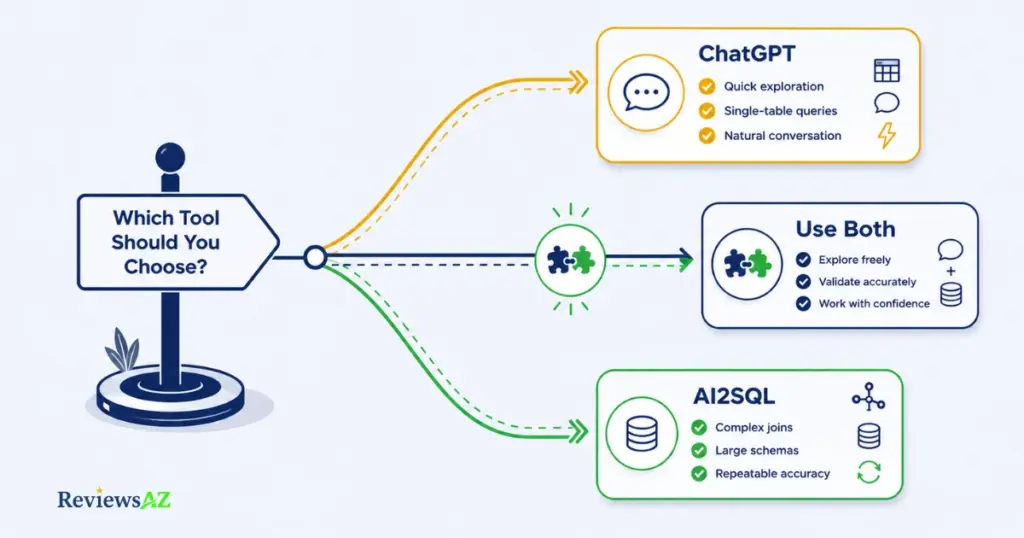
Choose ChatGPT if:
- You mostly write simple, single-table queries, or you’re still learning what SQL syntax even looks like
- You already pay for ChatGPT Plus for other work and don’t want a second subscription
- You need plain-language explanations of what a query does, not just the query itself
- Your schema is small enough to paste in full at the start of a conversation without losing track of it
Choose AI2SQL if:
- You’re running multi-table joins, window functions, or aggregations against a real production schema regularly
- You’re tired of re-pasting the same schema every session and want it connected once
- Silent errors — a query that runs but references the wrong table — are a real risk in your workflow, not a hypothetical
- You need consistent dialect handling for a specific database like PostgreSQL, Snowflake, or BigQuery without specifying it every time
Choose both if:
you’re a developer who uses ChatGPT for the surrounding thinking — explaining a data model, sanity-checking logic — and switches to AI2SQL specifically when a query needs to touch the real schema. That combination isn’t a compromise; based on the failure pattern from Test 2, it’s arguably the most accurate workflow available, since it plays each tool to the exact strength this article just tested.
Common mistake: assuming you have to pick one tool forever. The two aren’t mutually exclusive subscriptions competing for the same job — they’re better thought of as covering different parts of the same workflow.
Common Mistakes When Choosing or Using an AI SQL Tool
- Judging accuracy from a simple query alone. Test 1 in this article looked close to a tie. Test 2 didn’t. A five-minute trial on a basic
SELECTtells you almost nothing about how a tool handles your real, messy schema. - Assuming a query that runs is a query that’s correct. The most expensive mistake in this entire comparison is trusting a result because the database accepted the syntax, not because you checked the number against something you already know.
- Pasting a sensitive schema into a free or Plus ChatGPT account without checking the training-data setting first. It’s a one-time toggle, and it’s easy to forget until after you’ve already shared something you shouldn’t have.
- Re-pasting the same schema every ChatGPT session and treating that as “solved.” It’s solved for that one conversation. Tomorrow’s follow-up question starts from zero again.
- Picking a tool by price alone. A $19/month tool that removes recurring schema errors can cost less in practice than a free one that requires manual verification on every complex query — and vice versa, if your queries never get complex enough to need it.
- Treating the “winner” of an accuracy test as the right choice for every use case. AI2SQL won the schema-dependent test in this article. That doesn’t make it the better tool for someone who mostly needs a query explained in plain language, not generated against a live database.
Most of these mistakes share a root cause: treating “which tool is better” as a single, fixed answer instead of a question that depends on your schema, your query complexity, and what you’re actually trying to get done today.
Frequently Asked Questions
Is AI2SQL better than ChatGPT for SQL?
For queries against a real, complex database schema — multi-table joins, aggregations, window functions — AI2SQL’s schema-aware generation is more reliable, as shown in the hands-on test above. For simple queries, general SQL learning, or plain-language explanations, ChatGPT holds up well and may already be covered by a subscription you have.
Can ChatGPT connect directly to a database?
Not on its own. The standard ChatGPT interface has no native database connection — it works only from schema information you paste into the conversation, which has to be repeated in every new chat. AI2SQL, by contrast, supports importing or connecting a database schema directly.
Why does ChatGPT sometimes give the wrong SQL?
Usually because it’s guessing table and column names based on common naming conventions rather than reading your actual schema. The query can look syntactically correct and still reference a column, like customer_name instead of name, that doesn’t exist in your database.
Is AI2SQL worth paying for if ChatGPT is free?
It depends on how complex your queries get. For simple, occasional lookups, ChatGPT’s free tier is usually enough. Once you’re regularly running multi-table joins against a schema with dozens of tables, the time spent catching and fixing ChatGPT’s schema guesses can exceed what AI2SQL’s $9–19/month plans cost.
Do I still need to learn SQL if I use an AI tool?
Enough to read and sanity-check the output, yes. Both tools can produce a query that runs without error but returns the wrong answer — catching that requires knowing roughly what the correct result should look like, not necessarily being able to write the query from scratch yourself.
Which database systems does each tool support?
AI2SQL explicitly supports MySQL, PostgreSQL, SQL Server, MariaDB, SQLite, Snowflake, and BigQuery, selected per query. ChatGPT can generate SQL for any of these dialects if you specify which one you’re using, but defaults to generic ANSI SQL if you don’t — and won’t remind you to check.
The Verdict
Go back to the moment this article opened with: a query that ran, looked fine, and threw a column error two seconds later. That failure wasn’t bad luck — it was ChatGPT guessing at a schema it had never seen, and it’s exactly the failure mode this article’s hands-on test reproduced on purpose in Test 2.
If your work touches a real database with more than a handful of tables, AI2SQL’s schema-aware generation removes that specific failure. If you’re writing occasional simple queries or want a tool that also handles everything else on your plate, ChatGPT Plus already does that job well enough not to need a second subscription.
The honest middle answer, and the one this comparison actually points to, is that plenty of people end up using both — ChatGPT for the surrounding thinking, AI2SQL for anything that touches the schema directly. That’s not indecision. It’s matching each tool to the exact thing it was tested to be good at.
Start with whichever gap costs you more time right now: re-pasting a schema every session, or second-guessing whether a query that ran actually ran correctly. Whichever one you picked, that’s your answer.
Want to see how AI2SQL compares to a lighter alternative? Read our AI2SQL vs Text2SQL.ai comparison, or browse the full roundup of the best AI SQL tools we’ve tested.