How to Generate SQL Queries with AI: A Practical Step-by-Step Guide with Real Example

Learning how to generate SQL queries with AI sounds simple — until the query actually touches a production database. Somewhere between “just describe what you need” and a production database, a lot of AI-generated SQL falls apart. A JOIN condition looks fine until it silently doubles every row in your report. A WHERE clause references a column that got renamed six months ago. The query runs — it just runs wrong.
Generating SQL with AI means converting a plain-language request into a working query using a language model or a schema-aware tool, then reviewing that query before it touches real data. The generation part takes seconds. The part that actually determines whether you can trust the result takes a bit more discipline — and that’s what this guide focuses on.
Whether you’re a product manager who’s never written a JOIN in your life, or a backend developer who wants AI to handle the boilerplate so you can focus on the logic, the process below works the same way. What changes is how much schema detail you feed the model and how carefully you read what comes back.
By the end, you’ll have a repeatable five-step workflow: prepare your schema safely, write prompts that actually produce accurate SQL, verify the query before running it, and know when it’s time to move from a general AI model to a tool built specifically for your database.
What “AI-Generated SQL” Actually Means
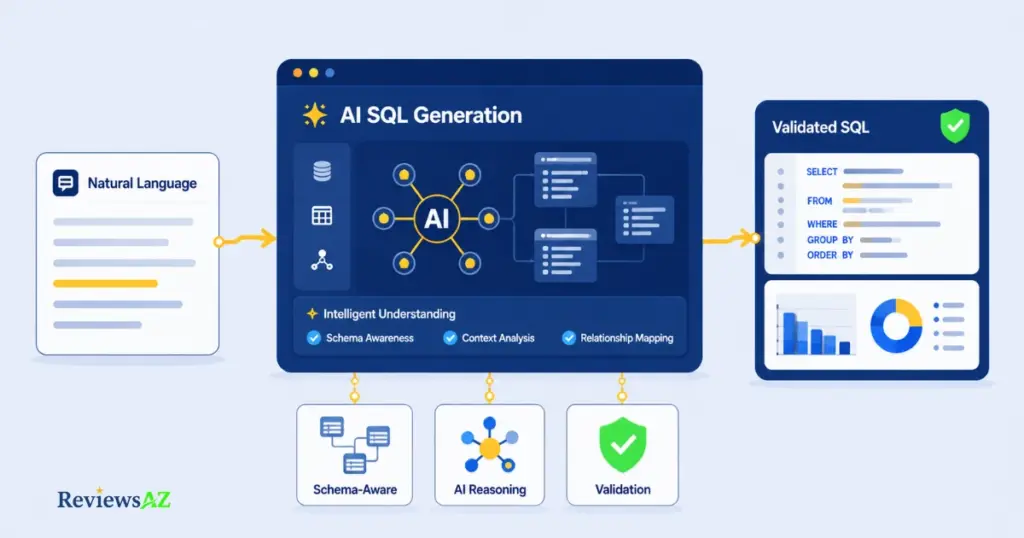
AI-generated SQL is a SQL statement produced by a language model or specialized tool that interprets a natural-language request and maps it to your database structure. You’re not writing SELECT, FROM, and WHERE by hand — you’re describing an outcome, and the model fills in the syntax.
Here’s the same request, side by side:
| What you type | What the AI returns |
|---|---|
| “Show me customers who spent more than $500 last month.” | SELECT customer_id, SUM(amount) AS total_spent FROM orders WHERE order_date >= '2026-07-01' GROUP BY customer_id HAVING SUM(amount) > 500; |
That translation step relies on a large language model recognizing intent — “spent more than $500” becomes a HAVING clause on a summed amount, “last month” becomes a date filter — and matching that intent against whatever it knows about your tables.
And that last part is the whole story. The model isn’t reasoning about your business; it’s pattern-matching your request against the schema it can see. Feed it nothing but a question, and it guesses at table and column names. Feed it your actual structure, and it writes SQL that references real fields. Same model, same prompt style, completely different reliability. If you want the fuller picture of what Text-to-SQL AI actually is and how it works before diving into the steps, that’s covered separately — otherwise, here’s exactly how AI SQL generation splits into two distinct approaches before you write a single query.
Two Layers of AI SQL Generation: General Models vs Schema-Aware Tools
Here’s something most guides skip entirely: “AI SQL generation” isn’t one thing. It’s two fundamentally different approaches, and confusing them is the single biggest reason people end up frustrated with the results.
Layer one is the general-purpose model — ChatGPT, Claude, Gemini, or any assistant you’d also use for writing an email. It knows SQL syntax extremely well. What it doesn’t know, unless you tell it, is your database. Every table name, every column, every foreign key relationship — all of that has to arrive inside your prompt, or the model fills the gaps with reasonable-sounding guesses. That’s not a flaw in the model; it’s a limitation of context. A model with no view of your schema is working from probability, not from your actual structure.
Layer two is the schema-aware tool — purpose-built products like SQLAI.ai, AI2SQL, or Text2SQL.ai that connect directly to your database or accept an uploaded schema. Instead of guessing at table names, the tool performs what’s called schema linking: it matches your request against the real columns and relationships it can see, which is what separates a query that merely looks correct from one that actually runs against your data on the first try.
The practical difference shows up fastest in messy schemas. Ask a general model to “get the top customers by revenue” and it might invent a customers table with a revenue column that doesn’t exist in your database. A schema-aware tool sees that revenue actually lives in an orders table and needs a JOIN plus a SUM — and writes it that way.
| Factor | General AI Model (ChatGPT, Claude, Gemini) | Schema-Aware Tool (SQLAI.ai, AI2SQL, etc.) |
|---|---|---|
| Schema knowledge | Only what you paste into the prompt | Reads your actual database or uploaded schema |
| Best for | Quick queries, learning, one-off requests | Recurring work on the same database |
| Setup effort | None — just describe the request | Requires a schema upload or connection |
| Accuracy on complex schemas | Drops as table count grows | Stays consistent — it isn’t guessing |
Common mistake: pasting a huge, disorganized schema dump into a general model’s chat and expecting tool-level accuracy. Context windows have limits, and a wall of unlabeled CREATE TABLE statements buries the exact relationship the model needs to find. If you’re repeatedly asking the same model about the same database, that’s your signal to move to a schema-aware tool rather than keep re-explaining your structure every session.
Neither layer is “wrong” — they solve different problems. The steps ahead work with a general model, since that’s where most people start, and the guide flags exactly where a schema-aware tool starts to pay for itself.
How AI Turns Natural Language into SQL
Before jumping into the steps, it helps to see the whole path a request travels — not as theory, just as a map so nothing ahead feels like a black box.
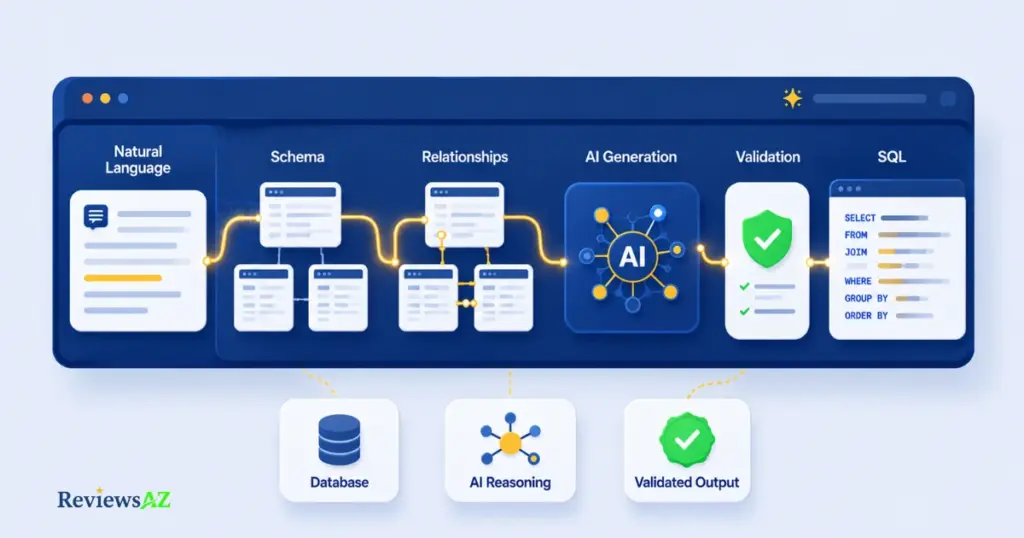
Natural Language → Schema Understanding → Table Relationships → SQL Generation → Validation → Final SQL
You type the request in plain English — that’s stage one. The AI then matches your words against whatever schema it can see, identifying which tables and columns are actually relevant. From there, it works out how those tables connect — which foreign key joins which primary key — before it writes a single line of SQL. Only after that groundwork does it generate the query itself, using the correct syntax for your target dialect. The last stage, validation, is technically optional from the AI’s side — but as you already know from Step 3 ahead, it’s the one stage you should never skip on your end.
Six stages, and only one of them — writing the SQL — is what people usually picture when they hear “AI generates SQL.” The other five are what make that final query accurate instead of a lucky guess.
Do You Need SQL Knowledge to Use AI?
No — you can generate a working query without writing a single line of SQL yourself. But you do need enough SQL literacy to read the result: recognize a JOIN, understand what GROUP BY does, and notice when a filter doesn’t match what you asked for. Think of it less as “SQL knowledge required” and more as “SQL knowledge helps you catch mistakes.” Beginners can absolutely start today — just don’t run anything you can’t explain in one sentence.
Step 1 — Prepare Your Schema: How to Generate SQL Queries with AI
Skip this step and every AI SQL generator you use afterward — general model or specialized tool — starts guessing. Schema preparation is the one part of this workflow that determines whether steps 2 and 3 go smoothly or turn into a debugging session.
At its simplest, schema preparation means telling the AI what tables and columns exist before you ask it to write anything. For a first attempt, that can be as basic as listing table and column names in plain text:
Table: customers (id, name, email, signup_date, country)
Table: orders (id, customer_id, amount, order_date, status)
That’s enough for the model to stop inventing field names. But it’s the minimum, not the ideal — the AI still has to guess at relationships, data types, and constraints.
Developer Note: for anything beyond a single simple query, paste the actual DDL instead of a plain list. A full CREATE TABLE statement gives the model data types, primary and foreign keys, and NOT NULL constraints in one shot — which is exactly what it needs to get JOIN conditions and aggregation logic right on the first try, rather than the third.
CREATE TABLE orders (
  id INT PRIMARY KEY,
  customer_id INT REFERENCES customers(id),
  amount DECIMAL(10,2) NOT NULL,
  order_date DATE NOT NULL,
  status VARCHAR(20)
);
Now the privacy part, and it deserves more than a passing warning. Sharing your schema is not the same as sharing your data. Table names, column names, and data types describe structure — they don’t expose a single real customer, transaction, or record. A well-prepared schema prompt never includes actual rows: no real emails, no real order amounts, no sample data pulled straight from production. If you need sample values to illustrate a pattern, invent placeholder ones.
Common mistake: copying a few real rows into the prompt “just so the AI understands the data better.” It doesn’t need to — column names and types already communicate the shape of your data, and pasting live rows into a third-party chat is the fastest way to leak information you never meant to share, especially with customer or financial tables.
Get the schema description right, and the next step — writing the actual prompt — becomes far more straightforward than most guides make it look.
Step 2 — Write Effective Prompts (With Templates)
Two people can hand an AI the exact same schema and get wildly different query quality back — because the schema was never the variable that mattered most. The prompt was.
A reliable SQL prompt has four parts: the outcome you want, the tables involved, any filters or conditions, and the output format. Miss one and the AI fills the gap with an assumption — which is exactly where accuracy quietly slips.
Here’s a reusable template that covers all four:
Using the [table_name] table(s) with columns [column_list],
write a [database dialect] query that [describes the exact outcome],
filtered by [condition], and return the results [sorted/grouped/limited as needed].
For beginners, start with single-table requests before combining anything:
Prompt: "Using the orders table, show all orders with status 'shipped'
placed in the last 7 days, sorted by order_date descending."

SELECT *
FROM orders
WHERE status = 'shipped'
  AND order_date >= CURRENT_DATE - INTERVAL '7 days'
ORDER BY order_date DESC;
That’s a SELECT with a WHERE clause — the two building blocks behind most everyday reporting questions. Once that pattern feels comfortable, combining tables is the natural next move.
Developer Note: once the schema includes real relationships, push the prompt to specify the JOIN type explicitly rather than leaving it to the model’s default assumption:
Prompt: "Using customers and orders (joined on customer_id), write a PostgreSQL
query with an INNER JOIN that returns each customer's name alongside their
total spend, grouped by customer, for customers with total spend over $1,000."

SELECT c.name, SUM(o.amount) AS total_spent
FROM customers c
INNER JOIN orders o ON c.id = o.customer_id
GROUP BY c.name
HAVING SUM(o.amount) > 1000;
For genuinely advanced work — ranking, running totals, or multi-step logic — window functions and CTEs are where AI saves the most time, because most people don’t write these from memory even when they know SQL well:
Prompt: "Write a PostgreSQL query using a CTE and a window function that ranks
customers by total spend within each country, showing name, country, total
spend, and rank."

WITH customer_totals AS (
  SELECT c.name, c.country, SUM(o.amount) AS total_spent
  FROM customers c
  INNER JOIN orders o ON c.id = o.customer_id
  GROUP BY c.name, c.country
)
SELECT name, country, total_spent,
       RANK() OVER (PARTITION BY country ORDER BY total_spent DESC) AS spend_rank
FROM customer_totals;
Common mistake: asking for “the data I need” without naming the SQL dialect. PostgreSQL, MySQL, and SQL Server handle date arithmetic, string functions, and even LIMIT syntax differently — a query that’s perfectly valid in one will throw a syntax error in another. Naming the dialect in every prompt costs one extra sentence and avoids an entire debugging cycle.
Notice what stayed constant across all three examples: table names, the target outcome, and the dialect. That consistency is what turns prompt writing from trial-and-error into something closer to muscle memory — right up until the query is ready to actually run, which is where the next step comes in.
Step 3 — Verify and Test Before You Execute
This is the step that actually determines whether you can trust any of this. Everything before it — schema prep, prompt writing — just gets you a syntactically valid query. Nothing has confirmed it’s correct yet.
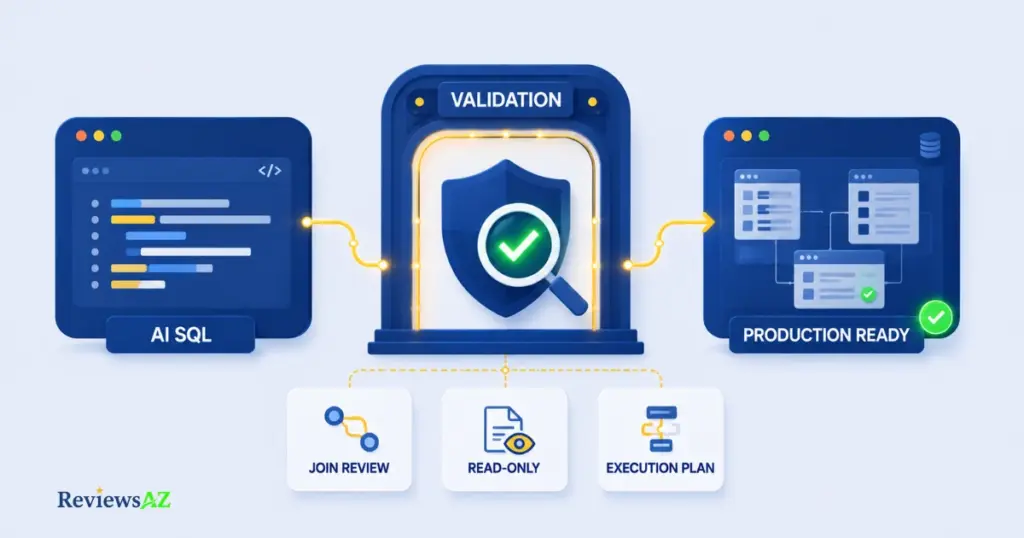
AI-generated SQL can run without errors and still return the wrong answer — a JOIN that quietly duplicates rows, a date filter off by one boundary, a status value that doesn’t match what’s actually stored. None of that throws an exception. It just produces numbers that look plausible and are wrong, which is far more dangerous than a query that fails outright.
Before running anything the AI hands you, walk through this checklist:
- Read every JOIN condition. Confirm it’s matching the columns you think it is — a JOIN on the wrong key is the single most common source of silently duplicated or missing rows.
- Check date ranges manually. “Last 30 days” and “last month” are not the same filter, and AI sometimes picks the one you didn’t mean.
- Verify filter values against real data. If the query filters on
status = 'shipped', confirm that’s the exact value stored in the column — not'Shipped'or'complete'. - Run it read-only first. Execute the query as a SELECT before ever adapting it into an UPDATE or DELETE, even if that was the original goal.
Once the query reads correctly, test it somewhere that can’t hurt you:
-- Add a LIMIT while testing, even on a SELECT
SELECT *
FROM orders
WHERE status = 'shipped'
ORDER BY order_date DESC
LIMIT 20;
A LIMIT clause costs nothing and gives you a fast sample to eyeball before scaling up to the full result set. Better still, run it against a development database or a read-only replica rather than production — most teams that connect AI tools to real databases restrict the connection to a read-only user for exactly this reason. If a query needs to modify data, that’s a deliberate second step, done manually, after the SELECT version has already proven itself correct.
Developer Note: for anything performance-sensitive, run EXPLAIN (or your database’s equivalent) before deploying the query anywhere it’ll run repeatedly. AI can write a query that’s logically correct but scans an entire table because it didn’t know an index existed — something no amount of prompt refinement fixes, only the execution plan reveals.
Common mistake: trusting a query more because it “looks” sophisticated — a clean CTE with a window function feels more authoritative than a simple SELECT, but complexity has nothing to do with correctness. A one-line query with the wrong JOIN is more dangerous than a ten-line query that’s exactly right. Judge accuracy by testing it, never by how advanced it reads.
Get into this habit and the fear of AI “breaking something” mostly disappears — not because the AI got smarter, but because nothing reaches your real data without passing through your own eyes first. That verification habit is also where the case for a schema-aware tool starts to look genuinely different from a general model, which is exactly what the next step gets into.
Step 4 — Choose the Right Tool for Your Workflow
At some point, a pattern shows up: you’re pasting the same three tables into ChatGPT every single day. That repetition is the signal — not a rule of thumb, not a fixed number of queries — that tells you it’s time to move from a general model to something built to remember your schema.
A general AI model works well for occasional queries and learning; a schema-aware tool earns its keep once AI SQL generation becomes part of your daily workflow. The difference isn’t which one is “better” — it’s which one matches how often you’re actually doing this.
If you’re querying the same database several times a week, re-explaining structure every session wastes exactly the time AI was supposed to save you. Tools like AI2SQL and Text2SQL.ai solve that by keeping your schema on file — you connect once, and every prompt afterward assumes that context automatically. AI2SQL leans toward business users and beginners who want SQL without much of a learning curve, while Text2SQL.ai fits lighter, more occasional use where a lower-cost plan makes sense. Neither is a universal answer; the right pick depends on how your team actually works, which is exactly why a side-by-side comparison is worth more here than a single recommendation.
Beginner Note: if you’re not sure yet whether you’ll use this daily or just a few times a month, stick with a general model for now. There’s no cost to waiting — schema-aware tools are just as useful next month as they are today, and you’ll make a better choice once you know your actual usage pattern.
Developer Note: for teams already deep in a specific stack — dbt models, a single cloud warehouse, CI/CD pipelines — the calculus shifts again. At that point, warehouse-native metadata access and dialect handling matter more than a simple schema upload, which is a different evaluation than what a solo analyst needs.
Common mistake: picking a schema-aware tool based on price alone. A cheap plan that only supports schema upload (not a live connection) still leaves you manually re-uploading your structure every time it changes — which defeats the entire point of switching from a general model in the first place. Check connection type before checking price.
Because the right tool genuinely depends on database size, team size, and budget, a single paragraph here won’t do it justice. The full breakdown — comparing the best AI SQL tools feature by feature, including pricing tiers and which databases each one connects to — covers that decision properly. It’s worth reading before you commit to a subscription.
When AI Gets SQL Wrong
Everything in the next section on Common Mistakes is something a careful prompt could have prevented. This is different — it’s what the AI itself gets wrong, even with a reasonable prompt.
| Prompt Problem | Wrong SQL Produced | Why It Happened | Better Prompt |
|---|---|---|---|
| “Show top products” | SELECT * FROM products ORDER BY id DESC LIMIT 10; | “Top” is undefined, so the AI defaulted to newest rows instead of highest-selling | “Show the top 10 products by total units sold” |
| “Get this month’s orders” (no dialect specified) | SELECT * FROM orders WHERE MONTH(order_date) = MONTH(GETDATE()); | The AI assumed SQL Server syntax when the target database was actually PostgreSQL, which has no GETDATE() function | “Get this month’s orders, using PostgreSQL syntax” |
| “Join customers with their orders” | SELECT * FROM customers, orders WHERE customers.id = orders.id; | Without an explicit foreign key hint, the AI guessed orders.id instead of the correct orders.customer_id | “Join customers and orders on customers.id = orders.customer_id” |
None of these are the AI being careless — each one is a reasonable guess made with incomplete information. That’s exactly why Step 1 and Step 2 exist: the more specific the schema and the prompt, the less guessing the AI has to do.
Common Mistakes When Generating SQL with AI
Most AI SQL horror stories trace back to the same handful of habits — not to the AI being “bad” at SQL. Here’s what actually causes the damage, and what to do instead.
| Mistake | Why It Happens | Correct Alternative |
|---|---|---|
| Letting AI assume what “active” or “recent” means | Business terms feel obvious to you but are ambiguous to the model — “active user” could mean logged in this week, or has a non-cancelled subscription | Define the term explicitly in the prompt: “active meaning last_login within 30 days” |
| Ignoring NULL handling in aggregates | SUM, AVG, and COUNT silently skip NULL values, which can quietly skew totals without any error | Ask the AI to handle NULLs explicitly, or check for them with a quick COUNT(*) vs COUNT(column) comparison first |
| Running an ungrouped DELETE or UPDATE straight from AI output | The write version of a query looks just as clean and confident as the read version | Convert every write query to a SELECT first, confirm the row count it would affect, then adapt it back |
| Assuming case-sensitive string matches | ‘Shipped’ and ‘shipped’ look identical in a prompt but not always in the database | Check actual stored values first, or ask for a case-insensitive comparison explicitly |
| Skipping the execution plan on a query that will run repeatedly | A query that returns correct results in two seconds on a small table feels “done” | Run EXPLAIN before scheduling or embedding any query that will execute regularly |
Notice the common thread: none of these are AI failures in the sense of “wrong syntax.” They’re gaps in context — business meaning, data quirks, execution scale — that only you can supply, because the AI has no way to know them on its own.
Real SQL Examples: Before and After
Everything so far has been explained in pieces. Here’s the full path — prompt to query to reasoning — for three different real-world requests.
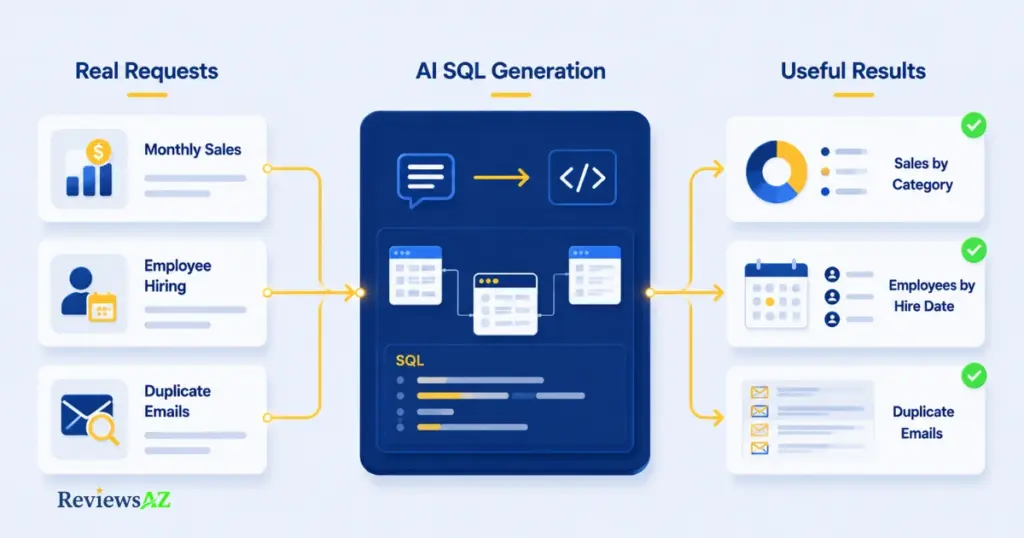
Example 1: Monthly Sales Report by Category
Prompt: “Write a PostgreSQL query showing total revenue by product category for the current month.”
SELECT p.category, SUM(o.amount) AS total_revenue
FROM orders o
INNER JOIN products p ON o.product_id = p.id
WHERE DATE_TRUNC('month', o.order_date) = DATE_TRUNC('month', CURRENT_DATE)
GROUP BY p.category
ORDER BY total_revenue DESC;
Why it works: DATE_TRUNC correctly isolates the current calendar month regardless of which day it is, and grouping by category before summing gives a clean per-category breakdown rather than one grand total.
Common mistake to avoid: filtering with
order_date >= '2026-08-01'hardcodes a specific month — the query breaks the moment you reuse it next month.
Example 2: Employees Hired After a Specific Date
Prompt: “Using the employees table, list everyone hired after January 1, 2024, sorted by hire date.”
SELECT name, department, hire_date
FROM employees
WHERE hire_date > '2024-01-01'
ORDER BY hire_date ASC;
Why it works: a single-table filter with a clear boundary condition — this is the kind of request beginners should practice first, before adding joins.
Common mistake to avoid: using
>=when you mean “after,” which would incorrectly include employees hired exactly on January 1st.
Example 3: Finding Duplicate Customer Emails
Prompt: “Write a MySQL query to find email addresses that appear more than once in the customers table.”
SELECT email, COUNT(*) AS occurrences
FROM customers
GROUP BY email
HAVING COUNT(*) > 1;
Why it works: HAVING filters on the aggregated count itself, which a WHERE clause can’t do — a distinction that trips up even people with some SQL background.
Common mistake to avoid: using WHERE instead of HAVING here causes a syntax error, since WHERE runs before GROUP BY has produced anything to filter.
Frequently Asked Questions
Can AI generate accurate SQL queries?
Yes, but accuracy depends heavily on context. A general model given only a plain-English request will guess at table and column names. The same model given your actual schema — or a schema-aware tool connected directly to your database — produces noticeably more reliable results. Either way, every query still deserves a manual check before it runs on real data.
What happens if I don’t know SQL and the AI gets it wrong?
This is exactly why Step 3 matters more than SQL fluency itself. Without any SQL background, you won’t catch a wrong JOIN by reading the code — but you can still catch it by checking the output: does the row count look reasonable? Do the numbers match what you’d expect from the business question you asked? When something looks off, that’s your cue to run it past a colleague or ask the AI to explain its own query in plain English before you trust it further.
Sharing table and column names is generally safe — it describes structure, not data. What’s risky is pasting real rows: actual customer emails, transaction amounts, or personal records. Stick to schema-only prompts with placeholder sample values, and for sensitive industries, check your AI provider’s data retention policy before connecting anything to production.
Can AI SQL tools connect to my database directly?
Many schema-aware tools do offer direct connections, reading your live schema instead of relying on a manual paste. If you’re connecting anything to a database with real data, use a read-only account and confirm the tool’s security certifications first — direct access is convenient, but it raises the stakes on getting permissions right.
Which AI is best for SQL queries?
There’s no single winner — it depends on frequency and complexity. General models like ChatGPT or Claude handle occasional queries and learning well. For daily use on the same database, a schema-aware tool built specifically for SQL generation will consistently outperform a general model, simply because it isn’t re-guessing your structure every time.
What’s the best free AI SQL generator?
Several tools offer usable free tiers, though they typically cap query volume or limit schema connections. A general-purpose model is genuinely free for casual use with no query limits at all — it’s the schema awareness, not the price tag, that determines whether “free” is actually enough for your workflow.
Is SQL still relevant now that AI can write it?
More relevant, not less. AI shifts the work from typing syntax to judging correctness — and that judgment call requires understanding what a JOIN, a GROUP BY, or a WHERE clause is actually doing. The people getting the most value from AI-generated SQL are the ones who already know enough SQL to catch it when the AI gets something wrong.
Conclusion
The gap between “AI wrote this SQL” and “I can trust this SQL” was never about the AI’s skill — it’s about how much you tell it and how carefully you check what comes back. A well-described schema, a specific prompt, and a five-second read-only test close that gap almost every time.
If there’s one habit worth keeping from everything above, it’s this: run the SELECT before you ever run the write. That single discipline catches more AI SQL mistakes than any amount of prompt refinement ever will.
Start with a general model on your next query — it costs nothing and teaches you exactly where the gaps in your schema descriptions are. Once the same few tables keep showing up in your prompts week after week, that’s your cue to look at a tool built to remember them. If you’re a data analyst specifically, the best AI SQL tools for data analysts narrows that comparison to your exact use case — otherwise, comparing the best AI SQL tools covers the full picture for making that choice well.