What Is Text-to-SQL AI? A Complete Guide to How It Works in 2026

Type a plain English question, get back a SQL query, run it against a database — that’s the pitch behind every Text-to-SQL AI tool shipping in 2026. It sounds almost too simple for something engineers spent decades trying to solve.
Here’s what rarely makes it onto the landing page: a tool can write syntactically perfect SQL and still hand you the wrong number. Not because the model is broken, but because “revenue” can mean five different things depending on who you ask, and nothing in a database schema tells the AI which one you meant.
This guide breaks down what Text-to-SQL AI actually is, the pipeline it runs behind every query, and — more importantly — where that pipeline tends to fail once real business questions replace clean textbook examples. By the end, you’ll know enough to judge a tool on more than the accuracy number in its marketing page.
What Is Text-to-SQL AI (Quick Definition)
Text-to-SQL AI is a system that uses a large language model to convert a plain-English question into a working SQL query, then runs that query against a real database to return an answer. No SQL syntax required from the user — just a question typed the way you’d ask a colleague. If you’re new to the space, our guide to the best text-to-SQL AI tools covers the full category in more depth.
Quick Definition: Text-to-SQL AI translates natural language into SQL by combining a language model with knowledge of your database's schema (its tables, columns, and relationships), so the generated query is valid for your specific data — not a generic guess.That schema-awareness is the part most people skip over. Ask ChatGPT for a query with no context and it invents table names that sound plausible but don’t exist. A dedicated Text-to-SQL tool reads your actual schema first, which is the difference between a party trick and something you can point at real data.
A Simple Example
Type: “Show me our top 5 customers by total spend this year.”
A schema-aware tool checks your customers and orders tables, confirms how they’re linked, and returns something like:
SELECT c.name, SUM(o.total) AS spend FROM customers c JOIN orders o ON c.id = o.customer_id WHERE o.order_date >= '2026-01-01' GROUP BY c.name ORDER BY spend DESC LIMIT 5;
No JOIN syntax memorized, no column names guessed — the tool already knew them.
⚠ Common Mistake: Assuming any AI chatbot “does” text-to-SQL. General-purpose models can write SQL-shaped text, but without a live connection to your schema they’re pattern-matching on how queries usually look — not on how your database is actually structured. If the tool never asked to connect to your database, treat its output as a draft, not an answer.
The practical takeaway: when you’re evaluating a tool, the first question isn’t “how good is the AI.” It’s “does this thing actually know my schema, or is it guessing.”
How Text-to-SQL AI Works
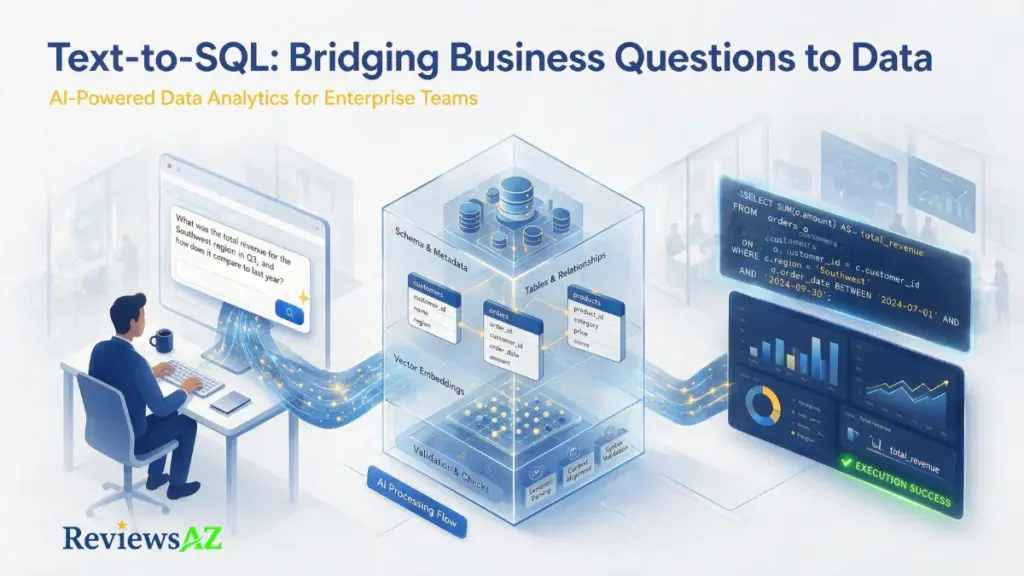
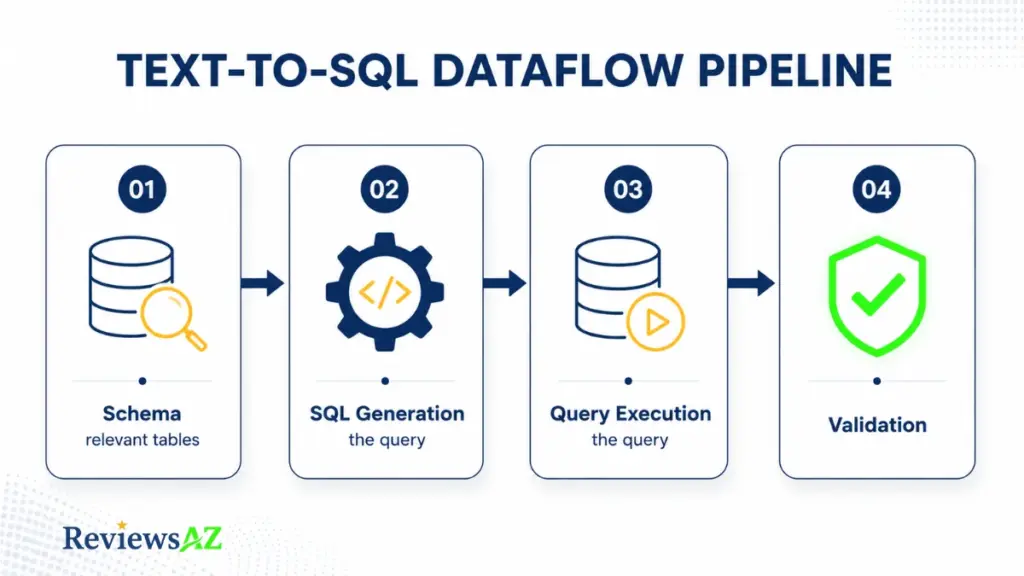
Behind that one-line answer sits a four-stage pipeline. Skip any of the four, and accuracy drops fast — this is where most “AI SQL generator” demos quietly cut corners.
Step 1: Schema Linking
Before writing anything, the system has to figure out which tables and columns are actually relevant to your question. In a database with a dozen tables, this is trivial. In an enterprise warehouse with thousands of tables and cryptic column names, it’s the hardest part of the whole process.
Modern tools handle this with retrieval: your question gets compared against embeddings of table descriptions and column names, and only the relevant subset gets passed to the model. Dump the entire schema in instead, and the model drowns in noise it doesn’t need.
Step 2: SQL Generation
With the relevant schema in hand, the language model writes the query. It’s given your question, the schema subset, and usually a system instruction like “target PostgreSQL syntax” or “always alias subqueries.”
This is the step people picture when they hear “AI writes SQL for me” — and it’s also the step that’s improved the most in the last two years, largely thanks to models trained specifically on code.
Step 3: Query Execution
The generated SQL runs against the actual database, and the result set comes back as rows. Production tools wrap this step in safety rails: row limits, timeouts, and cost caps, so one badly generated query can’t lock up a billion-row table.
Step 4: Validation
The final step is the one most casual tools skip entirely. A validation layer checks whether the SQL looks reasonable before showing it to you — catching an empty result where data clearly exists, or a query that technically ran but selected the wrong table.
⚠ Common Mistake: Judging a tool by Step 2 alone. Plenty of products generate impressively clean SQL in a demo because Steps 1 and 4 were pre-configured on a tidy sample database. Ask what happens when the schema is messy and the question is ambiguous — that’s where Steps 1 and 4 actually earn their keep.
One more distinction worth holding onto: a tool that stops after Step 3 is a converter. One that loops back through validation, retries, and sometimes asks you a clarifying question is closer to an agent. That difference matters enough that it gets its own section next.
Single-Shot Generators vs Agentic Text-to-SQL Systems
Not every product sold as “Text-to-SQL AI” works the same way under the hood. Since around 2024, the category has split into two genuinely different architectures — and knowing which one you’re looking at changes what you should expect from it.
Single-Shot Generators
This is the simpler design: one call to the model, prompt in, SQL out. No retry, no self-check. If the first attempt misreads your question, you get a confidently wrong query with no warning attached.
Single-shot tools are fast, cheap to run, and often look impressive in a demo. They work well when someone who already knows SQL is using the output as a starting point they’ll review anyway — not when the answer needs to be trusted as-is. AI2SQL is one widely used example worth evaluating against this exact question: does it stop at generation, or does it validate before handing you the query?
Agentic Systems
An agentic system treats SQL generation as one step in a loop, not the whole job. It plans, retrieves schema context, drafts a query, executes it, checks whether the result looks reasonable, and retries or asks a follow-up question if something seems off.
This is the architecture responsible for most of the accuracy gains reported over the past two years. The underlying language model didn’t get dramatically smarter at SQL — the orchestration wrapped around it got better at catching its own mistakes.
| Factor | Single-Shot Generator | Agentic System |
|---|---|---|
| LLM calls per question | 1 | Typically 5–15 |
| Self-correction | None | Retries and re-plans on failure |
| Speed | Fast (seconds) | Slower — more steps, more latency |
| Cost per query | Low | Higher |
| Best fit | Developers who’ll review the SQL themselves | Business users who need a trustworthy final answer |
⚠ Common Mistake: Assuming a higher advertised accuracy score means an agentic architecture. Vendors rarely label which type they’ve built. If the pricing page never mentions retries, validation, or a review step, it’s almost certainly single-shot — regardless of how the accuracy percentage is framed.
Neither architecture is universally “better” — a single-shot tool is the right call for a developer who wants a fast first draft, while an agentic one earns its extra cost when a non-technical user has no way to catch a wrong answer themselves. The question worth asking any vendor is simply: what happens after the first query comes back wrong?
How Accurate Is It, Really?
Ask a vendor for their accuracy number and you’ll usually get something in the 85–95% range. That number is real. It’s also measuring something narrower than most buyers assume.
Quick Definition: Text-to-SQL accuracy is typically benchmarked on academic datasets built from clean, standardized schemas — not on the messy, inconsistent databases most companies actually run.
What the Benchmarks Actually Show
Two datasets matter most here. Spider tests SQL syntax on tidy databases — it’s largely a solved problem now, with top systems clearing 90%. BIRD is tougher: it uses real-world data with inconsistent values and messy naming, and even strong models like early ChatGPT only reached roughly 40% execution accuracy against a human baseline near 93%.
By 2026, leading systems on BIRD have closed much of that gap, reaching around 82% — but that improvement came almost entirely from the agentic orchestration covered in the last section, not from the underlying model getting better at SQL on its own.
Where the Gap Widens
A separate benchmark called DABStep tests something closer to real analytics work: multi-step questions that require combining data with written business context, not just translating one sentence into one query. On its hardest split, even the best AI agents solve roughly one question in seven.
| Benchmark | What It Tests | Top System Accuracy |
|---|---|---|
| Spider | SQL syntax, clean databases | ~90%+ (largely solved) |
| BIRD | Execution accuracy, messy real-world data | ~82% (human baseline ~93%) |
| DABStep (hard split) | Multi-step analysis with business context | ~15% |
That’s the honest range: near-solved on clean syntax, strong but imperfect on realistic single queries, and still early on the multi-step reasoning that most business questions actually require.
⚠ Common Mistake: Reading a benchmark score as a production forecast. A tool’s number reflects one-shot performance on a standardized test schema. Your accuracy depends on how messy your own schema is, how ambiguous your team’s questions are, and whether the tool has a validation step at all. Two vendors quoting “90% accuracy” can perform very differently once connected to your actual database.
There’s a second gap worth naming: ambiguity. Independent research on real user questions found that roughly one in five is genuinely unclear — vague terms, missing filters, or a request that could reasonably mean two different things. A tool that silently picks one interpretation and moves on is often more dangerous than one that pauses to ask.
None of this makes Text-to-SQL AI unreliable. It means the honest question isn’t “how accurate is it” — it’s “accurate on what, and what happens when it’s wrong.”
Common Mistakes When Evaluating Text-to-SQL Tools
Most evaluation mistakes happen before anyone writes a single test query — they’re baked into how the trial gets set up in the first place. Here are the ones that show up most often.
1. Testing Only on a Clean Demo Database
Vendors hand you a tidy sample schema for the trial, and the tool performs beautifully. Your production database has years of renamed columns, deprecated tables nobody deleted, and inconsistent naming — none of which the demo ever tested.
Fix: Insist on connecting a real (or realistic copy of a) schema before judging accuracy, not the vendor’s showcase dataset.
2. Comparing Accuracy Numbers Without Checking the Benchmark
An “85% accuracy” claim means little without knowing what it was measured against. As covered earlier, a number from a clean-syntax benchmark and a number from a messy real-world one aren’t comparable, even when the headline figure looks similar.
Fix: Ask which benchmark the number comes from, and whether it reflects execution accuracy on realistic data or exact-match syntax on a tidy one.
3. Never Asking What Happens on a Wrong Answer
Every tool looks the same when the query is right. The real difference shows up on failure: does it flag uncertainty, retry, ask a clarifying question — or hand you a confident, silently wrong number?
Fix: Deliberately test with an ambiguous question during the trial and watch how the tool handles it, not just whether it produces SQL.
4. Ignoring Who Gets to See What
Text-to-SQL expands who can query a database, which also expands who can accidentally see data they shouldn’t. Without role-based access control, a natural-language interface can bypass permission boundaries your team already relies on.
Fix: Confirm the tool enforces access at the database level, not just inside its own UI.
⚠ Common Mistake: Letting AI-generated INSERT, UPDATE, or DELETE statements run automatically. Read operations are forgiving — a wrong SELECT just returns bad data you can catch. A wrong write operation can silently corrupt real records. Any tool that executes write queries without a human review step in between is a genuine risk, not a convenience.
5. Skipping the Domain-Language Test
Generic questions (“show total sales”) work everywhere. Your team’s actual language — internal shorthand, department-specific terms, a metric named differently than the column that stores it — is what separates tools that generalize from ones that only worked in the demo.
Fix: Test with the exact phrasing your team would actually type, jargon included, not the polished question from the vendor’s script.
None of these mistakes are about the AI being immature. They’re about evaluation conditions that flatter the tool instead of testing it — which is an easy trap regardless of how the underlying technology performs.
When to Use It (and When Not To)
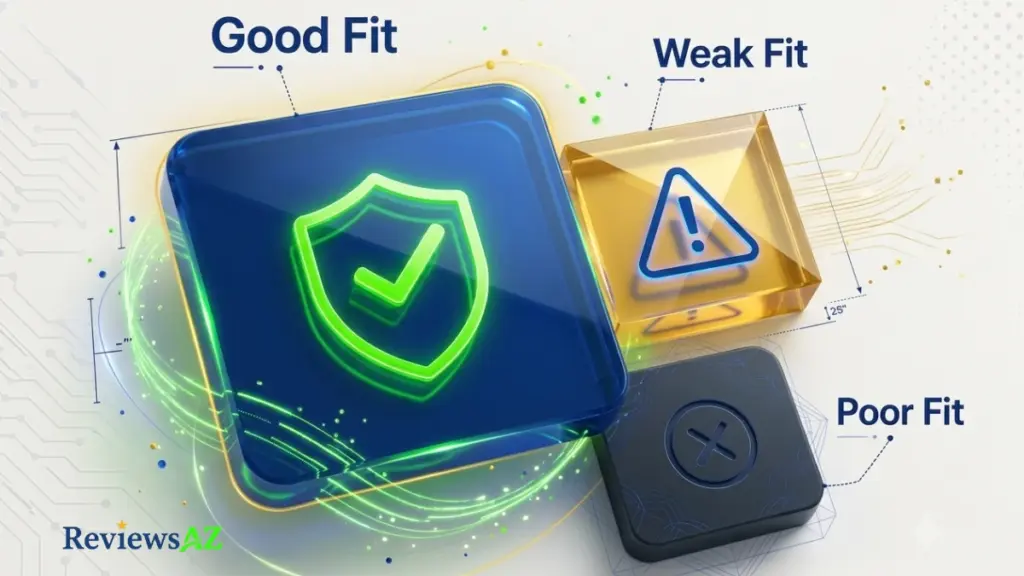
Text-to-SQL AI isn’t a universal replacement for SQL knowledge — it’s a tool that’s excellent in some situations and genuinely the wrong choice in others. Here’s how to tell which is which.
Good Fit: Exploratory, Read-Only Questions
Analysts, PMs, and operators asking day-to-day questions — “how many signups last week,” “what’s our churn by plan tier” — are the ideal use case. These are read-only, low-stakes if slightly imperfect, and exactly what the technology handles well today.
Good Fit: Learning SQL
Typing a question in English, then studying the SQL it generates, is a genuinely useful way to learn JOINs, GROUP BY, and subqueries by example rather than by memorizing syntax rules first.
Weak Fit: High-Stakes, One-Shot Decisions
A board deck, a financial filing, a number that triggers a business decision — these deserve a human-verified query, or at minimum a second look from someone who knows the schema. Treat the AI’s first answer here as a draft, not a citation.
Weak Fit: Write Operations Without Review
As covered earlier, INSERT, UPDATE, and DELETE statements generated by AI should never run unattended. This isn’t a maturity problem with the technology — it’s a permanent rule, the same way you wouldn’t auto-run a script you didn’t read.
Poor Fit: Deeply Undocumented, Inconsistent Schemas
If your database has no naming conventions, duplicate tables nobody has cleaned up, and tribal knowledge that lives only in one engineer’s head, no AI — agentic or otherwise — can reliably guess what you mean. Fix the schema documentation first, or expect the tool to guess wrong often.
| Manual SQL | ChatGPT (no schema access) | Dedicated Text-to-SQL AI | |
|---|---|---|---|
| Knows your real schema | Yes (you do) | No | Yes |
| Speed for simple queries | Slow (requires SQL skill) | Fast, but risks wrong tables | Fast and schema-accurate |
| Safe for write operations | Yes, with review | No — never run blindly | Only with a review step |
| Best for | Complex, performance-critical work | Learning syntax, quick templates | Daily self-serve data questions |
⚠ Common Mistake: Picking a tool based on features alone without checking how it fits your specific mix of use cases above. A tool built for developer-assisted queries and a tool built for non-technical, customer-facing self-serve access solve different problems, even when both are marketed as “Text-to-SQL AI.”
If you’re at the stage of comparing specific products rather than just understanding the category, our full breakdown of the best AI SQL tools walks through how the leading options handle exactly these trade-offs.
Frequently Asked Questions
Is Text-to-SQL AI accurate enough for production use?
For standard SELECT, JOIN, and GROUP BY queries on a reasonably well-documented schema, modern tools perform well. For complex, multi-step business questions, always have a human review the query before treating the result as final — especially for anything that feeds a decision or a report.
How is Text-to-SQL AI different from just asking ChatGPT for SQL?
A general-purpose chatbot has no live connection to your database, so it guesses at table and column names based on how queries usually look. A dedicated Text-to-SQL tool reads your actual schema first, which is why its output is valid against your specific data instead of a plausible-looking approximation.
Do I need a semantic layer to use Text-to-SQL AI?
Not strictly, but it helps significantly. A semantic layer defines business terms — like exactly what “revenue” means at your company — in one place, so the AI doesn’t have to guess between competing definitions when a term is ambiguous.
Can it handle complex queries with multiple JOINs or subqueries?
Yes, most modern tools handle multi-table JOINs, subqueries, and aggregations. Accuracy drops as complexity rises, particularly with window functions or recursive queries, so treat results on advanced queries with extra scrutiny.
Is it safe to let Text-to-SQL AI run write operations like UPDATE or DELETE?
Not without a human review step in between. Read queries are low-risk since a wrong SELECT just returns bad data you can catch. A wrong write operation can alter real records, so this should never run unattended regardless of how advanced the tool is.
What databases does Text-to-SQL AI typically support?
Most dedicated tools support the major SQL engines — PostgreSQL, MySQL, SQL Server, Snowflake, and BigQuery among them — and generate dialect-specific syntax for whichever one you connect.
Why do two tools quoting similar accuracy percentages perform so differently?
Accuracy claims usually come from different benchmarks measuring different things — clean-syntax tests versus messy, real-world execution accuracy. The number alone doesn’t tell you which one a vendor is quoting, so it’s worth asking directly before comparing tools on that basis.
Conclusion
Here’s the golden tip most guides skip: the best question to ask any Text-to-SQL AI tool isn’t “how accurate are you” — it’s “show me what happens when you’re wrong.” A tool that flags uncertainty, retries, or asks a clarifying question is fundamentally more trustworthy than one that always answers confidently, regardless of the headline accuracy number on its pricing page.
The technology itself is no longer the bottleneck. Language models write syntactically correct SQL reliably now. What still separates a good result from a wrong one is schema quality, business context, and whether a validation step exists between the query and the number you act on.
If you’re ready to move from understanding the category to comparing specific products, start by testing any shortlisted tool against your messiest real schema — not its demo database — and watch how it handles one deliberately ambiguous question.
Our comparison of the best AI SQL tools is a good next stop if you want to see how the leading options stack up on exactly that test.