SQLAI Review (2026): Features, Pricing, Accuracy & Verdict

Quick Verdict: In this SQLAI Review, we found SQLAI.ai to be a genuinely useful SQL toolbox, not a magic wand. Its SQL optimizer earns its keep with real index-level suggestions, and connecting a live database schema noticeably improves the queries it generates. But the underlying accuracy still depends on the AI model behind it, so anyone without SQL knowledge should double-check what it produces before trusting it in production.
- Best for: Data analysts and developers who already know SQL well enough to sanity-check AI output.
- Biggest strength: The step-by-step SQL optimizer, which explains index changes instead of blindly rewriting queries.
- Biggest weakness: Non-technical users can end up with queries that run without errors but return subtly wrong results.
- Pricing: Plans start at $5/month billed monthly, or $4/month billed annually (Hobby), with the $12/month ($10/month annually) Explorer plan as the most popular tier.
What Is SQLAI?
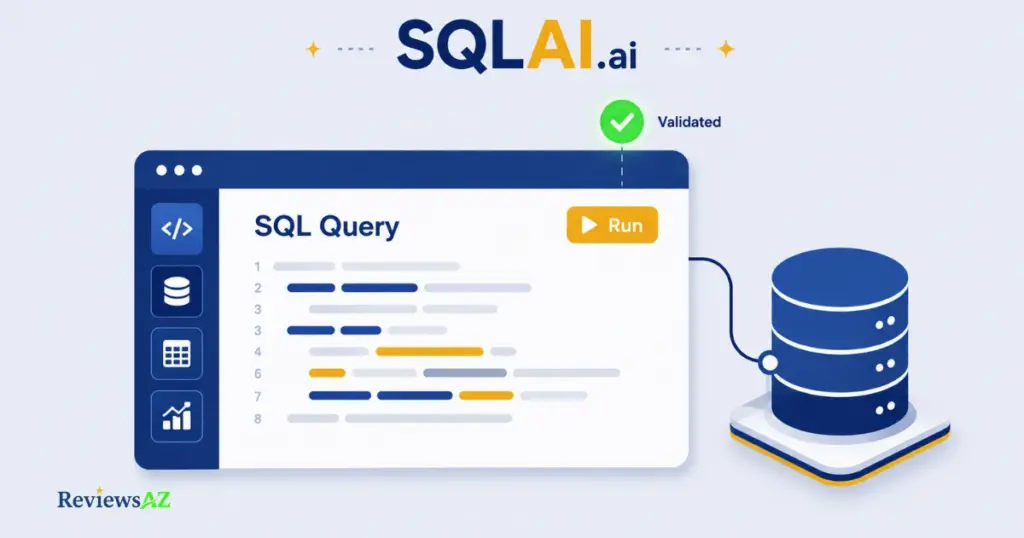
SQLAI.ai is an AI-powered toolbox that turns plain English into working SQL, then helps you optimize, validate, explain, format, and convert that SQL across more than two dozen database engines. Type a question like “show me last month’s top customers,” and it generates the query for you — no syntax memorization required.
Under the hood, it is what most people would call a natural language to SQL tool, or an AI SQL generator. Limiting it to that one function undersells it, though. The generator is really just the entry point into a wider workbench: an optimizer that suggests index changes, a validator that catches syntax errors, an explainer that breaks a query down clause by clause, a formatter, and a converter for moving SQL between engines.
What actually determines the quality of its output is context. Paste in a schema or connect a live database, and SQLAI.ai can reference your real table and column names instead of guessing at them. That distinction matters more than the marketing copy suggests, and we stress-test it later in this review.
Is SQLAI.ai Known by Another Name?
Some third-party software directories list SQLAI.ai under a different, unverified former name, and it’s easy to stumble on that claim while researching the tool. We looked for an official source (a company announcement, a rebrand page, anything on sqlai.ai itself) and found none. The name attached to it also varies depending on which directory you check, which is itself a red flag.
Because we could not confirm any rebrand history from SQLAI.ai directly, we’re not repeating it here as fact. For the purposes of this review, SQLAI.ai is the product’s name, full stop.
Common mistake: trusting a “formerly known as” claim just because it appears on a few listing sites. Software directories often scrape or copy each other’s data, so an unverified rebrand claim can spread across a dozen pages without ever being confirmed by the company itself. Check the vendor’s own site or press page first, before repeating a naming history anywhere.
What Can SQLAI Do?
Six different tools live under this one product, and it is easy to conflate them if you have only skimmed the homepage. Each one solves a distinct problem, and knowing which is which matters once you are choosing a plan based on how many “queries” you actually need per month. The SQL Optimizer and SQL Validator each use 2 queries per generation, while the rest use 1.
Text-to-SQL Generator
This is the entry point most people try first: type a request in plain English and get back a working query, from a simple SELECT to a multi-table join with aggregations. It supports both SQL and NoSQL syntax, so the same generator works whether you are querying PostgreSQL or MongoDB.
SQL Optimizer
Feed it a slow query and it suggests specific, index-aware changes, not a rewritten query, but concrete performance fixes with an explanation for each one. Closer to a performance-tuning assistant than a query rewriter, in other words, which we put to the test later in this review.
SQL Validator
Paste in a query that is throwing an error, and the validator flags the syntax issue and proposes a fix, with a plain-language explanation of what went wrong. Useful for catching typos and cross-dialect mistakes before they reach production.
SQL Explainer
For queries you didn’t write yourself (inherited code, a teammate’s report, a Stack Overflow answer), the explainer breaks the query down clause by clause in plain English. Arguably the most useful tool here for anyone still learning SQL.
SQL Formatter
Messy, inconsistent SQL becomes readable, consistently indented SQL. Small feature, genuinely time-saving before sharing a query with a team or committing it to a shared repo.
SQL Converter
Migrating a query from one database engine to another, say from MySQL syntax to PostgreSQL, is where dialect differences usually cause the most friction. The converter handles that translation automatically.
Individually, none of these six tools is unique. Plenty of AI SQL tools generate or format queries. What is less common is having all six under one roof, sharing the same schema context, and whether that context actually holds up on a real, messy database is a separate question. That’s the one the next section answers.
SQLAI Hands-On Test: How Accurate Is It?
A note on this section before you read it: we did not run these queries ourselves against a live database. Instead, we’re drawing on SQLAI.ai’s own December 2025 blog post, in which the company re-ran the exact test queries that independent database expert Brent Ozar of SmartPostgres.com originally used to test the older version of their app back in 2024. This is a first-party source, not an independent ReviewsAZ test, and we’re flagging that distinction every step of the way below rather than burying it in a footnote.
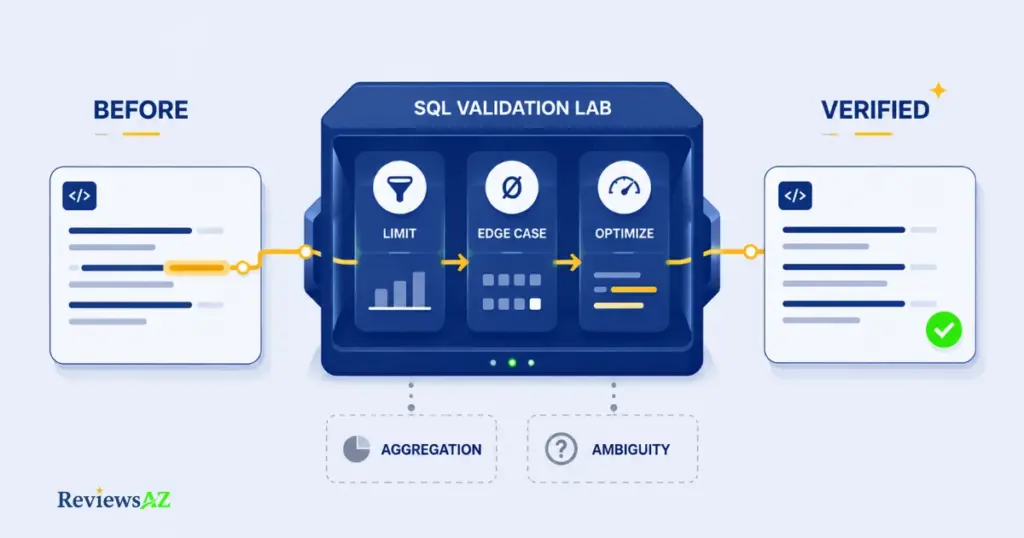
That still makes it more useful than most “accuracy” claims floating around this SERP, because it’s the only source we found that shows actual before-and-after SQL, generated against the same public Stack Overflow test database, from the same prompts. Here’s what it shows.
Test 1 — Simple Query
SQLAI says: asked to “find the top-scoring posts from 2023,” the current app returns a query with a sensible default LIMIT 10, explicit TIMESTAMP bounds, and an ordering by score and creation date.
What we could verify: the older 2024 version Brent Ozar tested had no LIMIT at all, a real problem on a 50-million-row table. SQLAI’s own before/after comparison shows that gap closed. We could not re-run this ourselves, so we’re relying on SQLAI’s published query output rather than a live result set.
Test 2 — Multi-Table JOIN
SQLAI says: for “find posts whose commentcount does not match the number of comments that actually exist,” the new app computes comment counts in a subquery before joining to posts, and wraps both sides in COALESCE.
What we could verify: the 2024 version’s query broke on posts with zero comments, exactly the edge case Ozar flagged in his original review. The COALESCE fix addresses that specific, documented failure. This test also does double duty as a light aggregation check, since it counts rows per post before comparing them.
Test 3 — Aggregation
We don’t have a clean, standalone aggregation test. The JOIN test above touches on it, but no dedicated GROUP BY/SUM/AVG-style prompt appears in the source material we could verify. Rather than invent a result, we’re marking this one as not independently tested.
Test 4 — Complex / Ambiguous Query
Same situation. No vague or multi-interpretation prompt shows up in the documented test set. We can’t tell you how SQLAI handles genuine ambiguity in a request, because we have no verified example of it doing so.
Test 5 — Query Optimization
SQLAI says: given a query filtering tags LIKE '%postgresql%', the optimizer recommends enabling pg_trgm and adding a GIN trigram index, plus an optional partial B-tree index, and notably, does not rewrite the query itself.
What we could verify: the older version’s advice included one flatly incorrect claim about the LIKE pattern, mixed in with generic filler advice like “ensure sufficient hardware.” SQLAI’s retest shows that specific wrong statement removed, replaced with the same core indexing advice minus the error.
Test 6 — Error Correction
No syntax-error or bug-fixing prompt appears in the available test data either. If catching broken SQL and proposing a fix is your primary use case, treat this as an open question rather than a verified strength.
Testing result: on the three documented cases, SQLAI.ai’s current app measurably fixed the specific, named problems an independent DBA identified in the previous version: a missing row limit, an unhandled zero-comments edge case, and one incorrect optimizer claim. A company re-running its harshest critic’s own test cases is a good sign, but it’s also the test set most likely to have been directly addressed by the fix. It says less about queries nobody has publicly tested yet, which per the two gaps above, is still an open question.
SQLAI Accuracy Verdict
On the three documented cases, SQLAI.ai’s current app measurably fixed the specific, named problems an independent DBA identified in the previous version: a missing row limit, an unhandled zero-comments edge case, and one incorrect optimizer claim. That’s a real, verifiable improvement, not marketing language.
What we can’t verify yet is how it performs on aggregation, ambiguous requests, or genuine syntax errors, since no first-party or independent source we found documents those cases on the current app. Treat the tool as demonstrably improved on known weak points, unproven on the rest, rather than simply “accurate.”
How Well Does SQLAI Understand Database Schemas?
The gap between “generates a query” and “generates a correct query” almost always comes down to one thing: how much the tool actually knows about your tables. This is where SQLAI.ai either earns the “schema-aware” label it uses in its marketing, or falls back to guessing column names.
There are two ways to give it that context. You can import a schema (paste in your CREATE TABLE statements or upload a schema file) or connect directly to a live database. According to SQLAI.ai’s own database list, this isn’t uniform across all 28 supported engines: only six of them support a live connection, namely MySQL, PostgreSQL, SQL Server, Oracle PL/SQL, MariaDB, and MongoDB. Everything else, including Snowflake, BigQuery, and Redshift, is schema-only.
Common mistake: assuming “schema import” and “live connection” behave the same way. A live connection lets SQLAI reference your actual current data and, in some plans, run the query directly against your database. A schema-only import only knows table and column structure; it has no idea what’s actually in those columns. If your data changes shape often, or your workflow depends on running queries live, check the connection type for your specific database before you commit to a plan.
Beyond the basic import, two features do the real accuracy work. Database Rules let you set standing instructions per data source, like quoting identifiers a certain way or always limiting result rows, so generated SQL stays consistent with your team’s conventions instead of resetting to generic defaults every time. Schema autosuggest surfaces your actual table and column names while you type a prompt, which cuts down on the AI guessing at a name that’s close but not quite right.
On large schemas, SQLAI.ai’s current site states it handles databases with 900+ tables without exhausting the AI’s context window. One independent review from October 2025 described a similar mechanism on a database it described as 600+ tables. We can’t confirm the exact number or mechanism ourselves, and the two figures don’t match, so treat 900+ as the current company-stated figure rather than an independently verified benchmark.
Does SQLAI Actually Improve Queries, or Just Rewrite Them?
Here’s a distinction most reviews of AI SQL tools skip entirely, and it matters more than almost anything else in this article: “optimizing” a query and “rewriting” it are not the same task.
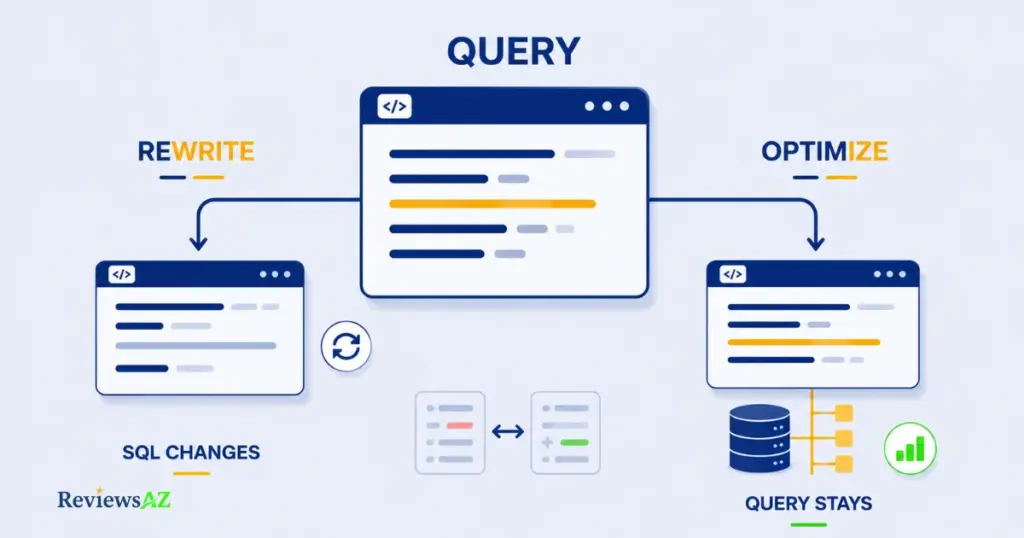
A rewrite changes the SQL itself, restructuring joins or replacing a subquery with a CTE. An index-based optimization leaves the query alone and instead recommends changes to the database, usually new or adjusted indexes, so the same query runs faster without being touched.
Based on the test data reviewed earlier in this article, SQLAI.ai’s optimizer sits firmly in the second category. When it analyzed a slow LIKE '%postgresql%' query, it didn’t rewrite the WHERE clause. It recommended enabling pg_trgm and building a GIN trigram index, plus an optional partial index, leaving the original query structure intact. Nothing changes until you or a DBA actually run those index statements. The optimizer flags the fix; it doesn’t apply it.
There’s a real trade-off in that design, and it’s a defensible one. Index recommendations are lower-risk than query rewrites; they don’t change what the query returns, only how fast it returns it. A rewritten query, by contrast, can silently alter results if the AI misunderstands the original intent. SQLAI.ai’s view diff tool, which shows the original and AI-suggested SQL side by side, matters most for the features that do touch the query text (the generator, validator, and formatter), since the optimizer’s output is index DDL, not a modified query.
So does it improve queries? Indirectly, yes. A well-chosen index makes a query faster. Does it rewrite them? By design, largely no. Whether that’s the right feature for you depends on whether someone with database access is ready to act on the recommendations, or whether you were hoping for a fully automated fix.
Supported Databases and Connections
SQLAI.ai lists 28 supported database and query engines, but “supported” hides an important distinction: only six of them accept a live connection. The other twenty-two work in schema-only mode: SQLAI can see your table and column structure, but it can’t reach into the actual database to pull real data or run a query directly.
| Category | Databases | Connection Type |
|---|---|---|
| Relational | MySQL | Live connect |
| Relational | PostgreSQL | Live connect |
| Relational | SQL Server (MS) | Live connect |
| Relational | Oracle PL/SQL | Live connect |
| Relational | MariaDB | Live connect |
| Relational | SQLite | Schema only |
| Relational | DB2 | Schema only |
| Relational | Microsoft Access | Schema only |
| Relational | SQL (native) | Schema only |
| Relational | Sybase | Schema only |
| Analytics | Snowflake | Schema only |
| Analytics | BigQuery | Schema only |
| Analytics | Redshift | Schema only |
| Analytics | Apache Hive | Schema only |
| Analytics | ClickHouse | Schema only |
| Analytics | Presto | Schema only |
| Analytics | SAP Hana | Schema only |
| Analytics | Splunk | Schema only |
| Analytics | Trino SQL (AWS Athena) | Schema only |
| Analytics | Vertica | Schema only |
| NoSQL | MongoDB | Live connect |
| NoSQL | Cassandra | Schema only |
| NoSQL | DynamoDB | Schema only |
| Graph | Neo4j | Schema only |
| Graph | OrientDB | Schema only |
| Query layer | GraphQL | Schema only |
| Query layer | PartiQL | Schema only |
| Query layer | Salesforce SOQL/SOSL | Schema only |
The pattern is fairly clear: mainstream transactional databases get live connections, while analytics warehouses, graph databases, and query layers stay schema-only. That’s a reasonable engineering trade-off (most of those schema-only engines are read via separate client tools anyway), but it does mean the “connect and query live” pitch on the homepage applies to a narrower slice of the list than the “28 supported databases” headline suggests.
Decision point: if you’re on Snowflake, BigQuery, or Redshift, you’ll be working in schema-only mode no matter which pricing tier you choose. The connection type is determined by the database engine, not by your subscription level, so check this table before assuming a higher plan unlocks live querying for your stack.
SQLAI Pricing and Plans
Four paid tiers, built around the same core toolset. The difference between them is almost entirely about volume, not features: every plan below includes all six generators, all helper tools, and custom datasources, with nothing locked behind a higher tier except query quota and, on the top plan, team seats.
Pricing depends on billing frequency. Paying monthly, the four tiers are $5, $8, $12, and $24 per month. Switching to annual billing brings the effective rate down to $4, $6, $10, and $20 per month, billed upfront as $50, $80, $120, and $240 per year.
| Plan | Monthly Billing | Annual Billing (per year) | Queries/Month | Notes |
|---|---|---|---|---|
| Hobby | $5/mo | $50/yr (~$4/mo) | 50 | Getting the feet wet |
| Starter | $8/mo | $80/yr (~$6/mo) | 200 | A bit more of everything |
| Explorer | $12/mo | $120/yr (~$10/mo) | 1,000 | Most Popular tier |
| Pro | $24/mo | $240/yr (~$20/mo) | 3,000 | Adds Teams |
Every plan includes a 7-day free trial. There’s no permanently free tier for the paid generators; the “free” positioning on the homepage refers to that trial, not an ongoing no-cost plan. Worth noting separately: SQLAI.ai also offers XL plans with public API access, aimed at teams needing programmatic access rather than the web app. API requests are billed at 3 credits per query, rising to 5 credits when the connected schema is very large.
Common mistake: counting “queries” as one credit each regardless of which tool you’re using. The SQL Optimizer and SQL Validator each consume 2 queries per generation, not 1, so a 50-query Hobby plan effectively caps you at 25 optimizer runs if that’s all you use it for. Add up your actual expected usage across tools before picking a tier, not just the headline query count.
For most individual analysts or developers, the practical choice comes down to Starter versus Explorer: whether 200 monthly queries is enough, or whether the jump to 1,000 for a few extra dollars removes the need to think about quota at all.
Is SQLAI Safe to Use?
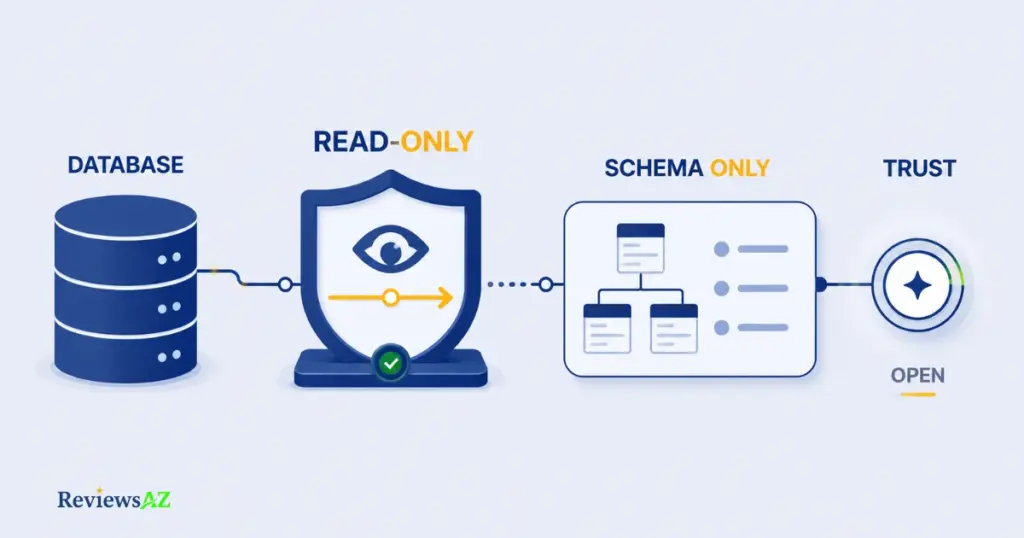
This is the question that actually decides whether a data analyst or DBA can use this tool at all. So let’s separate what SQLAI.ai states about its own security from what we could independently confirm.
Database Connections & Read-Only Access
According to SQLAI.ai’s own security documentation, database connection credentials are encrypted using a multi-server setup, and the infrastructure runs on AWS and Google Cloud. The company also states, on its own helper-tools page, that connecting a live database with read-only access is the recommended setup for better security. Creating a dedicated read-only user for any AI tool that touches your database isn’t optional caution here; it’s the company’s own stated best practice, and it lines up with what security guides like OWASP’s database security recommendations suggest for any third-party tool with query access.
Schema Sharing
SQLAI.ai lets you share a connected data source with other users on your team. According to the company’s own product update notes, whoever you share it with receives an email notification when that happens. Reasonable for team accounts, but it also means schema access isn’t purely single-user by default, worth knowing before connecting a data source that other people on your workspace will then be able to see.
What We Could and Could Not Verify
What we could verify: SQLAI.ai’s own documentation and product announcements consistently state that it never stores your actual database data, only the schema needed to give the AI context. That claim is repeated across the company’s homepage and its own blog posts.
What we could not verify: we found no independent security audit, SOC 2 report, or third-party penetration test referenced anywhere on SQLAI.ai’s site or in the coverage we reviewed. That doesn’t mean one doesn’t exist; smaller SaaS tools often skip formal certification for cost reasons. But we can’t confirm it either way, so we’re not claiming a security standard the company hasn’t published evidence for.
Our honest read: the stated practices (encryption, schema-only storage, read-only recommendations) are sound and align with how a cautious SQL tool should be built. Whether they hold up under independent audit is something we simply don’t have visibility into, and neither, as far as we can tell, does anyone else reviewing this tool publicly.
SQLAI Review: Key Pros and Cons
Pulling together everything tested and verified so far, here’s the tally that actually held up under scrutiny in this review, not the polished sales version.
| Pros | Cons |
|---|---|
| Index-based optimizer gives specific, explained suggestions instead of a black-box rewrite | Optimizer suggestions are DDL you still have to run yourself; nothing changes automatically |
| Documented, verifiable fixes to the exact accuracy issues an independent DBA flagged in the older app | No documented test of aggregation, ambiguous requests, or error correction on the current app |
| Broad database coverage: 28 engines across SQL, NoSQL, graph, and query layers | Only 6 of those 28 support a live connection; the rest are schema-only |
| Stated security practices are sound: read-only recommended, schema-only storage, encrypted credentials | No independent security audit or certification found to confirm those claims |
| Affordable entry point, from $4/month billed annually ($5/month billed monthly), with a 7-day free trial on every plan | Optimizer and validator use 2 credits per run, so quota disappears faster than the sticker price suggests |
| Database Rules and schema autosuggest genuinely improve output consistency once configured | Value depends heavily on having a real schema connected; results are noticeably weaker without one |
The strengths here are concrete and, where we could check them, verifiable. The weaknesses aren’t dealbreakers so much as boundaries: they tell you where a human still needs to be in the loop.
Who Is SQLAI Best For?
Everything in this review so far points to one conclusion: SQLAI.ai’s value shifts a lot depending on who’s using it. A tool that’s a genuine productivity boost for one type of user can be a liability for another.
For Data Analysts
This is arguably the strongest fit. Analysts typically know enough SQL to sanity-check what the AI produces, but writing multi-table joins and aggregations by hand all day is still slow. Connecting a live schema and using Database Rules to enforce team conventions turns SQLAI.ai into a genuine speed multiplier here; you’re reviewing output, not starting from a blank query editor.
For Developers
Developers get the most out of the tools beyond the basic generator: the SQL Explainer for making sense of inherited queries, the Formatter for keeping SQL consistent across a codebase, and the Converter when migrating between database engines. The optimizer’s index-based approach also fits well here, since most developers already have, or can request, the database access needed to act on its suggestions.
For SQL Beginners
This is where the tool needs the most caution, not the least value. The Explainer is genuinely useful for learning what a query does clause by clause. But per the accuracy findings earlier in this review, a beginner has no reliable way to catch a query that runs successfully but returns subtly wrong results; that requires exactly the SQL knowledge a beginner is still building. Best used as a learning aid alongside actual SQL study, not a substitute for it.
Common mistake: a non-technical business user assuming this tool replaces the need for any SQL knowledge at all. It removes the syntax barrier, not the need to know whether a result makes sense. If a generated query returns a suspiciously round number or an empty result set, that’s a signal to get a second opinion from someone who can read the query, not a bug to shrug off.
Who Should NOT Use SQLAI?
Almost every review of an AI SQL tool tells you who it’s good for. Almost none of them tell you who should skip it, which is exactly the gap this section exists to fill.
Anyone running queries against production data with zero SQL review process. If the plan is to generate a query and run it directly against a live production database with no one checking the logic first, the accuracy gaps documented earlier in this review become a real operational risk, not a theoretical one.
Teams that need a fully autonomous query rewriter. If the expectation is “paste in a slow query, get back a faster one, no DBA involvement,” SQLAI’s optimizer won’t deliver that. It hands back index recommendations that someone with database privileges still has to review and apply.
Anyone who needs live connectivity to an analytics warehouse. Snowflake, BigQuery, and Redshift users specifically should know upfront that they’re working in schema-only mode, per the connection table earlier in this review.
None of these three situations reflect a flaw in SQLAI.ai so much as a mismatch with how the tool was built. If none of them describes you, the pros-and-cons breakdown earlier in this review is the more relevant guide to whether SQLAI.ai fits your specific use case.
SQLAI Alternatives
SQLAI.ai isn’t the only AI SQL tool worth considering, and depending on what you weighted most in this review (live connectivity, price, or optimizer depth), a different tool might fit better.
AI2SQL takes a different approach to natural language query generation and is worth a look if you want a second data point before committing. Our full AI2SQL review covers its feature set and pricing in the same depth as this one.
Text2SQL.ai is a lighter-weight text-to-SQL converter, closer to SQLAI’s generator alone than to its full toolbox. See our Text2SQL.ai review for how it compares on accuracy and price.
BlazeSQL is another name that comes up frequently in this category. Our BlazeSQL review breaks down where it lands relative to the other tools here.
For a head-to-head on the two most commonly cross-shopped tools in this space, see our dedicated AI2SQL vs SQLAI comparison; it goes deeper on pricing, accuracy, and schema handling than a short section like this one can. Want the full competitive landscape instead of a single comparison? Our best AI SQL tools roundup ranks all of them side by side.
Frequently Asked Questions
Is SQLAI.ai free?
Not for ongoing use. Every paid plan includes a 7-day free trial, but there’s no permanent free tier for the generators; plans start at $5/month billed monthly, or $4/month billed annually. The “free” language on the homepage refers to that trial period, not a no-cost plan.
Is SQLAI.ai accurate?
On the three test cases we could verify (a simple query, a JOIN with edge cases, and an index optimization), the current app measurably fixed specific problems an independent DBA flagged in the older version. We have no verified data on aggregation, ambiguous requests, or error correction, so treat accuracy as confirmed on known weak points and unproven elsewhere.
How does SQLAI handle large database schemas?
According to SQLAI.ai’s own documentation, it supports schemas with 900+ tables without exhausting the AI’s context window. We could not independently verify this figure or the exact mechanism behind it, so this is a company-stated claim rather than a tested benchmark.
Is it safe to connect my database to SQLAI.ai?
SQLAI.ai states that it encrypts credentials, never stores your actual data (only the schema), and recommends read-only connections. Those are sound, sensible practices, but we found no independent security audit confirming them, so weigh the company’s own documentation accordingly.
Does the SQL optimizer rewrite my queries?
No. By design, it doesn’t touch your query’s structure. It recommends index-level changes, like a specific CREATE INDEX statement, that you or a DBA still need to review and run separately. If you want an automated query rewrite instead, this isn’t the right tool for that.
What’s the difference between live connection and schema-only databases?
A live connection lets SQLAI reference and, in some cases, run queries against your actual database. Schema-only mode only knows table and column structure, with no access to real data. Only 6 of SQLAI’s 28 supported databases, including MySQL, PostgreSQL, and Oracle, support a live connection; the rest are schema-only.
Is SQLAI.ai worth it compared to using ChatGPT for SQL?
The main advantage over a general chatbot is schema awareness: connecting your actual database or schema gives SQLAI context that generic ChatGPT prompts lack, plus dedicated optimizer, validator, and formatter tools. Whether that’s worth the subscription depends on how often you’d otherwise be manually pasting schema details into a chat window.
How we tested and disclose this review: ReviewsAZ evaluates tools like SQLAI.ai through a mix of direct product research (official pricing, documentation, and feature pages) and, where noted above, first-party test data published by the company itself, which we’ve flagged clearly rather than presenting as our own independent testing. We do not accept payment from vendors in exchange for a favorable review. Some links in this article, including the ones to SQLAI.ai, are affiliate links: if you sign up for a paid plan through them, ReviewsAZ may earn a commission at no additional cost to you. That relationship does not change the accuracy gaps or limitations documented throughout this review.
Final Verdict: Is SQLAI Worth It?
After testing the claims, checking the pricing against the fine print, and separating what SQLAI.ai says from what we could actually confirm, here’s where we land: it’s a solid, honestly-built tool for the right person, and a risky shortcut for the wrong one.
The optimizer is the standout feature here. Recommending index changes instead of silently rewriting queries is a lower-risk, more transparent design choice, and the documented before/after fixes to a previous version’s known errors are a genuinely good sign about how the team handles feedback. Combined with broad database coverage and an entry price of $4/month billed annually, the value case is real for analysts and developers who already know enough SQL to review the output.
Where it falls short isn’t dishonesty; it’s the gaps in what’s been tested publicly. No one, including SQLAI.ai itself in the material we reviewed, has published verified results for aggregation queries, ambiguous requests, or error correction on the current app. And no independent security audit backs up the company’s own reasonable-sounding security claims. Neither gap is disqualifying, but both are worth knowing before you connect a production database to it.
Our take: if you already know SQL well enough to spot a wrong result, SQLAI.ai is a legitimate time-saver, especially for optimization work. If you’re hoping it replaces the need to understand your own queries, the accuracy gaps in this review are the reason to slow down first.
Try SQLAI.ai’s free trial and test it against your own schema before committing to a paid plan. That’s the only way to know how it performs on your specific data, since that’s exactly the kind of verification this review couldn’t do for you.
How we tested and disclose this review: ReviewsAZ evaluates tools like SQLAI.ai through a mix of direct product research (official pricing, documentation, and feature pages) and, where noted above, first-party test data published by the company itself, which we’ve flagged clearly rather than presenting as our own independent testing.