Do You Still Need to Learn SQL in the Age of AI? What Actually Matters

Do you still need to learn SQL in the age of AI? If AI can generate a working query in seconds, it is fair to wonder whether spending hours learning SQL is still a smart investment. When a chatbot can write the JOIN, GROUP BY, and WHERE clause for you, why memorize syntax it can produce faster?
The honest answer is yes, but not in the way SQL used to be taught.
Running a query and getting a result are not the same thing as knowing that result is correct. AI can draft SQL from a natural-language prompt, but it cannot reliably tell you whether a join has silently multiplied your rows, whether a filter matches the business definition of “active customer,” or whether the number it returned actually answers the question you meant to ask.
That is the real shift AI has introduced. The work is moving from writing every query by hand to understanding, checking, and improving the SQL AI helps produce. Learn enough SQL to challenge the logic; let AI handle more of the syntax and repetition.
This guide looks at what SQL is still worth learning, where AI genuinely speeds things up, the ways AI-generated SQL can go wrong, how to validate it before you trust it, and how much SQL makes sense for different kinds of users.
AI as an SQL Copilot, Not a Replacement
Is AI replacing SQL, or replacing the part of SQL you used to type by hand? That is the more useful question, because the usual “SQL is dead” versus “nothing has changed” debate misses where the work is actually moving.
AI is very good at drafting. Give it a clear question and the relevant schema, and it can often turn that request into syntactically valid SQL, choose a reasonable first-pass join, and produce a starting point faster than most people can write one from scratch.
Remembering exact syntax, looking up function names, and producing repetitive boilerplate are mechanical tasks. AI is good at those.
Meaning is different.
AI does not automatically know that “active customer” has a specific definition at your company, that a particular join will multiply rows because a table contains duplicate keys, or that a metric should exclude test accounts. Those are decisions about the data and the business, not just SQL syntax.
In practice, most AI-assisted workflows sit somewhere in between. You might let AI write the first draft and then inspect every join, or use it for nearly everything and step in when the result looks suspicious. How far you lean on it depends on how often you work with data and how costly a wrong answer would be.
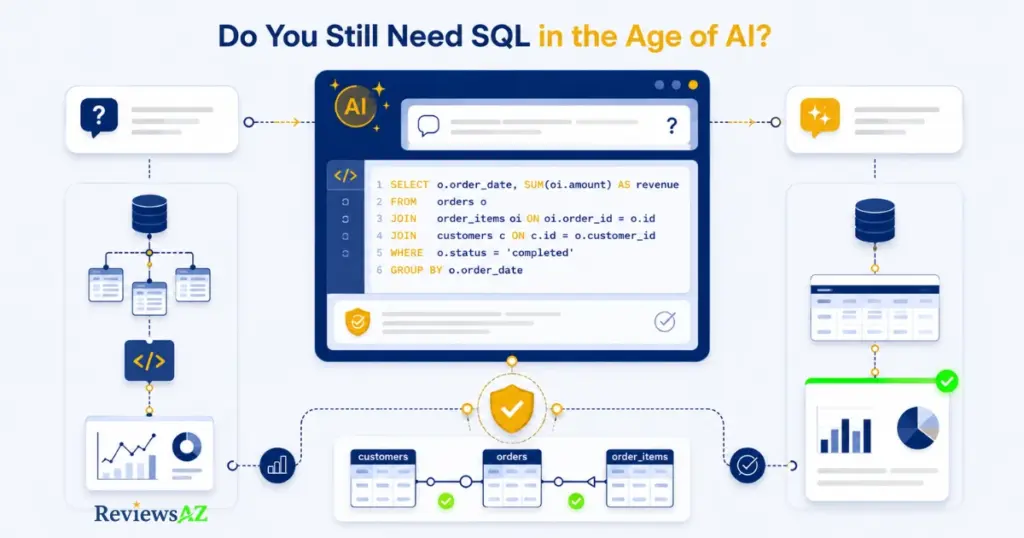
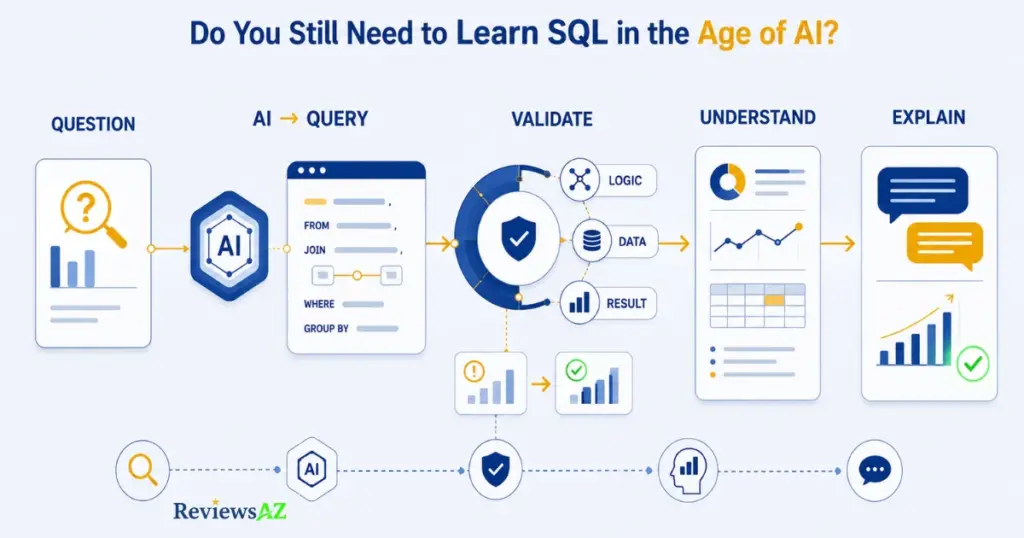
A typical workflow is simple:
- A question comes in.
- AI drafts SQL against the available schema.
- You check that the query matches the question and the data.
- Only then do you trust and use the result.
That third step is the one that is easy to skip. The query runs, the number looks plausible, and everyone moves on. The problem is that a syntactically valid query can still be answering the wrong question.
That is also why comparing individual AI SQL tools matters less than understanding this workflow. The best AI SQL tools make schema context, iteration, and validation easier, but they do not remove the need to think about what the query is actually doing.
What Is Text-to-SQL AI and How Does It Work?
Text-to-SQL AI takes a request in plain language, such as “show me total revenue by region for last quarter,” and turns it into SQL. In tools that can execute the generated query, the system can then run it and return the result.
The basic flow is easier to understand than it sounds:
- You submit a question in natural language.
- The system looks at the relevant database schema: tables, columns, and relationships.
- It combines that schema with your request and any business context you provide.
- It generates a SQL query.
- The query can be executed and the result returned when the workflow supports execution.
Why context matters: The way you phrase a question is only part of the story. A model that knows that
ordersjoins tocustomersthroughcustomer_id, or that “region” lives in a separate lookup table, has a much better starting point than one that has only the wording of the question.
Schema context and business definitions can change the quality of the generated query substantially. Two people can ask exactly the same question and get different SQL when one system has better information about the database and the other does not.
That distinction becomes more important as the task gets more complicated. A simple lookup may be fairly forgiving. A multi-table analysis with business-specific metrics is not.
AI-Generated SQL Risks and Limitations
A query can execute cleanly, return a full result set, and still be wrong. That gap between “runs successfully” and “answers the question correctly” is where many of the most important AI-generated SQL risks and limitations appear.
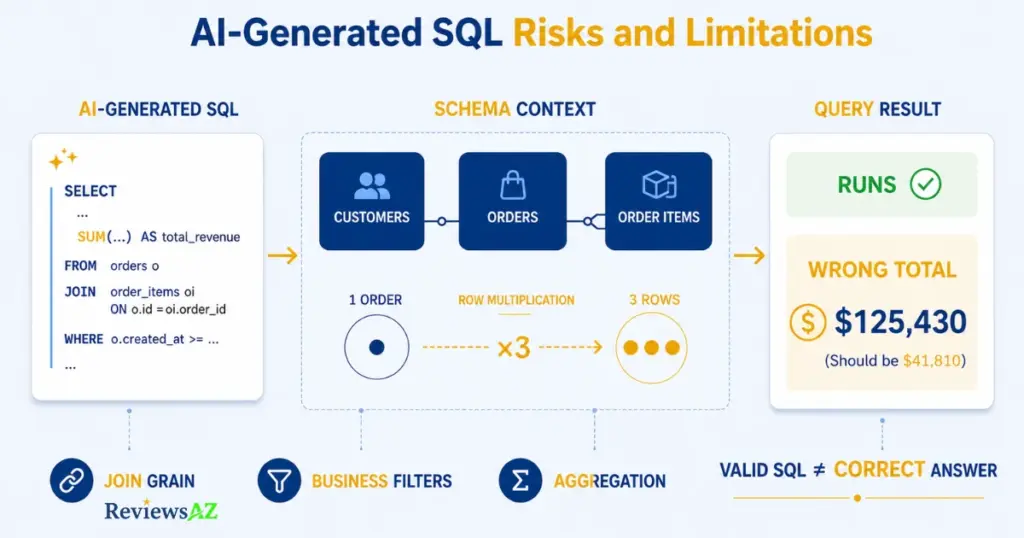
The most common problems tend to fall into four groups:
- Join errors. Joining tables at the wrong grain can duplicate rows before an aggregate ever runs.
- Filter errors. A
WHEREclause can match the words in the prompt while missing the business definition behind them. Treating “active” as “not deleted” instead of “purchased in the last 90 days” is a simple example. - Aggregation errors. Summing or averaging over a duplicated row set, or grouping by the wrong column, can change the result while leaving the SQL perfectly valid.
- Schema or context errors. A column can look right by name and still mean something different from what the model assumed.
Here is what the join problem looks like in practice. Suppose an orders table is joined to an order_items table, and the goal is to calculate total spend by customer.
SELECT c.customer_id, SUM(o.amount) AS total_spent
FROM customers c
JOIN orders o ON c.customer_id = o.customer_id
JOIN order_items oi ON o.order_id = oi.order_id
GROUP BY c.customer_id;
If an order has three line items, that order’s amount gets counted three times before the SUM runs. The query still executes. It still returns a number for every customer. Nothing in the result necessarily tells you that the totals are inflated.
The trap: A query can run perfectly and still multiply the numbers. When an aggregate is involved, check the grain of the data before trusting the result.
This is not a failure unique to one AI assistant or one Text-to-SQL product. It is a broader analytical problem that appears whenever SQL is generated from an underspecified request or incomplete context. The important habit is to treat semantic correctness as a separate check from “did it run?”
When generated SQL becomes part of application code rather than one-off analysis, another class of risk appears: injection and access-control problems if inputs are handled unsafely or permissions are too broad. That is a narrower application-security concern than the analytical issues discussed here. OWASP’s SQL injection prevention guidance covers parameterized queries and safe query construction, while the broader human-oversight principle is addressed by the NIST AI Risk Management Framework.
Debugging AI-Generated SQL
“Does this query run?” is not the best first question.
“Does this answer what I actually meant to ask?” is better.
A quick validation pass can catch many of the problems above. Start with the grain: what does one row represent? Then look at the joins and ask whether any of them can multiply those rows. Check the filters against the actual business definition, not just the wording of the prompt. Finally, make sure the grouping and aggregation happen at the level you intended.
The result itself deserves a sanity check too. Before you trust the number, ask whether its shape makes sense. If you expected one row per customer and suddenly have several rows per customer, that is a useful warning sign.
Run that kind of check against the query above, starting with the grain, and the inflated total becomes much easier to spot before it reaches a report.
Which SQL Fundamentals You Still Need to Master (Joins, GROUP BY, CTEs)
You do not need to memorize everything SQL can do. A lot of beginners get stuck because they assume that “learning SQL” means learning every function, every dialect quirk, and every performance trick before they can do anything useful. It does not.
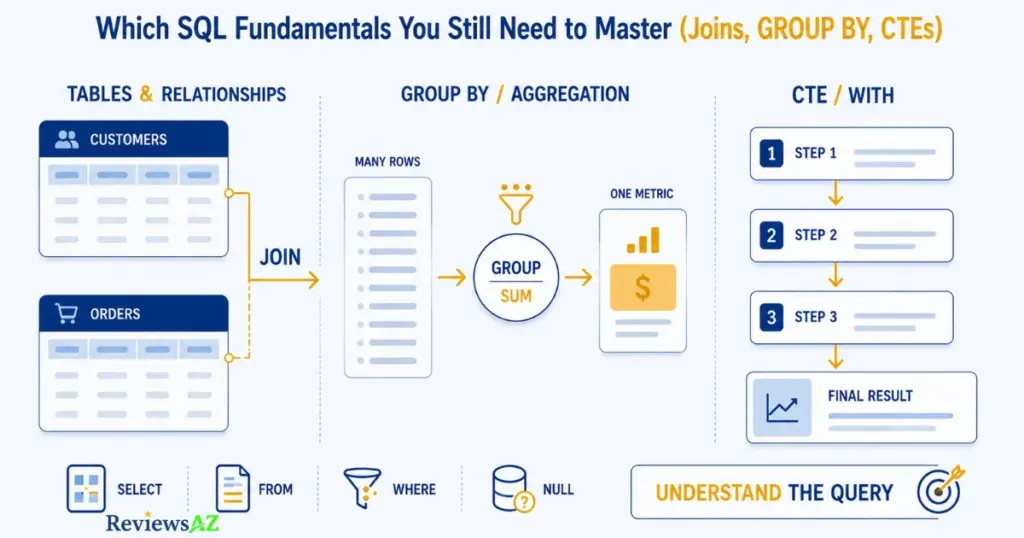
A relatively small set of concepts gives you most of what you need to read a query, question it, and catch obvious mistakes.
Must know: SELECT, FROM, and WHERE for filtering; JOIN for combining tables; GROUP BY and HAVING for aggregation; and how NULL behaves. These are the foundations that let you look at AI-generated SQL and understand what is happening to the rows.
Learn next: Common Table Expressions, or the WITH clause, which breaks a complex query into named steps instead of burying everything inside nested subqueries. CTEs are useful not just because they can structure a query, but because they make the logic easier to follow and audit.
Learn as needed: window functions, basic query performance, and dialect-specific features. These are useful skills, but you can pick them up when a real task calls for them rather than treating them as a prerequisite for working responsibly with SQL.
What to learn first: Focus on the concepts that help you reason about rows, relationships, filters, and metrics. Syntax that AI can autocomplete is lower priority than understanding what the query is actually doing.
That is why spending your first weeks memorizing syntax variations across database systems can be less useful than becoming comfortable with joins and aggregation. A missed join condition or an aggregate calculated at the wrong grain can change the numbers people act on even when every function in the query is valid.
Once joins, grouping, and CTEs feel comfortable, optimizing SQL queries with AI becomes a much more useful next step. You can ask the same assistant that helped write the query to explain why a slow one is slow, then judge whether the explanation makes sense instead of taking it on faith.
Understanding Database Schemas for Better AI Prompts
A major lever for getting better SQL from an AI assistant is not clever wording alone. It is giving the system enough schema and business context to understand the data it is working with.
A database schema is the map: which tables exist, what columns they hold, how tables relate through keys, and what grain each table represents. One row per order. One row per order line item. One row per customer per day.
AI can often infer some of this from table and column names, but inference is not knowledge. A column called status could mean order status, account status, or shipment status depending on the table. Someone who knows the schema can resolve that ambiguity; a model needs the relevant context supplied to it.
Business definitions have the same problem. “Active customer,” “revenue,” and “churn” rarely have one universal meaning. They mean whatever your organization has decided they mean, and that definition often lives outside the database schema itself.
Before asking for a query, it helps to spell out the relevant tables and how they relate, the grain you expect the result to have, any filters implied by terms such as “active” or “recent,” and the metric definition when the request involves a calculation.
This is also the discipline behind chatting with your database using AI. A conversational workflow becomes more useful when the system has consistent access to the relevant schema and definitions instead of trying to reconstruct them from a single sentence every time.
Formal database-design training is not the requirement here. You do not need to become a database architect just to communicate effectively with an AI system. The goal is simpler: describe your data clearly enough for the AI to reason about it without having to guess.
Do You Still Need to Learn SQL in the Age of AI? What Data Analysts Still Need to Know
Yes. In fact, the case for analysts is stronger than it is for casual users.
Analyst work is rarely a single question with an obvious answer. It is iterative. A stakeholder asks something, the first query raises another question, an assumption needs testing, a number looks strange, and suddenly you are debugging what produced it.
AI can speed up every part of that process, but someone still has to decide what to ask next. That means understanding query logic well enough to modify the draft rather than simply reading whatever answer the system produces.
The analyst’s value has shifted rather than disappeared. Typing perfect syntax was never the scarce skill. Knowing which question to ask, which filters matter, and whether the result makes sense given the data has always mattered more.
Now AI can automate more of the mechanical work. That makes the judgment around the result even more important. You still need to catch a join that is inflating a total, notice when a metric definition does not match what a stakeholder meant, and explain why a number is what it is when someone asks.
That last part matters more than it might seem. An analyst who hands over a number they cannot explain because AI generated the query puts stakeholder trust at risk. “The AI generated it” is not a useful explanation when the number turns out to be wrong.
The workflow can still be simple: a question comes in, AI or the analyst drafts the query, the analyst checks the logic against what they know about the data, and then explains the result to the stakeholder. AI can help at several points in that loop, but the responsibility for understanding the result does not disappear.
None of this means mastering every advanced SQL feature. The depth an analyst needs depends on how often they work with data and how much a wrong number would cost. For analysts, the best AI SQL tools for data analysts are often the ones that make this validation process easier rather than the ones that try to hide it.
Do Non-Technical Users Still Need SQL?
Someone in marketing wants to know how a campaign performed. A few years ago, that might have meant learning enough SQL to query the data directly or waiting for an analyst to get to it. Today, they can use AI SQL tools for non-technical users and ask the question in plain language.
Does that person still need SQL at all?
Sometimes, not much. The bigger question is what is at stake.
For an occasional, low-stakes question, using a natural-language tool is often reasonable. You may not need to know how to write the query, as long as you have enough data literacy to sanity-check what comes back. Does the number look plausible? Does a follow-up question produce a consistent answer? That is a lower bar than writing SQL, but it is not zero.
The more often the question comes up, or the more a decision depends on it, the more useful SQL understanding becomes. Someone pulling the same metric every week benefits from knowing that a bad join can inflate a total, that “customers” and “active customers” are different populations, and that a confident answer tells you nothing about whether the underlying logic is right.
Chat with Your Database Using AI
Conversational chat-with-your-database tools genuinely shine in this setting. They lower the barrier to asking recurring, plain-language questions against a database without forcing every user to write SQL by hand.
That can be a real advantage for non-technical teams that would otherwise have to wait for someone else.
The downside is just as straightforward: convenience can make it tempting to treat every fluent-sounding answer as correct. The tool does not become more reliable simply because the response sounds confident. The validation habit around it still matters.
Before you trust the answer: ask yourself whether you would notice if the number were wrong before it caused a problem. The more consequential the answer, the more carefully you should check it.
Frequently Asked Questions
The specifics below cover what people search for once they’ve already decided the bigger issue matters: do you still need to learn SQL in the age of AI, or has AI quietly made that skill optional? The short answers fill in the details – how much SQL is actually enough, where AI-generated queries tend to go wrong, and how much you need to know depending on how often you touch data.
Do you still need to learn SQL if AI can write it?
Yes. AI can draft the syntax, but it cannot verify on its own that the logic matches what you meant to ask. Understanding SQL is what lets you catch a query that runs successfully but returns the wrong answer.
How much SQL should you learn in the age of AI?
Enough to read, question, and validate a query, not necessarily enough to write every query from scratch. Joins, GROUP BY, and CTEs are a useful starting point because they are central to reading and validating analytical SQL.
What SQL fundamentals should beginners still learn?
Start with SELECT, FROM, and WHERE for filtering; JOIN for combining tables; GROUP BY and HAVING for aggregation; and how NULL behaves. CTEs are worth learning next because they make complex queries easier to read and audit.
Can AI-generated SQL be wrong even when it runs successfully?
Yes. A database can verify that a query is valid enough to execute, but it cannot determine whether the query matches the business question you intended to ask. A query running without errors is not proof that the answer is correct.
How can you validate AI-generated SQL?
Check the data grain, inspect the joins for row duplication, verify that filters match business definitions rather than keywords, confirm the aggregation logic, and compare the result’s shape against what you would realistically expect.
Should data analysts still learn SQL if they use AI tools?
Yes. Analysts still need enough SQL to modify queries, debug unexpected results, test assumptions, and explain their numbers to stakeholders. AI can speed up the work, but it does not remove the need to understand the logic.
Do non-technical users need to learn SQL to use AI database tools?
Not necessarily full SQL, but basic data literacy still matters. The more often a question is repeated, or the more a decision depends on the answer, the more important it becomes to understand and sanity-check what the system returns.
Related Posts:
What Is Text-to-SQL AI and How Does It Work?
How to Generate SQL Queries with AI
AI2SQL vs ChatGPT for SQL
Final Decision: What Should You Do Differently?
Learn SQL, but not the version of “learning SQL” that existed before AI could draft queries for you.
The goal has shifted from memorizing syntax to reasoning about data: understanding what a query is doing, inspecting what AI hands you, and deciding whether the result deserves to be trusted.
How much SQL you need depends on what you do with data and how much a wrong number would cost.
| User profile | SQL depth to aim for | What AI can reasonably handle | What you still have to verify |
|---|---|---|---|
| Occasional, low-stakes user | Enough to sanity-check a result | Drafting the full query from a plain-language question | Whether the result matches the question, expected grain, and basic business context |
| Data analyst / recurring user | Core fluency: joins, GROUP BY, CTEs | Drafting, debugging, and speeding up iteration | Query logic, filter definitions, and the reasoning behind the number |
| Advanced technical / production role | Deeper SQL and systems knowledge | Drafting and explaining options, not deciding | Correctness at scale, performance, and downstream impact |
None of these roles get to skip validation. Before accepting an AI-generated query, state in plain language what grain you expect, how the tables should join, which filters matter, and how the metric is defined. Then check whether the SQL actually matches those assumptions and whether the result looks the way you would expect.
The more often you work with data, and the more a wrong answer matters, the more SQL understanding you should keep in your toolkit.
Learn enough SQL to understand and challenge what AI produces. Let AI handle more of the syntax and repetition. Keep the judgment for yourself.