Codex Review: Is OpenAI’s Coding Agent Actually Worth Using?

Search for a Codex review today, and the results blur together a discontinued 2021 API, a terminal agent, an IDE extension, a desktop app, and a code-review feature. All of them share the same name. That naming confusion is actually where evaluating whether current Codex deserves a place in a real development workflow needs to start.
The distinction matters because the current product serves a substantially different role than the 2021 API ever did. That earlier Codex was a standalone code-completion model, later retired. Current Codex is an agentic system: it can read a repository, plan changes across multiple files, execute commands in a sandbox, and review pull requests, all under access and usage economics tied to ChatGPT plans, credits, and API keys that keep shifting.
Most existing coverage treats Codex as a single feature to praise or dismiss. This review treats it as a workflow system instead, and it separates claims by evidence type: what OpenAI officially states, what its documentation confirms, what users report from hands-on use, and what simply cannot be confirmed right now.
The goal by the end isn’t a verdict of “best” or “worst.” It’s a clear enough picture of Codex’s surfaces, costs, accuracy limits, and security boundaries that a developer or team can decide, for their specific workflow, whether adopting it actually makes sense.
Codex at a Glance: What This Review Concludes
Not everyone reading this has time for the full breakdown right now. If that’s you, here’s the shape of the argument this review builds toward, before any of the reasoning behind it.
- Best fit: developers and teams that need scoped agentic coding or code-review assistance, and are willing to keep human verification at the center of the process rather than treating it as optional.
- Where it genuinely stands out: a single workflow that spans terminal, editor, and delegated cloud execution, instead of locking a developer into one interaction style.
- Where it gets complicated: access, usage limits, credits, and exact feature availability shift by plan, model, and surface, which means static figures age faster than most reviews admit.
- The real decision to make: whether the work actually benefits from agentic delegation across CLI, IDE, and cloud, or whether a lighter, editor-first assistant would simply do the job with less overhead.
- On pricing and current status: as of 2026-09-23, OpenAI’s documentation describes Codex as available across ChatGPT plans, with usage governed by plan-specific limits and extendable through credits, alongside separate API-key billing. Numbers should be confirmed again before anyone relies on them.
- One thing worth remembering: current Codex shouldn’t be judged by assumptions carried over from the discontinued 2021 API, and its code-review findings work best as one signal among several, not a replacement for tests and human approval.
Everything that follows exists to justify these six points in detail, starting with a question that trips up more readers than it should: what exactly counts as “Codex” today?
What Is OpenAI Codex? (Understanding the Product Beyond the Name)
The name “Codex” has been recycled for two very different products, several years apart. That’s the first thing worth sorting out before judging whether the current version earns a place in a workflow.
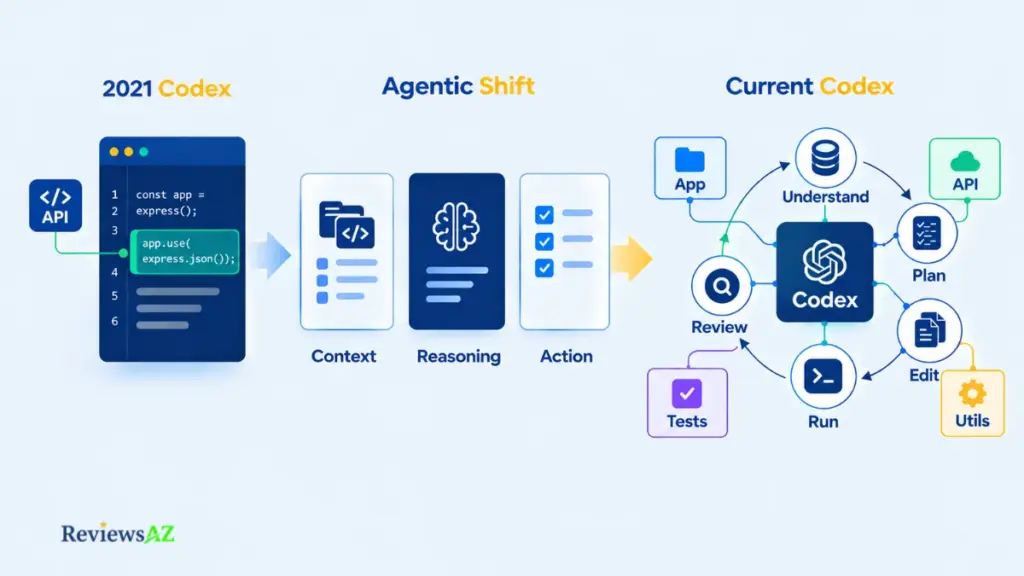
The 2021 Codex API vs. the Current Agentic Product
Current Codex is an agentic coding system, not the original 2021 Codex API. The earlier Codex was a code-completion model OpenAI introduced in 2021, mostly accessed through an API to power tools that suggested or completed code snippets. It was eventually deprecated as OpenAI shifted its underlying models toward broader, general-purpose reasoning.
Current Codex is built on that newer generation of models. Instead of completing a single line of code, it can read repository context, plan a multi-step task, edit multiple files, run commands in a sandboxed environment, and, as later sections cover, review pull requests against custom rules.
Treat any claim about “Codex” from before the agentic relaunch as historical context only. It doesn’t describe what the product does today, and conflating the two is where a lot of confusion still comes from, in reviews, forum threads, and even casual comparisons.
What “Agentic” Means in This Review
“Agentic” means something specific here. The system doesn’t just respond to a single prompt with a single output. It can break a task into steps, decide which files or commands are relevant, execute those steps within defined permissions, and report back on what it did, while a human keeps approval control over how much autonomy it’s given.
Readers comparing this category more broadly may find the AI code assistants landscape useful context, alongside the wider world of AI coding agents Codex sits within.
How Codex Works: CLI, IDE Extension & Cloud (Agentic Capabilities)
A single refactoring task, say, updating a function used across a dozen files, can move through Codex in three different ways. Picking the wrong one for the job is a big part of why early experiences with the product vary so much between developers.
- Codex CLI — close, interactive work. The CLI puts Codex directly in the terminal. A developer describes a task, the agent plans the steps, edits the relevant files, and can run commands, such as tests, inside a sandboxed environment. Because the work happens locally and interactively, this fits tasks where the developer wants to watch each step and intervene quickly if something looks wrong.
- IDE extension — in-context editor work. The same agent runs inside the editor, most commonly Visual Studio Code, without requiring a separate terminal window. The developer stays inside their normal editing flow while Codex works with visible file changes. Supervision is still active here, it just happens through the editor’s diff view instead of terminal output.
- Desktop app and cloud — delegated work. Built for a different pattern: handing off a task and returning later to review the result, rather than watching it unfold in real time. OpenAI’s current product documentation describes the desktop app as a separate interface for managing agent tasks outside the terminal and editor. Exact capabilities around running multiple tasks in parallel should be re-checked against current documentation before publication, since this is an area that has changed as the product matures.
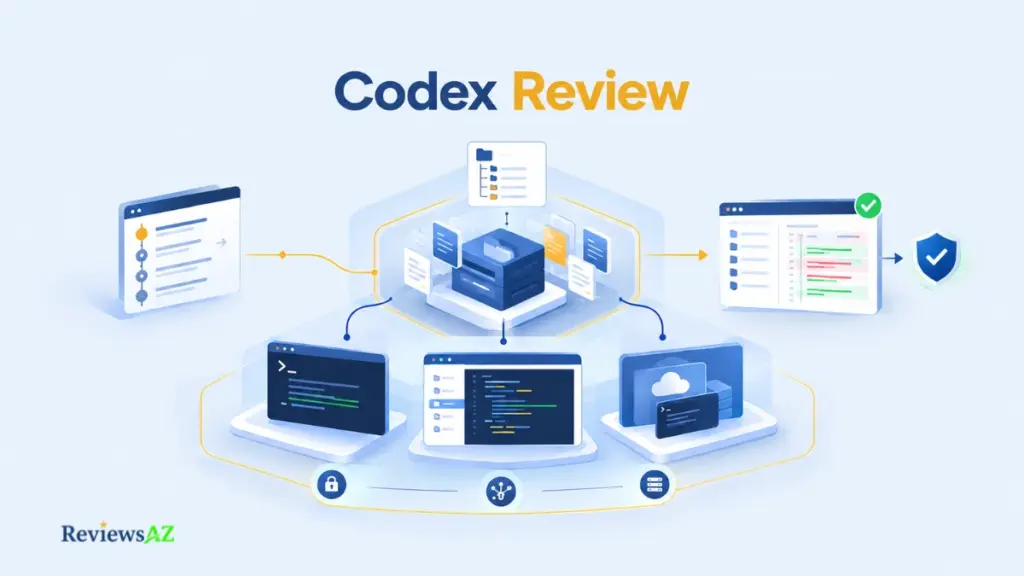
Workflow map: CLI suits close, interactive tasks. The IDE suits in-context editing. The desktop app and cloud suit delegated work the developer checks later. Code review, covered next, applies after any of these produce a change.
What matters more than the interface itself is supervision. The less oversight a task receives while it runs, the more the permission and review questions covered later in this article start to matter. Readers evaluating autonomous or delegated coding tools more broadly may also find the autonomous coding tools like Devin comparison useful context.
Setup follows the access path, not the surface. A ChatGPT plan ties usage to that plan’s included limits, with no separate API key needed. An independent API key follows standard API pricing instead, billed apart from any plan. The CLI itself installs separately either way, then authenticates through whichever path applies. Repository-specific guidance, through a file like AGENTS.md, can shape how the agent behaves once it’s running, which the next section covers in full.
Codex Code Review: What It Can Inspect and How Findings Are Reported
Not every search for “Codex review” means a third-party evaluation of the product. Sometimes it means something narrower: reviewing code with Codex. This section addresses that second meaning directly.
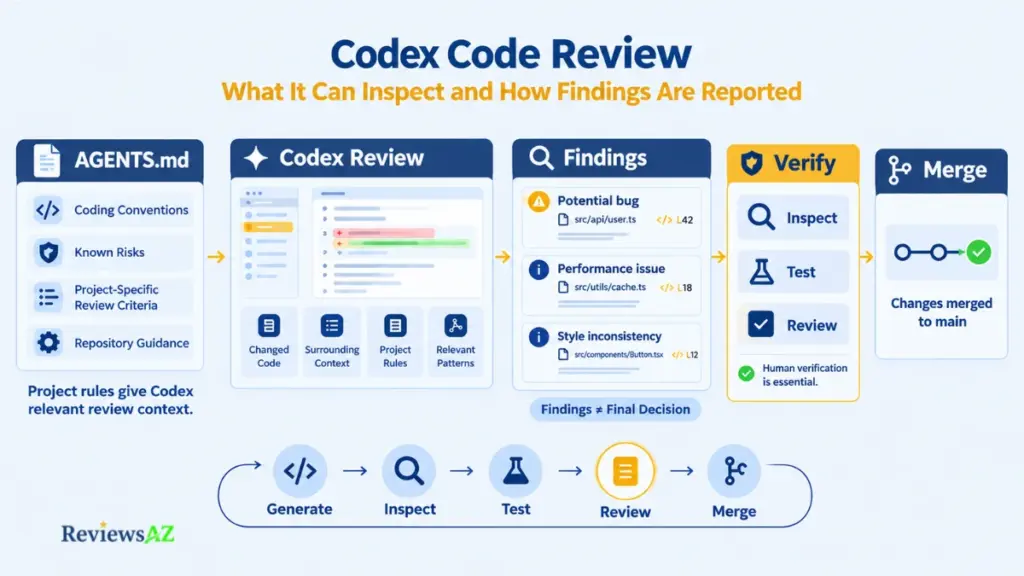
Custom Review Rules with AGENTS.md
Every team carries its own unwritten rules about what counts as risky code, and Codex has no way to know them unless someone writes them down. That’s the gap AGENTS.md is meant to close: according to OpenAI’s developer documentation, the file lets a team provide repository-specific guidance that Codex references when evaluating a pull request. Rather than applying one generic checklist, it’s intended to make review criteria more aligned with a project’s own conventions and known problem areas.
A team that documents its patterns and pitfalls in AGENTS.md gives the reviewer more relevant context to work from. That’s a reasonable expectation based on how the feature is designed, not a guarantee about how any specific review will turn out.
What a Review Finding Represents
When Codex reviews a pull request, it produces findings: flagged issues tied to specific lines or patterns, with an explanation of why something was flagged. According to OpenAI’s documentation, these findings are meant to surface issues a reviewer might otherwise miss, not to replace the review process itself.
Why Findings Are One Layer, Not the Whole Process
A clean automated pass doesn’t mean a pull request is safe to merge. A flagged finding doesn’t automatically mean the code is wrong. The discipline that actually protects a codebase looks the same with or without an AI reviewer in the loop:
Verification loop: Generate → Inspect → Test → Review → Merge. Codex’s findings sit inside the “Review” step, alongside branch protection and required approvals. They don’t replace any of the other steps.
This is sound engineering discipline rather than a feature unique to Codex. Any team introducing an AI reviewer benefits from treating it the same way.
Accuracy, Hallucinations, Security & Permissions
Code that compiles is not the same as code that’s correct. Four different things can go wrong, and only some of them show up quickly.
Four Kinds of Correctness
An AI-generated change can be syntactically correct, logically inconsistent, contextually wrong for the repository it lives in, or technically fine while violating a business rule the model never had access to. A passing compiler or a green test suite confirms the first form of correctness. It says very little about the other three.
User-reported experience, not an independently verified benchmark, suggests these gaps surface more often in unfamiliar codebases, ambiguous instructions, or logic tied to business context the model has no way to know. Exact failure rates for Codex specifically could not be reliably verified at the time of writing, and any figure claiming otherwise deserves scrutiny.
Context, Verification, and Test Requirements
Codex performs better with clear, scoped instructions and relevant repository context than with broad, open-ended requests. Existing test coverage matters more with an agentic tool in the loop, not less, because a change that looks reasonable can still fail in ways only a test suite catches.
Security, Permissions, and the Execution Boundary
According to OpenAI’s current documentation, Codex operates within a permission model covering sandboxed command execution and network access boundaries. The operating principle is straightforward: more autonomy increases the scope of possible side effects, so permission controls should match the risk of the task at hand.
Execution boundary: documented controls describe what the system is designed to restrict. They don’t guarantee every outcome in every environment. Wider permissions raise what’s possible, not just what’s convenient, which is why the scope granted should track the actual risk of the task.
A developer or reviewer approving a change remains the final checkpoint before it reaches production, regardless of how much of the work an agent completed. That single requirement underlies everything else in this section.
Codex Pricing & Token Usage / Rate Limits
What a developer pays for depends on which access path they’ve chosen, and the three paths aren’t interchangeable:
ChatGPT plan → included Codex usage.
Credits → additional eligible usage once the plan’s allotment runs out.
API key → usage-based API billing, independent of any plan.
Plan Access, Credits, and What Changes
Pricing pages for AI tools rarely stay accurate for long, and quoting a fixed number here would likely be wrong within months. What’s more reliable is the structure itself: according to OpenAI’s pricing documentation, Codex is included across multiple ChatGPT plans, with usage limits that vary by plan and model. Exact allotments, tier boundaries, and per-token rates change over time and should be checked directly at the time of publication rather than assumed from this or any other review.
Rate Limits and Task Complexity
Usage isn’t only about how many requests get made. A task touching many files, requiring multiple reasoning steps, or running for an extended period in a delegated cloud context will typically consume more of a usage allotment than a small, scoped request handled locally. Static pricing comparisons age quickly here for exactly that reason; historical figures from older reviews should never be treated as current. The AI coding assistant pricing comparison adds useful context on how this compares across tools.
Codex Review: Pros and Cons
A closer look at this Codex review shows that its strengths are closely tied to the same features that make the workflow more demanding. The ability to work across the terminal, editor, and delegated environments can make Codex useful for more than simple code completion, but it also means developers have more to consider around supervision, permissions, cost, and verification.
The table below puts those trade-offs side by side, so you can see where Codex can add practical value and where its flexibility may come with additional responsibility.
| Pros | Cons |
|---|---|
| Multi-surface workflow lets developers match the tool’s involvement to the task, from close terminal supervision to full delegation. | Behavior isn’t identical across surfaces; risk profile changes meaningfully once work moves to unattended cloud execution. |
| Code review with configurable AGENTS.md rules can surface issues a quick human skim might miss. | Findings are a supplemental signal; treating them as sufficient on their own reintroduces the risk they’re meant to reduce. |
| Documented permission and sandboxing controls let teams scope autonomy deliberately. | Controls reduce exposure but don’t eliminate it; actual outcomes still depend on configuration and oversight. |
| Flexible access across plan, credits, and API key accommodates different usage patterns. | Effective cost varies by model, task complexity, and surface, making spend harder to predict than a flat subscription. |
| Agentic delegation can reduce time spent on repetitive, well-scoped coding tasks. | Output can look correct while missing repository context or business logic it was never given. |
Taken together, the picture is fairly straightforward: Codex has meaningful advantages when you actually need agentic coding, multi-file work, or AI-assisted code review. Those benefits become less compelling when your main requirement is quick inline completion with minimal workflow overhead.
That distinction matters more than any individual feature. The right question is not simply whether Codex has useful capabilities, but whether those capabilities fit the way you write, review, test, and maintain code.
Who Should Use Codex (Use Cases by Audience)
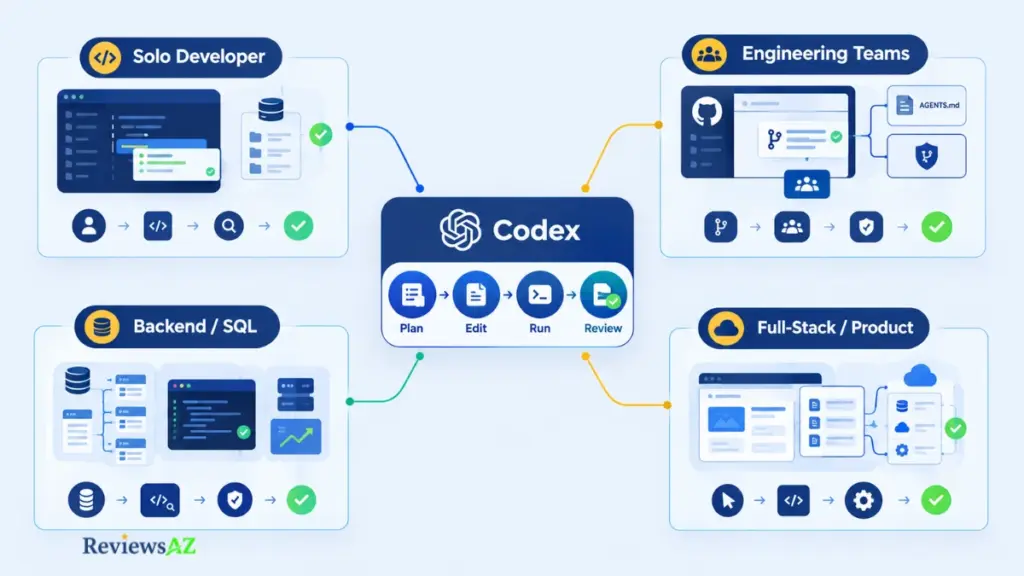
The more useful question isn’t “who should use Codex,” but what kind of work justifies the extra workflow complexity agentic delegation introduces.
- Solo developers and individual engineers. Codex fits offloading repetitive, well-scoped tasks, updating dependencies, writing boilerplate, drafting tests, while keeping direct control over what merges. The CLI or IDE tends to suit this better than heavy cloud delegation, since the developer stays close to each change as it happens.
- Engineering teams and technical leads. Teams get the most value when the code-review capability is configured deliberately through AGENTS.md, and when delegated cloud tasks start with lower-risk work. A technical lead deciding on adoption should weigh review-gate integration and permission scope as seriously as raw productivity gains.
- Backend and SQL-heavy workflows. Generated SQL can be syntactically valid and still wrong for the schema it touches, the indexing strategy in place, or how the query performs against real production workload. None of that shows up by simply running the query once. Developers here may find it useful to pair Codex with dedicated resources on how to generate SQL queries with AI, how to optimize SQL queries using AI, and the risks of AI-generated SQL before trusting agent-written database logic in production. The broader AI database tools for backend developers roundup is relevant for teams building this into a regular workflow. None of this makes Codex a database-specialized tool; it’s a general agent applied to a domain with unusually strict correctness requirements.
- Developers who mainly want lightweight completion. A developer who wants inline suggestions without reviewing multi-file changes or approval prompts is a poor fit for how Codex is designed to work. The same applies to teams without the discipline to enforce review consistently; the safeguards described earlier only function if someone actually uses them.
Codex Alternatives (Brief Comparative Note)
Not every developer evaluating Codex needs an agentic coding system. The more useful distinction isn’t “which tool is best,” but which workflow orientation a tool is built around: editor-first, terminal-first, repository/cloud-agent, or multi-surface agentic.
GitHub Copilot has moved beyond simple inline completion in its current form, adding review-oriented and agent-style features alongside its original editor-integrated experience; its core identity still centers on staying close to the editor. Claude Code shares more conceptual ground with Codex’s CLI, emphasizing terminal-driven, repository-level work. Cursor is an editor built around AI from the start, layering agentic features onto an IDE-first experience.
None of these is a strict upgrade or downgrade relative to Codex. For a full side-by-side breakdown, the Cursor vs Claude Code vs Codex vs GitHub Copilot comparison covers this in depth, with individual evaluations in the detailed Cursor review, the detailed Claude Code review, and the detailed GitHub Copilot review.
Frequently Asked Questions
A few practical questions tend to come up in any Codex review, especially around current pricing, safety, code review, and how well it fits into different development workflows. The answers below address those points directly, while also highlighting where Codex’s capabilities and limitations matter most in day-to-day development.
What is OpenAI Codex, and how is it different from the original 2021 Codex API?
Current Codex is an agentic coding system that can plan multi-step tasks, edit multiple files, execute commands in a sandbox, and review pull requests. The 2021 Codex API was an earlier, now-deprecated code-completion model with none of these agentic capabilities. They share a name but serve substantially different roles.
How does Codex work across the CLI, IDE, desktop/cloud, and code-review surfaces?
The CLI runs Codex as a terminal-based agent close to existing developer tools. The IDE extension brings the same agent into the editor, most commonly Visual Studio Code. The desktop app and cloud/web workflows support delegated tasks that run with less active supervision. The code-review surface separately inspects pull requests using configurable rules.
How much does Codex cost, and how do plan access, credits, token usage, and limits differ?
Codex is accessible through ChatGPT plan access, with usage tied to that plan’s limits and extendable through credits, or through an independent API key billed under standard API pricing. Exact allotments and rates change over time, so current OpenAI pricing documentation should always be checked directly before deciding.
Is Codex safe to use with a real codebase, and what permission controls matter?
Codex includes documented permission controls, sandboxing for command execution, and network access boundaries that let users scope how much autonomy the agent has. These controls reduce risk but don’t eliminate it entirely. Human review before merging remains the necessary final safeguard.
How does Codex code review work, and what role do AGENTS.md rules play?
Codex can review pull requests and generate findings tied to specific lines or patterns. An AGENTS.md file can provide repository-specific guidance that helps align review criteria with project conventions. These findings supplement tests, branch protection, and required approvals rather than replacing them.
Does Codex make mistakes or hallucinate code, and how should the output be verified?
Yes. Like other large-model-based coding agents, Codex can produce output that looks correct while containing logical errors or references to nonexistent functions, particularly in unfamiliar codebases or ambiguous tasks. Existing test coverage and human verification remain necessary regardless of how confident the output appears.
Who should use Codex, and when should a developer consider another coding tool?
Codex fits developers and teams whose work justifies agentic delegation and who are willing to maintain human verification as part of the process. Developers wanting lightweight inline completion without reviewing multi-file changes are likely better served by an editor-first assistant instead.
Related Posts:
AI Coding Assistant for SQL
Claude Code vs Cursor
Cursor vs GitHub Copilot
Final Verdict: Is Codex Worth It?
The real question is what kind of developer or team benefits enough from agentic delegation to justify the added workflow complexity, and who is better off without it.
- Worth it if: the work regularly involves multi-file changes, repetitive scoped tasks, or pull requests that benefit from a configured reviewer, and someone is committed to using the permission and review controls rather than just enabling them.
- Best suited to: developers and teams that treat agentic output as a draft requiring verification, and that want one workflow spanning terminal, editor, and delegated cloud tasks.
- Less suitable if: the main goal is fast, low-friction inline completion without reviewing multi-file changes or managing additional workflow complexity.
- Avoid making it the default if: the team cannot consistently maintain appropriate access, usage limits, permissions, and human review as part of its development process.
Codex isn’t a universal winner over editor-first assistants or other agentic tools. Its value is more specific: it makes sense for workflows where delegation, review-gate integration, and verification are part of the process rather than afterthoughts.