Claude Code Review: Features, Pricing, Security, and What It Actually Reviews

TypeClaude Code Review into a search bar, and you’ll get answers describing at least three different workflows. One is the /code-review command you run from your own terminal. Another is the managed reviewer that comments on GitHub pull requests without you asking. The third is a custom workflow developers stitch together with Claude Code, skills, and CI/CD pipelines. That one isn’t a discrete Anthropic feature at all.
That distinction matters more than most reviews admit. Pricing works differently for each path. Permissions and repository access differ too: a local agent with shell access and a GitHub App scoped to your repo settings are not the same trust boundary. How much human oversight each workflow still requires isn’t identical either.
This review sorts out which Claude Code Review you’re actually evaluating, then works through what’s documented, what independent practitioners have reported, what Anthropic hasn’t published, current pricing and plan eligibility, and where a finding from the tool stops being useful without a human deciding what to do about it. No test suite was run against a live repository for this piece. The goal here is grading the evidence that exists.
What to Know Before Choosing Claude Code Review
- Who is it for?
Claude Code Review is best suited to developers and teams that want repository-aware AI review and can clearly identify the workflow they need, whether that means reviewing a local branch, using managed GitHub pull request review, or building a custom CI or skill-based pipeline. - What is its main strength?
Current documentation supports repository-context analysis, configurable review behavior, and agentic analysis workflows. The exact capabilities and eligibility depend on the workflow, so local and managed review should not be treated as one identical feature. - What is the main limitation?
Cost, permissions, and review coverage vary by workflow. Managed Code Review is billed separately through usage credits, and an AI-generated finding is evidence for a human reviewer to assess, not a replacement for a human merge decision. - What is the key decision to make?
Start by matching the review surface to your repository workflow. Then evaluate cost, control, integration, and review limits. “Agentic” positioning alone does not tell you whether the workflow is the right fit. - How much does it cost?
As of September 2026, Pro costs $20/month ($17/month billed annually), Max 5x costs $100/month, Max 20x costs $200/month, Team Standard costs $25/month ($20/month annually), and Team Premium costs $125/month ($100/month annually). Enterprise costs $20/seat/month when billed annually, plus usage at API rates, with a 20-seat minimum. Managed Code Review is billed separately through usage credits, currently documented at an average of $15–$25 per review, and is available only to Team and Enterprise organizations. It is not available when Zero Data Retention is enabled. - What should you keep in mind about the evidence?
Official capability descriptions and vendor-reported benchmark results do not independently prove that Claude Code Review will detect a particular class of issue in every repository. Its findings are best treated as review evidence that a person still needs to evaluate.
What Is Claude Code Review?
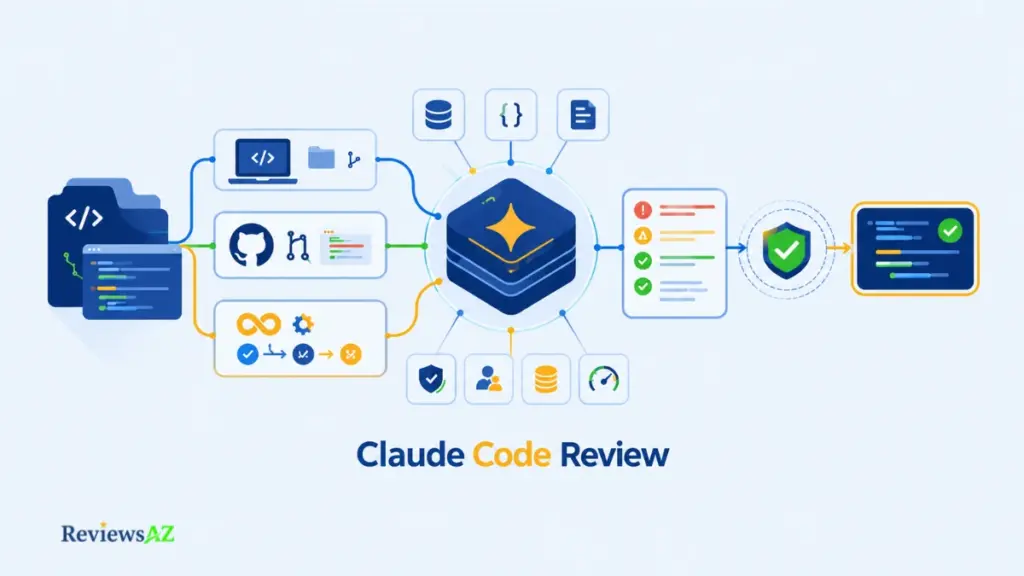
What is Claude Code Review, exactly? It isn’t one product. The phrase covers three workflow paths: the /code-review command you run locally inside a Claude Code session, Anthropic’s managed Code Review that comments on GitHub pull requests automatically, and custom CI workflows built on the Claude Code GitHub Action or GitLab CI/CD.
The lines between them aren’t perfectly clean either. /code-review ultra, for instance, launches a cloud sandbox on Anthropic’s own infrastructure and can post straight to a PR with a flag. Still, which path you’re using changes the cost, the permissions involved, and whether it fits the workflow you already have.
- Local review: /code-review runs inside your own terminal session. No GitHub App, no repository access beyond what your machine already has.
- Managed review: Anthropic’s GitHub App reads pull requests directly and posts inline comments, on Anthropic’s own infrastructure.
- Custom workflow: the open-source Claude Code GitHub Action, GitLab CI/CD, or a review skill/plugin you configure and run on your own CI.
Local /code-review vs Managed Code Review
The /code-review command reviews your branch’s commits ahead of upstream plus anything uncommitted, right in your terminal. As Anthropic’s own Code Review documentation describes it, it’s available to anyone on a paid plan that includes Claude Code, and nothing reaches GitHub unless you explicitly pass a flag to post it.
Managed Code Review works differently: an agent fleet examines the diff and surrounding codebase on Anthropic’s infrastructure once installed as a GitHub App, then posts findings as inline PR comments and a dedicated check run. It’s a research preview, limited to Team and Enterprise subscriptions. Organizations with Zero Data Retention enabled can’t use it at all.
Where Custom Skills, Plugins, and CI Workflows Fit
The third lane skips Anthropic’s managed service entirely. Anthropic’s own open-source GitHub Action, GitLab CI/CD support, and official review skills and plugins let teams run custom review workflows using Claude on their own CI runners, under their own triggers and control.
Anthropic frames this as an alternative infrastructure to the managed service, not a copy of it: the capabilities overlap, but a self-run pipeline isn’t guaranteed to behave identically to Managed Code Review. This is the option for GitLab users, GitHub Enterprise Server setups, or anyone who wants the review behavior without handing pull-request access to a managed AI code assistant.
Claude Code Features: Agentic Coding, MCP, and Benchmark Evidence
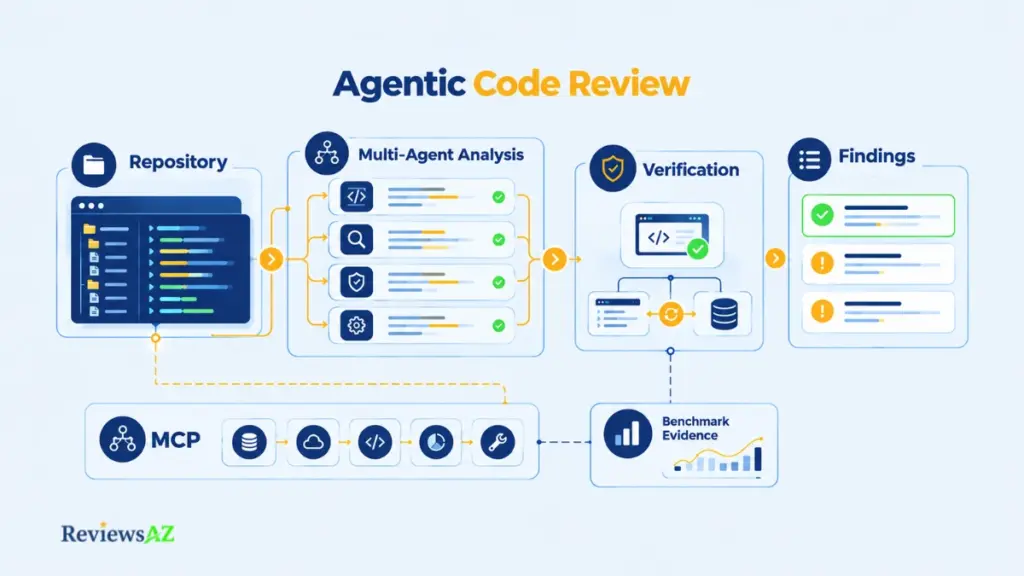
Agentic review means the system doesn’t just pattern-match a diff against a style guide. It reads the surrounding codebase, reasons about what a change is trying to do, and checks whether the result actually behaves correctly before reporting anything.
That is the promise behind Claude Code’s review capability, in both the local /code-review command and the managed GitHub reviewer. What differs is how much of that agentic machinery each version exposes, and how much of what gets marketed as a benchmark actually says something about review quality in your specific repository.
Agentic Coding and Repository Context
Local review and managed review can produce overlapping findings, but they aren’t the same execution model. Both send a fleet of agents through the diff alongside the full codebase around it, looking for logic errors and regressions a line-by-line diff view would miss. Where they diverge is control, context, and where that computation actually runs, covered section by section below. In the terminal, you can tune how much of that machinery runs by passing an effort level, from a fast low-confidence pass up to a deep multi-agent cloud analysis:
/code-review high
/code-review ultra 1234 --fix
That second line escalates to Anthropic’s cloud-based deep review and applies the fixes it finds directly to your working tree. Both commands come straight from Anthropic’s documented command reference; neither is output from a ReviewsAZ test run.
MCP and Database/Tool Connectivity
Claude Code’s Model Context Protocol support lets it connect to databases, issue trackers, monitoring tools, and internal APIs when you’re working with it directly in a session. That doesn’t carry over to Managed Code Review’s automated pipeline: the hosted reviewer reads your diff, your codebase, and only the CLAUDE.md and REVIEW.md files you provide. It doesn’t pull in your ticket tracker or query your database on its own. Run /code-review inside an interactive session with MCP servers already connected, though, and that additional context is available to it.
Multi-Agent Review and Verification
Multiple agents look for different issue classes in parallel, then a separate verification step checks each candidate finding against actual code behavior to filter out false positives before anything is reported. What survives verification is tagged by severity, from an Important bug worth fixing before merge down to a minor Nit, rather than dumped as one undifferentiated list.
Anthropic’s Internal Review Results
Anthropic reports that internal PR review coverage across its own engineering org rose from 16% of pull requests to 54% after rolling out Code Review. That’s a real number, self-reported from Anthropic’s own repositories rather than measured by an independent third party, and it says nothing about the lift a different codebase would see. The same source puts the average managed review at around 20 minutes end to end. That’s a useful planning figure, though it’s still Anthropic’s own number rather than one anyone else has verified.
Evidence Note: Anthropic reports increased review coverage and other internal results for Claude Code Review. These figures provide useful context, but they should be treated as vendor-reported evidence rather than independent proof of performance on every repository.
| Capability | Local /code-review | Managed Code Review |
|---|---|---|
| Repository-aware analysis | Yes | Yes |
| Parallel multi-agent review | Yes (scales with effort level) | Yes |
| Verification step (filters false positives) | Yes | Yes |
| MCP / external tool context | Yes, if the session has MCP servers connected | No — reads only CLAUDE.md / REVIEW.md |
| Runs on | Your own machine | Anthropic’s infrastructure |
Claude Code Terminal & IDE Integration
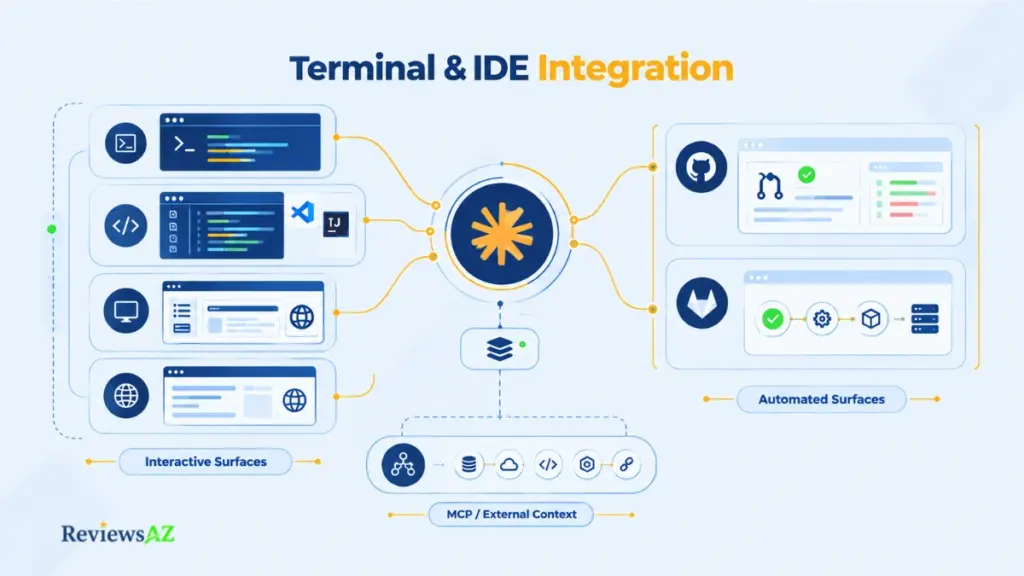
Claude Code started as a terminal tool, and the /code-review command still lives there. But treating review as terminal-only skips two other places it can now run: inside your IDE while you’re writing the code, and automatically the moment a pull request opens, with no terminal session involved at all. It’s part of a broader pattern among AI coding agents generally: the review moves to wherever the developer already is, instead of staying in one dedicated window.
Terminal-Centered Review
/code-review runs from the claude command in your terminal, works with any paid Claude subscription (Pro, Max, Team, or Enterprise) or a Claude Console account, and needs no separate API key. This is still the most direct path: you review a diff, a PR number, or a branch, and act on the findings in the same session.
VS Code, JetBrains, Desktop, and Web Surfaces
The VS Code extension and JetBrains plugin don’t reinvent that engine, they sit on top of it. The JetBrains plugin literally runs the claude command inside the IDE’s own integrated terminal; it shares selection context and opens diffs in the IDE’s native viewer, but the CLI still has to be installed separately underneath.
That’s a different architecture from IDE-first AI code assistants and tools like Cursor, where the editor is the product rather than a window onto a separate CLI. The Desktop app, for macOS and Windows, adds a full GUI on top of the same core, including a dedicated Code tab. The web version, at claude.ai/code, runs sessions server-side, with nothing to install locally. Claude Code is terminal-native, in other words, not terminal-only.
GitHub / GitLab Automation Boundaries
None of those four surfaces is Managed Code Review. That one runs as a GitHub App, on github.com or a self-hosted GitHub Enterprise Server instance, and triggers automatically on PR events without anyone opening a terminal. GitLab has no equivalent managed app; a GitLab pipeline gets the same kind of review through Claude’s CI/CD integration instead, running on your own runners rather than Anthropic’s.
| Surface | What Runs There | Requires the GitHub App? |
|---|---|---|
| Terminal (CLI) | /code-review command | No |
| VS Code / JetBrains | Same CLI engine, via an IDE panel | No |
| Desktop app / claude.ai/code | Interactive Claude Code sessions | No |
| GitHub (.com or Enterprise Server) | Managed Code Review (automatic PR reviews) | Yes |
| GitLab | Self-run CI/CD integration, no managed reviewer | No — uses your own runners |
Claude Code Security & Permissions
A developer running /code-review on their laptop and an admin installing the GitHub App for Managed Code Review are granting two completely different kinds of access, and most confusion about Claude Code’s security comes from treating those as one question. Local permission modes govern what happens on a developer’s own machine. The GitHub App’s scope, granted separately by an Owner, governs what Anthropic’s infrastructure can read and write on GitHub. Changing one setting doesn’t touch the other.
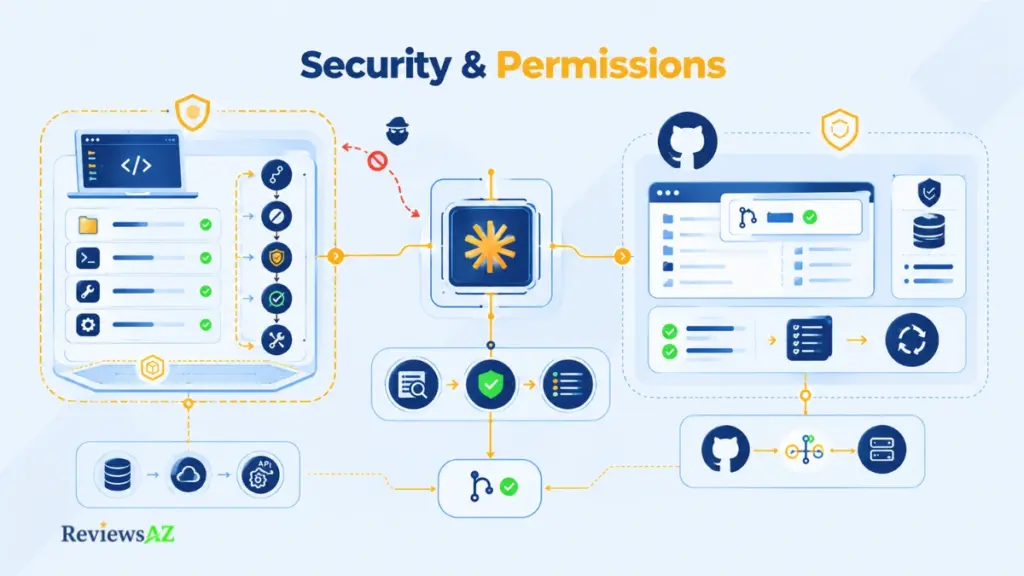
Shell Access and Permission Modes
Claude Code still offers manual permission modes: a mode that prompts before every file edit or shell command, an accept-edits mode that auto-approves file changes, and a plan mode that blocks edits until you approve a proposed plan. But since August 14, 2026, that isn’t where most sessions start.
Anthropic made an auto mode the default for new Claude Code sessions on Pro, Max, and Team, routing each action through a separate classifier that approves routine work and blocks anything it flags as irreversible, destructive, or aimed outside your project, instead of asking you first. Enterprise plans, Console API keys, and Bedrock, Vertex, or Foundry deployments still start in manual mode. If you haven’t touched your own permission settings recently, there’s a real chance your sessions are already running with less prompting than you’d expect.
Separately from whichever mode is active, OS-level sandboxing can restrict what a shell command actually reaches on disk or over the network, regardless of which permission mode or classifier approved it. Because auto mode is now most people’s starting point rather than something they opted into, its classifier is the main thing standing between a session and a bad action unless sandboxing is also enabled or an admin has pinned a stricter default. Tighter project or organization rules and sandboxing are both available; not checking which mode is actually active is a common way to end up less protected than assumed.
GitHub App Permissions and Repository Scope
The GitHub App side is scoped differently. To review a pull request, it reads repository contents through read access, and posts comments and the check run through write access to pull requests and checks. That permission set is shared with other Claude Code GitHub integrations, and an Owner grants it per repository during setup rather than across an entire organization.
Data Retention, Sandboxing, and Human Control
Managed Code Review is unavailable to organizations with Zero Data Retention enabled, which pushes those teams toward the local command or a self-run CI workflow instead. Sandboxing matters even against a compromised session: Anthropic’s own documentation notes that sandbox restrictions still apply even if a prompt injection bypasses Claude’s decision-making.
A SpecterOps researcher put that to the test in late 2025, disclosing a real prompt-injection path to code execution in Claude Code that Anthropic patched in version 2.0.31. The broader lesson SpecterOps draws from its security work with Claude Code isn’t “avoid it”; it’s that the tool holds up best as a reasoning and analysis layer operating under controlled, scoped permissions with a person validating what it finds, not as an autonomous authority left to run unsupervised.
None of this, local or managed, approves or blocks a PR directly. The check run always finishes with a neutral status, so branch protection behaves exactly as it did before Code Review was installed. Teams that want a hard gate can still read the severity breakdown from the check run output and wire it into their own CI; that’s a deliberate build step on the team’s part, not something Managed Code Review enforces by itself.
Security Decision Point: The important question is not simply whether Claude Code Review has security controls, but which permissions and execution surface your workflow actually gives it. Check the active permission mode, repository scope, data-retention settings, and where the review runs before treating the workflow as production-ready.
| Surface | Can Access | Default Behavior | Your Control |
|---|---|---|---|
| Local Claude Code | Your filesystem, shell, network (per session) | Auto mode by default on Pro/Max/Team (classifier-approved); manual on Enterprise | Permission modes, allow/deny rules, sandboxing |
| Managed GitHub App | Repo contents (read); PRs & checks (write) | Posts automatically per configured trigger | Per-repo enable/disable, admin settings, excluded under Zero Data Retention |
Claude Code Pricing (& Token Usage)
Two teams can run the exact same size of pull request through Managed Code Review and land on very different monthly bills, not because the code differs but because one team reviews once per PR and the other re-reviews on every push. Pricing here runs on two separate charges, and mixing them up is the single most common misunderstanding.
Claude Code Plans vs Code Review Usage Credits
Your Claude plan is priced, as of September 2026, at $20/month for Pro ($17/month billed annually), $100/month for Max 5x, $200/month for Max 20x, $25/month per Team Standard seat ($20 annually), $125/month per Team Premium seat ($100 annually), and $20/seat/month billed annually for Enterprise plus usage at standard API rates, with a 20-seat minimum.
That subscription covers using Claude Code itself, including the local /code-review command, on any paid plan that includes it. On top of that, Managed Code Review is billed through usage credits, currently documented at an average of $15–25 per review, and it doesn’t draw against your plan’s included usage at all. It’s only available on Team and Enterprise, and it isn’t available to organizations with Zero Data Retention enabled.
Additional Usage and Cost Exposure
That usage-credit charge can add up in ways a flat monthly number won’t tell you. Anthropic lets you set a monthly spend cap for Code Review specifically, and costs post to your bill regardless of whether your organization otherwise runs on Amazon Bedrock or Google Cloud’s Agent Platform for other Claude Code features.
Trigger Frequency, PR Size, and What Cannot Be Predicted from an Average
The real driver of total spend is how often reviews run, not the per-review average alone. A repository set to review once after PR creation runs one review per PR; one set to review after every push multiplies that by however many times a PR gets updated before merge; manual mode only spends when someone actually asks for a review.
As a purely illustrative example, not a documented rate: 100 single-trigger reviews a month at the low end of the published range works out to roughly $1,500 as a rough planning number, easy to adjust for your own volume. Treating $15–25 as a flat per-PR number and multiplying it by your monthly PR count will overstate or understate real spend either way, since it ignores trigger mode, PR size, and codebase complexity entirely.
| Plan | Monthly | Billed Annually |
|---|---|---|
| Pro | $20 | $17/mo |
| Max 5x | $100 | — |
| Max 20x | $200 | — |
| Team Standard (per seat) | $25 | $20/mo |
| Team Premium (per seat) | $125 | $100/mo |
| Enterprise (per seat, 20-seat minimum) | — | $20/mo + usage at API rates |
| Managed Code Review (separate meter) | Usage credits, ~$15–25/review average; Team & Enterprise only; not available with Zero Data Retention | |
Pricing as of September 2026, reconfirm on Anthropic’s pricing page immediately before publication, since these figures can change.
Claude Code Use Cases & Limits
A one-line change that looks safe to approve in five seconds is exactly the kind of thing Claude Code Review is built to catch. It’s also exactly the kind of thing it can’t tell you whether your team should want in the codebase at all. That boundary is worth understanding before you trust it with anything: it’s built for machine-detectable evidence, not judgment calls about whether code should exist in this form.
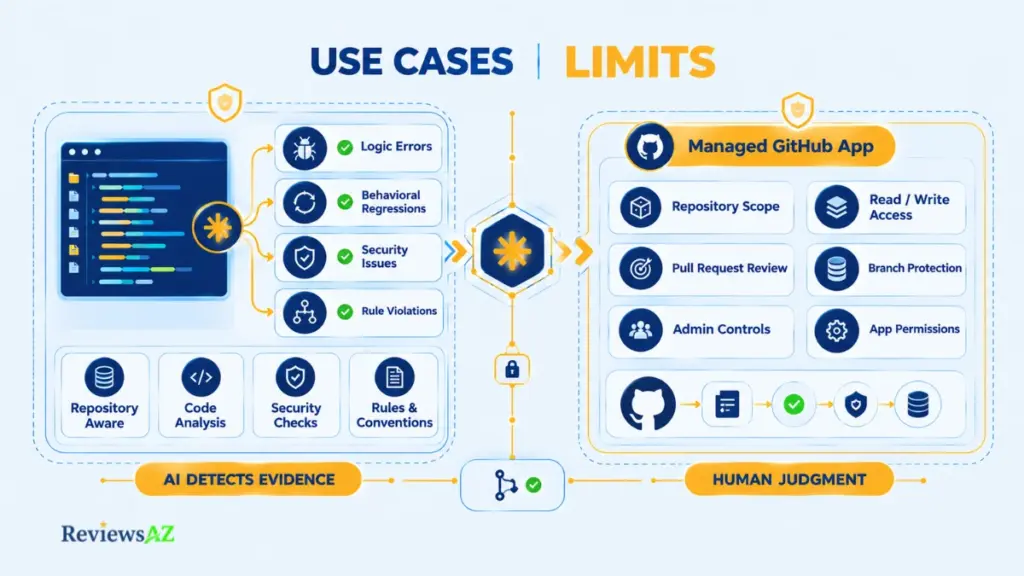
Where Repository-Aware Review Helps
Anthropic’s own account of running Code Review internally includes a case worth taking seriously: a one-line change to a production service looked routine enough to approve in seconds, but Code Review flagged it as critical because it would have broken authentication for the service, and the engineer said afterward they wouldn’t have caught it themselves. An early-access customer reported a similar pattern on a ZFS encryption refactor, where the review surfaced a pre-existing type mismatch quietly wiping an encryption key cache on every sync.
Anthropic also reports that larger PRs surface findings far more often than small ones: about 84% of PRs over 1,000 changed lines get a finding, versus roughly 31% of PRs under 50 lines, with well under 1% of findings marked incorrect. All of that is Anthropic’s own reported data, not an independent audit, but it points at a genuine strength: catching a behavioral regression or a latent bug in nearby code that a quick human skim reasonably misses.
What AI Review Can Miss
What it’s not built to catch is different in kind, not just in accuracy. By default, Code Review focuses on correctness rather than formatting preferences or missing test coverage, unless you explicitly configure it to check for those. Developers who’ve used it report it feeling weakest on novel business logic and broader architectural fit; that’s an account worth weighing, not proof.
A hand-written SQL migration is a good example: it can pass every correctness check the reviewer runs while still carrying a bad assumption about data volume; teams doing a lot of that kind of work may be better served comparing a general coding agent against specialized database tools instead. There’s also a structural question analysts have raised rather than settled: an AI reviewing AI-generated code shares some of the same blind spots by construction, even with a separate verification step in between.
Why Human Review Still Matters for Product, Architecture, and Unwritten Conventions
None of this replaces a human decision. A finding here is something to weigh, and the check run always completes neutrally, by design, so it can’t block a merge by itself. Product fit, whether an architectural direction suits where the codebase is headed, and the unwritten conventions a team never wrote into CLAUDE.md are exactly the questions a repository-aware diff reviewer isn’t built to answer.
| Good Fit | Poor Fit (as configured by default) | Requires Human Judgment |
|---|---|---|
| Logic errors and behavioral regressions in the diff | Formatting and style preferences | Product fit and prioritization |
| Latent bugs in code the PR touches but didn’t change | Missing test coverage (unless configured via REVIEW.md) | Architectural direction for the codebase |
| Security issues within the reviewed diff’s scope | Novel or unfamiliar business logic | Unwritten team conventions |
| Consistency with documented CLAUDE.md / REVIEW.md rules | Database-specific risks like SQL assumptions at scale | The final decision to merge |
The Practical Takeaway: Claude Code Review is most useful when its findings become evidence for a human review process. Use the AI to surface issues, investigate context, and reduce review workload, then validate the finding before treating it as a real defect or deciding whether code should merge.
Where Claude Code Fits Among AI Coding Tools
Claude Code is terminal-native, with IDE and web layers sitting on top of the same CLI engine. Cursor sits at the other end of that spectrum: a full IDE built around AI from the start, where its BugBot reviewer now bills per run rather than as a flat seat fee, after Cursor retired the $40/user/month rate in mid-2026.
That single difference in where the two products start (terminal vs. editor) tends to decide fit faster than a feature-by-feature scorecard does: a terminal-first, CI-heavy team gets more direct value from Claude Code’s automation surfaces, while a team already living inside Cursor day to day has little reason to add a second review layer on top. For the full breakdown of workflow, context handling, and cost model side by side.
Claude Code Alternatives
More agentic capability doesn’t automatically make a general coding agent the right review layer. If Claude Code’s fit doesn’t match what you actually need, the useful next step isn’t a flat list of competitors; it’s knowing which of three categories your unmet need actually falls into. (See our full Claude Code alternatives roundup for a complete side-by-side.)
Dedicated AI Code Review Tools
If review is the only job you need done, a handful of tools exist to do only that:
- CodeAnt AI, CodeRabbit, Qodo, Greptile: built purely around PR review, and several price it as a flat per-user rate instead of a separate per-review credit meter. That’s a real trade-off worth weighing on its own, not a reason to assume dedicated beats general-purpose by default.
GitHub-Native and General Coding Alternatives
- GitHub Copilot: the GitHub Copilot review features live inside GitHub’s own interface, for teams that want review without adding a second product.
- OpenAI Codex: the closest CLI-agent counterpart to Claude Code, via our Codex review, for teams standardized on a different provider’s terminal agent who want review parity there instead of switching tools.
- Cursor: if the real question is IDE-first versus terminal-first rather than dedicated versus general, see the positioning note above and our full Claude Code vs Cursor comparison.
Related Posts:
How to Chat with Your Database Using AI
How to Generate SQL Queries with AI
Best AI DB Tools for Backend Devs
Frequently Asked Questions
What matters most with Claude Code Review is not simply whether it can review code, but how, where, and under what controls that review actually happens. The differences between local and managed workflows, separate pricing models, security permissions, platform support, and the limits of AI-generated findings can change how the feature fits into a real development process. The questions below clarify those practical details and address the points most likely to affect how you evaluate Claude Code Review for your own team.
Is Claude Code Review the same as /code-review?
No. /code-review is a command you run locally in a Claude Code terminal session, on any paid plan that includes Claude Code, and nothing reaches GitHub unless you explicitly post it. Managed Code Review is a separate GitHub App that reviews pull requests automatically once installed, runs on Anthropic’s infrastructure, and is limited to Team and Enterprise subscriptions. Treating them as one product is the most common source of confusion about what “Claude Code Review” actually means.
How much does Claude Code Review cost?
It’s two separate charges. Your Claude plan (Pro at $20/month up through Enterprise at $20/seat/month plus usage) covers using Claude Code and the local /code-review command. Managed Code Review is billed separately through usage credits, at an average of $15–25 per review, and doesn’t draw against your plan’s included usage. Total monthly cost depends heavily on how often reviews trigger, not just that average.
Can Claude Code Review replace human code review?
No. A finding isn’t a verdict; it’s material for a person to judge, and the check run stays neutral so nothing merges on the review’s word alone. It’s strong on machine-detectable issues like logic errors and regressions, but product fit, architectural direction, and unwritten team conventions still require a person’s judgment.
Does managed Claude Code Review work with GitHub only?
Managed Code Review is a GitHub App, supporting github.com and self-hosted GitHub Enterprise Server; it has no GitLab equivalent. GitLab teams get comparable review through Claude’s CI/CD integration instead, running on their own runners rather than Anthropic’s managed infrastructure: a different cost and control model, not a lesser version of the same feature.
What permissions and security controls matter?
Locally, permission modes (manual, accept-edits, plan, or auto mode, now the default on Pro, Max, and Team) plus OS-level sandboxing control what Claude Code can touch on your machine. The GitHub App is scoped separately, with read access to repository contents and write access to pull requests and checks, granted per repository. Managed Code Review isn’t available to organizations with Zero Data Retention enabled.
How does Claude Code Review compare with Cursor?
Claude Code is terminal-native with IDE layers on top; Cursor is a full IDE built around AI from the start, with its BugBot reviewer now billed on usage (roughly $1–$1.50 per run) rather than the flat $40/user/month it used to charge. Neither wins outright. Terminal-first, CI-heavy teams tend to fit Claude Code better, while teams already standardized on Cursor as their editor get more value staying there.
What are the best Claude Code alternatives for review workflows?
It depends on the unmet need. Dedicated review-only tools like CodeAnt AI, CodeRabbit, Qodo, and Greptile suit teams that want review and nothing else. GitHub Copilot fits teams wanting review inside GitHub’s native interface, and OpenAI’s Codex is the closest CLI-agent equivalent for teams standardized on a different provider. See our full Claude Code alternatives roundup. There’s no single best option, only a better fit per workflow.
Final Verdict: Is Claude Code Review Worth It?
The fit question matters more than any quality score: Claude Code Review is worth adopting when it slots into a workflow you already run, and worth skipping when you’d be asking it to replace judgment it was never built to make.
Worth It If…
- Your team already works in Claude Code, GitHub, or GitHub Enterprise Server
- You’re on a Team or Enterprise plan (or fine using the local command on any paid plan that includes Claude Code)
- You’re willing to treat findings as evidence a person still reviews, not an automatic approval
Not Ideal If…
- You’re on GitLab and specifically want a managed, install-and-forget reviewer
- Your organization runs with Zero Data Retention enabled
- You’re expecting it to judge product fit or architecture on its own; see our Claude Code alternatives roundup if that’s the actual gap
- Your team already relies on Cursor’s BugBot day to day and has no reason to add a second, separately billed review layer
One Verification Step Before Adoption: before turning it on anywhere, verify:
- Which review path actually matches your current workflow
- Whether your plan is eligible
- What permissions and repository scope you’re granting
- What triggers a review
- What that’s likely to cost at your real PR volume, not the published average alone