Devin Desktop Review: What Changed, What It Costs, and Who Should Use It in 2026

A demo ends when the agent finishes the task. A Devin Desktop review has to start there, because the real questions begin once an agent touches a production repository, draws on a real usage allowance, and leaves a diff that somebody still has to read.
First, the name. Cognition describes Devin Desktop as Windsurf renamed, with the same IDE underneath and the Agent Command Center now in front, and the product hasn’t stood still since: Cascade, the old agent, was removed in September. Plenty of write-ups still describe the Windsurf-era product, which makes it easy to evaluate the wrong thing.
If you already work with an editor-based assistant, the question isn’t whether it can code. It’s whether the time saved by delegating survives review, retries, and usage cost.
This review keeps what Cognition says, what its documentation specifies, and what users report in separate piles. From them it builds a delegation-readiness check, a view of what drives cost, and the security boundaries worth settling before a trial.
Devin Desktop at a Glance
Before getting into the deeper parts of this Devin Desktop Review, it helps to establish what matters most at a glance. The points below summarize the product’s current position, its main trade-offs, and how the evidence in this review should be read.
Key Takeaways
- Best For: Developers and teams with repeatable, multi-step work that can be checked quickly, especially those who want local and cloud agents managed alongside a full IDE.
- Biggest Strength: Devin Desktop brings a full development environment together with an Agent Command Center for managing coding agents. Cognition documents this workflow, although its day-to-day effectiveness has not been independently tested in this review.
- Biggest Limitation: The benefit depends on whether agent orchestration is genuinely useful for your work. For developers who mainly need inline suggestions or simple coding help, the extra supervision and usage costs may add little value.
- Key Decision: The important question is not simply whether Devin can complete tasks, but whether you have enough repeatable, verifiable work to make delegation worthwhile.
- Pricing / Current Status: Plans range from a free tier to Pro, Max, Teams, and Enterprise, with usage allowances and additional usage costs varying by plan. The pricing section breaks down the current structure in more detail.
- Caveat: Devin Desktop does not mean that everything runs locally or stays on your machine. Local and cloud agents have different environments, and data handling depends on the agent, plan, and deployment.
How the Evidence Is Labeled
This review does not claim hands-on testing. Instead, it separates documented product capabilities from vendor-reported results, user experiences, and points that could not be independently confirmed.
- Officially Supported: Cognition explicitly describes the feature or behavior in its product documentation.
- Officially Reported: Cognition reports a result, benchmark, or performance figure that has not been independently confirmed.
- Documented Capability: The capability is described in official technical documentation rather than promotional material.
- User-Reported: The information comes from an identifiable user, independent trial, or review source.
- Independently Verified: The claim has been confirmed by a source without a commercial stake in the result.
- Could Not Be Verified: The available evidence was not strong enough to confirm the claim at publication time.
The distinction matters throughout the review. Cognition’s own documentation is useful for establishing what Devin Desktop is designed to do, but it is not treated as independent proof that a feature performs as advertised in every real-world workflow.
What Is Devin Desktop? Devin Local, Devin Cloud, and the Windsurf Transition
Search for Devin Desktop and you’ll still run into Windsurf pages, Devin agent documentation, and older reviews that blur the two together. That’s understandable: Devin Desktop is the renamed Windsurf IDE, but the product has been changing quickly since the rename, and the editor now sits alongside a much more agent-focused workflow.
Devin Desktop became the new name for Windsurf, Cognition’s IDE, on June 2, 2026. The full editor remained, but the Agent Command Center became the main screen for managing coding agents. Those agents can run locally or in Devin’s cloud, and that distinction matters because the two environments work differently.
What changed after the Windsurf rename?
The rename itself was presented as a relatively simple transition. Cognition said the June 2 update carried over plans, pricing, extensions, and settings, with the main change being the name and branding. What followed, however, was a steady shift toward an agent-first product:
- July 29, 2026: Cognition introduced a guided Cascade Migration Wizard. Around the same time, workflow screens began warning that workflows were being deprecated in favor of skills.
- August 21, 2026: The Agent Command Center was updated to follow the selected Space, while multiple agent windows could run side by side.
- September 8, 2026: Cascade was removed from Desktop. Cognition’s changelog described Devin Local as the only available agent and added a prompt to migrate older conversations.
- Mid-September 2026: Remote agent hosts over SSH arrived, ACP became always on, and Fusion launched in both Desktop and the CLI.
- September 29, 2026: Users gained the option to sign in with ChatGPT and bill eligible GPT usage to their ChatGPT plan.
That timeline is important because a review of Devin Desktop can become outdated quickly. The product you see today is not simply the Windsurf editor with a new name; several parts of the agent workflow changed during the months after the rename.
What is the difference between Devin Desktop, Devin Local, and Devin Cloud?
These names refer to different parts of the product rather than three versions of the same thing:
- Devin Desktop is the application itself: a full IDE with built-in agent management and the Agent Command Center.
- Devin Local is the agent that runs inside Desktop. Its documented harness includes features such as subagents, sandboxing, plan mode, worktrees, and permissions.
- Devin Cloud is the long-running cloud agent. It works on its own cloud machine, and Desktop can hand a task to it from a local session.
There is also a practical difference in what Devin Local inherited from the older Windsurf experience. Cognition’s documentation lists persistent memories, workflows, app deploys, and Arena mode as unsupported in Devin Local.
What still belongs to the IDE?
Despite the stronger agent focus, Devin Desktop remains an IDE first. Cognition’s Devin Desktop page says that extensions, keybindings, and language servers carry over from Windsurf and VS Code, although that compatibility has not been independently verified here.
JetBrains is a separate case. Cognition says Windsurf for JetBrains remains available under its old name, so the Desktop transition described here does not apply to that plugin in the same way.
How the Devin Desktop Workflow Works with the Agent Command Center
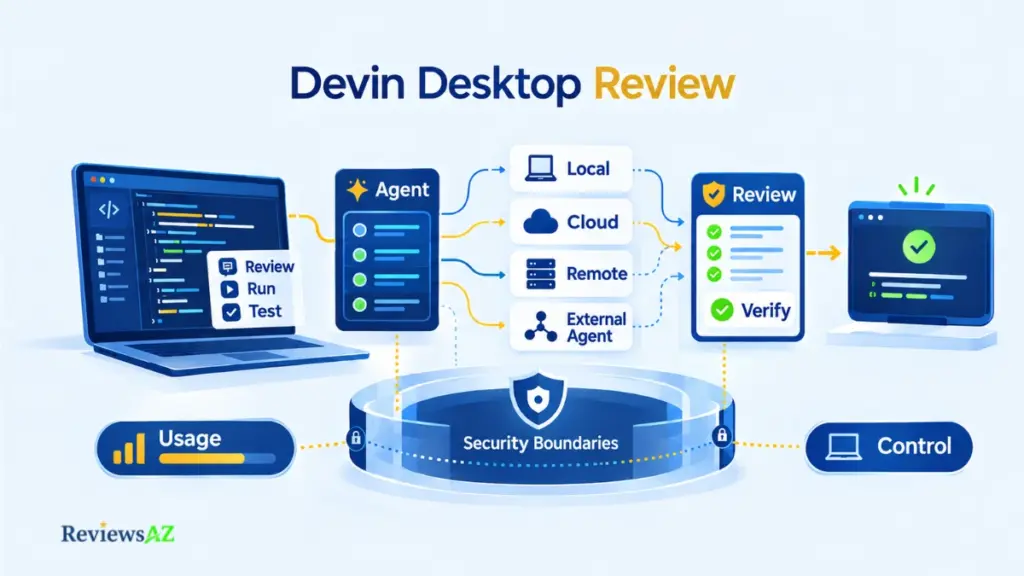
Devin Desktop connects planning, implementation, and testing across local and cloud sessions. A local session can draft the plan in the editor, one click can hand the build to a cloud session, and another cloud session can take on testing. This workflow brings several AI coding agents into the same development process, with each session handling a different part of the task. The illustration below is not a live test run, but it reflects the operating model documented by Cognition.
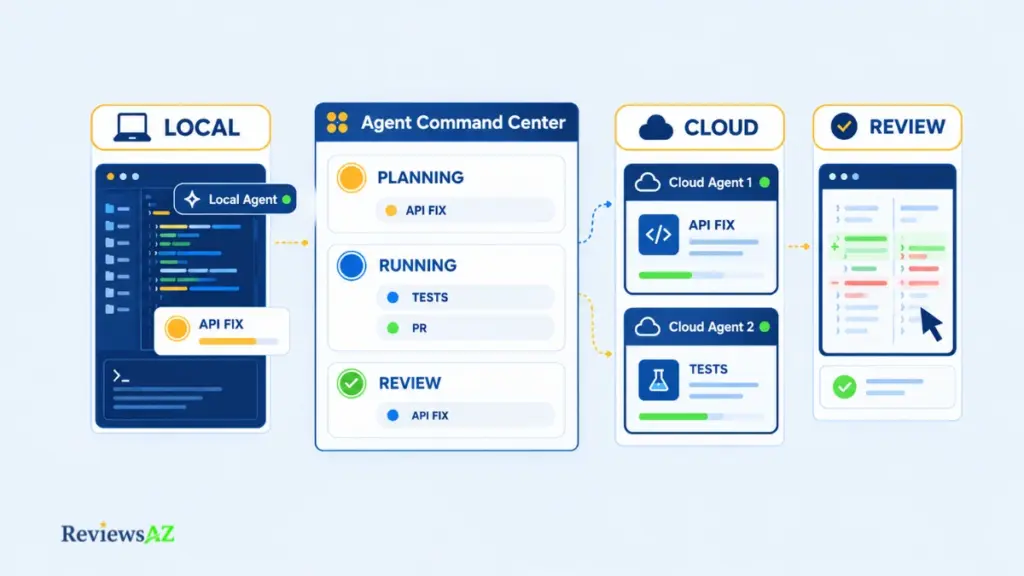
How Devin Desktop works, in the order the docs describe it:
- Define the task and start a session: a local agent in the editor, or a cloud Devin session.
- Optionally group related sessions into a Space so they share context.
- Track every session on the Agent Command Center board.
- Review the results; the editor stays available for last-mile edits.
- Decide whether to accept the work or send the agent back with new instructions.
The list shows where you supervise. It says nothing about how often a task comes back correct, which the delegation section takes up.
Starting a task
A session starts in the editor with a local agent, or you delegate to Devin in the cloud. The documented handoff has two stages: plan locally, send the plan to Devin with one click, and Devin spins up its own machine. Every session is already its own Space, so nothing needs configuring first.
Managing Local and Cloud Agents in the Agent Command Center
The Agent Command Center puts local and cloud sessions on one Kanban-style board, organized by status, according to Cognition. Spaces add the task layer: a Space gathers sessions, PRs, files, and context, and new sessions inherit that context, with sharing controlled by a setting. Since August the board follows whichever Space is selected and can run in a window of its own.
Cloud sessions keep working after you close your laptop, while local ones run in your editor. Here the board is the front door, where Claude Code’s terminal-based workflow usually starts at a command line.
Where the human re-enters the loop
The docs show three points where you step in. Before delegating, you can shape the plan with a local agent. During a run, Desktop can send one native notification when a session finishes or needs input, and Devin Local lets you edit a queued message before it sends. Afterward the board doesn’t replace the editor: you can jump back into a session and make last-mile edits by hand.
Devin Desktop Core Capabilities: AI Coding Agents, Context, and Code Review
Devin Desktop is built around a broader shift in how developers use AI code assistants to work with software. Rather than limiting the AI to inline suggestions or isolated code generation, Devin combines local and cloud sessions, shared context, task coordination, and code review into a more agent-driven workflow. The result is a development loop in which AI can contribute to planning, implementation, testing, and iteration while the developer remains responsible for directing and reviewing the work.
Eight capabilities do most of the work in that loop, but they don’t all solve the same problem. Some are there to make coding in the editor faster, while others help Devin understand a codebase, split work between agents, review changes, or bring another coding agent into the same workspace. Looking at them together makes it easier to see what actually changes the workflow, rather than treating every feature as another item on a list.
- Tab and Supercomplete focus on the editor itself, offering next-edit suggestions and autocomplete while you work.
- Subagents and Fusion push the workflow further by allowing work to be divided between agents instead of keeping every task in a single session.
- Codemaps, Fast Context, and Quick Review are aimed at the work around the code: finding the right files, understanding how a codebase fits together, and checking changes.
- ACP and the interactive browser extend the environment beyond Devin Local, whether that means bringing in a third-party coding agent or handling visual checks and authentication in a cloud session.
Important note: A feature page shows that a capability exists, not that it’s fast, accurate, or worth its usage cost. Try each one on your own tasks before it counts in your decision.
IDE capabilities
Cognition says Tab runs on its own models and offers three modes: Supercomplete for edit suggestions near the cursor, standard autocomplete, or off. Suggestions draw on your code, terminal, agent chat history, and recent edits, plus clipboard content if you opt in. The old Windsurf Browser is deprecated, with the changelog pointing to Previews instead, and ACP agents can open browser previews as well.
AI Coding Agent Management and Subagents
Beyond the board, Devin Local can spawn subagents for subtasks, in the foreground or background. Cloud sessions add a Progress tab that logs shell commands, edits, and browser activity in one view, plus an interactive browser for frontend prototyping, visual testing, and authentication.
Fusion, launched in September 2026, runs two agents in parallel: a frontier lead that plans and reviews, and a cheaper sidekick that implements. Cognition reports lower cost at comparable scores on benchmark runs it conducted with outside evaluators, and argues that models should be judged on price per task rather than price per token. Those are vendor-presented benchmark figures, not your workload.
Codebase Context, Codemaps, and AI Code Review
Codemaps maps how a codebase’s pieces execute and relate, and the docs say a Codemap can be @-mentioned as context in Devin Local. Fast Context, added to Devin Local in July 2026, finds the files and lines an agent needs; the “milliseconds” speed is Cognition’s claim. Quick Review, a Devin Local subagent, gives rapid feedback on changes.
ACP and Third-Party Coding Agents in Devin Desktop
ACP is an open protocol, which Cognition compares to LSP, for running coding agents inside an editor. Cognition’s docs name Codex CLI, Claude Agent, OpenCode, Junie, and Gemini CLI as examples, and added agents show up in the selector beside Devin Local. It’s available on Pro, Max, and Teams, while Enterprise admins go through their account team.
The agent binary must already be installed on your machine, since Desktop doesn’t download it. What happens to your data once an external agent is running is a security question, and the security section covers it.
AI Agent Delegation Limits, Autonomy, and Failure Modes
The impressive part of an agent demo is that it finishes. The useful question is what happens when it doesn’t, and how much checking the work takes even when it does. Devin Desktop can plausibly take work with clear requirements and outcomes you can verify quickly.
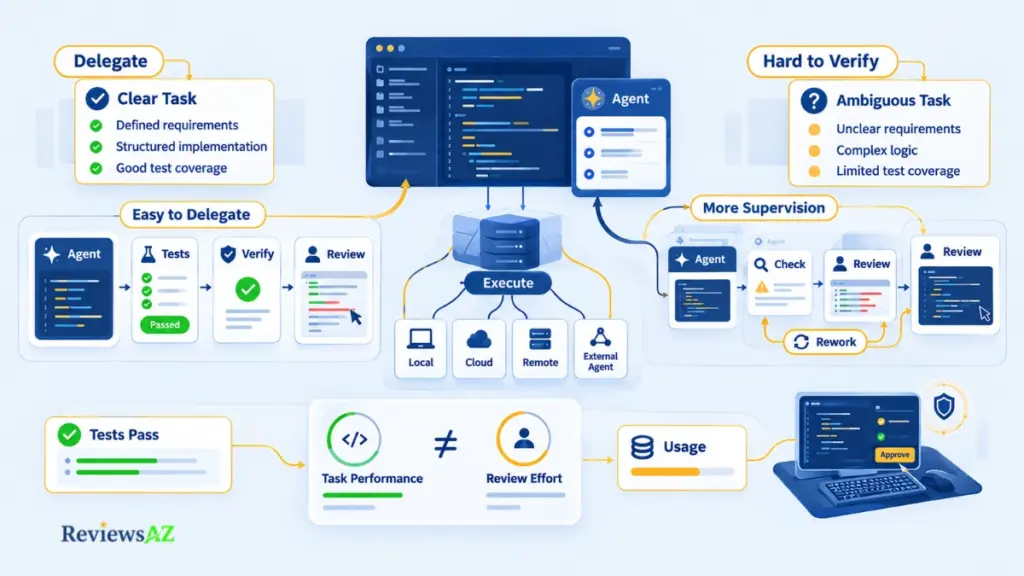
Supervision becomes more important when requirements are ambiguous, results are hard to check, or the agent may keep pushing at a task that cannot be done. The real cost of autonomy is review time and rework, not only software spend. That’s this review’s reading of the evidence, not a test of the current product.
1. Clear requirements are where delegation makes the most sense. Cognition’s 2025 performance review reports that Devin does well on tasks with clear upfront requirements and verifiable outcomes, which it estimates at roughly 4 to 8 hours of junior-engineer work. The expected human role is still to review the result. That evidence is a vendor description of Devin in general, written before Desktop existed, so it is better treated as a hypothesis for your own tasks than as a prediction of how Devin Desktop will perform.
2. Supervision becomes the bigger factor when the result is harder to judge. Cognition’s review says additional human review is needed when outcomes are not straightforward to verify. Its security documentation also warns that Devin can hallucinate, introduce bugs, or suggest insecure practices, and recommends code review and branch protections before changes are merged. In practical terms, that makes review the main risk for work where there is no quick way to tell whether the agent got it right.
The older independent evidence points in the same direction, although it comes from an earlier version of Devin. In January 2025, Answer.AI’s team tried Devin on 20 tasks and reported three successes. They described cases where the agent continued working on tasks that could not be completed and where it was difficult to know in advance which tasks would succeed. Yijia Shao, a Stanford researcher who used Devin hands-on for a month that winter, also described similar failure patterns while viewing the system as a meaningful step toward useful coding agents.
That evidence is too old and too limited to establish a recurring pattern for Devin Desktop. This review could not find three independent, dated reports on the current product, so it does not turn those earlier experiences into a claim about Desktop.
3. Benchmarks help, but they leave out part of the real cost. A benchmark tells you how an agent performs on a fixed set of tasks under specific conditions. It does not tell you how long a developer will spend reviewing the result, how much context a real repository requires, or what another attempt will cost on a particular plan. Shao’s write-up makes the uncertainty clear from another angle: SWE-bench Lite scores rose from under 1% in late 2023 to 55% by early 2025, while the Answer.AI trial produced a much less successful result.
The same caution applies to individual success stories and failures. A polished demo and a failed task are both narrow pieces of evidence, and their usefulness depends on how closely they resemble your own work. For the methodology behind evaluating these results, see our note on coding agent benchmarks.
The practical takeaway is simple: the more quickly you can verify an agent’s work, the easier it is to judge whether delegation is saving time. When verification becomes difficult, the supervision burden starts to become part of the task itself.
Ease of Use: Is Agent Management Actually Simpler?
Is managing agents actually simpler than prompting one assistant? The documentation suggests some friction disappears and some new friction arrives, and none of the sources found measures the trade.
Before adopting it, check:
- Do you rely on Cascade memories or workflows? Cascade is gone as of September 8, and Devin Local supports neither, so they need migrating to skills.
- Do you use the JetBrains plugin? The Devin Local docs say it isn’t supported there.
- On an Enterprise plan, has an admin enabled Devin Local in team settings, and arranged ACP through your account team if you want third-party agents?
- Can you review the output of several sessions in parallel? That one is the review’s own question, and it decides whether the board helps or overwhelms.
Setup and migration
Cognition’s docs include a Cascade Migration Wizard that chains hooks, skills, and memories in one flow, with per-item opt-in and dry-run previews. One catch: Desktop loads the Devin workflows directory if it exists and falls back to the legacy Windsurf one only when it doesn’t, and the two aren’t merged.
A developer posting as botoom on DEV Community described the in-app prompt to migrate from Windsurf shortly after the rename, said everything worked, and still advised backing up your old folders first. It’s one report, written before Cascade’s removal.
Working across sessions and Spaces
Spaces help with orientation: Cognition says returning to one shows the view as you left it. Since August the Agent Command Center follows the selected Space and can run in a separate window, with several agent windows side by side. More windows mean more places to lose track of work, so it makes sense to use the board to limit parallelism rather than maximize it.
Editor-First vs Agent-First Workflow in Devin Desktop
Desktop has separate Agent and Editor modes, so the editor stays one switch away. The harder change is habit. Compared with Cursor’s editor-centric workflow, the center of gravity shifts from what you type to what you assign and review, a framing that belongs to this review and hasn’t been measured.
Devin Desktop Integrations and Database Workflows
“Integration” can mean several different things in Devin Desktop. It can be a connector Cognition built, a protocol you configure yourself, or a capability that simply has not been documented. That distinction matters, especially with databases, where saying that a tool “supports” a database can mean much more than the documentation actually shows.
The current integration picture is easier to understand in three parts:
- Repository and team tools. GitHub, GitLab, Bitbucket, Azure DevOps, Slack, Jira, and Linear are documented around Devin Cloud. Microsoft Teams is also listed in the integration documentation. Some of these connections are set up through Devin’s web app rather than inside Desktop itself.
- Local development workflow. Devin Local supports worktrees, while Spaces can gather pull requests opened by you or by agents. The pages reviewed did not confirm that the same cloud connectors work inside Devin Local sessions.
- Database access. Devin can reach databases such as Postgres, BigQuery, and Cloud SQL through MCP servers that you configure. That is different from having native database support for a named engine, and no such native feature was confirmed in the documentation reviewed.
The important part is not simply whether something appears on an integrations page. The real question is where the integration runs, what part of Devin it belongs to, and whether another service is required to make it work.
Repository and Git Workflow
Cognition’s documentation for Devin in the cloud describes repository connections through GitHub, GitHub Enterprise Server, GitLab, Bitbucket, and Azure DevOps. It also recommends branch protections so that Devin’s pull requests go through your normal review process.
On the local side, Devin Local’s documented harness includes worktrees, and Spaces can collect pull requests opened by you or by agents. Anything beyond those documented Git capabilities for Desktop itself was not confirmed.
Team-Tool Integrations
Devin’s integration documentation lists GitHub, Slack, and Jira as native integrations, with Linear and Microsoft Teams also documented. In Slack, you can tag @Devin to start a run. In Jira and Linear, tickets can be assigned to Devin and turned into pull requests.
These integrations are documented for Devin’s cloud product and are set up through its web app. The pages reviewed did not confirm that Devin Local sessions running inside Desktop can use those same connectors.
Native Capability vs MCP-Mediated Database Work
Database support needs a little more context because a connection through another tool is not the same thing as native support built into the product.
Does “connects through MCP” mean native database support? No. Both approaches can end with a database answering questions, but an MCP server is a separate component with its own maintainer, credentials, and permissions. Before connecting production data, check who maintains the server, what it can access, and whether the connection can be limited to read-only use.
Devin’s documentation shows database access through MCP servers. The examples include Postgres, while marketplace entries cover databases such as BigQuery and Cloud SQL for MySQL. The documentation also notes that many database servers are maintained by the community. For production data, Cognition recommends a read-only connection or a restricted database user.
For Devin Local, MCP servers are configured through files at the user, project, or local level, with the default local scope gitignored. This review found no documented native database feature for any specific database engine.
That makes database work a little different from a built-in integration. You are effectively using a general coding agent together with a database tool that you have chosen and vetted. How well Devin writes or optimizes SQL is a separate question, and optimizing SQL queries with AI covers that workflow in more detail.
When databases are the main focus of the work, a dedicated database or SQL tool may make more sense than a general coding agent. Our roundup of AI database tools for backend developers covers that group.
Once you connect more tools to a repository and its database, the agent can reach more of your environment. That is where the security and permission boundaries become more important.
Security, Privacy, and Permission Boundaries
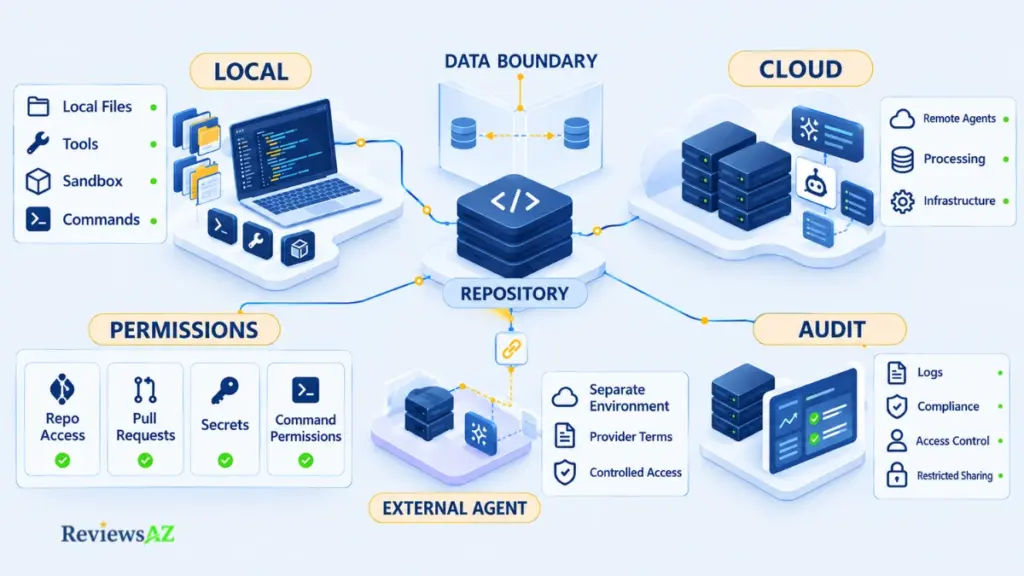
Does your code stay on your machine? Not necessarily. Devin Local works with your local files and tools, but Desktop also manages cloud agents on separate machines, and Cognition’s Security Exhibit says it may process customer data on its infrastructure depending on configuration. Locality depends on the agent, plan, and deployment.
Warning: a sandbox limits what an agent can touch, not what a service may process, and a SOC 2 audit covers a company’s controls, not every plan. Treat either as a blanket guarantee and you’ll scope the wrong thing. Tie each claim to a specific agent, plan, and deployment.
What is local
Devin Local’s docs say the agent operates on your machine with access to your local files, tools, and environment, and list sandboxing and permissions among its harness features. Desktop also refuses to run any agent, Devin Local and ACP agents included, while a workspace is open in Restricted Mode.
Third-party agents shift the boundary more. For an external ACP agent, Cognition’s docs say all operations are delegated to that agent, Desktop’s privacy policy and legal terms don’t apply, and billing runs directly between you and the agent’s provider.
What gets processed, and for how long
Cognition’s Security Exhibit (updated June 11, 2026) says that, depending on configuration and the features you use, it may process customer data in its own infrastructure or data plane. Its Privacy Policy (March 9, 2026) says it collects User Content, meaning input, file uploads, and output, and may use it to train, fine-tune, and improve models depending on the terms that apply.
Cognition’s enterprise security page, written around the Devin web app and integrations, says that by default it doesn’t train its models on customer data or code. It also says data is kept only for the length of the customer relationship unless the agreement says otherwise, apart from feedback and interaction data that Cognition may retain as it sees fit. Which statements govern you depends on your plan and agreement, and none of these pages addresses Desktop’s Devin Local directly.
Repository access and permissions
For Devin’s GitHub integration, the docs say an admin chooses which repositories Devin can access, and the installing administrator can review the permissions granted. Cognition also recommends branch protections so Devin’s pull requests go through your normal review. Credentials Devin needs can go in its Secrets feature, and Devin Local uses its own permissions model for commands.
Enterprise and compliance controls
For certain services, the Security Exhibit says the data plane can run in the customer’s own cloud account, where Cognition says it can’t access the stored data, and the enterprise docs describe dedicated deployments that keep customer data in the customer’s tenant. Small features follow the same logic: on Enterprise plans, sharing Codemaps requires opt-in because they’re stored on Cognition’s servers. The exhibit adds audit logs kept for at least a year, and the Privacy Policy says administrators of business accounts may be able to access certain account information, including User Content.
On compliance, Cognition’s enterprise security page says it has held SOC 2 Type II certification since September 2024, though another docs page gives March 2024, and its Trust Center lists SOC 2 Type 2 and ISO/IEC 27001:2022. In July 2026 Cognition said Devin Desktop and its CLI are FedRAMP High authorized, while the wider platform, Devin Cloud included, is only in process. Ask the Trust Center for the reports and check which products they cover. Whether any of this reaches your Desktop plan or Devin Local setup couldn’t be confirmed. For governance criteria, AI coding tools for enterprise teams compares the options.
Devin Desktop has a free tier, Pro at $20 a month, Max at $200, and Teams from $80, with usage past each paid plan’s allowance billed as extra usage at API pricing. Prices come from Cognition’s pricing page, checked September 30, 2026.
| Plan | Price | What it includes |
|---|---|---|
| Free | $0 | Light agent quota; limited models; unlimited Tab and inline edits |
| Pro | $20/month | Increased quotas; full model access; Devin Cloud; extra usage at API pricing |
| Max | $200/month | Everything in Pro, with significantly higher quotas |
| Teams | From $80/month; full seats $40 each (see below) | Up to 200 users; centralized billing; admin dashboard |
| Enterprise | Custom | Dedicated deployment option; SAML/OIDC SSO; centralized admin controls |
Older reviews describe ACU-based pricing. Cognition’s self-serve billing docs say on-demand credits carry the same dollar value as the ACUs on legacy plans, and current self-serve plans run on allowances plus extra usage. ACU language survives on the Enterprise side, where the changelog still mentions ACU limits. Nothing here predicts a monthly bill, because that takes a workload.
Current plan ladder
Teams wording differs by source. The pricing page reads as $80 plus $40 per full seat, while the billing docs call $80 a minimum that full seats count toward: two full seats cost $80, three cost $120. Confirm at checkout. Only full seats include Devin Desktop access; the free flex seats don’t.
How included usage works
Pro and Teams full seats get a daily and weekly allowance that refreshes on a calendar basis, and the daily portion is more than one-seventh of the weekly. Max has a weekly allowance with no daily cap. Each allowance is shared across Devin sessions, the CLI, and Desktop. Cognition says the quota covers most users’ agent usage, but the pages reviewed publish no numeric quota.
What changes actual spend
Cost per message varies with the model, the task’s size and complexity, and the reasoning required, Cognition says. Past the allowance, extra usage runs through prepaid on-demand credits that roll over, with optional auto-reload and spending limits. If you have an eligible ChatGPT Plus or Pro plan, GPT-model usage can be billed there instead, which keeps it out of your Devin allowance.
The SWE-2 promotion has conflicting end dates. Free SWE-2 use in Desktop and the CLI is a limited promotion, but Cognition’s own pages give different dates: October 16 on the pricing page and October 15 in the models documentation. The Desktop page also describes SWE-2 as unlimited. Check the date shown in your account before using this promotion to estimate your costs. After the promotion ends, list pricing applies.
How to estimate exposure
Estimate from a workload model rather than the sticker: tasks per week, which model, and how much review each needs. Run it for a week on Pro, see whether you stay inside the allowance, and set spending limits before turning on extra usage.
Enterprise buyers get a different pitch. Cognition’s AI Productivity Guarantee, announced in June 2026, promises to fund usage up to $10M if Devin delivers less engineering value than the customer pays for. The value comes from Cognition’s own estimator, which counts hours of useful output (unmerged PRs count as unproductive), and Cognition says the estimator doesn’t replace measuring ROI. As described, it prices output and leaves out the review effort around it.
Whether it’s worth the money comes down to one comparison: review time saved against usage spent. Only your own tasks can answer that.
Devin Desktop Review: Pros and Cons and Where the Trade-offs Land
An agent can save you from writing the code yourself, but that does not mean the work disappears. Someone still has to supervise the sessions, review the changes, pay for the usage, and decide what the agent should be allowed to reach. That is where the real trade-offs in Devin Desktop become easier to see.
Devin Desktop Pros: What It Does Well
The upside largely comes from putting agent work inside a full IDE rather than treating the agent as a separate tool. For developers who have the right kind of work, several parts of that setup can be genuinely useful.
- One place for local and cloud agents. The Agent Command Center gives you a single place to follow local and cloud sessions, which is useful when several tasks are moving at once. The trade-off is that more parallel work also means more sessions to supervise. This is a documented workflow capability, with the impact becoming more noticeable when you run several tasks at the same time.
- A full IDE with familiar editor support. Devin Desktop keeps the broader IDE experience, and Cognition says editor setup can carry over from Windsurf and VS Code. That makes the transition easier for existing users. The important caveats are that Cascade is gone, Devin Local does not support memories and workflows, the JetBrains plugin is not supported, and this compatibility has not been independently verified. The underlying support is officially documented, while the migration details are also documented capabilities. The impact is mainly relevant to people moving from Windsurf.
- A low entry price. There is a free tier, with Pro starting at $20 a month. That gives developers a relatively easy way to try the workflow before committing to a more expensive plan. The catch is that usage beyond the included allowance is billed at API pricing, while the current pages reviewed do not publish numeric quotas. Pricing details are officially documented, and the cost becomes much more important for heavy delegators.
- Local and third-party agent options. Devin Desktop can work with Devin Local, while ACP allows compatible third-party agents to run alongside it. That gives you more freedom over which agent handles a task. The other side of that flexibility is data handling: the flow depends on the specific agent, plan, and deployment, and external ACP agents operate outside Cognition’s privacy terms. The agent support itself is a documented capability, while the Desktop-specific security picture could not be fully verified. The issue matters most when the code is sensitive.
- A workflow built around delegation. Devin can take on work when the requirements are clear and the result is easy to verify. That is where the product’s agent-first approach has the clearest practical case. The evidence here is mixed in age and source: Cognition has reported positive results on suitable tasks, while independent user evidence comes from an earlier version of Devin. The biggest question is whether the review and rework time still leave you with a meaningful saving.
- MCP and team-tool integrations. Devin’s documented integrations cover several repository and team tools, and MCP can extend the workflow into databases and other services. That gives the agent a broader working environment. The limitation is that database access is tool-mediated rather than documented as native support, and the same connector coverage inside Devin Local has not been confirmed. The integration capabilities are documented, while some Local-specific details remain unverified. The practical impact depends heavily on your stack.
- A product that is still moving quickly. Fusion, ACP, remote agent hosts, and other changes have arrived in a short period. Frequent releases can be useful when you want the product to keep expanding, but they also mean features and terminology can change faster than reviews and documentation catch up. The release activity itself is documented in Cognition’s changelog, and the effect is most relevant to teams that want to standardize their workflow around the product.
Devin Desktop Cons: Where the Costs and Friction Show Up
The same design choices that make Devin Desktop interesting can also create more work. Most of the downsides are not about whether a feature exists. They are about what happens around that feature when you use it seriously.
- More agents also mean more supervision. A single board can make parallel work easier to see, but it can also leave you tracking several sessions at once. The more work you delegate, the more important it becomes to keep an eye on what each agent is doing and what still needs review.
- The Windsurf transition is not completely frictionless. Existing users keep much of their editor setup, but the removal of Cascade changes the workflow. Devin Local lacks some older Cascade-era features, and JetBrains users remain on the separate Windsurf plugin. Compatibility is not independently verified, so the migration story is strongest for the parts Cognition explicitly documents.
- Usage can become a meaningful part of the cost. The free tier and $20 Pro plan make entry straightforward, but usage beyond the included allowance is charged at API pricing, and the published pages do not give you a simple numeric quota to plug into a monthly estimate. For people who delegate heavily, the actual workload matters more than the headline subscription price.
- Local does not automatically mean private. Devin Local works with your local environment, but Desktop also manages cloud agents, and ACP agents bring their own providers and data-handling terms. That means you have to look at the specific agent, plan, and deployment rather than treating “Desktop” or “local” as a blanket privacy guarantee. This is especially important for sensitive repositories.
- The review burden can cancel out the time saved. The product is most attractive when a task has clear requirements and an easy way to check the result. Once the work becomes ambiguous, difficult to verify, or potentially impossible, supervision and rework can take over. The independent evidence available for these failure patterns is older and comes from a previous Devin version, so it should not be treated as a direct verdict on the current product.
- Database work depends on the tools around Devin. MCP can give the agent access to databases, but that connection has its own credentials, permissions, and maintainer. The same is true for other external tools and connectors. This makes the environment more capable, but it also gives you more to configure, vet, and secure.
- The product can change faster than your documentation. A rapid release cycle is useful, but it makes older reviews, screenshots, workflows, and terminology less reliable. Teams adopting Devin Desktop as a standard tool may need to keep their internal guidance current as new features such as Fusion, ACP, and remote hosts arrive.
Taken together, the pros and cons come from the same basic choice: Devin Desktop puts agents at the center of the development environment. That can reduce hands-on coding for work that is repeatable and easy to check, but it also shifts more attention toward supervision, usage, permissions, and review. The value is therefore less about how many features Desktop has and more about whether those features fit the way your team already works.
Who Should Use Devin Desktop, and Who Should Not
Two developers can open the same AI coding tool and come away with very different experiences. One may have a queue of small, well-tested fixes that are easy to hand off. The other may be dealing with a poorly documented system where even a correct-looking change takes hours to verify. Devin Desktop fits those situations differently.
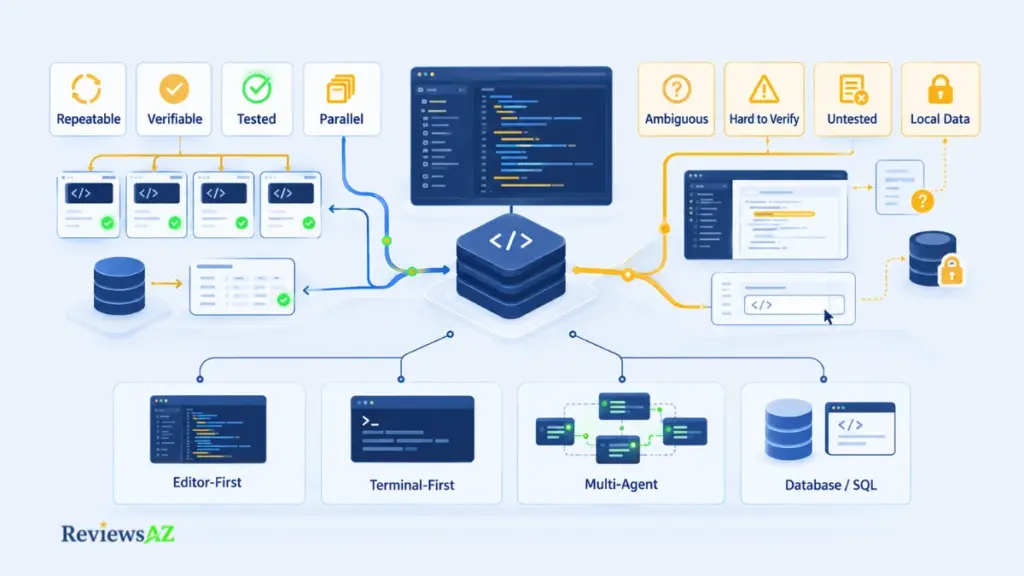
Every fit judgment below is the review’s own, based on the evidence discussed earlier. None is a vendor-verified result.
When Devin Desktop Is a Good Fit
The clearest case for Devin Desktop is work that is structured enough to delegate and simple enough to check when the agent hands it back.
- Repeatable, well-scoped tasks: Work with clear requirements, the kind Cognition says Devin handles well, is the most natural starting point for delegation.
- Results you can verify quickly: Tests, obvious pass/fail conditions, or another reliable way to check the result make agent output easier to trust.
- Several tasks that can run in parallel: The Agent Command Center is more useful when you have multiple independent tasks moving at the same time, provided someone is still reviewing the resulting changes.
- Backend development with solid test coverage: This can be a practical fit when the codebase is well tested and a vetted database tool can be added to the workflow. AI database tools for backend work cover that part of the stack.
The sweet spot: Devin Desktop works best when you can hand over a task with confidence and check the result without much detective work. When the requirements are clear, the task is repeatable, and the outcome is easy to verify, delegation has a much better chance of actually saving time.
When Devin Desktop May Not Be a Good Fit
The same agent-first design becomes harder to justify when the work is difficult to define, difficult to check, or too sensitive to expose to the wrong environment.
- Ambiguous or exploratory work: When there is no clear definition of success, the agent may need more guidance and review than the task is worth.
- Poorly documented or poorly tested codebases: If there is little reliable way to check an agent’s output, delegation becomes much harder to manage.
- Code that must remain on your machine: This can be a problem when the data flow cannot be scoped clearly by agent, plan, and deployment.
- Developers who mainly want inline help and chat: If most of your work comes down to autocomplete, small edits, and conversational assistance, an agent board may add more machinery than you need. GitHub Copilot’s editor features are one alternative worth examining.
Complex work isn’t automatically a good reason to delegate. A thinly tested, poorly documented codebase can make delegation less useful because there is little to check the agent’s output against.
Five Questions to Ask Before Delegating Work to Devin Desktop
Before handing a task to an agent, it helps to separate the appeal of automation from the conditions that make it practical.
- Repeatability: Does this kind of task come up often enough to justify setting up a repeatable workflow?
- Verifiability: Can you tell quickly whether the result is correct?
- Test coverage: Would your tests catch a wrong result?
- Review burden: Can someone review the output in substantially less time than it would take to write the work manually?
- Cost tolerance: Can you absorb usage beyond the included allowance when extra usage is billed at API pricing?
A “no” does not automatically rule out delegation. It simply identifies something that has to be fixed, monitored, or accepted before the workflow makes sense.
Devin Desktop Alternatives by Coding Workflow
Choosing an alternative is easier once you decide what kind of coding workflow you actually want. Devin Desktop is built around agent management inside an IDE, but other tools place the emphasis elsewhere. And the old Devin versus Windsurf comparison no longer applies because Windsurf became Devin Desktop in June 2026.
The positioning below is based on each vendor’s public documentation. No competitor pricing is compared, and the sections describe workflow differences rather than ranking the products.
The main alternatives fall into four different workflow patterns:
- Editor-first: Cursor and GitHub Copilot put more emphasis on working directly inside the development environment, with agent features layered into the coding workflow.
- Terminal-first: Claude Code and Codex grew from command-line workflows, although both now extend beyond the terminal into other surfaces.
- Multi-agent: Some workflows put more emphasis on running several coding agents or cloud tasks in parallel, rather than keeping everything inside one development session.
- Database-focused: When SQL and database work are the main reason you need AI assistance, a dedicated tool may be more relevant than a general coding agent.
Editor-First Coding Workflow
Cursor’s documentation describes a coding agent that understands your codebase, plans and builds features, and reviews changes across desktop, CLI, web, and mobile. The Cursor Review provides a closer look at how that workflow is put together.
GitHub’s documentation describes Copilot agent mode in the IDE as making autonomous edits directly in your local environment. The GitHub Copilot Review covers its broader workflow and capabilities.
Terminal-First AI Coding Workflow
Anthropic describes Claude Code as an agentic coding tool that works across the terminal, IDE, desktop app, and browser. The Claude Code Review looks more closely at how those surfaces fit together.
OpenAI’s Codex CLI runs locally on your computer, while Codex also has separate options for IDEs, a desktop app, and a cloud agent. The Codex Review goes into those different surfaces in more detail.
Multi-Agent Coding Workflow
For parallel cloud work, GitHub documents a Copilot cloud agent that runs in a GitHub Actions-powered environment on assigned tasks. OpenAI also describes Codex Web as a cloud-based agent. These approaches overlap with parts of Devin Desktop’s agent-oriented model, but the surrounding workflow and where the work is managed are different.
A broader side-by-side look is available in Cursor vs Claude Code vs Codex vs GitHub Copilot.
Database-Focused Coding Workflow
When the main job is writing, debugging, or tuning SQL, a dedicated database tool may be a better match than a general coding agent. Best AI SQL Tools covers that category in more detail.
Related Posts:
AI Coding Assistant for SQL
Claude Code vs Cursor
AI-Generated SQL Risks and Limitations
Frequently Asked Questions
Once you look past the product rename and the feature list, the important questions are fairly practical. What actually changed from Windsurf? How does Devin Desktop pricing work once you go beyond the included usage? Does “local” mean your code stays on your machine? And can other coding agents work alongside Devin Local? This Devin Desktop Review answers those questions directly, with the focus on the details that can affect how the product fits into a real development workflow.
What is Devin Desktop, and what changed from Windsurf?
Devin Desktop is Windsurf renamed on June 2, 2026: the same IDE, now with an Agent Command Center for managing coding agents that run locally or in Devin’s cloud. The changes since then have been substantial. Cascade was removed on September 8, leaving Devin Local as Desktop’s own agent, and Fusion, always-on ACP, and remote SSH hosts followed in September.
How much does Devin Desktop cost?
There’s a free plan at $0, Pro at $20 a month, Max at $200, and Teams from $80, with Enterprise priced on request. Paid plans include a usage allowance, and anything past it is billed as extra usage at API pricing, through prepaid credits that roll over. These figures come from Cognition’s pricing page, checked September 30, 2026, so confirm them the day you buy.
Can everyone on a Teams plan use Devin Desktop?
No. Teams has two seat types, and only full seats, at $40 a month each, include Devin Desktop access along with a Pro-equivalent quota. Flex seats are free, draw on the team’s shared on-demand credits, and don’t include Desktop. Admins pick the seat type when inviting someone and can convert it later in settings.
Do I lose my Windsurf setup if I switch?
Your settings and extensions carry over, but Cascade-era state doesn’t. Cognition says the rename arrived as an over-the-air update that ported settings automatically. Cascade itself was removed on September 8, so memories and workflows need moving to skills, and Devin Local isn’t supported in the JetBrains plugin. A migration wizard handles hooks, skills, and memories.
Does my code stay on my machine?
Not necessarily. Devin Local works with your local files, but Desktop also manages cloud agents on separate machines, and Cognition’s Security Exhibit says it may process customer data on its infrastructure depending on configuration. An external ACP agent takes over its own operations, so scope that agent separately. Locality belongs to the specific agent, plan, and deployment.
Does Devin Desktop train on my code?
It depends on your terms. Cognition’s Privacy Policy says it may use User Content to train and improve models depending on the terms that apply, while its enterprise security page says it doesn’t train on customer data or code by default. Which one governs you turns on your plan and agreement, and the Desktop-specific answer couldn’t be verified.
Can I use other coding agents inside Devin Desktop?
Yes, through ACP, an open protocol for running coding agents inside an editor, available on Pro, Max, and Teams. Cognition’s docs name Codex CLI and Claude Agent among the examples, and added agents appear in the agent selector beside Devin Local. The agent binary has to be installed on your machine already, and an external ACP agent handles all operations itself.
Final Verdict: Is Devin Desktop a Fit for Your Workflow?
Devin Desktop is a bet on delegation, and delegation pays only when checking the work costs less than doing it. It’s a strong fit for repeatable, verifiable work with a review routine behind it, and a weak fit for ambiguous tasks, thinly tested codebases, or code whose data flow you can’t scope. Three gates decide the cases in between.
- Workflow need. Delegatable, verifiable tasks plus someone to review the output make an agent-first workflow worth trying. Mostly after inline suggestions? You may not need agent management at all.
- Control and security. Proceed when you can scope data flow by agent, plan, and deployment. When you can’t, hold off.
- Cost. Proceed once you can absorb usage past the allowance at API pricing and have modeled your own workload.
If the gates pass, test one task type instead of the whole product. Pick something repeatable, such as dependency bumps or test backfills, give it a fixed period, and track three numbers: time saved, time spent reviewing, and usage billed. When the saving clearly outweighs the other two, widen the scope. When it doesn’t, you’ve learned where Desktop doesn’t fit for the price of a trial.
Still unverified: independent evidence on the current product’s reliability, whether Enterprise-level security terms and certifications reach your Desktop plan, and whether Devin’s team-tool connectors work inside Devin Local. The end of the free SWE-2 window is also unsettled. Settle each before you commit.