AI Coding Agents: Types, Workflows, Evaluation, and How to Choose One

Two developers can each say they used AI coding agents today and mean different things. One accepted a suggested function in the editor. The other handed over a ticket, and the tool read the repository, edited several files, ran the test suite, and returned a diff to review. The first is undone with a keystroke; the second touched files, ran commands, and made choices along the way that a person now has to check. Yet one product page can use the same word for both.
Rankings date quickly, so this page takes a different approach. It maps the field by where an agent runs, how much autonomy it gets, how it is deployed, and how its work gets verified. Underneath that framework is a simple progression: suggestion, interactive assistance, delegated execution, and asynchronous delegation.
Most of what separates a safe setup from a risky one comes down to where a given tool sits on that line. The goal here is to give you a working definition, a practical evaluation framework, and a path to the specialist reviews, comparisons, and SQL and database resources where product-level detail belongs. The choice follows task risk and execution environment, not popularity.
What Is an AI Coding Agent?
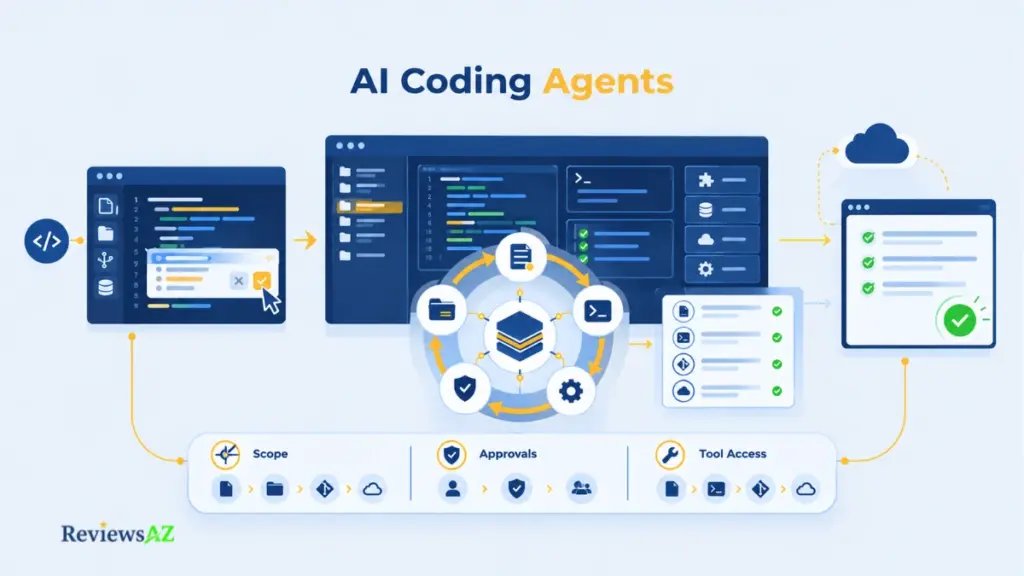
An AI coding agent is a software system that takes a development goal, works toward it across multiple steps using tools such as file edits, shell commands, and tests, and checks its own results before handing work back for review. The person sets the goal and the boundaries. The agent chooses the steps in between.
Labels vary by vendor and the edges overlap, so treat this as a working definition rather than a settled standard. The pattern it describes is often called agentic coding.
A typical agent follows a loop of gathering context, planning what to do, taking action, checking the result, and trying again when something fails. It may inspect relevant files and conventions, make edits, run commands or tests, and use the results to decide what to do next. Verification is what makes that loop meaningful: without it, the agent is simply generating and changing code without knowing whether the work actually succeeded.
What does not qualify a tool as agentic is how little typing it needs. One sentence asking a tool to write tests for a module, run them, and fix any failures can trigger a whole cycle of reading, editing, and testing, so prompt count is the wrong yardstick. What counts is how much execution gets handed over inside that cycle.
Autocomplete and a chat window that explains code do none of it, since nothing acts on the repository. A tool that drafts a multi-file change and leaves you to apply it sits somewhere in between. “Agent mode” as a label settles little on its own; ask who picks the next step, what the tool may do without prompting, and how it checks its own work.
A rejected suggestion costs a keystroke. A delegated task costs whatever the agent was allowed to touch. Once a tool can edit files, run shell commands, or open pull requests, its mistakes can travel well beyond the diff on screen.
From AI Assistance to Agentic Execution: Where the Boundary Sits
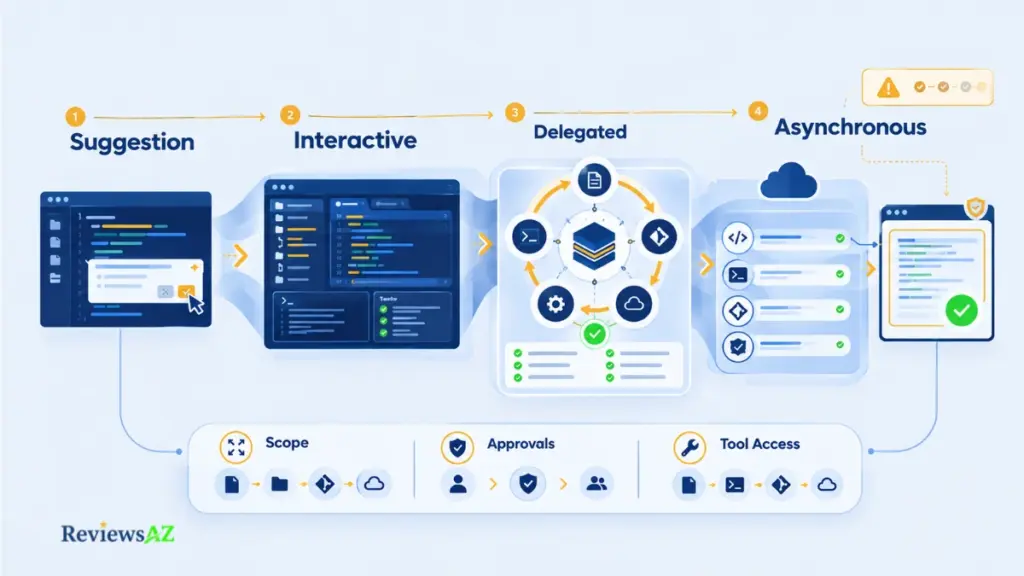
The assistant-versus-agent split is usually drawn as a wall. It behaves more like a dial, and one product can sit at several settings depending on the mode you pick. Several major tools now span the whole range under a single name: completions and chat sit alongside an in-editor agent mode, a command-line agent, and a cloud agent working asynchronously.
GitHub Copilot is a clear example of that shift. What started largely as code completion now spans chat, agent mode, command-line work, and cloud-based delegation, with the exact capabilities depending on the environment and configuration.
An assistant proposes; you read the suggestion, accept or reject it, and the action happens in your hands. An agent acts: it edits files, runs commands, and reports back, so your review moves from before the action to after it. That shift in timing, more than any marketing copy, is the boundary worth tracking.
Three settings decide where a given tool lands on that dial:
- Scope: one file, a folder, the whole repository, or beyond it.
- Approvals: confirmation before each edit or command, approval per task, or none inside an allowed boundary.
- Tool access: read-only, file edits, shell, Git, external services.
Broad reach with no approvals is a different animal from the same reach behind a human-in-the-loop check. Approval prompts carry their own blind spot, though: a long run of one-click confirmations drifts into rubber-stamping, and a shell command you approve can still write anywhere your user account can. Sandboxing exists to cover that gap, because approval is not containment.
The stages below are typical patterns, not hard categories, and one product can offer several of them:
| Stage | What changes |
|---|---|
| Suggestion | The developer applies the proposed change |
| Interactive assistance | The tool can prepare broader changes, but the developer directs the action |
| Delegated execution | The agent chooses steps and uses tools within defined limits |
| Asynchronous delegation | The work continues in the background and is reviewed afterward |
Agentic coding, as used on this page, starts at delegated execution. The wider split between assistants and agents gets a fuller treatment on the parent category page, how AI coding assistants differ from agents.
The Main Forms of AI Coding Agents
Most roundups blur two separate questions: where does the agent run, and how is it deployed and controlled? Runtime is the working environment, such as an editor, terminal, or cloud service. Deployment and control are about who hosts the model, where the agent runs, and who holds the keys. These are related, but they are not the same thing.
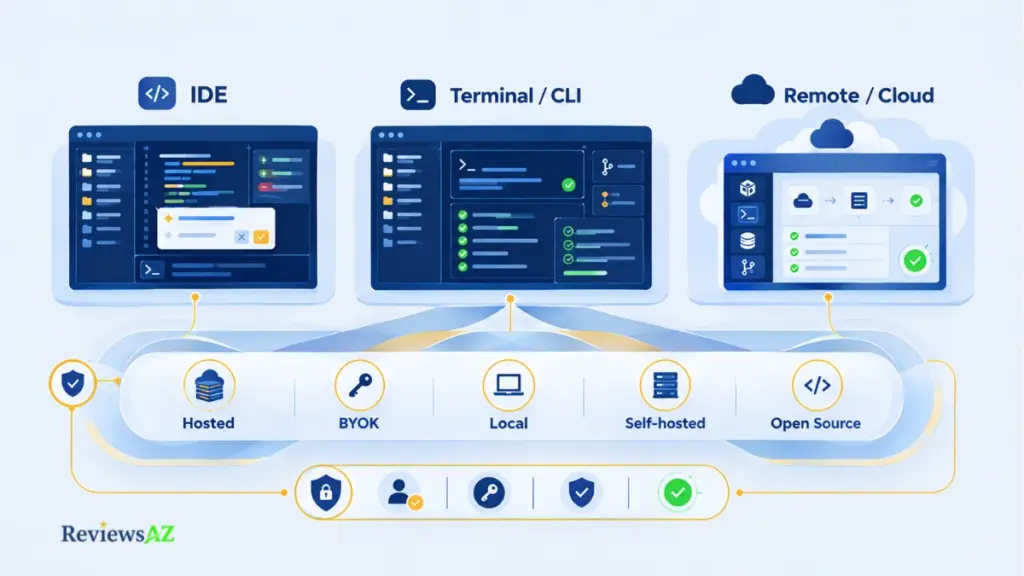
Product names are examples here, not fixed categories. The major tools no longer stay within a single runtime. The same vendor may offer an agent inside an editor, through a CLI, and as a cloud-based runner working on an isolated copy of a repository. Codex illustrates this shift, with coding-agent workflows that span the editor, terminal, and cloud. A brand name tells you where a tool started, but not necessarily where it runs today.
Where AI Coding Agents Run
The main runtime choices come down to where the agent does its work. It may operate inside the editor, through the terminal, or in a remote environment. Within those settings, the workflow can vary quite a bit depending on how much control the developer keeps and how the agent connects to the project.
- IDE-integrated agents work where the code is already open. That makes them a natural fit for feature work and changes across a handful of related files, especially when you want to see the diff as it develops. Cursor is one example, with an agent that can search the codebase, edit files, run terminal commands, and handle larger coding tasks without moving the work into a separate environment.
- Open-source and customizable IDE workflows take a slightly different approach. Cline combines an IDE-based agent with file editing, terminal commands, and other tools while keeping the developer involved in approvals. Continue.dev adds more control over how the workflow is put together, giving teams room to choose models, tools, and project-specific behavior rather than relying on a single fixed setup.
- Terminal and CLI agents fit workflows that already revolve around the shell and Git. Repository-wide edits, test and repair cycles, and scripted maintenance are common examples. Claude Code is one example, while Aider takes a more terminal-centered approach that keeps Git and the repository at the heart of the workflow. In both cases, review depends heavily on the diff, command output, and test results.
- Remote and cloud agents work away from your machine. You provide a task, the agent works in an isolated environment, and you review the result afterward. Devin Desktop is one example of this model, where the work can continue remotely while the developer focuses on the returned changes rather than watching every step. This can suit clearly defined background tasks, while exploratory work often benefits from keeping the developer closer to the process. The isolation also raises a practical question: what can that environment reach, and whose infrastructure is handling the work?
Verified category pattern. Modern coding agents are no longer tied to a single development surface. Current documentation shows agents working across local editors and terminals as well as remote cloud environments, with the same task able to move between those surfaces when the workflow allows it. This makes runtime a practical choice for the job at hand, rather than a fixed label attached to a product.
Tools, MCP, and Multi-Agent Orchestration
Runtime is only one part of the picture. An agent can also extend what it can do by connecting to external tools, data sources, and other agents. Several vendors now support the Model Context Protocol (MCP) or similar standards to make those connections easier to set up without building a separate integration for every service.
Some products also support orchestration, where one agent delegates a smaller task to another. That might mean asking a secondary agent to review a diff, search a narrower part of the repository, or perform another bounded check before the main run continues. These additions do not replace the core agent loop. They expand the range of tools and services that can take part in it, which means the same questions about permissions, action boundaries, and observability still apply.
How AI Coding Agents Are Deployed and Controlled
Deployment and control form a separate axis, and the options can overlap:
- Hosted service: the vendor runs the agent service and often the model as well.
- External model provider (BYOK): you use your own API key or provider account and are billed through that provider.
- Local execution: the model, the agent, or both run on your own hardware.
- Self-hosted infrastructure: you operate the environment in which the agent runs. At least one major vendor documents this model for a cloud-style agent, but current support should be checked for the specific product.
- Open-source code: the agent’s code is available for inspection and, depending on the project, for modification or self-managed deployment. For a closer look at what this means in practice, our guide to open-source AI coding assistant options covers the main approaches, trade-offs, and reasons teams may choose an open setup over a fully managed service.
These properties can be combined in different ways. An open-source agent can still call a hosted model, and a cloud-based agent can run on infrastructure that your organization operates. None of these labels, by themselves, answers the privacy question. The details that matter are the actual data path, what leaves the machine, which services receive it, where the agent executes, and which credentials it can access.
What AI Coding Agents Actually Do in a Real Development Workflow
Picture a ticket that says users can’t save a draft when the title contains an emoji. A suggestion tool might patch the line you point it at. An agent is expected to find where titles are validated, change the code, check what else depends on it, run the tests, and return a diff. Each step there is something an agent can attempt. Doing it reliably depends on the task, the repository, and the controls wrapped around the run.
Feature work and multi-file changes
Agents can build a feature across several files at once: a route, a handler, a data model change, the tests that go with them. In multi-file work, review effort changes shape: the question stops being whether one line is right and becomes whether the agent touched only what it should have. A diff small enough to read, backed by tests that exercise the new behavior, is what makes that judgment possible. Without tests, the reviewer is the only check left standing.
Debugging and test-and-repair loops
Debugging is where the loop earns its name: run a failing test, read the error, form a hypothesis, edit, run again, repeat until the result changes. The catch sits in what “changes” means. A green run proves the tests passed, not that the bug is gone. A red run can turn green because an assertion got loosened or a test got quietly edited. Test changes deserve exactly the scrutiny source changes get.
Refactoring, migrations, and repository maintenance
Renaming a function across a codebase, updating a deprecated API call in a hundred places, moving a module: these are repetitive and easy to describe, which makes them suit delegation well. Dependency bumps and lint fixes sit in the same bucket. Verification here leans on what already exists: a solid test suite, type checks, linters, CI. Delegation gets harder to defend as a change leans more on design judgment than mechanics, and that’s where a person should stay close to the work.
Documentation, review, and automation
Agents can update docs after a code change, summarize a diff for reviewers, or give a pull request a first-pass read. Treat the output as an extra reader, not an approver: documentation still has to match what the code does, and a review comment is a lead worth checking, not a verdict. Automation carries the most weight here: running an agent inside a CI/CD pipeline is routine now, and nobody may be watching as it acts, so its permissions need fixing before the first run rather than discovering them after.
How to Evaluate an AI Coding Agent Before Trusting It
What would you want to know about a contractor before handing over the keys to your repository? Probably more than a leaderboard position. A benchmark score tells you how a system performed on a particular task set, not how it will behave in your codebase, with your permissions, tools, tests, and review process.
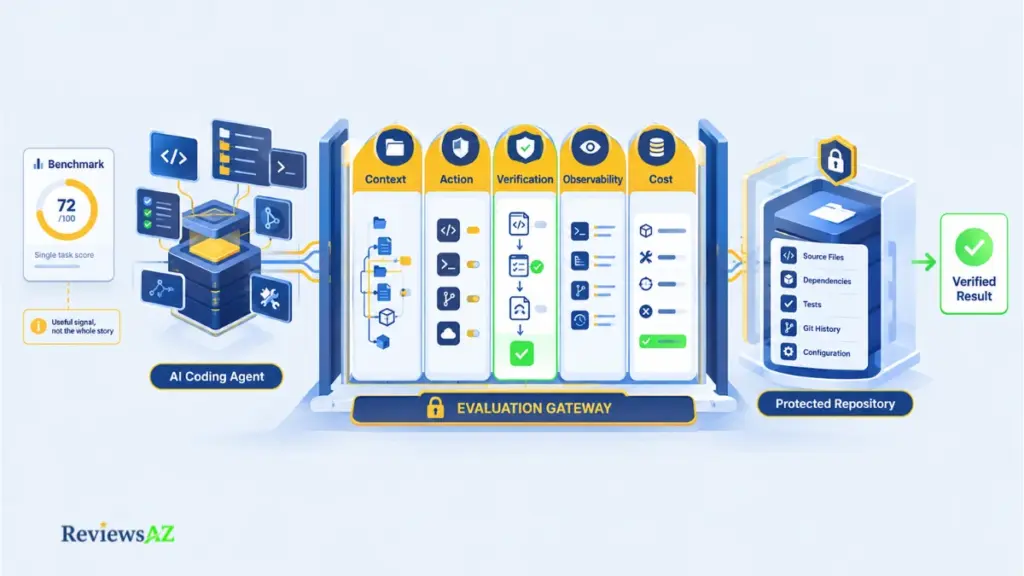
A real pilot needs more than two or three prompts. That is a smoke test, nothing more. Use several tasks that reflect the work your team actually does, run them more than once, and track completion, rework, review time, regressions, human intervention, and cost from start to finish.
Model, harness, or both? An agent’s behavior comes from the model, the tools, and the surrounding system working together. A benchmark that evaluates a model in a minimal environment is therefore answering a different question from one that evaluates a complete agentic setup.
SWE-bench Verified remains a useful reference point because it is a human-validated set of 500 real-world tasks. At the same time, concerns raised through 2026 about training-data contamination and the validity of some coding-benchmark tasks have made benchmark scores harder to interpret as a clean measure of current frontier capability. Use them to understand how systems are being evaluated, then test the exact configuration you plan to use on representative work of your own.
A useful pilot should go beyond whether the agent eventually produces a working patch. It should show how consistently the system gets there, how much help it needs along the way, and what the accepted result actually costs. Six checks cover the most important parts of that process:
- Measure the task, not just the model. Decide up front whether you are judging the language model, the harness and tools around it, or the complete product as it will actually be used. The same model can behave very differently depending on what it can see, which tools it can call, and how the surrounding system handles failures.
- Check repository context. An agent can only work with the context it can access. Look at how it finds relevant files and conventions, whether it relies on on-demand search or indexing, and what happens when a task becomes too large for its working context. Long tasks can expose context loss, so recovery matters as much as the initial context window.
- Define the action boundary. List what the agent may do without asking: read files, edit them, run shell commands, use Git, call external services, or access connected tools. Then check how precisely those permissions can be controlled. Broad permissions with constant interruptions are not much better than unrestricted access if the approval process turns into routine clicking.
- Test verification and recovery. Give the agent work where something can fail. See whether it runs the right tests, understands the failure, and makes a sensible correction. Just as important, see whether it can stop cleanly when it cannot finish. If a run goes wrong halfway through, you should be able to recover through Git, checkpoints, or another deliberate rollback mechanism rather than reconstructing the repository by hand.
- Measure observability and human intervention. A final diff does not tell the whole story. You should be able to see which files changed, which commands ran, where the agent needed help, and how often a person had to intervene. A task that finishes only after repeated rescue attempts is a different result from one that completes cleanly under the same conditions.
- Calculate total cost per accepted task. Agentic workflows can use substantially more tokens than autocomplete because context, tool output, and earlier steps may be processed again as the task continues. Pricing also varies between seats, credits, CI usage, and bring-your-own-key setups. Count the full cost: subscription or credits, token usage, compute or CI minutes, failed attempts, and the human time spent reviewing, correcting, or redoing the work. A tool that looks inexpensive per run can become the more expensive option when every accepted result needs an hour of cleanup.
The result of the pilot should be more useful than a single benchmark score or completion percentage. You should know which kinds of tasks the agent handles reliably, where human intervention is still needed, what permissions those tasks require, and what an accepted result costs under the conditions in which your team would actually use it.
Which AI Coding Agent Fits Your Workflow?
Finding an agent rarely takes long. Deciding how much of your work to hand over, where that work should happen, and what controls need to stay in place takes longer. No single agent fits every workflow, so this section focuses on the decisions that matter before comparing specific products.
Choosing the Right Runtime
Runtime follows from where the work already happens because that shapes how you review it. IDE agents tend to show the diff as it forms, which suits interactive work. Terminal agents fit workflows built around the shell and Git. Cloud agents make more sense for tasks you can define clearly up front and review afterward. Claude Code vs Cursor for terminal and IDE workflows looks at that choice in more detail.
A clean success condition is only one part of the decision. Reversibility, blast radius, data sensitivity, external side effects, ambiguity, approval requirements, and test coverage all matter too. A task can be well defined and still need human approval when the consequences of a mistake are difficult to reverse.
Matching Autonomy to Task Risk
Autonomy should follow the risk of the task, not how impressive an agent appears. A useful way to think about risk is to combine the blast radius of a mistake with how quickly you would detect it. The distinction also matters when choosing between tools that can work both as assistants and as agents. Cursor vs GitHub Copilot for assistant and agent workflows looks at that difference in more detail.
Roughly:
- Low risk (documentation edits, lint fixes, mechanical renames in well-tested code) can run under delegated execution with a bounded scope and CI checks as the backstop.
- Medium risk (feature work in a module with solid tests) fits interactive assistance or supervised delegation, with tests and diff review providing the main checks.
- High risk (authentication, payments, production migrations, database changes) belongs at suggestion level, or under narrow delegation where a person handles the final step. Human approval should remain in place for production writes, destructive commands, credential access, external network actions, deployments, and database mutations, together with least-privilege access and a rollback plan.
These bands are a heuristic rather than a fixed rule. Strong test coverage, isolation, and recovery controls can make some tasks suitable for more autonomy. Trust does not automatically carry from one task class to another, though. An agent that handles a documentation change cleanly has not demonstrated that it should handle a production migration.
Governance and Control
Governance adds another layer, especially in team and enterprise environments. A sensitive repository can narrow the available choices before editor features or benchmark results become relevant. Data controls and the deployment model should be settled first. For a closer look at what changes when coding agents move from individual use to team-wide deployment, see enterprise deployment and governance.
Before rollout, clarify who may enable the agent and for which repositories, where logs and audit trails are stored, which providers may receive your code, which actions always require human approval, and how usage costs are tracked and allocated.
Security, Privacy, Permissions, and Human Oversight
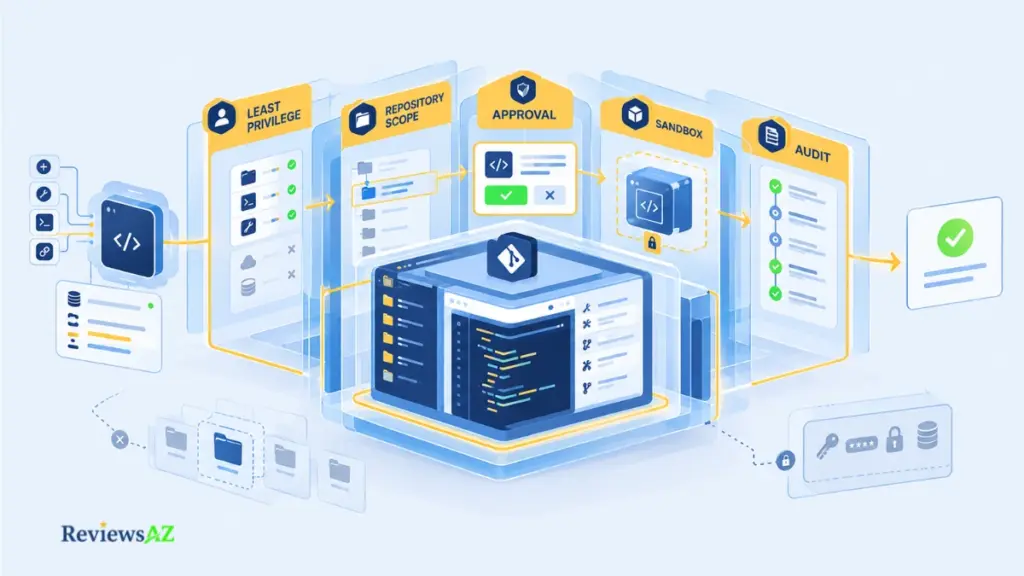
Most worries about coding agents trace back to reach: what the agent can read, run, or send somewhere. No agent is safe or unsafe in the abstract. The controls below work best stacked, since each one covers a gap the others leave open.
- Least privilege and repository scope. Give the agent the narrowest access that lets it finish the task: one repository instead of a whole organization, read-only where editing isn’t needed, credentials carrying only the permissions the work requires. A wrong action can then only reach what the agent was allowed to touch, no matter how the mistake happened.
- Prompt injection and untrusted input. Scope matters even when you trust the agent completely, because text planted in an issue, a web page, a dependency, or a tool’s output can try to steer the agent’s behavior. Treat everything the agent reads as untrusted input: review commands before approving them, avoid piping untrusted content straight into the tool, and reach for isolated environments on riskier work. No system is fully immune to this, which is exactly why the rest of this list matters too.
- Secrets and credentials. Agents often genuinely need something: test credentials, a package registry token, Git access, cloud permissions. A blanket ban isn’t realistic. Aim instead to cut unnecessary long-lived, broad credentials: favor short-lived, narrowly scoped, task-specific ones, store them in a secret manager rather than loose files in the working directory, and isolate the environment where they live. Separately, check the provider’s current terms on retaining or training on your code. These differ by vendor and shift over time, so verify rather than assume.
- Approval and sandbox boundaries. Approval gates keep a person between intent and action for steps that matter: deleting files, making network calls, pushing code. Sandboxing limits where an approved action can take effect, typically inside an isolated container or workspace. A gate depends on human attention staying sharp; a sandbox says nothing about what happened inside it once it ran. Read the documented scope of a sandbox before leaning on it. A sandboxed shell tool, for instance, may cover commands only, with nothing said about network calls made from inside that same session.
- Auditability and recovery. A log of commands run and files changed lets problems get traced after the fact, though logging alone prevents nothing. It only makes the damage visible sooner. Pair it with an actual rollback path: Git history, checkpoints, or backups that let a bad run be undone rather than rebuilt by hand.
Taken together, these controls make an AI coding agents easier to trust without asking you to trust it blindly. The aim is not to remove every risk, but to make the agent’s access, actions, and mistakes easier to limit, see, and undo. The more an agent can reach, the more important those boundaries become.
AI Coding Agents and the Database/SQL Boundary
A migration file sitting in a pull request is text. The same migration run against a live database is an event, and it may not be reversible. “AI coding agents for databases” can mean either one, and the two carry very different risks.
Backend code already runs through the database: models, query builders, repository layers, migration files, and test fixtures. A coding agent can edit these in the repository like any other code, and the result goes through diff review and tests before anything reaches a live database.
When the task is still mainly about writing application code around SQL, an AI coding assistant for SQL can be a better fit than giving a broader database agent direct execution access. The two workflows may look similar on the surface, but the control boundary is different. Direct database interaction means the agent can hold a live connection and run statements itself.
For backend teams that need more than repository-level coding help, AI database tools for backend developers cover the broader set of workflows around queries, schemas, database inspection, and data access.
Query generation and optimization
Agents can draft SQL and propose index or rewrite changes for slow queries. A query that runs and returns rows is not necessarily right. A wrong join or filter can produce plausible-looking results that are simply incorrect. For a closer look at these correctness and safety issues, see risks and limitations of AI-generated SQL.
Optimization brings a different problem. A query can become faster while returning the wrong result or behaving poorly under a realistic workload. Compare important output against a known baseline, then check the execution plan and test the change against representative data. For a deeper look at using AI to improve query performance without losing sight of the evidence, see optimizing SQL queries with AI.
Schema, migrations, and where writes belong
Schema changes sit right at the seam between code and data. An agent can write a migration file and update the models that depend on it, and that work stays on the code side until someone actually runs it. The run itself deserves its own ladder: read-only access suits inspection and query analysis, but it can’t exercise migration writes, transactional behavior, or rollback, so those belong on a disposable or staging clone.
Production writes should go through explicit human approval. For a migration touching live data, the real question isn’t whether the agent can write correct SQL, but whether your organization is willing to let it cross the write boundary at all.
Where the line should sit. Giving a coding agent write access to production just so it can verify its own changes removes the one safeguard that matters most: a wrong statement then runs against live data, often with no rollback path in place. Read-only diagnostic access can be reasonable where governance allows it. Writes should sit behind a person’s approval every time, regardless of how reliable the agent has been on other tasks.
Frequently Asked Questions
The main idea is straightforward: AI coding agents differ less by the label they carry than by what they can see, what they can do, and how their work is checked. The questions below focus on the practical issues that tend to matter once an agent moves beyond experimentation and into a real development workflow.
What should a coding-agent pilot measure before a wider rollout?
A short pilot should look past completion rate. Track how often the output needed rework, how long review took, whether regressions appeared later, and what the task cost once failed attempts and human time are included. A tool that finishes quickly but leaves a messy diff behind can cost more per accepted task than a slower one that needs almost no cleanup.
How can you tell whether a failure came from the model, the harness, or the tools around it?
Check what changed between a working run and a failing one. If the same model misses context it was never given, the harness or tool setup is the likely cause. If the model proposes a plan a correct harness could execute cleanly and still gets the logic wrong, the gap sits in the model itself. Reading the agent’s logs, not just the final diff, usually makes the source clear.
What does sandboxing actually protect, and what does it leave exposed?
Sandboxing limits where an approved action can take effect, typically by isolating a shell session or workspace. It does not evaluate whether the action itself was safe or correct, and coverage can be partial: a sandbox that contains shell commands may say nothing about network calls or credentials available inside that same session. Check the documented scope of a sandbox rather than assuming it covers everything the agent touches.
How does prompt injection enter an agentic coding workflow?
An agent that reads issues, web pages, dependency files, or the output of other tools can encounter text written to steer its behavior rather than to inform it. Because the agent cannot reliably tell instructions from content, that planted text can redirect an action the person never approved. Treating everything the agent reads as untrusted input, and narrowing what it can do afterward, is the practical defense.
When can passing tests still leave a task incorrect?
A test suite only checks what it was written to check. An agent chasing a green run can loosen an assertion, delete a failing test, or satisfy the letter of a check without fixing the underlying bug. Any change to a test file deserves the same scrutiny as a change to source code, especially inside a debugging loop.
How should database access differ between inspection, staging migration tests, and production writes?
The three stages carry different risk and need different permissions. Inspection and query analysis can run on read-only access. Testing a migration’s write behavior needs a disposable or staging copy, since read-only access cannot exercise it. Writes against production data should require explicit human approval and a rollback path, regardless of how well earlier stages went.
What should total cost per accepted task include?
Subscription or credit spend and token usage are only part of it. A fair figure also includes CI minutes, failed attempts that produced nothing usable, and the human time spent reviewing, correcting, or redoing the work. Two tools with similar sticker prices can land far apart once that review and rework time is counted.
Related Posts:
How to Chat with Your Database Using AI
Best AI SQL Tools
Where to Go Next in the AI Coding Agents Landscape
The right starting point is not a product name. It is a task, the environment in which that task will run, and the amount of control you are prepared to give an agent. The same workflow may call for an editor-based assistant in one situation, a terminal agent in another, or a remote agent when the work is well defined enough to run in the background. The important part is to match the level of delegation to the consequences of getting the task wrong.
Start with one task rather than one tool:
- Pick one recurring development task that is easy to describe and easy to evaluate.
- Define its inputs, its success condition, and how reversible the result is.
- Decide the action scope, permissions, and verification gate before the agent starts.
- Choose the runtime that fits the work, whether that is an editor, terminal, or cloud environment, and only then compare specific tools against that need.
From there, increase autonomy gradually. A task that works well under supervised delegation may eventually be suitable for less hands-on execution, while another may always need a person at the final approval point. What matters is repeated evidence from the same class of work, not a single successful run or a strong benchmark result.
Once you know which runtime, autonomy level, and controls fit the task, the comparison across major coding-agent workflows can help you see how Cursor, Claude Code, Codex, and GitHub Copilot approach that same problem in practice.
That is also the useful way to read the wider AI coding agents landscape. Runtime, autonomy, deployment, tool access, verification, and governance are not separate product features to collect. They are parts of the same decision about how much software work you are willing to delegate and where you want human control to remain. Start with the boundary, test the workflow, and then choose the tool that fits it.