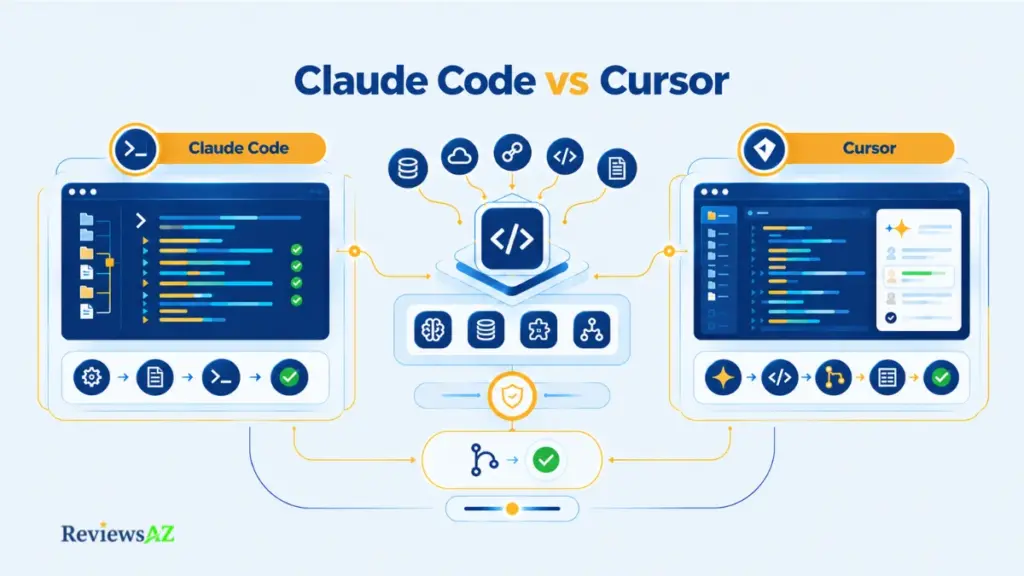
Claude Code vs Cursor: Terminal vs IDE Is No Longer the Whole Story

Claude Code vs Cursor sounds like a choice between a terminal and an editor. Except you can now install Claude Code inside Cursor, and Cursor has a command-line interface of its own.
That makes the old shorthand less useful than it used to be. Advice written a few months ago can already describe a product that has changed, while the two tools also meter usage differently. Two plans with the same sticker price can therefore provide very different amounts of usable work.
So the useful comparison is not simply where each tool lives. It comes down to three questions: how much work you hand over, where you review it, and how you want the usage billed. Context handling, MCP, security, and the case for using both tools follow from those choices.
The Decision in Three Questions
1. How much work do you want to delegate?
Claude Code is oriented toward delegated, task-first execution, especially across terminal and scripted workflows. Cursor is oriented toward supervising changes in the editor, with model choice built into the workflow.
2. Where do you want to review the work?
Claude Code fits developers who are comfortable reviewing task-driven changes across terminal and editor surfaces. Cursor puts more of that review directly inside the editor, alongside Agent, CLI, MCP, and a broad model selection.
3. How do you want to pay for that work?
Both products add usage mechanics beyond the headline subscription price. Cursor’s cost can move with model choice, while Claude Code sits inside Claude’s broader plan and usage system.
Start with your last ten tasks: Apply the three questions above to them. The pattern will tell you more about tool fit than a generic “terminal vs IDE” label.
Pricing snapshot: September 20, 2026, monthly billing — Claude Pro $20, Max from $100; Cursor Pro $20, Pro Plus $60, Ultra $200.
Important caveat: No hands-on benchmark was run for this comparison. Community reports are dated and sometimes contradict each other, so individual anecdotes and token-cost figures are treated as reports, not as a verdict.
Agent-First vs Editor-First: What Are You Really Comparing?
An agent-first workflow starts with a task you hand over. An editor-first workflow starts with code you are already looking at.
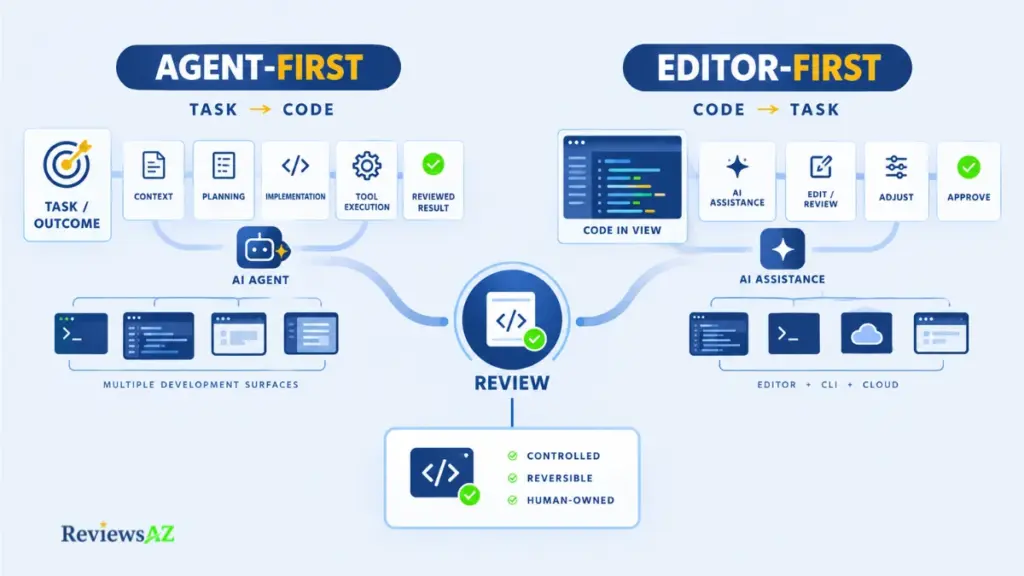
Terminal versus IDE says where a tool lives, while the comparison that matters is who takes the steps. Assistants suggest and complete, while agents plan, edit, and run commands across several steps. The line blurs easily in the broader AI code assistants category, and both tools here sit on the agent side. What separates them is how much autonomy each grants by default and where review happens, a distinction that how AI coding agents differ in practice takes further.
The comparison keeps returning to eight checks:
- Delegation: how much you can hand off
- Supervision: where you stay involved
- Execution surface: where the work runs
- Model choice: who picks the model
- Context acquisition: how relevant code is found
- Tool execution: what the agent may run
- Reviewability: how easily you see changes
- Reversibility: how easily you undo them
Claude Code Today: Agent-First Across Multiple Development Surfaces
Anthropic describes Claude Code as a tool for delegating coding tasks, and its reach goes well beyond a terminal. The same agent runs from the command line and, through an extension, inside VS Code-based editors, with a documented install path for Cursor. The surfaces are close but not identical, since not every CLI command exists in the extension. Claude Code tends to start from a task you hand over: you describe an outcome and the agent works through the steps. Our Claude Code review and product evaluation covers the product on its own.
Cursor Today: Editor-First with CLI and Agent Workflows
Cursor is a VS Code-family editor whose Agent works where you already read and edit code, and it tends to start from the code in front of you. It also has a command-line interface, and cloud agents run as a mode separate from the local Agent. Model choice belongs to the surface as well: Cursor ties usage to whichever model you select, which matters once pricing comes up. The standalone profile is in our Cursor review and current product evaluation.
The Steering-Wheel Test: Delegation, Supervision, and Control
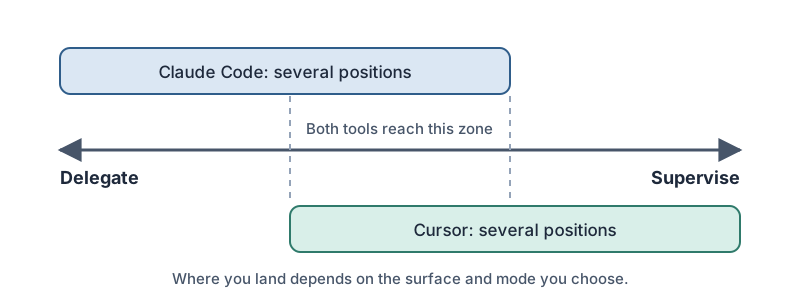
Three questions sort the two tools better than their surfaces do: how much you hand over, where you review it, and how you pay for it. The eight checks feed those answers, and the rest of the comparison keeps coming back to them. Agentic describes who takes the steps, and merging the result stays with you.
Claude Code vs Cursor: Comparison at a Glance
The labels are getting less useful. Claude Code can now sit inside Cursor, while Cursor can meet you in the terminal, so the old terminal-versus-editor split no longer tells the whole story. What matters more is how each tool takes on the work and where you step back in to review it.
The Core Comparison Matrix
Start with the same criteria for both tools. The table gives you the shape of the difference; the sections that follow explain where those differences matter.
| Criterion | Claude Code | Cursor |
|---|---|---|
| Workflow posture | Agent-first: you describe a task and the agent works through it | Editor-first: Agent works where you read and edit code |
| Agentic execution | Gather context, act, verify loop; plan mode researches without editing | Agent edits, searches, and runs commands; Plan Mode; Projects; Cloud Agents on separate machines |
| Surfaces | Terminal CLI, VS Code and JetBrains extensions, desktop app | Editor, standalone CLI, Cloud Agents |
| Model choice | Claude models, switchable mid-session | Cursor’s own models plus third-party models, drawn from separate pools |
| Context acquisition | Searches and reads files as it works; loads CLAUDE.md at start; compaction for long sessions | Instant Grep and an Explore subagent; semantic-search status varies by docs version; rules for project instructions |
| MCP and integrations | Servers at local, project, or user scope; project servers ask for approval in interactive sessions | Configured in mcp.json or the Customize page; approval follows your Run Mode |
| Pricing mechanics | Included in paid Claude plans; higher tiers raise usage limits | Included usage in two pools; on-demand billing after that |
| Permissions | Modes from ask-every-time to accept-edits, plan, auto, and bypass; allow and deny rules on top | Run Modes: Auto-review, Allowlist, Run Everything; sandboxed terminal commands |
| Hybrid compatibility | Extension has a documented install path for Cursor | Can host the Claude Code extension beside its own Agent |
Checked against official Claude Code and Cursor documentation on September 20, 2026. Each row records what the docs say a tool can do, not how it performs.
What the Table Can Show, and What It Cannot Prove
Read down the rows and the overlap stands out: Claude Code and Cursor each search a codebase, edit files, run commands, connect to MCP servers, ask for approval, and snapshot work so you can roll it back. What differs is where the agent starts and where you look at its work. A row can tell you a capability is documented, but it cannot tell you which tool finishes a task more accurately, faster, or cheaper on your workload, and no controlled comparison was run.
The rows will age as well: Cursor’s docs refer to older run modes that recent releases replaced, and Claude Code’s docs carry version-specific permission notes, so read the table as a dated snapshot.
Agentic Coding: How Claude Code and Cursor Handle Autonomous Work
Agentic coding means the tool plans, edits, and runs commands across several steps before you see a result. Claude Code and Cursor differ in the harness around the model: the loop it follows, the tools it gets, and the points where it stops and waits for you. That harness is separate from the model inside it. Anthropic’s docs describe Claude Code as the harness and Claude as the model, and Cursor lets you pick Claude models too, so credit or blame for a result does not automatically belong to the model.
Claude Code’s Agentic Loop: Planning, Execution, and Verification
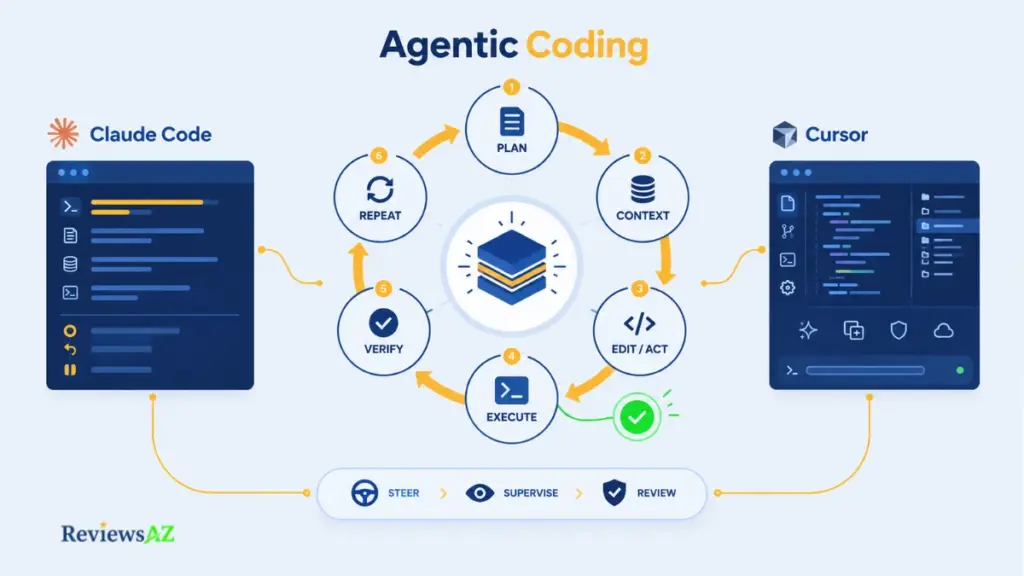
In Anthropic’s current description, every task runs as a loop: gather context, act, verify, repeat, with room to interrupt at any point. In plan mode, Claude reads files and runs exploratory commands but leaves your source alone until you approve the plan. Larger jobs can lean on subagents that explore in a separate context, and Anthropic suggests using them to check work after implementation. Parallel sessions can each get a git worktree so their edits do not collide.
Claude Code also checkpoints file changes automatically, and /rewind returns the conversation, the code, or both to an earlier state. Checkpoints only track edits made through Claude’s file editing tools, so changes made another way, such as by a shell command, may fall outside them, so it is safer to commit before a long handoff.
Cursor Agent Mode: Multi-File Editing, Commands, and Checkpoints
Cursor’s Subagents page carries a detail that surprises people: subagents share the parent’s checkout by default, so several editing at once can overwrite each other. Isolation has to be requested, through a worktree or a cloud environment.
The rest of Agent Mode works from the editor’s side pane: it searches the codebase, edits across files, and runs terminal commands, with a separate planning mode and Agent, Plan, and Ask modes in the CLI. Checkpoints are created automatically before significant changes and kept locally, separate from Git, and Cursor points to Git for anything permanent, one more reason to commit before a long unattended run.
Steering vs Supervising: Where the Human Stays in the Loop
Steering happens during a run, supervising happens after it, and the two tools lean differently on each. Cursor lets you send a follow-up that steers the active turn at the agent’s next tool call, or queue instructions for later. Claude Code lets you interrupt the loop and, through permission modes, choose how often it pauses for approval. Cloud Agents shift things further: per Cursor’s Run Modes page, they run on their own machine and never ask you to approve an action, so all review lands on the result.
Common mistake: treating a long unattended run as a verified one. Fewer prompts mean fewer chances to catch a bad step, so decide before delegating where you will check the work: the diff, the tests, or both.
Claude Code CLI / Terminal Workflow vs Cursor’s Development Workflow
The terminal used to be the part of the story you gave one tool, and the editor the part you gave the other. That distinction is harder to maintain now. Both products can follow you across different surfaces, so the more useful question is what happens when the work starts in a shell, moves to a remote machine, or needs to run without you watching it.
Terminal, Remote, and Scripted Workflows
For developers who live in SSH sessions, CI jobs, or repeatable scripts, the CLI is more than another interface. It changes how much of the workflow you can hand over and how much still needs a human in the loop.
Claude Code’s docs say the CLI works in any terminal, so a remote shell is enough, and -p runs it non-interactively for headless jobs. Cursor’s CLI installs on macOS, Linux, and Windows and has its own print mode for scripts and CI. Here is one example from each vendor’s docs, copied as written and not run here:
claude -p "Find and fix the bug in auth.py" --allowedTools "Read,Edit,Bash"
agent -p --force "Refactor this code to use modern ES6+ syntax"
The two commands are not equivalent tasks, but the flags hint at different defaults. Claude Code names which tools the run may use, while Cursor’s headless documentation says that without --force, print mode only proposes changes. Another Cursor CLI page describes full write access in non-interactive mode. Because the official pages describe the behavior differently, check the behavior on your installed version before relying on it in automation.
For remote development in the editor, third-party guides describe Cursor connecting through the standard Remote-SSH extension, since it is a VS Code fork. That makes this a secondary-evidence point rather than a vendor-documented feature comparison.
Visual Review, Diffs, Checkpoints, and Rollback
Once the work reaches the editor, the question changes. It is no longer just what the agent can do, but how easily you can see, interrupt, revise, and undo what it just did.
In Manual mode, Claude Code’s VS Code extension shows the original and proposed change side by side before it asks permission, and you can edit the proposal in that diff before accepting. The CLI can reach the same view: run inside VS Code’s integrated terminal, it opens diffs in the editor’s native diff viewer.
Cursor’s review interface shows additions and deletions as color-coded lines, the diff view updates while the agent works, and you can stop a run heading the wrong way. Rollback through checkpoints exists on both sides, so the review surface is where they diverge.
Cursor Community threads from early 2026 also describe a review bar going missing after agent changes, and edits applying without a review interface, though those user reports concern specific versions and may not describe the current build.
Where the CLI and Editor Surfaces Now Converge
The boundary is getting thinner. You can start in one surface, move to another, and keep the same task moving, which makes the default workflow more important than the label attached to the tool.
Claude Code’s extension bundles a copy of the CLI, shares conversation history with it, and offers a Use Terminal setting for a CLI-style interface inside the editor, though it supports only a subset of commands and lacks the ! bash shortcut and tab completion.
Cursor’s CLI supports the same modes as the editor, and a message prefixed with & goes on to a Cloud Agent.
You can start from either surface and end up using both, so what still differs is the default: which one opens first, and how much effort it takes to leave it.
Context Window and Large Codebase Handling: What Actually Matters?
“Context” covers two different things. Capacity is how much the model can hold at once, and retrieval is how the tool decides what goes in. Capacity belongs to the model, while retrieval belongs to the harness, along with the instruction files that steer it, and mixing the two up is one reason reports on large repositories contradict each other.
How Claude Code Gathers and Manages Context
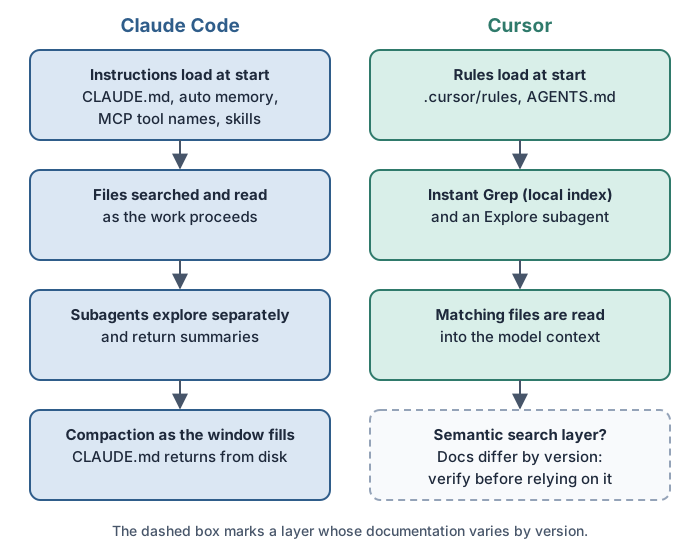
Anthropic’s context window page lists what loads before you type anything: CLAUDE.md, auto memory, MCP tool names, and skill descriptions, with AGENTS.md files able to load too, but not your repository. The code arrives as the agent searches and reads files, and the same page notes that file reads dominate context usage, while path-scoped rules load when Claude reads a matching file.
Subagents keep large reads out of the main window and return a summary. When the window fills, compaction runs: project-root CLAUDE.md comes back from disk, up to five recently touched files are re-read, and instructions given only in conversation can be lost, so anything that must survive compaction belongs in CLAUDE.md. The /context command shows what is using space.
How Cursor Indexes and Retrieves Code
Cursor’s instruction layer is Project Rules in .cursor/rules, plus AGENTS.md in the root and subdirectories. Applied rules are included at the start of the model context, scoped by path pattern, by relevance, or by @-mention.
On retrieval, Cursor’s current Search page describes Instant Grep, a search index built on your machine for exact and regex matching, plus an Explore subagent that searches in its own context window. The same page says Cursor does not store embeddings of your codebase for search. Earlier Cursor documentation, an engineering blog post, and many third-party explainers describe embedding-based semantic search over an indexed codebase instead. The accounts conflict, and the docs alone cannot tell you which one matches your installed version, so treat any claim about how Cursor searches your repository as version-dependent.
Large Repositories and Monorepos: What the Evidence Supports
Scoping context to part of a repository is documented for Claude Code (path-scoped rules, nested CLAUDE.md files, and subagents) and for Cursor (globs on rules, nested AGENTS.md files, and multi-root workspaces, though some features such as worktrees are disabled in that mode and Cloud Agents do not support it). No controlled head-to-head test on a large repository turned up, so there is no winner to name, but you can run a useful test in an afternoon: point each tool at one module you already know well, give it a task with a known answer, and watch which files it opens first and whether they are the ones you expected.
Why More Context Does Not Automatically Mean Better Results
Capacity does keep growing: Anthropic’s model configuration page lists a 1 million token window for models including Sonnet 5 and the Fable models (its priciest tier), with availability varying by model and plan. A bigger window raises the ceiling on what can be held, but what goes in is still decided by retrieval. Vendor guidance on both sides treats context as a budget: Anthropic advises specific prompts so Claude reads fewer files, and Cursor advises keeping rules under 500 lines instead of pasting in whole style guides. Selection quality, tidy instruction files, and a well-scoped task belong in the comparison next to window size, and none of them shows up on a spec sheet.
MCP Support and Integrations: Databases, Trackers, and Internal Tools
A bug ticket lands in your queue. You paste the ticket into the chat, then the table schema, then a log line. By the third paste, you are the integration.
The Model Context Protocol exists to remove that step. An MCP server exposes a tool, such as an issue tracker, a monitoring service, or a database, and the agent calls it directly, which Claude Code and Cursor both support.
MCP Support in Claude Code and Cursor
Claude Code adds servers with claude mcp add at one of three scopes: local (the default, private to you), project (a .mcp.json file shared through version control), or user. Tool definitions are deferred by default, so extra servers cost little context. Cursor takes servers from its Customize page or an mcp.json file, and its CLI reads the same configuration as the editor. Because MCP is a shared protocol, a server is not tied to one client, and Anthropic even shows how to adapt setup instructions written for Cursor or Claude Desktop.
Database and Schema Access Through MCP
Database access here is an MCP capability, not a native database feature of either product. A database server exposes the schema and queries as tools, and Anthropic’s own example uses the open-source DBHub server. What can happen depends on two layers: the client’s permission layer controls what the agent may ask to do, and the MCP server and its credentials control what the connected system can actually do.
The day-to-day workflow after connecting is covered in how to chat with your database using AI, and query drafting in how to generate SQL queries with AI.
Least-Privilege Access: Start Read-Only
Start with a non-production database or a copy of one, and connect through a database user that can only read. Anthropic’s example does this: it passes a read-only user in the connection string so the agent’s queries cannot modify data. Credentials belong outside version control too, and Anthropic points to local scope for servers with credentials you would not commit.
The approval prompt is not the security boundary.
Approving a query in the editor does nothing to limit what the credentials in the server configuration can do, so a write-capable connection stays write-capable. Read generated SQL before it runs; AI-generated SQL risks and limitations explains what to look for before you ever grant write access.
Permissions, Privacy, and Data-Handling Checks
Cursor asks for approval before using MCP tools by default, and MCP follows the same Run Modes as terminal commands, so a permissive mode loosens MCP too. Claude Code prompts before using project-scoped servers from .mcp.json in interactive sessions, but in claude -p runs and cloud sessions it loads them without asking. Vetting matters as well: Anthropic warns that servers fetching external content can expose you to prompt injection, and Cursor says MCP servers come from external vendors and should be reviewed before you enable them. Enterprise teams can restrict servers centrally in either tool.
Tool results also become part of what the model sees, so rows returned from a table travel with the request, and each vendor’s data-use documentation governs what happens next.
Claude Code vs Cursor Pricing: Plans, Usage Limits, and Effective Cost
Claude Pro and Cursor Pro both cost $20 a month, but each company meters usage differently and neither says how much work a plan covers. A week of real work on the entry plan of each is the quickest way to learn what it holds for you.
Last verified: September, 2026, against Anthropic’s pricing page and Cursor’s Models and Pricing documentation. Prices are before tax.
How Claude Code and Cursor Meter Usage
| Mechanic | Claude Code | Cursor |
|---|---|---|
| Entry paid plan (monthly billing) | Pro $20 monthly, or $17 a month billed annually ($200 up front) | Pro $20 |
| Higher individual tiers | Max from $100 | Pro Plus $60; Ultra $200 |
| Usage model | One pool shared across Claude chat and Claude Code, with a five-hour session limit plus weekly limits | Two monthly pools: Cursor Models, and Other Models for third-party models at API price |
| Model effect | Usage varies with model and task; Fable models (the priciest tier) need usage credits on Pro | Third-party models draw at their per-token API rate |
| After included usage | Wait, upgrade, use credits at API rates, or use Console API credits | On-demand usage at the same API rates, or upgrade |
| Team seats | Claude | Cursor |
|---|---|---|
| Standard | $25 monthly, or $20 annual | $40 per user |
| Premium | $125 monthly, or $100 annual; 5x Standard usage | $120 per user; 5x Standard Agent limits |
| Extras | Enterprise adds API-rate usage on a $20 seat price | $0.25 per million third-party tokens on Teams and Enterprise |
Why Sticker Price Is Not Effective Cost
Anthropic publishes multipliers, such as Max giving 5x or 20x the usage of Pro per session, rather than token counts, and Cursor’s Models and Pricing page gives no dollar amount for either of its pools.
Both companies let you keep going past the included usage and bill that overage at API rates, through Cursor’s on-demand usage and Claude’s usage credits. The accounting differs, but the rate card is shared: Claude Sonnet 5 is listed at $2 input and $10 output per million tokens on both companies’ pages, as of September 20, 2026. Model choice moves the meter too, since Cursor’s rate card lists Claude Opus 5 at $5 input and $25 output, 2.5 times Sonnet 5 per token, before counting how many tokens each model uses.
What you can plan around is predictability: where the ceiling sits and what happens above it. Our AI coding assistant pricing comparison widens the lens beyond these two products.
Occasional, Daily, Heavy, and Team Usage Scenarios
These scenarios rest on vendor guidance and published plan terms, not measured token use.
- Occasional use. A few agent tasks a week. Cursor says limited Agent users often stay within included usage, and Anthropic publishes no message count, so start at $20 and watch your usage page.
- Daily use. Cursor’s guidance puts daily Agent users near $60 to $100 of monthly usage, above Pro’s sticker price, so expect Pro Plus or on-demand charges. Claude has no published dollar equivalent, which makes the five-hour and weekly limits the thing to watch.
- Heavy use. Cursor says power users running multiple agents often pass $200. On Claude, Max adds 5x or 20x session usage while weekly limits still apply.
- Team use. Cursor allocates usage per seat, and it does not transfer between members.
What to Re-Verify Before Paying
Treat these as a stale-claim check:
- Fixed request counts describe Cursor’s legacy request-based pricing.
- Prompts-per-window figures for Claude are estimates; Anthropic says there is no fixed message count.
- Formulas equating plan price with a credit pool appear on neither official page.
- Auto is not free: Cursor bills every Auto mode at the routed model’s list price.
- Anthropic says it occasionally runs limited-time promotions, so check whether one is active.
Confirm your own numbers in Settings > Usage on Claude and on the usage dashboard on Cursor before committing.
Using Claude Code Inside Cursor: Hybrid Workflows Explained
Yes. Claude Code runs inside Cursor in two ways: install the Claude Code extension from Anthropic’s documented Install for Cursor link, or run the standalone claude CLI in Cursor’s integrated terminal. Both run Claude Code’s own agent, so usage is counted on the Claude side. Picking a Claude model in Cursor’s Agent is a third setup that runs Cursor’s agent.
Claude Code Extension/CLI vs Claude Models in Cursor
| Setup | Agent doing the work | Usage counted on |
|---|---|---|
| Cursor alone, including Claude models | Cursor’s Agent | Cursor’s plan; Claude models draw from the Other Models pool at API price |
| Claude Code extension in Cursor | Claude Code | Your Claude plan limits, or Console API credits |
| Claude Code CLI in Cursor’s terminal | Claude Code | Your Claude plan limits, or Console API credits |
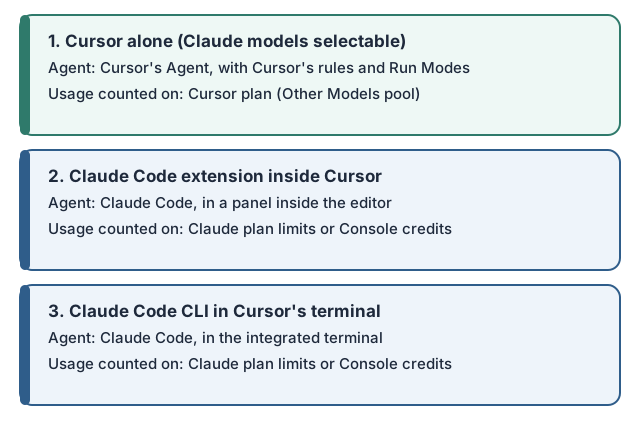
A Claude model inside Cursor still runs in Cursor’s harness: its Agent, rules, checkpoints, and Run Modes. Claude Code brings its own loop, CLAUDE.md, and permission modes, whichever window it sits in.
Running Claude Code from Cursor’s Integrated Terminal
Anthropic’s Claude Code VS Code documentation says the extension bundles its own copy of the CLI for the chat panel only, so running claude in the integrated terminal takes the standalone install as well. Once it runs, the CLI integrates with the editor for diff viewing and diagnostic sharing, and /ide connects it from an external terminal. The extension and CLI share conversation history, so claude –resume picks up an extension session in the terminal.
Some GitHub issues, user-reported and tied to specific versions, describe /ide failing to detect Cursor on Windows, and one describes an extension-level MCP error over Remote SSH that the plain CLI did not show.
When the Hybrid Workflow Adds Real Value
Suppose a well-scoped task is ready to hand off. You start it in Claude Code from the integrated terminal, keep working in another file of the same Cursor window, and review the finished change in the diff viewer. Delegated work in one place and hands-on work in another is the case for the hybrid setup.
It also helps when you already hold a Claude plan that includes Claude Code and want its permission modes and CLAUDE.md conventions without leaving the editor. Because history is shared, a session can move between panel and terminal. One habit is worth building: save and commit before you hand anything to an agent in the terminal. Claude Code’s checkpoints only track edits made through its own file tools, and Cursor’s checkpoints are local and separate from Git, so Git is the layer that covers both.
When Using Both Simply Duplicates Capability and Cost
Search, file edits, commands, and MCP connections exist in both tools, so the second one mostly adds a second meter. The overlap is sharpest when you select a Claude model in Cursor and also run Claude Code: the same model family is billed through two plans, and each tool keeps its own MCP configuration and permission settings to maintain. If one tool covers your last ten tasks, the other adds a bill without adding a capability.
Security, Permissions, and Privacy: Where the Trade-Offs Appear
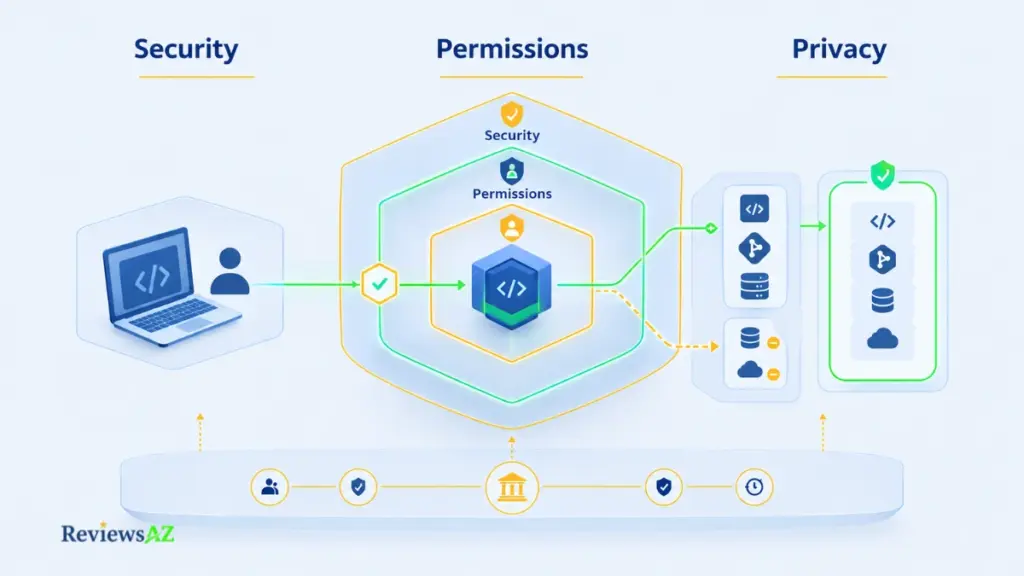
An approval prompt can make an action feel controlled, but it is not the whole security model. The real question is what the agent can reach, what it is allowed to do, and where the final responsibility still sits with you.
Permission and Approval Models
What an agent may access, and when, depends on more than an approval prompt. Anthropic’s security page says Claude Code has only the permissions you grant it, and that you are responsible for reviewing proposed code and commands before approving them. Commands that fetch web content, such as curl and wget, are not auto-approved by default, and an optional sandbox can add isolation.
Cursor pairs its Run Modes with sandboxed terminal commands, and its security documentation calls the modes best-effort. Permission features describe what a tool can do rather than what will happen, so each vendor in effect leaves the human as the backstop, and an approval prompt only helps when someone reads what it approves.
Code, Context, and Data-Handling Considerations
In both tools, ordinary agent requests send prompts and code context to a model provider, and what happens next is a vendor claim, so it is attributed here.
Cursor’s data-use page says that with Privacy Mode on, Cursor does not use customer data for training and holds zero-data-retention agreements with providers. It adds a carve-out: prompts that trigger abuse detectors may be stored for investigation. With Privacy Mode off, Cursor says it may use code data to train its models. On Teams, Privacy Mode is on by default.
Anthropic’s Claude Code documentation describes limited retention periods and user control over training preferences. Its pricing page lists model training as opt-out on Free, Pro, and Max, and none by default on Team and Enterprise.
Privacy Mode is one control, and it does not cover every model.
Cursor’s governance page says a few models, including Claude Fable 5.1 and Fable 5, fall outside its zero-data-retention agreements because Anthropic stores their inputs and outputs for harm-prevention reviews, without using them for training. Check the model’s data policy as well as your plan.
Cloud Agents are a separate case: the same governance page says to leave them off if your policy prohibits code storage. Anything neither vendor documents stays out of the comparison.
Team and Enterprise Controls to Verify
Anthropic’s pricing page lists SSO and central administration on Team, and adds SCIM, audit logs, role-based access, and custom data retention on Enterprise. Cursor’s docs list SAML/OIDC SSO and team-wide Privacy Mode enforcement on Teams, with SCIM and advanced security controls on Enterprise. Contract terms follow the plan: Anthropic’s Commercial Terms cover Team, Enterprise, and API use, while its Consumer Terms cover Free, Pro, and Max. Cursor’s data processing agreement applies to Teams and Enterprise, not individual plans.
Certifications and sub-processor lists belong in each vendor’s trust center, checked on the day you decide, and none are named here. Wider evaluations of enterprise options are collected in best AI coding assistants for enterprise teams.
Key Differences and Trade-Offs: What Actually Changes the Decision?
Two verdicts get repeated more than any others, that one tool is smarter and that the other is cheaper, and both are hard to verify.
- Delegation vs Inline Supervision. With Claude Code, attention tends to move to the review afterward. With Cursor, it tends to stay with the work while it happens.
- Control vs Automation. More automation means fewer prompts, and fewer prompts mean fewer chances to catch a bad step. Cursor’s Cloud Agents sit at the far end, with no per-action approval.
- Model Choice vs Workflow Consistency. Cursor lets you pick among its own models and third-party ones, Claude models included, while Claude Code keeps you in the Claude family, inside one loop and one permission model.
- Cost Predictability vs Usage Flexibility. Claude meters one shared pool with five-hour and weekly limits, and Cursor meters two monthly pools. With no published measure of work per plan, your own usage history is the only guide.
- Why Accuracy Cannot Be Ranked Honestly From This Evidence. Nothing gathered compares the two tools’ accuracy on the same tasks, and community reports conflict because they tend to measure different setups: models, plans, versions, and repositories. Averaging those anecdotes into a score would manufacture precision the evidence does not have.
What the evidence cannot tell us: Which tool completes your tasks more accurately, which finishes faster, and which costs less for your usage. Only your own work can answer those.
Best Fit by Developer Workflow: Claude Code, Cursor, or Both?
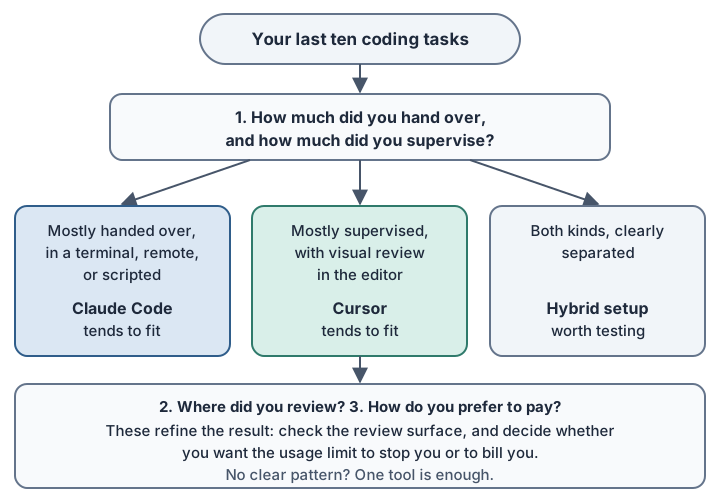
Before choosing, open your last ten coding tasks. Next to each, note whether you handed it over or watched it happen, and where you reviewed the result: a terminal, an editor diff, or a pull request.
Those notes answer three questions:
- How much do you want to delegate: a task you hand over, or code you supervise as it changes?
- Where do you want to review and control changes: the terminal, an editor diff, or after the fact?
- How do you prefer to pay for usage: within fixed limits, or with paid continuation past them?
Tally your ten tasks against these questions; the pattern in your own work is the test, and no one else’s benchmark can stand in for it.
Terminal-First, Remote, and Scripted Workflows
Count how many of your ten tasks happened in a shell, over a remote connection, or in a script. When most did, Claude Code’s defaults fit: its CLI works in any terminal, and -p runs it headless. Cursor’s CLI has a print mode for scripts and CI too, though its docs are inconsistent about write access without –force, so check that on your version first.
Editor-First Development and Continuous Visual Review
Now count the tasks where you watched multi-file changes as they happened. A high count points toward Cursor’s defaults: its diff view updates while the agent works, and you can stop or steer a run midway. Claude Code’s extension also shows side-by-side diffs in Manual mode, which suits someone who wants to delegate and still see the change.
Backend, Database, and Large-Repository Work
Database work reaches either tool through MCP, so the safeguard is the same: a read-only user on non-production data, and generated SQL read before it runs. Dedicated tools for that job are compared in best AI database tools for backend developers. On large repositories, Claude Code and Cursor can each scope context to part of the codebase, so how you scope the task deserves as much thought as which tool you pick.
Team and Budget-Constrained Workflows
Teams can reuse the security checklist: SSO, administration, retention terms, and contract terms by plan. Cursor allocates usage per seat and it does not transfer between members, which matters when a few people use it heavily. On a tight budget, decide what you want the ceiling to do, because either tool lets you stop at the limit or pay to continue past it.
When a Hybrid Setup Makes Sense
Using both tools only helps when they cover different parts of your work. A hybrid setup makes sense when one handles delegated tasks while the other gives you the editor-based review you want, rather than simply duplicating the same workflow.
That distinction is worth testing against your own last ten tasks. Look for a real split between work you want to hand over and work you prefer to supervise closely; that is where using both can start to justify the extra usage meter.
When Both Earn a Place: A hybrid setup earns its place when your ten tasks split cleanly between delegated work and hands-on supervision, and you are willing to carry two usage meters. When that split does not show up in your own work, one tool is usually enough.
Frequently Asked Questions About Claude Code vs Cursor
The biggest questions about Claude Code vs Cursor usually come down to cost, workflow, context, and how much control you want to keep over an agent. Because prices, plans, and settings can change, the answers below were last verified on September 20, 2026.
Is Claude Code cheaper than Cursor?
That depends on your usage more than the sticker price. Each tool meters usage differently, and neither company says how much work a plan covers. Past the included usage, both continue at API rates if you enable it. Measure your own last ten tasks, and check the Last verified date in the pricing section before paying.
Do you need both Claude Code and Cursor?
Only if your tasks split between delegated agent work and hands-on editor supervision, and you accept two usage meters. When one tool covers your last ten tasks, the second mostly adds cost.
Can you use Claude Code inside Cursor?
Yes. Install the Claude Code extension through Anthropic’s documented Install for Cursor path, or run the standalone claude CLI in Cursor’s integrated terminal. Choosing a Claude model in Cursor’s own Agent is a different setup, metered by Cursor. Check Anthropic’s VS Code documentation for current setup details.
Does Cursor support MCP?
Yes. Servers are configured through the Customize page or an mcp.json file, and the CLI reads the same configuration. Cursor asks for approval before using MCP tools by default, and calls follow your Run Mode. For databases, use a read-only user on non-production data.
What is the main difference between Claude Code and Cursor’s agent workflows?
The main difference is where the work tends to start: Claude Code from a task you hand over, Cursor’s Agent from code you are already looking at. Each tool now reaches the other’s surface, so treat it as a default posture rather than a hard boundary.
Which is better for large codebases?
No source supports naming one. Scoping context to part of a repository is documented for each tool, and no controlled head-to-head test on a large codebase turned up. Community reports conflict and are user-reported, so point each tool at a module you know well and compare which files it opens first.
How do Claude Code and Cursor handle permissions and agent autonomy?
Permission levels are stepped on each side, from approving each action to running more freely, and Cursor’s Cloud Agents run without per-action approval. These describe capability rather than security outcome, so check the current modes in each vendor’s docs.
Related Posts:
AI-Generated SQL Risks and Limitations
AI Coding Assistant for SQL
Cursor vs Claude Code vs Codex vs GitHub Copilot
Final Decision: Which Workflow Does the Evidence Support?
Given how much you want to delegate, where you want to review changes, and how you prefer to pay, which workflow does the evidence support: Claude Code, Cursor, or both?
None of it supports a universal winner, and a verdict without that evidence would only be a preference; what it supports is fit.
- Mostly delegated, terminal-based, remote, or scripted work maps more naturally to Claude Code, which starts from a task, runs in any terminal, and has a headless mode.
- Mostly interactive editing with continuous visual review maps more naturally to Cursor, whose diff view updates while the agent works. Claude Code’s extension also shows diffs, so this is a matter of defaults.
- A real split between the two, and a willingness to run two usage meters, makes the hybrid setup worth trying. Without the split, the second tool mostly adds cost.
- Review-governed teams should decide on the controls they must verify, since administration and privacy controls are documented on both sides and vary by plan, with Cursor’s also varying by model.
- Avoid choosing on price alone, expecting continuous visual review from a terminal-only session, or leaning on either tool to make up for missing automated tests.
Run your last ten tasks through the three questions and let the pattern in your own work decide. Plans, limits, and features in this comparison were last verified on September 20, 2026, and they change quickly. Confirm them on the day you decide.