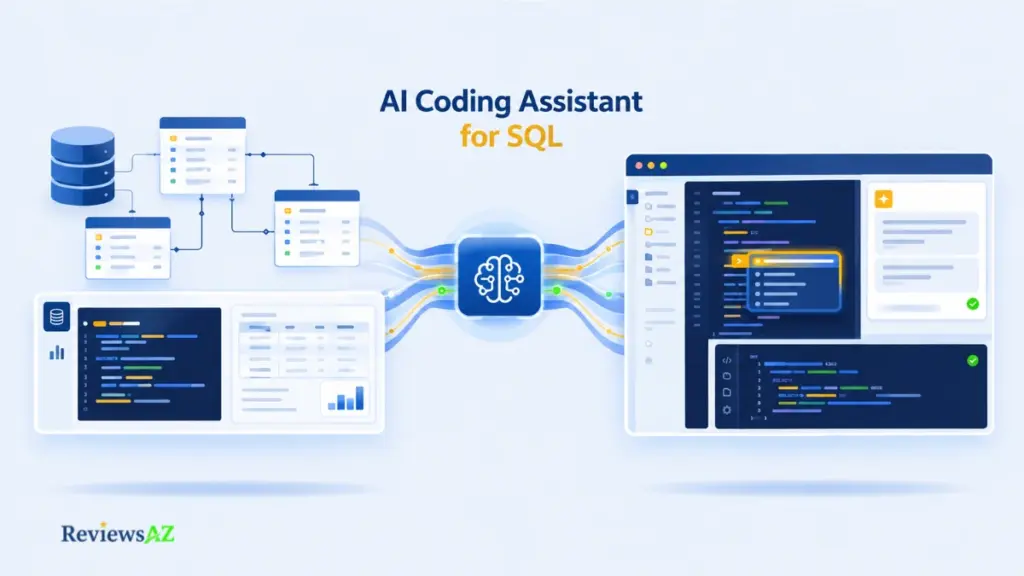
AI Coding Assistant for SQL: How AI Helps Developers Write and Work with SQL

An AI coding assistant for SQL can generate a query that runs cleanly, returns real rows, and still be wrong for the table it was never shown.
That gap is the whole story here. Most coding assistants read the file in front of them well: the function calling into the database, the migration script, the ORM model. What they rarely know is what the database itself actually looks like right now. A table renamed six months ago. A foreign key that no longer means what its name suggests. A dialect quirk that changes how a date filter behaves. None of that lives in the surrounding code.
A text-to-SQL AI is built differently, translating plain language directly into a query against a schema it can already see. A general coding assistant works from a narrower, code-shaped view of the problem instead, which is often enough, and sometimes isn’t.
So the real question isn’t whether AI can write SQL. It’s which kind of context the task actually needs: the surrounding application code, the live database schema, or both at once.
This guide walks through what a coding assistant can reliably do with SQL, where codebase awareness stops and database awareness has to take over, what needs verifying before anything reaches production, and when a dedicated SQL tool, or a hybrid of the two, fits the job better.
What Is an AI Coding Assistant for SQL?
An AI coding assistant for SQL is a general-purpose coding assistant, built into an IDE, editor, or chat interface, that can read, generate, explain, and modify SQL as part of the surrounding application code rather than as a standalone database tool.
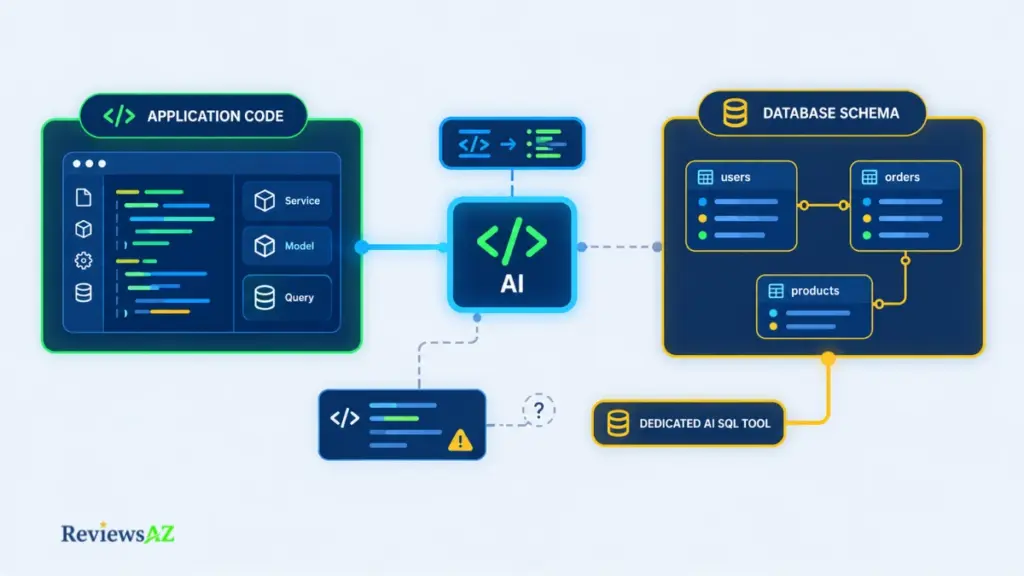
The important distinction is what it’s actually looking at. It reasons from the code around it: the function calling the query, the ORM model, the migration file, sometimes a comment describing intent. It’s rarely connected to the live database itself, which is where a dedicated tool changes the picture.
How AI Coding Assistants Differ From Dedicated AI SQL Tools
A coding assistant lives where the code lives. It sees variable names, function signatures, and whatever schema hints happen to be nearby: a type definition, a comment, an ORM class. That’s often enough to draft a reasonable query.
A dedicated AI SQL tool usually starts from the other direction. Tools like DBeaver and JetBrains’ DataGrip AI Assistant connect to the database, or a schema export, directly, so suggestions can reference actual table names, column types, and relationships instead of inferring them from code, a capability both products document rather than something inferred from general marketing. Our best AI SQL tools roundup covers how these tools stack up against each other in more depth.
Neither approach is strictly better; they’re built to see different things. Lean on the coding assistant when the surrounding logic is the harder part of the task, and reach for a schema-aware tool once the database’s actual contents become the bottleneck.
What Can an AI Coding Assistant Do With SQL?
Within that code-facing view, a capable AI coding assistant can reliably help with several parts of SQL work:
- Generate or explain SQL: drafting a query from a natural-language request or existing code context, or explaining what an existing query does.
- Debug queries: spotting obvious syntax errors, mismatched types, or logic that doesn’t match the stated intent.
- Optimize SQL: suggesting index-friendly rewrites or flagging inefficient patterns like unnecessary subqueries.
- Work with application code: connecting SQL to the ORM calls, service functions, or migration scripts around it.
- Assist with database-related development: drafting migrations, seed data, or test fixtures alongside the SQL itself.
That list covers generate SQL queries reasonably well. What it doesn’t cover is validation against your actual database, and that’s the part worth being careful about.
A query that looks correct and runs without error can still be wrong for your schema. Without a live connection, the assistant is often guessing at table and column names, so it’s worth checking generated SQL against the real schema before executing it, especially anywhere near production data.
How AI Coding Assistants Work With SQL in Application Code
Most SQL assistance doesn’t start with a blank query. It starts with a slow endpoint, a half-finished migration, or a stack trace pointing at a database call somewhere in the application code.
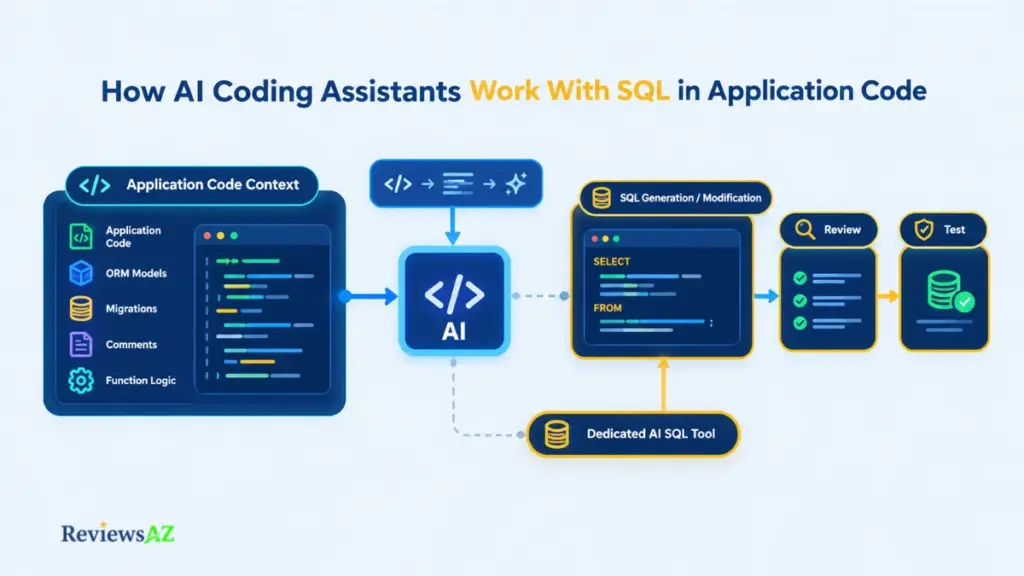
Across those situations, the assistant tends to enter the loop at roughly the same points:
- Describe the operation: in plain language, or by starting to type the surrounding code.
- Provide or expose relevant context: the ORM model, schema comment, or migration file it needs to see.
- Generate or modify SQL: the assistant drafts, edits, or extends the query.
- Review the query: check it against your actual schema before anything else happens.
- Test it within the application: run it in a safe environment, never straight against production.
Generate SQL From Code Context or Natural Language
Given a comment, a function signature, or a short natural-language request, the assistant can draft a query by leaning on what’s nearby: an ORM model class, a similar query elsewhere in the file, the naming conventions already in use.
That context also has to include the SQL dialect. A query written for PostgreSQL’s ILIKE or window-function syntax won’t necessarily run as-is against MySQL or SQL Server, and a coding assistant that isn’t told the target dialect can just as easily default to the wrong one, often assuming PostgreSQL or generic ANSI SQL unless the prompt or surrounding code says otherwise.
Explain and Debug Existing SQL
Pasting an existing query and asking “what does this do” or “why is this returning duplicates” plays to a coding assistant’s actual strength: reading and reasoning about text it can see in full.
It can usually walk through joins, filters, and grouping logic clearly. What it can’t do is see the query plan, the actual row counts, or how the database engine is executing it, so debugging performance issues from logic alone has a ceiling.
Optimize SQL and Refactor SQL
Some inefficiencies are visible from the query text alone, which is exactly where a coding assistant can help without needing a live connection:
- Subqueries that could be rewritten as joins
SELECT *where only a handful of columns are actually used- Missing or overly broad
WHEREconditions that scan more rows than needed - N+1 query patterns hidden inside a loop in the application code
Rewrites like these can be suggested with reasonable confidence from the optimize SQL queries side of things. Whether they actually improve performance still depends on real table sizes, existing indexes, and the query planner, none of which the assistant can see from the code alone.
Worth checking before you trust an “optimized” rewrite: test it against a copy of the real schema and, where possible, look at the actual execution plan. A rewrite that looks more efficient can still be measurably slower on real data.
Inline SQL in Application Code
A large share of SQL never lives in its own file. It sits inside template literals, ORM raw-query calls, or string-built statements scattered through the codebase. Here, the assistant is working with two overlapping tasks at once: getting the SQL right, and keeping the surrounding code safe.
That mainly means proper parameterization rather than string concatenation, which protects against SQL injection, and keeping the inline query readable enough that the next developer, human or AI, can still reason about it later.
Schema Awareness: Can an AI Coding Assistant Understand Your Database?
Does your AI coding assistant actually know what’s inside your database, or is it inferring the table names from a filename and a reasonable guess?
For most general-purpose assistants, it’s the second one. Without a live connection or an exported schema, the assistant is pattern-matching against whatever it can see in the code: a model class called Order, a comment mentioning user_id, a similar query three files away. That’s often close enough to work. Until it isn’t.
Why Schema Context Matters
Real database schema context means knowing the actual table and column names, their data types, which fields are nullable, and how tables relate to each other, not the names a developer thinks are still accurate.
Databases drift. A column gets renamed during a migration and the old name lingers in old comments. A table gets split in two. Without visibility into the current schema, an assistant has no way to know any of that changed, and it will confidently reuse whatever name last appeared in the code it read.
Tables, Relationships, and Constraints
Foreign keys, unique constraints, and nullable fields matter as much as table names, arguably more, since they’re what turn a syntactically valid query into a semantically correct one.
A join across two tables can run without error and still return the wrong rows if the assistant assumed a one-to-one relationship where the schema actually defines one-to-many. Constraints like NOT NULL or UNIQUE also shape what a safe INSERT or UPDATE looks like, details that live in the schema, not in the surrounding application code.
Confirmed capability: JetBrains’ own documentation for the DataGrip AI Assistant describes schema-aware suggestions and query-plan explanations built directly into the product once it’s connected to a live database.
What Happens Without Database Context?
Without that connection, an assistant falls back on inference, and inference produces plausible SQL, not necessarily correct SQL. Common failure patterns include:
- Referencing a column that was renamed or removed
- Assuming a relationship that the schema doesn’t actually define
- Missing a
NOT NULLconstraint and generating an insert that will fail - Using a data type comparison that’s technically valid but semantically wrong
This is the gap that database-aware tools are built to close. Rather than reasoning about the schema secondhand, some tools let a developer effectively chat with your database directly, querying it in natural language against the real, current structure instead of a code-inferred approximation of it.
Before you trust it: confirm the referenced tables, columns, and relationships still match what the assistant assumed. A query that parses correctly can still target a column that no longer exists.
Dedicated SQL Tools vs. General AI Coding Assistants
“Dedicated” doesn’t mean “better” here: it means built around a different center of gravity. A dedicated AI SQL tool is designed around the database itself; a general coding assistant is designed around the codebase. Each does its best work when the task actually matches that center.
What Dedicated AI SQL Tools Do Better
Tools built specifically for SQL tend to start from a live connection or an exported schema, which changes what they can safely do. Coalesce, for instance, embeds its AI SQL assistant directly into a data catalog, so suggestions can draw on existing metadata rather than guessing at table structure from scratch. DBeaver works from an active database connection in much the same way, grounding natural-language queries in the real schema rather than an inferred one.
That schema-first design is also where tools like AI2SQL, BlazeSQL, and Text2SQL.ai fit, purpose-built for turning natural language into SQL against a connected database rather than as one feature inside a broader coding workflow.
What General AI Coding Assistants Do Better
A general coding assistant’s advantage is everything around the query. It can see the whole file, the function calling the database, the test that exercises it, and the migration that created the table in the first place, and it can move across all of that in one place without switching tools.
That matters most when SQL is a small part of a larger task: adding a new field means touching a migration, an ORM model, an API response, and a test, and the assistant can reason about all four together. A schema-aware tool, by contrast, typically has no visibility into the API layer or test suite at all.
When a Hybrid Workflow Makes Sense
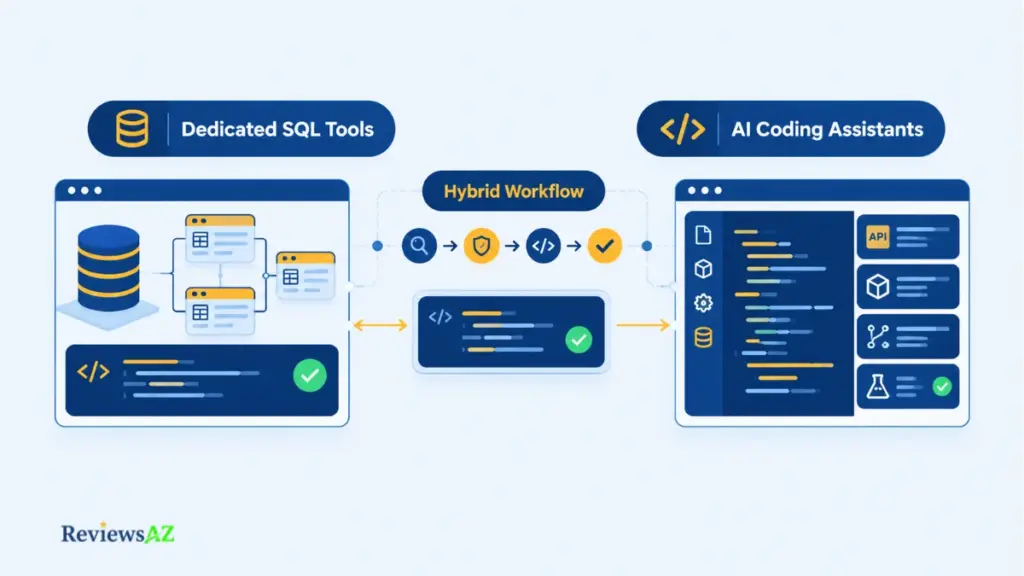
The two aren’t mutually exclusive, and for a lot of real work, using both is the actual answer. A common pattern: use a dedicated SQL tool to explore the schema, validate a query’s logic, or check an execution plan, then bring the verified query back into the coding assistant to wire it into the application code, migrations, and tests.
One habit worth keeping regardless: if a query passes validation in a dedicated tool but gets retyped or paraphrased by hand into the codebase, verify it there too. A small transcription change is enough to reintroduce the exact schema mismatch the dedicated tool just ruled out.
ORM Autocomplete for SQL Development
Most developers don’t write raw SQL by hand as often as they used to. They write it through an ORM, which means a lot of “AI helps with SQL” work happens one layer up, inside model definitions and query builders instead of SELECT statements.
That layer actually gives an assistant something useful: an ORM’s model file (a schema.prisma, a SQLAlchemy model class, a Django models.py) is a form of schema, written directly into the codebase. It doesn’t replace a live database connection, but it’s closer to real schema context than an assistant would otherwise have.
Prisma
Prisma centralizes the schema in one file, and that file is exactly what a coding assistant reads to autocomplete queries built through the Prisma Client: field names, relations, and enums included.
The catch is staleness: if a migration changed the database but schema.prisma wasn’t regenerated to match, the assistant will autocomplete confidently against the old definition. The schema file is only as current as the last time it was synced.
SQLAlchemy
SQLAlchemy models describe tables as Python classes, and an assistant reading those classes can autocomplete filters, joins, and relationship lookups that reflect the declared columns and foreign keys.
Where this gets harder is with dynamically constructed queries or reflected tables, schemas introspected from the database at runtime rather than declared in code. An assistant has nothing to read in that case, since the structure doesn’t exist anywhere in the source files.
Django ORM
Django’s models.py plays a similar role, and QuerySet autocomplete (filtering, chaining, select_related for joins) tends to work well because the field names and relationships are declared explicitly and consistently in one place.
Worth remembering: autocomplete only reflects what the code says the schema looks like. A migration that’s written but not yet applied, or applied outside the ORM’s own migration tooling, can leave the model file and the real database quietly disagreeing, and the assistant has no way to know that from the code alone.
Best Practices for Using AI Coding Assistants With SQL
Picture two developers using the exact same AI coding assistant on the exact same task. One ships a query that quietly corrupts a report three weeks later. The other doesn’t. The difference is rarely the tool: it’s what they gave it, and what they checked before hitting run.
Provide Enough Schema Context
The single biggest lever a developer controls is how much schema the assistant actually sees. Pasting the relevant CREATE TABLE statements, an ORM model, or even a short comment listing column names and types turns a guess into an informed suggestion.
This matters more as a query gets more complex. A simple SELECT with one obvious table rarely needs much context; a query touching four joined tables with nullable foreign keys needs all of it.
Verify Generated SQL Before Execution
Reading a query and running it are two different levels of trust, and AI-generated SQL should earn the second one separately from the first.
At minimum, that means running it against a non-production copy of the data first, comparing the row count and a sample of results against what the task actually calls for, and confirming the query targets the schema you’re really working against, not the one the assistant assumed.
Check Joins, Filters, and Data Types
Three specific spots account for most of the quietly-wrong queries that pass a first read:
- Joins: confirm the relationship direction and cardinality match the real schema, not an assumed one-to-one.
- Filters: check that a
WHEREclause captures the actual business condition, not just a plausible-looking one. - Data types: watch for comparisons between incompatible or loosely-coerced types, especially with dates and numeric strings.
Why this matters: These three checks catch the failure mode that matters most here. A query can execute without error and return real-looking rows while still answering a slightly different question than the one that was asked.
Protect Credentials and Sensitive Data
None of this is only about correctness. Pasting a connection string, an API key, or a sample of real customer rows into an AI assistant to “give it more context” hands that data to a tool that wasn’t necessarily built to keep it private.
The safer pattern is giving the assistant structure, not secrets: table and column names, anonymized sample data, and schema definitions. Never live credentials or unredacted production rows. See AI-generated SQL risks for a closer look at what can go wrong when that line gets crossed.
Choosing the Right Tool for Your SQL Workflow
Here’s the distinction that actually decides this, more than any feature comparison: what does the task depend on more, the code around the query, or the database underneath it?
Choose a Dedicated SQL Tool When…
The task is genuinely database-centric. Live schema exploration matters, query execution and plan feedback matter, and metadata or catalog context, the kind Coalesce and DataGrip’s AI Assistant are built around, is doing real work, not just a nice-to-have.
This is the natural fit for analytics engineers, data engineers, and anyone spending most of a task inside the database itself rather than the application built on top of it.
Choose a Coding Assistant When…
SQL is one piece of a bigger application task: a new endpoint, a migration wired into a service, a feature that touches an ORM model, an API layer, and a test suite in the same pull request.
General coding assistants like Cursor, GitHub Copilot, or Claude Code hold that whole picture at once. Pulling the SQL out into a separate schema-aware tool would mean losing sight of everything it’s actually connected to.
Consider a Hybrid Workflow When…
Some tasks genuinely need both: a new feature that requires exploring an unfamiliar schema and wiring the result into application code, tests, and a migration.
The practical version of this rarely means running two tools open side by side for every query. It usually means reaching for a dedicated tool at specific moments, validating a query’s logic against the real schema, checking an execution plan, then carrying the verified result back into the coding assistant to finish the implementation. There’s no universal “best overall” in any of this; a tool that’s clearly right for a data engineer’s daily work can be the wrong choice for a backend developer touching SQL twice a sprint, and the reverse is just as true.
Related Posts:
AI Code Assistants
AI Coding Agents
Open Source AI Coding Assistants
Frequently Asked Questions
An AI coding assistant for SQL can run a query, return rows, and still be working from a guess about your schema. Is that a risk worth taking, or one worth catching before it reaches production? The questions below cover the parts of that decision developers ask about most.
What is an AI coding assistant for SQL?
It’s a general-purpose coding assistant that can generate, explain, debug, and optimize SQL as part of the surrounding application code, reasoning mainly from the code it can see rather than a live database connection.
Can AI coding assistants generate SQL inside application code?
Yes. They can draft queries from natural language or existing code context, and connect that SQL to ORM calls, migrations, and tests in the same file or pull request.
Does an AI coding assistant understand my database schema?
Only indirectly, unless it’s connected to the database or reading an ORM model file. Without that, it infers table and column names from the surrounding code, which can be outdated or incomplete.
When should I use a dedicated AI SQL tool instead?
When the task is database-centric: exploring an unfamiliar schema, validating query logic against live data, or checking an execution plan matters more than the surrounding application code.
Is a hybrid workflow better for SQL development?
For tasks that touch both a database and an application codebase, yes. A common pattern is validating SQL in a schema-aware tool, then bringing the verified query into the coding assistant to finish the implementation.
What should I verify before executing AI-generated SQL?
Check joins against the real table relationships, confirm filters match the actual business condition, and watch for data type mismatches: the three spots where a query can run without error and still be wrong.
Which context should I give an AI coding assistant for SQL?
Relevant table structures, ORM models, or CREATE TABLE statements, never live credentials or unredacted production data. More complex queries need more schema context to be reliable.
Final Decision: Matching the Tool to the Task, Not the Other Way Around
There’s no single winner to declare here, and that’s not a dodge. It’s the actual shape of the decision. The right choice depends on where the SQL work actually lives.
Best for: application-centric SQL development, where queries are one part of a larger feature spanning code, migrations, and tests.
Better for: database-centric work, where live schema exploration, metadata, and SQL-specific tooling are the core of the task.
Consider a hybrid workflow if: both application code and direct database work are first-class parts of what you’re doing, not just occasional overlap.
Avoid relying on either if: the task calls for autonomous, unverified changes to a production database. Every AI-generated query still needs a human check against the real schema before it runs anywhere that matters.
Worth it if: your SQL work is embedded in a broader software development workflow, where the coding assistant’s view of the whole codebase is the more valuable context.
Not ideal if: database interaction and SQL-specific tooling are the primary need. At that point, a schema-aware tool built for exactly that job will consistently outperform a general assistant working from inference.
The context boundary from earlier in this guide is the practical test worth returning to: know what the assistant can actually see, verify what it can’t, and let the shape of the task decide which workflow fits, rather than a fixed preference for one tool.