Open Source AI Coding Assistants: 10 Tools Worth Using in 2026

The hardest part of choosing among open source AI coding assistants is not finding a free one. It is knowing what you are actually getting when a tool calls itself open source.
A tool’s code may be open while the model behind it requires a paid API. It may support local models but still send prompts to a hosted service by default. And a project featured in last year’s roundups may now be archived or read-only.
That makes “open source” a weak buying signal on its own. These tools belong to the broader AI code assistant category, but developers often have different priorities: control over their data, freedom to choose a model, or a way out of closed ecosystems. Those goals do not always point to the same tool.
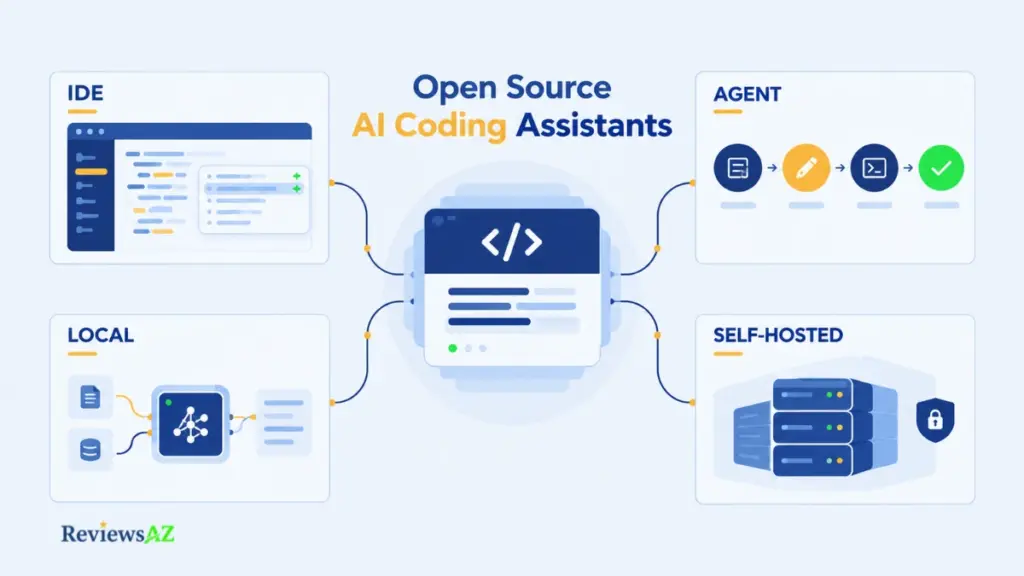
Four terms are easy to confuse. An open source tool uses a recognized open-source license. An open model has weights governed by their own license. Local means the model runs on your machine, while self-hosted means you operate the server. These are separate characteristics, and none automatically guarantees the others.
This list starts with verifiable evidence: licensing and active maintenance. It then considers workflow, model access, data privacy, and practical cost. GitHub stars are a supporting signal, not the ranking method. The assessment draws on project repositories, license files, documentation, and third-party reviews rather than hands-on benchmarks. Anything that could not be confirmed is identified accordingly. The result is a ten-tool shortlist, along with a practical way to judge what each tool’s version of “open” actually offers.
Decision snapshot
- Best for: Developers and teams seeking more control over model choice, code exposure, or deployment than closed assistants typically provide.
- Main advantage: Many open-source clients separate the coding interface from the model provider, allowing you to choose your workflow and deployment path independently.
- Main limitation: Open source does not automatically mean free to use, local, private, or actively maintained. Each requires a separate check.
- Before you choose: Start with your workflow, whether IDE, terminal, autonomous agent, or self-hosted completion. Then verify the model path, maintenance status, privacy implications, and total cost. Model usage, gateways, and hardware can still cost money, while GitHub stars alone cannot establish coding quality, privacy, or current maintenance. Confirm current plans and project status through official sources.
How We Rank Open Source AI Coding Assistants
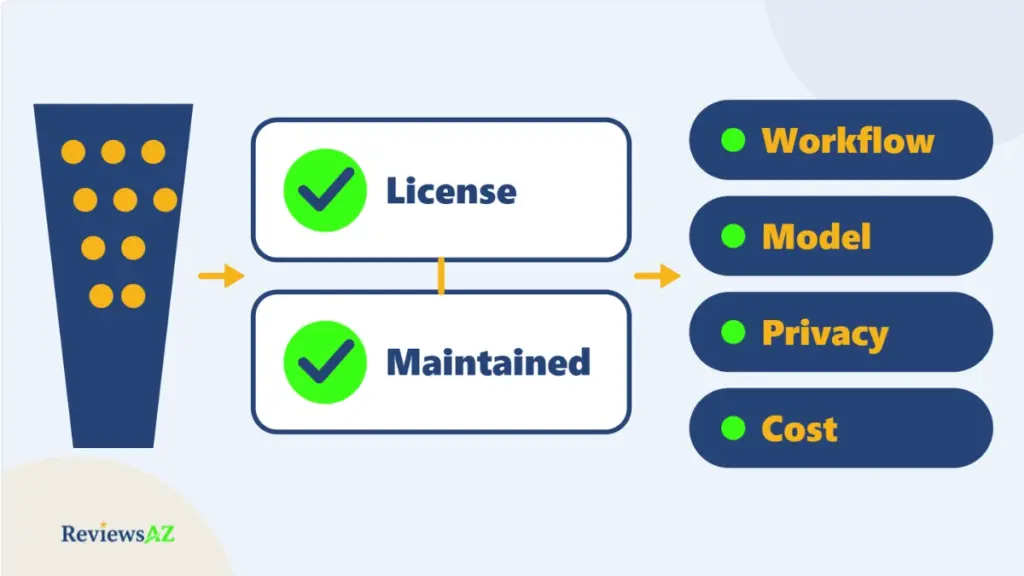
Sorting tools by GitHub stars is an easy way to build a list, but it can also lead to recommending an archived project. Each tool in this list must first meet the eligibility criteria, then earn its place through practical fit. The ranking follows four checks.
- Verify the open-source license. The code must use a license recognized as open source, with the official repository serving as the primary evidence. A landing page that calls a product “open” or “free” is not enough. When the license cannot be confirmed, the status is marked Could Not Be Verified.
- Confirm active maintenance. A repository that is archived, read-only, or explicitly no longer maintained does not qualify. Silence alone is not proof that a project has been abandoned, but it lowers confidence and warrants closer inspection.
- Assess workflow and model control. Where does the tool run: VS Code, JetBrains, the terminal, or an autonomous runtime? Does it use a hosted API, your own provider key, a local model, or a self-hosted service? Coding capability, workflow coverage, and deployment flexibility all matter. Autonomy is a separate consideration from openness.
- Examine the data path and practical cost. Check where prompts and code context travel, which provider or service handles them, and what the complete setup costs. A free client can still require paid model usage, a gateway subscription, or local hardware.
These criteria carry qualitative weights. Open-source legitimacy, maintenance, coding capability, and deployment and model control count most, followed by IDE and terminal coverage, privacy, and practical cost. There are no numerical scores because no shared benchmark supports them.
Popularity is a signal, not the ranking method. GitHub stars remain a supporting signal, not the ranking method. An archived project keeps its stars, and popularity alone cannot establish maintenance, privacy, or coding quality. The final order is an editorial judgment based on stated criteria, with uncertainty identified where the evidence is limited.
The 10 Open Source AI Coding Assistants to Consider in 2026
These ten tools approach open source coding assistance in different ways. Some prioritize model choice, others focus on agentic work or Git-based review, and a few are built around infrastructure you control. The order reflects editorial judgment against the criteria above, not benchmark scores.
1. OpenCode: Best for Broad Model Flexibility
OpenCode is a strong starting point for developers who do not want their workflow tied to one model provider. Its official provider documentation lists support for more than 75 providers, including local models. The MIT-licensed coding agent is terminal-first, with IDE and desktop options, plus MCP and LSP integrations that support more connected development workflows.
The client itself is free, but the model route determines the cost. You can connect a hosted API or a local model, while optional paid offerings include OpenCode’s Go subscription and the pay-as-you-go Zen catalog. The trade-off is responsibility: flexibility gives you more control, but you must check the endpoint and data path yourself. Teams that need one tightly managed configuration may prefer a narrower setup.
2. Cline: Best for Controlled Agent Work Inside the IDE
Cline’s strength is how it handles permission and execution. The Apache 2.0 agent works in VS Code, with JetBrains, CLI, and SDK options as well. It asks for approval before making edits or running commands, allowing you to follow and control its actions as they happen. MCP servers extend that workflow. Cline’s agentic coding workflow is particularly useful for developers who want an agent without giving up step-by-step oversight.
The model route is a separate decision. Cline supports its own usage-billing sign-in, ClinePass, provider keys, and local runtimes such as Ollama and LM Studio. Some providers also support subscription sign-in, including OpenAI Codex. Costs therefore depend on how you connect: API usage can rise during long agentic tasks, while subscriptions and managed services have their own limits.
3. Aider: Best for Git-Native Terminal Coding
Aider suits developers who want AI-assisted changes to remain visible in their normal Git workflow. The Apache 2.0 terminal pair programmer maps the repository, edits files across a project, and can record changes as Git commits. You can inspect the result with git diff and git log, then keep or undo changes using familiar Git tools. Aider’s terminal-first coding workflow is a natural fit for developers who prefer working in the shell.
It supports hosted models as well as local models through Ollama, so costs depend on the provider and model you choose. One practical drawback is the commit-per-edit workflow, which can create a noisy history for teams that squash-merge. Check how that behavior fits your review process before adopting Aider across a team.
4. OpenHands: Best for Delegating Whole Software Tasks
OpenHands is designed for work that extends beyond the current line of code. Its core is MIT-licensed, while the enterprise/ directory is covered by a separate license. You can run it in Docker, use the CLI, run it headlessly in scripts, or work on tagged issues through a GitHub action.
Self-hosting the core does not remove model costs, and OpenHands Cloud is available for teams that do not want to operate their own deployment. The trade-off is setup effort. For a quick, isolated edit, an IDE extension is usually simpler. OpenHands makes more sense when a task is substantial enough to justify delegation and a review step afterward.
5. Goose: Best for Extensible Agent Workflows
Goose began at Block and is now part of the Linux Foundation’s Agentic AI Foundation. The Apache 2.0 agent is available as a desktop app, CLI, and API, with support for multiple model providers and MCP extensions that let it work beyond editing code.
The software is free, but hosted models can still cost money. Running a model locally can avoid per-request charges, provided your hardware can handle it. Goose is a general-purpose agent with an engineering focus rather than a coding-first product, so it is less compelling if tight editor integration is your main requirement.
6. Kilo Code: Best for Agentic Work Across Editors
Kilo Code covers VS Code, JetBrains, and the CLI, with cloud agents as another option. Its CLI is a fork of OpenCode, making it relevant to teams that want agentic development across more than one environment. The main repository uses the MIT license.
You can connect your own model-provider keys or use Kilo’s optional managed inference. A local inference route could not be verified in the documentation reviewed, so do not choose Kilo on the assumption that it can keep every model request on your own hardware. Its appeal is broader workflow coverage, not confirmed local deployment.
7. Tabby: Best for Self-Hosted Team Completion
Tabby takes a different approach from the agent-first tools: you run the server yourself. It provides code completion, chat, and repository-aware answers, with plugins for VS Code, JetBrains, Vim, and Neovim. The core is Apache 2.0 and is designed for teams that want to operate the backend on their own infrastructure.
Check the licensing boundary before a company-wide rollout. The community core is free, but the enterprise directory has a separate license, and TabbyML offers paid Team and Enterprise plans. Tabby is also more focused on completion than on autonomous task execution, and the quality of self-hosted inference depends on the model and hardware you choose. The official releases page lists v0.32.0, dated January 25, 2026, as the latest stable release, alongside a nightly channel, so review the release history before standardizing on it.
8. Qwen Code: Best for Multi-Provider and Local Model Workflows
Qwen Code started from Gemini CLI, but its maintainers say it stopped syncing with upstream early in its development and has since evolved independently. The Apache 2.0 agent supports OpenAI-, Anthropic-, Gemini-, and Qwen-compatible APIs, along with local providers such as Ollama and vLLM. It remains useful in the terminal, but the project also lists editor integrations, desktop and web interfaces, and SDKs.
The main advantage is choice. You can work with Qwen models or connect to other supported providers, depending on your setup. The client is free, but model usage may not be, and costs depend on the endpoint you select. Qwen Code is a good fit when provider flexibility matters more than staying inside a single model ecosystem.
9. Codex CLI: Best for OpenAI Workflows With a Local-Model Option
Codex CLI is an Apache 2.0 coding agent that runs in the terminal. Its default workflow connects to OpenAI, using a ChatGPT plan or an OpenAI API key. A separately configured local route is also available: the documented Ollama integration uses the --oss option to connect to local open-weight models, with other supported local hosts such as LM Studio.
The cost depends on the route you choose: your ChatGPT plan, API usage, or local hardware. Running the CLI on your computer does not mean the model is local by default. If privacy is the deciding factor, verify the selected model and endpoint rather than relying on the fact that the client runs locally.
10. Gemini CLI: Best for Paid Gemini API and Enterprise Workflows
Gemini CLI is an Apache 2.0 terminal agent from Google. It supports MCP servers and GitHub Actions for pull-request workflows, but its current access model needs an important caveat. Google announced that, starting June 18, 2026, free individual use and Google AI Pro and Ultra access moved from Gemini CLI to Antigravity CLI. Gemini CLI remains available for supported enterprise use and paid Gemini API access.
That makes Gemini CLI a more specialized choice than it once was. It is relevant if your team already uses Gemini Code Assist, Google Cloud, or paid Gemini API credentials, but it should no longer be presented as a generally available free personal CLI. The client is open source; the default model path remains tied to Google’s hosted models.
At-a-Glance Comparison: Which Tool Fits Your Workflow?
Comparing open source AI coding assistants is easier when you start with the way you work. Some tools are built around an editor, others fit terminal-based development, and a few focus on running your own infrastructure or delegating larger tasks. The comparisons below focus on workflow, model access, deployment options, and practical limitations, not coding benchmark scores.
For in-editor development and self-hosted completion
- Cline: Works in VS Code, with JetBrains, CLI, and SDK options. It suits developers who want approval before agent edits and commands. You can connect provider API keys or supported subscription routes, and local models work through Ollama. API-key costs can rise with longer tasks.
- Kilo Code: Supports VS Code, JetBrains, the CLI, and cloud agents. It is useful when you want an agent across different environments. You can use your own provider keys or Kilo’s managed inference, but a local inference route could not be verified in the sources checked.
- Tabby: Provides completion, chat, and repository-aware answers through a server you operate, with plugins for VS Code, JetBrains, Vim, and Neovim. It is designed for teams running models on their own hardware. Check the separate enterprise license, and bear in mind that self-hosted models can lag behind leading hosted models on multi-step reasoning.
For terminal work and repository control
- OpenCode: A terminal-first agent with IDE and desktop options. Its broad provider support, including local models, makes it a strong choice when model flexibility matters. Optional Go and Zen services add paid routes, and privacy depends on the endpoint you select.
- Aider: A terminal-based pair programmer for Git-native workflows. It works with hosted models and local models through Ollama, and its commit-per-edit approach makes changes easy to inspect or undo. That history can become noisy in teams that squash-merge, so review the workflow and recent repository activity before standardizing on it.
- Qwen Code: Primarily a terminal coding agent, with integrations for environments such as VS Code, Zed, and JetBrains. It supports several API styles and local providers such as Ollama and vLLM. The client is free, but model costs depend on the endpoint, and its tuning favors the Qwen model family.
- Codex CLI: A terminal agent that normally connects to OpenAI through a ChatGPT plan or API key. Its
--ossoption supports local open-weight models through compatible hosts such as Ollama or LM Studio. The important distinction is that running the CLI locally does not make its default model path local. - Gemini CLI: A terminal agent built around Google’s hosted Gemini models, with MCP support and GitHub Actions for pull-request workflows. Its model path is centered on Gemini, and a local inference route could not be verified in the sources checked. Confirm current access and billing terms before relying on it for a particular workflow.
For delegated tasks and broader agent workflows
- OpenHands: Supports web, CLI, headless, and GitHub Action workflows for delegating larger software tasks. You can run it yourself in Docker or use its hosted cloud option. Self-hosting does not remove model costs, setup is heavier than installing an extension, and the enterprise directory uses a separate license.
- Goose: A general-purpose agent available as a desktop app, CLI, and API, with MCP extensions and support for multiple model providers. It can use local models through Ollama, provided your hardware can handle them. It is less focused on coding than dedicated coding agents, so it may not be the best fit when tight editor integration is essential.
The local option is not the same across these tools. Tabby is designed around a server you operate, while Codex CLI needs to be configured explicitly to use a local model. OpenCode and Aider can connect to local models, whereas the local inference path for Kilo Code and Gemini CLI could not be verified in the sources checked.
Pricing is not ranked here because a free client can still incur API, subscription, gateway, or hardware costs. For teams considering a wider rollout, AI coding assistants for enterprise teams provides a complementary view of security and workflow fit.
The most useful comparison is the one tied to your actual requirement. Choose an editor-integrated tool if you want help inside your existing environment, a terminal tool if repository control matters most, or a delegated agent if you need it to work through a larger task. Then verify the model route, deployment setup, and costs before committing.
Are Free AI Coding Assistants Really Free?
The code is free. The thing that does the thinking usually is not. A coding client may cost nothing to install, but model usage, API calls, hosted services, or local hardware can still add to the bill.
Free Software vs Free Inference
The license governs the software, not the cost of generating code. Four things are easy to confuse:
- Free software: The client itself usually costs nothing, and its license determines how you can use and modify the code.
- Free usage tier: A model provider may include a usage allowance. Gemini CLI and Qwen Code have offered free tiers, but published limits have differed between README versions. Check the current terms rather than treating a quota as a permanent feature.
- Hosted gateway: A paid service sits between the coding tool and the model provider. Examples include OpenCode’s Zen catalog and Kilo Code’s managed inference.
- Local inference: The model runs on hardware you control, avoiding a per-request API bill. The equipment, electricity, setup, and maintenance still cost something.
API Keys, Subscriptions, and Usage Costs
When configured for direct access to a provider, tools such as Cline and Aider can send requests using your own API key without an added markup from the coding tool. The trade-off is that costs can vary with usage. Agentic tasks may read files, make repeated model calls, and retry after errors, so a long task can cost more than a quick code suggestion. One secondary review reported that a complex Cline task could cost several dollars, although actual costs depend on the model, configuration, and workload.
Subscriptions can make spending more predictable, but they do not remove usage limits. A ChatGPT plan used with Codex CLI, Cline’s OpenAI Codex sign-in, or OpenCode’s Go subscription replaces direct metered billing with plan-specific limits. Those limits can change, so check the terms that apply to your account before relying on them.
Hardware and Local-Model Trade-Offs
Running a model through Ollama or a similar runtime removes the per-token API bill, but introduces other costs. You need suitable hardware, electricity, and time to maintain the setup. Local models can also trail leading hosted models on complex, multi-step reasoning, depending on the model and task. Reviews of Goose note the hardware demands of local models, while Tabby is designed around a server you operate yourself.
Before choosing a setup, compare the likely cost of your model usage with the hardware and maintenance required to run a model locally. A hosted option may be easier to get started with, while local inference may make more sense if you already have capable hardware and want greater control over where processing takes place.
Best Open Source Alternatives to GitHub Copilot / Cursor
Developers often look beyond Copilot or Cursor because of cost, editor flexibility, model choice, or concerns about where their code is processed. The best alternative depends on which of these matters most to you.
- If you’re moving away from GitHub Copilot: Cline and Kilo Code offer agentic workflows inside VS Code and JetBrains, while Tabby focuses on completion and chat through a server you operate. Aider and OpenCode suit terminal-based development. Copilot’s features and billing vary, so check GitHub Copilot’s current workflow before comparing costs, especially if you’re on a plan with legacy billing terms.
- If Cursor’s editor or model restrictions are the concern: Cursor’s agentic coding workflow is built into a proprietary VS Code fork. Cline and Kilo Code let you keep your existing editor, while OpenCode offers a broad choice of model providers. Cursor supports custom API keys for selected models, but these do not replace every built-in model dependency. OpenHands is worth considering for delegated tasks, while Tabby or a local-capable client configured with a local model may suit developers who want inference on infrastructure they control. Cursor’s Privacy Mode addresses data use for training, but prompts and code context may still reach model providers. Understand Cursor’s agentic coding workflow and its data path before deciding.
- If you’re comparing terminal-based agents: Claude Code is proprietary and built around Anthropic’s models, even though its GitHub repository is public. Claude Code’s terminal agent workflow provides a useful reference for the closed-source side of this category, while OpenCode and Aider are open-source alternatives. Codex CLI is a hybrid: its client uses the Apache 2.0 license, but its default model route uses OpenAI’s hosted models. The broader Codex experience also includes cloud features outside the CLI client. Review Codex’s current coding workflow and configure a local model explicitly if keeping inference on your own hardware is a requirement.
Start with the constraint that matters most: your editor, your model provider, the amount of work you want to delegate, or where inference takes place. These are different requirements, and the best tool for one may not be the best for another.
Self-Hosted & Local AI Coding Assistants: Privacy and Control
Privacy is one reason developers consider these tools, but choosing a local or self-hosted setup does not settle the question on its own. What matters is where the model runs, who operates the infrastructure, and what happens to the data along the way.
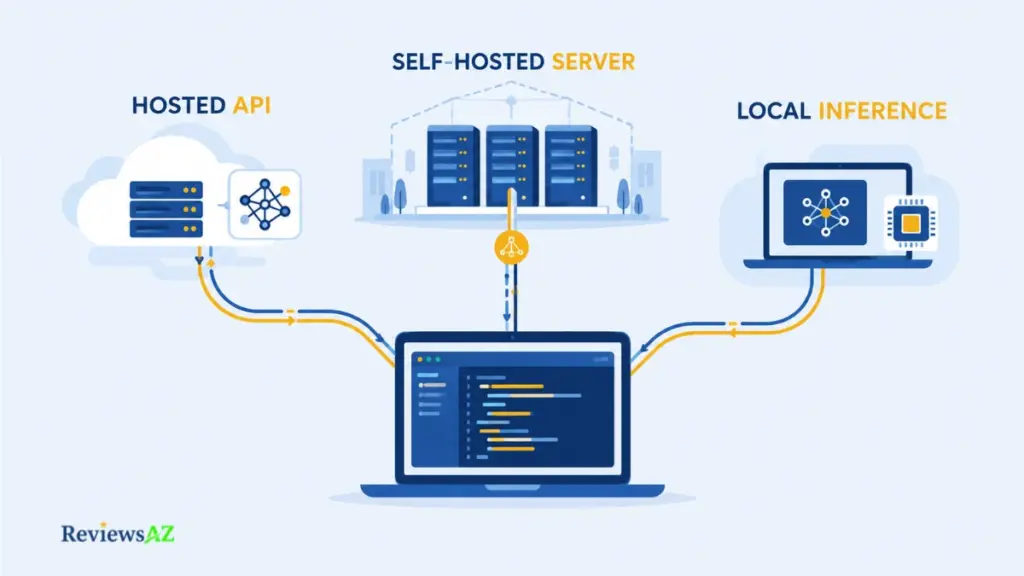
Self-Hosted Server vs Local Inference vs Hosted API
These setups differ in where the model runs and who is responsible for operating it.
- Hosted API: The model runs on a provider’s infrastructure. Requests sent to that endpoint may include prompts, file contents, and repository context, whether you pay per token or use your own API key.
- Self-hosted server: You operate the assistant backend or model service on infrastructure you control. Tabby, for example, can run on a team’s own GPU server, with editors connecting over the network. Your team manages the server, but that alone does not guarantee that every model request stays within your infrastructure.
- Local inference: The model runs on your own computer, for example through Ollama. This keeps inference local, provided the client is actually using the local model rather than a cloud endpoint.
The coding client and the model are separate parts of the setup. Cline, Aider, and OpenCode can use different model endpoints, so their deployment path depends on how you configure them, not just on their licenses. A local route for Kilo Code could not be verified in the sources checked.
Data Path and Privacy Questions to Verify
Before treating a setup as private, check what happens when the assistant handles a real coding task. Four questions are particularly useful:
- Where does the model run, and who operates it?
- What leaves your machine: the prompt, file contents, repository context, or an index?
- Does the client, extension, or model provider collect telemetry or retain data, and can those settings be changed?
- Is another service involved, such as a gateway, hosted sign-in, or cloud agent?
Use the official documentation for the exact configuration you intend to deploy. A claim that no data leaves the machine should be treated as a Documented Capability only when the documentation covers that specific setup. Third-party reviews can help identify questions to investigate, but they do not establish the data path for your configuration.
Enterprise Use and Network-Control Implications
For a team, self-hosting changes who is responsible for the system. A server can run behind the company’s firewall, giving security reviewers an environment to inspect, but the organization must also manage GPUs, updates, access control, and incident response.
Licensing and provider dependencies need attention as well. Tabby’s enterprise-edition code is covered by a separate license, so check which components the proposed deployment would use. If an open-source client connects to a hosted model, the provider’s terms, data-retention practices, and service availability still matter.
Assign ownership before deployment. Decide who manages the infrastructure, model access, security settings, updates, and incident response before the team starts using real code.
Local LLMs for Coding (Ollama, DeepSeek Coder)
A useful test for local inference is to download a model, disconnect from the network, and see whether it can still generate a response. That tells you where the model is running, although it does not prove that every feature of the coding client works offline or that no other service receives data.
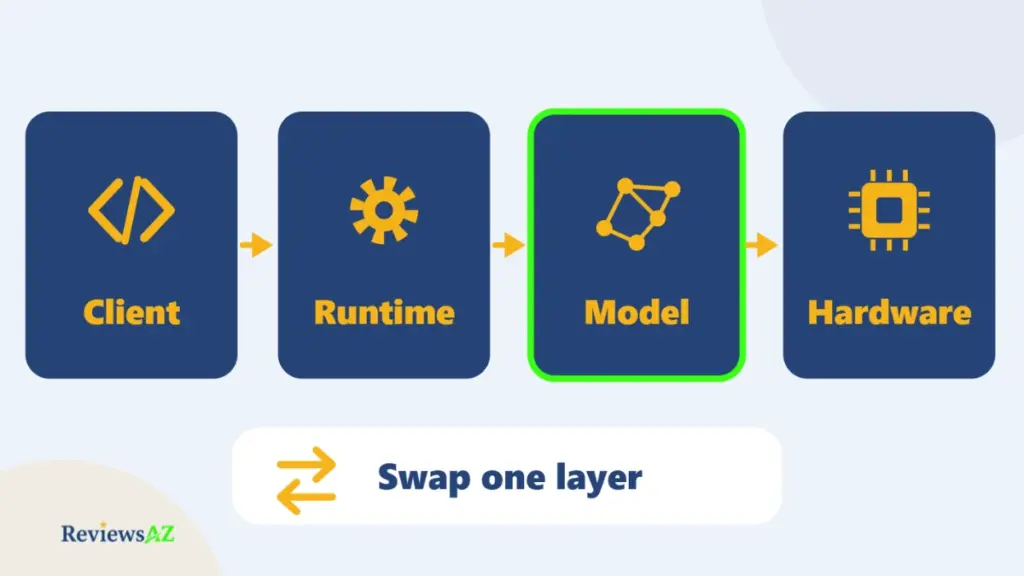
A local LLM for coding runs on hardware you control, usually through a runtime such as Ollama. The coding client is a separate layer that sends requests to the runtime, and the model is another component again. Each has its own configuration and licensing considerations, so check them separately.
Ollama as a Local Runtime
Ollama runs downloaded models on your machine and exposes an API on localhost. Coding clients that accept a custom base URL can connect to it, and both Cline and Aider support this setup.
Ollama also offers cloud-hosted model routes. The important detail is the endpoint your client actually uses: a local runtime and a cloud API are different paths, even when they are accessed through the same product. Check the configuration before assuming that inference stays on your computer.
Want to verify that inference is local? Disconnect from the network and send a prompt to the configured model. If it still responds, that supports local inference for this setup, but does not prove that every client feature works offline or that no data is transmitted when connectivity returns.
DeepSeek Coder and Other Code Models
DeepSeek Coder V2 is available in 16B and 236B parameter variants. In Ollama’s library, a listed 16B variant is about 8.9 GB, while one 236B Q4_0 variant is about 133 GB. Other quantizations have different download sizes, so compare the exact version you intend to use.
The licensing also needs a closer look. DeepSeek’s repository code is MIT-licensed, but the model weights are covered by a separate DeepSeek Model License. The code license should not be taken as the license for the weights. Read the terms for the specific model before using or redistributing it.
Ollama’s listing for DeepSeek Coder V2 has not seen a recent model update, so treat it as one candidate rather than the default choice for local coding. Compare it with other code models, including Qwen’s coder models, and test whichever one best fits your own tasks.
Hardware and Quality Trade-Offs
The model’s download size is only part of the hardware question. Quantization, context length, runtime overhead, and available memory all affect whether a model will run comfortably on your machine. A file that fits on disk may still require more RAM or GPU memory than you have available.
Claims that a local model matches a hosted frontier model are not a substitute for trying it on your own codebase. Test a representative task, inspect the generated changes, and check how well the model handles the context your project requires.
Before downloading, check the exact model variant and quantization rather than relying on parameter count alone. That small check can save both storage space and time.
Open Source AI Coding Agents vs Autocomplete Assistants
An autocomplete assistant finishes what you are typing. An agent works toward the outcome you asked for.
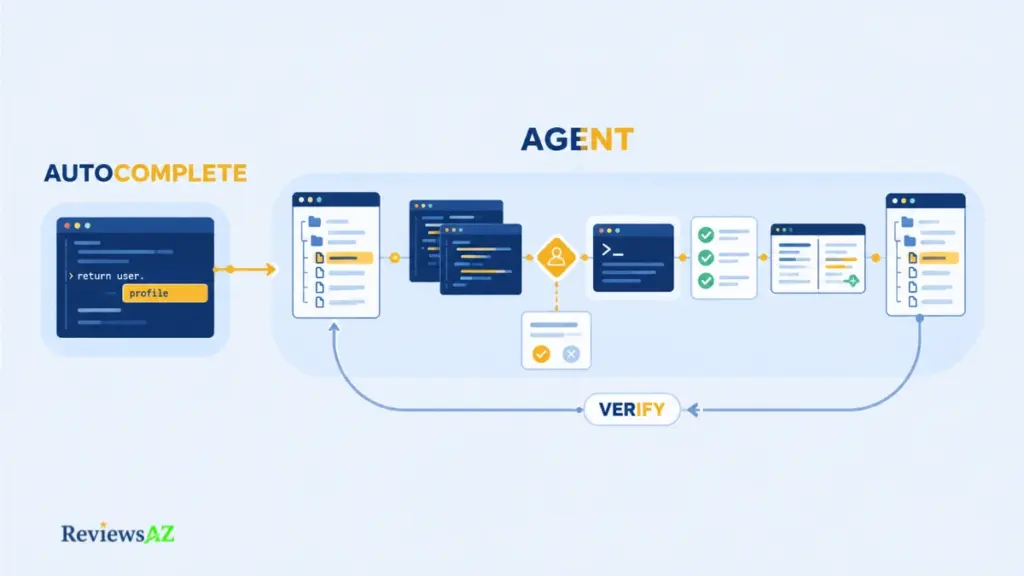
The distinction is about scope, not how much control the tool takes. An agent may inspect repository files, edit code, run commands, and verify results while still asking for permission before acting. Open-source status does not determine how autonomous a tool is.
Reactive Autocomplete and Chat
In this workflow, the tool responds to what you type or ask, then waits for you to accept its suggestion. It does not independently change repository files. Tabby is the clearest example in this list, offering completion and chat through a server you run. Its agent features are more limited than those of some closed alternatives, according to one review. It suits developers who want faster coding while remaining in control of every edit.
Agentic Repository Tasks
Some tools can work across an entire repository rather than responding only to the current line or prompt. The capability descriptions here come from project READMEs and third-party write-ups, not hands-on testing, so they should be understood as summaries of documented behavior.
OpenCode reportedly follows a cycle in which the agent reads relevant files, may draft a plan, edits code, and runs commands. Goose can read and write files, execute terminal commands, and launch tests. OpenHands supports broader delegation, including headless operation and a GitHub action that works on tagged issues. Many of these agents also support MCP integrations, while OpenCode lists LSP integration for code understanding.
Human Approval, Terminal Commands, and Verification Loops
A key difference between agents is how much permission they require before taking action. Cline requests approval before edits and commands. OpenCode offers a fine-grained permission system. Aider commits each change, allowing developers to inspect or undo it using standard Git tools.
Verification adds another layer of control. An agent can run tests, examine errors, and try to correct them, while the developer reviews the final diff.
Before treating any agent as hands-off, ask three questions: what can it read without asking, what can it change, and what can it run? If the settings do not make those boundaries clear, do not assume the agent will operate safely without supervision.
Which Open Source AI Coding Assistant Fits Your Workflow?
The right tool depends on where you work and how much control you want over the coding process. An editor extension, a terminal-based tool, and a database workflow can place very different demands on an assistant, even when they offer some of the same capabilities.
AI Coding Assistants for VS Code (Extensions)
If VS Code is your main workspace, three tools in this list offer distinct approaches. Cline focuses on agentic work with approval before edits and commands. Kilo Code combines its VS Code extension with JetBrains and terminal options, while Tabby provides code completion and chat through a server you operate.
All three also list JetBrains integrations, so editor compatibility alone may not settle the choice. Consider how much autonomy you need, where the model runs, and whether you are prepared to manage the backend. With Tabby, for example, the extension is only one part of the setup because the server is the infrastructure you operate.
An open source extension does not automatically make the entire stack open source. Check the extension’s license, the backend it connects to, and the route your prompts and code take, including any hosted sign-in. Recent marketplace updates and repository activity are also worth checking before you standardize on a tool.
Terminal-First and Git-Native Workflows
Terminal-based tools suit developers who want to work directly with a repository and inspect changes through familiar development tools. Aider commits each change, making git diff and git log useful for reviewing what happened and deciding what to keep or undo. OpenCode and Goose also offer terminal interfaces, while Codex CLI is another option for developers who prefer working from the shell. Keep in mind that running a client on your computer does not necessarily mean its model runs locally too.
Git history is only one part of the decision. Check which terminal commands an agent can execute without approval and whether it can modify files outside the project. OpenHands, for example, supports work on tagged issues through a GitHub action, allowing tasks to be delegated and changes reviewed through a pull request.
Before starting a substantial task, commit or stash your existing work so you have a clean recovery point. That matters most when an agent can run commands or change multiple files, where an apparently small task can have wider consequences.
Database and SQL Workflows
Most coding assistants can generate SQL when given a schema and enough context, but writing a query and executing it against a database are two different things.
General-purpose tools can help draft and revise queries as part of AI coding assistance for SQL workflows, while leaving execution under your control. This can be a useful starting point when SQL is one part of a broader development task.
Database-specific frameworks take a different approach. Vanna, an MIT-licensed Python framework, uses schema information and example queries to generate SQL. Its README describes execution in the local environment. Vanna AI’s text-to-SQL approach is a useful reference for this specialized workflow, but the repository was archived on March 29, 2026. It is therefore a reference for the approach, not a current coding-assistant recommendation.
Review generated SQL before execution. An incorrect SELECT may return misleading results or waste time, while a faulty write or schema change can damage data. Check queries for correctness, safety, and performance before connecting any assistant to a live database. For additional context, see the risks and limitations of AI-generated SQL.
Common Mistakes When Choosing an Open Source AI Coding Assistant
Open source does not automatically mean free, private, local, maintained, or inexpensive to run. Most poor choices in this category begin with assuming that one of these qualities guarantees the others.
- Mistaking free software for open source. Price and licensing are separate questions. Gemini CLI illustrates the distinction: its client uses an Apache 2.0 license, while its default model path leads to Google’s hosted Gemini models. A pricing page explains the cost, but the repository’s license is the evidence for the code’s licensing terms.
- Assuming open source means local or private. OpenCode, Cline, and Codex CLI can send prompts to hosted providers when configured to use their hosted models. A local option does not make the default setup local. Verify the actual model endpoint, data path, and relevant provider settings before relying on a privacy claim.
- Ignoring maintenance and archive status. Continue is Apache 2.0, but its main repository states that it is no longer actively maintained and is read-only, so it is excluded from this list. Vanna’s repository was archived on March 29, 2026, making it a database reference rather than a current pick. Always check the official repository because forks and mirrors may retain outdated project information.
- Ranking tools by GitHub stars alone. Stars show community interest, not current development or suitability for your workflow. An archived project can retain a large star count long after its maintenance has stopped.
- Overlooking model and hardware costs. A free client connected to a metered model is not a cost-free setup. Account for API usage, gateways, subscription limits that may change, and the hardware and electricity required for local inference.
Do not declare a project abandoned based on silence alone. An archive notice or a read-only status is clear evidence of a project’s state, while a lack of recent activity calls for further investigation. Check the official repository before relying on a tool, and do not assume that a fork or mirror reflects the original project’s current maintenance status.
Before choosing a tool, check the license, maintenance status, model route, privacy implications, and total cost separately. No single label or popularity metric can answer all five questions.
Frequently Asked Questions About Open Source AI Coding Assistants
Choosing among open source AI coding assistants often raises questions that go beyond comparing features. The details matter: a license does not tell you where your prompts go, a local model does not automatically make an entire setup private, and a free client can still generate ongoing costs. These answers address the practical distinctions and checks that can help you make a more informed choice.
What makes an AI coding assistant open source?
A tool qualifies when its code is published under a license recognized as open source and the project is still actively maintained. Free describes the price, while source-available means you can read the code without necessarily being free to use or modify it. The model is a separate consideration, since an open source client can still connect to a proprietary model. Check the license file in the official repository and confirm that the project is not archived or read-only.
Are open source AI coding assistants really free?
The software may be free to install, but the model and infrastructure can still cost money. Cline, Aider, and OpenCode can be used without paying for the clients themselves, but hosted models may charge per request or token. Gateways and subscriptions can add fees, while local models require suitable hardware and electricity. Free provider tiers are available in some cases, but their limits can change.
What are the best open source alternatives to GitHub Copilot and Cursor?
The best fit depends on the workflow you want to replace. Cline and Kilo Code suit in-editor agent work, Aider and OpenCode suit terminal-based development, Tabby focuses on completion using your own infrastructure, and OpenHands is designed for delegated tasks. These recommendations reflect workflow fit, not comparative benchmark results.
Can open source AI coding assistants run local LLMs with Ollama or DeepSeek Coder?
Yes. Cline and Aider support Ollama, while OpenCode supports local models. These tools can connect to a compatible model, such as DeepSeek Coder V2, running on your own machine. Check that inference actually takes place locally, since Ollama also offers cloud-based options for some models. Verify the model’s license separately from the coding client’s license.
What is the difference between open source AI coding agents and autocomplete assistants?
Autocomplete assistants suggest code as you type. AI coding agents work toward a broader goal by reading repository files, editing code, running commands, and checking results. However, openness and autonomy are separate characteristics. Before adopting an agent, check what it can read, modify, and execute without your approval.
Which open source AI coding assistants work as VS Code extensions?
Cline, Kilo Code, and Tabby are the options in this list that support VS Code extensions, and all three also offer JetBrains integrations. Cline focuses on approval-based agent workflows, Kilo Code extends agentic development across multiple environments, and Tabby provides completion and chat through a server you operate. Before standardizing on any extension, verify its current maintenance status and data path.
Are self-hosted and local AI coding assistants automatically private?
No. Self-hosted and local describe where software or a model runs, not everything that happens to your data. A self-hosted assistant can still use a hosted model, while a local model may be accessed through a client that requires a hosted login or collects telemetry. Check the documented data path for your exact configuration, including the client, model endpoint, and any intermediate services.
Related Posts:
Best AI DB Tools for Backend Devs
Best AI SQL Tools
Conclusion and Decision Layer
Conclusion and Decision Layer
Open source AI coding assistants are one corner of the wider world of AI code assistants, and the right choice comes down to the constraint that matters most in your day-to-day work. Rather than choosing the tool with the longest feature list, start with what you need it to do and what you are willing to manage yourself.
- OpenCode is a strong starting point if you want broad model-provider choice and flexibility across different workflows. Its MIT-licensed codebase gives you room to choose how you work, but you still need to decide where your prompts go and which model provider to trust.
- Cline makes sense if you prefer working inside your editor and want to approve changes and terminal commands as the agent proceeds. Keep an eye on API usage costs, since longer tasks can generate larger bills.
- Aider suits developers who want their changes recorded in Git and easy to inspect or undo. Its commit-per-edit approach may create noise on a shared branch, so check recent repository activity before adopting it across a team.
- Tabby is worth considering when you want code completion and chat on infrastructure you control. That also means taking responsibility for the server, while accounting for hardware requirements, model capability trade-offs, and the separate license covering its enterprise directory.
- OpenHands is a better fit when you want to hand broader software-engineering tasks to one of the more autonomous AI coding agents, including work started through a GitHub action. Its setup is more involved than installing an extension, and the resulting changes still need review before they are merged.
Your priorities may lead to a different choice. Strict data-residency requirements, a limited budget, or an established editor workflow can all outweigh general flexibility. If control over the software itself is not your main concern, Cursor, Claude Code, Codex, and GitHub Copilot compared offers another starting point.
Before committing to a tool, try it on a scratch branch in a representative project. Pay attention to the quality of its changes, the permissions it requests, and where your code and prompts travel. A short trial under realistic conditions will tell you more about its fit than a feature list alone.