Aider Review: Features, Pricing, Git Workflow & Best Fit in 2026

Most AI coding tools now arrive as a bundle: a visual editor, inline autocomplete, an agent panel, and a subscription that covers the model behind it all.
This Aider Review starts somewhere else. Aider can write code, but so can every competitor. The useful question is whether its terminal-first workflow gives you more control than friction.
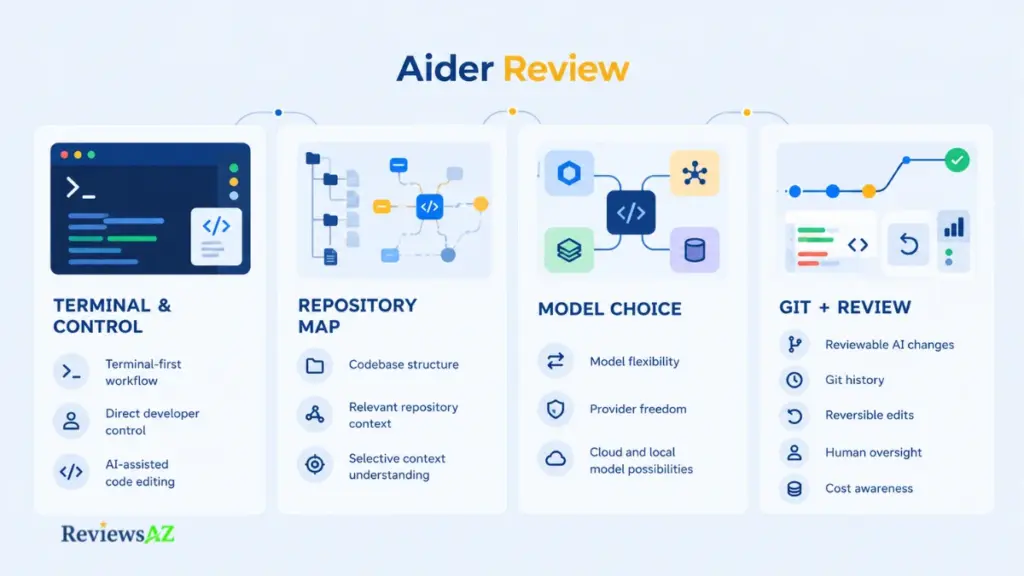
Aider is an open-source assistant that runs in your terminal, works inside your Git repository, and lets you pick the model. That puts it in a different corner of the wider field of AI code assistants. Each choice also removes a convenience a bundled tool would have handled for you, and hands a decision back: which model, which files, which changes to keep.
Along the way we cover how Aider builds repository context, how its Git workflow handles review and rollback, what “free” covers, and where privacy depends on someone other than Aider. Everything rests on Aider’s documentation and published pricing. None of it comes from hands-on benchmarking. One question runs through all of it: what does Aider make easier, and what work does it hand back to you?
What Is Aider? Architecture and Core Philosophy
Aider is a terminal AI coding assistant that edits the files in your local Git repository through a conversation with a large language model you choose.
That definition leaves out the editor, the autocomplete layer, and the hosted workspace. Aider is a command-line program sitting between your repository and a model, and everything else follows from that placement.
The Terminal-First, Git-Native Workflow
Aider describes itself as AI pair programming in your terminal. The placement is deliberate: builds, tests, logs, and Git already live there, so the assistant works where those tools are. It works best with code that already lives in a Git repository, and it offers to create one if you launch it in a directory without one.
People often file it under AI coding agents, though the difference worth caring about is that every edit lands in a repository you control. Aider itself is open source as well, which puts it among the open-source AI coding assistants whose code you can read yourself.
How Aider Works with a Local Repository
A request travels through five steps on its way to a reviewed change:
- You start Aider inside a Git repository on your machine.
- You choose which files to hand over for editing, and Aider adds a condensed map of the wider codebase for orientation.
- Aider sends your request and that context to the model you configured.
- The model’s reply is applied as edits to the files on disk.
- Aider commits the change to Git, where you review it with a diff or reverse it.
Step 2 decides how much the model can see, and it is the least obvious part of the loop. One thing it isn’t: an editor replacement. Aider edits files on disk while you keep working in your usual editor, which is also the best place to read its diffs.
Aider Features and Capabilities
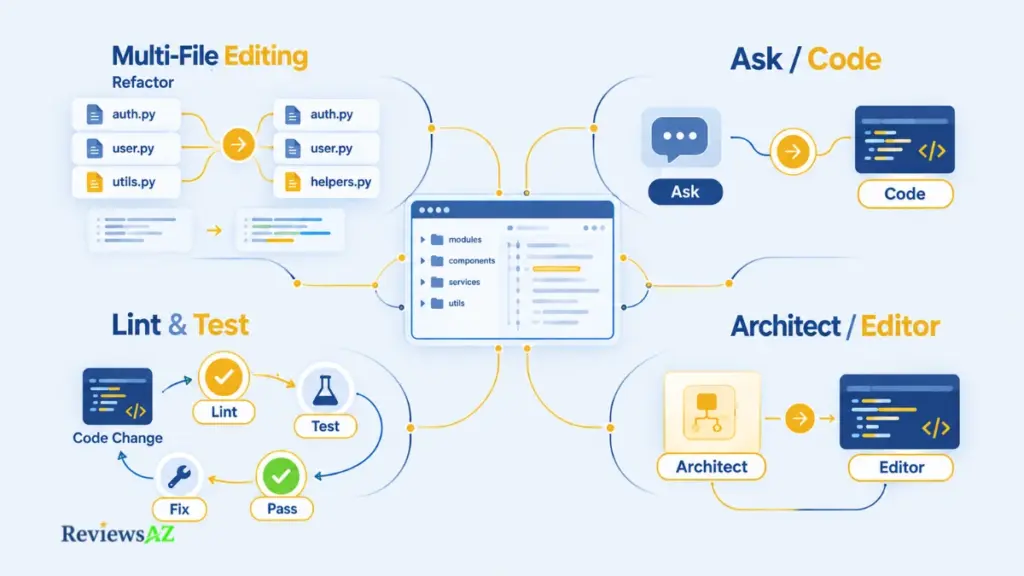
Only four of Aider’s capabilities change what it can do for a codebase: how it edits across files, how you steer it, how it checks its own work, and how it splits planning from editing. None of them removes the need for review, and defaults shift between releases, so confirm the specifics against the current documentation before relying on them.
Multi-File Code Editing and Refactoring
This is the practical core. You describe a change, add the files involved, and Aider asks the model for edits that can span several files at once: renaming a function and updating its callers, say. The edits are then written to disk.
Aider’s documentation describes several edit formats, which are the ways a model is asked to express its changes. Models differ in how reliably they follow each one, so the format is part of model selection rather than a cosmetic setting. By default each applied change lands in Git, which keeps a multi-file refactor reviewable as a diff.
Chat, Ask, and Code Modes
Aider calls these chat modes. Code is the default: the model’s answer is applied as file edits. Ask is discussion only and never changes files, which makes it handy for questioning the code or weighing an approach. Architect, a two-step variant of coding, gets its own section below, and a help mode answers questions about Aider itself.
Asking before coding is the underrated habit, and the documentation recommends it: settle the plan in ask mode, then switch to code, where a terse “go ahead” is enough. A question costs a model request but leaves nothing to undo.
Testing and Linting Support
Linting and testing work differently. Aider lints the files it edits by default, using built-in linters for most popular languages or one you set with –lint-cmd, and –no-auto-lint switches that off. Testing is a separate step: /test runs a command you supply, and running it after every edit takes –test-cmd together with –auto-test. Passing lint, in other words, says nothing about whether your tests ran.
When a check fails, Aider tries to fix the errors it reports. That loop only catches what your linter and tests are able to catch. The linting and testing documentation covers the setup, including compiled languages.
Aider Architect Mode: How It Works
Architect Mode splits a task between two model roles: an architect that proposes how to solve the problem, and an editor that turns the proposal into concrete file edits. Your main model plays the architect, and Aider chooses a matching editor model unless you set one with –editor-model.
The appeal is separation of concerns. One model reasons about the approach while another concentrates on producing edits in the right format, which suits changes where the plan is the hard part.
It earns its keep with models that reason well but struggle to produce precise edit instructions in one pass. Aider’s documentation says pairing such a model with a separate editor can give better results, and that using the same model for both roles can sometimes help too, simply because it gets two requests to solve the problem. On a small, well-scoped change, the second request is more likely to add waiting time than value.
The cost is real, though. Two roles mean extra requests, so more latency and more tokens, and a second step is no guarantee of better output: if the plan is wrong, the editor will implement it faithfully. Use it where planning is the bottleneck.
Aider Repository Map and Codebase Context
Picture asking a model to change a function whose callers live in six other files. If it can’t see them, it edits blind, and the breakage shows up later at a call site nobody looked at. The repository map is Aider’s answer to that problem.
In practice it is a condensed, ranked outline of your Git repository, listing files and their key symbols, sent along with your requests so the model can see how code connects without receiving every file.
Tree-sitter, Symbols, and Structural Context
Aider builds the map with Tree-sitter, a parsing library that turns source files into syntax trees, the structure developers usually mean by an AST. From those trees it extracts where symbols such as classes and functions are defined, and where other code refers to them. Many IDEs and editors use Tree-sitter for the same reason: navigating large codebases by their structure.
The map then shows each file with the key lines of its definitions, like function and class signatures, but not function bodies. Structure is cheap to send. Implementation is expensive.
How Aider Selects Relevant Repository Context
A real repository holds more symbols than any token budget can carry, so the map has to choose. According to Aider’s repository map documentation, it treats files as nodes in a graph, connects the files that depend on each other, and runs a graph-ranking algorithm to pick the parts most relevant to the current state of the chat. Symbols that other code references most often tend to make the cut.
The budget is set with –map-tokens, which defaults to 1K tokens, and Aider adjusts the map’s size to the state of the chat. It can expand well beyond that default when no files are in the chat and Aider has to understand the whole repository. So the map is not a fixed snapshot of the repo. It is a ranked selection that shifts with what you are working on.
The detailed context stays in your hands. If the model needs more code, it can ask for specific files and Aider offers to add them; you can also add files yourself with /add and drop the ones that stopped mattering with /drop. A well-ranked map still can’t promise the one file you need is in it, and on a large codebase a model can know a function exists without ever seeing what its body does.
Once the model has its context and returns edits, the question changes: what happens to those edits next?
Aider Git Integration and Code Change Workflow
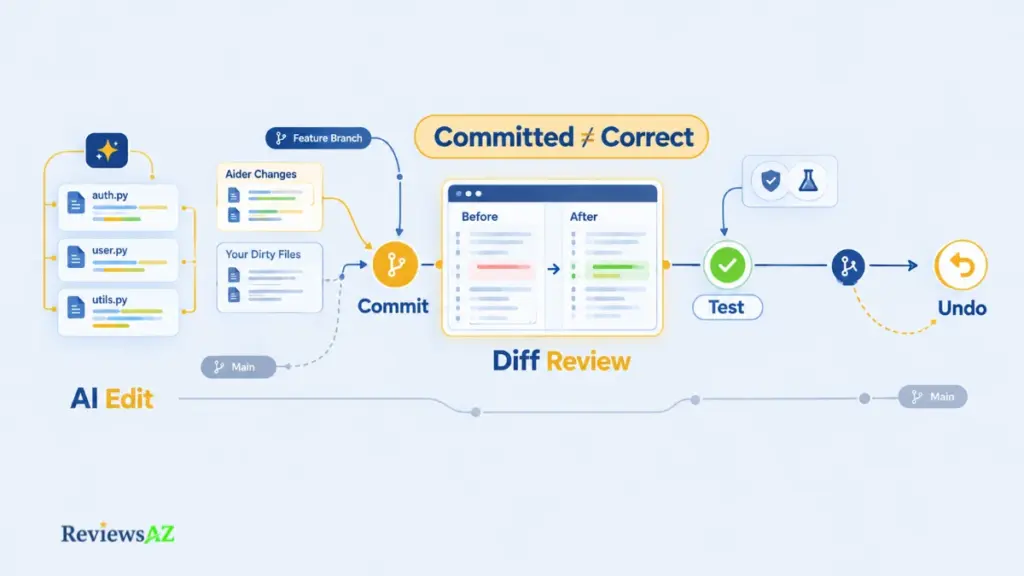
One of Aider’s biggest practical advantages is that its coding workflow is built around Git rather than sitting beside it. By default, Aider commits every change it makes with a descriptive message, as its Git documentation describes. That means an AI edit becomes a discrete Git commit you can inspect, build on, or reverse with /undo. It adds a useful safety boundary, but it should not be mistaken for a sign that the change is correct.
- Automatic commits keep AI changes separate. With auto-commit enabled, Aider places the changes it makes into their own Git commits, giving you a clean history of what the assistant did rather than mixing its work into your own edits. You can turn this behavior off with
--no-auto-commits, leaving the files uncommitted so you can review and manage them with ordinary Git commands instead. - Diffs are where the real review happens. Inside Aider,
/diffshows the changes since your last message, whilegit difflets you inspect them through your normal Git tools. The commit message tells you what the model intended to change; the diff tells you what actually changed. That distinction matters, especially when an edit looks reasonable at first glance. - A commit is a boundary, not a verdict. Aider can commit a perfectly plausible refactor that still breaks an edge case, or generate a SQL migration that nobody has carefully reviewed. Read the diff, run your tests, and check the repository state before building on top of an AI-generated change. Generated SQL deserves particular caution; our article on the risks of AI-generated SQL covers why.
/undoreverses Aider’s latest commit, not your entire Git history. The command is useful when an AI change clearly needs to be rolled back, but its scope is specific: it reverses the most recent commit Aider made. If you have committed your own work afterward, or changed the history with a rebase or amend, undoing “the last Aider change” is no longer the same thing as simply undoing “the last commit.”- Dirty files need attention before you let Aider edit. A dirty file is one that already contains your own uncommitted work. By default, Aider commits those existing changes separately before applying its edits, so your work and the AI’s work remain in different commits instead of being tangled together. It is a small Git behavior, but an important one to understand before starting a session in the middle of an unfinished change.
- Aider leaves useful fingerprints in the history. Commits authored by Aider have
(aider)appended to the author name, which makes them easier to identify and filter later. Aider also skips pre-commit hooks by default, so repository hooks will not run on its commits unless you enable--git-commit-verify. Teams that rely on hooks for validation should account for that behavior rather than assuming their normal commit checks are running. - A few simple Git habits make the workflow much safer. Work on a feature branch so AI-generated commits stay away from your main branch. Run
git statusbefore a session begins so you know exactly what is already changed. And before opening a pull request, consider squashing small AI-generated commits into a cleaner history, while avoiding history rewrites on commits that have already been pushed and shared.
The result is a workflow that gives Aider a meaningful advantage for developers who like Git to remain the source of truth. Every change can have a visible place in the history, but that only helps when you actually inspect the diff and test the result. Aider makes rollback and review easier; it does not remove the need for either.
Aider Supported Models and LLM Providers
Which model should Aider use? Aider doesn’t choose. It arrives without one attached, which hands you the decision about which model does the work, what it costs, and where your code goes.
Cloud Providers and Model Choice
According to Aider’s documentation, it connects to the major hosted providers, including OpenAI, Anthropic, Google Gemini, DeepSeek, and xAI, as well as routing services such as OpenRouter, and it uses the LiteLLM package to reach hundreds of other models. The supported list changes often, so treat it as a menu to check rather than a list to memorize. Model names go stale quickly too. Confirm against Aider’s current LLM documentation and your provider’s pricing page before settling on one.
The better question is what you are optimizing for. Six criteria carry most of the decision:
- Coding and edit quality: how reliably the model produces correct changes in the edit format Aider expects.
- Latency: how long you wait per turn, which adds up over a session.
- Context: how much the model can take in, which interacts with the repository map and the files you add.
- Cost: input and output token pricing, billed by the provider and not by Aider.
- Availability: rate limits, regional access, and what happens when a provider has an outage.
- Lock-in: how easily you can switch if prices or quality change.
Lock-in is where Aider differs most from tools tied to one vendor’s models. Claude Code is the obvious example. In Aider, changing models is a configuration choice, not a change of tool.
Model freedom is the real advantage. With Aider, you can switch between supported providers, routing services, and local endpoints without replacing the coding assistant itself. That makes it easier to match the model to the task, budget, or privacy requirements as your needs change.
Local Models, Ollama, and OpenAI-Compatible Endpoints
Yes, Aider can use local models. It connects to servers such as Ollama and LM Studio, and to other endpoints that follow the OpenAI API format, so your code can be processed on hardware you control instead of by a hosted provider.
A local workflow has a different privacy and cost profile. Model requests go to a server you control and there is no per-token charge from a hosted provider, but the cost moves to hardware, power, and setup time instead of disappearing.
Quality is the catch. Local models vary widely, and one that handles a single-file change can struggle with a multi-file refactor or with the precise edit formats Aider expects. Don’t assume a local model matches a top hosted one on difficult changes.
Context size is the setup detail that bites. Aider’s Ollama documentation notes that Ollama uses a small 2k context window by default and silently discards anything beyond it. Aider sets a larger window for each request by default, but you still need hardware with enough memory to run the context size your codebase demands.
Aider Setup and Ease of Use: Terminal vs. IDE
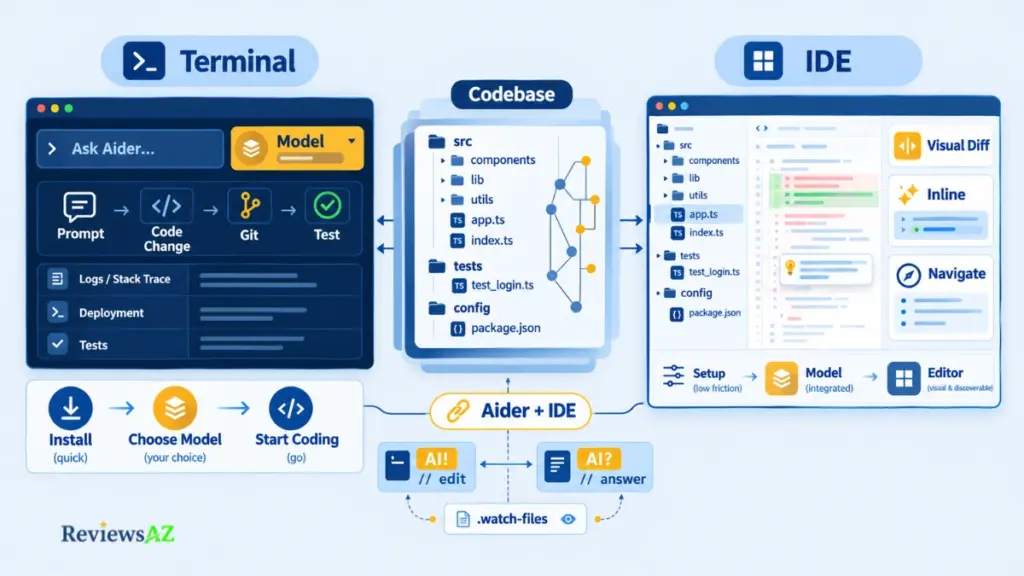
The loudest objection to Aider fits in one sentence: “I would rather just use my editor.” It deserves a real answer, because the better choice depends less on which tool is more capable and more on how you prefer to work.
- Aider keeps setup simple, but puts model choice in your hands. The project README shows a short installation path: install the
aider-installpackage with pip, run Aider, and then provide an API key for the model you chose or connect to a local endpoint. The installation itself is not the complicated part. The real decision is choosing the model and configuring the endpoint that fits your needs. - The terminal workflow works best when the rest of your work already happens there. For terminal-centric developers, a failing test, a stack trace in a log, or a deployment script is often already on screen. You can bring that context into the conversation without switching environments, and Git is only a command away. There is also less interface to learn: a chat prompt and a small set of slash commands. The trade-off is that those commands are not sitting in visible menus, so you have to learn them yourself.
- Visual IDEs still make some everyday tasks easier. Side-by-side diffs inside an editor are generally easier to scan than terminal output when a change is large. Inline completion is another major difference: suggestions appear as you type, rather than waiting for a chat-driven interaction. Navigation is also more immediate, with clicks replacing descriptions, while menus and panels make features easier to discover. Managed tools can also bundle the model and billing, reducing the amount of setup you have to handle yourself.
- Cursor is the clearest example of that visual-first experience. It combines editing, diffs, navigation, and AI features inside one environment, which can make it a more natural fit for developers who want the assistant to feel like part of the editor rather than a separate terminal workflow.
- Aider can still work alongside your existing editor. It is terminal-first rather than strictly CLI-only, and because it edits files directly on disk, you can keep using the editor you already know. With
--watch-files, Aider monitors your files for one-line comments that start or end withAI!(make a change) orAI?(answer a question), allowing you to send instructions from inside the editor. The IDE documentation explains how this workflow works, so it is worth checking before assuming Aider has to be used entirely from a terminal window.
Aider and an IDE-first tool therefore do not have to be an either-or decision. Aider gives terminal-focused developers tighter control over models, Git, and the surrounding workflow, while visual tools reduce friction in the parts of development where an editor interface simply works better. One area where that difference matters even more is database code, where Git-level review can carry more weight than convenience.
Managing Database Schemas and SQL Code in Aider
Ask a model to “drop the unused column” and it will write the statement without hesitation. What it cannot know is whether a report, a cron job, or a production replica still reads that column.
SQL Files, Schemas, and Migration Workflows
Aider is a general-purpose coding assistant, not a database product. It treats SQL files, schema definitions, ORM models, migration scripts, and the backend code around them as ordinary text files in your repository. You add the relevant files, describe the change, and review the diff like any other.
That generality helps on a backend project, where one schema change usually touches a model, a migration, and the code that queries it. It also means Aider works from the files you give it, not from your live database, unless you supply that information yourself. Tools built specifically around databases exist too, and we compare several in our guide to AI database tools for backend developers.
Why Database Changes Need Stronger Review
A bad code change is usually caught by a failing test. A bad schema change can pass every test and still damage data in production. Review database changes against a short list:
- Migration ordering: does this run after the migrations it depends on?
- Destructive operations: drops, truncations, and type changes that can lose data.
- Constraints and foreign keys: do existing rows already violate what is being added?
- Indexes: depending on your database, can building one block writes on a large table?
- Production drift: does the real database still match the schema in the repository?
Migration rule: A migration that has already run is history. Add a new one instead of editing it in place, and follow whatever migration discipline your project already has.
Security, Privacy, and Local Execution
Privacy with Aider is easier to understand once you count all the parties involved. It is not just you and Aider. Aider runs on your machine, but the model you choose may receive your code and other repository context, so the real privacy question is where the data goes after Aider prepares the request.
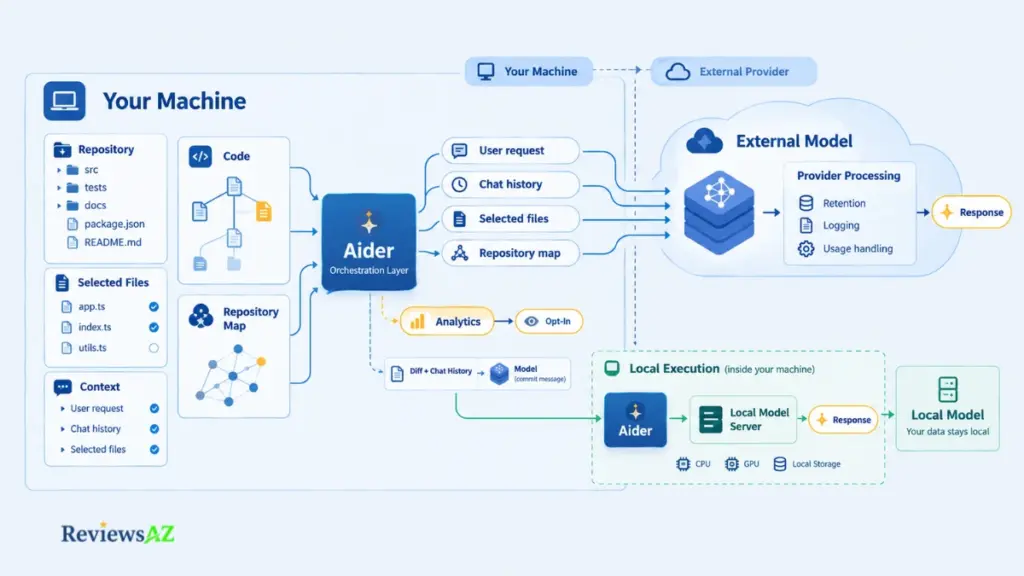
There are four parts to keep separate when evaluating Aider’s privacy:
- What Aider sends to the model. When Aider makes an edit, it sends your request, chat history, the files you have added, and the repository map to the model you configured. That means repository content can leave your machine and reach an external model provider. This is part of how the product works, rather than an optional analytics feature. There is another model request worth knowing about: Aider sends diffs and chat history to its weak model to generate commit messages. That is separate from the analytics system and part of the workflow itself.
- What Aider collects for analytics. Analytics are a different data flow. According to Aider’s analytics page, they are collected only if you opt in. Aider says it does not collect your code, prompts, chats, API keys, or personal information through this analytics system. A random subset of users is asked whether to opt in, and
--analytics-disablecan permanently disable analytics. So there is an important distinction: Aider’s own analytics are opt-in and anonymous, while the code and context needed for an AI edit can still be sent to whichever model provider you have selected. - What happens with a hosted model. A hosted workflow has three distinct layers: Aider software → External model provider → Provider processing policy. Aider runs locally and assembles the request. The external provider then receives that request over the network. What happens after that—such as retention, logging, or other data use—depends on the provider’s processing policy. This third layer deserves the closest attention because Aider does not control it. Before sending proprietary code, check the provider’s data-handling terms and look closely at any differences between consumer and API plans. Aider being open source does not change that. You can inspect Aider’s code, but that tells you nothing by itself about how the model provider handles the requests it receives.
- What changes with local LLM coding. A local model changes the data path. With a model served by Ollama or LM Studio on hardware you control, the request goes to your own model server instead of an external hosted provider. One party drops out of the chain. That does not make the setup automatically secure or private. Responsibility simply moves closer to your own infrastructure. Your machine, network, model server, and access controls now determine who can reach the data.
The practical takeaway: privacy is something you verify in the complete setup, not something you automatically get from using Aider or from the fact that it is open source. And the same control over the data path comes with control over the cost, because removing a hosted provider can replace per-token charges with hardware, power, and setup costs.
Aider Pricing, API Costs, and the BYOK Economic Reality
Aider’s price tag is zero. Its running cost is whatever your model provider charges, and that is where the real number lives.
The software is free and open source, but using it isn’t free: you pay your model provider per token, or pay for hardware and power if you run a local model, plus any fee a routing service adds. What you spend depends on the model, how many files you add, and how long your sessions run.
What Is Free and What You Still Pay For
Aider works on a bring-your-own-key (BYOK) basis. You supply the API key or endpoint, and the bill goes to whoever runs the model. Four meters can be running:
- Aider software: free, under the Apache 2.0 license.
- Hosted-model inference: input and output tokens, billed by your provider.
- Routing and provider fees: gateways and aggregators can add their own pricing on top of the underlying model.
- Local-model infrastructure: no per-token charge, but hardware, power, and setup time are real costs.
That is the opposite shape from a bundled subscription. Managed tools such as GitHub Copilot typically fold model access into a plan, trading variable cost for a predictable one.
Scenario-Based API Cost Modeling
A published monthly average for Aider users would be invented, so these are calculated scenarios from stated assumptions, not typical developer bills. Rates are Anthropic’s list prices per million tokens, checked on October, 2026: Haiku 4.5 at $1 input and $5 output, Opus 5.5 at $4 and $20. Other providers price differently. Each month assumes 20 working days.
- Light usage (low-cost model): 15 requests a day, averaging 12,000 input and 1,000 output tokens each. That is 180,000 input and 15,000 output tokens daily, about $0.26 a day, or roughly $5.10 a month.
- Professional usage (premium model): 60 requests a day, averaging 40,000 input and 3,000 output tokens each. That is 2.4 million input and 180,000 output tokens daily: $9.60 plus $3.60, or $13.20 a day, roughly $264 a month.
- Local workflow: API inference is $0 under any assumption. The cost moves to hardware, electricity, and setup, which depend entirely on your machine.
Input tokens drive most of the difference, and they grow with the files you add, the repository map, and the length of the chat.
Prompt caching can cut the input line where it is supported and configured, but it shouldn’t be assumed to be on by default. If 80% of the professional scenario’s input were read from cache at Anthropic’s $0.20 cache-read rate for Opus 5.5, the daily input cost would fall from $9.60 to about $2.30, before cache-write charges are counted.
Prices and model names also move. Anthropic’s documentation says models from Opus 4.7 onward produce roughly 30% more tokens for the same text, which can quietly change a budget built on an older model. Re-run these numbers with your provider’s current rates and your own usage before deciding.
Same tool, about 50 times apart. At these assumptions, a light day on a low-cost model costs roughly $0.26 and a heavy professional day on a premium model roughly $13.20. Model choice and context size move the bill far more than Aider itself does.
Aider Review: Pros and Cons
Aider’s strengths are closely tied to the same choices that can make it more demanding than a managed AI coding tool. You get control over the model, the provider, the repository context, and the Git workflow, but that control also means taking responsibility for the decisions that a bundled product would normally make for you. Looking at the pros and cons together gives a more useful picture of where Aider fits than either list does on its own.
Aider Pros: Where It Has a Real Advantage
- Model and provider flexibility: You can switch models without switching tools, which makes it easier to match the model to the task, the required quality, and your budget.
- Git-native reviewability: By default, Aider turns its edits into Git commits, so diffs, undo, and history fit naturally into a workflow you already know.
- Repository-aware context: The repository map gives the model a structural view of the wider codebase without requiring every file to be sent with every request.
- Local-model options: You can route requests to models running on hardware you control, removing per-token inference charges from the equation.
- Terminal workflow integration: Aider works alongside your shell, tests, logs, and deployment tools instead of requiring you to move your work into a separate environment.
- Open-source transparency: Because Aider is open source, you can inspect how it builds context and applies edits rather than having to take the underlying workflow entirely on trust.
Aider Cons: Where It Creates More Work
- Configuration responsibility: Choosing and tuning the model, API keys, endpoints, and context settings is part of the setup, and that responsibility stays with you.
- Variable inference cost: There is no fixed monthly price for the software’s AI usage. Your bill follows your usage, model choice, and context size.
- Model-dependent quality: Aider’s results depend heavily on the model behind it, and local models in particular can vary significantly on difficult multi-file changes.
- Terminal-centric review friction: A large diff can be slower to inspect in a terminal than in a visual editor designed around side-by-side code review.
- Context discipline: The repository map provides structure rather than full implementation details, so you still have to decide which files Aider should add and which ones it should drop.
- Continued need for human review: A commit, a clean diff, and passing tests are all useful signals, but none of them proves that the change is actually correct. You still need to read the code and understand what was changed.
Taken together, these pros and cons point to the same conclusion: Aider rewards developers who value control and are comfortable taking responsibility for the workflow around that control. Its flexibility is a genuine advantage, but it works best when model selection, context management, cost, and code review are treated as part of the job rather than hidden behind the tool.
Is Aider Right for You? Best Fits and Alternatives
Three questions settle most of the decision. Do you already live in a terminal? Do you want to choose and pay for your own model? Are you comfortable with reading diffs as your main way of verifying work? Three yes answers point to Aider. Three no answers point elsewhere.
Best-Fit Developers and Workflows
The strongest fit is a developer whose habits already match Aider’s shape. Terminal-centric developers who run builds, tests, and deploys from the shell get the assistant in the same place as the rest of their workflow. Backend engineers working across models, services, migrations, and tests often need changes that span several files. Open-source maintainers value small, reviewable commits and the freedom to choose a model without being tied to a vendor’s plan, while experienced Git users are already comfortable with branches, diffs, and tidying their own history.
What these groups share is not seniority. They already treat review as part of the job, which is the habit Aider depends on.
When Another Tool Makes More Sense
Aider is the wrong default when your priorities sit on the other side. Developers who think in editor panes and click-through diffs will often find an IDE-first tool more natural where Aider feels like friction. Anyone who wants inline completion as the main feature, a predictable monthly bill, or minimal setup is better served by a bundled product. Teams that need shared policies and seat management should also start with a managed tool.
Aider vs. Alternatives
Cursor, Cline, Claude Code, Codex, and GitHub Copilot all overlap with Aider, but none of them occupies exactly the same position. Three things decide most comparisons: the environment you work in, whether you or the vendor controls the model choice, and how you are billed. That means comparing the shape of the workflow matters more than comparing feature counts.
| Tool | Environment | Model choice and billing | Best fit |
|---|---|---|---|
| Aider | Terminal-first | Any provider or local model; you pay per token | Control and model portability |
| Cursor | Its own AI-first editor | Subscription with usage credits; bring-your-own-key option | Visual-first development |
| Cline | Editor extension | Open source; bring your own key | Agentic workflows inside the editor |
| Claude Code | Terminal, desktop, and mobile | Anthropic’s models; Claude plans or API billing | Anthropic-centered workflows |
| Codex | Command line | OpenAI’s models; ChatGPT plans or API key | OpenAI-centered, more autonomous work |
| GitHub Copilot | Many editors | Managed plans; usage metering changed in 2026 | Managed, bundled assistance |
These tools change quickly, so check each vendor’s current documentation and pricing before making a decision.
- Aider vs. Cursor: Cursor is its own AI-first editor, billed as a subscription with usage-based credits and an option to bring your own API keys. It trades some of Aider’s control for convenience: visual diffs and inline completion are built in, and there is little to set up. That makes it a natural fit for visual-first developers, especially when an integrated editor saves more time than model choice does. Developers who prefer to stay in their terminal and current editor keep more control over the model and the cost with Aider. Our Cursor review covers that experience in more detail.
- Aider vs. Cline: Cline is also open source and uses a bring-your-own-key model, so the underlying economics are familiar. The main difference is where the workflow lives. Cline runs as an agent inside your editor, with plan and act modes and approval steps, while Aider works from the terminal and Git. For developers who want agentic workflows and approvals inside the editor without giving up model choice, Cline is the closest route to Aider-style economics without leaving the editor. Our Cline review covers its safety and costs in detail.
- Aider vs. Claude Code: Claude Code is Anthropic’s coding agent, built around Anthropic’s models and available through Claude plans or API billing. It runs from the command line as well as through desktop and mobile apps. The main trade-off is ecosystem alignment versus model freedom. Developers who want one vendor’s models and tooling to work closely together may prefer Claude Code, while those who want the freedom to switch providers or run local models may find Aider a better fit.
- Aider vs. Codex: Codex is OpenAI’s coding agent, and its open-source command-line tool overlaps with Aider’s terminal-first workflow. It is aligned with OpenAI’s models and can be used through ChatGPT plans or with an API key, making it an easy trial for terminal developers who already pay for ChatGPT and want a more autonomous agent. Developers who put model and provider portability first will likely find Aider the better fit. The Codex review goes deeper into that workflow.
- Aider vs. GitHub Copilot: Copilot is a managed assistant that works across many editors, with plans whose usage metering GitHub has changed during 2026. Aider’s per-token, bring-your-own-key model is the opposite shape, so the useful comparison is how each fits your actual usage rather than their sticker prices. Individuals and teams who want one managed assistant with administration built in will find Copilot easier, and predictable bundled access is a major reason to choose it. What you give up in return is direct control over the model and the inference bill. The GitHub Copilot review goes deeper into its managed workflow, plans, and trade-offs.
The comparison ultimately comes back to workflow rather than a simple winner. Aider makes the most sense when terminal-based work, Git-centered review, model portability, and local-model options are more valuable to you than a turnkey visual environment. When convenience, inline completion, managed billing, or centralized administration matter more, one of the alternatives may fit the way you already work better.
Related Posts:
Cursor vs Claude Code vs Codex vs GitHub Copilot
How to Optimize SQL Queries Using AI
Best AI Coding Assistants for Enterprise Teams
Frequently Asked Questions
The questions below focus on the practical details that can affect your decision after you have looked through the main Aider Review. Rather than repeat the feature overview, they address the choices, limitations, and workflow details that are easy to overlook when deciding how Aider will fit into a real development setup.
Is Aider free to use, and what costs can I still incur?
Yes, the Aider software is free and open source, but running it is not free. You pay your model provider for tokens, or pay for hardware and power if you run a local model, plus any fee a routing service adds. Spend depends on the model, how many files you add, and how long your sessions run, so estimate it from your own usage, not an average.
What LLM models and providers does Aider support?
Aider supports most major hosted providers, including OpenAI, Anthropic, Google Gemini, DeepSeek, and xAI, plus routing services like OpenRouter and local servers such as Ollama and LM Studio. It also accepts OpenAI-compatible endpoints. Support changes often, and quality varies by model on difficult multi-file edits, so check Aider’s current LLM documentation and test your chosen model on a real task before relying on it.
How does Aider’s Git integration work?
Aider works inside your Git repository and, by default, commits each set of changes it applies with a descriptive message. You can review a change with /diff or git diff and reverse the latest Aider commit with /undo. These are review and rollback tools, not correctness checks: a committed change can still be wrong, so read the diff and run your tests.
What is the Aider Repository Map and why does it matter?
The repository map is a condensed, ranked outline of your codebase, listing files and key symbols, that Aider sends so the model can see how code connects without receiving every file. It matters because the model can edit with awareness of callers and dependencies. It carries structure, not implementation, so you still need to add the files that matter to each task.
What is Aider Architect Mode, and when is it useful?
Architect Mode splits a task between two model roles: an architect that proposes how to solve the problem, and an editor that turns the proposal into file edits. It is most useful when the plan is the hard part, such as a change spanning several files. It costs extra requests, latency, and tokens, and a flawed plan still gets implemented, so skip it for small fixes.
Is Aider a good choice for large or existing codebases?
It can be, if you manage context deliberately. The repository map gives the model a structural view of an existing codebase, and Git commits keep each change reviewable. On a large codebase, though, the map is a ranked selection within a token budget, so it may miss the file you need. Add relevant files explicitly, work in small steps on a branch, and expect results to depend on the model.
Is Aider better for some developers than Cursor or Claude Code?
Yes, for developers who prioritize model choice, Git-based review, and working from the terminal. Cursor suits visual-first developers who want an integrated editor with inline completion, and Claude Code suits those who prefer one vendor’s models and tooling. Neither is better overall. If you want a predictable monthly bill or minimal setup, Aider’s bring-your-own-key model is likely the wrong fit.
Final Verdict: Is Aider Worth It?
Aider’s biggest strength is also its biggest trade-off: control. You get to choose the model, keep the workflow close to Git, decide what context reaches the model, and choose where your code is processed. The trade-off is that those decisions, along with the cost and the review, stay with you.
That is the real takeaway from this Aider Review. Aider is worth it for developers who see that control as an advantage rather than extra work. Its value isn’t simply that it can edit code with AI; every tool covered here can do that. Its difference is how much of the workflow it leaves in your hands: the model, repository context, Git history, and rollback process.
Aider isn’t the universal winner. It fits terminal-first developers, backend engineers, open-source maintainers, and experienced Git users, especially when model portability, local-model options, and Git-centered review matter more than a turnkey visual experience. It is a weaker fit for anyone who wants visual-first editing, inline autocomplete, minimal setup, bundled pricing, or centralized administration. And whatever tool you choose, code review, testing, and Git hygiene still belong to the developer.
For a practical trial, start on a feature branch and keep the scope small. The installation steps are in the repository README, and Aider’s commit-per-change workflow makes the experiment easy to inspect and discard. In the end, Aider is strongest when the extra control is something you want, not something you have to manage.