Cline Review: Features, Pricing, Security, Models, and Whether It’s Worth It

A Cline review starts with an unusual catch: the software is free, but the AI doing the work is not. Cline is free for individual developers, while inference is usage-based, so what you actually spend depends on the model, provider, and amount of work you give the agent.
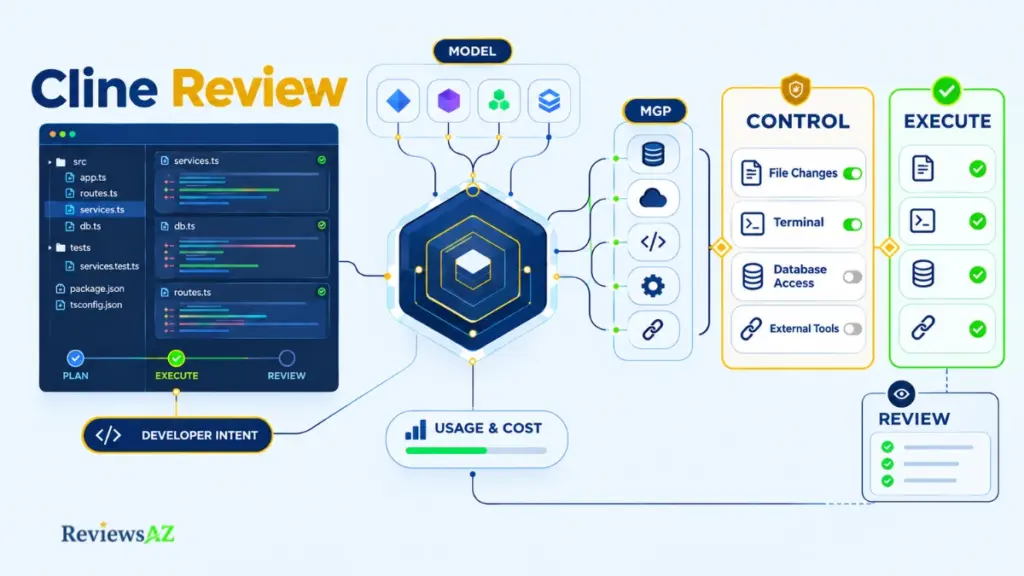
That would be fairly simple if Cline were just another coding assistant. It isn’t. Cline can edit files across a repository, run terminal commands, and connect to external tools and data through MCP. Once you give an agent that much access, the important questions go beyond code generation: what can it reach, what can it do without asking, and where does your code or tool output go?
That is what this Cline review sets out to answer. The appeal is clear: you get control over the model, provider, workflow, and permissions. The trade-off is that more of those decisions become your responsibility, along with the cost of inference and the risks that come with broader access.
And open source does not automatically settle the security question. Cline’s approval settings, terminal access, MCP connections, provider data paths, and its documented 2026 CLI supply-chain incident all matter when deciding whether the agent belongs in your development workflow.
This is an evidence-based review rather than a hands-on test. It draws on Cline’s official documentation, pricing, and privacy materials, together with dated user reports, to separate documented capabilities from reported behavior.
What Is Cline? Features, Workflow, and Use Cases
Cline is an open-source AI coding agent that reads a codebase, edits files, runs terminal commands, and calls external tools. It sits within the broader AI Coding Agents category, with the developer approving or automating each step.
Older write-ups often describe Cline as a VS Code autocomplete add-on. It did start as a VS Code extension, but Cline’s official site now presents the product across several surfaces. That broader scope changes what you are actually evaluating when you review it.
What Makes Cline an Agent?
A coding assistant usually waits for a prompt, suggests something, and leaves the next move to you. An agent starts with a goal and takes action on the project.
Cline falls into the second category. It can plan a task, propose changes to files, run commands, read the results, and adjust what it does based on the feedback. Its workflow is divided into Plan and Act modes, with Plan used for exploration and planning before changes are made in Act mode.
Calling it an “agent” describes the way Cline operates, not the quality of its output. That depends heavily on the model you connect to it, which is a separate part of the equation.
Where Cline Runs: IDE, CLI, SDK, and Desktop
Cline now covers more than the editor. The product spans an IDE extension, a terminal CLI, an SDK, and a desktop app that does not require an editor. Cline’s own materials also refer to extensions for both VS Code and JetBrains.
The experience is not necessarily identical across those surfaces. One important difference is approval behavior: the CLI reference lists auto-approval as on by default.
Core Use Cases: Refactoring, Debugging, Tests, and Automation
Cline becomes more useful when a task crosses multiple files and needs a feedback loop rather than a single code suggestion. That includes multi-file refactoring, such as a rename that affects dozens of call sites; debugging that moves from an error message to a fix and then back through the tests; and test generation where the agent can run the tests, read the failures, and make another pass.
It can also help with codebase exploration and command-line scripting, particularly for repetitive development chores that are easy to describe but tedious to handle manually.
These are workflow patterns, not claims that Cline will perform them better than another tool. The result still depends on the model behind it, the repository it is working in, and how carefully you review the diffs it produces.
How Cline Works: Plan, Act, Files, and Terminal Execution
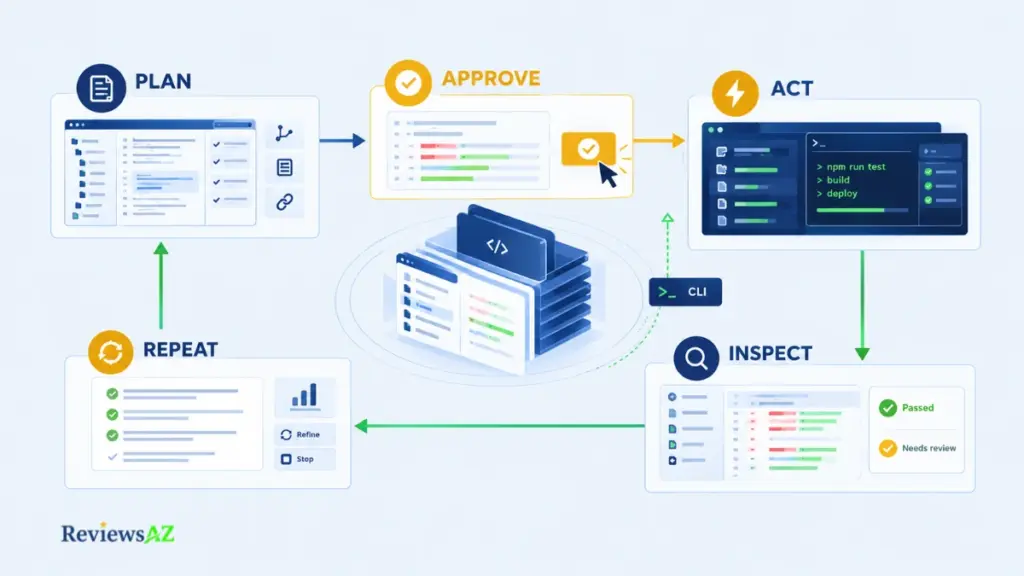
Cline’s Plan/Act workflow is designed so that reading can come before writing. That shapes its agentic workflow, which follows five steps as documented:
- Plan: Cline reads the relevant code and proposes an approach.
- Approve: you accept the plan or redirect it.
- Act: files change and commands run.
- Inspect: you review the diffs and the command output.
- Repeat: feedback goes back in until the task is finished or abandoned.
Plan Mode vs Act Mode
The Plan/Act documentation describes Plan mode as read-only: Cline explores the code, asks questions, and drafts an approach. Act mode is where files change and commands run. Separating the two gives you a simple checkpoint for catching a misunderstanding before it turns into a messy diff.
The CLI inverts that default. According to its reference, a prompt starts in Act mode with auto-approve on, while Plan mode is opt-in through a flag.
Documented vs. reported: The docs say Plan mode does not modify anything. A GitHub issue opened on August 10, 2026, for version 4.1.7 reports a case where it did. That is one user’s report tied to one version. A clean Git branch gives you a practical way to verify the behavior in your own environment.
Multi-File Editing, Diffs, and Checkpoints
When Cline acts, it can change several files in one task and show the changes as diffs to review before accepting them. Cline’s materials also mention checkpoints as a way to step back from changes, although the docs are the better source for the details of how restoring works.
A diff shows what changed, but whether the change is right is a separate matter, and that gap becomes more important as tasks grow.
Terminal Commands, Feedback Loops, and Verification
Cline can run a test suite, read the failures, edit the code, and run the suite again. That loop is one of the practical differences between an agent and an assistant because the tool can check its work against an actual test or command result.
The catch is what “checked” really means. A clean run proves only that the checks it ran passed, and a thin test suite makes that evidence thin as well. Read the diff and run your own tests before merging. Everything so far happens inside the repository, which is where the next layer of the workflow begins.
Cline MCP: How It Extends the Coding Agent
Say a bug only appears when a query returns one particular row. With only local files in view, Cline can read the code but cannot see that row. Connect a database through MCP and the agent can go and look.
Cline MCP is Cline’s support for the Model Context Protocol, a standard that lets the agent connect to external tools and data sources through MCP servers, so it can work with systems beyond your repository.
What Cline MCP Can Connect
Per Cline’s MCP documentation, you add MCP servers and Cline can call the tools those servers expose while it works on a task. A server is the bridge: one might wrap a database, another a web API, another a documentation source or an internal tool.
Databases, APIs, and Development Tools
Databases tend to be the first thing developers connect, because so much debugging hinges on real data and real schemas. APIs and documentation sources follow the same logic: the agent reads an interface instead of guessing at it.
Querying a database from an agent is its own discipline, covered in how to chat with your database using AI. Within Cline the point is narrower. Once an agent can query, it is working with something more consequential than source files.
MCP Setup and Governance Trade-Offs
Setup is manageable: point Cline at a server, supply credentials, and decide what may run without approval. How approval settings apply to MCP tool calls is worth confirming for your surface, since that separates a supervised query from an unattended one.
Three questions are worth answering before connecting anything valuable:
- Who vetted the server? Its code is as much a dependency as any package.
- What can its credentials do? A read-only database user caps the damage of a bad query. That is an editorial suggestion, not a Cline requirement.
- Where do results go? Tool output flows back into the model’s context, so it travels the same route as your prompts.
More servers do not mean safer or more accurate output. Each one widens what the agent can reach and what can steer it. A new server is a new permission, not just a new feature.
Is Cline Safe? Security, Privacy, and Permissions
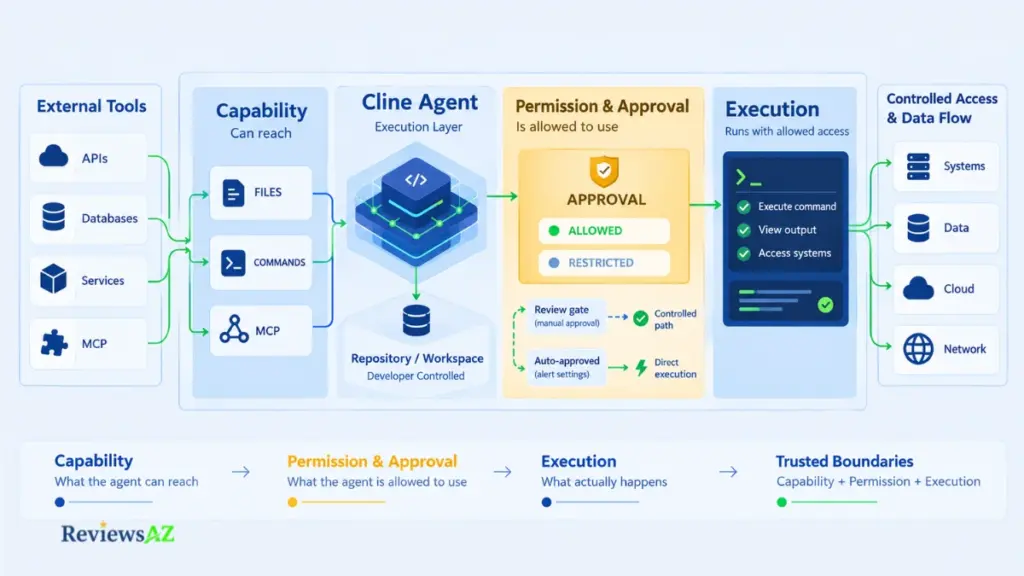
Is Cline safe to point at a real repository? It depends less on the software itself than on what you allow it to do. The risk comes from four places: file and command permissions, approval settings, where your code is sent, and the software supply chain. Each can be managed, and open-source status alone settles none of them.
1. File and Terminal Permissions
Capability and permission are different things. Cline can edit files and run commands, but whether it does so on its own or waits for you is a separate setting, and its documentation describes an approval step for these actions.
The terminal is the sharper edge. A command runs with the access of the account that launched it, so a bad command can do more damage than a bad edit. A Git branch, a container, or a limited account can help contain that risk.
2. Auto-Approval, Command Restrictions, and Surface Differences
Auto-approval lets chosen kinds of action proceed without a prompt, removing the pause that made review possible. Where you run Cline also decides the starting point. The CLI reference lists auto-approval as on by default, and off by default only in ACP mode, the editor-integration route.
The same reference documents a command-permissions policy that restricts which shell commands the agent may run. It takes allow and deny patterns, and deny rules always win.
It is easy to judge a tool by its first few prompts and then loosen it once they feel tedious. On the CLI the sequence runs backwards: the loose setting is the starting point, and tightening it is the work. Set the restrictions before the first long task, not after the third.
3. Provider Privacy, MCP Data Paths, and the 2026 CLI Supply-Chain Incident
Where your code goes depends on the route. With your own API key, requests go directly to the provider you chose, and Cline’s privacy notice says it does not collect that data. With a Cline-provided key, Cline receives the request and forwards it to the provider, whose privacy terms then apply.
Cline’s terms also note that providers may use content for training unless an opt-out exists and is used. A local model keeps inference on your machine, but shifts the hardware and quality trade-off to you.
MCP creates another data path because tool output enters the model’s context and follows the same route. When a connected server can run queries, the risk includes what the model writes and executes, not just what it reads, which makes understanding AI-generated SQL risks and limitations especially important before connecting an agent to a database that matters.
There is also a documented supply-chain incident. According to Cline’s official post-mortem, an unauthorized party used an active npm publish token to release [email protected] on February 17, 2026. The release added a postinstall script, exposure lasted about eight hours, and Cline says no malicious code was delivered; 2.3.0 was deprecated and 2.4.0 shipped as the corrected release.
VS Code and JetBrains extensions were not affected. Cline attributes the root cause to an AI-powered issue-triage workflow vulnerable to prompt injection, followed by an incomplete token rotation, and says later releases carry provenance attestations. This remains the vendor’s own account and has not been independently audited.
The judgment here: Cline is a reasonable choice for developers who review permissions, keep command access appropriately restricted, understand where their code and tool output are sent, and treat its supply-chain history as something to account for rather than a reason to label the entire product unsafe.
Documented vs. reported: The docs say Plan mode does not modify anything. A GitHub issue opened on August 10, 2026, for version 4.1.7 reports a case where it did: one user’s report tied to one version. A clean Git branch gives you a practical way to verify the behavior in your own environment.
Cline Pricing: Is Cline Free?
Cline’s software is free for individual developers, but the AI behind it is not. According to the official pricing page, inference is usage-based and is either paid directly to a model provider or covered by a ClinePass subscription. Enterprise pricing is custom.
- What is free: The software itself is free to install, read, and run as an agent in your editor or terminal. The model that does the actual thinking is a separate cost. An agent without a model is essentially an empty shell.
- BYOK: Bring your own key and connect an API key from a model provider. You then pay that provider directly. This gives you control over the provider and the resulting usage costs.
- Cline’s provider: Cline also operates its own provider. The ClinePass FAQ describes it as access to a wider list of models at pay-as-you-go API rates.
- ClinePass: The subscription route costs $9.99 per month and includes a curated set of open-weight models from labs such as Z.ai, Moonshot AI, DeepSeek, MiniMax, MiMo, and Qwen, with no separate provider keys required. The ClinePass page describes the quotas as generous and frames them as 2 to 5 times the usage of standard API rates. It does not publish an absolute quota, and additional processing fees may apply.
- What actually drives cost: Spending follows the work rather than the tool itself. The model you choose, the amount of code in each request, and how many times the agent loops can all change the final bill. A small bug fix and a large refactor on the same model can therefore cost very different amounts.
- Budgeting: No typical monthly figure appears here because no source supports one. If your provider offers spending limits, set one before a long unattended run.
- Enterprise: Enterprise pricing is custom, with organization controls and support features. There is no public number, so a team budget starts with a conversation.
The important distinction is simple: Cline itself can be free, but the model usage is where the cost comes from. The model you choose will usually have the biggest effect on what you actually pay.
Cline Models and Provider Flexibility
When a review says Cline wrote excellent code, the next question is: which model was behind it, and when was it tested?
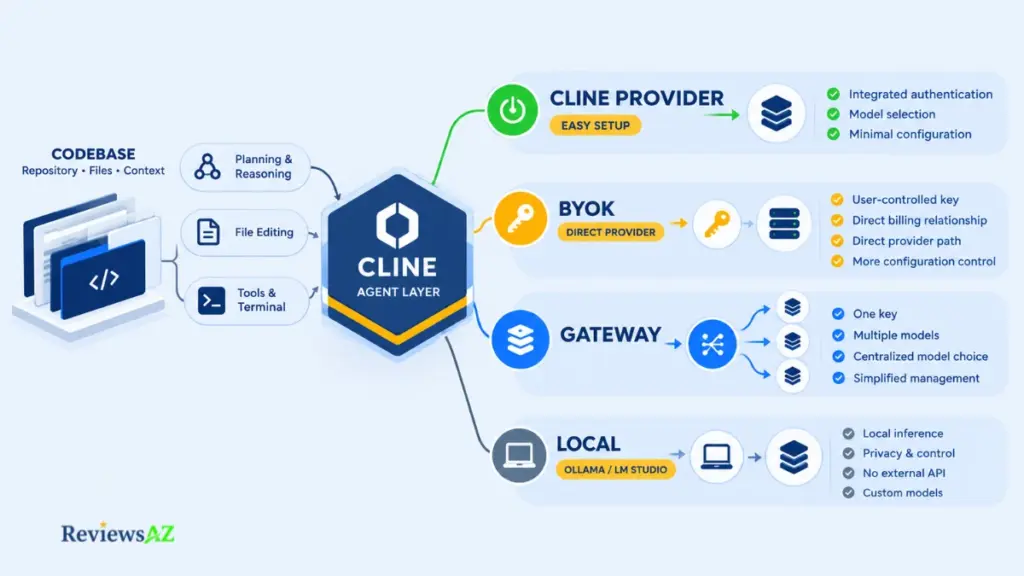
Cline is designed to work with many models rather than a single one. According to Cline’s documentation, you can use Cline’s own provider, bring a key from providers such as Anthropic, OpenAI, or OpenRouter, or run models locally through Ollama or LM Studio. Provider lists change often, so the documentation remains the best source for the current options.
Why Model Choice Changes the Review
Cline is the platform: the planning loop, file and terminal tools, and approval controls. The model does the reasoning and code generation, while also affecting speed and cost.
That makes it easy to give Cline credit or blame for work that actually comes from the model. Older user reports need the same caution because they may describe a model or Cline version that you are no longer using.
Cloud Providers, Gateways, and Local Models
Each route changes something different. Cline’s own provider is the simplest place to start: sign in, choose a model, and manage no separate API key. The trade-off is that requests pass through Cline.
Using your own key sends requests directly to the provider. Billing and terms then sit between you and that provider, which the docs recommend for specific billing arrangements or higher rate limits. A gateway such as OpenRouter sits between the two, giving you one key and access to multiple models, but also adding another party to the request path.
Local models through Ollama or LM Studio keep inference on your machine and remove per-token cloud billing. The trade-off is the hardware requirement and the open question of how well a particular local model handles agentic work.
Can Cline use local models? Yes. Cline supports local models through Ollama and LM Studio. How well a specific local model performs on agentic tasks was not evaluated here, so test it against your own workflow first.
Choosing Different Models for Different Tasks
Because the model is a setting, you can match it to the job. Exploring a codebase or drafting a plan may not require the same model as a large, careful refactor. A sensitive repository may also point you toward a local option.
These are trade-offs among cost, capability, and privacy rather than a ranking of models. No model is named best here because the right choice depends on your repository, workload, and tolerance for cost.
Cline Ease of Use and Setup
How much work stands between installing Cline and getting a useful, reviewable result? That is the more useful test of ease of use. In practice, the friction comes from three places: installation, configuration, and governance.
- Getting Started. Installation is the easy part. Cline’s docs describe the quickest start as signing in with Google, GitHub, or email through Cline’s own provider, then choosing a model. The Cline-Pass page also lays out four steps from signup to coding. The important choice comes early because the provider and model you pick shape what follows.
- Model, Provider, and Permission Setup. Configuration is where the effort increases. Bringing your own key or running a local model adds a provider account, a key, and a model choice that affects both cost and quality. Permissions come next. Because the CLI auto-approves by default, it is an easy step to overlook, even though it has a direct effect on how much control you keep over the agent.
- When Setup Friction Becomes Useful Control. Choosing a model and deciding how approvals should work is meaningful setup. Those choices determine part of your cost and your risk, so that friction is worth keeping. The unnecessary friction comes from a fast-moving product. Provider lists change, and defaults can differ between surfaces. Older user reports may describe earlier versions, so they are better treated as historical context than as a guide to the current setup.
Ease of use with Cline is therefore less about how quickly it installs and more about how much configuration you are willing to do before the first serious task. Some of that setup adds friction, but much of it is also what gives you control over cost, permissions, and the way the agent works.
Cline Review: Pros and Cons
Cline’s advantages and its costs come from the same source: it hands decisions to the developer. A developer who wants those decisions will read the first list below differently from one who does not.
Where the Pros of Cline Show Up in Real Work
- Control over the model and provider. You choose what runs behind the agent instead of accepting one vendor’s pick.
- Reviewable execution. Changes arrive as diffs, work moves through Plan and Act, and approval steps decide how much runs unattended.
- MCP extensibility. The same agent can reach databases, APIs, and documentation through MCP servers.
- No software fee for individual developers. AI usage is paid separately, through a provider, Cline’s provider, or ClinePass.
- Choice of surface. IDE, CLI, SDK, and desktop options let you work where you already do.
- Code you can read, with a caution. Open-source status lets you inspect how the agent is built, but readable is not the same as secure, and counting it as a pro in itself is an easy error with lists like this one. How the wider open-source field compares is mapped in open source AI coding assistants.
Where the Cons of Cline Turn Flexibility into Friction
- Cost that moves with the work. Usage-based inference leaves no single number to plan around, and ClinePass’s flat fee comes with an unpublished quota and possible processing fees.
- Setup decisions up front. Provider, model, and permissions all need an answer before the tool pays off.
- Permissions you must govern. Auto-approval is the CLI’s documented default, and each MCP server is a new trust boundary.
- Behavior that varies by surface and version. The IDE and CLI start from different defaults, and one user report describes Plan mode modifying files in version 4.1.7 despite the documentation.
- Details that keep moving. Provider lists, plans, and prices change, so the current docs need rechecking before you commit.
Where the Cons of Cline Still Leave Work to You
Cline does not make the model better. Code quality tracks the model you connect, and a weak choice produces weak diffs inside a polished workflow.
It does not verify its own correctness either: a clean run proves only that the checks it ran passed. It does not make cost predictable, and it does not remove the permission decisions it hands you.
Cline vs Cursor: Which Is Better?
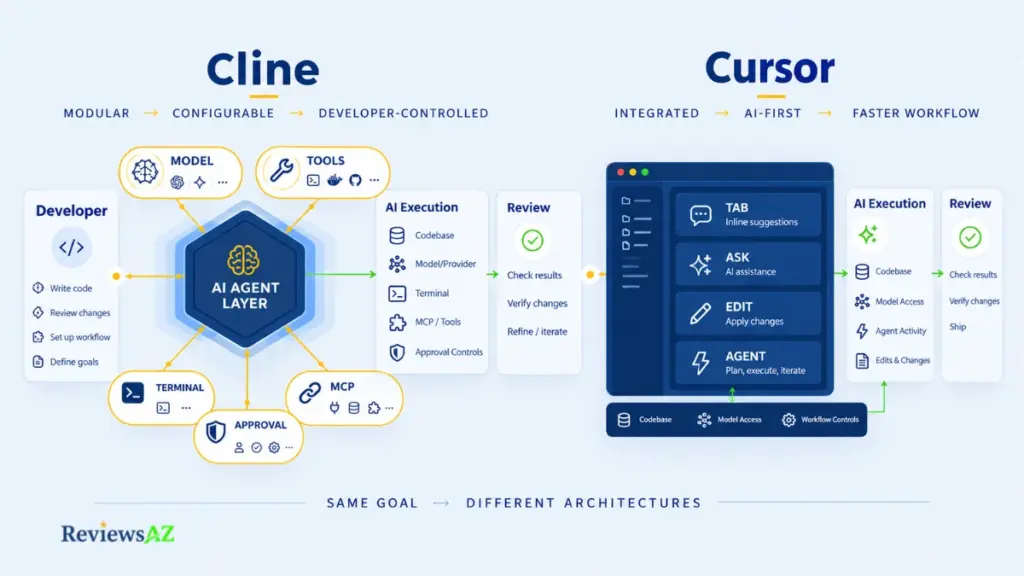
Neither is better overall. Cline suits developers who want to choose their own models, tools, and permissions and accept the configuration that comes with that. Cursor suits developers who want an integrated, AI-first editor with less setup. The right pick depends on how much control you want to manage yourself.
Open and Configurable vs Turnkey AI IDE
The two are different kinds of product. Cline is an open-source agent layer that runs on several surfaces and connects to models you choose. Cursor, according to its own documentation, is an AI-first code editor with Tab completion plus Ask, Edit, and Agent modes built into the editing experience.
One is an agent you add to a workflow; the other is an environment you adopt.
Cost, Model Choice, and Workflow Control
| Factor | Cline | Cursor |
|---|---|---|
| Model and provider | Your choice: Cline’s provider, your own key, or local | Handled through the plan; check its docs for current options |
| Surfaces | IDE, CLI, SDK, desktop | Editor-first, with Tab, Ask, Edit, and Agent |
| Cost model | Free software; usage-based inference or ClinePass | Subscription plans; see Cursor’s pricing page |
| Control | Configurable approvals and command restrictions, varying by surface | Rules shape AI behavior; approval controls not compared here |
| Setup | More decisions up front | Integrated editor, typically a quicker start |
Third-party explainers quote differing Cursor prices, so none appear here. When both tools point at similar models, differences in output mostly reflect the model, not the tool, so no claim is made about which one writes better code.
Which Developer Profile Fits Each?
Cline fits developers who want to pick the model, work in the terminal or SDK, and manage spend and permissions themselves. Cursor fits those who want one integrated editor and a quicker start.
The two are not mutually exclusive, and plenty of developers could reasonably use each for different work. Cursor’s side of this comparison, including how it handles pricing and agent features in practice, gets full treatment in the Cursor Review.
Cline Alternatives: Cursor, Claude Code, Copilot, and Aider
Cline makes the most sense when you want control over the model, provider, permissions, and agent workflow. But not every developer wants to manage those choices, and some prefer a terminal-first or editor-first approach. The right alternative depends on how you already work and how much control you want over the stack behind the agent. If you’re comparing the broader landscape of AI Code Assistants, the same workflow differences help explain why these tools take such different approaches. Match the tool to how you want to work:
- An integrated AI editor: Cursor.
- A terminal-native agent: Claude Code.
- Git-centered terminal pairing with your own model key: Aider.
- An assistant that grew agent modes inside your editor: GitHub Copilot.
These are workflow lanes, not a ranking. Each tool’s own documentation is the place to confirm current details.
Cursor for Integrated IDE Work
Cursor is the move when you want the AI inside the editor itself and would rather not make the configuration choices Cline hands you.
The difference is mainly in where the workflow lives. Cursor keeps the AI experience tightly integrated with the editor, while Cline gives you more choice over the model, provider, and agent setup. For developers who prefer an editor-first workflow and want fewer provider decisions to manage, that makes Cursor a natural alternative to consider. The broader comparison appears in the Cursor Review.
Claude Code for Terminal-Native Agent Work
Claude Code is Anthropic’s agentic coding tool. Per its documentation, it works in the terminal, where it can edit files, run commands, and create commits, and it can also be reached through a desktop app and IDE extensions.
The reason to switch is a purpose-built agent for people who already live in the command line. The trade-off is model choice: the docs describe it as the harness around Claude, while choosing the model is much of Cline’s appeal. The differences are examined in the Claude Code Review.
Aider for Git-Centered Terminal Pairing
Aider is open source and terminal-based. According to its project README, it edits files in your local Git repository, commits changes automatically with generated messages, and runs on the model API key you supply.
Developers who think in commits get the lightest, most chat-driven loop from it. The workflow and trade-offs are covered in the Aider Review.
GitHub Copilot for Editor-Centered Agent Work
GitHub Copilot starts from the other side. It began as a completion tool and, per GitHub’s feature documentation, now includes Ask, Edit, and Agent modes, with Agent mode iterating on a request until it is done.
That makes it a natural bridge for developers coming from the assistant side who want to try agentic work without leaving a familiar tool. The broader comparison is covered in the GitHub Copilot Review.
Who Should Use Cline?
Picture a developer with a mid-sized repository, a model provider account already set up, and a habit of reading every diff before committing. Now picture another who wants to open an editor, sign in, and start. Same tool, two very different afternoons.
That difference is the useful way to think about Cline. It can be a strong fit for developers who want control, a conditional fit for those who value flexibility but want less setup, and a weak fit for anyone looking for turnkey simplicity and predictable billing.
- A Strong Fit: Control-Oriented Developers. Cline makes the most sense when you want to own the decisions it exposes: picking the model, deciding what runs unattended, reviewing the diffs, connecting MCP servers you will vet, and working across IDE, terminal, or SDK. These are editorial judgments drawn from the evidence in this review, not product claims. The common thread is control, and Cline suits developers who are comfortable making those decisions themselves.
- A Conditional Fit: Flexibility Without the Configuration Appetite. Developers who like the flexibility but not the setup can lower the friction with Cline’s own provider or ClinePass, though permissions and spend still need attention. Experienced AI-tool users get the most from that trade because they already know how to scope a task and read a diff critically. Engineering leads sit here too. Enterprise is listed with custom pricing and organization controls, but whether that meets your governance needs is a conversation, not something the product settles by itself.
- A Weak Fit: Turnkey Simplicity and Fixed Billing. Look elsewhere if you need a fixed monthly cost, want minimal setup and a managed workflow, or are not ready to manage permissions and inference spend yet. An integrated editor like Cursor may suit that better, and starting with a managed option and moving later is a reasonable path.For a terminal-first agent or Git-centered pairing, Claude Code or Aider are the natural comparisons.
Cline is strongest for developers who value control and are willing to manage it. For developers who want the tool to make more of those decisions for them, its flexibility can become friction rather than an advantage.
Related Posts:
Best AI Coding Assistants for Enterprise Teams
Codex Review
Cursor vs Claude Code vs Codex vs GitHub Copilot
Frequently Asked Questions About Cline
The interesting questions usually come after the first look at the tool: what happens to your code, what are you really paying for, and how much control do you keep once Cline starts working? This Cline Review covers those trade-offs in depth, but a few practical questions are easier to answer on their own.
Is Cline free, or do you pay for AI usage?
Cline itself is free for individual developers, but the AI inference is not. According to the official pricing page, you either pay a model provider based on usage, use Cline’s provider, or choose ClinePass at $9.99 per month for its included open-weight models. Additional processing fees may apply, and Enterprise pricing is custom.
Is Cline safe to give file and terminal access to?
It depends on how you configure it and which surface you use. Cline provides approval controls for edits and commands, while the CLI starts with auto-approval enabled by default. It also provides command-permission controls that let you restrict what the agent can run.
Because commands run with your account’s access, a Git branch, container, or limited account can help contain the impact of a bad command. Cline’s February 2026 npm incident is also worth knowing about, although the company’s post-mortem says it was limited to the CLI package and did not affect the VS Code or JetBrains extensions.
Does Cline see my code when I use my own API key?
According to Cline’s privacy notice, when you use your own API key, requests go directly to the model provider and Cline does not collect that user content. With a Cline-provided key, Cline receives the request and forwards it to the provider on your behalf.
What is Cline MCP used for?
MCP lets Cline connect to external tools and data through servers, including databases, APIs, and documentation. That gives the agent access to systems outside the repository itself.
The trade-off is the extra trust boundary. A connected server can widen what the agent can reach, so it is worth vetting the server and limiting the credentials you give it.
What models and providers does Cline support?
Cline can work with its own provider, bring-your-own-key providers such as Anthropic, OpenAI, and OpenRouter, as well as local runtimes. The available provider and model lists change often, so the current documentation is the best source for what is supported now.
Can Cline use local models such as Ollama?
Yes. Cline supports local models through Ollama and LM Studio, allowing inference to stay on your own hardware. That removes per-token cloud billing and changes where your code is processed, but it also shifts the trade-off toward your hardware and the capability of the local model you choose.
Is Cline better than Cursor?
There is no overall winner. Cline is the better fit when you want to choose your own models, providers, tools, and permissions and are comfortable managing that setup.
Cursor is the more natural fit when you want an integrated AI editor with less configuration. In practice, differences in output can also come down to the model behind each tool, not just the tool itself.
Final Verdict: Our Cline Review
Cline is worth using if you want to own your agent stack, and a poor default if you want someone else to own it. The difference is not really about whether Cline can do the work; it is about how much of the model, provider, permissions, and execution process you want to control yourself.
For the right developer, that trade can be worthwhile. This Cline Review found a configurable agent layer with model and provider choice, reviewable execution, and MCP extensibility, but those advantages come with setup work, cost monitoring, and permission decisions.
The choice becomes clearer when you look at what you actually want from the tool:
- Choose Cline when control matters more than simplicity. Model and provider freedom, MCP extensibility, one agent across IDE, terminal, and SDK, and control over what executes are strong reasons to use it. If at least two of those matter more to you than a simpler setup, Cline is worth serious consideration.
- Use it selectively while you learn the trade-offs. You do not have to make Cline your default agent on day one. Start with smaller, non-critical work and see how much configuration, review, and spend you are comfortable managing. That gives you a better answer than any feature checklist can.
- Look elsewhere when you want a managed workflow. If a fixed monthly cost, minimal setup, or less responsibility for permissions and inference spend matters more to you, another tool may be the better fit. Cline is not the universal best choice, and it does not need to be.
Before adopting it for serious work, recheck the current pricing, supported providers, and permission defaults on Cline’s own pages because all three can change. Start with a non-critical repository on a Git branch, keep approvals enabled, and use a limited-privilege credential for any MCP server. With the CLI, set command permissions or turn auto-approve off first, and use a spending limit when your provider offers one. In the end, judge Cline by two things you can actually observe: the diffs it produces and the bill it generates.