How to Chat with Your Database Using AI: Setup, Prompts, Safety & Verification

What if you could ask your database a question in plain English and still know exactly what SQL ran underneath? That’s the practical goal behind learning how to chat with your database using AI. Not skipping SQL entirely, but getting a faster path from a question to a checked, trustworthy answer.
The appeal is obvious for anyone who has waited on a report, or bounced a question to someone else because they didn’t know the schema. Conversational database access removes that bottleneck. What most tutorials skip is what happens after the AI answers: whether the generated SQL was actually correct, and whether it should have had access to that data in the first place.
This guide covers the full path. How AI turns a question into schema-aware SQL and back into a plain-language answer. What to set up before connecting anything. How to phrase questions that get accurate results. How to verify SQL and results before acting on them. And how to keep access scoped and safe. By the end, you’ll have a repeatable workflow instead of a one-off experiment.
How to Chat With Your Database Using AI: What Does It Actually Mean?
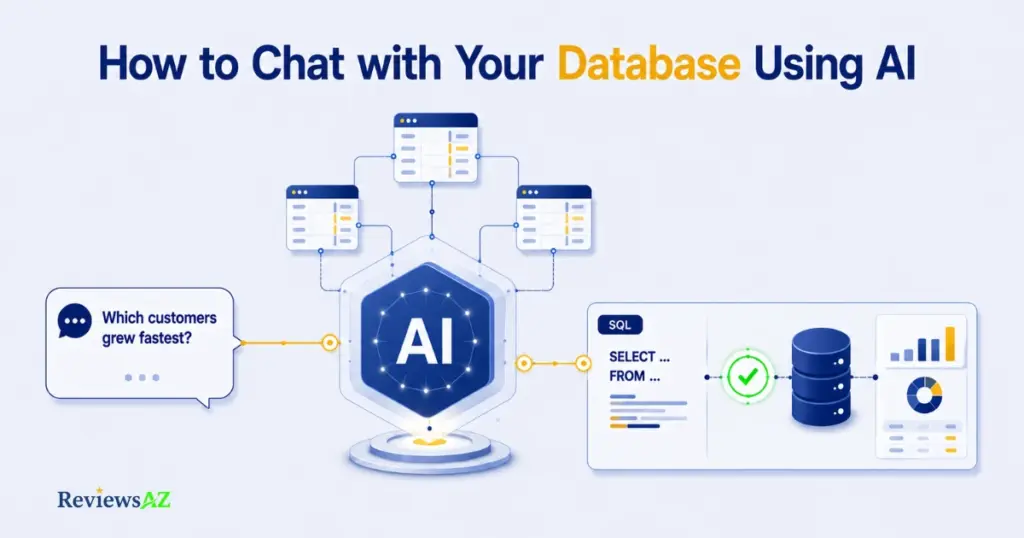
Chatting with a database using AI means typing or speaking a plain-language question and getting back an answer generated by turning that question into a real SQL query, running it, and translating the result back into words you understand. It isn’t a separate database feature. It’s a layer that sits between you and the database, doing the SQL work you’d otherwise write by hand.
That layer isn’t one single thing, though. Some tools generate SQL and run it directly against a live connection. Others build the query, show it to you, and wait for approval before executing anything. A few only draft SQL for you to copy and run elsewhere yourself. Worth knowing before you pick a tool: none of these behaviors are universal, and assuming they all work the same way is how people end up surprised by what a tool just did.
What the user actually asks
In practice, the questions people type are ordinary business questions, not SQL. “Which customers didn’t renew last quarter?” “What’s our average order value by region this year?” The user doesn’t need to know table names or join logic. That’s exactly the problem this workflow solves.
What happens behind the scenes
Behind that plain question, the system needs to understand your database’s schema, translate the question into SQL that matches your actual tables and columns, then either run the query or hand it to you for review. Text-to-SQL is the term most often used for that translation step specifically. “Database chat” is the broader umbrella covering the conversation and result explanation around it.
The rest of this guide breaks that process down step by step.
From Natural Language to SQL: How AI Chats With a Database?
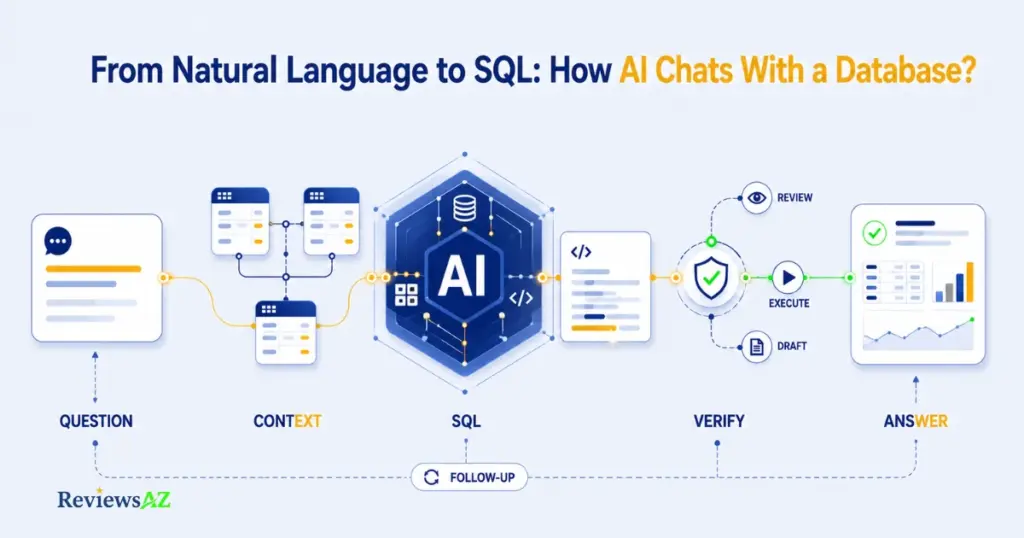
Ask a database AI “which products underperformed last month” and a lot has to happen before you see an answer.
Understand the question
The system first interprets your question in natural language: which metric, which time range, which entities. Vague phrasing creates problems downstream. An ambiguous question produces an ambiguous query no matter how good the AI is.
Retrieve Database Schema and Context
Next, the AI needs your database schema, table names, columns, and relationships, so it can map your plain-language question onto real structures. This is how Text-to-SQL AI works under the hood. Schema awareness is what separates a usable answer from a plausible-looking guess.
Generate SQL
With the question and schema in hand, the system drafts an actual SQL query. DBeaver’s AI Chat documentation describes this as a translation step from natural-language prompts into SQL tied to the connection you’ve selected.
Review or execute
Some tools run the generated SQL automatically. Some show it in an editor for review first. Some stop at the draft stage entirely. Knowing which behavior you’re dealing with, before you rely on the result for anything that matters, is worth five minutes with the documentation.
Return and explain results
Finally, the raw query result gets translated back into a plain-language answer, sometimes alongside the SQL itself and a table or chart. DBeaver’s documentation notes that conversation history and scope controls carry across a session, so follow-up questions build on what came before rather than starting cold each time. That continuity is convenient. It’s also where schema context can quietly drift, which the next few sections walk through.
What You Need Before Connecting AI to a Database
Four things need to be in place before any of the workflow above can run. Skip one and you’ll either hit an error immediately or, worse, get a confident-sounding answer built on incomplete information.
- A supported database: a common relational system such as PostgreSQL, MySQL, or SQL Server
- Credentials and permissions: a database user account with defined, deliberately scoped access rights
- Schema or metadata: visibility into your table structure, columns, and relationships
- An AI/LLM layer: the layer that handles language understanding and SQL generation
A supported database
Most database chat tools work with common relational systems such as PostgreSQL, MySQL, or SQL Server, though exact support varies by product. Working with something less common? Check the tool’s current documentation rather than assuming compatibility.
Credentials and permissions
You’ll need a database user account with defined access rights. Decide scope upfront rather than reaching for whatever credentials are easiest to set up. A broad, write-capable login is convenient. It’s also risky for a chat interface.
Schema or metadata
The AI needs visibility into your table structure, column names, and relationships to generate correct SQL. Some tools pull this automatically once connected. Others need it defined or scoped manually, which matters more as your database grows larger or messier.
An AI/LLM layer
The LLM handles language understanding and SQL generation. The connection and permissions layer controls what that SQL is actually allowed to touch. These are separate things to configure, and getting the first one right doesn’t mean the second one is safe by default.
Heads Up: Four things need to be in place before any of the workflow above can run. Skip one and you’ll either hit an error immediately or, worse, get a confident-sounding answer built on incomplete information.
Choose a Safe Connection Approach
A marketing analyst and a database administrator asking the exact same question, “show me last month’s churned customers,” often need two completely different connection setups behind it. The question doesn’t change. The acceptable level of access does.
Direct/live connection
This is what most people picture: the AI talks straight to your production or staging database, generates SQL, and can run it in real time. DBeaver’s AI Chat works this way, translating prompts into SQL tied to a selected connection. It’s the fastest setup, and the one where a permissions mistake has the most immediate consequences.
Local or desktop connection
Some tools run as a desktop client connecting to a database you control locally or over a private network, rather than exposing it through a hosted service. AskYourDatabase and similar products position this as a way to keep the connection and its data closer to the user, though the exact privacy behavior still depends on the specific product’s architecture.
Controlled workflow or automation
Rather than a chat interface talking directly to the database, some setups route the question through a defined workflow. n8n’s database-chat template requires specific credentials (an API key plus a Postgres, MySQL, or SQLite connection) and can extend results into Slack, Teams, or WhatsApp. This trades spontaneity for a fixed, auditable path.
When the AI Should Not See Raw Data
Setup location and data exposure are separate questions. A local tool with an overly broad database user can still expose everything, while a live connection scoped to a read-only, limited view can expose very little. The connection type is the starting condition. The permissions you assign inside it decide what actually gets exposed.
| Connection Approach | Security | Ease of Setup | Data Exposure Risk |
|---|---|---|---|
| Direct / Live | Depends entirely on the credential scope you assign | Fastest to set up | Highest if permissions aren’t restricted |
| Local / Desktop | Connection stays closer to the user, but the database user’s own permissions still apply | Moderate, usually a client install plus connection setup | Moderate, depends on local network exposure |
| Controlled Workflow / Automation | Access is bounded by whatever the workflow explicitly permits | Slower, requires configuring the workflow itself | Lowest when the workflow is scoped narrowly |
How to Ask Better Questions in Database AI Chat
“Show me sales” and “show me total revenue by product category for Q2, excluding refunds” will produce two very different queries from the same tool. Only one of them is likely to match what you actually wanted.
Start with a precise business question
Name the specific thing you want to know, not a general topic. “What’s happening with churn?” leaves too much for the AI to guess. “How many customers cancelled in the last 30 days?” gives it something concrete to translate.
State time range and metrics
Be explicit about the period and the exact metric. “Last quarter” and “this year to date” aren’t interchangeable. Neither are “revenue” and “orders.” A database AI picks one interpretation and runs with it unless you specify.
Add business context
If a term in your question has a specific meaning in your business, what counts as an “active” customer, which statuses count as “completed”, say so. The AI has no way to know your internal definitions unless the schema or your prompt makes them explicit.
Ask for assumptions
A useful habit: ask the tool to state what it assumed before running the query, not just what the answer is. Catching a wrong assumption before you trust the number beats catching it after.
Refine with follow-ups
Conversational database chat is meant to be iterative. Start broad, look at the first result, then narrow: “break that down by region,” “now exclude enterprise accounts.” Each follow-up should build on the established context rather than repeating it from scratch.
Practical tip: avoid stacking several unrelated questions into one prompt, like “show me revenue by region and also list churned accounts and check inventory levels.” The AI will often try to answer all three at once, producing a query that partially satisfies each and fully satisfies none. Ask one thing at a time.
How to Handle Schema Context and Follow-Up Questions
You ask about “top customers by revenue,” get a solid answer, then follow up with “now break that down by region.” Three questions later, the AI is quietly using a definition of “customer” from your second question, not your first. The final number looks completely normal. It’s also wrong.
Tables and relationships
Schema awareness means the AI understands not just table and column names, but how tables relate to each other, which foreign keys connect a customer to their orders, for instance. Without that relational context, a question spanning multiple tables can produce a query with a wrong or missing join.
Narrowing context
Large databases often have far more tables than any single question needs. Scoping the AI to a relevant subset, rather than your entire schema, reduces the chance it pulls in an unrelated table that happens to share a similar column name.
Conversation memory
Most database chat tools carry context across a session so follow-ups build on earlier questions instead of starting cold. DBeaver’s documentation describes maintained conversation history alongside defined scope controls. Useful, though exactly how long context persists and how it’s scoped varies by product.
When to reset context
Context built for “customer revenue” can silently bleed into a later question about “inventory turnover” if the conversation was never reset, producing SQL that quietly mixes assumptions from two different topics.
Decision point: changing subjects mid-conversation? Start a new conversation instead of stretching the old one. A query built on stale or drifted context can run without error and still be wrong, which is exactly what the next section is about.
How to Verify AI-Generated SQL and Database Answers
The query ran without an error. Does that mean the answer is correct? Not necessarily. A syntactically valid SQL query can still join the wrong tables, filter the wrong date range, or answer a slightly different question than the one you asked.
Read the generated SQL
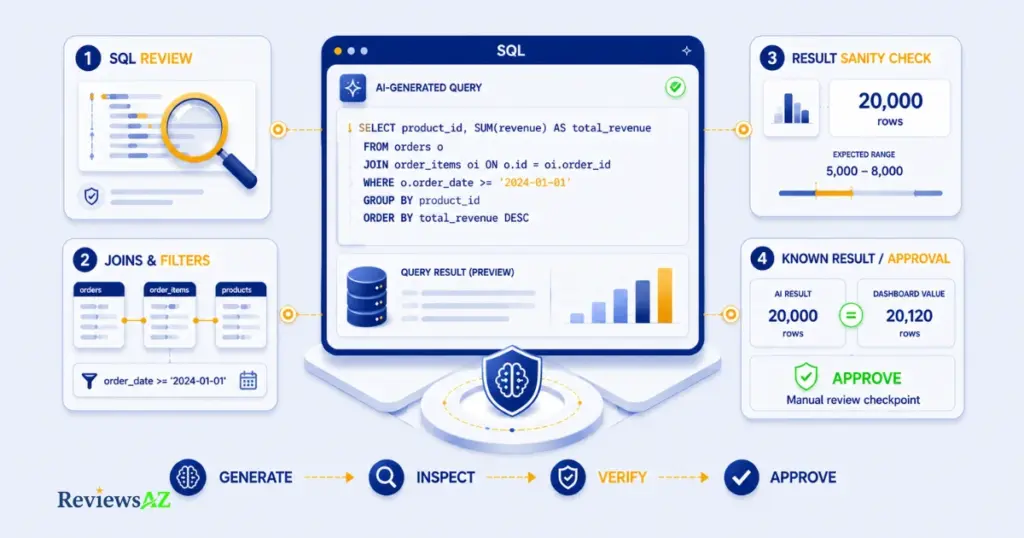
Before trusting any result, read the SQL itself if the tool shows it to you, most database chat tools do. You don’t need to be a SQL expert to spot obvious problems. Check which table it’s pulling from, and whether that table matches what you actually meant.
Check joins and filters
Joins are where plausible-but-wrong queries most often hide. Confirm the query is connecting tables the way you’d expect, and that any WHERE clause matches the scope you asked for.
Sanity-check result size and scope
Expected roughly 200 rows and got 20,000? Expected a handful of results and got zero? Something upstream likely misfired. Row counts and rough magnitude are a fast, low-effort check.
Compare with a known result
Cross-check a new AI-generated answer against something you already know to be accurate: a familiar report, a dashboard number, a manually run query. Agreement builds confidence. A mismatch tells you exactly where to dig.
Require approval for sensitive actions
DbGate documents approval modes and error-feedback loops as part of its chat workflow, letting a query be reviewed before it runs rather than executing automatically. That kind of manual checkpoint matters most for anything touching sensitive columns or capable of modifying data.
One accurate result confirms that question worked. It doesn’t confirm every future question will. Read AI-generated SQL risks and limitations for a deeper look at where this process tends to fail.
Security, Permissions and Data Privacy
If this AI tool got a prompt it misunderstood, what’s the worst SQL it could actually run? Your answer should come from your permissions setup, not from trusting the tool to behave correctly every time.
The safest setup is not one control but several layers of restriction. For a read-and-query workflow, the practical safeguards are:
- Prefer read-only credentials. The single most effective safeguard for database AI chat is connecting with a read-only database user whenever the goal is querying, not modifying data. A read-only credential means even a badly generated query can’t delete, update, or insert anything.
- Limit schema/table/column exposure. Beyond read and write access, consider which tables and columns the connection can see at all. A support-facing chat tool rarely needs visibility into payroll or authentication tables.
- Understand what reaches the LLM. Schema details, and sometimes sample data, get sent to the underlying language model to generate accurate SQL. AskYourDatabase and DbGate both document specific privacy and access controls around this, though the exact scope of what’s transmitted varies by product and deployment.
- Review execution permissions. Start with the narrowest permissions the current workflow actually requires. Expand only when a specific, verified need appears. Broad access set up “just in case” is exactly the kind of exposure that goes unnoticed until it matters.
- Log or audit database actions. A record of what was queried and when makes it possible to catch a problem after the fact, not just prevent one in advance. This matters more as more people in an organization start using the same connection.
None of this makes database chat risk-free, and no setup should be presented that way. It shrinks the blast radius of a bad query down to something you can live with.
Common Mistakes When Chatting With a Database Using AI
Most database chat failures aren’t dramatic. They’re small, quiet errors that produce a wrong number nobody double-checks. These six show up across teams regardless of which tool they’re using.
- Asking vague questions. “How’s revenue doing?” leaves too much open to interpretation, which revenue, which period, gross or net. The AI picks something reasonable and moves on, and “reasonable” isn’t always what you meant.
- Assuming business rules are obvious. Terms like “active user” or “completed order” carry specific meaning inside your business that the AI has no way to infer from the schema alone.
- Trusting the first query or result. A query that runs successfully isn’t the same as one that answers the right question.
- Giving broad permissions. Connecting with a write-capable or unrestricted credential because it’s simpler removes the safety net that read-only access provides, even if nothing goes wrong for a while.
- Mixing unrelated context. Continuing a long follow-up chain after switching topics lets earlier assumptions bleed into a new question.
- Skipping validation. Once a workflow feels reliable, it’s tempting to stop checking. That’s precisely when an unnoticed error is most likely to slip through.
None of these require a technical background to avoid. Being specific, staying skeptical of a first answer, and keeping permissions tight by default covers most of it.
Tools and Approaches for Chatting With a Database
Not every “AI database chat” product does the same job. Some are standalone assistants built specifically for conversational querying. Others are database clients that added AI chat as a feature. Some setups skip a dedicated product entirely in favor of a custom or automated workflow.
Dedicated AI Database Assistants
These are products built around the chat experience itself, where querying in plain language is the primary interface rather than an add-on. AskYourDatabase positions itself this way, with explicit privacy and access controls built into the product. SQLAI, BlazeSQL, and Outerbase are further examples, each with its own approach to connection setup and permissions worth checking directly.
Database clients with AI chat
Some tools you may already use for managing a database, rather than for AI specifically, have added conversational querying as a feature. DBeaver AI Chat and DbGate both fall here. DbGate in particular documents context-aware iterative chat alongside approval modes, which suits teams who want AI querying inside a tool they already trust.
Automation workflows
Rather than a chat window, some teams route database questions through an automation platform. n8n’s database-chat template requires an API key plus a Postgres, MySQL, or SQLite connection, and it can push results into Slack, Teams, or WhatsApp instead of a standalone interface.
Build-your-own agent workflow
A custom agent gives you architectural control, schema lookup, execution, and validation steps you design yourself. That control only pays off if you actually implement the same verification discipline a mature product already has built in. Building it yourself is not automatically safer than buying it. Microsoft’s engineering write-up on collaborating agents is a useful reference for what a more structured, multi-agent version of this approach can look like.
A dedicated tool suits someone who wants querying to be the whole product. A client add-on suits someone already living inside that tool. Automation suits a fixed, repeatable question. A custom agent suits a team with the resources to maintain one.
When AI Database Chat Works Well, and When It Does Not
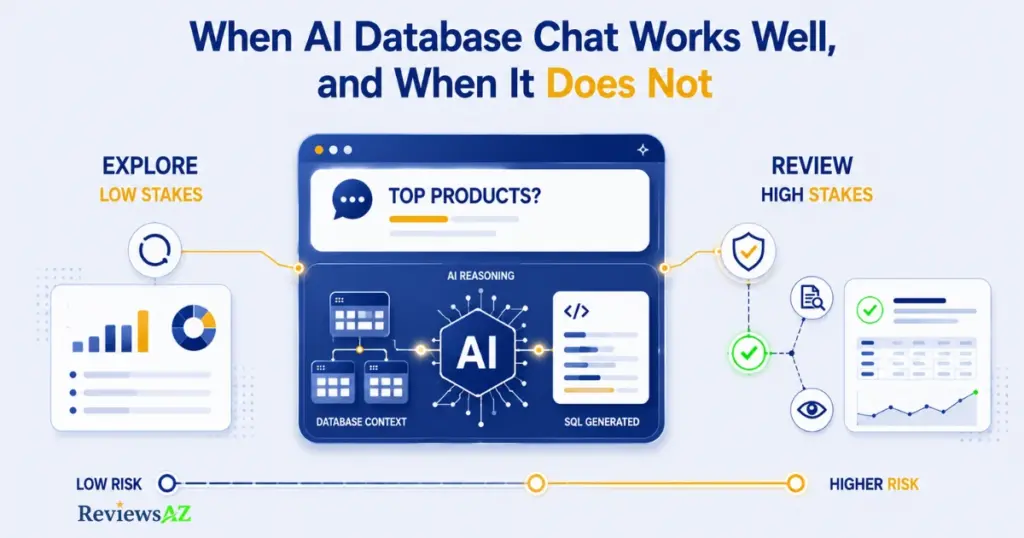
A tool that handles “what were our top five products last month” reliably won’t necessarily be trustworthy for “should we approve this loan application based on the applicant’s transaction history.” Same underlying technology, very different stakes.
Strong fits
Database chat performs best on exploratory, ad-hoc questions where the cost of a wrong answer is low and easy to catch: internal reporting, quick metric checks, early-stage data exploration. It also works well for non-technical users who currently have no way to query a database at all. Any accurate answer is an improvement over none.
Weak fits
It’s weaker for highly ambiguous business logic, multi-step calculations depending on several unstated assumptions, or any question where an incorrect answer wouldn’t be obviously wrong on inspection. The more subtle a potential error is, the more dangerous it becomes, precisely because it’s less likely to get caught.
High-stakes exceptions
Anything touching financial reporting, compliance, customer-facing data, or decisions with legal or safety consequences deserves manual SQL review and a second set of eyes, regardless of how reliable the tool has seemed so far. Applying the same trust level to a low-stakes exploratory question and a high-stakes decision, just because both went through the same chat interface, is where teams get into trouble.
AI database chat is genuinely useful for exploration and everyday questions. It’s a poor substitute for judgment on anything where being wrong is expensive.
Practical Workflow by User Type
Everything covered so far applies broadly. How it plays out day to day looks different depending on who’s asking.
For analysts
Database chat speeds up exploratory work: pulling a quick number, checking a hypothesis, scoping a question before writing a full query by hand. The SQL knowledge you already have becomes a verification tool rather than a requirement. You can read the generated query, catch a wrong join or filter immediately, and decide whether it’s worth writing yourself instead. That’s also the honest answer to whether you still need to learn SQL in the age of AI: the skill shifts from writing every query to judging one quickly.
For developers
The relevant questions are usually architectural: which connection model fits the application, what execution boundaries need enforcing, how schema context gets scoped and maintained as the system grows. Developers are often the ones setting the read-only, permission-scope, and audit-logging defaults for everyone else who uses the tool.
For business and non-technical users
This is the group database chat helps the most in absolute terms. It opens up a capability, asking your own questions of the data, that previously required going through someone else. Verification habits matter more here, not less, precisely because a non-technical user is less equipped to spot a subtly wrong query on their own. AI SQL tools for non-technical users covers this in more depth.
Related Posts:
Do You Still Need to Learn SQL in the Age of AI?
Best AI SQL Tools for Data Analysts
Best AI DB Tools for Backend Developments
Frequently Asked Questions
What happens when an AI gives you an answer that looks perfectly right, but the data behind it is wrong? That is the real challenge behind How to Chat with Your Database Using AI. Connecting AI to a database is usually the easy part. The harder part is knowing whether the answers it gives you are accurate, using the right data, and safe to act on. Before you build or rely on a system like this, these seven questions can help you spot the issues that are easy to overlook until they cause a real problem.
Can I chat with my database using AI without knowing SQL?
Yes. You can ask questions in plain English and let the AI generate the SQL for you. But you still need to check the answer, especially when the result affects an important decision. You do not have to become a SQL expert, but knowing when something looks off is still useful.
What should I do if an AI-generated answer looks wrong?
Go back to the question you asked and check what the AI was actually asked to find. Look at the date range, filters, metrics, and other assumptions. If the result still does not make sense, review the SQL or ask the AI to explain how it reached the answer.
Can AI return a plausible answer from the wrong data?
Yes. The SQL can run without an error and still use the wrong table, join, or data range. That is one reason an answer that looks reasonable is not automatically a correct one.
Should I give an AI tool access to my entire database?
You usually do not need to. It is safer to give the tool access only to the data it actually needs. Limiting tables, columns, and permissions also makes it easier to control what the AI can see and what it can do.
Can I rely on AI database chat for important business decisions?
It depends on the decision and how the system is set up, but important results should not go straight from AI to action without review. This is especially true for financial figures, compliance-related information, or anything that could have a meaningful business impact.
What should I look for when choosing an AI database chat tool?
Start with the practical details, not just the chat experience. Check which databases it supports, whether you can see the generated SQL, how it handles permissions, what execution controls are available, and what happens to the data sent to the AI model.
Which types of databases can I chat with using AI?
Many tools support popular relational databases such as PostgreSQL, MySQL, and SQL Server. Support varies from one product to another, though, so it is worth checking the tool’s current documentation before you connect your database.
Final Takeaway
The safest and most useful way to start chatting with your database using AI isn’t picking the “best” tool. It’s starting with one well-scoped business question and a read-only connection, reading the SQL it generates, and checking the result against something you already know before you trust it.
From there, expand gradually. Widen the schema access, hand off more follow-up questions, maybe automate a recurring report, but only after that first narrow workflow has proven itself reliable. The right approach depends on your database, your team’s skill level, and how much is actually at stake if a query gets something wrong. There’s no single tool or setup that’s correct for every situation.
If you’re ready to compare specific options once your workflow and permissions are settled, our guide to the best AI SQL tools is the natural next step.