Best AI SQL Tools in 2026: Generators, Assistants, Agents & How to Choose

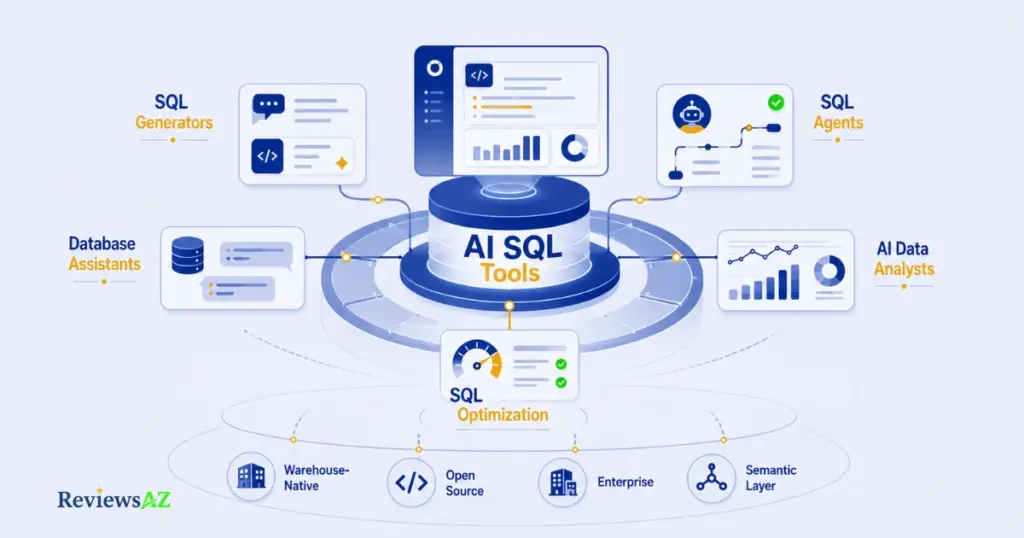
Best AI SQL Tools are no longer limited to simple systems that turn natural-language prompts into SQL. In 2026, the category spans SQL generators, database assistants, AI SQL agents, AI data analysts, optimization tools, warehouse-native platforms, enterprise-governed systems, open-source and self-hosted tools, and semantic-layer solutions.
These categories are not interchangeable, even though vendors often market them as if they were. A generator that turns a question into a query is not the same thing as a database assistant built for ongoing conversation. An AI SQL agent that orchestrates several steps on its own is a different product entirely from an AI data analyst designed to end with a chart, not a query. That inconsistency in labeling is part of why picking the right category matters more than chasing a single universal winner.
The market today includes SQL generators, database assistants, SQL agents, AI data analysts, optimization tools, warehouse-native systems, enterprise and governed platforms, open-source and self-hosted tools, and semantic-layer systems. Each group is built around a different primary purpose, a different level of technical depth, and a different type of user.
This guide is a category and decision guide, not a ranked list of products. It explains what each category actually does, which tools represent it, and how those tools differ from the ones next to them, rather than naming one tool as the best overall. By the end, you should know which type of AI SQL tool fits your workflow, your technical environment, and your level of SQL experience, not just which one has the loudest marketing.
Our Top Picks
Not everyone wants to read through every category before picking a starting point. If that’s you, here is the short version of where each type of tool tends to stand out, based on what’s covered in more detail further down this guide.
- AI2SQL is a strong starting point: for accurate SQL generation with live database connections and a workflow that suits most everyday use cases.
- BlazeSQL is a strong choice for data analysts: for conversational, question-driven analysis rather than one-off query generation.
- SQLAI is a strong choice for developers: for a technical toolkit that combines generation with query optimization.
- Outerbase is a strong choice for non-technical users: for exploring a database through conversation without writing SQL directly.
- Vanna AI is a strong open-source option: for teams that want to self-host or embed text-to-SQL in their own product.
- Vanna AI is a strong fit for agentic workflows: for its agentic, multi-step approach to querying rather than single-shot generation.
These are starting points, not final answers. The category and decision sections below explain why each pick fits where it does, and where a different type of tool might serve you better.
Best AI SQL Tools at a Glance
Best AI SQL Tools vary widely in what they actually do. Some focus on generating SQL from natural language, while others act as database assistants, AI agents, or full data-analysis platforms. The table below highlights the main differences at a glance so you can quickly identify which tools fit your workflow.
| Tool | Category | Best For | SQL Generation | Database Interaction | Optimization | Deployment |
|---|---|---|---|---|---|---|
| AI2SQL | AI SQL Generator | SQL generation | Strong | Yes | Yes | SaaS |
| Text2SQL.ai | Text-to-SQL | Simple SQL generation | Strong | Limited/varies | Limited | SaaS |
| SQLAI | AI SQL Generator / Assistant | Generation + optimization | Strong | Yes | Strong | SaaS |
| BlazeSQL | AI Database Assistant | Conversational data analysis | Yes | Yes | Some | SaaS |
| Vanna AI | AI SQL Agent | Agentic database workflows | Yes | Yes | Context-dependent | Open Source / Cloud |
| Outerbase | Database Assistant / Analytics | Database exploration + AI | Yes | Yes | Some | Open Source / Platform |
| ChatGPT | General AI Assistant | SQL help and explanation | Yes | Context-dependent | Yes | General AI platform |
| Snowflake Cortex Analyst | Warehouse-Native AI | Snowflake analytics | Yes | Yes | Platform-dependent | Warehouse-native |
| Databricks Genie | Warehouse/Lakehouse AI | Databricks analytics | Yes | Yes | Platform-dependent | Platform-native |
What Are AI SQL Tools?
Call something an “AI SQL tool” and you could be describing five very different products. That looseness is exactly why so many buyers end up comparing tools that were never meant to compete with each other in the first place.
Start with the narrowest one. An AI SQL generator‘s job is to turn a natural-language request into a SQL query, a process most people know as Text-to-SQL. You describe what you want, the tool reads your schema, and it returns a query you can run, copy, or edit. Some generators stop there. Others add validation or light optimization, but generation stays the core of what they do. If you want to see the mechanics of natural language to SQL translation in more depth, our breakdown of how Text-to-SQL AI works covers it step by step.
“Let me talk to my data” is a different request entirely, and it’s what a database assistant is built around. Instead of “write me this query,” the goal is an ongoing conversation: ask a question, get an answer, ask a follow-up, refine from there. SQL generation still happens somewhere in that process. It’s just not the product.
Where a generator produces one query and stops, a SQL agent plans and executes several steps on its own, deciding what to query, checking the result, adjusting without a new prompt for every move. Not every tool that uses AI or supports chat qualifies. What matters is whether the product actually orchestrates multi-step work, not whether its marketing uses the word “agent.”
Same starting question, different destination: an AI data analyst ends at a chart, a summary, or an insight rather than a raw query result. SQL might run in the background. The tool’s real job is turning data into something a person can act on without opening a query editor.
The outlier of the five is the SQL optimizer, because it usually isn’t answering a question at all. It takes SQL that already exists, written by a person or generated by another tool, and rewrites it to run faster or more efficiently.
These categories overlap in places. A single product can generate SQL, hold a conversation, and optimize a query at once. Understanding what each type is fundamentally built to do is still what makes “best AI SQL tool” a question without one answer, and it’s why the rest of this guide is organized by category rather than by ranking.
How Do AI SQL Tools Work?
AI SQL tools can follow very different workflows, but most begin with a natural-language request and then use database context to generate, validate, and sometimes execute SQL. The main difference is what happens around that core process: some tools stop at query generation, while others add validation, execution, visualization, or agentic multi-step analysis.
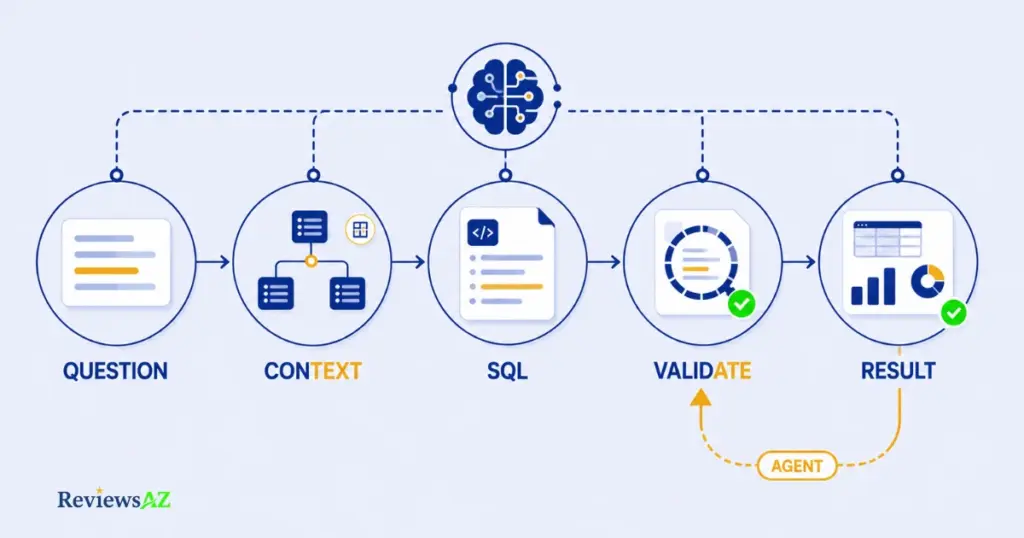
Understanding this workflow makes it easier to see why an AI SQL generator is not necessarily the same thing as a database assistant or an AI SQL agent.
Natural Language → SQL
Every workflow starts the same way: with a plain-English question instead of a query. This translation step, commonly called Text-to-SQL, is what most people picture when they hear “AI SQL tool.” The user types something like “show me last month’s top customers by revenue,” and the model converts that intent into SQL syntax. At this stage, the tool isn’t yet checking whether the query is correct or safe to run. It’s converting natural language to SQL structure, which is a language-understanding problem before it’s a database problem.
Database Schema and Context
A generated query is only as good as what the model knows about your database. This is where database schema comes in: table names, column types, primary and foreign keys, and how tables relate to each other. Schema awareness lets a tool pick the right table instead of guessing, and avoid joining on columns that don’t actually connect.
Schema context alone isn’t always enough. A column named status tells the model nothing about what value means “active” versus “cancelled” unless that business logic is documented somewhere the tool can see. This is one reason two AI SQL tools can read the exact same schema and still produce different queries for the same question.
If you want to see this step in action, from a plain question to a working query, our guide on how to generate SQL queries with AI walks through the process directly.
SQL Generation and Validation
Once a query exists, the next question is whether it’s actually correct. SQL generation on its own doesn’t guarantee that. Validation is where a tool checks the query for syntax errors, confirms it references real tables and columns, and in some cases catches logic problems, like a filter that would silently return zero rows. Not every tool validates in the same way. Some run a syntax check and stop there. Others attempt to catch correctness issues before the query ever touches the database, which matters more the further that query is from a simple, single-table lookup.
Query Execution and Results
This is where a real split in the market shows up. Some tools generate SQL and hand it back to you to run yourself, in your own database client. Others go a step further and execute the query directly, retrieving results as a table, a chart, or a short written summary. That difference sounds small, but it’s the line between a tool that helps you write SQL and a tool that actually works with your database on your behalf.
Agents and Multi-Step Analysis
Not every AI SQL tool follows this entire workflow. Agent-based systems go further by orchestrating multiple steps, tools, and database interactions instead of simply returning a single SQL query.
Rather than generating one query and stopping, an agentic workflow can reason through a problem across several steps: run a query, look at what came back, decide that a follow-up query is needed, and repeat until it has a complete answer. This depends on a few underlying capabilities, most notably some form of memory or state across steps, the ability to use multiple tools, and iterative execution that refines results rather than accepting the first output. Not every product markets these capabilities the same way, but without at least some of them, a tool is doing SQL generation, not agentic data analysis. AI SQL agents and other multi-step database agents are covered in more detail later in this guide.
How We Evaluate AI SQL Tools
Two tools can read the same schema and technically do “the same thing,” yet be completely wrong for each other’s use cases. That’s the problem with judging AI SQL tools on a single spec sheet. What matters is how they perform across the dimensions that actually affect daily use, not whether a vendor’s landing page checks a box.
We classify AI SQL tools based on their primary workflow, technical architecture, database interaction, deployment model, governance capabilities, and intended users, rather than simply repeating vendor categories. A tool that calls itself an “AI assistant” on its homepage might function, in practice, as a straightforward generator with a chat interface bolted on. Understanding what a product actually does, not just how it’s marketed, is the starting point for every evaluation in this guide.
Across the tools covered here, this guide looks at ten dimensions, weighted differently depending on the category being discussed.
- SQL generation covers how well a tool turns a request into a working query, and how much of the workflow that query represents versus a starting point that still needs editing.
- Schema understanding is closely related but distinct: it’s whether a tool reads your actual tables, columns, and relationships, or generates SQL based on generic assumptions about what a schema “usually” looks like.
- Accuracy and reliability are where documentation and independent verification diverge most. A vendor’s stated accuracy under controlled conditions is not the same as accuracy on a messy, real production schema with inconsistent naming and legacy tables. Where this guide references accuracy, it distinguishes between what a product officially claims and what has been independently confirmed, rather than presenting vendor claims as tested fact.
- Database support is exactly what it sounds like: which databases and warehouses a tool actually connects to, and whether that support is native or handled through a workaround.
- SQL Optimization covers whether a tool only generates SQL or can also rewrite existing queries for performance, which is a meaningfully different skill.
- Ease of use matters differently depending on the audience. A tool built for backend developers can reasonably assume SQL literacy; a tool aimed at non-technical business users can’t. This guide evaluates ease of use against the audience a tool is actually built for, not a single universal bar.
- Security and governance covers read-only access, credential handling, permissions, and audit capabilities, framed around what each product documents rather than an independent security audit.
- API and integrations looks at how a tool fits into an existing stack: whether it can be embedded, automated, or connected to other systems, or whether it’s designed as a standalone destination.
- Deployment covers where and how a tool runs, SaaS, self-hosted, open-source, or warehouse-native, since that choice has implications for cost, control, and compliance well beyond the SQL generation itself. Finally,
- Value looks past the price tag alone to whether a tool’s pricing model actually fits how a team would use it, since a generous free tier can be worthless for one workflow and more than enough for another.
Taken together, these ten dimensions are what separate a tool that looks capable in a demo from one that holds up in daily use, and they’re the lens applied consistently across every category in this guide.
AI SQL Generators & Text-to-SQL Tools
AI SQL generators and Text-to-SQL tools focus on turning natural-language requests into SQL, but they differ in database support, schema awareness, optimization capabilities, deployment options, and how much of the workflow they automate beyond query generation.
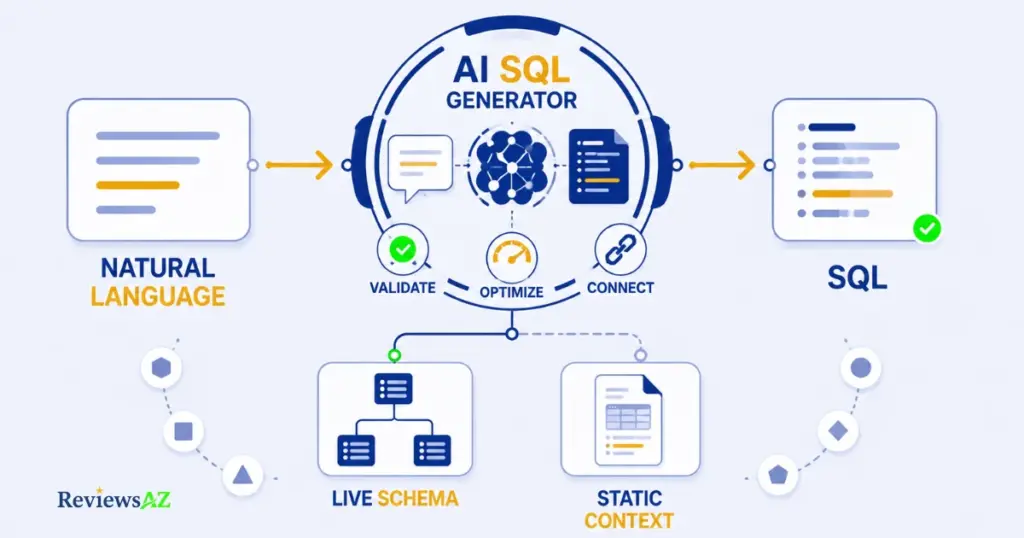
Some focus almost exclusively on SQL generation, while others extend the workflow with validation, optimization, database connections, or broader data-analysis capabilities. AI SQL generators typically fall into two patterns: some connect to a live database and work against real tables, while others rely on a pasted schema or static context and function more like query-writing assistants. The common difference is how much context, database access, and workflow automation sits around the SQL generation itself.
This category fits users ranging from individual analysts who just need a fast query to developers who want a SQL query generator built into their daily workflow, rather than teams looking for a full conversational database assistant or a multi-step agent. The main limitation across the category is scope: even the strongest generators are still centered on producing a query, not on holding a conversation, orchestrating multiple steps, or replacing the judgment that goes into interpreting the result.
These are six representative tools in the AI SQL Generator / Text-to-SQL category:
- AI2SQL reads your actual schema before generating a query, not a pasted approximation of one. According to current documentation, it supports a live database connection, which distinguishes it from lighter Text-to-SQL tools that may rely on static schema context. Its documented live-connection model makes it a strong fit for individual analysts and developers who want fast query generation without setting up a broader BI layer. Where it may fall short is for users who want an ongoing conversation with their data rather than a tool focused primarily on returning a query.
- Text2SQL.ai covers similar ground with a narrower reach. Its database interaction is narrower than the live-connection model described for AI2SQL, which makes it more naturally suited to simpler, ad-hoc query-generation workflows.
- SQLAI‘s differentiation isn’t generation, it’s what happens after. Pairing SQL generation with genuine optimization, rewriting and improving queries rather than only producing them, is a second layer that AI2SQL doesn’t build its identity around. Developers and analysts who want generation and performance work in one tool will find that combination useful. If optimization isn’t part of your day-to-day, it’s less of a reason to choose SQLAI over a straight generator.
- Defog AI belongs here through its SQLCoder model family, built specifically for SQL generation rather than adapted from a general-purpose language model. Teams that need strong generation with the option to fine-tune or self-host are the natural fit, which sets it apart from the SaaS-only tools above.
- WrenAI takes a different approach to grounding: connecting natural-language questions to a defined semantic model instead of the raw schema alone.
- Chat2DB comes at the category sideways, as an AI-enhanced database client where SQL generation is one capability inside a broader tool built around browsing, editing, and querying databases directly.
Generating the right query is only half the picture. For someone who wants to skip SQL entirely and just ask a question, the next category matters more than the one above it.
AI Database Assistants and Conversational SQL Tools
AI database assistants and conversational SQL tools are built for users who want to interact with their data through natural-language questions rather than treat SQL generation as the end goal. Instead of simply returning a query, these tools can combine database context, conversation, exploration, results, and in some cases visualization or follow-up analysis.
A SQL generator answers “How do I write this query?” A database assistant is designed around the broader question: “What can I learn from my database?” That shift changes what the product actually needs to do well. Conversation has to hold context across turns, exploration means the tool should help surface what’s worth asking about, not just answer what you type, and the result has to land as something you can actually use, not only a correct query sitting in a results pane.
Primary purpose here is data exploration through conversation, not query production. The typical workflow starts with a question, but unlike a generator, it doesn’t necessarily end with a single query. A follow-up question, “now break that down by region”, should work the way it would in an actual conversation, without starting over.
Technical depth requirements skew lower than generators aimed at developers, since ease of use for non-technical users is often the point of the category, not a bonus feature. Database interaction tends to be deeper too: these tools are generally built to connect to a live database rather than work from a static schema, since ongoing exploration depends on being able to query results again immediately. Deployment is mostly SaaS across this group, and the best-fit users are business users, product managers, and analysts who want answers without writing or reading SQL themselves. The limitation worth naming plainly: a conversational assistant is not the right tool if what you actually need is orchestrated, multi-step execution against a complex workflow, that’s a different category, covered later in this guide.
- BlazeSQL is built around conversational data analysis rather than one-off query generation. Ask a question, get back results and context, keep asking follow-ups the way you would with a person who already knows your data. It connects to a live database and suits data analysts and less technical teammates working side by side more than it suits anyone managing SQL directly.
- Outerbase approaches the same category from a database-exploration angle, combining AI-assisted querying with a broader interface for browsing and working with data directly. It’s a solid fit for users who want AI assistance layered on top of genuine database exploration, rather than a pure chat-only interface.
- Basedash focuses on conversational access to connected databases, letting users ask questions in natural language and turn the resulting analysis into dashboards and practical views. Its emphasis is less on producing SQL and more on making database information accessible to non-technical teams who need answers, monitoring, and reporting without working directly with queries.
- AskYourDatabase is designed for conversational work with large and complex databases, including production schemas with hundreds of tables. Users can ask questions in natural language, explore the resulting data, and generate dashboards from the same conversation, making it particularly suited to teams that need to investigate data without navigating SQL manually.
- Chat2DB fits this category through its conversational querying capabilities, allowing users to interact with databases using natural language rather than writing every query themselves. Its broader identity, however, remains closer to a developer-oriented database client, with AI-assisted querying sitting alongside a wider set of database management and development features. That makes it a less purely conversational assistant than tools built primarily around business-user data exploration.
Worth knowing: Outerbase isn’t one product anymore. Its current lineup spans a hosted platform and a separate self-hosted Studio option, and capabilities can differ between the two. When comparing features, pricing, or deployment options, make sure you’re looking at the same Outerbase product rather than assuming a capability applies across both.
SQL still runs underneath every one of these tools. It’s just no longer what the user is trying to produce. For a closer look at what that conversational workflow looks like in practice, see how to chat with your database using AI.
AI SQL Agents and Agentic Data Tools
Generator ≠ Agent. An AI SQL generator primarily produces SQL from a request, while an AI SQL agent can orchestrate multiple steps, tools, or database interactions to complete a broader task.
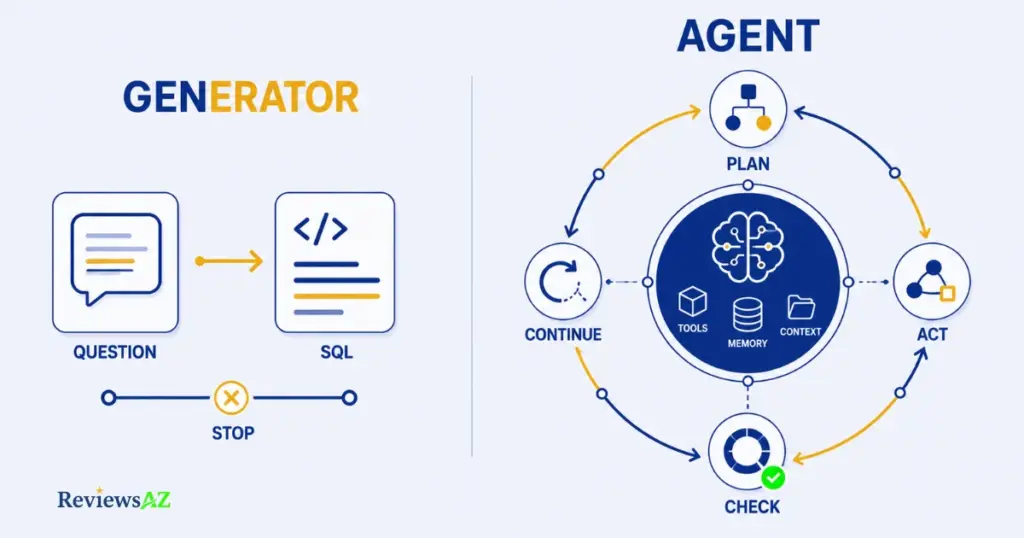
What makes an AI SQL tool an agent isn’t the presence of the word “AI,” or even the ability to hold a conversation. It comes down to whether one or more of a specific set of components is actually built into the product: tools the system can call on its own, memory or state that persists across steps, multi-step execution instead of a single request-response cycle, context awareness that carries forward what it already learned, and orchestration that decides what to do next without a new prompt for every step.
A product doesn’t need all five to belong in this category, and most don’t. But at least one of them has to be a real, documented part of the architecture, not a description that only shows up in marketing copy. A chat interface sitting on top of a generator is still a generator. What separates an agent from that is whether it can actually plan, act, check its own work, and decide on a next step, on its own.
- Vanna AI is built as an open-source, RAG-based framework rather than a finished product you simply log into. You train it on your schema, sample queries, and documentation, and it grounds its SQL generation in that context. What makes it agentic isn’t the generation step itself, it’s the layer built around it: retrieval-augmented context that functions as a form of memory, the ability to work across multiple steps rather than stopping at a single query, and enough architectural flexibility that developers plug it into their own applications rather than using it as a closed tool. Vanna AI is primarily designed for developers who want to embed agentic text-to-SQL into their own products, or who need a self-hosted setup for data residency reasons. It’s a poor fit if what you want is a ready-to-use interface with no setup involved.
- Defog AI represents the category through its underlying architecture as much as its interface. Beyond the SQLCoder models covered earlier for their generation strength, Defog AI’s agent-oriented deployments are built around orchestrating queries and context across a broader task, not just returning a single answer, which is what separates its agentic positioning from a standard fine-tuned generator.
- Seek AI is included here as a tool built around multi-step data analysis rather than single-query generation, orchestrating context and execution across a task instead of stopping at the first result. Its approach fits the agentic category because the system is designed to move through a broader analytical workflow rather than treating SQL generation as the final output.
This category will likely grow. Agentic architecture is becoming more common across AI SQL products generally, and tools that currently sit closer to generators or assistants may add real orchestration and memory over time. When that happens, they’ll be evaluated against the same standard applied above, not added simply because a changelog mentions the word “agent.”
AI Data Analysts and AI Analytics Agents
AI Data Analysts go beyond SQL generation. SQL may be only one step in a larger analysis workflow, where the goal is not just to produce a query but to turn data into an understandable answer, visualization, or actionable insight.
An AI SQL agent focuses on executing and orchestrating database tasks, while an AI data analyst extends that workflow into analysis, visualization, explanation, and follow-up questions. The workflow looks different too: question leads to query or analysis, which leads to visualization, which leads to insight, rather than stopping once a task is completed.
What sits inside that workflow depends heavily on the product. Some tools lean on SQL as the underlying engine and layer analysis on top of it. Others bring in Python for statistical work that plain SQL doesn’t handle well. Most combine some mix of built-in analytics, charts, and dashboards, and a growing number support multi-turn analysis, where a follow-up question builds on the last result instead of starting the analysis over from scratch.
The primary purpose here is decision support, not query production or task execution. That distinction matters because it’s easy to lump this category in with the two before it. An AI SQL generator’s job ends at a working query. An AI SQL agent’s job ends once a multi-step task is orchestrated and completed. An AI data analyst’s job doesn’t really end until there’s an answer a person can act on, a chart that shows a trend, a summary that explains why a number moved, or a follow-up thread that digs into an anomaly.
Ease of use tends to skew toward business users and analysts rather than developers, since the entire point is reducing how much SQL knowledge stands between a question and an answer. Best-fit users include data analysts who want to move faster through routine analysis and non-technical stakeholders who need a self-serve way to explore a dataset. The limitation to keep in mind: depth of statistical or exploratory analysis still varies a lot between tools, and a product that’s strong at generating a quick chart isn’t automatically strong at more rigorous, multi-step analytical work.
- BlazeSQL is built around conversational, question-driven analysis of connected databases. Its ability to carry context across follow-up questions and return results in a usable form lets it move beyond query generation into lightweight analysis. It’s a natural fit for analysts and non-technical users who want to explore data conversationally without having to write SQL for every question.
- Seek AI takes a more agentic approach to data analysis, combining multi-step task execution with the analytical work that follows. Where its agentic side is about orchestrating a broader data task, its analytics side is about turning that work into an answer a non-technical stakeholder can actually use rather than simply returning a raw result set.
- Hex AI, known as Magic within the product, is built around a notebook-style workspace where SQL and Python can sit side by side, with AI assistance spanning both. That combination makes it less like a chat interface attached to a database and more like a collaborative analysis environment, particularly suited to data teams doing recurring or deeper analytical work rather than one-off questions.
- Metabase AI extends the existing Metabase BI platform with natural-language question answering layered onto the dashboards and data workflows teams may already have in place. Its main distinction is not a standalone analysis environment, but making an established BI platform easier to query and explore in plain language, making it a particularly natural fit for teams already working with Metabase.
Across all four, the throughline is the same: SQL is infrastructure, not the deliverable. Analysis, visualization, and the insight at the end of it are what this category is actually built to produce.
AI SQL Optimization Tools
Generating a query and optimizing one are not the same skill, even though they often get lumped together. Generating SQL turns a question into a query. Rewriting SQL takes a query that already works and restructures it, sometimes for readability, sometimes for correctness. Optimizing performance goes a step further: analyzing how a query actually runs against real data volumes and adjusting it so it runs faster, uses fewer resources, or avoids an expensive full table scan. Recommending improvements is narrower still, surfacing specific changes, such as a missing index or a join that could be restructured, without necessarily rewriting the query itself.
Few tools in this space treat optimization as their entire product. More often, it appears as a capability layered onto SQL generation, which is the pattern with the two tools most relevant here.
- AI2SQL includes SQL optimization as part of its broader toolkit alongside query generation. Its role in this category is therefore broader than a dedicated optimization tool: it can help users take an existing query, identify opportunities to improve it, and refine the SQL while keeping optimization within the same workflow as generation and other SQL tasks.
- SQLAI places more emphasis on optimization as a distinct capability alongside SQL generation. Its approach includes rewriting existing SQL rather than treating performance improvement as an afterthought, making it particularly relevant for users who want AI assistance not only to create queries but also to improve queries they already have.
If you want to see what that process looks like in practice, from an existing query to a faster one, our guide on how to optimize SQL queries using AI walks through it directly.
AI SQL Tools by Architecture, Deployment and Governance
Two tools can solve the same SQL problem but differ dramatically in where they run, how they understand business context, and how much governance an organization can apply. Everything above this section grouped tools by what they do. This part of the guide groups them by a different question entirely: where does the tool live, and who controls it.
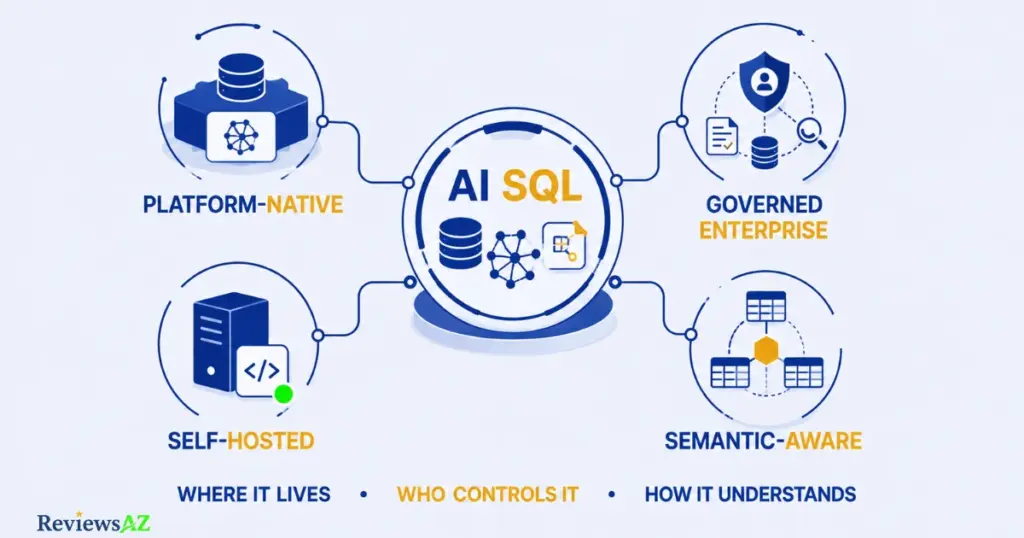
Warehouse-Native and Platform-Native AI
Some AI SQL tools aren’t separate products at all. They’re built directly into the warehouse or platform where your data already lives, rather than connecting to it from the outside.
Snowflake Cortex Analyst is Snowflake’s own natural-language analytics layer, built to answer questions against data that’s already inside Snowflake using a defined semantic model rather than raw schema alone. Databricks Genie serves a similar role inside the Databricks lakehouse, aimed at letting users ask questions in plain English against data and pipelines that already live on the platform.
So this section stays at the category level rather than making claims about how either performs in practice. What’s worth understanding is the category itself: warehouse-native AI trades the flexibility of a standalone tool for tight integration with data that’s already governed, modeled, and secured inside the platform. That tends to matter most for organizations already committed to Snowflake or Databricks, where a bolt-on tool would mean re-solving governance and semantic modeling that the platform already handles.
Enterprise and Governed AI SQL Tools
Governance isn’t really about whether a tool is secure in the abstract. It’s about whether an organization can control who asks what, what data they can see, and how that access is tracked, at a scale where “just trust the tool” stops being a workable answer. That’s a different question from the technical security practices covered later in this guide; this is about organizational control over a system that many people are using at once.
Vanna, already covered for its agentic, self-hostable architecture, extends naturally into governed deployments because self-hosting is itself a governance decision: the organization keeps the model, the data, and the access controls inside its own infrastructure rather than handing them to a third party. Seek AI, introduced for its multi-step analytical approach, is positioned toward enterprise use where orchestrating a task also means applying permissions and oversight across every step of it, not just the final query. Snowflake Cortex Analyst and Databricks Genie, discussed above for their platform-native architecture, inherit governance from the platforms themselves, which is precisely why organizations already invested in that governance often prefer the native tool over a standalone one.
Other tools may fit this category as their enterprise offerings mature, but inclusion here depends on documented governance capability, not a pricing page that simply says “Enterprise.”
Open-Source and Self-Hosted AI SQL Tools
Open source and self-hosted get used interchangeably often enough that the distinction is worth stating plainly: they’re not the same thing. Open source means the code is publicly available and you can inspect, modify, or extend it. Self-hosted means you run the software on your own infrastructure instead of a vendor’s servers. A tool can be one without the other. Open-source code you still run on someone else’s cloud isn’t self-hosted. A closed-source product offered as an on-prem deployment is self-hosted without being open source.
Common mix-up: Open source and self-hosted answer two different questions. Open source is about whether you can see and modify the code. Self-hosted is about whether you run it on your own infrastructure. A tool can be either without being both.
Vanna is both: MIT-licensed and open-source, with genuine self-hosted deployment as an option alongside its cloud offering. WrenAI, covered earlier for grounding queries in a defined semantic model rather than raw schema, fits here through its open architecture built around that same semantic layer. Defog, discussed above for its SQLCoder model family, is open source at the model level, with weights available for teams that want to fine-tune or self-host rather than depend on a hosted API. Chat2DB offers a community edition that’s open source, separate from its paid, AI-enabled Pro tier. Outerbase Studio represents the self-hosted side of Outerbase’s current product structure, distinct from its hosted platform offering.
For teams with real data residency requirements, healthcare, finance, government, or any organization that can’t send schema or query data to a third-party API, this distinction isn’t academic. It determines which tools are even viable candidates before any other evaluation criteria come into play.
Semantic-Layer and Context-Aware AI SQL Tools
Key insight: Schema awareness ≠ business semantic understanding. A tool can read your table and column names perfectly and still get a question wrong, because knowing that a table is called
ordersisn’t the same as knowing what your organization means by “active customer” or “monthly revenue.”
A semantic layer sits between the raw schema and the question being asked. It defines business metrics in a way the AI can reference consistently, so “revenue” means the same thing every time instead of being recalculated slightly differently depending on how a question is phrased. It encodes which joins are correct for a given relationship, so the tool doesn’t have to infer them fresh from foreign keys every time. And it captures business rules, like which records count as cancelled or which accounts should be excluded from a report, that live in institutional knowledge rather than in the database structure itself.
WrenAI is built around this idea directly, connecting natural-language questions to a defined semantic model rather than treating the raw schema as the only source of truth. Snowflake Cortex Analyst and Databricks Genie, already discussed for their platform-native architecture, also depend on semantic models, Cortex Analyst through Snowflake’s semantic model definitions and Genie through metadata already curated in the lakehouse, which is part of why platform-native tools can produce more consistent answers to business questions than a tool working from schema alone.
Context-aware, in this sense, means something more specific than “the tool remembers the last message.” It means the AI’s understanding of your data reflects how your business actually defines things, not just how your tables happen to be structured.
Comparing AI SQL Tools in Real-World Scenarios
The categories above explain what each type of tool is built for. In practice, most people aren’t choosing between five abstract categories. They’re choosing between two or three specific tools that happen to sit in different ones.
Paste a schema into ChatGPT and it can write SQL, but there’s no live connection and no schema awareness carried between sessions. A purpose-built generator trades that flexibility for direct database access and consistency. AI2SQL vs ChatGPT for SQL covers how that plays out in practice.
Sometimes the real question isn’t which generator to use, it’s whether generation is even the right category. If what you actually need is “what can I learn from this data” rather than “write me this specific query,” a conversational assistant usually wins even when a generator could technically produce the same SQL. AI2SQL vs BlazeSQL breaks down that distinction with two tools built for different goals.
Not every tool in the same category solves the same problem equally well, either. AI2SQL vs Text2SQL.ai compares two generators that look similar on the surface but differ in database interaction and how much of the workflow they cover beyond generation. AI2SQL vs SQLAI covers a related trade-off from a different angle: generation-first versus generation-plus-optimization.
A generator stops once it hands back a query. An agent can take that further, running a query, evaluating what came back, deciding whether another step is needed. Whether that’s worth the added complexity depends on whether the actual task is a single question or an open-ended investigation.
And a standalone tool works across whatever database you connect it to, while a warehouse-native assistant like Snowflake Cortex Analyst or Databricks Genie only works inside its own platform, in exchange for governance and semantic modeling it doesn’t have to build from scratch. Whether that trade is worth it usually comes down to one thing: are you already committed to that platform.
Best AI SQL Tools for Different Needs
Category explains what a tool is. This section is about who you are. The breakdowns below are short on purpose, they’re a starting point, not a full evaluation, and each links to a dedicated guide that goes deeper into that specific use case.
For Data Analysts
Analysts tend to sit at the intersection of speed and depth: fast enough for routine questions, capable enough for real analysis when it’s needed. AI2SQL and SQLAI cover the generation and optimization side of that well, BlazeSQL fits the conversational, follow-up-driven side of daily analysis, and Seek AI or Hex become more relevant once the work shifts toward multi-step or notebook-style analysis rather than single queries. The full breakdown, matched more precisely to different analyst workflows, is in Best AI SQL Tools for Data Analysts.
For Non-Technical Users
If writing or even reading SQL isn’t part of the job, the priority shifts entirely to how naturally a tool handles conversation and how little it assumes you already know. BlazeSQL and Outerbase are both built with that audience in mind, prioritizing exploration over query production. For a closer look at what to expect from a no-code SQL tool as a non-technical user, see AI SQL tools for non-technical users.
For Backend Developers
Developers usually want less hand-holding and more control, direct database access, editable output, and ideally something that fits into an existing workflow rather than replacing it. AI2SQL and SQLAI serve that need from the generation and optimization side, Vanna appeals to developers who want to embed or self-host rather than use a closed product, and Chat2DB fits naturally for anyone who already works inside a database client day to day. Best AI DB tools for backend devs covers this in more depth.
Are AI SQL Tools Safe to Use?
Can you trust AI-generated SQL? The honest answer is: mostly, with conditions, and the conditions matter more than the headline accuracy number any vendor puts on a landing page.
The failure modes are fairly consistent across tools. Wrong joins show up when a schema has multiple plausible paths between two tables and the AI picks a technically valid one that isn’t the one you meant. Schema confusion happens when column or table names are ambiguous, a table called orders existing alongside one called order_items is exactly the kind of thing that trips up a model working from names alone. Business logic errors are subtler and often invisible until someone checks the output: a query can be syntactically perfect and still misrepresent the business, filtering out cancelled orders that should have been included, or the reverse. Hallucinated SQL, referencing a column or table that doesn’t actually exist, is less common with schema-aware tools than it used to be, but it hasn’t disappeared, particularly on complex, multi-join queries or heavily denormalized schemas.
Unsafe execution is a different category of risk entirely, less about whether the SQL is correct and more about what it’s allowed to do. A tool connected with write access could, in theory, modify or delete data if something goes wrong, whether that’s a model error or a misinterpreted request. This is why read-only access matters as more than a checkbox: a properly scoped, read-only database connection means the worst-case outcome of a bad query is an incorrect result, not a damaged table. How a tool handles database credentials, whether they’re encrypted at rest, scoped narrowly, and never sent anywhere beyond what’s necessary to run the query, is worth checking before connecting anything resembling a production database.
None of this means AI-generated SQL should be treated as unreliable by default. It means human validation stays part of the workflow, especially for anything that will inform a real decision or run against production data. Tools that keep generated SQL visible and editable make that validation easier; tools that hide the query entirely make it harder to catch an error before it becomes a wrong number in a dashboard. Verification doesn’t have to mean rewriting every query from scratch, it usually means a quick read of the SQL, or a sanity check against a number you can verify some other way, before treating the result as fact.
A closer look at where these failures tend to happen, and how to catch them before they matter, is in AI-generated SQL risks and limitations.
Do You Still Need to Know SQL in the Age of AI?
AI can generate SQL, but understanding schemas, business logic, validation and debugging still matters. That’s the short version, and it doesn’t really change based on which tool you’re using.
What changes is where your SQL skills actually get used. Writing a query from scratch matters less than it used to. Reading one, catching a wrong join or a filter that quietly excludes half your data, matters just as much as ever, arguably more, since you’re now reviewing someone else’s output instead of your own. Debugging still depends on the same underlying knowledge it always did: understanding what a query is doing well enough to fix it when the result looks wrong.
None of that requires becoming a career database engineer. For most non-technical users, a working sense of what tables, joins, and filters do is enough to sanity-check AI-generated output without needing to write SQL from a blank page. For developers and analysts, the underlying skill matters more, not less, because you’re the one deciding when to trust the AI’s SQL and when to rewrite it yourself.
If you’re starting from zero, learn SQL in the age of AI covers how much you actually need to know and where to focus first.
How to Evaluate Value Across AI SQL Tools
Value isn’t the same question as price, even though the two get treated as interchangeable more often than they should. A cheap tool that doesn’t fit your workflow is expensive in a way that doesn’t show up on an invoice, and a costly one that saves an analyst hours every week can pay for itself many times over.
Pricing models vary more across this category than the tools themselves do. Some are structured around a free tier or free trial meant to get you generating queries within minutes, with paid plans unlocking higher limits or additional features. Others meter usage through credits or a query cap, which works fine for occasional use and becomes a real constraint the moment a tool becomes part of someone’s daily workflow. Per-seat pricing is common among tools built for teams, and it scales in a way that’s easy to underestimate when you’re evaluating a product with just one or two people. Enterprise pricing, usually negotiated rather than published, tends to bundle in governance, support, and deployment options that aren’t available on standard plans at all.
Deployment cost is easy to overlook when a tool’s headline pricing only reflects the software itself. A self-hosted or open-source option might have no license cost at all, but still requires infrastructure, and often someone’s engineering time, to set up and maintain. That’s a real cost even when no invoice says so.
Hidden limits are where a lot of surprise comes from after the fact: a generous-looking free tier that turns out to cap the number of connected databases, or a plan that includes AI features only above a certain pricing tier that wasn’t obvious during signup. It’s worth checking what happens once you exceed a limit, not just what the limit is.
The more useful question underneath all of this is time saved relative to what the tool actually costs, not the sticker price in isolation. A tool that costs more per month but replaces hours of manual query-writing every week is a different value proposition than a free tool that ends up needing just as much manual cleanup afterward. Total cost of ownership means adding up the license or subscription, any infrastructure or setup cost, and the time your team spends working around a tool’s limitations, then weighing that against what the tool actually replaces.
Exact pricing changes often, so current plan details should be checked on each product’s dedicated page.
Which AI SQL Tool Should You Choose?
Everything in this guide has been building toward this question, but the answer was never going to be a single tool. The right choice depends on the workflow, not on which product has the loudest marketing or the highest star rating. Match your situation to one of the categories below, most people will recognize themselves in one or two immediately.
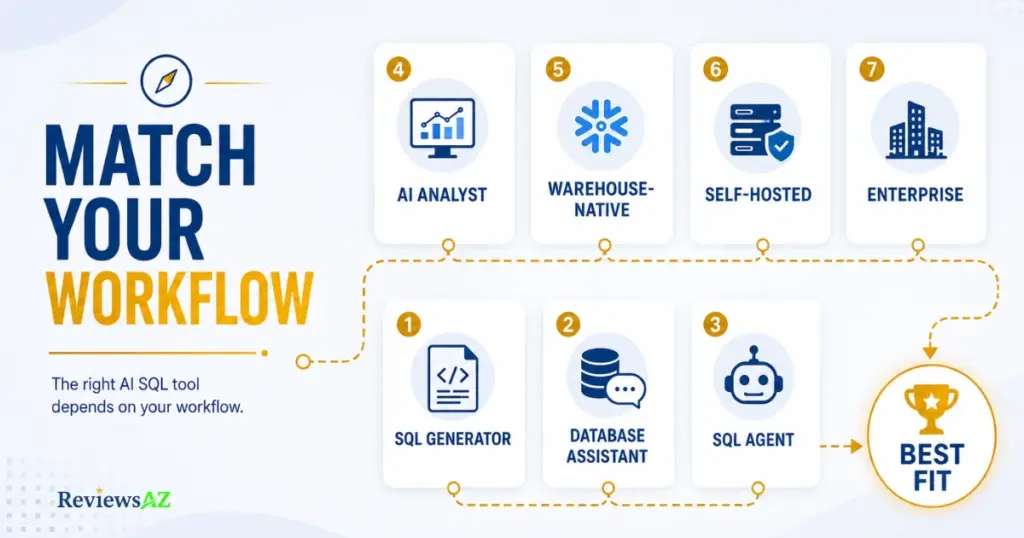
Choose an AI SQL Generator if…
Reading and editing SQL doesn’t scare you, and mostly what you need is a fast, working query. This fits developers and analysts who want a query-writing accelerator, not a full analytics platform, and who’d rather run the result themselves than have a tool run it for them.
Choose a Database Assistant if…
“What can I learn from my data” matters more to you than “how do I write this query.” Non-technical business users and anyone who wants to explore a database without owning the query-writing part of the process usually belong here.
Choose an AI SQL Agent if…
Your task is bigger than one query. If getting an answer actually requires running a query, checking the result, deciding what to ask next, and repeating that a few times, an agent that orchestrates those steps on its own saves more time than a generator that hands you one query and stops.
Choose an AI Data Analyst if…
You want an answer, not a query result. If what you actually need at the end is a chart, a written summary, or an insight you can act on without opening a query editor, this category is built around that outcome specifically, in a way generators and assistants generally aren’t.
Choose a Warehouse-Native Tool if…
Your data already lives inside Snowflake or Databricks, and it’s already governed and modeled there. In that case, a platform-native assistant inherits all of that instead of asking you to rebuild governance and semantic modeling in a separate, standalone tool.
Choose an Open-Source / Self-Hosted Tool if…
Data residency isn’t optional for you, whether that’s regulatory, contractual, or simply a policy your organization won’t bend on. Self-hosting means the model and your schema stay on infrastructure you control, and open-source means you can actually inspect what the tool is doing instead of trusting a vendor’s description of it.
Choose an Enterprise-Governed Platform if…
More than a handful of people will be querying through this tool, and you need to control who sees what, track how it’s being used, and apply that oversight consistently rather than case by case. At that scale, governance capability matters more than any single feature the tool offers.
Frequently Asked Questions
What is the best AI SQL tool in 2026?
There isn’t one universal best AI SQL tool. The right choice depends on whether you need a fast SQL generator, a conversational database assistant, a multi-step agent, or a full data-analysis platform, since each of those does a different job well.
What is the best AI SQL generator?
Among the generators covered in this guide, AI2SQL stands out for schema-aware generation with a live database connection, while SQLAI adds strong query optimization on top of generation. Which one fits better depends on whether optimization matters for your workflow.
What is the best Text-to-SQL tool?
Text-to-SQL tools focus specifically on turning a plain-English question into a SQL query. AI2SQL and Text2SQL.ai both fit this description, differing mainly in database interaction depth and how much of the broader workflow they cover beyond generation.
Can AI SQL tools connect to live databases?
Many can, but not all connect the same way. Some tools read your schema and query a live database directly, while others work from a pasted or uploaded schema without an ongoing connection. Checking a tool’s actual database interaction model matters more than assuming “AI SQL tool” implies a live connection.
Are AI SQL tools accurate?
Schema-aware AI SQL tools generally produce correct queries for common joins, filters, and aggregations. Accuracy drops on ambiguous questions and complex, multi-step analysis, which is why generated SQL is worth reviewing rather than trusted blindly, especially against production data.
Which AI SQL tools are open source?
Vanna AI is fully open source under the MIT license, with a genuine self-hosted option. Defog’s SQLCoder models are also open source at the model level, and Chat2DB offers an open-source community edition separate from its paid AI features.
Are AI SQL tools safe?
They can be, with the right precautions: a read-only database connection, encrypted credentials, and human review of generated SQL before it runs against production data.
Do I still need to know SQL?
Writing SQL from scratch matters less than it used to, but reading, validating, and debugging a query still does. A working understanding of SQL helps you catch a wrong join or a bad filter before it becomes a wrong number in a report.
Final Verdict
There is no single best AI SQL tool for every workflow. That’s not a hedge, it’s the actual shape of this market: the nine categories covered in this guide exist because they solve genuinely different problems, from generating a query to exploring a database, orchestrating multi-step tasks, analyzing data, optimizing SQL, and working within a governed data platform.
If you mainly need SQL generation, AI2SQL is a strong starting point, particularly if live database access and schema-aware generation matter to you. If what you really want is to ask questions of your database and keep the conversation going, BlazeSQL and Outerbase are better aligned with that workflow. If your work involves multi-step tasks that need to be orchestrated rather than answered with a single query, Vanna AI is the clearest fit among the agentic tools covered here, particularly for developers who value open architecture and self-hosting.
For analysis that needs to end in a chart, explanation, or insight rather than a query, BlazeSQL, Seek AI, and Hex AI represent different ways of moving beyond generation into analytical work. If optimization is the priority, SQLAI puts more emphasis on rewriting and improving existing SQL, while AI2SQL keeps optimization within a broader SQL-generation toolkit. And if your data already lives inside Snowflake or Databricks, their native AI tools make a different trade-off: tighter integration with the governance and semantic models already built into those platforms.
The right choice ultimately comes down to the job you need the tool to do. Generate SQL. Explore a database. Orchestrate a task. Analyze a dataset. Optimize an existing query. Work inside a governed warehouse. Or keep control of the deployment yourself. Those aren’t competing answers to the same question. They’re answers to different questions. The point of this guide is to help you identify which question you’re actually trying to solve.