Replit AI Review: What the Agent Can Build, What It Costs, and Where It Falls Short

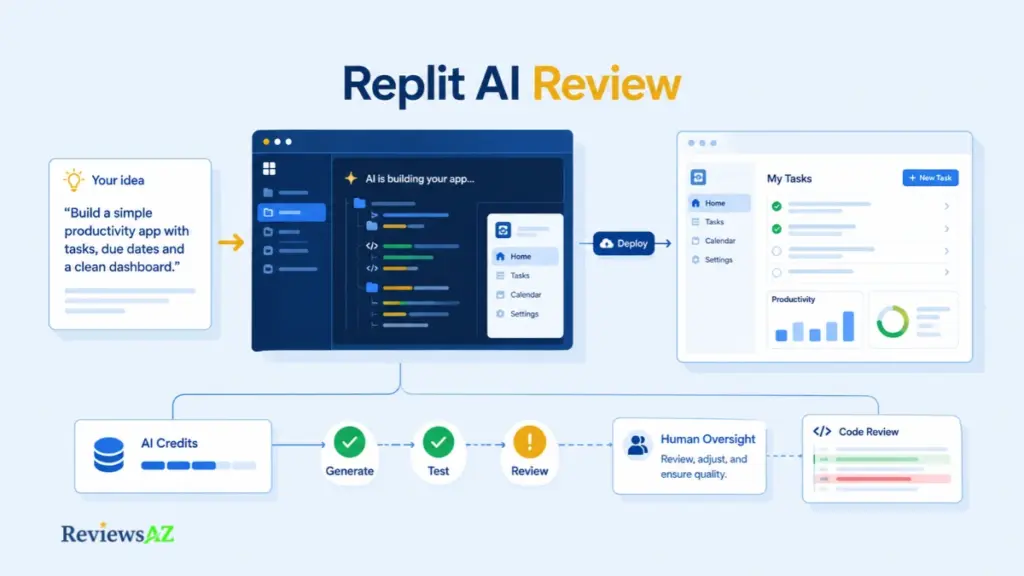
A sentence goes in, a running app comes out, and the demo ends right before the expensive part begins. This Replit AI Review covers that part: the testing, the usage charges, the publishing decision, and the maintenance that follow.
Replit pairs a browser-based code workspace with an AI Agent that plans and builds apps from natural-language prompts. If you’re still comparing it against the wider market, AI code editors for building and editing software is a useful starting point.
Its plans combine a flat subscription with usage credits and effort-based charges, so the number on the pricing page rarely matches what finishing a project actually costs. We break down the current plans and what to watch for later in this review. Readers weighing Replit against editor-first tools will find that comparison in our hub on AI code editors and IDEs.
The real question is not whether Agent can produce a first version, but how much verified, maintainable work is left once it does. By the end, you’ll have fit criteria, cost questions, security checks, alternatives, and a small pilot to run before paying.
Replit AI Review: What the Platform Includes Today
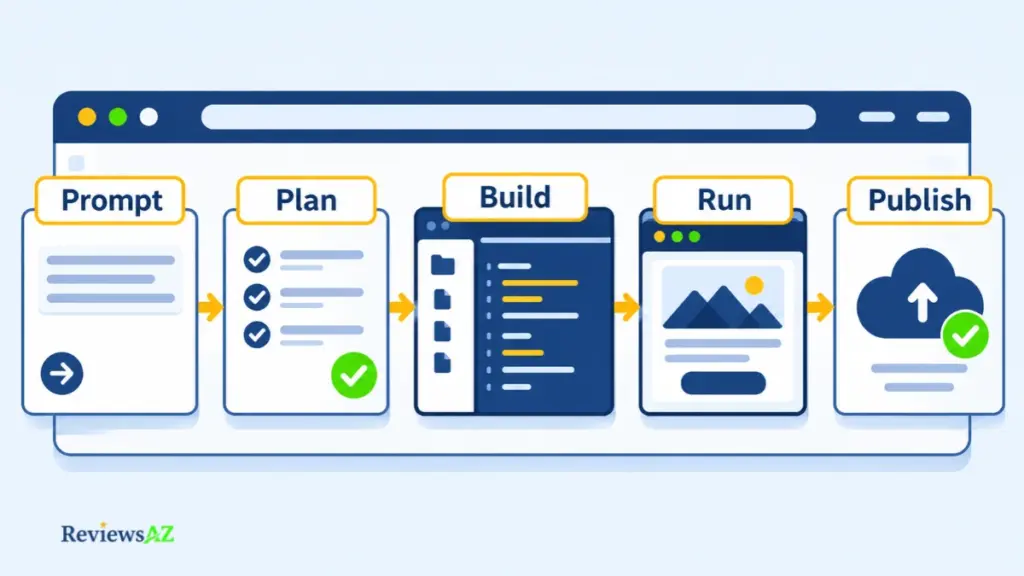
Most AI coding tools suggest the next line inside your editor. Replit AI is a browser-based IDE and app-building platform where an Agent plans, builds, tests and publishes whole applications from natural-language prompts. That makes it a different product from a code-completion model. What you’re evaluating is the connected loop: describe, build, run, publish.
Replit’s documentation currently presents this as Agent 4, announced in March 2026, and usually shortens it to “Agent.” Naming and plan gates shift with every release, so treat the list below as a documented snapshot, not a promise that every plan includes every item.
- Natural-language building: describe a web app, dashboard, data tool or mobile app, and Agent writes the code and sets up the runtime.
- Plan Mode: map the build before any code is written, then approve the plan so Agent can start. Replit’s plan comparison lists this for Core and Pro, not Starter.
- Parallel tasks: Agent can work on several tasks at once. How much time this actually saves on real projects isn’t independently measured.
- Self-review and publishing: Agent runs and checks its own work as it goes, but a passing run isn’t the same as a passing review. You refine through chat and publish when ready.
- Paid and free usage modes: Agent asks for confirmation before a paid action starts. Exact plan gates and credit amounts should be read from the current plan comparison, not assumed from this list.
- Mistake to avoid: a running preview isn’t evidence that an app is correct, secure or production-ready. Test the behavior and review the generated code before real users touch it.
That list shows what the platform does when everything goes well. What it can’t show is how much verification, correction and maintenance remain once the first version runs. That remainder is what decides whether one integrated workspace saves you time, or simply moves the work somewhere else.
How This Replit AI Review Was Evaluated, and What Could Not Be Verified
Opening a page proves only what it says on the day you open it. Nothing more. That distinction is the whole method here, and every sentence in this Replit AI Review carries one of five evidence labels.
The sources were Replit’s live pricing page, AI Billing documentation, the Agent 4 announcement, the security page and the privacy policy, all read from their current versions. Added to that are community sources such as Trustpilot reviews and a Reddit complaint thread, treated here as individual reports, not as proof of how often anything goes wrong.
- Officially Supported: Replit published this itself, covering prices, plan names and security statements. It proves what the vendor said, not that the product behaves that way.
- Documented Capability: the official documentation confirms a feature exists and works as described on a given plan, not how reliably it works on your project.
- User-Reported: someone had a specific experience and said so publicly. That confirms the report happened, not how common the problem is or why it occurred.
- Independently Verified: a source with no commercial stake in the claim confirmed it. That proves the exact claim, and nothing wider.
- Could Not Be Verified: an open question we could not confirm either way. We say so instead of guessing.
The most common review error is upgrading a claim’s status just because its page was open. A vendor statement stays Officially Supported no matter how confident it sounds, and a pattern of complaints stays User-Reported no matter how many people repeat it.
Replit Agent 4: What It Can Build and Where Reliability Limits Remain
Generation produces a first version. Maintenance means every later change still works without breaking something else. Replit’s documentation covers the workflow in detail, but no published figure says how often the generated code is actually correct, and that gap is what you are really evaluating. Treat Agent 4 as a fast first draft, not a verified result.
What the Current Agent Workflow Documents
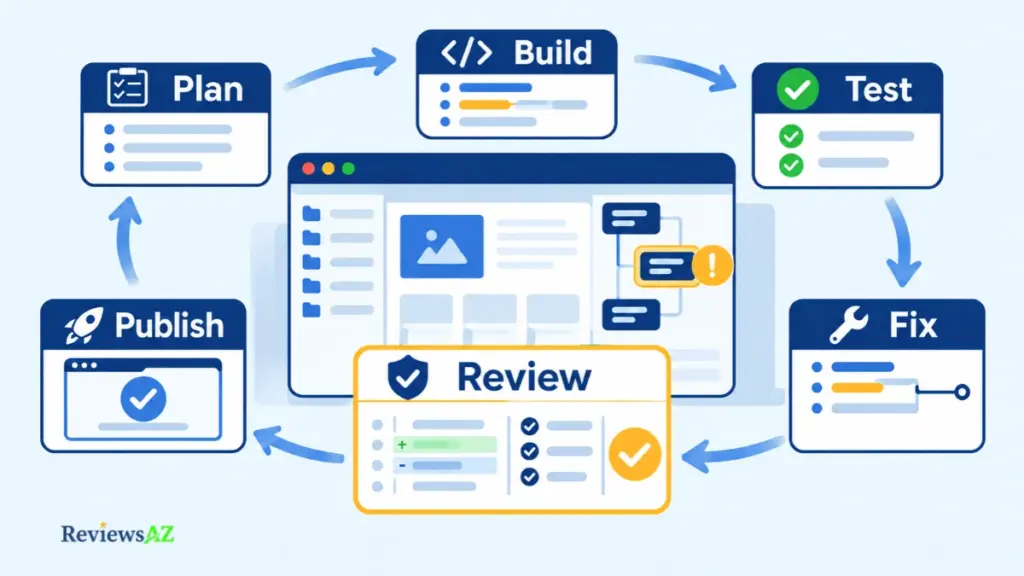
Start with what the documentation actually describes: you chat with Agent, approve a plan when your subscription includes Plan Mode, Agent builds and tests its own work, you describe problems for it to fix, then you publish. That prompt-led pattern is explained in our guide on how vibe coding uses natural-language prompts to build software.
It also belongs to a wider category, covered in our hub on AI coding agents that plan and execute development tasks, rather than tools that only finish a line of code inside your editor.
The gap sits in one sentence. Documentation says Agent tests its work regularly. It does not say how often those tests catch a real defect.
Where Generated Code Still Needs Human Review
Three illustrative scenarios, none of them observed by ReviewsAZ: a fix in one file quietly changes behavior in another, a dependency change breaks a route that worked yesterday, or an error surfaces in logs the builder cannot read. Each is cheap to trigger and hard to diagnose without the skills Agent was meant to replace.
- Plan stage: Agent maps the build before code is written; you still verify scope, data and user access.
- Build stage: Agent writes code and sets up the runtime; you review diffs and dependency changes.
- Self-test stage: Agent tests its own work; you test edge cases and failure states.
- Fix stage: Agent repairs what you describe; you check for side effects in other files.
- Publish stage: Agent publishes when you are ready; you verify the core user path, permissions and mobile layout.
A long Agent run, green test output or an attractive preview is not a correct result. Agent moves fast and reports progress in ways that sound like confidence, which makes output easy to accept at face value. Break work into reviewable tasks, inspect diffs and test edge cases before accepting changes, especially when data or user access is involved.
Why Users Report Reliability and Billing Frustration
User-Reported evidence is mixed. Some Trustpilot reviewers say Agent gets things right most of the time; others describe it editing the wrong files or breaking code during small changes, with credits spent on the repairs. A Reddit complaint thread voices similar anger about cost, but one self-selected discussion is not proof that Replit is a scam. None of these reports measures Replit AI accuracy or reliability, only individual experiences.
What they do show is how the two problems interact: a failed fix that consumes credits is both a quality problem and a billing problem in these accounts. Whether you can review what Agent changes at all is the question that follows.
Is Replit AI Beginner-Friendly? Ease of Use and Deployment
A Replit app can look finished before a beginner knows what still needs checking. The preview loads, a form appears to work, and the Publish button is ready. But a working preview only confirms that the app runs in that moment. It does not prove that the app handles unexpected input, protects user data, or behaves correctly after deployment.
What Replit AI for Beginners Actually Means
Replit lowers the barrier to getting started. Agent runs in a browser-based development environment and accepts plain-language instructions. Replit describes the experience as requiring no coding or setup to begin. That is a fair description of the starting point, not a guarantee that beginners can handle every issue that follows. Debugging, data handling, permissions, and later changes still require careful review.
A clear project brief makes the first request more useful. Tell Agent who will use the app, what information it needs to store, which actions users should be able to take, and what the app must not do. When your plan includes Plan Mode, use it to review the scope and task list before implementation begins.
- Beginner: Replit removes the need to configure a local development environment and provides a straightforward way to describe an idea. The harder part is understanding errors and checking what Agent has actually built.
- Product builder: The platform offers a direct route from an idea to a testable app. The remaining work includes defining the feature scope, checking data and access requirements, and keeping track of usage credits.
- Experienced developer: Agent can help with initial scaffolding and deployment. You still need to inspect code changes, dependencies, and platform choices rather than accepting generated output at face value.
These are editorial assessments of likely fit, not scores from a controlled usability study.
Preview, Testing and Publishing
Publishing is not simply making the version in the editor public. Replit creates a snapshot of the app’s current files and dependencies, then runs that snapshot as a separate instance on its cloud infrastructure. Changes made afterward do not automatically appear in the published app. You need to publish again to create an updated snapshot.
Replit’s Replit deployment types documentation explains the available options. The Publishing tool selects an option based on the project type and its needs, while Autoscale is the default and recommended deployment type. It adjusts resources according to traffic and can scale down to zero when the app is idle.
Static deployments work differently. They serve files without a backend server and are intended for landing pages, portfolios, and documentation sites. Replit states that Static deployments are not compatible with apps created using Agent because those apps are built as full-stack applications that need a backend. For such projects, Replit recommends Autoscale or Reserved VM. The deployment options also have different billing models, so check the applicable charges before publishing.
One storage detail is easy to overlook: Replit advises against relying on data written to a published app’s filesystem. Information that must persist should be stored in a database or a storage service instead. When comparing this workflow with other AI IDEs for web development and app publishing, look beyond the editor and consider how each platform handles deployment and persistent data.
A published URL is not proof of production readiness. Before sharing the app, test the main user journey, sign-in and permissions where applicable, failure states, data persistence, and mobile layout. Confirm that the chosen deployment can support the app’s backend and expected workload.
A live URL tells you that the app is online. It does not answer how its data is stored, which services it depends on, or how easily you can move the project later.
Replit Databases, Integrations, Code Portability, and Workflow Fit
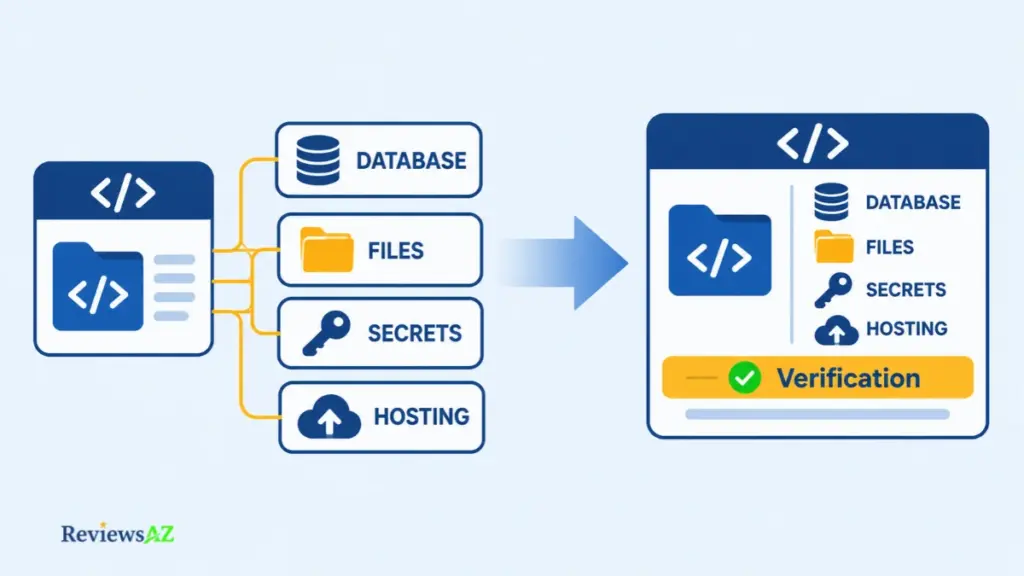
Source-code access is not the same as a painless exit. A GitHub repository can preserve your application code, but it does not automatically move the services the app relies on. Databases, uploaded files, secrets, authentication, and deployment settings each need to be accounted for.
Replit Database and App Storage
Replit provides a managed SQL database, and its current documentation says Agent can add a PostgreSQL database, create its schema, and update the app to use it. The application accesses the database through environment variables. That makes database setup part of Replit’s integrated workflow, but the data still needs a separate migration plan when you move the app.
App Storage requires separate attention. Replit supports downloading individual objects through its storage interface or SDK. Its documentation explains these download options, but does not provide a one-click process for moving an entire storage setup to another host. Plan to transfer the files, recreate the destination storage structure, and update the app’s object references and access rules.
GitHub Imports and Version History
GitHub is a practical bridge for source code. Replit’s Bolt project import guide currently covers Vite + React projects exported from Bolt to GitHub. It explains that code, assets, backend logic, and database schema can be imported when present. Existing Supabase records and secrets are not included, so those need separate migration steps.
Version history matters once Agent starts changing the project. Replit documents Agent Checkpoints, which create automatic snapshots and support one-click rollback. It also recommends Git commits for longer-term tracking and collaboration. Checkpoints help recover an earlier development state, while GitHub provides a separate repository for managing the source code outside Replit.
External Migration and Code Portability
For a practical example of leaving Replit, Railway’s Replit migration guide explains how to connect a GitHub repository, copy environment variables from Replit’s Secrets tab, migrate PostgreSQL data with pg_dump and pg_restore, and configure the new deployment. It also documents a separate script-based process for projects using Replit’s key-value database. That is a Railway-specific migration procedure, not a neutral comparison of hosting platforms.
- Database. Confirm the database type, export and restore method, schema compatibility, and new connection string.
- Secrets and integrations. Recreate environment variables, API credentials, authentication settings, and external service connections on the destination.
- Uploaded files. Move App Storage objects to the destination storage service, then check file paths and access permissions.
- Deployment. Recreate the build and start commands, environment configuration, and domain settings on the new host.
The surest test of code portability is a dry run. Rebuild a copy from the repository on a second host, restore a sample of data and files, reconnect its services, and test the main user path before moving real users.
Replit Security, Privacy, and Production Readiness
A secure platform does not make a secure app. Replit describes protections for its infrastructure and development workflow, but those controls cannot prove that an Agent-built app handles every permission, data request, or edge case correctly.
What Replit’s Platform Security Covers
Replit says each customer receives an isolated Google Cloud project. Its security page also lists separate development and production databases, runtime secret handling, pre-publish scanning through Security Agent, and Auto-Protect monitoring for vulnerabilities after deployment. Replit also lists SOC 2 Type II among its compliance credentials. These are vendor-described platform controls, not an independent security assessment of your application.
Replit AI Data Privacy and App-Owner Responsibilities
Replit’s privacy policy, last updated October 21, 2026, says the service collects code, project files, prompts, and other content users submit. It also lists product development and improvements to machine-learning technologies, including code generation, among its purposes for processing personal data. Pro and Enterprise customers are governed by separate commercial agreements that restrict the use of Customer Content for model training and product improvement, subject to stated exceptions. Do not assume identical contractual terms across all plans. Check the agreement that applies to your account before submitting sensitive material.
Platform security does not configure your app’s own authorization rules or prove that users can access only their own records. Review sign-in, permissions, data access, third-party integrations, and privacy notices. Use least-privilege access and test with non-production data before launch.
When Production or Sensitive-Data Use Needs a Stricter Review
Customer records, payment details, and regulated information require additional scrutiny. Confirm the hosting and data-retention terms that apply to your account. Have a qualified reviewer inspect the generated code and test the application before it handles live data.
SOC 2 Type II is not an app-level security review. It does not verify that Agent-generated code is safe for your users or data. Require human review before connecting sensitive records or opening the app to customers.
Replit Pricing, Credits, and Effort-Based Billing
What does Replit cost, and why can the final bill exceed the subscription price? The monthly plan is only part of the cost. Paid Agent usage and other billable services can add to it. Replit uses effort-based pricing, so the charge depends on the work involved in each request.
| Plan | Published Price | Included Usage or Limits | Best Suited For |
|---|---|---|---|
| Starter | Free | Daily-capped Agent usage; no Full build or Plan Mode | Exploring Replit before paying |
| Core | $20/month, or $18/month equivalent billed annually | $20 in monthly credits; Full build and Plan Mode; up to 5 builders | Individual builders and small teams |
| Pro | $100/month, or $90/month equivalent billed annually | $100 toward powerful models; tiered credits with two-month rollover; up to 15 builders and 10 parallel tasks | Teams with heavier usage and collaboration needs |
| Enterprise | Custom | Custom seats, security controls, and enterprise features | Organizations with specific governance requirements |
Prices are listed in USD before tax. Annual figures are monthly equivalents billed yearly. Confirm the current numbers on Replit’s pricing page before subscribing. Plan names and credit allowances shift between releases.
Starter: Free Access and Daily Limits
Starter offers daily-limited Agent chat and Free Mode, but it excludes Full build and Plan Mode. It is useful for exploring the platform and trying small tasks, not for evaluating the complete paid workflow. For a broader no-cost comparison, see our guide to the best free AI code editors.
Core and Pro: What the Subscription Includes
Core adds Full build, Plan Mode, and $20 in monthly credits. It supports up to five builders. Pro offers up to 15 builders, ten parallel tasks, and a $100 credit allowance toward more powerful models. It also offers higher credit tiers, with unused credits rolling over for two months.
These credits are not simply a measure of how many Agent requests you can make. Replit says they can also cover eligible services such as publishing, network transfer, database storage, and AI integrations. The amount left for Agent work therefore depends on how you use the platform.
Replit Agent Credits and Effort-Based Billing
Paid Agent work is billed according to effort. A small change typically costs less than a complex feature or integration. Plan Mode can also incur charges when it performs paid reasoning, even if it does not change the code. In Build Mode, Agent creates one checkpoint for each completed request.
Core and Pro include Free Mode for everyday work. Its allowance resets every five hours and has a separate weekly limit. Replit asks you to confirm before a paid action starts. Usage can take up to 30 minutes to appear in the dashboard. Charges beyond included credits are billed when they reach a set threshold, rather than waiting for the end of the subscription cycle.
A Replit subscription does not cap your total spend. Paid usage can add charges beyond the included credits, so set a hard budget limit, enable spending alerts, and monitor your usage. Replit also states that Agent and AI usage charges are non-refundable. Since there is no verified fixed credit cost for completing an app, estimate your budget around the work your project requires.
Pros and Cons of Replit AI for Real Projects
The real Replit AI pros and cons become clearer after the first preview. Replit can turn an idea into a working draft, but someone still has to review the code, manage usage, and decide whether the result is ready to ship.
Where Replit AI Adds Value
- One connected development workflow. Planning, building, testing, and publishing take place within the same browser-based environment. This reduces the need to piece together separate tools for an early project.
- An easier starting point. Natural-language prompts lower the initial setup barrier. Core and Pro users can also review a Plan Mode outline before Agent begins building.
- Useful spending controls. Replit provides a usage dashboard, spending alerts, and hard budget limits. It also asks for confirmation before paid Agent actions begin.
Where Replit AI Falls Short
- Output quality still needs verification. Agent can test its own work, but that does not establish that every feature, edge case, or later change will behave correctly. The evidence assessed for this review does not establish a verified, version-specific success rate for Agent 4.
- Total costs are difficult to predict. Effort-based billing means complex requests can consume more credits than small changes. Usage can exceed the subscription allowance, and there is no verified fixed cost per completed app.
- Production responsibility remains with the owner. Platform security controls do not replace application-level code review, access checks, data protection, and testing before real users depend on the app.
Replit is most appealing when speed and an integrated development environment matter more than having every detail under your control. Its limitations matter more when predictable costs, sensitive data, or production reliability are priorities. Treat these points as issues to examine in a bounded pilot, not as measured failure rates.
How to Evaluate Replit Before Paying: A Bounded Pilot
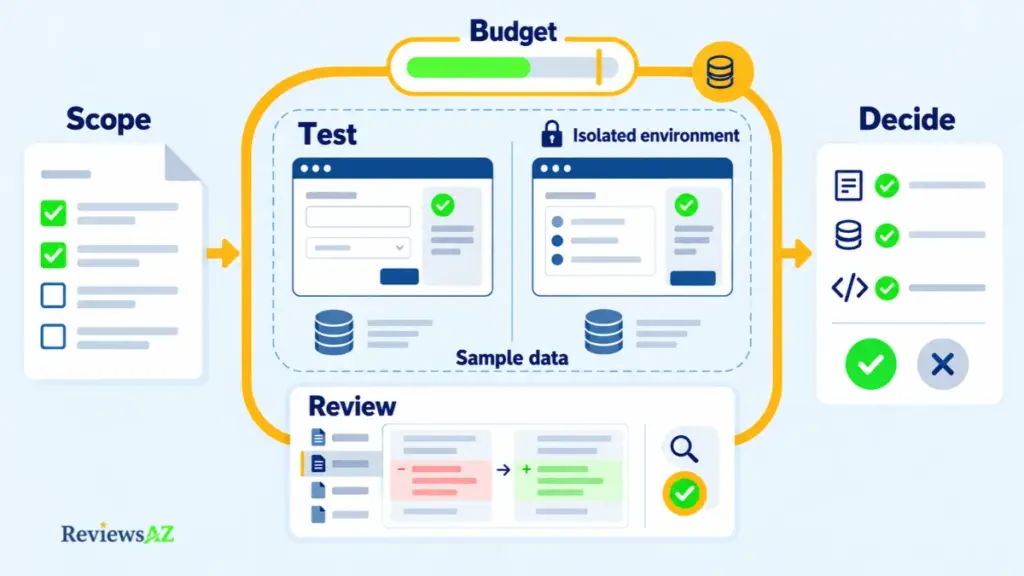
An impressive first build can still be a poor test. Ask Agent to create a complete client portal without defining what success means, and the result may look convincing while telling you little about whether Replit fits your work. A better Replit AI test project starts small, has clear acceptance criteria, and gives you something concrete to measure.
- Choose one representative feature. Pick a small task from the kind of project you actually intend to build. A form that validates input and saves a test record is one example. Keep the scope narrow enough to inspect properly.
- Define success before writing the prompt. List the expected behavior, the failure cases that matter, and the result you would accept. Decide how much manual correction is reasonable before the build begins.
- Prepare a separate test environment. Use a disposable project or copy, sample data, and test-only credentials. Keep live customer records and production secrets out of the experiment.
- Choose your usage level and set a budget. Select the plan and Agent mode that reflect how you expect to use Replit. Set a hard spending limit before starting any paid work.
- Give Agent a fixed brief. Describe the feature, its requirements, and its boundaries. Keep the scope unchanged during the first attempt. Review the proposed approach before allowing the build to proceed.
- Test the main workflow and failure cases. Check that the feature works with valid input. Try empty fields, invalid data, denied access, or interrupted actions where relevant. Do not judge the result by its preview alone.
- Inspect the changes and record the rework. Review modified files, dependencies, permissions, and saved data. Note what Agent handled correctly and what you had to fix yourself.
- Measure the cost and compare one alternative. Record the usage shown in your dashboard, the time spent, and the manual corrections required. Replit’s AI Billing documentation explains how to track usage. Give one suitable alternative the same brief and judge both against your original checklist.
What a Successful Pilot Looks Like? The feature meets its acceptance checklist, stays within the agreed budget, and leaves you with code you can understand, review, and maintain.
A useful pilot should end with a clear decision. Replit is worth considering when it meets your requirements within an acceptable budget and does not leave you with more correction work than you can manage. If it falls short, you have identified a specific limitation to test against another tool before committing to a larger project.
Who Replit Fits and Which Alternatives to Consider
The right tool is not necessarily the one that builds an app fastest. It is the one whose workflow, costs, and ongoing demands match the way you work. Replit favors a hosted path from an idea to a published app. Other workflows give developers more direct control over the codebase.
Who Is Replit a Good Fit For?
Replit is a stronger fit for small projects with clear requirements and someone available to review the generated code. As project complexity grows, so does the need to check permissions, data handling, and the effects of later changes. The following table is an editorial assessment, not a measured ranking.
| User Need | Potential Fit | What to Verify |
|---|---|---|
| Learning or testing an idea | Good for a small, clearly defined prototype | Whether the result meets your requirements |
| Building a small app independently | Potential fit if you can review Agent’s output | Usage costs and ongoing maintenance |
| Working with direct codebase control | Less suitable if you prefer an editor-centered workflow | Code access, dependencies, and portability |
| Handling sensitive or regulated data | Requires additional review before adoption | Data handling, access controls, and application security |
Alternatives Worth Comparing
Most bad tool choices happen before the tool is picked. The reader knows something is missing but not what. Get clear on which part of Replit you actually needed, and the shortlist shrinks fast.
- Blackbox AI. A direct contender if you want a different shape of AI-assisted coding. Its public materials describe browser-based building, a VS Code extension and a command-line workflow. The detail sits in our review of Blackbox AI’s coding features and limitations.
- Other hosted AI app-builders. These fit when you want to describe, generate and manage most of the workflow online. Before choosing one, check backend support, deployment options, storage and code export.
- A conventional IDE with an AI assistant. This one suits developers who want to stay inside an editor they already know. Setup costs more. Control over files, dependencies and hosting stays closer to your hands.
Before switching, identify the actual blocker. Is it output reliability, limited workflow control, usage cost, hosting dependence, or the amount of debugging you can handle? Compare another tool against that specific problem rather than reacting to one disappointing result.
Replit makes the most sense when its integrated workflow saves enough setup to justify the ongoing cost and oversight. When direct codebase control or a different development environment matters more, an alternative may be the better fit.
Related Posts:
GitHub Copilot vs JetBrains AI Assistant
Frequently Asked Questions About Replit AI Review
A polished demo can make Replit look like an easy decision. The harder questions come when you consider the bill, the reliability of later changes, and the responsibility that remains after publishing. This Replit AI Review answers seven practical questions to help you decide whether the platform fits your project.
What is the difference between Replit Agent and inline AI code completion?
Replit Agent works at the project level. It can plan a task, edit files, run the app, test changes, and help publish the result. Inline code completion usually predicts or suggests code inside an editor while the developer directs the wider task. The distinction is project-level execution, not simply a faster autocomplete feature.
Is Replit AI free, and what does Starter include?
Yes. Starter is free and includes daily-capped Agent chat and Free Mode. It does not include Full build or Plan Mode, so it is useful for exploring the platform and trying limited tasks. It does not expose the complete paid build workflow. Check the current plan comparison before signing up, since plan entitlements can change.
How much do Replit Core and Pro cost, and how does usage-based billing work?
Core costs $20 per month, or $18 per month on annual billing. Pro costs $100 per month, or $90 per month on annual billing. Taxes may apply. These subscription prices do not make Agent usage unlimited. Paid work is billed by effort, and usage beyond included credits can add to the bill.
Can Replit Agent build and publish a complete app from a prompt?
Yes. Replit Agent can turn a natural-language request into a first working version and help publish it. But a generated app is not automatically complete, secure, or maintainable. Review the code changes, test the main user journey and failure cases, and check permissions and data persistence before real users depend on it.
Why can fixing an Agent mistake increase Replit costs?
A correction can require another paid Agent request. Replit bills paid work according to the effort involved, so repeated attempts and repairs can increase usage. Some users describe this combination in public reviews, but those accounts are self-selected. They show possible pain points, not how often they occur across all projects.
Is Replit secure enough for production apps and sensitive data?
Not on platform controls alone. Replit lists SOC 2 Type II and a shared-responsibility model, but those do not certify every app built with Agent. The owner still needs to review permissions, secrets, data handling, and dependencies. Use non-production data until application-level checks are complete, especially before handling sensitive or regulated records.
Is Replit AI worth it for beginners and solo builders?
It can suit beginners and solo builders with small, clearly defined projects. The fit depends on more than coding experience: you must be able to inspect the output, test changes, and manage usage. It is a weaker choice when a project needs strict cost predictability, complex permissions, or maintenance you cannot review yourself.
Final Verdict: Is Replit Worth It for Your Project?
Replit AI is worth considering when you can review and maintain what Agent builds. It is a poor fit when that responsibility exceeds your time, skills, or budget.
The real decision is not how quickly an app takes shape. It is who takes responsibility once Agent’s work needs to change. A tool can shorten the distance between an idea and its first working version. That advantage matters only when you can understand the code, manage future changes, and keep the project under control.
- Worth considering when: you are building a small app, can inspect the generated code, and can manage variable usage costs.
- Not ideal when: you need predictable spending, greater control over the development environment, or fewer dependencies on a hosted platform.
- Avoid relying on it when: the application handles sensitive data or supports critical operations, and no qualified person can review and maintain it.
Do not commit to a development workflow without knowing who owns the work after generation. Agent can produce the initial implementation, but someone must remain responsible for its changes, defects, and maintenance. That responsibility should be clear before the application serves real users.
Replit makes sense when its convenience fits the way you can actually work. The right choice is not the tool that promises to do the most. It is the one whose remaining work you can take responsibility for.
Still deciding between a hosted app-building platform and an editor-centered workflow? Our Replit vs Blackbox AI workflow comparison examines that distinction directly.