Augment Code Review: What It Does, What It Costs, and What Changed in 2026

A review tool can catch a serious bug and still be the wrong choice if its billing, access limits, or roadmap do not fit your team. That is the question behind Augment Code Review in 2026.
On 8 October, Augment announced the transfer of selected assets, including Cosmos, Auggie CLI and the Code Context Engine, to Harness. Separately, its documentation says the current GitHub Code Review bot is scheduled to be replaced by a Cosmos review pipeline, although no sunset date has been published. For teams considering the product, the transition matters alongside its existing capabilities.
The wider market matters too. AI code editor can speed up code production, leaving teams with more pull requests to review. Before choosing Augment, check whether its self-serve plan fits your GitHub setup and whether you can predict costs once included usage runs out. The documented limits for self-serve Code Review cover one GitHub organization, 20 seats and a limited number of connected repositories.
Augment Code Review at a Glance
- Best for: Teams reviewing large, connected GitHub codebases where changes can affect other services or shared components.
- Core strength: Repository-wide context that may help identify consequences beyond the changed lines.
- Main limitations: Self-serve Code Review is documented for one GitHub organization, 20 seats and a limited number of connected repositories. Several governance and integration features require Enterprise.
- Pricing and decision: Standard is $20/month and Business is $100/month, each with included usage equal to its fee. LLM usage carries a 40% service fee, and compute costs $0.19/hour. Confirm the applicable plan limits, expected usage and transition to Cosmos before committing.
What Augment Code Is Today
Augment Code has grown beyond its original role as an AI coding assistant. Its platform includes IDE extensions, a command-line tool called Auggie CLI, the Code Context Engine, and Cosmos, an orchestration layer for specialised agents. For this review, the important distinction is between the GitHub Code Review bot and the Cosmos workflow intended to replace it.
- The current Code Review bot: This is the GitHub app that reviews pull requests. Augment’s documentation says it will be retired in favour of the Cosmos review pipeline, but no shutdown date has been published.
- Cosmos: Augment describes Cosmos as a workflow built around specialised agents that handle different parts of code review. It is the documented successor to the current GitHub bot, so teams evaluating the product should consider the transition as well as its existing capabilities.
- Auggie CLI and the Code Context Engine: Auggie CLI provides a command-line interface for working with Augment’s coding tools. The Code Context Engine supplies repository context. Both are part of the wider platform, but neither should be confused with the current GitHub review bot.
- What the Harness transfer means: Augment and Harness announced the transfer of selected assets, including Cosmos, Auggie CLI and the Code Context Engine, along with the team working on them. This concerns specific products and technology, not an announced acquisition of the entire Augment company. The announcements do not establish a complete post-transfer roadmap.
- How the pieces fit into a review workflow: Reviews are triggered and delivered through GitHub. Repository context helps the reviewer assess a change, while guideline files committed to the repository define how it should behave. Enterprise customers can also use MCP connections to bring in context from services such as Jira or Notion. Once findings arrive, developers use their IDE to investigate or apply a suggested fix.
When reading older reviews of Augment Code, check whether the information reflects the current product and pricing model. Details about plan limits, billing and the move to Cosmos are particularly important because they can affect whether the tool fits your team, regardless of its review capabilities.
Augment Code Review, Examined: How the Code Review Actually Works
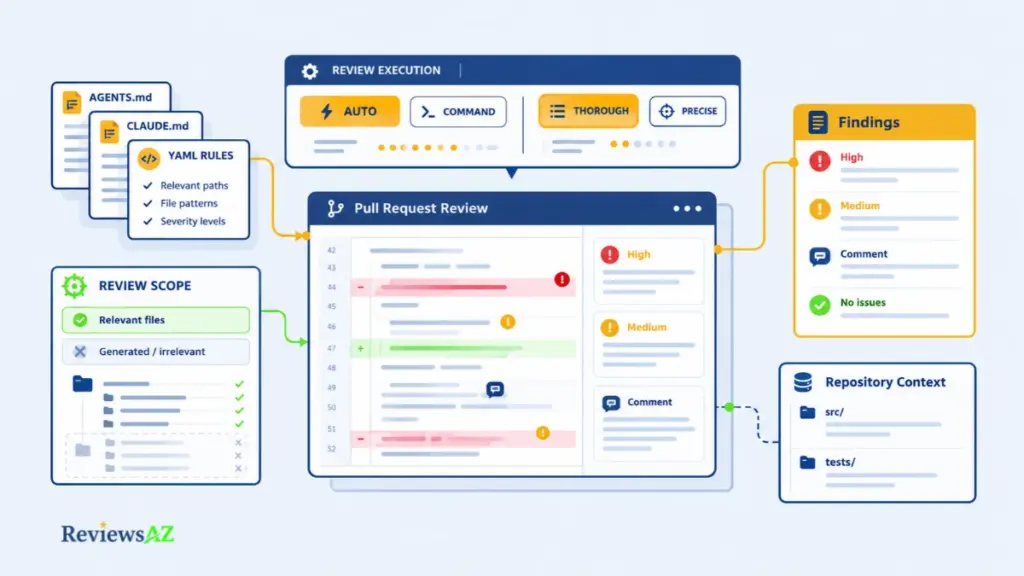
Augment Code Review is a GitHub-native reviewer. It runs automatically or on command, applies a style, Thorough by default, and reads guideline files such as AGENTS.md, CLAUDE.md, plus a YAML layer of areas, globs and severities. Each of those settings shapes the output before the model ever does.
Triggers and review styles: the configuration matters more than the model
Three triggers decide whether a review runs at all, and what counts as “automatic” is narrower than it sounds. Here’s how each one behaves:
| Trigger | What happens | Evidence tier |
|---|---|---|
| Automatic | The review starts when a pull request is marked ready, out of draft, and lands within minutes | Documented |
| Command | Someone comments auggie review, augment review or augmentcode review on the pull request | Documented |
| Disabled | No review runs for that repository, even when its siblings are active | Documented |
Styles sit on top of the trigger. Thorough is the default, and Augment’s own documentation says it finds 50% more bugs than Precise, while both hold the same low false-positive rate. Precise posts fewer comments, for teams that only want the critical ones flagged. Either way, expect more findings to triage, not fewer. That tracks with Augment’s stated preference for recall over precision.
Two different numbers get attributed to Augment, and they are not the same kind of evidence. One set comes from Augment’s own codebase: 3x more code shipped, 67% lower median merge time, 65% precision on flagged issues, and a weekly revert rate under 1.5%.
The other comes from a comparison Augment published of seven review tools across 50 pull requests from five open-source projects, where Augment Code Review scored 65% precision, 55% recall, and a 59% F-score.
That benchmark gets its own section further down, since it is the more interesting number. What matters here is simpler: the 65% shows up in both sets, but they measure different things. One is Augment’s own repository. The other is 50 pull requests Augment picked.
Configure before you judge. A noisy repository can make Thorough produce too many comments, even when some are useful. Set clear guidelines and exclude generated files before evaluating the results.
Guideline files: AGENTS.md, CLAUDE.md and the YAML severity layer
AGENTS.md and CLAUDE.md at the repository root get picked up automatically. Rules already written for other agent tools carry over, no duplication needed.
A separate YAML file adds areas, globs, and severities of high, medium, or low. This is where a team writes down what actually matters in each part of the codebase. It is what turns a review into a triage list instead of a stream of opinions. The reviewer also skips certain files by default: archives, images, fonts, office documents, lockfiles, minified bundles, and anything under a generated path.
Cross-repository context works the same way. List external repositories in AGENTS.md with a short note on what each one defines, and the agent queries them for types, interfaces, and contracts, citing the file it used. That route runs through the Augment MCP server, which the plan comparison marks Enterprise-only. So the capability arrives with a plan question attached.
Editor choice is a separate matter from review itself. The reviewer lives on GitHub, while the documented extensions for VS Code, JetBrains, and Vim sit on the editing side. Findings arrive as a comment with a fix path. In VS Code, that opens an agent session with the prompt pre-filled. Elsewhere, it is copied to the clipboard.
A JetBrains team gets the review, then a manual hop. It’s worth checking how JetBrains’ built-in AI assistant handles the same hand-off before assuming the two workflows are equivalent.
Cross-Repository Review Context: What Augment’s Context Engine Can and Cannot Do
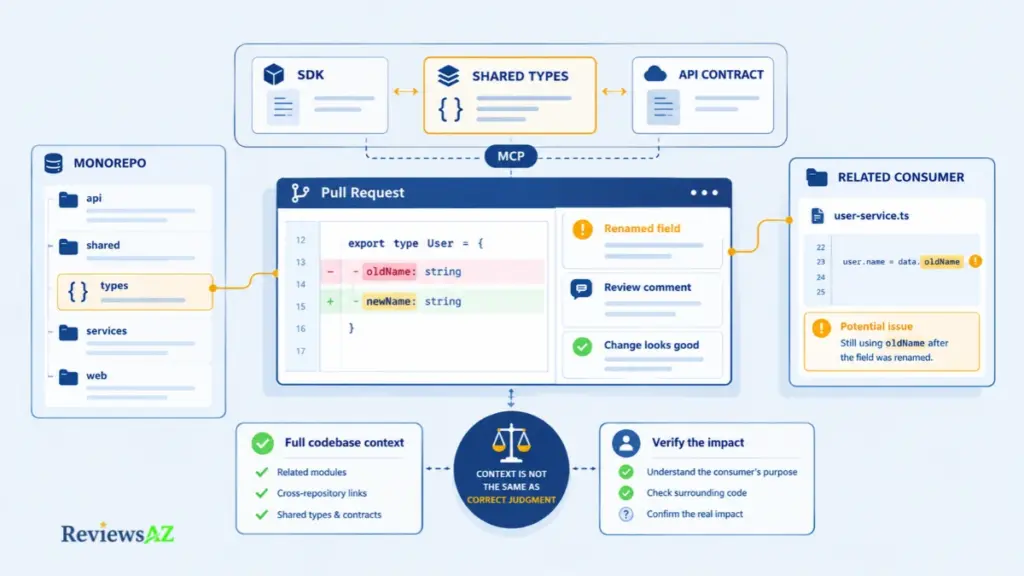
Augment’s main claim is that its reviewer can consider more than the lines changed in a pull request. That matters when a change to a shared type or API affects code elsewhere. The diff may look correct, while another part of the application still relies on the old behavior. Access to wider repository context can help identify that risk, but it does not guarantee that every affected dependency will be found or interpreted correctly.
In a monorepo, related code is already within the same repository. Reviewing changes across separate repositories relies on additional configuration through AGENTS.md and the Augment MCP server, which is listed as an Enterprise feature.
Indexed does not mean understood. A reviewer may find a distant caller and still misunderstand its role. Treat a cross-file comment as something to investigate, not proof that the change is wrong.
The quality of the review also depends on the information provided. Augment recommends writing a clear pull request description so the reviewer can understand why a change was made. Repository context cannot replace missing intent, and a human still needs to verify important findings before merging.
It is also worth distinguishing a code reviewer from broader AI coding agents. A reviewer identifies potential problems in a change, while a coding agent may carry out a sequence of coding tasks. The two can use similar context, but they serve different purposes.
The most useful way to assess Augment’s context handling is to give it a known defect in a representative repository. Check whether it identifies the problem, how many comments are genuinely actionable, and whether it misses serious issues that human reviewers catch.
Augment Code Review Pricing: What the Invoice Actually Says
Ask three people on the same team what Augment costs and you may get three answers. The pricing page counts seats one way. The review documentation caps them another. The invoice adds a line nobody mentioned. Here is what is on the record as of October 2026.
The seat question: 50 on the pricing page, 20 in the docs
Standard and Business are flat plans with no per-seat charge, good for up to 50 platform seats, and each includes usage equal to the monthly fee. Then the Code Review documentation caps self-serve review at 20 seats, one GitHub organization and a limited number of connected repositories.
Both numbers come from Augment. They cover different scopes: workspace seats on one page, review seats in the feature docs. What nobody explains is how the two meet for a team sitting in between. Get that answer in writing before you book a pilot.
The service fee, the compute rate, and the no-rollover rule
Every request bills as tokens at the provider’s public list price, plus a flat 40% fee on the LLM portion, plus compute for time in a Cosmos sandbox at $0.19 an hour, charged in five-minute blocks and rounded up. Compute carries no service fee.
Included usage resets each cycle and never rolls over. Start mid-cycle and it is prorated. Run past the allowance and billing continues at the same rates, with no minimum top-up.
How to estimate your own monthly bill
Run a pilot. Record a month of token spend and compute hours. Then fill in the lines below. The rates are real and the inputs are invented. Swapping in your own numbers is the entire exercise.
| Line | Amount | Where the number comes from |
|---|---|---|
| Business subscription | $100.00 | Published price |
| Model token usage | $150.00 | Hypothetical input |
| 40% service fee on that usage | $60.00 | 0.40 × $150 |
| Compute, 10 hours | $1.90 | Hypothetical hours × $0.19 |
| Usage total | $211.90 | $150 + $60 + $1.90 |
| Included usage applied | −$100.00 | Documented: $100 across tokens, compute and fees |
| Metered usage billed | $111.90 | $211.90 − $100.00 |
| Estimated monthly bill | $211.90 | $100 subscription + $111.90 metered |
The logic is simple once you see it. The subscription buys $100 of included usage, so the bill is the fee plus whatever runs past it. Change one assumption, say that Code Review turns out to be a separately priced add-on, and the total moves with it.
Teams that cannot justify a paid tier at all may do better with free AI code editors, and the comparison with Kiro is worth reading if the licence model is your sticking point.
Security, Privacy, and Enterprise Gating: What Is Actually Documented
“Enterprise-ready” is a pricing tier on one page and a set of controls in the documentation. For review, only the second list counts, and it is shorter than the badge row suggests.
Certifications and data commitments on the record
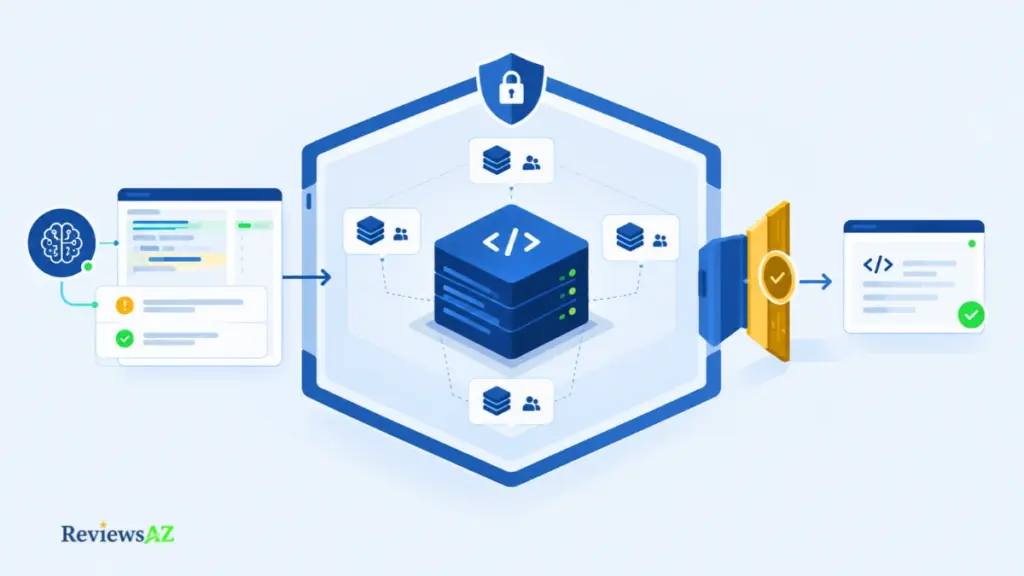
TThe pricing page lists SOC 2 Type II, ISO 42001, customer-managed encryption keys, SSO with OIDC and SCIM, data-residency options, and no AI training on customer code.
One distinction is documented and easy to lose. The service fee is justified in part by the Context Engine, described as the component that hosts your codebase and dynamically indexes changes as you work. No training on your code and no transmission of your code are different promises, and only the first is being made.
What Enterprise actually unlocks for review
- Multiple organizations. Lifts the one-organization ceiling on self-serve review.
- GitHub Enterprise Server. The route for a self-hosted GitHub instance, which self-serve cannot touch.
- User allowlist. Restricts who may trigger reviews and switches automatic and manual reviews off for everyone else, which is what a phased rollout needs.
- MCP context. Carries the cross-repository capability, and with it the plan question.
- Full analytics. The word “full” implies a reduced view below Enterprise, so ask what the lower tier leaves out.
Certifications describe how the vendor operates. The gating list describes what your plan can switch on. Check the second against your GitHub setup before leaning on the first.
The governance question is not whether a bot can merge your code. It cannot. The Cosmos documentation states that a human always performs the final merge, and the cosmos approve command is disabled by default.
A human makes the final merge decision. Augment’s Cosmos documentation states that the agent can evaluate and approve a pull request against policy, but it does not merge the code. A human remains responsible for the final merge.
Augment Code Review Pros and Cons: Key Strengths and Limitations
Two teams can run the same trial and reach opposite verdicts, and both can be right. One keeps a dozen repositories in a single GitHub organization and finds the comments outside the diff worth acting on. The other runs three organizations and learns on day one that self-serve review stops at one. Every line below carries its evidence tag, so neither reading wins by omission.
- Context that appears outside the diff. Review comments can reach code the pull request never touched, and cross-repository context runs through MCP.
- Configuration depth. Automatic, command and disabled modes, two review styles, AGENTS.md and CLAUDE.md discovery, and a YAML layer of areas, globs and severities. (Documented.)
- Controls for a staged rollout. Allowlist, MCP context, multiple organizations and GitHub Enterprise Server exist, and a human always performs the final merge.
- Flat pricing at platform level. $20 and $100 a month rather than per seat, with included usage matching the fee.
- GitHub-first delivery. The native reviewer is a GitHub app; GitLab, Bitbucket and Azure DevOps need CLI automation and a sales conversation.
- A ceiling that arrives early. One organization, a seat cap and a limited repository count on self-serve, against a pricing page that counts platform seats differently.
- Metered billing on top of the fee. A 40% service fee, compute at $0.19 an hour, no rollover and no published per-review price.
- A product mid-transition. The bot is scheduled for sunset, the cutover is not atomic, and the Harness transfer is announced.
Treating the ledger as a scorecard is the mistake. Adding the strengths, subtracting the limitations and calling the total a verdict assumes the two sides weigh equally, when they are conditional facts that change with the estate they land in.
How to Evaluate Augment Code Review Before You Commit
Would this survive your own procurement checklist, or only the vendor’s demo? The six checks run in the order that protects your time: each one can end the evaluation before the next costs you anything.
- Plan boundary. Count the GitHub organizations, the people who need review and the repositories involved, then note any code outside GitHub. Pass if everything fits one organization and 20 seats, or Enterprise is already on the table. Record: the counts and the written answer on 20 seats against 50.
- Cost. Fill the cost table with your own token spend and compute hours, and settle whether Code Review is a separate add-on. Pass if the projected month fits your budget with metered usage included. Record: the figure and both answers.
- Configuration. Scope guidelines to the areas that matter, exclude generated paths, then run Thorough and Precise over the same pull requests. Pass if reviewers can live with the noise. Record: the settings, so the run can be repeated.
- Baseline. Before switching anything on, log which defects your reviewers caught in the last ten pull requests and how long each took. Without that sheet, “better” has no denominator.
- Evidence. Pilot on two or three repositories where cross-system breakage is expensive, and fill the scorecard below. Pass if the results beat thresholds you set in advance. Record: the completed scorecard, split by whether the code was AI-generated.
- Cutover. Read the migration documentation, list the triggers, allow-lists, MCP attachments and run identity you would rebuild, and name an owner. Pass if the team can absorb that in the quarter it lands. Record: the list and the owner, with a date beside them.
| Metric | How to record it |
|---|---|
| Actionable findings | Comments that led to a code change |
| False positives | Comments dismissed as wrong or irrelevant |
| Missed high-severity defects | Serious defects your reviewers caught and the tool did not |
| Time to first comment | Minutes from trigger to the first comment |
| Reviewer acceptance | Share of comments human reviewers accepted |
Write the pass marks before the pilot starts. Choosing them afterwards makes almost any result look acceptable, which is how pilots become shelfware. And if part of your estate began as prototype work, add one of those repositories to the sample, because the habits of vibe coding leave a defect profile a mature service will never show you.
The gate is real: proceed only if all six pass. A team that stops at check one has not wasted the evaluation, it has finished it.
Augment Code Review Alternatives: How Other Tools Compare
The benchmark below was produced by the company that wins it. Augment also published the reference comment set, the scripts and the scoring method, so anyone who wants to challenge the result can. Here is what it measured, what it cannot prove, and what each row actually means.
Inside the benchmark
Augment scored seven review tools across 50 pull requests taken from Sentry, Grafana, Cal.com, Discourse and Keycloak. First release December 2025, updated June 2026. Augment Code Review ran on GPT-5.2 and scored 65% precision, 55% recall and a 59% F-score.
| Tool | Precision | Recall | F-score |
|---|---|---|---|
| Augment Code Review | 65% | 55% | 59% |
| Cursor Bugbot | 60% | 41% | 49% |
| Greptile | 45% | 45% | 45% |
| Codex Code Review | 68% | 29% | 41% |
| CodeRabbit | 36% | 43% | 39% |
| Claude Code | 23% | 51% | 31% |
| GitHub Copilot | 20% | 34% | 25% |
The other six tools
Each entry covers what the tool is, what its row says, and what puts it in the same conversation as Augment Code Review.
- Cursor Bugbot. Cursor’s pull request reviewer, and the nearest rival in this set at 60% precision and 41% recall. It reads diffs, comments with explanations and fix suggestions, runs on every pull request update or when someone types Cursor review or
bugbot run, and covers GitHub, GitLab, Bitbucket and Azure DevOps. What its documentation never states is whether it reasons about code outside the diff, which is exactly the ground Augment claims. - Greptile. A reviewer built around whole-codebase context, and the only row where precision and recall land on the same number. All three of its figures read 45%, which puts the overlap with Augment’s pitch on the table directly.
- Codex Code Review. OpenAI’s reviewer, and the precision leader at 68%. Fourth overall, because 29% recall leaves most reference defects unmentioned. Our Codex review covers how it runs and where that trade shows up.
- CodeRabbit. A dedicated pull request reviewer with 36% precision, 43% recall and a 39% F-score. It caught fewer than half of the reference defects, and close to two thirds of the comments it posted did not match one. How much triage that ratio creates depends on your reviewers, which is a question the benchmark cannot answer.
- Claude Code. Anthropic’s coding agent, scored here in a reviewer’s seat. It reached 51% recall, second only to Augment, on a precision of 23%, which makes it the clearest row in the table for recall bought at the cost of noise. Our Claude Code review covers how the agent behaves when it is asked to review.
- GitHub Copilot. The reviewer built into GitHub, at 20% precision, 34% recall and 25% F-score, the bottom row. It is the natural baseline for anyone already on the platform. Whether Copilot code review is available to you depends on your plan and on which surfaces it covers, so check the entitlement before treating it as free. Our GitHub Copilot review covers the wider product.
Where Cursor, Kiro and JetBrains fit
Cursor is the awkward case. The editor and the reviewer share a company but not a purchase. Bugbot earned its place in the review table on its own scores, and choosing Cursor is a decision about where the team writes code. The benchmark is a reason to look at Bugbot, not a reason to migrate anyone’s editor.
- Kiro. A spec-first editor, which moves review pressure earlier, into the document and away from the pull request. That is a different bet rather than a stronger one, and Kiro’s spec-driven approach is documented on its own page.
- JetBrains AI Assistant. The AI layer already inside JetBrains IDEs, so a shop on IntelliJ or PyCharm adopts it without changing tools. Its documentation describes agents, chat, completion and next-edit suggestions rather than a reviewer working against the whole repository. That is a different job from the one this article covers, and our JetBrains AI Assistant review goes into the IDE side.
Kiro and JetBrains belong to the editor shortlist. Bugbot, Greptile, Codex, CodeRabbit, Claude Code and Copilot belong to the review shortlist. The two rarely overlap, and how Augment Code compares with Kiro takes the editor side further.
Migration Risk: The Cosmos Cutover and Vendor Continuity
Your triggers, your allow-lists, your run identity and your review history all cross a migration that begins before you decide to make one. The documentation carries two of them across. The other two are still open.
Cutover mechanics: the configuration you rebuild by hand
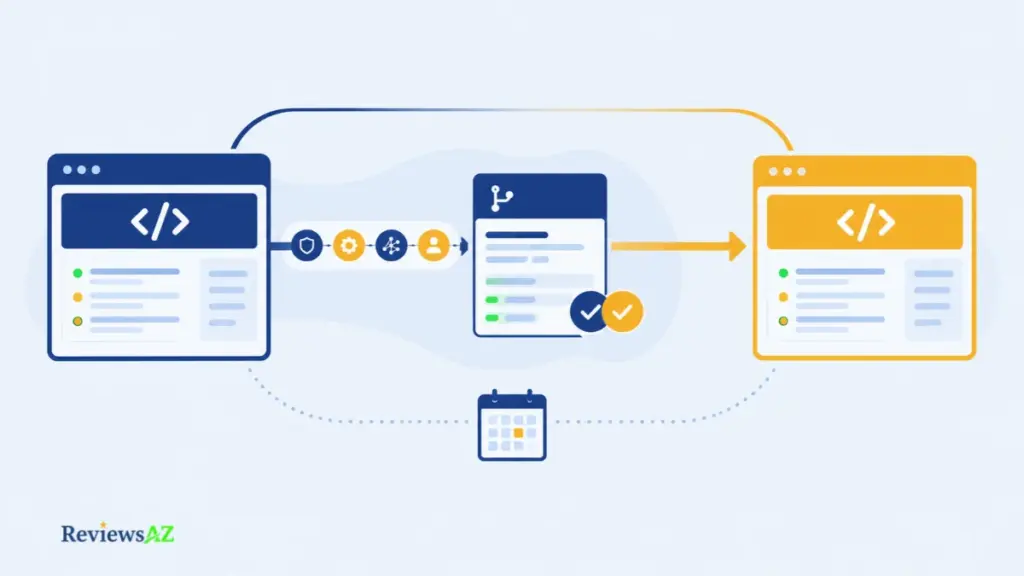
Augment’s migration guide sets out the sequence, and the sequence is more careful than the marketing around it. Four pieces of configuration do not travel on their own.
- Triggers. The rules that start a review have to be recreated on the Cosmos side. The guide has you prepare them while keeping them disabled, so nothing fires twice during the switch.
- Repository allow-lists. Rebuild these to match the current setup exactly. The guide asks for the whole active inventory in one cutover rather than repository by repository, which keeps permissions consistent and raises the stakes on getting the list right first time.
- MCP attachments. Any external context you wired in, such as Jira or Notion connections, needs reattaching. On the Augment side this capability sits behind the Enterprise plan, so confirm that the move does not change the tier you need.
- Run identity. The account your runs authenticate as has to exist on the new side. This is the easiest item to overlook, because none of the trigger rules remind you that it exists.
The order the guide gives is safe enough. Prepare with triggers off, cut over the whole inventory together, then disable the old triggers and enable the new ones. Duplicate reviews appear inside that window. Two comments on one pull request is how a team learns to skim, and nobody switches the habit back on when the migration ends.
The Harness transfer, read as a contract question
What changes in practice is ownership of the roadmap, not the capability of the product on your repositories. So the open questions are contractual rather than technical. Who signs as counterparty to your agreement, and what does that agreement say if the party holding it changes?
That is the lock-in worth measuring with any AI coding vendor. Not the invoice, but the size of what you would have to rebuild to leave, or to sit through a change like this one. Five answers close most of the risk, and all five are procurement questions rather than technical ones. Ask for each in writing:
- The sunset date for the GitHub Code Review bot.
- What happens to review history and to existing configuration at cutover.
- Which plan tier each item above requires once it lands on Cosmos.
- Who the contracting party will be, and what the agreement says about a change of owner.
- Who on your team owns the cutover, and which quarter it lands in.
Those five can be settled in a week. The alternative is settling them during the migration, which costs more and happens at the worst possible time.
Frequently Asked Questions About Augment Code Review
Most people reach Augment Code Review with one question first: is Augment Code free? The six after it decide whether a purchase is even possible, which is why they cover cost, plan limits, platform support and what changed in the past year.
Is Augment Code free?
No. Augment lists no free plan. Standard costs $20 per month with $20 in included usage, Business costs $100 with $100 included, and Enterprise is custom-priced.
How much does a team actually pay per month?
The total depends on usage beyond the included allowance. LLM usage carries a 40% service fee, compute costs $0.19 per hour, unused allowance does not roll over, and no per-review price is published.
What does Augment Code Review check, and how good is it?
It reviews GitHub pull requests using Thorough or Precise styles and repository guidelines. Augment’s own comparison of seven review tools recorded the highest F-score for its product, but the vendor ran the study, so teams should validate the results on their own codebases.
Does it work with JetBrains IDEs?
Yes. Augment offers JetBrains extensions, but review takes place in GitHub. Unlike the VS Code workflow, the fix prompt is copied for JetBrains users rather than opening a prefilled agent session.
Can one plan review several GitHub organizations?
Not on self-serve. Code Review documentation sets a limit of one GitHub organization, 20 seats and a limited number of repositories. Since the pricing page lists up to 50 workspace seats, confirm in writing which limit applies to your setup.
Does it support GitLab, Bitbucket, or Azure DevOps?
Not through a native review app. These platforms require CLI-based pipeline automation and a sales conversation. GitHub Enterprise Server is also restricted to Enterprise.
What changed for Augment Code in 2026?
Billing now includes a 40% service fee on LLM usage, the current GitHub review bot is scheduled to give way to Cosmos, and selected Augment assets were announced for transfer to Harness. No sunset date has been published.
The Verdict: Is Augment Code Worth It?
Augment Code earns a pilot, not a blanket recommendation. It fits large, multi-repo GitHub codebases where a bug slipping between systems is the expensive kind of failure, and only if the plan boundary already works for your team and someone owns the cutover ahead of time.
Two things decide that, and neither is about how good the reviews actually are:
- The numbers: one GitHub organization, 20 seats, and a limited repository count on self-serve.
- The timing: a bot scheduled for sunset, a cutover that needs manual coordination, and core assets already announced for transfer to Harness.
The capability itself holds up well. Context that reaches past the diff, configuration deep enough to actually shape the output, and a human who always makes the final merge call. Pricing checks out too, flat plans with a metered bill layered on top. Precision is the shakiest part of the evidence, not because nothing exists, but because the only thing that does exist is Augment’s own benchmark, run by the company selling the product, on a sample it picked itself.
A few things would shift this verdict in either direction:
- Wait if non-GitHub review is a hard requirement without a sales call, your setup spans multiple organizations with Enterprise off the table, or nobody can realistically own a cutover this quarter.
- Look elsewhere if you need a free tier, an open-source reviewer, a published per-review price, or a product surface that will not keep shifting under you.
- A firmer yes needs one of three things: an independent precision benchmark, an actual sunset date, or a written answer on whether 20 seats or 50 governs review.
One check settles most of this before price or quality even enter the conversation. Count your GitHub organizations and the people who need review access. If those numbers do not fit, Enterprise becomes the question, not review quality, and everything else waits.
That is an afternoon of work, not a quarter’s. Get the counts, ask for the two written answers above, and set your pilot thresholds before the first review runs. If the numbers still do not fit and Enterprise is not on the table, the wider field of AI code editors and IDEs is the next place to look.