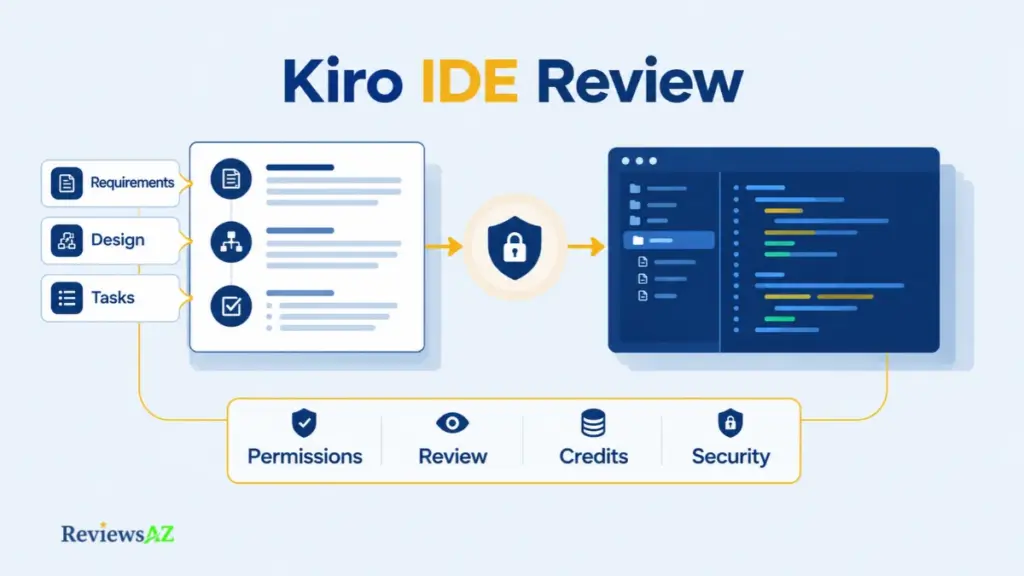
Kiro IDE Review: Is Amazon’s Agentic IDE Worth It for Production Use?

Kiro wants requirements, a design, and a task list on the table before it writes code. Useful discipline or extra paperwork? That’s the question this Kiro IDE review has to answer.
It depends on the codebase, your patience for process, and what each request costs in credits. A spec that heads off rework on a multi-file feature can feel like dead weight on a one-line fix.
Timing matters here too. Kiro, AWS’s agentic IDE, launched in 2025. Since then, plans, models, and privacy settings have shifted enough that write-ups from the preview period may not match what you’d sign up for today.
There’s no “best AI IDE” crown to hand out here. Kiro fits some workflows and fights others. This review comes down to four tests, workflow control, credit economics, security boundaries, and fit, measured against the wider field of AI code editors and IDEs.
Kiro IDE Review: What It Is and What It Is Not
Kiro is an agentic IDE from AWS, built on Code OSS, that organizes AI-assisted coding around written specs as well as chat.
In the documented workflow, you describe a feature, Kiro drafts requirements, a design, and tasks, and you review them before implementation. This review compares what Kiro and AWS document, attributes user reports, and labels the gaps. What it can’t do is vouch for code quality or reliability on your repository.
That puts Kiro in the AI code editor category, though AWS positions its spec-first approach as the differentiator. Four points frame what follows:
- Category: an IDE built on Code OSS, the open-source base of VS Code, so VS Code settings, themes, and Open VSX-compatible plugins can be imported.
- Workflow: features move through requirements, design, and tasks, each kept as a reviewable file.
- Agent features: agentic chat, event-triggered hooks, steering files, and external tool connections sit alongside specs.
- Scope of this review: workflow fit, credit costs, security boundaries, and alternatives, with each claim labeled by evidence level.
Kiro is a workflow system, not a promise of finished code. “Agentic” describes an agent that plans and acts on your behalf; it doesn’t mean the output checks itself, so the diff, the tests, and the spec still need your eyes. The documentation shows what the product does. Only your own repository shows how well.
Spec-Driven Development in Kiro: From Requirements to Tasks
A password-reset flow for a web app makes a convenient example, and anyone weighing an AI IDE for web development will recognize the shape of the task. Treat it as an illustration of the workflow, not a test run. Instead of typing “add password reset” and hoping, you work through written artifacts first.
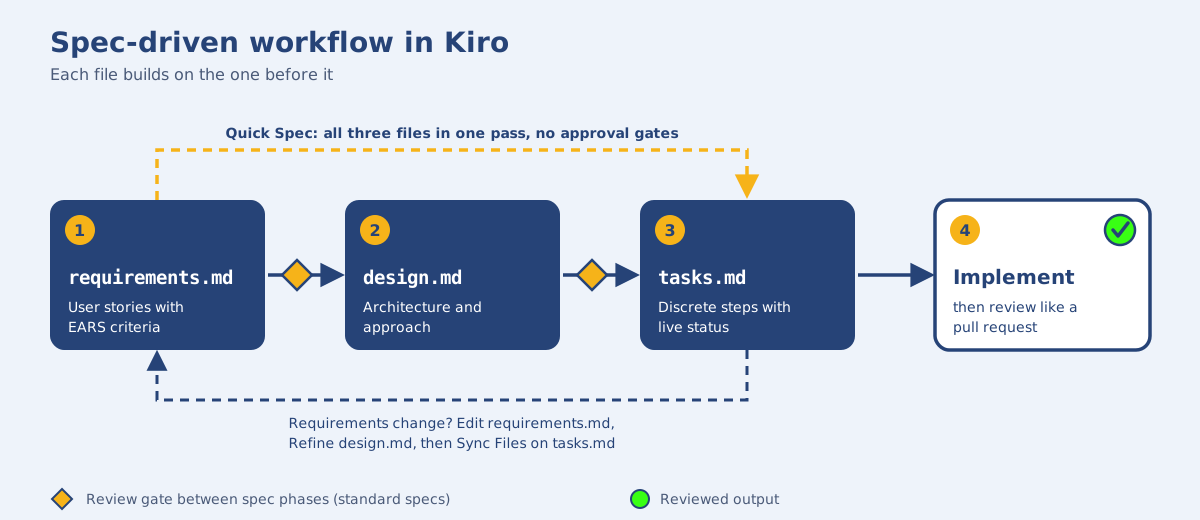
In Kiro’s documentation, a spec is three Markdown files saved under .kiro/specs/: requirements.md, design.md, and tasks.md. Spec-driven development means working through them in order, because each file builds on the one before it. Where vibe coding leans on open-ended chat, a spec leaves reviewable artifacts before any code exists.
- Define scope and constraints. Describe the feature and its limits, such as reset links that expire.
- Review the requirements. Kiro drafts user stories with acceptance criteria in EARS notation. This is the cheapest place to catch a wrong assumption, so read closely what it assumed about expiry, retries, and error states.
- Check the design. Architecture and implementation approach land here; confirm they fit your stack.
- Trim the task list.
tasks.mdbreaks the work into discrete steps. Reword or cut any that don’t match how you’d build it. - Run the tasks, then review like a pull request. Read the code and tests before anything merges.
Standard Feature Specs pause for your review between phases. Quick Spec doesn’t: it generates all three artifacts in one pass with no approval gates, which the docs suggest for well-understood features.
Requirements will change, and specs can follow. Edit requirements.md directly, or ask Kiro in a spec session. Then use Refine on design.md to update the design and task list, and Sync Files on tasks.md to add tasks for the new requirements. That upkeep is the real cost of the method: a spec is something you maintain, not something you generate once.
Common mistake: treating generated requirements as final. Kiro drafts from your description, so a missed edge case flows straight into the design and tasks. Revisit the acceptance criteria as needs change.
Kiro IDE Features: Specs, Quick Spec, Agent Hooks, and Steering
Kiro’s headline features do three different jobs: some structure the work, some automate reactions to events, and some carry project context from one session to the next.
Specs and Quick Spec
Think of the options as a dial for how much structure you want. Standard specs suit features with unknowns, since every phase waits for your review. Quick Spec suits work where the requirements are already clear, because it produces everything in one pass. Vibe mode skips spec files altogether and fits throwaway tasks. The workflow itself is walked through above; what remains is deciding how much review you want before code appears.
Agent Hooks and Event-Triggered Automation
Agent Hooks are event-triggered automations that either run a shell command or hand the agent a prompt when something happens.
The current IDE documentation defines them in JSON files under .kiro/hooks/. Triggers include a file being saved by the agent, a tool about to run, and a spec task finishing, and some triggers can block the action when a command exits with a specific code. Automating chores like formatting or test checks is an idea shared across AI coding agents; Kiro ties it to IDE events.
Because a hook fires on its own, a too-broad trigger or a careless command repeats its mistake every time. Check the command, its scope, and its output before relying on it. Older tutorials show a previous hook format, which the docs say the IDE can migrate.
Steering Files and Project Context
Steering files are Markdown files that give Kiro persistent knowledge about your workspace. Kiro can generate three foundational ones, product.md, tech.md, and structure.md, and you can add custom files. An inclusion mode decides when each one loads: always, for matching files, manually, or auto.
| Agent Hooks | Steering files | |
|---|---|---|
| Role | Event-driven automation | Persistent project context |
| Form | JSON file with a trigger and an action | Markdown file with an inclusion mode |
| Acts when | A defined event fires | Its inclusion mode loads it |
The documentation shows what these features do, not how much time they save, and this review claims no productivity figure.
What Kiro Can Actually Do, and What Remains Unverified
A feature existing in the product and a feature working well on your code are two separate claims. Kiro’s documentation can establish the first. Only a test on your own repository can establish the second, and this review ran none.
Multi-File Feature Work and Refactoring
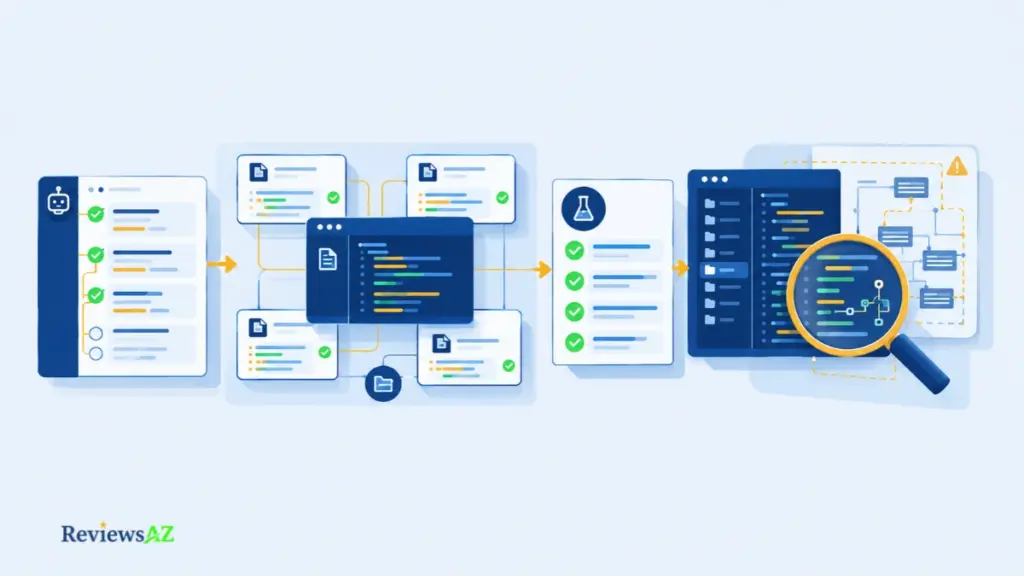
Per the docs, a spec splits a larger change into tasks, shows live status as each one runs, and can run independent tasks concurrently after building a dependency graph. Whether those tasks combine into a correct multi-file change is a different matter, and the docs don’t say.
Reviewers report single-project results. LogRocket’s walkthrough, published in August 2025 during the early launch period, centers on a small Tetris build, and HostAdvice’s review follows one property-management example. Each is a User-Reported data point from one project, not a benchmark. Refactoring quality on large codebases could not be verified.
Tests, Bug Fixes, and Iteration
Bugfix Specs frame a fix around current, expected, and unchanged behavior, which the docs pitch as a way to prevent regressions. Kiro also documents property-based tests, which run many randomly generated inputs against a requirement, plus a requirements-analysis step meant to catch gaps before design. Hooks can run a command, such as a test run, after a spec task finishes. All of this is mechanism, described by the vendor. It helps you check work; it doesn’t check the work for you.
Does “the tests passed” mean the code is correct? No. “The task ran,” “the tests passed,” and “the code is correct” are three separate claims. A task can finish with weak tests, and passing tests only cover what they check.
What Documentation Cannot Prove
Documentation can’t show code quality, speed, reliability, how large a repository Kiro handles well, or whether specs reduce hallucinations. Those claims could not be verified, so none appears here. What’s left is a narrower question: where does structure actually pay off, and where does it cost more than it returns? The list below is editorial judgment about that, not measured results.
- Multi-step feature across several files. Structure is likely worth more here, review points land before code. You still have to check each task’s diff, and confirm that the design fits your architecture.
- Bug fix with regression risk. Moderate to higher value, expected and unchanged behavior gets written down. Verify with a reproduction, plus your own regression tests.
- Small one-off edit. Lower value, the spec may cost more than the change itself. The diff is what you check.
- Large-codebase refactor. Value not established. Behavior preservation is on you, checked against your existing tests.
None of this argues against Kiro. The machinery is documented, and the projects reviewers describe are real. What no review can hand you is the result on your own repository. The bullets above map where structure tends to earn its keep and where it tends to cost more than it returns. Where a line ends in “not established,” the answer only comes from the diff.
Ease of Use and the Learning Curve
The steepest part of Kiro’s learning curve may not be the interface at all. Kiro is built on Code OSS, the open-source base of VS Code, so the editor itself should look familiar. What changes is how you plan, review, and revise work, and that takes discipline, not menu-hunting.
What Carries Over from VS Code
Kiro’s docs say the first launch can import your VS Code profile, bringing over settings, keybindings, themes, and extensions, and a manual profile export and import covers anyone who skips that step. Extensions are the one real constraint, and they get their own treatment in the integrations section below.
Where the Workflow Adds Overhead
For a feature with real unknowns, writing and reviewing a spec can be time well spent. For a typo fix or a one-line change, it’s likely ceremony: the requirements, design, and task list may take longer to read than the edit takes to make. Vibe mode, covered earlier, is the more proportionate choice for quick edits.
Reviewer impressions carry limited weight here. LogRocket’s walkthrough presents the workflow as approachable on a small project, but one project is thin evidence for a team decision, and no usability or latency figures were verified.
Rolling Kiro out to a whole team mid-sprint is where the overhead bites hardest. Familiar menus hide the real change, which is process, so onboarding ends up competing with delivery.
How to Pilot Without Disrupting a Sprint
Keep your current editor available and run a small trial:
- Pick one task class, such as a mid-sized feature, and leave urgent fixes out.
- Set a time box and a credit budget before you start.
- Check data-sharing settings before opening private code.
- Define “worth it” up front: rework avoided, review time, credits used.
Kiro IDE Extensions, Integrations, MCP, and Database Support
What breaks when you move an existing setup? For most developers the answer sits in three places: extensions, external tools, and the database layer. Kiro’s documentation covers the first two, and the third has no official support statement that this review could find.
VS Code Extensions and Open VSX
Mostly, with a caveat. Kiro is built on Code OSS and uses the Open VSX registry, so extensions available there should work, and the first-launch import can bring over your existing setup. Some VS Code Marketplace exclusives may not be available, so check the extensions you depend on before committing.
The trap is assuming a VS Code foundation carries every Marketplace extension with it. Kiro draws on Open VSX, so an extension you rely on may not be available or licensed there. Before switching:
- List the extensions you can’t work without.
- Check each one against Open VSX.
- Test debugging and language tooling on a sample repository.
- Confirm which Kiro surface you plan to use: IDE, CLI, or web.
MCP Servers and External Tools
Model Context Protocol (MCP) is a protocol that lets Kiro talk to external servers for extra tools, prompts, and resources.
Kiro’s docs describe local (stdio) and remote servers, configured in JSON at the workspace or user level. Kiro also ships as an IDE, a CLI, and a web interface, and the docs list feature support per surface, so don’t assume parity. MCP servers run code outside Kiro’s sandbox, which is why they get a section of their own on trust below.
Database and SQL Support: What Is Documented?
As far as this review found, Kiro’s docs describe no native database management interface and no supported-database matrix. That doesn’t put database work out of reach. Generating SQL or migration files is ordinary code generation and needs no live connection; a live connection would come through MCP servers or Kiro powers, which bundle MCP tools with steering files, once you configure them.
Supabase, for one, says its power lets Kiro read a schema and suggest migrations. That’s a third-party claim, and schema and migration correctness could not be verified. Treat any generated SQL as a draft for review.
Security and Data Protection: Prompts, Permissions, and MCP Safety
What does Kiro collect, and what can its agent touch? Per Kiro’s docs, Free plan and individual-subscriber content may be used for service improvement unless you opt out; enterprise content isn’t used that way. Permission rules and a command sandbox limit what the agent can do, but MCP servers need their own trust review.
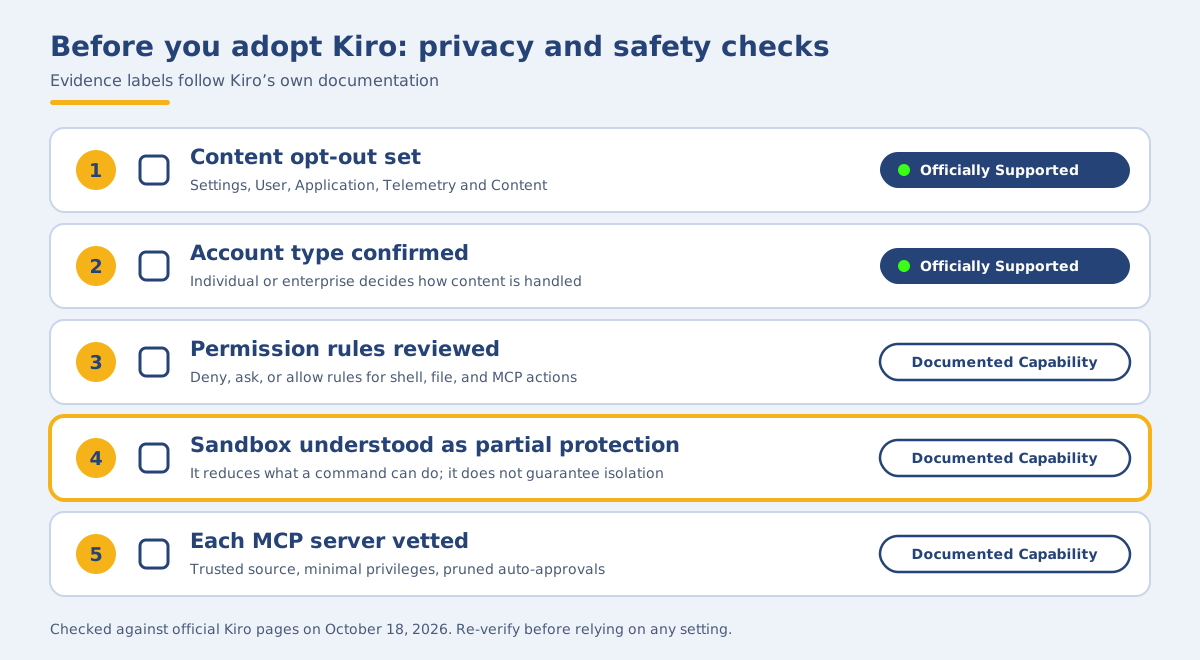
Before trusting Kiro with a real repository, five items are worth checking on your own account:
- Opt out of content use, if you are on the Free plan or an individual subscription (Officially Supported).
- Confirm your account type: individual or enterprise (Officially Supported).
- Review the permission rules for shell commands, file writes, and MCP calls (Documented Capability).
- Enable the command sandbox, and treat it as partial protection (Documented Capability).
- Vet every MCP server, and run it with minimal privileges (Documented Capability).
Content Used for Service Improvement and Opt-Outs
By default, Kiro collects content for service improvement from Free plan users and individual subscribers, per its data-protection and content-sharing rules. The docs say that can include prompts and generated code, and the uses can include model training. In the IDE, the opt-out lives under Settings → User → Application → Telemetry and Content.
Opting out isn’t the end of processing. Abuse detection applies to all users, and model-specific retention rules can apply. Free plan users face an extra layer: inputs may be stored for up to 60 days for additional abuse detection. Kiro says it won’t use that data to improve its underlying models.
Individual vs Enterprise Handling
Individual subscribers are paid users who sign in with a social login or AWS Builder ID. Enterprise users are automatically opted out, and their content isn’t used for service improvement.
That doesn’t mean nothing is logged. If an administrator enables prompt logging or daily usage reporting, that data goes to a customer-selected Amazon S3 bucket in the customer’s AWS account.
Storage and processing are also separate questions. Free plan and individual content is stored in US East (N. Virginia), while enterprise content may be stored in the profile’s region. Inference can run elsewhere, and some models use global routing.
Permission Modes, Terminal Actions, and Human Review
In the IDE, an Autopilot or Supervised toggle sets how much the agent does before asking. Beneath it, a permissions layer lets you deny, ask, or allow shell commands, file writes, and MCP calls. For those rules, a deny always wins, in any scope. The sandbox’s network rules are the exception: they’re applied in order, and the first match decides.
A local command sandbox, available in IDE 1.3 and later, adds an operating-system boundary around agent-run shell commands. Kiro’s docs describe it as reducing what a command can do, not guaranteeing isolation.
A documented control is not proof of safety. A sandbox limits what a command can do. An approval prompt gives you a place to say no. Neither shows that the generated code is correct, or that every integration is safe. Keep reviewing changes and commands yourself.
MCP Server Trust Boundaries
Third-party MCP servers run code outside Kiro’s main sandbox. The docs advise installing only from sources you trust, running servers with minimal privileges, and pruning auto-approved tools.
The sandbox can cover local stdio servers if you enable that option, but remote servers stay outside it. Treat each server like a dependency with access to your machine.
The controls are real, and so are their edges. Kiro gives you a permissions layer, a sandbox, and an opt-out; none of them decides whether to trust the tool with your code. That part stays with you.
Kiro Pricing: Plans, Credits, and How to Budget a Month
Picture two requests in one session: a quick question about a function, and a spec task. Per Kiro’s pricing page, simple prompts can use less than one credit, a spec task typically more than one, and the model you choose changes the rate again. The pair shows why credits vary, not what a typical month costs.
Prices are per user per month, before taxes, as listed on Kiro’s pricing page and checked October, 2026.
What Each Tier Includes
- Free, open-weight models and Claude Sonnet 4.5 with rate limits. No add-on packs, so it waits for the reset. It’s also the tier most worth checking against other free AI code editors if you’re testing the workflow before paying.
- Pro and Pro+, paid plans add premium models, though not every one is available in every country or region. Pro+ includes 1,000 more credits than Pro for roughly $20 more, based on the same per-credit rate.
- Enterprise, centralized billing, SSO, usage analytics, and security controls, purchased and billed through AWS. It runs on the paid tiers, so the Free plan isn’t available there. Admins can enable overages billed at month-end at $0.04 per credit, off by default.
First-time upgraders using social login or AWS Builder ID get $20 credited toward their subscription. On paid plans, add-on packs run at $0.04 per credit, from $5 for 125 credits up to $100, billed immediately. Unused add-on credits expire 12 months after purchase. Included plan credits reset each billing month and don’t roll over.
How Credits Map to Actual Work
Credits are metered to two decimals, and planning, spec refinement, task execution, and agent-prompt hooks all draw from one pool. Cost depends on request, model, and iteration, so be wary of any fixed “cost per feature.”
A credit is a unit of work, not a task. The same plan can stretch across many small prompts or a few heavy spec runs.
Common mistake: treating the monthly subscription as a fixed amount of delivered work. Two months with identical bills can produce very different amounts of finished code. Budget by the kind of work you do, not by the plan’s promise.
During a pilot, watch the usage dashboard, then pick the plan that covers a month with margin.
Where One Tier Starts Costing More Than Another
By plain arithmetic, a full allowance works out to about $0.02 per credit on every paid plan, so an add-on credit at $0.04 costs roughly double.
The break-even on Pro is straightforward. A month that regularly needs more than about 500 add-on credits – around $20 – is where Pro+ costs no more and includes 1,000 extra. That’s arithmetic, not advice; it only applies if your real usage looks like that.
The numbers on the pricing page shift, but the arithmetic doesn’t. Know your usage pattern first, then pick the tier that covers a month with margin. Everything else on the pricing page is a current number you can verify in one visit.
Pros and Cons: An Evidence-Graded Summary
Across workflow, usability, pricing, and security, one pattern repeats: Kiro’s strengths are mostly about structure and control, and its costs show up as process, credits, and review time. A long feature list isn’t evidence of better outcomes for every user.
Every item below is drawn from Kiro’s official documentation or its published pricing page unless marked otherwise. Where the judgment is mine rather than Kiro’s, or where a claim could not be verified, the item says so.
Pros: Strengths That Hold Up in Documentation
- Reviewable planning: specs produce requirements, design, and task files before code.
- Lighter paths: Quick Spec and Vibe mode cover work that doesn’t need full specs.
- Repeatable context and automation: steering files and hooks.
- Easier switching: VS Code profile import eases the move.
- Layered controls: permission rules, a command sandbox, and automatic enterprise opt-out from content collection.
- Enterprise path: SSO, centralized billing, and usage analytics are listed for enterprise accounts.
- Transparent pricing: five published tiers and a Free plan for evaluation.
Kiro’s Strongest Documented Advantage: Kiro’s strongest documented advantage is reviewable planning. Requirements, design, and task files make assumptions and proposed steps visible before implementation begins. This creates useful checkpoints for multi-step work, provided someone reviews the generated artifacts and the final code.
Cons: Limitations and Costs That Matter
- Process overhead: specs are likely ceremony for small edits (editorial judgment).
- Variable credit use: cost shifts with request, model, and iteration. Add-on credits run roughly double the plan rate (arithmetic, not a vendor claim).
- Data sharing by default: Free and individual content may be used for service improvement unless you opt out, and abuse detection continues either way.
- Extension gaps: Open VSX means some Marketplace extensions may be missing.
- Partial protection: the sandbox isn’t guaranteed isolation, and MCP servers need separate trust review.
- Unproven outcomes: code quality, speed, repository scale, and database support could not be verified. Reviewer reports on any of these are single-project (User-Reported).
Read side by side, the two lists answer one question: is the structure worth the overhead? A developer who already reviews AI output closely will feel the pros weigh heavier. A developer optimizing for speed on small changes will hear the cons louder. Neither answer travels well beyond the person making it — which is why the next section flips the question from what Kiro can do to who actually needs it.
Who Kiro Is For, and Who Should Wait
Choosing the wrong tool can cost real time even when the software is appealing. Kiro’s spec workflow rewards some projects and taxes others. These judgments are editorial, built from the documentation and costs covered above, not from measured outcomes.
Best-Fit Workflows
Kiro tends to earn its keep in four situations:
- The work is multi-step features, where written requirements and a task list give you review points before code.
- A team wants shared project context through steering files and can budget credits per user.
- You work in VS Code with extensions available on Open VSX.
- The organization needs enterprise data terms or central administration, where content isn’t used for service improvement.
Poor-Fit or Higher-Risk Workflows
The same structure works against you in five others:
- Most of your work is small edits, where a spec is likely ceremony.
- You depend on a Marketplace-only extension.
- You handle private code on a Free or individual account and haven’t reviewed the opt-out.
- Heavy spec execution would strain your credit budget.
- Nobody has time to review generated specs and code.
All of this describes a process, not a guarantee. “Production-oriented workflow” is a way of working, it doesn’t mean Kiro is production-ready for your project. Match the tool to your risk level and to how much review time your team actually has.
A Bounded Pilot Checklist
Beyond the basic pilot outlined earlier, five checks sharpen the decision:
- Decide in advance what result means adopt, extend, or drop.
- Run one comparable task in your current tool.
- Log credits used and review time per task.
- For teams, start with two or three developers, not everyone.
- Have a second developer review the first specs.
None of these checks tell you whether Kiro is better than the IDE you already use. That’s a comparison question, not a fit question, and it needs its own criteria. The next section takes it up directly.
Kiro Alternatives: Cursor, GitHub Copilot, and Augment Code
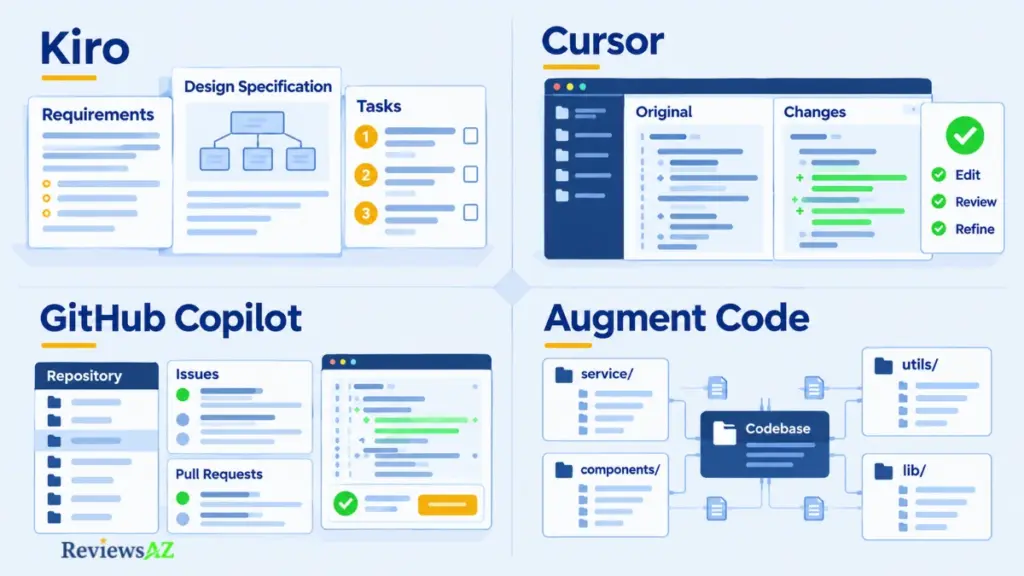
Most readers arrive at Kiro with one of these three tools already installed. Each answers the same two questions Kiro does: how work gets structured, and who stays in control. Each from a different starting point. This section points rather than settles. Each tool has its own page where the trade-offs get the space they deserve.
- Cursor: momentum inside one editor. You type a sentence, you get a diff, you approve it, you type the next one. Its docs describe an optional Plan Mode (Shift+Tab) that researches the codebase and drafts a plan first, which narrows the gap with Kiro more than a specs-vs-no-specs contrast implies. If Cursor’s workflow sounds closer to what you do, our Cursor review goes deeper on where that approach wins and where it doesn’t.
- GitHub Copilot: already where your work lives. Its advantage isn’t a feature. It’s placement. If your team runs on GitHub issues and pull requests, Copilot is already on the machine. Its plans cover agent mode, a coding agent that opens PRs from assigned issues, and a CLI, metered through premium requests that vary by model. Kiro asks you to adopt a separate IDE and a credit system. Copilot asks you to stay. If you’re leaning that way, our GitHub Copilot review goes beyond placement and into what the workflow actually delivers.
- Augment Code: when codebase context is the bottleneck. Its Context Engine promises a live understanding of code across repositories, a claim the vendor makes and this review cannot verify. Kiro’s bet runs the other way: write it down before the agent touches it. If remembering how code connects is your daily problem, Augment is the direction to look. The Augment Code vs Kiro comparison works through the trade-off in detail.
Four tools, four bets on the same question: how much structure, and where. Kiro puts it in writing. Cursor keeps it in motion. Copilot keeps it where the work already lives. Augment keeps it in the codebase itself. None wins on a feature count. It was never the question. Which bet matches the work you do most is one only your own repository can answer.
Related Posts:
Cursor vs Claude Code vs Codex vs GitHub Copilot
AI-Generated SQL Risks and Limitations
Best AI Coding Assistants for Enterprise Teams
Frequently Asked Questions About Kiro
A Kiro IDE Review should settle a few practical questions before you start a pilot. Plans, credits, and privacy settings carry real costs, while the spec workflow, hooks, and extensions decide how disruptive a switch will be. The answers repeat only what earlier sections established, with pricing and status details checked against Kiro’s official pages on October, 2026. Each is short enough to quote, and each carries a date where it matters. Check those pages again before you commit.
Does Kiro have a free plan, and what does it include?
Yes. As of October 18, 2026, Kiro’s Free plan costs $0 and includes 50 credits per month, with access to open-weight models and Claude Sonnet 4.5 under rate limits. Add-on credits aren’t available on Free, so it waits for the monthly reset once the 50 credits run out. Paid plans add premium models, though not every one is available in every country or region.
How does Kiro’s credit-based pricing work?
Paid plans include a monthly credit allowance: Pro $20 for 1,000, Pro+ $40 for 2,000, Pro Max $100 for 5,000, and Power $200 for 10,000, per user per month before taxes, as checked October 18, 2026. A credit is a unit of work, so cost varies with the request, model, and iteration. Add-on credits cost $0.04 each, and plan credits reset monthly without rolling over.
What is spec-driven development, and how is Quick Spec different?
Spec-driven development in Kiro means moving a feature through three reviewable files, requirements.md, design.md, and tasks.md, before implementation. Standard Feature Specs pause for your review between phases. Quick Spec generates all three artifacts in one pass with no approval gates, which Kiro’s docs suggest for well-understood features. Either way, you still need to review generated specs and code yourself.
What can Kiro Agent Hooks automate?
Agent Hooks are event-triggered automations that either run a shell command or hand the agent a prompt. Per the current IDE documentation, triggers include a file being saved by the agent, a tool about to run, and a spec task finishing, and some can block an action. Review each hook’s command, scope, and output, because it runs automatically every time it fires. Agent-prompt hooks also use credits.
Does Kiro support VS Code extensions from the existing Marketplace?
Largely, but not entirely. Kiro is built on Code OSS and draws extensions from the Open VSX registry, so anything available there should work, and the first-launch import can carry over your settings, keybindings, themes, and extensions. Marketplace exclusives may be missing, so list and test your must-haves before committing.
How does Kiro handle prompts, code, telemetry, and content sharing?
Per Kiro’s data-protection documentation, checked October 18, 2026, Kiro collects content for service improvement by default from Free Tier users and individual subscribers. That can include prompts and generated code, and uses can include model training. Opt out in the IDE under Settings, User, Application, Telemetry and Content. Enterprise users are automatically opted out. Opting out doesn’t end abuse detection, and Free Tier inputs can be stored for up to 60 days for it.
Is Kiro suitable for production or enterprise use, and what should a team verify first?
That depends on your controls, testing, and policy, not on a blanket yes or no. Enterprise accounts are automatically opted out of content collection, and administrators can route prompt logging to their own S3 bucket. Permission rules and a command sandbox limit agent actions, but neither guarantees correct code. Before rollout, verify account type, data settings, extensions, credit budget, MCP server trust, and who reviews generated specs and code.
Kiro IDE Review: The Final Verdict
Kiro is worth a bounded pilot, not a team-wide rollout, if your work centers on multi-step features and someone reviews the output. It suits developers who already pay the cost of code review. For small edits, or for teams without review capacity, it’s a poor default.
That judgment is editorial, not measured. The specs, hooks, and permission model are documented; whether the code they generate holds up on your repository is unverified until you run it yourself.
The Real Cost of Kiro: Kiro’s value depends on whether the benefits of reviewable planning outweigh the time spent maintaining specs, checking diffs, and managing credits. The subscription price is only part of that decision.
The pricing page tells you what a credit costs. It doesn’t tell you what the workflow costs, or whether that cost matches the process your team already runs.
Take the workflow cost first. Kiro’s real price isn’t the subscription. It’s the hours you spend reading what it wrote, and the specs you edit after they’re wrong. The cheapest plan and the priciest plan can both be worth it, or both be wasted, depending on how often your reviews catch what the agent missed.
Then take the process question. If you write design notes before you code, read diffs before you merge, and budget time to review an agent’s output, Kiro formalizes habits you already have. If those habits don’t exist, they won’t arrive with the install.
Start with a single mid-sized feature, a time box, and a credit budget one week, one feature, one reviewer. That pilot will answer the question the documentation cannot: whether the specs, the diffs, and the review time add up to work your team actually ships. Everything else you need to decide is in this review. This last piece isn’t.