Blackbox AI Review: Features, Pricing, and Who It Fits

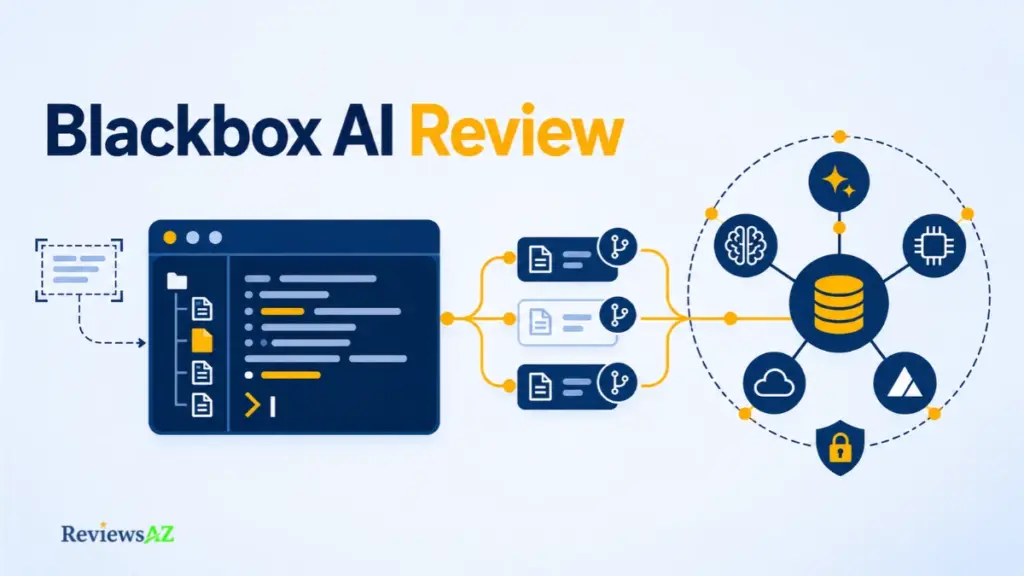
Open Blackbox’s pricing page and you will find per-token inference sold under a custom annual enterprise commitment. Open an older review and you may find an individual coding assistant with browser OCR and monthly plans. That gap helps explain why Blackbox AI review can appear to contradict one another: they may describe different product surfaces or different points in the product’s history.
Blackbox AI today spans several surfaces: a terminal CLI and an Agents API in the developer docs, an enterprise inference offer on the pricing page, and older browser and editor listings whose current status is unconfirmed. Which surface you are evaluating changes what pricing information applies, what privacy questions you should ask, and what verdict makes sense. This review separates documented capabilities from dated or disputed claims, using official pages and public reviews rather than hands-on testing. It is part of our broader coverage of AI code editors and IDEs.
Likely fit: developers and teams weighing a terminal CLI, cloud coding tasks, or per-token model routing.
Check first: any individual plan, browser extension, or OCR you were expecting. Public sources do not confirm their current status.
What Is Blackbox AI Today? Product Surfaces and Scope
Follow the public trail for Blackbox AI and you pass through four places: a Chrome Web Store listing, a VS Code install guide, a terminal CLI page, and an enterprise pricing page. Each sketches a different version of the product, and they were not published at the same time. Sorting them by source and date is the most reliable way to see what is documented today and what still needs checking.
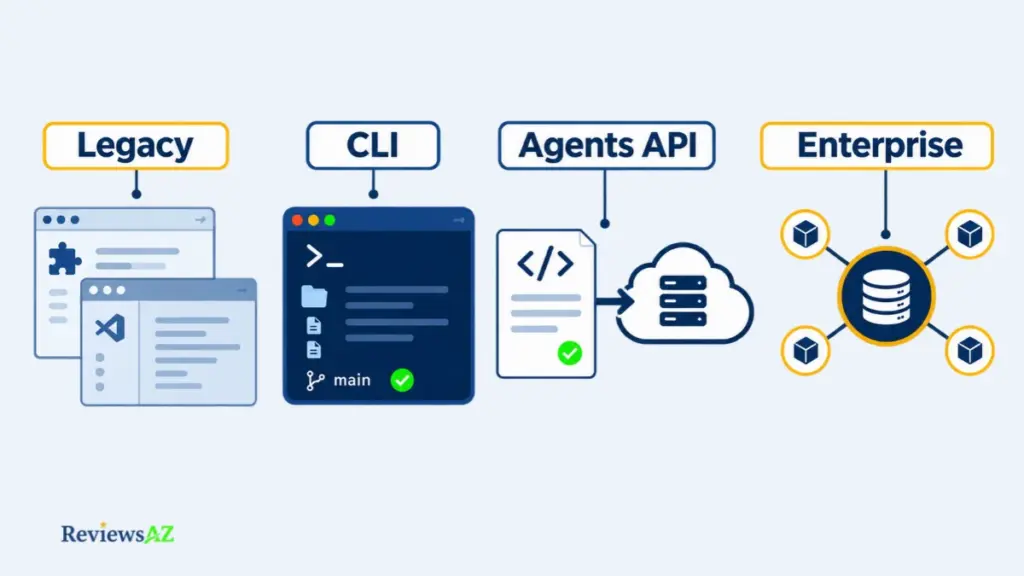
Blackbox AI is an AI coding and inference company. Its pricing page presents enterprise model routing, while its developer documentation covers a terminal CLI, an Agents API, and remote agents. Older browser and editor listings describe an individual assistant whose current status remains unconfirmed.
An AI code editor is the workspace, an assistant works inside it, and an agent takes on multi-step tasks with less step-by-step direction. The documented CLI and Agents API fit that last category.
Check the date before you trust a feature list. Blackbox’s Privacy Policy (last updated January 7, 2024) and Terms (November 9, 2024) both describe the VS Code extension as discontinued, yet an undated docs guide still walks through installing it. The Chrome extension listing, version 3.1.92, was last updated May 19, 2025. Confirm what your account can open today.
Current public positioning: enterprise inference
The pricing page presents per-token access to 300+ models under a custom annual enterprise commitment, with no platform fee or per-seat charge. It also lists dedicated deployment and contractual zero data retention. This is Blackbox describing itself, so it counts as Officially Supported: a vendor claim, not a measured result.
Developer interfaces: CLI, API, and remote agents
The developer documentation describes a terminal CLI, an Agents API for cloud coding tasks, and remote agents, so Blackbox belongs in the conversation with other AI code assistants, not only editor plug-ins. The docs establish that these capabilities exist, which makes them Documented Capability. They say less about who can use them. The pricing page lists the CLI and Agents API as enterprise surfaces, while the API authentication page calls the Agents API a Pro feature.
That mismatch is the pattern to watch for in the rest of this review. For every feature, ask who documents it, when it was written, and whether anyone outside Blackbox has shown it working.
Blackbox AI Features: CLI, Agents API, Model Routing, and OCR
Blackbox’s documentation can tell you how to start a coding task, stream its logs, and cancel it. It cannot tell you whether the task was any good. That gap runs through every feature below, and OCR sits at its thin end, backed by little more than a Chrome listing last updated in May 2025.
The evidence behind the four main features is uneven:
- BLACKBOX CLI is a Documented Capability: a terminal tool with several agent options.
- The Agents API is another: cloud coding tasks you create and monitor.
- Model routing is Officially Supported by the pricing page: one endpoint, failover, and caching across a catalog listed as 300+ models.
- OCR has only a dated Chrome listing behind it, and its current operation could not be verified.
Blackbox AI CLI: Setup, Project Work, and Agent Selection
The official guide covers an install script, a configure step, and a Blackbox API key. It then lists the agent options: Blackbox’s own models, Claude, Codex, Gemini, Goose, OpenCode, and Qwen. Native Windows supports only the Blackbox and Claude agents. The rest need WSL.
Commands take plain-language instructions, the prompt-driven style covered in our guide to what vibe coding means.
Several agents can run on the same prompt, each on its own Git branch. You can read the branches side by side, but the docs describe no built-in comparison view. Whether the parallel runs produce better code is a separate question, and the docs do not answer that either.
Agents API: tasks, logs, and GitHub work
The API reference documents a full task lifecycle. You create a task from a prompt, optionally against a GitHub repository, then poll its status, stream its logs, send a follow-up, manage sandbox files, or cancel it. A finished task can report the branch the agent pushed to.
Repository work depends on a credential you hand over. The docs have you store a GitHub personal access token with Blackbox, classic or fine-grained, with repo scope for private repositories, and a separate endpoint purges stored tokens.
Access is the open question. The authentication page and the pricing page place the Agents API on different plans, as covered earlier, so check what your own account allows before planning around it.
OCR / Image-to-Text: what the Chrome listing described
Read “Image-To-Text” literally. The Chrome Web Store listing, version 3.1.92, last updated May 19, 2025, describes pressing a shortcut, selecting an area of the screen, and pasting the extracted text. Video-to-code extraction does not appear in it, so the listing gives no reason to expect that.
Whether the feature still works in current builds, and how accurate it is, could not be verified from public sources.
One detail from this section is worth carrying forward: the GitHub token. The docs accept a fine-grained one, and GitHub lets you limit those to selected repositories, so a trial can start with a single non-sensitive repository. That is general GitHub practice, not Blackbox guidance.
What Can Developers Actually Use Blackbox AI For?
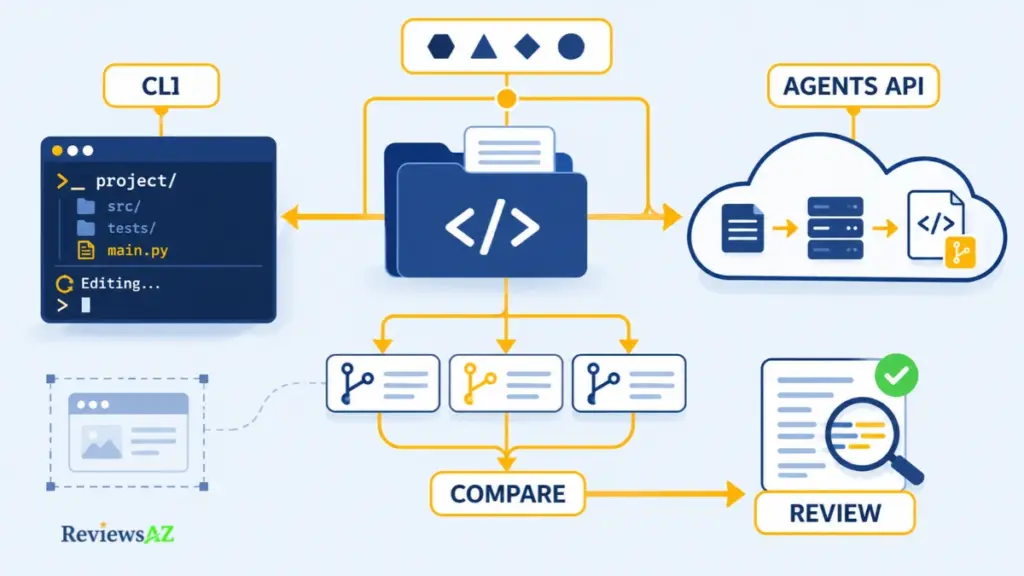
An AI coding agent can hand you a patch quickly. Deciding whether it is safe to merge takes longer. Blackbox’s documentation describes two ways to give it work: the CLI operates on local project files, and the Agents API runs remote tasks against a GitHub repository. If Python-specific editor support is your priority, an AI code editor for Python may be a better starting point, since this review does not evaluate language-specific behavior. Before you connect a repository, check which interface your account can access.
- Local project work in the CLI: the guide describes analyzing a project, creating or editing files, and debugging from the terminal, using plain-language instructions and the agent provider you configure.
- Remote GitHub tasks: the API reference covers submitting a cloud task against a repository, following its status and logs, continuing it with a follow-up, or cancelling it. It needs a GitHub token stored with Blackbox.
- Parallel comparison: the CLI docs describe a multi-agent command that gives several agents the same prompt, each on its own Git branch. That yields competing implementations to compare, but it does not show that one is more accurate or that running them together saves time.
- Model routing: the pricing page advertises one endpoint across 300+ models, with failover and caching, billed per token. It does not say which models a given account can reach.
- Screen-text capture: the Chrome listing, last updated May 19, 2025, describes extracting text from a selected screen region. Whether it still works today is unconfirmed.
Where the review happens may matter more than the feature list. The CLI runs in your terminal session, so you can read the work as it unfolds, though multi-agent mode leaves one branch per agent to compare afterward. The Agents API hands back a branch and logs, so all of the reading comes later. On paper, that makes the CLI a fit for developers who want to stay in the loop, and the API a fit for those who prefer to delegate and review afterward. Anyone who needs a complete browser-based workspace rather than a terminal agent should also compare an AI IDE for web development.
Blackbox AI IDE Integration: VS Code, Zed, and Browser Extension Status
Three kinds of editor support are in play for Blackbox: a CLI wired into an editor through a protocol, a native extension, and a browser add-on. Each asks something different of you. The documentation describes the first for Zed, the sources disagree about the second for VS Code, and the third survives as a Chrome listing with an older release date. If you expect an assistant to fit the environment you already use, those differences decide how much setup you are taking on.
Zed: a documented CLI integration through ACP
The CLI documentation supports the Agent Client Protocol, and a dedicated page covers connecting it to Zed. As described there, you install the CLI, add it as a custom external agent in Zed’s settings with your Blackbox API key, then select it and authenticate. The documented configuration launches the CLI with a flag named –experimental-acp. That is the docs’ own wording, and it does not say how stable the integration is.
This is a configuration task rather than a marketplace install. The docs reviewed name Zed and no other editor, so support in any other editor is unconfirmed.
VS Code and browser extension status: conflicting and dated evidence
VS Code is where the sources split. Blackbox’s 2024 Privacy Policy and Terms both describe the extension as discontinued, yet an undated install guide in the docs still explains how to add it. On the other side, G2 carries a February 2026 user review describing direct VS Code integration. That is User-Reported evidence, and it cannot show that a maintained Marketplace release exists. VS Code support stays Could Not Be Verified until someone checks a current listing.
The Chrome extension is a separate case. Its listing is still published, but the version shown dates from May 2025, and a published page does not show that the OCR feature described earlier still works.
If your editor is neither Zed nor VS Code, the CLI in its own terminal window is the route the docs describe, so the practical question is whether you are comfortable running an agent beside your editor instead of inside it. And if a maintained native extension is a hard requirement, get its current status confirmed before you pay for anything.
Blackbox AI Pricing: Enterprise Commitments, Token Rates, and Individual Plan Unknowns
Blackbox’s pricing page opens with a contract. There is no plan grid, no monthly price, and no free tier to click. Anyone who came looking for a subscription fee will not find one there.
The public pricing page shows a single offer: a custom annual Enterprise commitment with per-model token rates. In plain terms:
- Commitment: you agree an annual spend through a purchase order, and your team’s token usage draws the balance down.
- Rates: each model has its own price per million tokens, with input, output, and cached reads billed separately.
- Fees: the page states no platform fee and no per-seat charge, and says the contract specifies how seats are treated.
- Expiry: unused commitment expires at the end of the billing period, with alerts at 75% and 90% of spend.
Those four points are Officially Supported, since they come from Blackbox’s own page. Individual, monthly, and free plans do not appear there, so their status is Could Not Be Verified. They may exist behind a login or in another purchase flow.
No per-seat charge does not mean no minimum. The annual commitment is the minimum, and the alerts only warn you as the balance falls. They do not extend the expiry date. Overspending is one risk, and under-using is the other. Older reviews that list monthly tiers describe something this page no longer shows, so treat those prices as dated. If you want a plan with a price you can read today, our list of the best free AI code editors is a better starting point.
Before you contact sales, estimate how many tokens your team would use in a month. The commitment is sized on that guess, and the unused part expires, so it decides whether the contract works for you. Then ask for four things in writing: the minimum commitment, the rates for the models you plan to use, the seat terms, and which plan includes the Agents API. Its documentation mentions Pro, while the pricing page lists it under Enterprise.
Is Blackbox AI Legit? Public Reviews, Billing, and Trust Signals
At the time of writing, Trustpilot shows Blackbox about 2.5 out of 5 from 104 reviews. G2 shows 4.5 out of 5 from 17, and SoftwareReviews shows 8.6 out of 10 from 142. Each platform has its own scale, reviewer pool, and scoring method, so the three figures cannot be set side by side or averaged.
What they can show is where complaints gather. On Trustpilot, reviewers report charges higher than advertised, charges after a trial was cancelled, paid access that did not work, and support that was hard to reach. Praise appears too, mostly from students and builders. These are User-Reported accounts from people who chose to post, and none has been checked against billing records.
Read complaints as questions. A cluster of self-selected reviews is a reason to question the vendor about billing. It cannot prove a scam, and no single score speaks for every customer.
The higher scores need the same caution. G2’s profile is claimed by Blackbox, its 17 reviews are a small sample made up mostly of small businesses and reviewers based in Asia, and several carry G2’s incentivized label. SoftwareReviews reports a composite score built on its own method.
Blackbox’s own billing help says a subscription can be cancelled in account settings and advises doing it at least 24 hours before renewal. That is the company’s stated position, not proof of how any single case was handled. The current pricing page lists only an enterprise contract, so a complaint may refer to a plan you cannot see today. Before you pay, ask which plan it concerns, then get four answers in writing: the plan terms, the billing cycle, the cancellation and refund rules, and a named support route. Keep your cancellation confirmation.
Is Blackbox AI Safe for Private Code? ZDR and Data Handling
Blackbox’s blog describes zero data retention as the default on every plan. Its API documentation says that when an endpoint’s policy is unclear, Blackbox treats the endpoint as one that retains data and trains on it. Both statements come from Blackbox, and they describe different scopes.
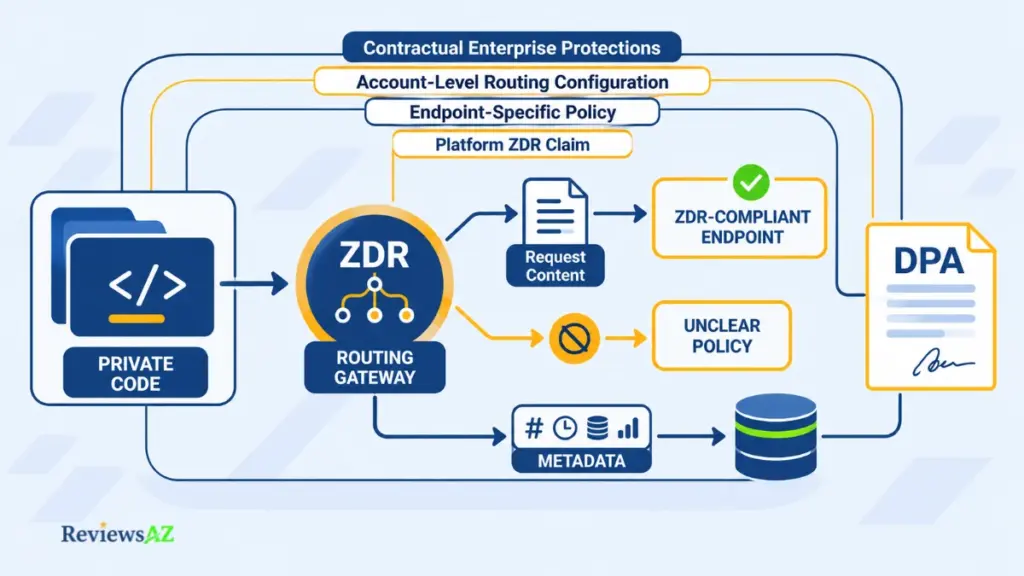
Add the pricing page and two legal pages from 2024, and you hold several statements about your code, each written at a different time for a different purpose. Here is what each one covers.
- Homepage and vendor blog (Officially Supported): encryption and zero data retention are advertised. The blog calls it a platform default on every plan and says requests are rejected when no route can meet the standard. It also says operational records are kept, such as request IDs, timestamps, model names, token counts, and costs.
- Pricing page (Officially Supported): contractual ZDR with a DPA, PII removal before closed models, data residency, SSO, SCIM, RBAC, audit logs, and dedicated deployment all appear under the Enterprise offer. The page does not say whether any other plan receives them.
- API documentation (Documented Capability): the Zero Data Retention documentation says a provider’s general policy can differ from an endpoint’s. A per-request ZDR option limits routing to endpoints that have a ZDR policy. If you leave it out, enforcement depends on whether ZDR is enabled for your account. By Blackbox’s definition, in-memory prompt caching does not count as retention.
- Privacy Policy (last updated January 7, 2024): personal data is kept while you have access and as needed for legal purposes, and it is processed in the United States. Whether newer terms supersede it is unconfirmed.
- Terms (last updated November 9, 2024): Blackbox claims no rights in your results, and you keep your code. Content you share through Blackbox spaces, code included, is licensed to Blackbox, and results carry no accuracy guarantee. Which of these applies to code sent through the CLI or API could not be confirmed.
- Your contract: the DPA and the quoted terms record what Blackbox agrees to for your account, so request them before relying on any page above.
Do not treat a general ZDR promise as proof that every route and every kind of data gets the same protection. The sources describe different scopes, and none of them says which one applies to your account. Ask Blackbox to confirm four things in writing: the DPA, the endpoint policy for the model you plan to use, which operational records it keeps, and how caching is handled. Until you hold those answers, keep proprietary code out of any evaluation and use non-sensitive code instead.
Blackbox AI Review: Pros and Cons That Hold Up to the Evidence
Blackbox’s strengths fit on a documentation page. Its weaknesses are the questions that page leaves open. Every item below traces back to a section above, so this list sorts what the sources show from what they do not.
Strengths Blackbox Documents Well
- A terminal CLI with parallel agents. The documentation covers installation, a Blackbox API key, and a choice of agents. Multi-agent mode runs several agents on one prompt, each on its own Git branch, so you get separate outputs to compare. Nothing shows that any one of them is better.
- A visible task trail. Agents API tasks carry a status, logs, sandbox files, and a pushed branch, and they can be continued or cancelled. Judging the result is still your job.
- One endpoint, many models. Blackbox cites 300+ models behind a single endpoint with failover and caching. The count is its own, and the pricing page does not say which models your account can reach.
- Published enterprise controls. SSO, SCIM, RBAC, audit logs, and dedicated deployment are listed under Enterprise, and the API documentation adds a per-request option that limits routing to endpoints with a ZDR policy.
Gaps to Close Before You Pay
- No individual plan on the public page. Whether a monthly or free plan exists elsewhere is unconfirmed.
- A commitment that can expire. Unused balance lapses at the end of the billing period, and the spend alerts only warn you.
- Pages that disagree on the Agents API. One documentation page calls it a Pro feature, while the pricing page lists it under Enterprise.
- Data terms that depend on the route. ZDR policy can differ by endpoint, and the Privacy Policy and Terms date from 2024.
- Unclear VS Code and OCR status. The Privacy Policy calls the VS Code extension discontinued, an undated install guide still describes it, and the Chrome listing that mentions OCR was last updated in May 2025.
- No independent quality evidence. The sources reviewed here contain no reproducible benchmark, only publisher and user accounts. That describes the evidence, not the output.
Look at what separates the two lists. Blackbox can close most of the gaps in writing: the plan, the Agents API entitlement, the data terms, the extension’s status. The last one is different, because only your own repository can show whether the output holds up. The next section sorts readers by which gaps they can live with.
Who Should Use Blackbox AI, and Who Should Look Elsewhere?
A terminal-only developer can shrug at the unclear VS Code status. A team that needs private code in the loop cannot shrug at the data terms.
Terminal-first developers. They can set the editor question aside. Access is the open issue, and it depends on the surface. The pricing page lists the CLI and Agents API as Enterprise surfaces, while one documentation page calls the Agents API a Pro feature.
Teams routing work across models. One endpoint gives access to 300+ models, billed per token. The open question is the commitment: whether it can be sized for your team, and what a quiet month does to the unused balance.
Enterprise buyers. This is the closest match to what Blackbox publishes. Ask which listed controls your contract includes, then review the DPA, each model’s endpoint policy, and the procurement route.
Individuals who want a monthly IDE plan. This is not yet a clear fit. The public page shows no individual or monthly plan, and VS Code and OCR support could not be confirmed.
Sensitive workloads. Wait for settled contract and endpoint terms. ZDR claims differ by source and endpoint, and the legal pages date from 2024.
Your workflow should place you in a group. Enterprise-led marketing alone does not make you an enterprise buyer. If you fit more than one group, the stricter one decides.
How to Evaluate Blackbox AI Before You Commit
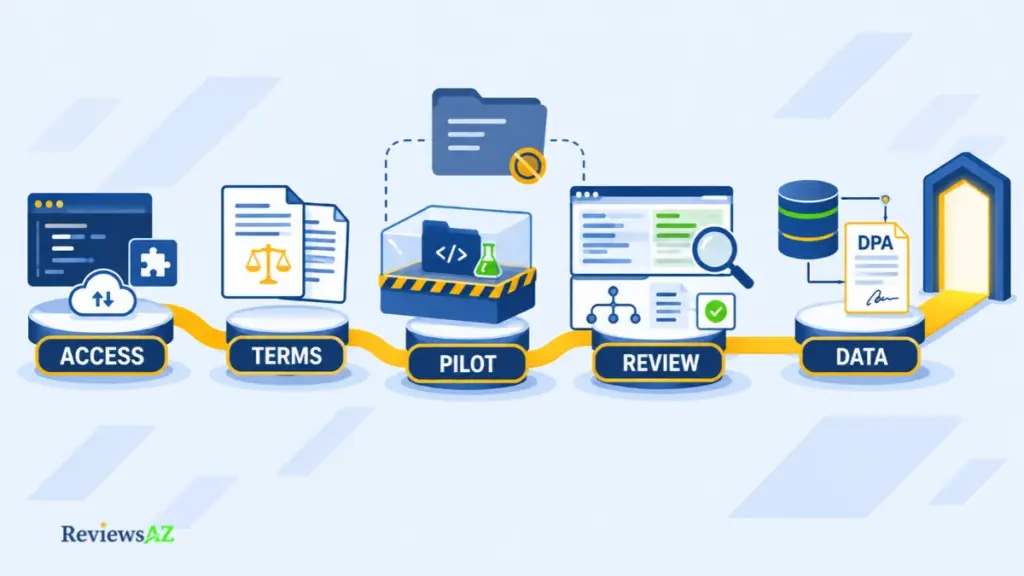
A pilot can go perfectly and still settle nothing. The agent finishes, the tests pass, and you still do not know whether your account includes that surface, what the invoice will look like, or where your prompts went. The five checks below cover all three, in order.
- Identify the surface and confirm access. Decide whether you want the CLI, the Agents API, an editor extension, or routed model access. Then confirm your account can reach it. For the Agents API, ask which plan applies, since the docs and the pricing page differ. An older extension listing alone leaves availability unconfirmed.
- Match the written terms to the public page. Place your quote or plan confirmation beside the pricing page and compare rates, seat treatment, expiry, and the cancellation route. Any difference is a question for sales before you sign. If you expected an individual plan, ask whether one exists for your account.
- Run the pilot on a throwaway repository. Client code, credentials, and proprietary repositories stay out of this first run. Write your acceptance criteria before the agent starts, such as which tests must pass. When the pilot ends, revoke any GitHub token it used.
- Inspect what the agent did. Read the diff and the logs, run the tests yourself, and open any branch it pushed. Look for dependencies it added. Then run the same task again and see how much the result changes. Judge both runs against the criteria you wrote down in advance.
- Make private code a separate decision. Keep the pilot on the throwaway repository until you hold the current DPA. You also need the endpoint data policy for each model you plan to use, and the deletion terms for what you send.
A failed check is an answer, and it points somewhere. Whatever stopped you becomes your requirement: a price you can read, an editor you already use, a data term in writing. Carry it into the alternatives in the next section, and hold each one to the same five checks.
Blackbox AI Alternatives by Workflow: Replit, Copilot, Cursor, and Agent Tools
Blackbox AI sits between tool categories, so the products it gets compared with often do a different job. Name the job you would be replacing first: building an app, assisting inside your editor, or running an agent on a repository.
- Replit, for building an app from a prompt. If you want a hosted app without local setup, the Replit AI app-building workflow starts from a browser project rather than a terminal or an API.
- GitHub Copilot or Cursor, for help inside the editor. Copilot works inside IDEs you already use (GitHub Copilot review), while Cursor is an editor built around AI (Cursor review). Both live in the editor, which is where Blackbox’s VS Code status is still unresolved. A negotiated model-access contract and an editor plan are different purchases, so compare editor support before price.
- Augment Code, for agent-style repository work. If the agent itself is what interests you, the Augment Code review for agent-style coding workflows looks at that angle.
If Replit is on your shortlist, Blackbox AI compared with Replit sets the two side by side. None of these covers everything Blackbox lists on its pages, so replacing one piece often means pairing two tools, an editor assistant and a terminal agent. That is a reasonable answer. Each added tool brings its own setup, billing, and data terms, which means the cost and data questions get asked twice.
Related Posts:
JetBrains AI Assistant Review
Kiro IDE Review
Frequently Asked Questions
Some questions only show up after the feature tour, when you are about to pay: can it build a whole project, can you bring your own model accounts, and what happens if you cancel? This Blackbox AI review ends with five answers drawn from Blackbox’s own pages.
Does Blackbox AI offer a free plan or a personal subscription?
The public pricing page shows only a custom annual Enterprise commitment, with no free, monthly, or individual plan. Blackbox’s billing support documentation, however, describes monthly and annual subscriptions and a 90-day trial. It does not say who is eligible today, so neither source settles the question. Check the offer inside your own account, and ask Blackbox which plan your use would fall under.
How do I cancel Blackbox AI and ask for a refund?
Blackbox’s billing support says you can cancel under Manage Subscriptions in account settings, and it advises doing so at least 24 hours before renewal. It also says refunds are assessed case by case and unused paid credits are generally non-refundable. Those rules describe subscriptions. An Enterprise purchase-order commitment follows its contract, so read the cancellation and expiry terms there. Keep your confirmation.
Can Blackbox CLI build a complete application?
The CLI documentation describes creating whole projects from scratch, including web apps, API backends, database connections, and authentication, along with development and deployment configuration. That is what the tool is designed to attempt. No public source reviewed here shows how often the result runs without fixes, so treat the output as a first draft. Confirm your account can use the CLI before you plan around it.
Which AI models can I use through Blackbox AI?
Blackbox says its catalog holds 300+ models behind one endpoint, with a separate per-million-token rate for each. The pricing page does not say which of them your account can reach, and data handling can differ by model endpoint. Before you commit, ask for the models your contract includes, the rate for each, and the endpoint data policy for every one you plan to use.
Can I connect my own OpenAI, Anthropic, or Google account?
Blackbox’s Enterprise Router documentation says you can connect existing OpenAI, Anthropic, or Google accounts, keep your negotiated provider rates, and still use routing, failover, and caching, with usage billed by your provider. That describes the Enterprise Router specifically, so do not assume it applies to every plan. Ask whether it changes how an annual commitment and its expiry work.
Blackbox AI Review Verdict: Is It Worth It for Your Workflow?
Blackbox AI is easier to recommend as an experiment than as a default for a whole team. The public record shows tools worth a look, but what you get from them depends on your account, your contract, and the repository you point them at.
- Terminal-first developers: your own repository decides this one. If the CLI closes a gap your current tools leave open and its diffs hold up against your acceptance criteria, it has earned a place.
- Enterprise teams: the paperwork decides it. Routing and governance controls justify a commitment only once the quote, your access, and the data terms are in writing.
- Individuals who want a monthly plan: wait for Blackbox’s answer. Until it confirms a plan and editor support for your account, a tool you can sign up for today is the lower-risk choice.
Start by asking Blackbox in writing about your plan, models, and data terms, then run the pilot if the answer comes back clear. Walking away is a legitimate outcome too. If setup, billing questions, and diff review cost more time than the tool saves, you have your answer, and it costs far less than learning it after you have signed.