Augment Code vs Kiro: Workflows, Pricing, Security, Review Quality, and Best Fit

Both bring agentic capabilities into software development, and that overlap is where an Augment Code vs Kiro decision usually goes wrong. They differ in what organizes the work.
Kiro, AWS’s agentic IDE, centers its workflow on written requirements, a design, and a task list before code. Augment Code is built around repository context, delivered through editor extensions and a command-line tool. The old plugin-versus-IDE shortcut has worn thin, since Kiro now documents CLI and web surfaces too.
Money adds a second trap: Augment publishes flat team plans with pooled usage, while Kiro publishes per-user credit tiers, so the headline numbers count different things. And the ground is moving: on October 8, Augment said it had agreed to sell select assets, including Cosmos, Auggie CLI, and the Code Context Engine, to Harness, so older write-ups may describe a different lineup.
Within the wider field of AI code editors and IDEs, the useful question is narrower than “which agent is smarter.” Should codebase context or written specifications organize your team’s work?
You get the documented differences, a price snapshot checked October, 2026, a clear line between documented and merely claimed, and a pilot to run on your own repository. Neither product was tested here, so no winner is declared; the goal is a choice you can defend.
Augment Code vs Kiro at a Glance
- Best for (Augment Code): teams whose engineering work leans on codebase context and who want to start with the editor extensions and CLI they already use.
- Best for (Kiro): teams that want requirements, design, and tasks written down before implementation, with steering files, hooks, and one agent across the surfaces they use.
- Biggest strength (Augment Code): the Context Engine paired with IDE clients and the Auggie CLI. Augment has agreed to sell Cosmos, Auggie CLI, and the Context Engine to Harness, so confirm which company provides them.
- Biggest strength (Kiro): reviewable requirement, design, and task files, plus a shared agent across IDE, CLI, Web, and Mobile. Mobile is marked Preview, and feature support differs by surface.
- Biggest limitation: the public evidence does not show which tool writes better code or cuts review effort on your repository.
- Key decision: is your constraint context across an existing codebase, or making the plan explicit before anyone writes code?
- Billing unit: Augment sells flat team plans with pooled usage; Kiro bills per user in credits. Current prices and their verification date sit in the pricing section.
- One caveat: nobody ran a matched test, and the units differ, so the smaller monthly number is not automatically the cheaper plan.
Comparison Criteria: What Should Decide Between Augment Code and Kiro?
Overlapping agent labels hide workflow and cost differences, so compare six criteria: default workflow, documented surfaces, context or spec artifacts, integrations, billing unit, and controls. Augment Code and Kiro differ on most of these in ways that shape daily work and review load.
| Criterion | Augment Code | Kiro |
|---|---|---|
| Default workflow | Repository context guides the agent | Requirements, design, and tasks before code; Vibe mode also available |
| Surfaces | VS Code, JetBrains, Vim and Neovim, plus Auggie CLI and Cosmos | IDE, CLI, Web, Mobile; Mobile marked Preview |
| Context or specs | Context Engine retrieval | requirements.md, design.md, tasks.md, steering files |
| Integrations | MCP; some cross-repository features are Enterprise-only | MCP servers, hooks, Open VSX extensions |
| Billing unit | Flat team plan with pooled usage | Per-user credit tiers |
| Controls | Vendor-stated certifications; confirm scope | Permission rules, optional command sandbox, MCP trust review |
Rank the six by how much each constrains your team, then score both tools on only the top two or three of them.
Both sit in the AI code editor category, but the label says little about the adoption model: what organizes the work, what a seat or credit costs, and how much review load lands on your team.
Common mistake: scoring two agents on one feature list. A JetBrains team and a team ready to write specs are answering different questions, so name the workflow and surface first.
How Augment Code Organizes Work Across IDEs, CLI, and Cosmos
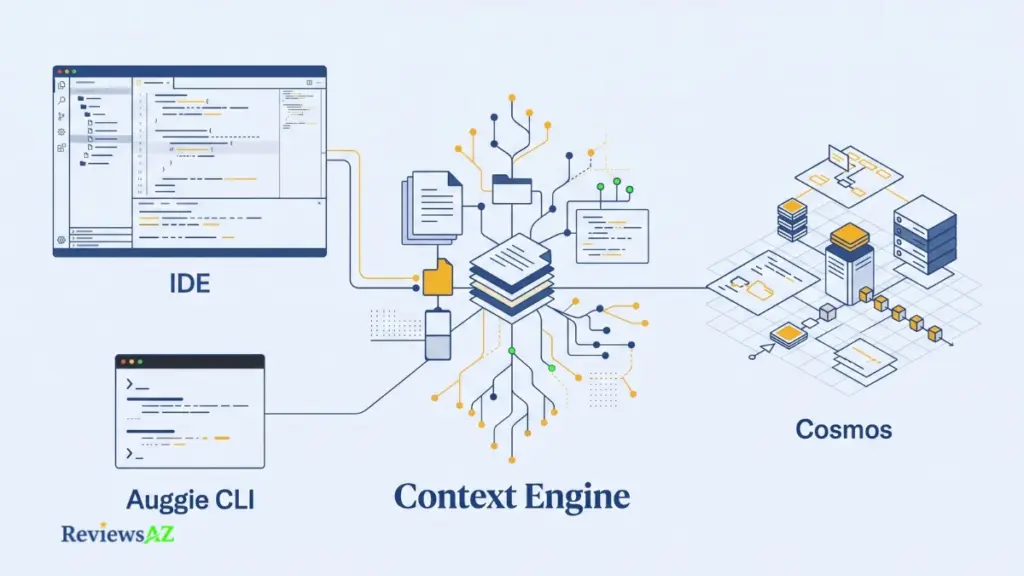
Augment Code’s documented setup brings together editor extensions, a command-line interface, and Cosmos, its cloud-based environment for agent workflows. The extensions work inside VS Code, JetBrains, Vim, and Neovim, while Auggie CLI brings the agent into a terminal session. Cosmos adds cloud-hosted agent sessions and connected engineering workflows. The important distinction is what each surface lets your team do, and what still needs to be verified before relying on it. The Augment Code review covers the product in more detail; here, the focus is how these surfaces fit into existing engineering work.
- Context Engine and Repository Context. Augment describes the Context Engine as the component that indexes your codebase and keeps that index current as the code changes. Its clients also list codebase indexing and workspace context among their setup features, though support is not identical across editors. JetBrains, for example, lacks the extra source folders option. Claims that the engine understands large repositories better or responds faster remain vendor positioning; no independent, same-task test establishing those advantages was found. An index explains how context is gathered, but it does not prove that the right files will be retrieved or that a task involving a large codebase will succeed. Test file retrieval and change quality on representative work from your own repository, and leave speed claims aside until a fair latency test is available.
- IDE Clients and Terminal Workflows. The editor extensions support VS Code, JetBrains IDEs, Vim, and Neovim, allowing developers to work with the agent and chat in an editor they already use. That makes Augment worth evaluating for teams working across different editors without requiring everyone to switch environments. Auggie CLI provides another route, bringing the agent and chat into a terminal session. Before relying on either option, check whether its features cover your actual editor or shell workflow. Feature parity should not be assumed: code completions became Enterprise-only after support for other plans ended on March 31, 2026, and some features remain in beta on certain clients.
- Cosmos and SDLC Automation. Cosmos provides the cloud side of the workflow, with agent sessions that users can launch and monitor through the web on Augment-managed compute. Its documented capabilities include Experts, which are reusable agent personas; integrations with GitHub, Slack, and Linear; and webhooks that trigger Experts in response to external events. These capabilities make Cosmos relevant to teams looking to connect agent sessions with broader software development lifecycle workflows.
Taken together, Augment’s editor extensions, CLI, and cloud environment offer different ways to incorporate agent-assisted work into an engineering team’s existing processes. Their availability and documented capabilities describe how the system is organized, not how well it will perform on a particular codebase. The practical next step is to verify client-specific limitations, test repository context and workflow fit on representative tasks, and clarify the relevant support arrangements before committing to the platform.
How Kiro Organizes Work Across IDE, CLI, Web, and Mobile
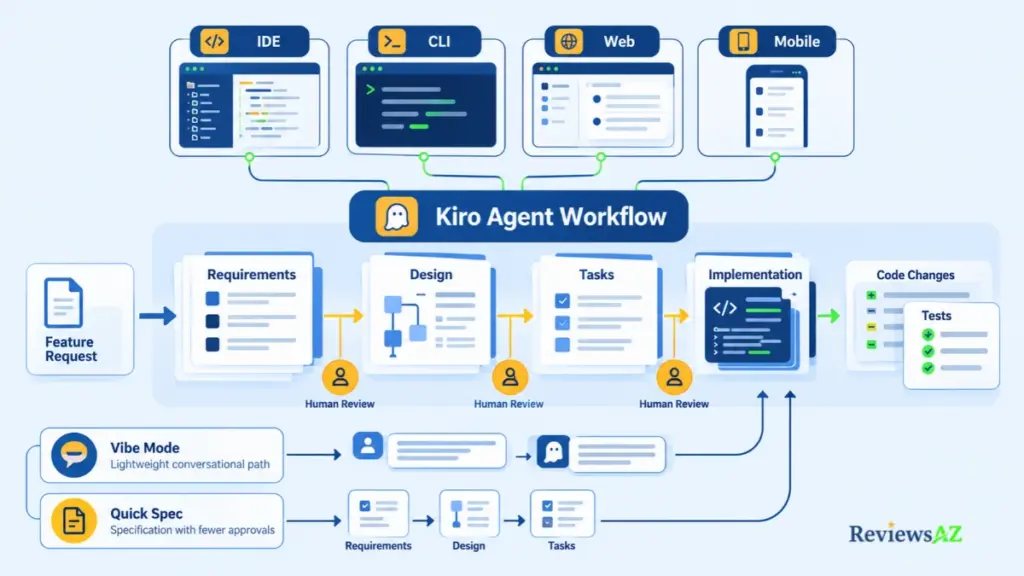
Consider a request to add CSV export to a reporting page. With a standard Kiro Feature Spec, the agent starts by drafting requirements, then a design and a task list. You review each stage before implementation begins. Kiro, AWS’s agentic IDE, is built around spec-driven development, with a lighter Vibe mode for quick work. Its full feature set is covered in the Kiro IDE review.
- Specs and the Requirements, Design, and Tasks Workflow. Kiro turns the initial request into three written artifacts:
requirements.md, where requirements are expressed using EARS notation;design.md, which describes the proposed design; andtasks.md, which breaks the work into implementation steps. You can check the assumptions and acceptance criteria in the requirements, confirm that the design fits your stack, and adjust the task list before code is written. There are two ways to build a spec: Requirements-First derives the design from the expected behavior, while Design-First starts with the architecture and derives the requirements from it. In both cases, the files live in.kiro/specs, allowing reviewers to trace tasks back to the requirements they came from. That record is useful, but it needs maintenance: when requirements change, the design and tasks may need updating too. - Steering, Hooks, and Permissions. Steering files preserve project context, while hooks run a command or prompt when a defined event occurs. Permissions govern shell commands, file writes, and MCP calls. Kiro resolves conflicting rules by applying deny over ask, and ask over allow, across the relevant scopes. These controls help teams define what the agent may do, but they do not establish that the resulting code is correct. The changes still need to be checked and tested.
- Shared Harness and Surface-Specific Limits. Kiro’s IDE, CLI, Web, and Mobile surfaces use the same underlying agent harness, and configuration travels with the repository. The IDE and CLI run it on your machine by default and can also attach to cloud sessions, while Web and Mobile run it in a managed cloud sandbox. The experience is not identical across all four surfaces, though. Feature Specs and Bugfix Specs are available in the IDE, CLI, and Web, but not Mobile; Analyze Requirements is available only in the IDE and CLI. Web is limited to paid plans, and Mobile is marked Preview. Check the current feature support for the surface you intend to use rather than assuming that everything available in the IDE is available elsewhere.
- Kiro Spec Workflows Versus Vibe Mode. Not every task needs the full specification process. Vibe mode is conversational and does not save artifacts to
.kiro/specs. Quick Spec takes a middle route: it still generates the requirements, design, and task files, but without approval gates. The choice depends on the work involved. A one-line fix rarely needs a full spec, while a feature spanning several files may benefit from written requirements and review points before implementation.
Kiro gives teams several ways to work with the same underlying agent, but the right approach depends on the size and risk of the task, the need for a written record, and the capabilities available on each surface. Specs provide a structure for reviewing intent before code is written; Vibe mode offers a lighter alternative for quick work. Neither removes the need to review the changes, run the relevant tests, and confirm that the implementation meets the original requirements.
Augment Code vs Kiro: Key Workflow Differences
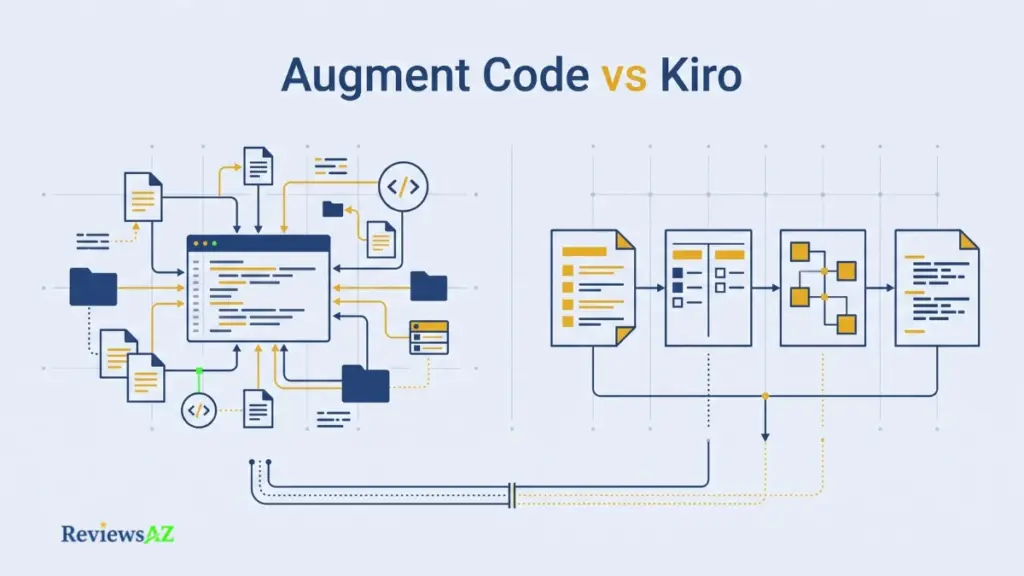
In an Augment Code vs Kiro decision, the useful question is not which of the many AI coding agents is more agentic; both act on your code. It is what organizes the work. Augment Code leans on repository context, Kiro on written specs.
Do not shrink either product to a label. Augment is not just inline autocomplete and Kiro is not just free-form chat; both document broader agent features, so describe each by the mechanisms its documentation lists.
- Default organization: Kiro’s free-form chat mode is close to what many call vibe coding, but its headline workflow is written specs; Augment starts from repository context. Specs pay off when scope is contested and drag on small, clear tasks.
- Context versus artifacts: Augment retrieves context through its Context Engine index; Kiro keeps intent in files you can read and edit. One helps when finding the right code is hard, the other when agreeing on what to build is.
- Reviewable output: Kiro puts requirements, design, and tasks in front of reviewers before code; Augment’s Cosmos sessions can be monitored and resumed. Either way the diff needs a reviewer, so decide whether attention is better spent before the code or after.
- Surfaces: Augment lists VS Code, JetBrains, Vim and Neovim, Auggie CLI, and Cosmos; Kiro is a Code OSS IDE plus CLI, Web, and Mobile, with capabilities varying by surface. A team tied to one editor should start there.
- Integrations: both document MCP servers, and Augment’s client matrix lists hooks too. Cosmos adds GitHub, Slack, and Linear; Kiro adds Open VSX extensions. Choose by the systems you already run.
- Billing units: Augment sells flat team plans with pooled usage; Kiro’s paid plans bill per user in credits. Seat count and usage pattern decide which hurts less, so price your own team.
- Governance: Kiro documents rule-based permissions and an optional local command sandbox; Augment’s published controls include vendor-stated certifications and Enterprise-gated features such as SSO and customer-managed keys. Ask for the documents behind each claim.
- Evidence still needed: code quality, latency, and review load remain unproven for both tools until compared on the same tasks.
What decides a purchase is not in the documentation: whether context retrieval holds up on your repository, and whether specs reduce rework or just add steps.
Codebase Context and Review Quality: What Can Be Proven?
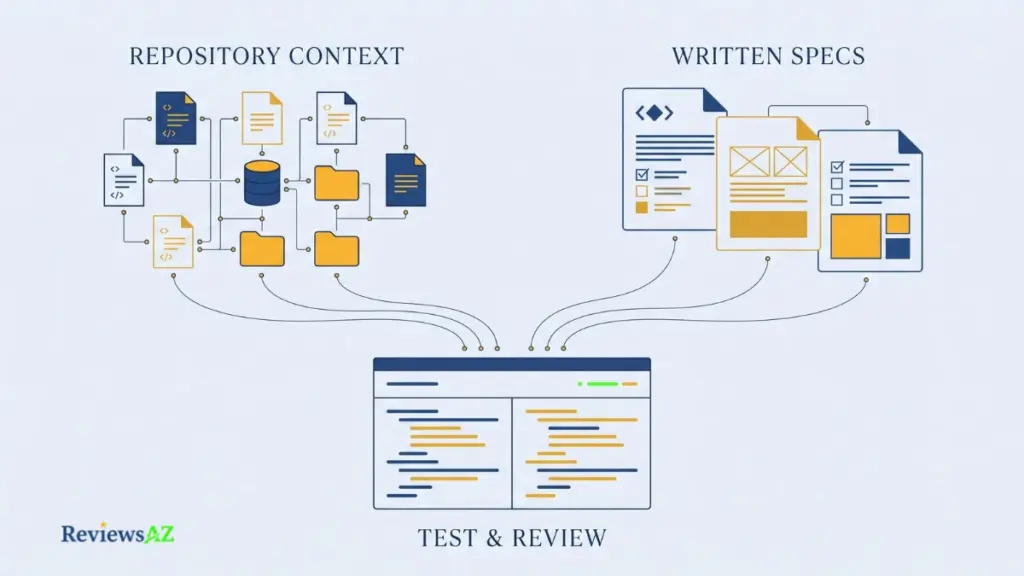
What would show that an agent understands your repository, or that its changes are easy to review? A feature list cannot. Documentation proves a mechanism exists, a vendor can state what it claims, and neither proves the outcome on your code.
| Criterion | Augment Code | Kiro |
|---|---|---|
| Mechanism | Context Engine index and a GitHub pull request reviewer | Specs, tasks, Bugfix Specs, and hooks |
| Evidence available | Documentation and a vendor-run benchmark | Documentation and single-project user reports |
| What to test | File retrieval and comment usefulness on your repository | Spec accuracy, task diffs, and test results on your repository |
Context Mechanisms Versus Context Outcomes
For codebase context, Augment documents a Context Engine that indexes the codebase and keeps that index current. Kiro documents steering files and specs that put project context in plain files. Those are mechanisms. Whether the right files reach the model on a given task is an outcome.
Indexing is a prerequisite, not proof. A larger index or context window does not guarantee the right files are retrieved or that a change is safe. What counts is correct file retrieval, tests, accepted changes, manual corrections, review time, and defects found after merge, measured on the same task.
Augment’s published comparison of review tools ranked its own product first. The vendor ran it, so treat it as a claim to reproduce, not independent evidence.
Multi-File Edits and Validation
Kiro’s documentation describes a dependency graph over tasks, with independent tasks grouped into waves, plus Bugfix Specs that record current, expected, and unchanged behavior. Augment documents agent sessions across its clients and Cosmos. Both organize multi-file changes. Written requirements do not guarantee the code matches them, and neither tool’s documentation shows the combined result is correct, so validation stays with your tests and reviewers.
On a legacy repository, ask first whether existing tests cover the code being changed; a passing suite that never touches the changed lines proves little.
Review Quality, Latency, and What a Pilot Must Measure
Augment documents a GitHub pull request reviewer that is scheduled to give way to a Cosmos review pipeline. Kiro’s documented checks come earlier, in specs, tests, and hooks.
Review quality can only be judged on your own pull requests, so note how long reviewers spend on comparable changes before either tool arrives. Treat latency as a pilot metric rather than a feature claim; the documentation supports no speed ranking. For each tool on the same task, record accepted diffs, manual corrections, test outcomes, and reviewer time.
Security, Privacy, and MCP Permissions
A vendor’s certification, a cloud provider’s infrastructure, and the permissions given to a local MCP server are three different assurances. None substitutes for another, so judge each on its own terms.
| Question | Evidence to request | Why it matters |
|---|---|---|
| Is my code used for training? | Written terms for your plan | Defaults vary by plan and sign-in |
| What does the certification cover? | Current report and scope | A certificate may not test a policy |
| Which MCP servers can run? | Admin controls, approved list | Servers act with granted access |
| What can the agent do alone? | Permission rules and defaults | Shell, writes, and MCP calls are risk surfaces |
What Augment Publishes About Data and Security
Augment’s security page lists SOC 2 Type II as attested and ISO/IEC 42001 as certified, and says it never trains on customer proprietary code. The pricing page lists customer-managed keys and SSO with SCIM among Enterprise features.
All of that is vendor-stated. The same page still lists Cosmos, CLI access, and Context Engine usage, yet its footer now carries a Harness, Inc. copyright line, so confirm which company’s terms apply to each.
Kiro Permissions and MCP Setup
Kiro’s permission rules cover shell commands, file writes, and MCP calls, resolved deny over ask over allow across user, workspace, agent, and admin scopes. An optional local command sandbox limits the network access of shell commands. MCP is open by default; enterprise administrators can switch it off or limit it to an approved registry. A server still acts with whatever access you grant, so run each with minimal privileges.
Code privacy depends on the account type. Free Tier and individual subscribers, including paid social-login and Builder ID accounts, may have content used for service improvement unless they opt out, and Free Tier inputs may be stored up to 60 days for abuse detection regardless. Enterprise content is not used for service improvement.
Enterprise Checks Before Adoption
“Enterprise-ready” is a label, not a control. Neither a certificate nor a cloud provider’s infrastructure shows that your configuration is safe. Before rollout, ask each vendor for current compliance material with its scope, written data and retention terms for your plan, subprocessor and region details, and the exact MCP controls an administrator holds. Storage and inference can sit in different regions, so ask about both.
Public pages cannot settle any of this, so neither product earns a security verdict here.
Augment Code Pricing vs Kiro Pricing: What the Monthly Prices Actually Buy
The two price lists do not measure the same thing. Augment charges a flat team fee and pools usage across the team, while Kiro charges per user and allocates credits to each plan. That makes a direct comparison between two headline prices misleading: the real cost depends on team size, usage, and what each plan includes.
Consider a team of ten people. Kiro Pro would cost $200 per month before add-ons and taxes. Augment Standard costs $20 per month for the team, including $20 in pooled usage. But these figures measure different things. Kiro provides individual credit allowances, while Augment includes a shared usage balance and charges extra when usage exceeds it. The 40% fee on Augment model calls and Kiro’s add-on credits also affect the final bill.
Augment’s Pooled Team Plans and Top-Ups
According to Augment’s pricing page, checked October, 2026, the published plans are structured around a flat team fee rather than a charge per user.
- Standard — $20 per month per team. Includes $20 in pooled usage and covers up to 50 seats.
- Business — $100 per month per team. Includes $100 in pooled usage and also covers up to 50 seats.
- Enterprise — custom pricing. Offers custom usage arrangements and top-ups, with unlimited users.
Usage is measured in dollars across model calls, Context Engine, and compute. Team members share the included balance, so one person’s usage affects what remains available to everyone else.
Model calls are billed at the provider’s list price plus a 40% service fee. Compute does not carry that additional service fee. When included usage runs out, pay-as-you-go top-ups are available and remain valid for 12 months. Code Review also has seat and repository limits on plans below Enterprise, so check those limits if pull-request review is part of your intended workflow.
The flat fee makes Augment’s pricing straightforward to read, but it does not guarantee a low total bill. Actual costs depend on how much the team uses the service and how that usage is split between model calls, context, and compute.
Kiro’s Per-User Credit Tiers
Kiro’s pricing page, checked on the same date, uses a different model: each user pays for a monthly tier with a defined credit allowance.
- Free — $0 per month. Includes 50 credits, with no add-on credits available. The plan is not offered under Enterprise.
- Pro — $20 per user per month. Includes 1,000 credits.
- Pro+ — $40 per user per month. Includes 2,000 credits.
- Pro Max — $100 per user per month. Includes 5,000 credits.
- Power — $200 per user per month. Includes 10,000 credits.
Paid plans allow additional credits at $0.04 each. Included credits reset monthly and do not roll over. For individual accounts, add-on credits remain valid for 12 months, while Enterprise overages are disabled by default.
A credit represents a unit of work, not a fixed amount of development time. A simple prompt may cost less than one credit, while a spec task typically costs more; usage also varies by model. Based on the published allowances, each tier works out to roughly $0.02 per included credit on paper, making add-on credits about twice that nominal rate. These figures are useful for understanding the pricing structure, but they do not establish the cost of completing a particular coding task.
Kiro’s Free plan is also an option among free AI code editors. It provides 50 credits and access to selected models subject to rate limits, making it useful for evaluating the workflow. It does not, however, offer add-on credits or establish what sustained team usage will cost.
How to Compare Total Cost Fairly
Start with the number of people who will use the tool and the mix of tasks they are likely to run. Then calculate each product’s cost using its own billing unit rather than comparing the monthly prices in isolation.
For Kiro, calculate the total cost of the required individual plans, then add $0.04 for each credit purchased beyond the included allowance. For Augment, begin with the flat team fee and account for any usage beyond the included balance, including model calls, their 40% service fee, and compute.
The fairest estimate comes from actual usage. Run representative tasks, check the usage figures each product reports, and calculate the resulting cost for the same team and workload. This also helps expose an important difference between the plans: Augment’s usage is pooled across the team, while Kiro’s included credits are allocated per user.
Some directories still list Augment at $50 per developer and Kiro at $19. Those figures match neither vendor’s current published pricing structure and should be treated as stale or not directly comparable. Kiro’s listed prices exclude applicable taxes and duties, too. Recheck both official pricing pages on the day you buy.
Which Tool Fits Your Workflow?
Most teams do not choose between two products. They choose between two ways of working, with constraints already fixed: a codebase that exists, editors people use, a review process, a budget unit, and a security gate. These are fit hypotheses from documented workflows, not performance findings. A longer feature list only hides workflow mismatch, such as a spec-first tool on a team that never writes specs. Score each candidate against your own tasks and review process.
- Existing codebase or multi-repo work. Start by evaluating Augment Code, whose documented Context Engine indexes the codebase, which matters most when the hard part is finding relevant code. Cross-repository features sit on Enterprise.
- Spec-heavy greenfield feature work. Start by evaluating Kiro when a feature needs requirements, design, and tasks reviewed before code. A web team adding a settings page, for example, should pick its AI IDE for web development by that task shape, not by framework labels. Specs only help while someone keeps them current.
- Mixed IDE and terminal teams. Start by evaluating Augment Code if people use VS Code, JetBrains, and Neovim, since its documented clients cover all three. Start with Kiro if everyone can work in its Code OSS IDE or CLI. Features differ by client either way.
- Cost-sensitive solo users. Start by evaluating Kiro’s Free plan to see whether the spec workflow suits you, then price Augment Standard’s $20 flat fee against Kiro Pro. Credit burn on your own tasks is the number that matters.
- Security-gated organizations. For an enterprise AI coding workflow, start by evaluating whichever vendor’s governance material your security team can obtain: Augment Enterprise controls, or Kiro enterprise sign-in with administrator MCP limits. Certificate scope and retention terms decide whether either passes review.
- Neither yet. Hold off if your team has no acceptance criteria, no code review gate, or no way to check cost and permissions. Either tool will inherit those gaps.
Usually one constraint controls the rest: the thing your team cannot change. If it is the codebase, test context retrieval on your own repositories first. If it is how changes get reviewed, test whether the output arrives in a form your reviewers can check. Name that constraint before opening either product.
How to Run a Fair Augment Code vs Kiro Pilot
A feature checklist cannot show how a tool performs on your repository or how much review it creates. Only a pilot can, and the publisher of this article did not run one, so nothing below is a result.
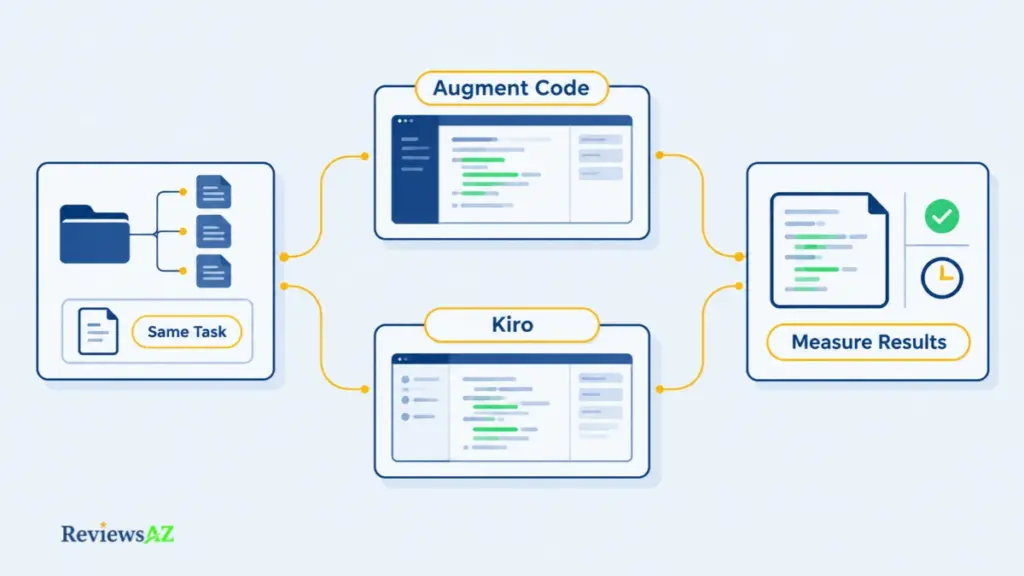
The usual failure in an AI coding tool evaluation is running different prompts on different code, or crowning a winner on response speed alone, which says nothing about whether the change survives review. Compare the same task, and count the downstream review and validation.
- Choose representative tasks. One feature, one refactor, and one bug fix your team would ship, including one that touches several files. No demos.
- Pin the same baseline. Every run starts from the same commit, branch, and dependencies.
- Write acceptance criteria and tests first. Define what done means before any prompt is written, so neither tool grades its own work.
- Check surfaces and permissions. Confirm that the IDE, CLI, or cloud surface you plan to use supports the features you need; Kiro’s Feature Specs, for example, are not available on Mobile. Then set permission and MCP rules for each tool.
- Keep tasks comparable and keep records. Give both tools the same task description, and save the prompts and resulting diffs.
- Record outcomes. Latency, test results, accepted and rejected changes, manual corrections, reviewer time. Time the review, not only the generation.
- Calculate cost in plan units. Read Augment’s usage analytics, including the 40% model-call fee, and Kiro’s credit use, including add-on credits, then apply each plan’s fee and included allowance.
- Check the exit path and decide against written thresholds. Ask what stays in your repository if you leave and who governs data and permissions. Set pass marks first, such as a minimum accepted-change rate and a maximum review time per change. “Neither” is a valid outcome.
Treat the result as evidence about your team, not about the products. A tool that does well on a small new feature may stall on a legacy module, so repeat the pilot when your workload changes. When the thresholds are met, you have a defensible proof of concept; when they are not, “neither yet” is a decision too.
Frequently Asked Questions
People weigh Augment Code vs Kiro on more than features, so these questions cover the points that usually stay unresolved: workflow, surfaces, pricing, quality evidence, and trust.
What is the main difference between Augment Code and Kiro?
They organize the work differently. Augment Code starts from repository context, delivered through editor extensions, the Auggie CLI, and Cosmos, with its Context Engine indexing the codebase. Kiro starts from written requirements, design, and tasks before code, with a lighter Vibe mode. Both are agents that change code. Which one produces better results on your repository has not been established by independent testing.
Is Kiro only an IDE, or can it be used through other surfaces?
No. Kiro is also documented for CLI, Web, and Mobile, which front the same agent harness as the IDE. Capabilities differ by surface: Feature and Bugfix Specs are not available on Mobile, Analyze Requirements is IDE and CLI only, Web needs a paid plan, and Mobile is marked Preview. Check the current surface matrix for the features you need before planning around one.
What is the difference between Kiro’s spec workflow and Vibe mode?
The spec workflow produces requirements, a design, and a task list as files in .kiro/specs, with review points before code. Vibe mode is conversational and saves no spec artifacts. Quick Spec generates the three files without approval gates. Spec-driven development adds traceability and upkeep; Vibe mode is lighter but leaves less written record. Choose by the size and risk of the change.
How do the current Augment Code and Kiro pricing units compare?
They count different things. Augment sells flat team plans, $20 or $100 a month for up to 50 seats, each with matching pooled usage, and bills model calls at list price plus a 40% fee. Kiro’s paid plans bill per user: $20 to $200 a month for 1,000 to 10,000 credits, with add-on credits at $0.04 and prices listed before taxes. Figures were checked October, 2026; recheck both pricing pages before buying.
Which tool is better for a large existing codebase?
Public evidence does not establish that. Augment documents a Context Engine that indexes the codebase for context and a client set covering common editors, which makes it a reasonable first candidate for existing and multi-repo work. Kiro’s specs and steering files can also carry project context. Which retrieves and changes code more reliably in your repository is unverified, so test both on the same tasks.
Do Augment Code and Kiro support the same IDE and terminal environments?
Not the same ones. Augment lists extensions for VS Code, JetBrains IDEs, and Vim and Neovim, plus the Auggie CLI. Kiro is its own Code OSS-based IDE with a separate CLI, plus Web and Mobile. The Auggie CLI is among the select assets joining Harness, and feature support varies by client on both sides, so confirm the current matrix for your editors and terminal workflow.
What should a team verify about MCP permissions and source-code privacy?
Verify four things in writing: whether code is used for training under your plan, what each vendor’s certification covers, which MCP servers can run and who can restrict them, and how permissions resolve for shell commands, file writes, and MCP calls. Defaults differ by plan and sign-in, so confirm retention, region, and subprocessor terms. Ask for current compliance material rather than relying on summaries.
Related Posts:
Best AI DB Tools for Backend Devs
AI Coding Assistant for SQL
Final Decision: Augment Code vs Kiro, Which Should You Evaluate First?
Do not buy a category label. Both tools bring agentic capabilities to software development, so your workflow decision is which operating model is the best fit, and then whether it holds up on your repository. The evidence reviewed supports only a conditional recommendation, not a winner.
- Evaluate Augment Code first when an existing codebase is your main constraint and its Context Engine, IDE clients, CLI, and connected workflows fit your repository, once you confirm who supports those components after the Harness transfer.
- Evaluate Kiro first when requirements, design, and tasks should be written and reviewed before code, and its steering files, hooks, and available surfaces match how the work should run.
- Choose neither yet when your team cannot state acceptance criteria, review agent changes, model usage cost, or approve permissions and data-retention terms.
Treat these as workflow-fit inferences, not benchmark results: relative code quality and the fastest workflow remain unverified without a matched test, and the headline prices measure different units.
Run the same bounded team pilot across a representative set of tasks, and decide against written thresholds your engineering team can explain and defend.