AI2SQL vs SQLAI (2026): Features, Pricing, Accuracy & Which Is Better?

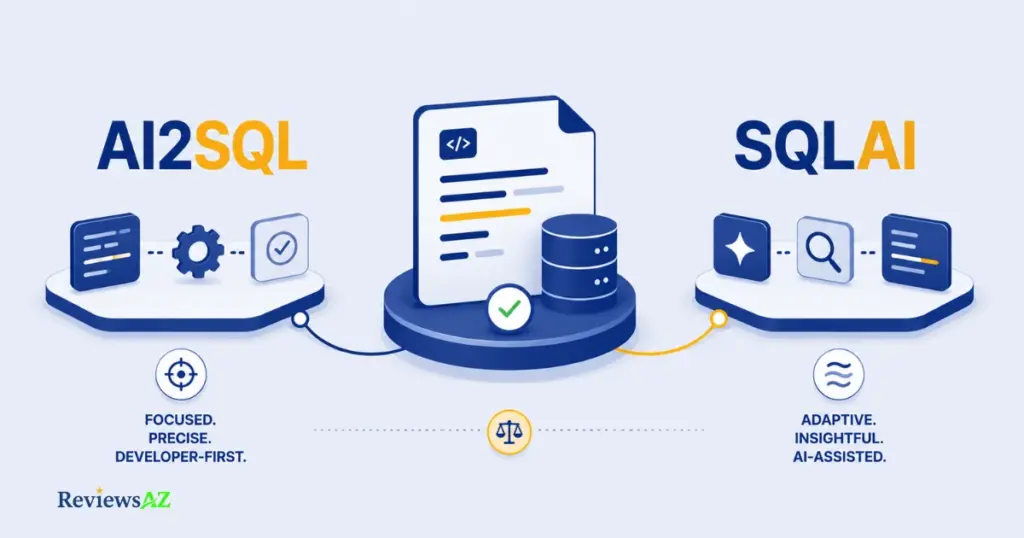
In the AI2SQL vs SQLAI comparison, AI2SQL wins on governance and live database control, while SQLAI wins on database breadth and entry pricing. Neither dominates every use case, and the sections below explain exactly where each one pulls ahead.
- Best overall fit: AI2SQL, if your queries touch a live production or staging database and someone needs to answer for what ran against it.
- Best for data analysts: SQLAI, thanks to its lower entry price and wider spread of analytics-style engines like BigQuery and ClickHouse.
- Best for developers: AI2SQL, because of the MCP Gateway and API access built for agent-driven workflows rather than a single chat box.
- Best database coverage: SQLAI, with 35+ supported engines against AI2SQL’s 20.
- Best value: depends on volume. SQLAI’s Pro plan gives 3,000 monthly queries for the same $24 that buys 300 on AI2SQL Pro.
- No universal winner: a schema-heavy enterprise team and a solo analyst exploring a new dataset will not land on the same answer here.
AI2SQL vs SQLAI at a Glance
Both tools convert plain English into working SQL, and both will explain and optimize a query once it exists. Where they split is depth versus reach: AI2SQL leans into governed, live execution against a smaller set of engines, while SQLAI spreads its coverage across a much wider range of SQL and NoSQL systems.
| Category | AI2SQL | SQLAI |
|---|---|---|
| Core approach | Governed, agent-ready SQL layer with live execution | Broad SQL/NoSQL toolbox across many engines |
| SQL generation | Text-to-SQL, dialect-aware | Text-to-SQL, dialect-aware |
| Optimization | Query optimizer included | Dedicated SQL optimizer generator |
| Schema awareness | Semantic layer, ER diagrams, file upload | Schema autocomplete, database rules, custom datasources |
| Database support | 20 engines (7 live connectors + 13 dialect-only) | 35+ engines (SQL, NoSQL, and other datasources) |
| API / integrations | API on Business/Enterprise plans, MCP Gateway for AI agents | Public API on higher-tier plans |
| Pricing from | $9/mo (Start) | $5/mo monthly, $4/mo billed yearly (Hobby) |
| Best for | Teams needing strict governance and live database execution | Teams needing the widest possible dialect and database coverage |
AI2SQL vs SQLAI: What’s the Main Difference?
A lot of comparison pages start this fight in the wrong place. They claim AI2SQL can’t connect to a live database at all, then treat that as the deciding factor. That claim is simply outdated. AI2SQL connects live to seven engines: PostgreSQL, MySQL, SQL Server, Snowflake, BigQuery, MongoDB, and Oracle. It also generates dialect-aware SQL for another thirteen without a live session. SQLAI does something similar at a larger scale, spreading across 35+ engines total.
So if “does it connect live” isn’t the real split between these two, what is? For anyone comparing the broader best AI SQL tools for developers, the answer here comes down to depth of governance versus breadth of coverage. AI2SQL builds its live connectors around sqlGuard and an MCP Gateway designed for AI agents that need supervised, read-only access to something close to a production database. SQLAI leans the other way: more engines, more generator types (validator, explainer, formatter, converter), and less emphasis on locking down what happens once a connection exists.
Neither approach is universally correct, and that’s the point of this whole comparison. A three-person startup running ad-hoc analytics queries against BigQuery cares more about dialect breadth than audit trails. A data platform team wiring an AI agent into a Postgres instance that’s one step from production cares far more about read-only enforcement than a longer list of supported databases. The full AI2SQL review and full SQLAI review cover each tool’s mechanics in more depth than a comparison page reasonably can. This section exists to fix the framing before we get into specifics, not to repeat either one.
What Do We Know About Accuracy?
AI2SQL Accuracy Claims
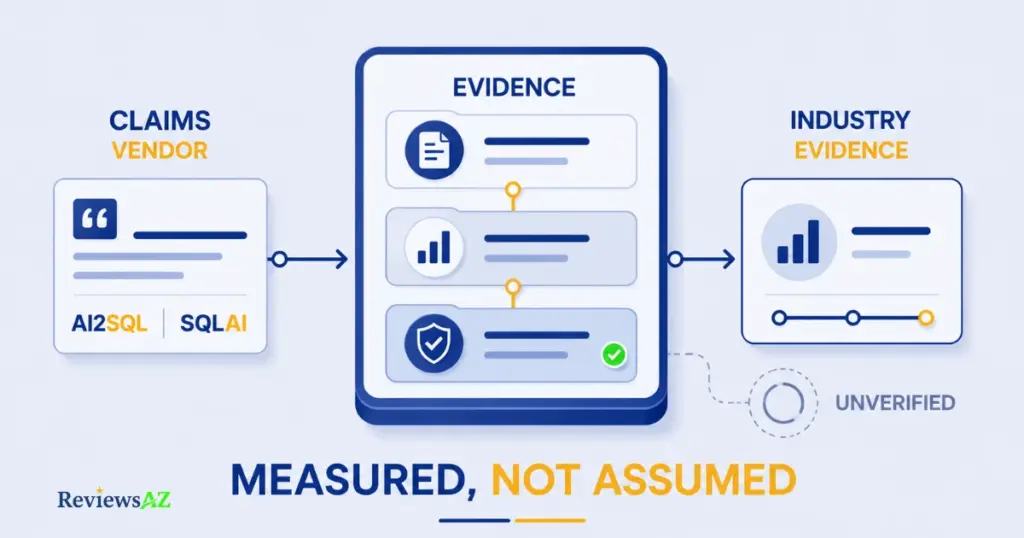
AI2SQL does not publish a specific accuracy percentage for its own model. Its marketing language stays qualitative: queries are described as syntactically correct, dialect-aware, and less error-prone when schema context is provided through file upload or a live connector.
Practical takeaway: if a claim isn’t backed by a number, treat “accurate” as a starting point, not a guarantee. Test it against your own tables before trusting it on anything that matters.
Technical takeaway: AI2SQL’s own blog acknowledges a real gap in the field. Frontier models can score around 80% on published text-to-SQL benchmarks, yet still misfire on production schemas with real-world ambiguity. That’s a rare moment of candor from a vendor, and it applies to their own product as much as anyone else’s.
SQLAI Accuracy Claims
SQLAI makes the same kind of claim, just at larger schema scale. It advertises accurate output on databases with 600 to 900+ tables, using context management to avoid losing track of relationships as schema size grows. Like AI2SQL, no independent percentage backs this. The claim matters most if your actual database is huge; a ten-table startup schema won’t stress-test this feature either way.
SQLAI’s context management for large schemas is a genuine engineering problem worth solving. Long schema dumps eat into an LLM’s context window fast, but “doesn’t lose accuracy” is still a vendor description of their own mitigation, not a third-party measurement of the result.
What Independent Evidence Shows
Independent, tool-specific benchmarks comparing AI2SQL against SQLAI head-to-head do not currently exist in any form we could verify. What does exist is broader industry data on text-to-SQL accuracy in general: AWS’s own architecture guidance on building text-to-SQL systems stresses that output quality depends heavily on the metadata and schema context supplied, not the model alone. That lines up with what both vendors say about their own products, even without a number attached.
Practical takeaway: the honest industry consensus is that schema context matters more than which specific tool you pick. A well-documented schema fed into either product will likely outperform a vague prompt fed into the “better” one.
Technical takeaway: published benchmarks like Spider and BIRD measure general NL-to-SQL capability, not AI2SQL or SQLAI specifically, since neither tool has a disclosed leaderboard entry. Treat any specific accuracy percentage you see quoted for either tool, including on this page, with the same caution you’d apply to an unaudited number.
Common mistake to avoid: assuming a vendor’s confident tone about accuracy is the same thing as a measured result. Most buyers only discover the gap after a complex join comes back wrong on a live report. Ask for a trial, run your own five or six real queries, including the messy ones with date logic and null handling, before comparing tools on accuracy alone.
What We Still Cannot Verify
Neither AI2SQL nor SQLAI has published an independently audited accuracy benchmark for their own product. Any claim you see stating one tool is “more accurate” than the other, on this page or elsewhere, should be read as an editorial judgment or a vendor claim, not a measured fact, unless it links to a disclosed methodology. The only accuracy test that matters is the one you run yourself, on your own schema, with your own edge cases. That’s also why AI2SQL’s governance layer, covered next, matters independently of accuracy. If you can’t fully verify output correctness in advance, limiting what a wrong query is allowed to do becomes the more reliable safety net.
Database Schema Awareness and Connections
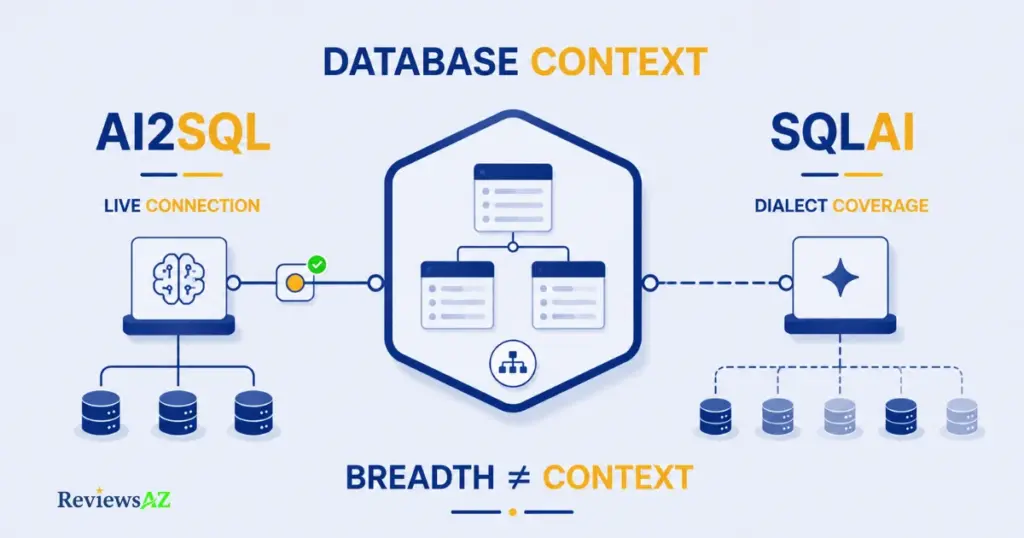
Here’s a number that surprises most people comparing these two on database count alone: SQLAI supports well over 35 database engines, but only a fraction of them accept a live connection. The same split applies to AI2SQL, just at a smaller scale.
- SQLAI: 35+ database engines total, only a fraction with a live connection.
- AI2SQL: 20 database engines total, with live execution limited to seven.
The database count on a pricing page and the database count that actually matters for your workflow are two different lists.
Before you pick a tool based on “supports 35 databases,” check whether your specific database is in the live-connect list or the schema-only list. Schema-only means the tool writes SQL for that dialect correctly, but doesn’t run anything against it or read live table structure. You’re still uploading or pasting schema by hand.
AI2SQL’s seven live connectors (PostgreSQL, MySQL, SQL Server, Snowflake, BigQuery, MongoDB, and Oracle) get a genuine semantic layer built from actual tables, columns, and relationships once connected. The other thirteen, including SQLite, MariaDB, Redshift, ClickHouse, IBM Db2, SAP HANA, and several more, fall under dialect support: correct syntax generation without a live session grounding it in your real schema.
Why this matters: a live connector can catch a typo’d column name before you run the query. Dialect-only support can’t. It’s generating plausible SQL for a database it has never actually seen.
SQLAI takes the opposite bet: breadth first. Its database rules feature lets you define standing instructions per data source, things like “always wrap identifiers in quotes” or “never generate a CTE,” and schema autocomplete surfaces table and column names as you type once a schema is loaded. SQLAI documented live-connect support for around six engines as of our last verification; treat that specific number as provisional and worth reconfirming against SQLAI’s own connection setup before publishing, since the vendor doesn’t list it as clearly as the total engine count.
If your team works across a genuinely wide mix of engines, say a Postgres production database alongside a Redshift warehouse and a Salesforce export, SQLAI’s broader dialect list means fewer moments where the tool simply doesn’t recognize your target. Its “large schema” claims (600 to 900+ tables without losing accuracy) apply mainly to its context-management approach for schema-only and custom-datasource workflows, not specifically to its live-connect tier. That’s a distinction the vendor’s own marketing doesn’t always separate clearly. On AI2SQL, MongoDB is a live connector; Redshift is dialect-only. Always check which tier a specific engine falls into before you commit a workflow to it, regardless of which tool you’re using.
AI2SQL Features vs SQLAI Features: What Actually Differs?
| Capability | AI2SQL | SQLAI |
|---|---|---|
| Text-to-SQL generation | Yes | Yes |
| SQL Explainer | Yes | Yes |
| SQL Validator | Yes | Yes |
| SQL Optimizer | Yes | Yes |
| SQL Formatter | Yes | Yes |
| Dedicated dialect converter | No standalone tool; dialect switching happens inside the generator itself | Yes, as a separate SQL Converter generator |
| Query editing / dashboard | SQL Tools workspace, Desktop App (Business plan) | Query dashboard with side-by-side diff view |
| API access | Business and Enterprise plans | Public API on higher-tier plans (charged per credit) |
| MCP support for AI agents | Yes, dedicated MCP Gateway | Not documented |
| Schema/context extras | ER Diagrams, Formula Generator, Data Insight Generator | Database rules, schema autocomplete, shared datasources |
The core generator set overlaps almost completely. Both tools generate, explain, validate, optimize, and format SQL, so that part of the decision rarely tips the scale either way. Two rows do the real differentiating.
First, SQL conversion between dialects is a named, standalone tool in SQLAI. AI2SQL folds the same capability into its generator by letting you pick a target dialect up front, which works for new queries but isn’t quite the same job as translating an existing PostgreSQL query into BigQuery syntax on demand.
Second, MCP support is documented for AI2SQL and isn’t for SQLAI. If you’re building an AI agent that needs to query a database through a governed, standardized protocol rather than a web form, that’s not a minor feature gap. It’s the difference between “usable by a person” and “usable by another AI system.”
SQL Optimization: Which Tool Fits Better?
Most “AI optimizes your SQL” claims collapse into the same three moves: suggest an index, rewrite a subquery as a join, and call it done. What actually separates these two tools isn’t whether they do that. Both do. It’s how much they let you see and trust before you run anything.
AI2SQL’s optimizer documents a fairly specific approach to SQL optimization: it analyzes query patterns to recommend composite or covering indexes, converts inefficient subqueries into joins where that helps, and suggests keyset pagination instead of heavy OFFSET clauses for large result sets. Alongside the rewritten query, it returns an explanation of the trade-offs and, in some cases, safe alternative variations rather than a single forced answer.
SQLAI’s optimizer documents a similar core mechanic, AI-powered suggestions with index-aware rewrites, but adds one feature that matters more than it sounds: a side-by-side diff view showing exactly what changed between your original query and the optimized version. That’s a small governance win in disguise. A rewrite you can’t easily audit line by line is a rewrite you’re more likely to paste into production without reading closely.
One caution applies to both tools equally: an AI-suggested index that speeds up one report can quietly slow down every insert and update hitting that same table. Reading the actual execution plan before committing a change to a live database still isn’t optional, regardless of which optimizer suggested it.
Neither company has published a controlled benchmark showing their optimizer beats the other’s on a shared set of queries, and we haven’t run one ourselves. What’s documented is the mechanic each one uses and how transparent it makes the change. On that specific point, SQLAI’s diff view gives it a slight edge for teams that want to review before they trust.
Supported Databases and Connections
Ask most buyers how many databases these tools support and you’ll get an answer copied straight from a pricing page: “10” or “28.” Neither number is accurate as of this writing, and neither tells you what actually happens when you pick your specific engine from the list.
| AI2SQL — Live Connectors (7) | AI2SQL — Dialect Support Only (13) |
|---|---|
| PostgreSQL | SQLite |
| MySQL | MariaDB |
| SQL Server | Amazon Redshift |
| Snowflake | ClickHouse |
| BigQuery | IBM Db2 |
| MongoDB | SAP HANA |
| Oracle | Apache Cassandra, Amazon DynamoDB, Apache Hive, Presto/Trino, DuckDB, CockroachDB, GraphQL |
SQLAI documents a wider net: 35+ engines spread across SQL databases (including MySQL, PostgreSQL, MS SQL Server, Oracle PL/SQL, Snowflake, BigQuery, Redshift, MariaDB, ClickHouse, Teradata, Vertica, and several others), NoSQL databases (MongoDB, DynamoDB, Elasticsearch, GraphQL), and a handful of “other” sources like Redis and even WordPress queries. Not all of them accept a live connection. SQLAI’s own connection setup separates “connect to a live datasource” from “import a schema,” the same split AI2SQL makes, just across a longer list.
Practical takeaway: if your stack leans toward analytics warehouses and less common engines, SQLAI’s breadth means fewer moments where the tool simply has no entry for what you’re using. If you live mainly in Postgres, MySQL, SQL Server, Snowflake, BigQuery, MongoDB, or Oracle and want that connection to be live rather than pasted in, AI2SQL covers exactly that set natively.
Technical takeaway: live query execution means the tool reads your actual table structure, can validate that a column exists before generating SQL against it, and, on AI2SQL specifically, enforces read-only access through sqlGuard at the connection level. Schema-only generation means the model is producing syntactically correct SQL for that dialect based on training data and whatever schema you paste in, with no live grounding to catch a typo’d table name. Both are useful. They are not the same guarantee, regardless of how either pricing page bundles the count.
AI2SQL Pricing vs SQLAI Pricing: Value for Money
| Plan | AI2SQL | Queries/mo | Plan | SQLAI (Monthly) | SQLAI (Yearly) | Queries/mo |
|---|---|---|---|---|---|---|
| Start | $9 | 100 | Hobby | $5 | $4 | 50 |
| Pro | $24 | 300 | Starter | $8 | $6 | 200 |
| Business | $39 | 1,000 | Explorer | $12 | $10 | 1,000 |
| — | — | — | Pro | $24 | $20 | 3,000 |
Pricing verified against official vendor documentation at the time of publication.
Look closely at row two and row four: AI2SQL Pro and SQLAI Pro both cost exactly $24 a month on standard monthly billing. That’s not a coincidence worth reading too much into, but it does make the comparison unusually clean: same price, ten times the quota on SQLAI’s side.
Practical takeaway: if you’re comparing purely on cost per query, SQLAI wins at every tier once you do the math, at roughly $0.08 per query on AI2SQL Pro versus $0.008 per query on SQLAI Pro. SQLAI also offers a lower entry price and knocks another 15 to 20% off if you commit to yearly billing.
Technical takeaway: raw cost per query isn’t the whole picture. AI2SQL’s plans carry table limits (10, 50, unlimited) that matter more than query count once your schema gets wide, and its Business tier is the only one that unlocks the desktop app and API access. On SQLAI’s side, the optimizer and validator generators each burn 2 queries per run instead of 1, so a workflow leaning heavily on optimization and validation will eat through a quota faster than the headline number suggests. SQLAI’s public API adds its own separate cost, 3 credits per call or 5 for very large schemas, on top of the plan quota.
Why this matters: a plan that looks ten times cheaper per query can still cost more in practice if half your workflow runs through generators with a hidden 2x multiplier. Check which specific tools you’ll use most before comparing quotas as a flat number.
Both companies offer a 7-day free trial with no credit card required to start, and both let you cancel anytime. If cost per query is your deciding factor, the fastest way to confirm the math is to run both trials against your own real workload rather than trusting either quota table, including this one.
Data Security and Privacy
Picture the moment an engineer is asked to hand a new AI tool credentials to a database that’s one query away from production. That hesitation is the entire reason this section exists, and it’s where the two tools genuinely part ways.
AI2SQL: Enforcement at the Gateway
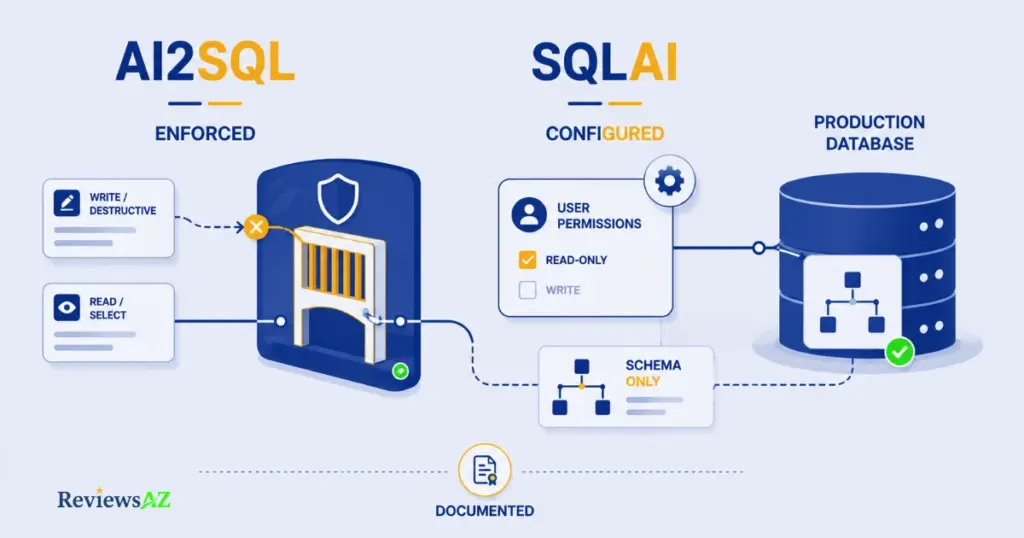
Practical takeaway: AI2SQL blocks destructive queries itself, automatically, even if the database credentials you gave it technically had write access. You don’t have to trust that the AI “won’t” write. The platform refuses to let a write reach your database at all.
Technical takeaway: AI2SQL documents a component called sqlGuard that classifies every statement before it reaches the database, blocking INSERT, UPDATE, DELETE, DROP, other DDL, multi-statement input, and file-reading functions. Connections are read-only by default. The MCP Gateway extends this same enforcement to AI agents; Claude Code, Claude Desktop, Cursor, and ChatGPT can all query through it, with every call logged against the API key that made it and any key revocable in one click. AI2SQL’s own documentation shows a sample audit line: a blocked UPDATE attempt, logged with a timestamp and the calling agent’s identity, alongside successful read-only queries.
SQLAI: Recommendation, Not Enforcement
SQLAI’s own security documentation recommends connecting with a read-only database user, but that’s guidance for you to configure, not something SQLAI enforces on its end. If you connect a credential with write access, nothing in SQLAI’s documented architecture stops a generated query from using it. Where SQLAI is genuinely strong is data minimization on the schema side. Its documentation states plainly that actual database contents are never stored, only table names, column names, and data types, alongside encrypted connection credentials. Deleted data sources are removed from backups within seven days. That’s a specific, verifiable claim, not a marketing buzzword.
Common mistake to avoid: connecting either tool with a full-access database credential because it’s faster than setting up a scoped one. AI2SQL’s enforcement reduces the blast radius if something goes wrong; SQLAI’s does not, by its own documentation. This isn’t a reason to avoid SQLAI. It’s a reason to create a dedicated read-only user yourself before connecting it, following the same least-privilege principle that applies to any application touching a database.
What Is Documented vs What We Cannot Verify
Documented and verifiable: AI2SQL’s sqlGuard enforcement and MCP audit logging, and SQLAI’s schema-only storage with encrypted credentials. Not documented by either vendor, as of this writing: a specific “zero data retention” guarantee for query prompts or conversation content, or an independent third-party security audit. If that level of assurance matters for your use case, ask both vendors directly and get it in writing before connecting anything resembling a production credential. A marketing page is not a compliance document.
Which Tool Is Better for Different Users?
Best for Data Analysts
If your day is mostly ad-hoc questions against a warehouse, “what did revenue look like by region last quarter,” SQLAI’s lower entry price and wider dialect coverage (BigQuery, ClickHouse, Redshift, and dozens more) means fewer moments where your specific data source isn’t supported. The SQL Explainer also doubles as a fast way to understand a colleague’s query without asking them to walk you through it.
Best for Developers
AI2SQL pulls ahead here, mainly because of what happens outside the browser. The MCP Gateway and API access on the Business plan let you wire query generation into an actual development workflow, whether that’s Claude Code, Cursor, or your own agent, with sqlGuard enforcing read-only access server-side instead of trusting a prompt instruction. That’s the difference between a tool you use and infrastructure you build on.
Best for SQL Beginners
Either tool works, but for genuinely different reasons. AI2SQL’s explanation output and ER Diagrams help someone see the logic behind a query, not just copy the output. SQLAI’s lower-cost Hobby tier ($4 to $5 a month) lowers the cost of experimenting while you’re still deciding if you need this at all. Start with SQLAI if budget is the deciding factor; lean AI2SQL if you want more built-in teaching.
Best for Teams
This one comes down to what “team” means to you. A team sharing query patterns and datasources across a wide mix of database engines fits SQLAI’s Pro tier and its 3,000-query allowance. A team that needs an audit trail, who ran what, against which database, and proof that nothing destructive got through, fits AI2SQL’s Business plan and its MCP-logged activity. Compliance-sensitive teams should weight this more heavily than raw query quota.
AI2SQL vs SQLAI: Pros and Cons
| Pros | Cons | |
|---|---|---|
| AI2SQL | Live execution on 7 major engines with a real semantic layer · sqlGuard enforces read-only server-side, not just by suggestion · MCP Gateway built for AI agents, with per-key audit logs · ER diagrams and a desktop app for teams that want it | Higher cost per query at every tier · Only 7 engines get a live connection, the rest are dialect-only · API access locked behind the Business plan |
| SQLAI | Widest database coverage in this comparison (35+ engines) · Lowest entry price, especially on yearly billing · Never stores actual database contents, only schema metadata · Optimizer includes a diff view for reviewing changes before applying them | Read-only access is a recommendation, not an enforced default · Optimizer and validator generators cost 2 queries per run, not 1 · No documented MCP support for agent-based workflows |
Nothing above is new information. It’s the same findings from earlier sections, condensed into a shape you can screenshot and send to a teammate who doesn’t want to read the whole comparison.
Which Is Better: AI2SQL or SQLAI?
Choose AI2SQL if…
You’re connecting an AI tool, human or agent, to something close to a production database, and you need that connection to refuse a bad write rather than just be told not to make one. AI2SQL fits teams building on Postgres, MySQL, SQL Server, Snowflake, BigQuery, MongoDB, or Oracle who want live schema awareness, sqlGuard’s enforced read-only access, and an audit trail they can actually show a compliance review.
Choose SQLAI if…
Your database landscape is wider than a handful of mainstream engines, or you’re still validating whether an AI SQL tool earns a permanent line item in the budget. SQLAI’s 35+ engine coverage, lower entry pricing, and documented schema-only storage make it the more forgiving starting point, especially for a data analyst working across a patchwork of warehouses and NoSQL sources.
Consider Neither If…
You need a tool that has published an independently audited accuracy benchmark or a formal zero-data-retention guarantee in writing. Neither AI2SQL nor SQLAI currently offers that, and no comparison page, including this one, can manufacture evidence that doesn’t exist yet. Ask both vendors directly and get the answer in a contract, not a pricing page, if that’s a hard requirement.
Related Articles:
AI2SQL vs BlazeSQL
AI2SQL vs ChatGPT for SQL
How to Generate SQL Queries with AI
Frequently Asked Questions
What is the main difference between AI2SQL and SQLAI?
AI2SQL focuses on governed, live-connected access to a smaller set of databases: read-only enforcement, audit logging, and an MCP Gateway for AI agents. SQLAI focuses on breadth, supporting 35+ database engines with lower entry pricing, but treats read-only access as a recommendation rather than something it enforces itself.
Which tool is more accurate, AI2SQL or SQLAI?
Neither company has published an independently audited accuracy benchmark for their own tool, and no third-party test compares them head-to-head. Both rely on general marketing language like “accurate” and “reliable.” The only reliable way to judge accuracy is to run your own real queries against your own schema on a free trial.
Does AI2SQL have a free trial?
Yes. AI2SQL offers a 7-day free trial with no credit card required, across its Start, Pro, and Business plans. Pricing starts at $9 a month for the Start plan, which includes 100 queries and a 10-table limit.
Can SQLAI connect to a live database?
Yes, for a subset of its supported engines. SQLAI’s documentation separates “connect to a live datasource” from “import a schema,” similar to AI2SQL’s live-versus-dialect split, just across a longer overall list of 35+ supported databases.
Is it safe to connect an AI SQL tool to a production database?
It depends on the tool and how you configure access. AI2SQL enforces read-only connections through sqlGuard by default, blocking writes at the gateway level. SQLAI recommends using a read-only database user but doesn’t enforce it itself, so the safeguard depends on how you set up the connection.
How many databases does each tool support?
AI2SQL supports 20 databases total: 7 with live connections (PostgreSQL, MySQL, SQL Server, Snowflake, BigQuery, MongoDB, Oracle) and 13 with dialect-only support. SQLAI documents 35+ engines across SQL, NoSQL, and other data sources, spread across live-connect and schema-only tiers.
Which tool is cheaper, AI2SQL or SQLAI?
SQLAI is cheaper at every comparable tier, starting at $5 a month, or $4 billed yearly, versus AI2SQL’s $9 entry price. On the top plans, both cost $24 a month, but SQLAI includes ten times the monthly query quota at that price point.
Final Verdict
Most comparison articles end by picking a side because a clean answer sells better than an honest one. This isn’t that kind of article, and these aren’t that kind of tool.
AI2SQL and SQLAI solved different problems on purpose. One decided that governance comes first and coverage can stay narrower as a result. The other decided that breadth serves more people, and left enforcement as something you configure rather than something you get by default. Neither decision is wrong. Neither is universally right, either.
If there’s one thing worth carrying away from everything above, it’s this: the question “which tool is better” is the wrong question. The right one is “what does a mistake cost me here,” a wrong query against a warehouse you can re-run, or a wrong query against a database someone depends on being correct right now. Answer that honestly about your own setup, and the choice between these two stops being close.
Start with whichever free trial matches that answer, run a handful of your own real queries against your own real schema, and let the tool prove itself on your data, not on a pricing page, and not on this one.