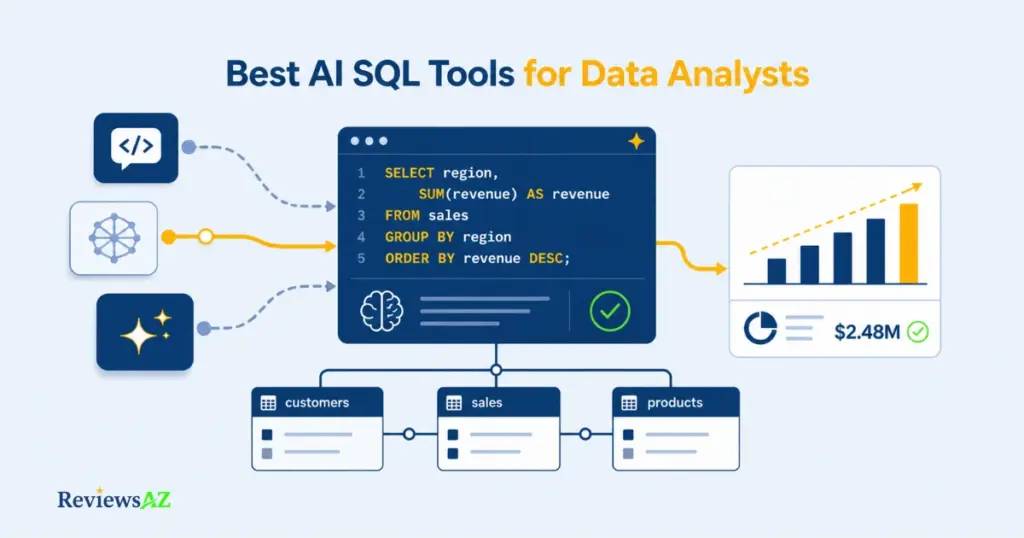
Best AI SQL Tools for Data Analysts (2026): How to Choose the Right Tool for Your Workflow

A data analyst asks an AI tool to write a SQL query, and it runs without a single error. That is usually where the real problem starts, not ends, and it is why choosing the best AI SQL tools for data analysts takes more than checking whether a query executes. Syntactically valid SQL can still pull the wrong join, return the wrong grain, or land on a metric that doesn’t match what finance is reporting in the same meeting. The tools themselves are solving different problems. Some are text-to-SQL generators. Some are database-aware assistants that understand a live schema. A few are broader AI data-analysis platforms with SQL as one part of a larger workflow.
The category matters more than the brand. An analyst who picks a pure SQL generator when the real bottleneck is stakeholder reporting will still be stuck building the chart by hand afterward. One who picks a schema-blind tool for a large, undocumented warehouse will spend more time correcting hallucinated joins than the tool ever saved. A mismatch doesn’t just underperform; it quietly hands the analyst back the same validation and rework the tool was supposed to remove.
This guide works through that landscape by workflow, not by hype or a single accuracy percentage that rarely survives contact with a real schema. The organizing question stays the same throughout: what is actually slowing you down right now? Generation itself, schema understanding, an inherited query you didn’t write, semantic consistency across a team, or the handoff to a chart nobody quite trusts?
By the end, you’ll have a fast read on where named tools like AI2SQL, SQLAI, and BlazeSQL tend to fit, a practical way to judge schema and business-context grounding before you let a generated query near production, and a short, honest list of situations where an AI SQL tool isn’t actually the fix, because the real bottleneck sits somewhere else in the workflow entirely.
How AI SQL Tools Fit a Data Analyst’s Workflow
Type “AI SQL tools for data analysts” into a search bar and the results blur together, because the label quietly covers at least four different kinds of product. A pure text-to-SQL generator, a full database client with AI built in, a notebook or workspace assistant that chains SQL into a larger analysis, and a broader AI-BI platform that runs on a governed semantic layer all get marketed under the same phrase. For an analyst trying to fix a specific bottleneck in their day-to-day analyst workflow, that ambiguity is the first real obstacle, before any question of natural language to SQL accuracy even comes up. For a wider view of the full market beyond this analyst-focused breakdown, our Best AI SQL Tools guide covers the category landscape in more depth.
The table below is an orientation map, not a ranking. It groups a mix of verified tools by what they are built to do and what an analyst should check before relying on any of them for real work.
| Tool | Best-fit analyst workflow | Main verification question |
|---|---|---|
| AI2SQL | Natural-language SQL generation with schema-aware context for analysts who want a fast path from a question to editable SQL | Does it handle your actual joins, schema context, and SQL dialect rather than producing a plausible query that still needs substantial correction? |
| SQLAI | Generation plus routine cleanup, in one place, for analysts who also want optimization and plain-language explanations of existing queries | Does its optimizer suggestion measurably improve runtime on your workload, or just look different? |
| BlazeSQL | Ad-hoc stakeholder self-service where the deliverable is a chart or dashboard, not just SQL text | What does it actually access on your database, and does the auto-generated visualization match what you would have charted yourself? |
| Chat2DB | Analysts and DBAs who want a full multi-database client with AI generation built in, rather than a separate standalone generator | Are the AI features you need available in the edition and database type you actually use? |
| Hex / Magic | Multi-step analysis that chains SQL, Python, and a chart into one reproducible notebook | Who is reviewing the generated SQL and Python before it ships, since Hex’s own documentation frames this as a tool for technical users who audit the output? |
| Seek AI | Teams that need one governed semantic layer shared across multiple analysts and business users, not just faster individual queries | What does deployment actually look like for your organization’s schema, since enterprise pricing and scope are quote-based? |
| Metabase AI (Metabot) | Teams already running Metabase who want natural-language querying inside the BI tool they use for dashboards | Is Metabot answering from your team’s defined models, or scanning raw tables it could misread past a bounded set? |
| Snowflake Cortex Analyst | Snowflake-native teams who want query generation grounded in a maintained semantic model rather than a bolt-on tool | Who owns building and maintaining the semantic model, since the feature is only as accurate as that model? |
| Databricks Genie | Databricks lakehouse teams who want conversational analytics governed through Unity Catalog | Is your catalog and access-policy setup mature enough to keep Genie from surfacing tables it shouldn’t? |
None of this is a leaderboard. A tool near the bottom of this table can be the right one, and a tool near the top can be the wrong one, depending entirely on which bottleneck is actually slowing you down.
What Makes an AI SQL Tool Analyst-Friendly?
An analyst-friendly AI SQL tool does three things a generic coding assistant does not: it works against your actual schema instead of a context-free text box, it hands back SQL you can read and edit rather than a black-box answer, and it fits the SQL dialect and access pattern your warehouse actually uses. A data analyst is not the same user as a developer debugging an application, and a tool built for one persona often disappoints the other. The analyst needs to stay in control of what runs against production, even when the AI wrote the first draft.
Where SQL Generators, Database Clients, and AI Data Analysts Diverge
Pure generators such as SQLAI take a natural-language prompt and hand back a SQL string, leaving execution, review, and visualization to the analyst. AI2SQL sits a step further along that spectrum: its own documentation describes read-only query execution through a governed connection, query optimization, and an automated semantic layer built from schema, joins, and business terms, alongside generation itself, rather than stopping at a SQL string. Database clients with AI built in, such as Chat2DB, fold that generation step into a full workspace where you also manage connections and run queries. Notebook and workspace assistants, Hex’s Magic AI being the clearest example, go further and chain SQL, Python, and charts together so a single prompt can move from question to visualized answer inside one reproducible document. Broader AI data-analyst and AI-BI platforms, whether that is BlazeSQL connecting straight to a database, Metabase AI operating inside an existing BI tool, or a semantic-layer system like Cortex Analyst, Genie, or Seek AI, add a layer of business context on top of the raw schema so the same question returns a consistent answer across a team. None of these categories is strictly better than another. They solve different parts of the same workflow, and the analyst persona this article is built around usually only has one or two of those parts actually causing pain right now.
Database Schema Understanding Is the First Accuracy Gate
Before any of these categories can be judged on speed or convenience, there is a gate every one of them has to clear: does it actually understand your schema, or is it guessing from a handful of table names you pasted in? A tool working from a live connection and documented metadata has a real shot at correct joins and column references on a large or messy warehouse. A tool working from a short prompt with no schema context is producing plausible SQL, not grounded SQL, and the difference only shows up once you check the output against your own tables. That check is the subject of the next section, because syntactically valid SQL and analyst-trustworthy SQL are not the same claim.
SQL Query Generation for Analysts: How Accurate Is It, Really?
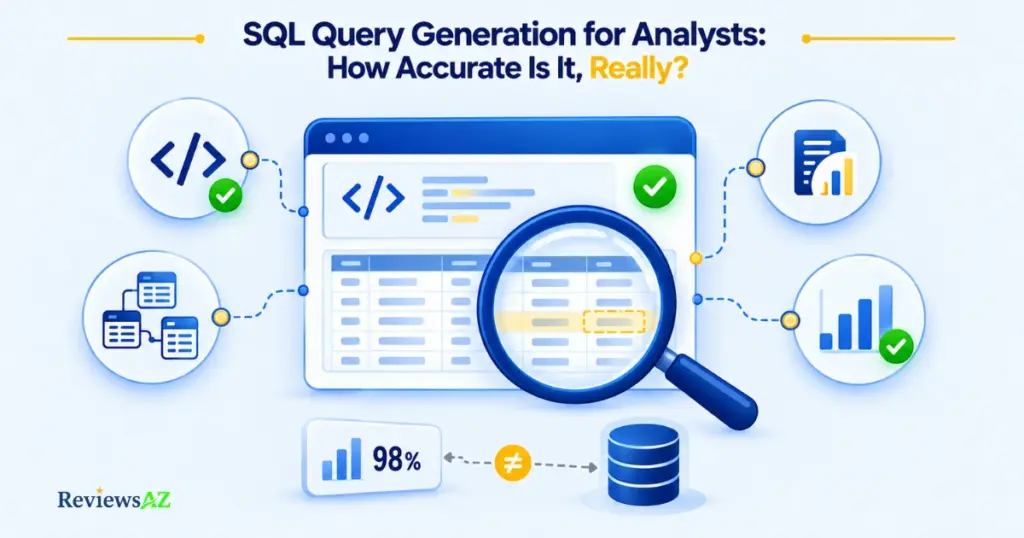
The most common misconception about AI-generated SQL is that a query counts as “accurate” the moment it runs without throwing an error. It does not. A query can execute cleanly, return a full result set, and still be wrong in ways that only surface once someone compares the number to what finance, product, or the warehouse team already knows to be true. Accuracy in SQL query generation for analysts is a layered claim, and most marketing pages collapse those layers into one.
What “Accurate SQL” Actually Means for an Analyst
Syntactic validity means the SQL parses and runs on your dialect. Schema correctness means it references the right tables, columns, and join keys for your actual database, not a plausible-looking guess. Business or metric correctness means a term like “active user” or “net revenue” matches how your organization actually defines it, not a generic default. Result validity means the numbers that come back are internally consistent and reconcilable against a source you already trust. A tool can clear the first gate and fail the other three, and from the outside the output looks identical either way.
Why Vendor Accuracy Percentages Rarely Transfer Cleanly to Your Schema
Any accuracy percentage a vendor publishes describes performance on a specific benchmark or an internal test set, not on your database. That distinction matters more than it sounds. Academic text-to-SQL research uses benchmarks like Spider, a large cross-domain dataset built by Yale researchers, specifically because generalizing to a database a model has never seen is the hard, unsolved part of the problem; Spider deliberately splits databases between training and test so that a system cannot simply memorize a schema it was tuned on. If a benchmark built for exactly that purpose still treats cross-schema generalization as a genuinely difficult, ongoing research problem, a single vendor-reported accuracy number should be read as a claim about that vendor’s own test conditions, not as a forecast for your warehouse. Treat any accuracy percentage as vendor-reported unless you can see the methodology, and never treat it as independently verified performance on schemas it has not been tested against.
In practice, a workable evaluation sequence looks like this:
- Context. Confirm the tool actually has access to your real schema, business glossary, or semantic model, not just the tables you happened to mention.
- Generation. Generate the query and read it before running it, checking that the joins, filters, and grouping match your intent, not just your wording.
- Validation. Run it against a known-good comparison, a prior report, a hand-written query, or a source system, rather than trusting that a plausible-looking result is a correct one.
- Result quality. Check that the output is usable at the grain you actually need, not just numerically present, before it goes anywhere near a stakeholder.
Common mistake to avoid: treating a query that “ran successfully” as validated. A successful execution confirms syntax, nothing else. The join can still be wrong, the metric definition can still be off, and the result can still disagree with a report your stakeholder already trusts, all while the query itself throws no error.
None of this means AI-generated SQL is unreliable by default. It means the analyst’s job shifts from writing every query by hand to verifying every query before it’s trusted, and schema and business context, up next, start to matter as much as generation itself.
Database Schema Understanding: Why Some Tools Guess and Others Ground
The gap between a smooth AI SQL demo and a frustrating real deployment usually comes down to one thing: how the tool actually knows what your tables mean. In a demo, the schema is small, clean, and well-named. In production, warehouses accumulate years of renamed columns, half-documented joins, and tables nobody quite remembers the origin of. Database schema understanding is not a nice-to-have feature at that point, it’s the difference between a tool that grounds its answers and one that guesses at them.
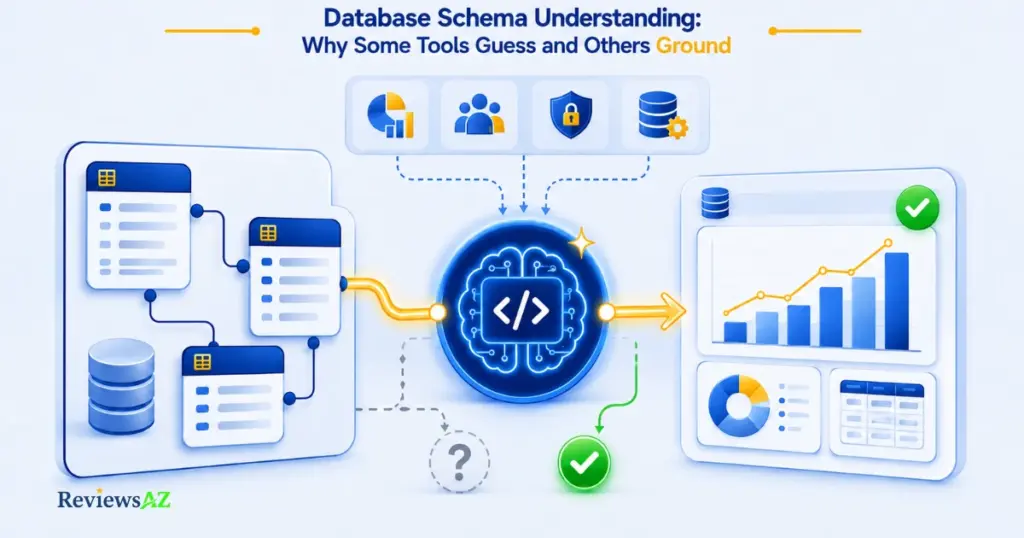
A grounded tool reads your live metadata, table names, column types, foreign keys, and ideally row-level samples, before it writes a single line of SQL. A guessing tool works from whatever you happened to paste into a prompt, a handful of table names, a rough description of a join, and fills in the rest from general patterns learned from other databases entirely. Both can produce SQL that looks confident. Only one of them is actually reasoning about your schema. On a small, tidy database the difference barely shows. On a warehouse with hundreds of tables, inconsistent naming, or undocumented junction tables, a guessing tool starts inventing plausible joins that happen to be wrong, and nothing about the output signals that it’s wrong.
It’s worth separating two things that get conflated constantly: physical schema awareness and semantic or business context. Knowing that a users table joins to an orders table on user_id is physical schema awareness. Knowing that “active user” excludes trial accounts, or that “revenue” in this company means net of refunds, is business context. No amount of table-and-column metadata gives a tool that on its own; it has to come from a maintained definition somewhere, whether that’s a semantic layer, a glossary, or explicit instructions someone wrote down. A tool can be fully schema-aware and still get the business question wrong, because those are two separate accuracy problems, not one.
Before trusting an AI SQL tool on anything beyond a trivial query, an analyst is generally better served checking the following directly:
- Tables and columns: does the tool read your actual current schema, or a stale snapshot, cached export, or a handful of tables you typed in manually?
- Relationships: does it understand foreign keys and join paths correctly, including tables that aren’t directly connected and require an intermediate join?
- Dialect: does it generate SQL that actually matches your engine’s syntax and functions, not a generic SQL dialect that needs manual correction before it runs?
- Business definitions: does it have access to how your team defines core metrics and entities, rather than falling back on a generic industry default?
A tool that handles the first three well but has no mechanism for the last one is still a schema tool, not a business-context tool. Which one you’re actually evaluating matters once a semantic layer enters the decision.
Query Optimization for Analysts: Fixing Queries You Didn’t Write
The scenario an AI SQL generator doesn’t really address is the one many analysts hit constantly: a query someone else wrote two years ago, no documentation, and a dashboard that now times out because the table it scans has grown ten times over. This is not a generation problem. The SQL already exists, it’s not broken in the sense of returning wrong results, it’s just slow, and the analyst’s job is to make it faster without quietly changing what it returns.
Inherited Queries vs. Fresh Generation
Fresh SQL generation starts from an analyst’s intent and builds a query from nothing. Inherited-query optimization starts from working code that already encodes someone else’s assumptions and edge-case handling, often undocumented. That changes the risk profile completely. When you optimize a query you didn’t write, correctness preservation matters as much as speed, and a rewrite that’s faster but subtly changes a join or a filter is a regression wearing a performance improvement as a disguise. An AI tool asked to “optimize this query” is being asked to do two things at once: keep the meaning identical, and reduce the cost. It’s worth checking which one it actually prioritized.
As a conceptual example, a query using a correlated subquery to check for the existence of related rows in a large table can often be rewritten using an EXISTS clause or a window function instead. That rewrite is a legitimate optimization pattern in general, but whether it actually helps depends entirely on your table sizes, existing indexes, and query planner.
Why this matters: a rewrite that changes join order can produce an identical result on today’s data and still hit a completely different execution plan once a table doubles in size next quarter. A rewrite validated once isn’t validated forever.
What Evidence Makes an Optimization Suggestion Credible?
A rewrite that removes a subquery, replaces a correlated pattern, or restructures a join order can look more efficient without actually being faster on your data. Credible evidence of an improvement is a change in the execution plan, fewer rows scanned, an index actually being used, a lower estimated cost, or a measured runtime difference on data volumes close to production, not a rewrite that simply reads cleaner. Run any suggested rewrite through this validation pass before trusting it:
- Inspect the plan. Run
EXPLAIN(or your engine’s equivalent) on both the original and the rewritten query and compare how each one actually accesses the data. - Compare runtime and cost. Test both versions against a realistic data volume, not a small development sample that hides the problem the original query actually has.
- Check result equivalence. Confirm the rewritten query returns the same rows, the same aggregates, and the same edge-case handling as the original, especially around nulls and duplicate rows.
- Confirm production constraints. Verify the rewrite respects locking behavior, permissions, and any downstream dependency that assumes the original query’s exact output shape.
Skip any of that, and “AI-optimized” is an unverified claim rather than a measured improvement. A rewritten query is never automatically a faster query until it’s been checked on the workload that actually matters.
Where a Semantic Layer Changes the Picture
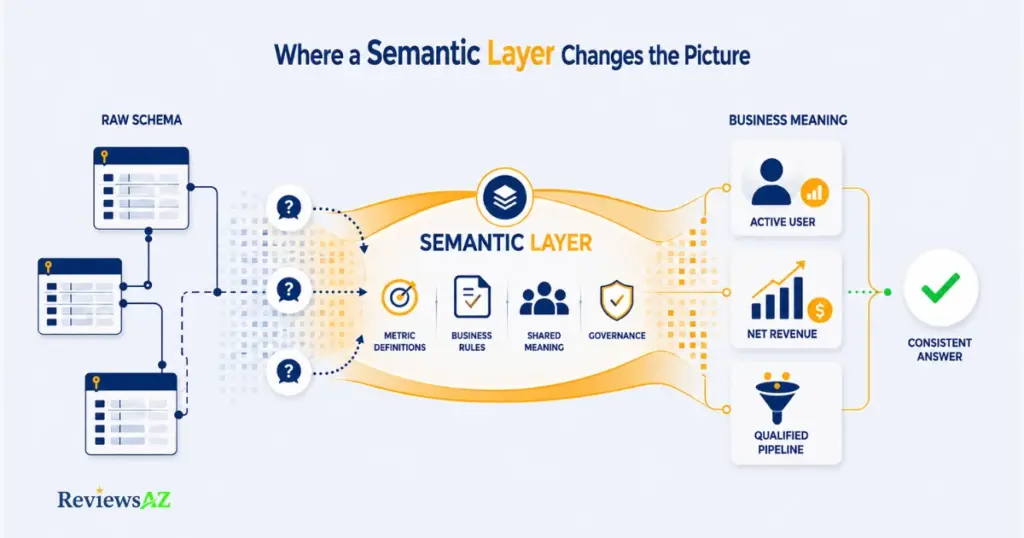
A semantic layer is a layer of business definitions sitting on top of the physical database, one that maps raw tables and columns to the terms people in your organization actually use, like “active customer,” “qualified pipeline,” or “net revenue,” so that the same question returns the same answer no matter who asks it or which tool they used to ask.
- Raw schema context: the tool sees table and column names, data types, and foreign keys, and infers what they probably mean.
- Semantic/business context: the tool reads explicit, human-authored definitions of metrics and entities, so it doesn’t have to guess what “active” or “revenue” means in your business.
- Governance and reuse: those definitions live in one place and get reused across every query and every tool that references them, instead of being redefined slightly differently by each analyst who writes SQL by hand.
Consider a small team where three analysts each get asked, in the same week, “how many active users do we have?” Without a shared definition, one analyst counts anyone who logged in during the last 30 days, another excludes trial accounts, and a third includes a churn grace period nobody documented. All three queries run without error. All three return a different number.
The Key Benefit of a Semantic Layer: A semantic layer doesn’t make individual analysts smarter. It gives the team shared definitions for metrics and business concepts, so the same question can be answered consistently instead of producing three technically valid queries with three different meanings.
What a Semantic Layer Adds That a Raw Schema Cannot
A raw schema tells a tool what tables and columns exist. It says nothing about what those columns mean to the business, which filters are implied by a term like “qualified,” or which joins represent a real relationship versus an incidental one. Snowflake’s own documentation on Cortex Analyst describes exactly this gap: a semantic model is presented as a way to bridge generic text-to-SQL conversion and the business process and metric definitions that a plain schema doesn’t capture, precisely because schemas on their own tend to produce plausible SQL that answers the literal question rather than the intended one. That’s a documented design rationale from Snowflake, not an independently verified accuracy claim, and it’s worth reading it that way.
When a Team, Not Just an Individual Analyst, Needs It
A single analyst working alone can often get by without a formal semantic layer, by keeping their own definitions consistent and documenting assumptions as they go. The need becomes real once more than one person is answering the same kinds of questions, when the same metric shows up in multiple dashboards, or when a metric definition changes and every downstream report needs to update in lockstep rather than drift apart silently. At that point, relying on individual analyst conventions becomes increasingly difficult, and a governed semantic layer can provide a much stronger foundation for consistency without requiring a manual audit every quarter.
Not every AI SQL tool operates against a semantic layer, and it’s worth verifying this directly rather than assuming it. Pure generators working from schema and prompt context, SQLAI among them, are not semantic-layer products by design. AI2SQL is a partial exception worth flagging: its own documentation describes an automated semantic layer built from schema, joins, and business terms as part of query generation, though that is a schema-inferred layer rather than a team-governed, human-authored one like Cortex Analyst’s semantic model. Snowflake Cortex Analyst is built around one by default. Databricks Genie can use Unity Catalog’s governed semantic context, including metric definitions and business concepts, alongside catalog metadata. Seek AI markets a custom semantic layer as a core part of its platform. The category a tool falls into here matters as much as its general reputation for accuracy.
From Query to Chart: Data Visualization and Reporting
Picture an analyst who gets a correct, validated SQL query in under a minute, exactly the result their AI SQL tool promised. Then they spend the next forty minutes doing what the tool never touched: picking the right chart type, formatting axis labels so a non-technical stakeholder doesn’t misread them, saving the query somewhere the next person can find it, and writing two sentences of context so the number doesn’t get repeated out of context in a meeting next week. The query was the easy part. The last mile, turning a correct result into something a stakeholder can actually use and trust, is where a lot of the analyst’s real time still goes, and it’s a part of the workflow that generation-only tools don’t touch at all.
What Happens After the Query Runs?
A result set is not a deliverable. Between “the query ran” and “the stakeholder understood the answer,” there’s a review step, a formatting step, and a framing step, and each one is easy to skip when a tool hands back something that already looks finished. Tools that stop at generating SQL leave every one of those steps to the analyst manually. Tools built further into the analyst workflow, BlazeSQL and Hex’s Magic AI among them, are documented as carrying the result through to an automatically generated chart or dashboard rather than handing back a raw table, which changes what “done” looks like but doesn’t remove the need to check whether that auto-generated chart is actually the right one for the question being asked.
When the Chart Is the Deliverable, Not the SQL
For a lot of stakeholder requests, nobody downstream ever sees the SQL at all. What they see is a chart in a dashboard or a number in a slide, and that’s the artifact that has to be correct, reproducible, and clearly labeled. A tool can be excellent at data visualization and reporting while still producing a chart built on a subtly wrong query. A polished chart tends to look more trustworthy than a plain result table, not less, regardless of what’s actually underneath it. Databricks describes Genie’s dashboard and conversational-analytics output as grounded in governed Unity Catalog metadata, specifically to keep that visual layer tied to the same access and definition rules as the rest of the platform. That’s a documented governance choice, not a guarantee that any individual chart is asking the right question.
A short checklist before a chart goes anywhere near a stakeholder:
- Result review: does the underlying number match a source you already trust, at least directionally?
- Chart suitability: is this the right visualization for the question, not just the default one the tool picked?
- Reproducibility: can someone else rerun this next month and get a consistent, explainable answer, or does it depend on a one-off manual step?
- Sharing: does the person receiving this have enough context to interpret it correctly without you standing next to them?
Visualization is a presentation layer. It can make a correct query easier to understand, and it can just as easily make an incorrect one look more convincing. Keeping those two concerns separate is what stops a good-looking dashboard from becoming the next stale number everyone quotes without checking.
Best-Fit AI SQL Tools by Analyst Use Case
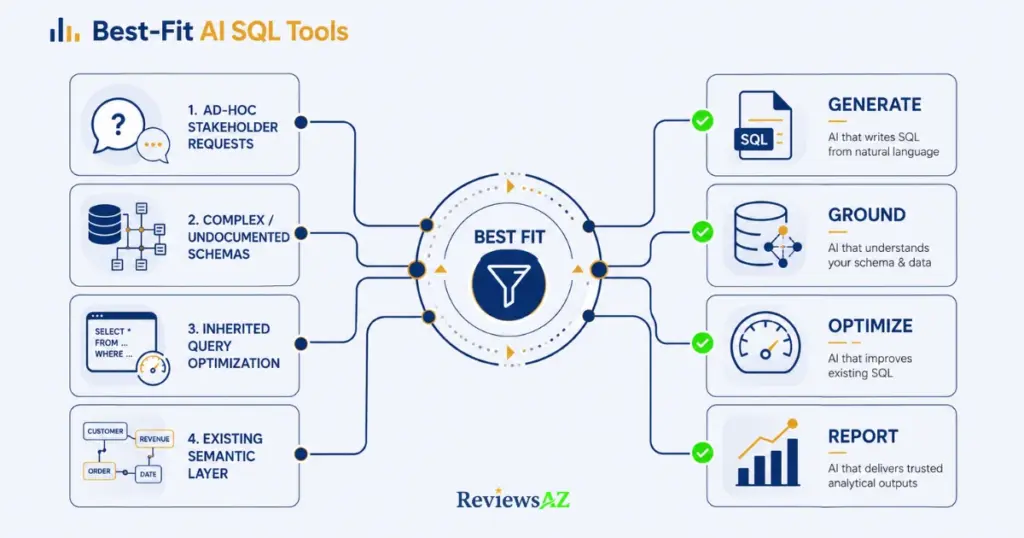
None of the categories or criteria above matter until they get applied to an actual Tuesday-afternoon situation. Here are four of the most common ones, and which kind of tool genuinely fits each, based on documented capabilities rather than a single “best overall” pick.
Scenario 1: Ad-Hoc Stakeholder Requests
A stakeholder pings you with “can you pull last month’s numbers by region” and wants an answer today, not a scoped project. Speed from question to chart matters more here than deep schema documentation. BlazeSQL is built for exactly this path: it connects directly to the database, generates and runs the SQL, and produces a dashboard-style visualization from the same prompt, according to its own product documentation. AI2SQL fits a lighter version of the same need when the analyst wants a fast, schema-aware route from a natural-language request to editable SQL and plans to handle the rest of the workflow separately. If your organization already runs Metabase for BI, Metabase’s built-in AI assistant can handle the same request without introducing a new tool into the stack.
- Strength: Shortest path from a stakeholder question to a reviewable answer when the workflow includes generation and visualization.
- Limitation: Speed can mask an ungrounded query if the tool isn’t actually reading your live schema; verify the result before it reaches the stakeholder, not after.
Scenario 2: Complex or Undocumented Schemas
Some warehouses have hundreds of tables, inconsistent naming, and no living documentation. Schema handling capacity and live connection quality matter more here than speed. SQLAI’s own documentation describes support for large schemas and live schema integration, with features aimed at helping analysts work from current database context. Chat2DB, as a full database client with AI generation built in, gives an analyst the ability to browse the actual schema structure alongside the AI-generated SQL, which helps when you need to sanity-check a join against a table you don’t fully trust yet. For an enterprise on Snowflake or Databricks specifically, Cortex Analyst and Genie both work from platform-native metadata and governed context rather than a prompt-supplied guess, which is a meaningfully different starting point on a genuinely messy schema.
Scenario 3: Inherited-Query Optimization
You’ve been handed a slow query someone else wrote, and the job is to make it faster without changing what it returns. SQLAI is documented as providing index-aware rewrite suggestions with an explanation of the expected performance impact. AI2SQL’s own documentation describes a comparable optimize step, returning a rewritten query along with the reasoning behind the change. Whatever tool you use here, the optimization guidance in this guide still applies: no rewrite should be trusted until its execution plan and result equivalence have actually been checked against your data.
Scenario 4: Teams With an Existing Semantic Layer
If your organization has already invested in shared metric definitions, the right tool is the one that plugs into that investment rather than creating a second, competing source of truth. Snowflake Cortex Analyst is the natural fit if your semantic model already lives in Snowflake. Databricks Genie fits the same role for teams whose governance runs through Unity Catalog. Seek AI positions itself as a vendor-agnostic layer built specifically for this kind of cross-tool consistency, though how well that plays out on your particular stack is a question for your own evaluation, not a vendor page. Teams already inside Metabase get a similar workflow without introducing a separate analytics environment.
| Analyst situation | Candidate tools | Verification question |
|---|---|---|
| Ad-hoc stakeholder requests | BlazeSQL, AI2SQL, Metabase AI (if already on Metabase) | Is the underlying query grounded in your live schema before the chart reaches the stakeholder? |
| Complex or undocumented schemas | SQLAI, Chat2DB, Cortex Analyst or Genie (platform-native) | Does it read your current live metadata, not a cached or manually typed subset? |
| Inherited-query optimization | SQLAI’s optimizer or AI2SQL’s optimize step, combined with manual EXPLAIN validation | Has the rewrite been checked for result equivalence and measured runtime, not just readability? |
| Existing semantic layer | Cortex Analyst, Databricks Genie, Seek AI, Metabase AI | Does the tool plug into your existing definitions, or does it create a second, competing source of truth? |
None of these candidates is a universal answer, including within its own row. The right starting point is still the specific bottleneck you’re trying to fix, not the tool with the longest feature list.
When These Tools Are Not the Right Fit
Everything up to this point has assumed an AI SQL tool is the answer to something. Sometimes it isn’t, and pretending otherwise wastes more time than it saves.
- An analyst who already writes reliable SQL quickly. Someone who can write the query they need in three minutes and trust it without a second look gains a review step from an AI generator, not a shortcut. These tools earn their place by closing a gap between intent and correct SQL. When that gap barely exists on routine queries, the honest read is that generation was never the bottleneck, and a generation-focused tool won’t move the number that’s actually slowing anyone down.
- The real bottleneck is reporting, not query writing. When the actual time sink is building the chart, formatting it for a stakeholder, and distributing it on a schedule, a text-to-SQL generator does nothing for that problem. What helps is closer to the reporting and dashboard layer covered earlier in this guide, possibly a BI tool with governed dashboards rather than a conversational SQL assistant. The wrong category of tool here doesn’t just fail to help, it adds a new interface to learn without touching the actual time cost.
- Business logic is too ambiguous for unattended generation. Some questions genuinely can’t be answered correctly without a judgment call a machine can’t safely make on its own, deciding which of three overlapping definitions of “churned customer” applies to a specific board report, for instance. Feeding that kind of ambiguity into an AI SQL tool and trusting the first answer back is how a wrong number ends up in a leadership deck with nobody noticing until someone asks a follow-up question. A conversation with a stakeholder fixes this. A better prompt does not.
- Governance constraints outweigh convenience. In regulated environments, or wherever access to production data is tightly restricted, the convenience of a natural-language interface can be outweighed by the friction of getting a new tool approved, connected, and audited. A tool that saves ten minutes per query is still not a candidate at all until it clears your organization’s data-handling and access-control requirements.
Exception: none of this evaluation matters if your organization already forbids third-party AI tools from touching production data by policy. That decision is made before the fit question ever comes up.
Frequently Asked Questions
The best AI SQL tools for data analysts are not defined by one feature or one accuracy number. The questions that matter are more practical: how well a tool understands your schema, how safely you can trust its SQL, and whether it actually solves the bottleneck slowing your workflow. These FAQs address those questions directly.
What are the best AI SQL tools for data analysts?
There’s no single best tool, only a best fit for a specific bottleneck. AI2SQL and SQLAI suit quick generation and cleanup of standalone queries, BlazeSQL and Chat2DB fit workflows that need database connection and visualization built in, and Snowflake Cortex Analyst or Databricks Genie fit teams already governed by a platform-native semantic layer. Match the tool to the workflow gap covered earlier in this guide rather than picking by popularity.
What should data analysts look for in an AI SQL tool?
Four things matter more than a feature list: whether it reads your live schema instead of guessing, whether it supports your actual SQL dialect, whether generated queries stay editable and reviewable, and whether it has any mechanism for business context beyond raw tables and columns. A tool that’s fast but ungrounded in your schema creates more verification work than it saves.
How does database schema understanding affect AI-generated SQL?
Schema understanding is the first accuracy gate: a tool that reads your live tables, columns, and foreign keys can ground its joins correctly, while one working from a short prompt is guessing at relationships it’s never actually seen. On a small, clean schema the difference is minor. On a large or undocumented warehouse, it’s usually the main source of wrong joins and hallucinated columns.
How accurate is AI-generated SQL for real analyst workflows?
Accuracy isn’t one number, it’s four separate checks: syntactic validity, schema correctness, business or metric correctness, and result validity, and a query can pass the first and still fail the other three. Treat any vendor-published accuracy percentage as a claim about that vendor’s own test conditions, not a guarantee on your schema, and validate generated SQL against a source you already trust before relying on it.
Does a semantic layer improve AI SQL reliability?
A semantic layer improves consistency more directly than raw accuracy: it gives a tool access to explicit business definitions, so terms like “active user” or “net revenue” mean the same thing every time they’re queried, instead of being guessed at differently by each tool or analyst. It matters most once more than one person is answering the same kinds of questions, and less for a single analyst working alone with well-documented assumptions.
Can AI SQL tools optimize queries, or do they mainly rewrite SQL?
Some tools, SQLAI’s optimizer and AI2SQL’s optimize step among them, are documented as offering rewrite suggestions specifically for existing queries, which is a distinct capability from fresh generation. A rewrite is not automatically an optimization, though: it only counts as one once its execution plan, runtime, and result equivalence have actually been checked against your data, not just its readability.
When should an analyst choose an AI SQL tool versus a broader AI data-analysis platform?
Choose a focused AI SQL tool when the bottleneck is specifically writing or fixing SQL and you’ll handle validation, visualization, and reporting yourself. Choose a broader AI data-analysis platform, one that also generates charts, dashboards, or works through a governed semantic layer, when the bottleneck extends past the query itself into stakeholder-facing reporting or team-wide metric consistency.
Related Posts:
AI SQL Tools for Non-Technical Users
AI-Generated SQL Risks and Limitations
Do You Still Need to Learn SQL in the Age of AI?
Conclusion: Choose the Workflow, Then Validate the Tool
The right AI SQL tool for a data analyst isn’t the one with the longest feature list or the highest vendor-reported accuracy number. It’s the one that fits the actual bottleneck slowing you down, whether that’s schema-blind generation, an inherited query nobody documented, inconsistent metric definitions across a team, or a reporting handoff that eats more time than the query itself, and gives you enough schema and business context, verification, control, and output support to trust what comes out the other end.
That means the shortlist worth taking into a real pilot isn’t a single winner. It’s two or three category-appropriate candidates, tested against your own schema, your own dialect, and a handful of questions your team actually asks, not a vendor’s demo dataset. A tool that looks impressive on someone else’s clean warehouse tells you very little about how it will behave on yours.
Before piloting any candidate from this guide, work through this checklist:
- Confirm it connects to your live schema and supports your actual SQL dialect, not a generic approximation.
- Run it against three to five real, representative questions your team asks regularly, not simplified textbook queries.
- Validate at least one generated or optimized query against a source you already trust, checking result equivalence, not just plausibility.
- Check whether it has a mechanism for your business definitions, a semantic layer, a documented glossary, or explicit context, rather than relying on generic defaults.
- Confirm it meets your organization’s data governance and access requirements before it touches anything production-adjacent.
Nothing in this guide replaces that final check on your own data. The workflow-first approach narrows the field, but the schema, the dialect, and the questions in the pilot are the actual filter, and no article, including this one, can run that filter for you.