AI-Generated SQL Risks and Limitations: What to Trust, What to Verify, and Why

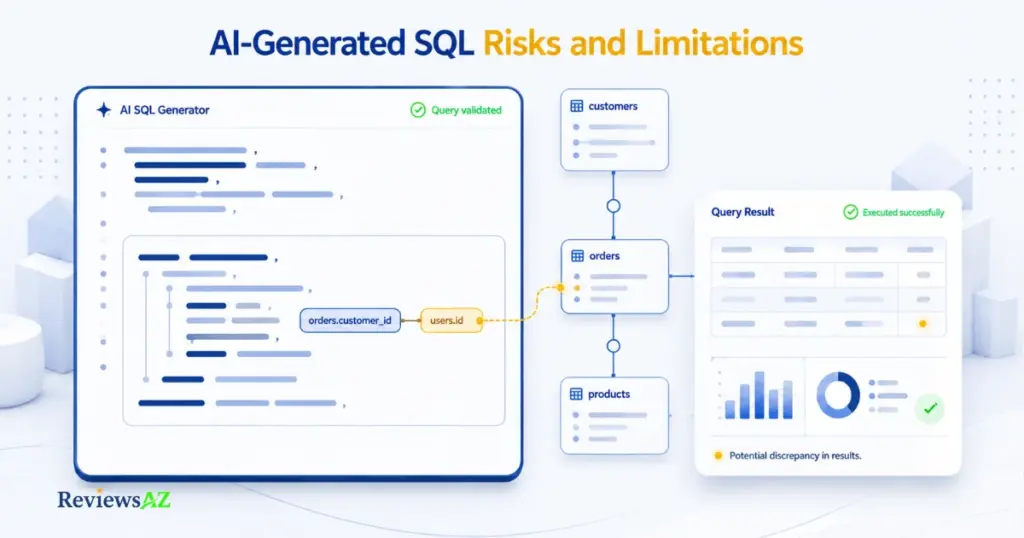
Ask an AI model to write a SQL query, and it can often hand back something that looks plausible and runs without error. That’s really the core issue behind AI-generated SQL risks and limitations: a query can execute cleanly, return real rows, and still be wrong in ways that never show up as an error message.
The failure rarely starts at the SQL itself. It starts earlier, at the moment the model has to guess at a column that doesn’t exist, join two tables on the wrong key, or infer a business rule nobody told it about. The same gap shows up in security and cost: a query that looks clean in the editor can quietly leak data, skip a tenant filter, or scan a production table it was never scoped to touch.
Key concept: AI-generated SQL accuracy isn’t one score. It moves through six layers, syntactic validity, executable correctness, semantic correctness, business-rule correctness, authorization fit, and performance fitness and a query can clear the first two easily while still failing the rest. This guide works through each layer in turn.
This guide treats AI-generated SQL as a draft, not an authority. It covers why the failures happen, what “accurate” actually means once you split it into layers, where the real security exposure sits, when a working query is still an expensive one, and the validation workflow that has to run before any of it touches real data.
Even the best AI SQL tools can produce queries that look convincing while getting the logic, scope, or business meaning wrong. The tool can speed up the first draft, but validation still has to happen before that draft touches real data.
Why AI SQL Hallucinations Happen
Why does an AI model write SQL that references a column your database doesn’t have? An AI SQL hallucination happens when the model fills a gap in its schema knowledge with a plausible-looking guess, because a text-to-SQL model or SQL agent has no built-in awareness of your actual tables, keys, or business rules unless that context is explicitly supplied.
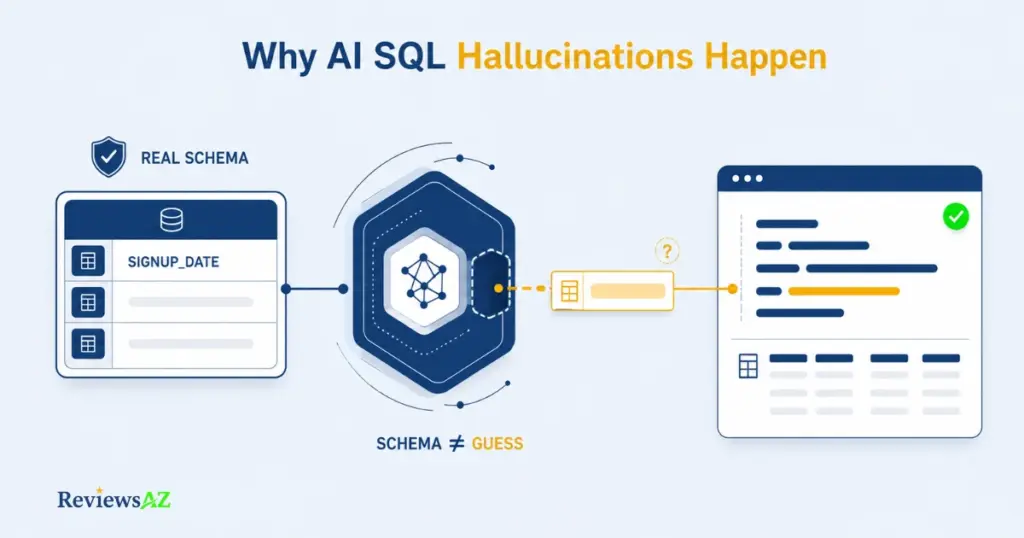
Quick definition: an AI SQL hallucination is a query that is syntactically valid but references a table, column, relationship, or business concept that doesn’t actually exist in the target database, or misrepresents one that does.
The model isn’t looking up your schema the way a developer would. It’s predicting the most statistically likely SQL pattern for a request like yours, drawing on patterns learned from other databases it has seen. Give it a full schema with keys and constraints, and it has something real to anchor to. Leave that context out and it fills the gap anyway, with something that sounds right for a table like yours whether or not it actually exists. The same gap shows up in business meaning: a schema tells the model what columns exist, not what your organization means by “active” or “revenue,” a distinction the accuracy section ahead picks up in more detail.
The Role of Schema Context in Query Errors
Most hallucinated SQL doesn’t fail because the model “doesn’t understand SQL.” It fails because it’s missing or misreading the identifiers, relationships, and constraints that only your actual schema can supply. A column name, a foreign key relationship, a NOT NULL constraint, a naming convention specific to your team, none of that is knowable from the prompt alone unless someone put it there.
Take a simple example. A model asked to pull recent signups from this table:
CREATE TABLE customers (
  customer_id INT PRIMARY KEY,
  full_name VARCHAR(255),
  signup_date DATE,
  region VARCHAR(50)
);
might still generate this:
SELECT customer_id, full_name
FROM customers
WHERE created_at > '2025-01-01';
created_at doesn’t exist in this schema, the real column is signup_date, but created_at is such a common convention that the model reproduces it anyway. That’s not a training-data problem in any way you can verify from the outside; it’s a direct consequence of incomplete context at generation time. For a closer look at how these systems generate SQL in the first place, see how text-to-SQL AI works.
How Hallucinations Become Silent Data Errors
Not every hallucination throws an error. Some run fine and quietly return the wrong population, which is the more dangerous failure mode because nothing in the output tells you it happened.
Consider a query meant to list active customers who ordered in the last 30 days:
SELECT DISTINCT c.customer_id, c.full_name
FROM customers c
JOIN orders o ON c.customer_id = o.customer_id
WHERE o.order_date >= CURRENT_DATE - INTERVAL '30 days';
It runs. It returns rows. It looks correct. But it never filters out cancelled or refunded orders, so a customer whose only recent activity was a cancelled order still shows up as “active.” The JOIN and filter are syntactically valid; the population they return is wrong. That’s the difference between an identifier hallucination, where a column or table doesn’t exist, and a logic hallucination, where every reference is real but the business meaning is off.
| Error Type | Does It Run? | What Actually Fails | Detection Method | Validation Owner |
|---|---|---|---|---|
| Syntax Error | No | Query is rejected before execution | Database engine error | Developer |
| Semantic Error | Yes | Wrong rows, wrong joins, wrong population | Manual review, test-data comparison | Developer / reviewer |
| Business-Rule Error | Yes | Technically correct query, wrong business definition | Domain review against agreed definitions | Domain owner |
Why “It Runs” Is Not the Same as “It Is Correct”
Executable SQL, semantically correct SQL, and business-correct SQL are three separate claims, not one. AI-generated SQL tends to satisfy the first far more consistently than the other two, and the gap between them is where most of the real risk in this guide lives.
Warning: a successful execution is not proof of correctness. A query can pass every syntax check, return a full result set, and still answer the wrong question, because the database engine only confirms the SQL is well-formed and references real objects. It has no way to check whether the logic matches what you actually meant.
Think of it as a ladder. Syntactic validity is the bottom rung, the SQL parses. Executable correctness is one step up, it runs against real objects. Semantic correctness asks whether the logic matches intent. Business-rule correctness asks whether it matches how your organization actually defines the terms involved. AI-generated SQL climbs the first two rungs easily and tends to slip on the third and fourth, the layers the next two sections dig into.
AI-Generated SQL Accuracy: How Accurate Is It, Really?
Accuracy isn’t one number. Ask how accurate AI-generated SQL is, and the answer depends on which of six layers you mean: syntactic validity, executable correctness, semantic correctness, business-rule correctness, authorization fit, and performance fitness. A query can score well on the first two and still fail badly on the rest, and most “accuracy” claims only ever describe the first two or three.
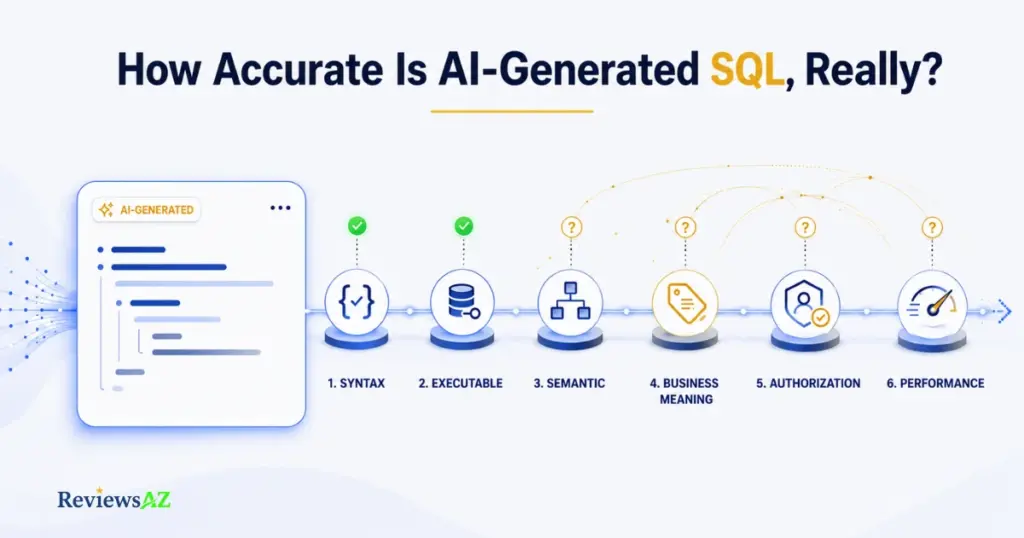
Syntactic validity just means the SQL parses. Executable correctness means it runs against real tables and columns. Semantic correctness means the JOIN, WHERE, and aggregation logic actually produce the result set the question was asking for, not just a result set. Business-rule correctness means that result matches how your organization defines the terms involved, not a generic interpretation. Above that sit authorization fit and performance fitness, covered in the sections ahead.
Treat each layer as a separate pass/fail check rather than one impression of “accurate” or “not accurate.” A query that groups correctly, joins the right tables, and filters correctly has cleared syntactic, executable, and semantic correctness. Whether it also respects business definitions, authorization scope, and production performance are three more questions, each with its own answer, and a model’s confidence in its own output tells you nothing about how any of them will turn out.
What Accuracy Benchmarks Can and Cannot Tell You
Academic text-to-SQL benchmarks are useful for comparing models against each other under controlled conditions. They are not a substitute for testing a query against your own schema.
In the Spider 2.0 evaluation, a code-agent framework built on OpenAI’s o1-preview solved roughly one-fifth of the enterprise-scale tasks, somewhere between 17 and 21 percent depending on which reported run of the benchmark you look at, compared with 91.2 percent on the earlier, much simpler Spider 1.0 benchmark using the same underlying model. That’s a specific result tied to one evaluation setup built from real enterprise schemas, not a general accuracy rate for “AI-generated SQL” as a category, and it should be read that way.
| Dimension | What a Benchmark Measures | What It Doesn’t Measure |
|---|---|---|
| Schema | Fixed, well-documented test schemas | Your live schema, with its undocumented quirks |
| Correctness | Match against a single gold-standard query | Whether your business rules match that “gold standard” at all |
| Environment | A controlled evaluation harness | Production load, permissions, and data volume |
| Outcome | A single accuracy percentage | Whether one specific query is safe to run today |
Important: Treat any other specific accuracy figure attached to a particular tool or product with caution unless you can trace it to a named, dated, primary source.
When SQL Is Correct but the Business Answer Is Wrong
A query can be syntactically clean, executable, and even semantically sound in the sense that the JOIN and WHERE logic do what they appear to do, and still return the wrong business answer because “correct” was never defined the way the business actually uses the term.
Take “revenue.” If the business defines revenue as the total of paid orders only, but nobody told the model that, it will default to the most literal reading of the question:
-- What the model generates by default
SELECT SUM(amount) AS revenue
FROM orders;
-- What the business actually means
SELECT SUM(amount) AS revenue
FROM orders
WHERE status = 'paid';Both versions run without error. Both return a number that looks like revenue. Only one of them matches what the business calls revenue, and a schema that’s technically complete, with every table and column correctly referenced, does nothing to close that gap. The missing piece was never the schema. It was the business definition, and no amount of schema documentation supplies that on its own.
Schema Context Limitations in AI-Generated SQL
Enough context means the model can stop guessing. In practice, that means supplying or verifying:
- Every table and column the query could touch
- The primary and foreign key relationships between them
- Relevant constraints (NOT NULL, unique, check constraints)
- The target SQL dialect
- A plain-language note on any business term that isn’t self-evident from the column name, “active,” “revenue,” “current,” whatever applies
Anything short of that leaves a gap, and the model will fill it, quietly and confidently, with an assumption instead of a fact.
What Are the Security Risks of AI-Generated SQL?
Can you actually let an AI tool run queries against your production database? That depends entirely on what sits between the model and the data, not on how well-behaved the model appears to be. A model told “only read data, never write” is following an instruction, not obeying a constraint, and instructions can be ignored, misread, or talked around by a cleverly worded follow-up. Enforced constraints can’t be.
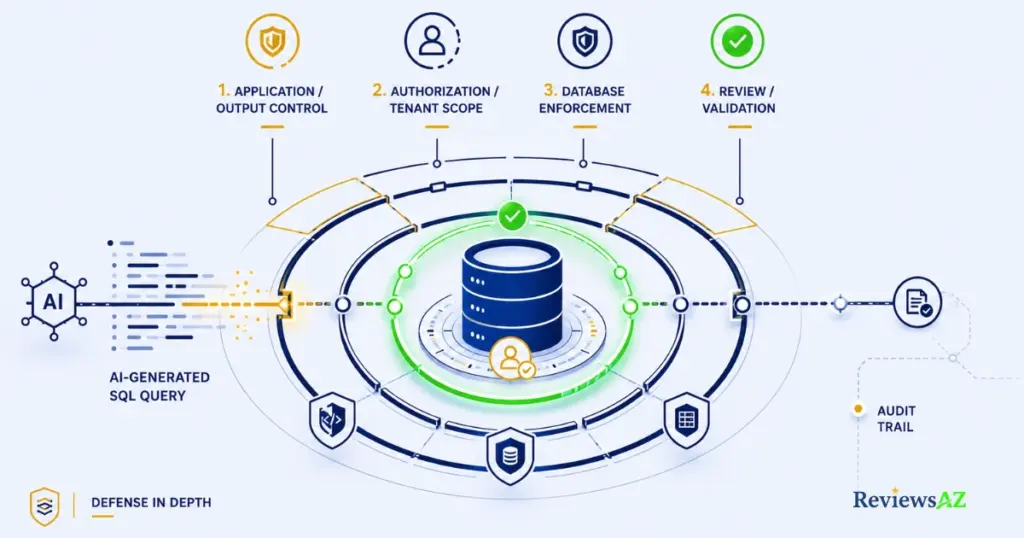
Six things tend to go wrong, each belonging to a different layer of the stack, with a different owner responsible for closing it:
| Risk | What Fails | Control Layer | Owner |
|---|---|---|---|
| Prompt-level guidance is ignored or misread | Model executes broader access than intended | Application / output handling | App developer |
| Query isn’t scoped to the caller’s tenant | Cross-tenant data exposure | Authorization / tenant scope | Backend / platform team |
| SQL is built from unsafe string concatenation | Injection vulnerability | Execution path / output handling | Developer |
| A write query runs directly against production | Irreversible or hard-to-reverse data change | Database enforcement (roles, transactions) | DBA / platform team |
| Nobody reviews the query before it runs | A bad query reaches production undetected | Human approval | Reviewer / approver |
| There’s no record of what actually executed | Incidents are hard to diagnose or recover from | Audit / recovery | Ops / security team |
None of these risks is solved by a smarter model or a better prompt. They’re solved by controls that exist independently of what the model generates. For a closer look at where these risks show up in practice, see chatting with your database using AI.
Enforcing Read-Only Access for AI Tools
“Make this read-only” is a sentence in a prompt. A read-only database role or connection is a permission the database itself enforces, and only one of those two actually stops a write from happening.
Read-only replicas genuinely help for exploratory querying: when the connection itself is configured without write privileges, they shrink the blast radius of a bad query by keeping writes off the table. That configuration detail matters; a “read-only replica” still reachable through a writable connection path doesn’t buy you this. What replicas don’t do, configured correctly or not, is prevent data leakage or resolve authorization scope.
A read-only connection can still read data it shouldn’t, across tenants it shouldn’t touch, and hand that back with total confidence. The OWASP Top 10 for LLM Applications 2025 names excessive agency and improper output handling as separate risk categories precisely because systems built around LLM output tend to grant more access, or trust the output more, than the situation warrants.
Correctness and authorization are separate questions, and mixing them up is how a technically flawless query turns into a security incident. A model, or a developer for that matter, can write a query that returns exactly the rows it was asked for. Whether it was safe to ask for those rows in the first place is a different question entirely.
-- Missing tenant scope
SELECT * FROM invoices WHERE customer_id = 4821;
-- Scoped to the authenticated tenant
SELECT * FROM invoices
WHERE customer_id = 4821
AND tenant_id = ?;The first version runs fine in a single-tenant test environment and silently crosses a boundary in a multi-tenant one. Database-level row-level and column-level controls can enforce this scope independently of whatever the application layer does or forgets to do, which matters because application-layer scoping alone depends on every code path remembering to apply it.
Warning: Any claim that a specific AI tool “handles multi-tenant scoping automatically” should be treated as unverified unless the vendor documents exactly how.
Injection and Unsafe Output Handling
AI-generated SQL is not inherently a SQL injection vector. The risk shows up in how the generated SQL, or the values it depends on, get assembled and executed, which is an execution-path and output-handling problem, not a property of the model itself.
-- Unsafe: string concatenation
query = "SELECT * FROM users WHERE email = '" + user_input + "'"
-- Safe: parameterized query
query = "SELECT * FROM users WHERE email = %s"
execute(query, [user_input])OWASP’s LLM05:2025 guidance on improper output handling treats unvalidated model output flowing into a sensitive downstream system, in this case a database execution layer, as the risk pattern to defend against, regardless of whether a human or a model produced the string. The long-standing OWASP guidance on SQL injection prevention still applies in full: parameterized queries, allow-listing, and least-privileged database roles remain the controls, whether the SQL was typed by a developer or generated by an AI tool.
Database-Level Defense: Read-Only Replicas, Transactions, and Rollbacks
Every layer above the database can fail: a prompt can be ignored, an application check can be skipped, a reviewer can miss something. The database should be one of the last enforceable control layers, not the only one, which is why it needs to enforce limits on its own rather than assume everything upstream worked correctly.
A practical stack looks like this:
- Least-privilege roles that limit what any connection can touch
- Read-only replicas for exploratory and reporting workloads
- Transactions with a clear rollback path for anything that writes
- Restricted write roles on a separate, more privileged connection than the one used for generation and review
- Row-level and column-level controls where multi-tenant exposure is a concern
- Audit logging that records exactly what ran and when
No single item is sufficient alone. Read-only access without audit logging still leaves you unable to reconstruct what was read, and transactions without least privilege still let a write role touch tables it never needed, so it’s the combination of all of them that actually holds.
Two queries can return identical results and cost wildly different amounts to run. That gap almost never shows up in a correctness review, because a correctness review checks whether the rows are right, not what it took to get them. Query Performance Issues are usually the last thing anyone checks, well after the logic has already been signed off. That ordering is backwards, given how expensive a mistake at this layer can turn out to be.
The pattern repeats often enough to be worth naming up front. AI-generated SQL tends to trip on:
- Missing indexes on the columns it filters or joins on
- Full table scans where a narrower predicate would do
- Predicates that look selective but aren’t, given the real data
- Excessive or unnecessary joins that inflate the working result set
- Aggregation written without regard for the actual data volume
- Dialect-specific behavior the model assumed rather than confirmed
Every one of these traps still returns a correct result. What they change is whether that result comes back in milliseconds or minutes, and whether it costs a rounding error or a noticeable line item.
| Dimension | Valid SQL | Production-Fit SQL |
|---|---|---|
| Correctness | Returns the right rows | Returns the right rows, at acceptable cost |
| Indexing | Not required to execute | Required to execute efficiently at scale |
| Data volume | Assumed or ignored | Explicitly accounted for |
| Dialect behavior | Generic assumption | Confirmed against the target engine |
Query Performance Issues and Cost Surprises
The shape of a query, not just its logic, determines what it costs to run. A query that reads a bounded, well-indexed slice of a table behaves nothing like one that reads an unbounded range, and a model has no way to tell the two apart unless the schema and indexing situation were part of what it was given.
-- Bounded read: filters on an indexed column, limits the range
SELECT order_id, total
FROM orders
WHERE order_date >= '2026-08-01'
  AND order_date < '2026-09-01';
-- Unbounded read: no date filter, scans the full table
SELECT order_id, total
FROM orders
WHERE status = 'refunded';Both queries can be entirely correct and still behave completely differently once they run. Read-only does not mean cheap; a read-only query against a large, unindexed table can still consume significant compute time and, on usage-billed platforms, real cost. Any specific number attached to that cost depends entirely on your data volume, engine, and configuration, and should be verified in your own environment rather than assumed from a general claim.
Dialect, Index, and Cardinality Blind Spots
A model generating SQL works from patterns, not from your database’s actual execution plan, so it has no direct visibility into which columns are indexed, how values are distributed, or which dialect-specific behaviors your engine follows. It can assume an index exists where none does, or assume even value distribution when a column is actually skewed toward a handful of values.
Cardinality assumptions matter more than they look like they should. A filter that returns ten rows out of ten thousand behaves completely differently from one that returns nine thousand out of ten thousand, even though both are syntactically identical WHERE clauses, and only your database’s real statistics, not the model’s guess, tell you which situation you’re actually in. For a closer look at closing this gap, see optimizing SQL queries with AI.
How Cartesian Products and Missing Join Conditions Amplify Results
A missing or incomplete join condition is one of the most expensive mistakes a generated query can make, because the result isn’t just wrong, it’s wrong at a multiplied scale.
-- Missing join predicate: produces a cartesian product
SELECT c.full_name, o.order_id
FROM customers c, orders o;
-- Corrected: explicit join predicate
SELECT c.full_name, o.order_id
FROM customers c
JOIN orders o ON c.customer_id = o.customer_id;The first version doesn’t error. It runs, and it returns every possible pairing of customers and orders instead of only the pairings that belong together, so the row count grows multiplicatively with the size of both tables rather than reflecting anything real. The exact scale depends on how many rows each table holds, but the direction is always the same: a missing join predicate doesn’t just return wrong rows, it returns far more of them than a correct query would.
Common Mistakes When Using AI-Generated SQL
Most AI-generated SQL problems aren’t caused by the AI. They’re caused by habits that would produce the same failures with a junior developer’s SQL, an AI tool just makes the habit easier to fall into, because the output looks polished and arrives instantly. Three habits explain most of the damage: trusting a clean execution as proof of correctness, treating a prompt instruction like “only read data” as if it were an enforced permission, and skipping the schema and business-rule check because the query “looks reasonable.” None of them are hard to fix on their own. They’re just easy to skip under time pressure, which is exactly when skipping them costs the most.
Validate Before You Execute: A Practical AI SQL Control Workflow
Picture the moment right before you run a query an AI tool just generated. It looks right. The syntax is clean, the table and column names line up with what you expected, and it would take about four seconds to hit execute. Whatever happens next, whether the mistake gets caught or slips through, shouldn’t depend on how confident the query looks.
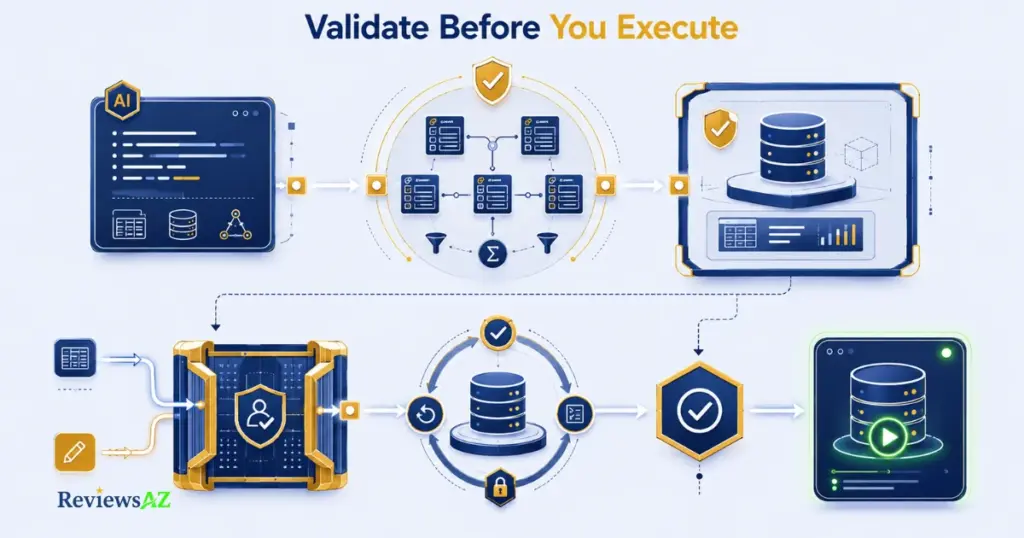
Human Validation of AI-Generated SQL isn’t a single check, it’s a short sequence: reduce the blast radius before anything runs broadly, verify the logic against the schema and the business rules, put a higher gate in front of anything that writes, and keep a record of what actually happened. Each step is simple on its own. What takes discipline is running all of them every time, not just when a query looks unusually complex, because the queries that cause the most damage are often the ones that looked the most routine.
Stage or Dry-Run First
Before a query touches anything that matters, run it somewhere it can’t do damage. A staging environment or a controlled dry-run reduces blast radius by letting you see the actual result set before it affects real data, and for exploratory reads, simply bounding the query, adding a LIMIT, filtering to a narrow date range, lets you inspect behavior without scanning or exposing more than you need to.
Staging is not a substitute for the checks that follow; a query can behave identically in staging and production and still be semantically or authorization-wrong if the staging data happens to mask the problem. Treat a clean staging run as permission to move to the next check, not as a green light for production.
Check Columns, JOINs, Filters, Aggregates, NULLs, and Scope
This is the semantic review, made explicit instead of assumed. Confirm the columns referenced actually exist and mean what they appear to mean. Confirm the JOIN predicates connect the right keys, not just plausible-looking ones. Confirm the WHERE clause includes the filters and tenant or user scope the request actually requires.
-- Before: unscoped, unclear aggregation intent
SELECT customer_id, SUM(amount)
FROM orders
GROUP BY customer_id;
-- After: scoped, explicit about what counts
SELECT customer_id, SUM(amount) AS paid_total
FROM orders
WHERE status = 'paid'
AND tenant_id = ?
GROUP BY customer_id;Also check how NULLs behave in any aggregation or comparison; a SUM or COUNT can quietly exclude rows a business user would expect to be included. A quick look at the query plan or EXPLAIN output can confirm the engine is doing what the SQL appears to say, especially when indexes and join order are part of the concern.
Gate Writes with Transactions and Explicit Approval
Reads that go wrong return bad information. Writes that go wrong change or destroy real data. That difference in stakes is the whole reason UPDATE, DELETE, INSERT, and other material operations need a higher bar than reads, not the same one.
-- Dangerous: no WHERE clause
DELETE FROM orders;
-- Gated: scoped, and reviewed at every checkpoint before commit
BEGIN;
DELETE FROM orders
WHERE order_id = 4821;
-- verify affected row count matches expectation
-- ROLLBACK if the result looks wrong
-- COMMIT only after that verification and approvalA missing WHERE clause on a write is one of the most damaging failures an AI-generated query can produce, and it’s also one of the easiest to catch, because the fix is procedural, not technical. A transaction on its own is not the safeguard; BEGIN and COMMIT just mark where the safeguard has to happen. The actual protection is what runs between them: least-privilege write roles, a checked row count, a real willingness to roll back if that count looks wrong, and explicit human approval before anything commits. A smarter model doesn’t fix any of that. Only the procedure does.
Copy-Paste Pre-Execution SOP
Every AI-generated query, no matter how simple it looks, should pass through the same fixed sequence before it touches real data. This isn’t about slowing things down for the sake of caution; it’s about replacing a case-by-case judgment call with a checklist that doesn’t depend on how confident the query looks or how rushed the moment is.
- Verify schema and identifiers: confirm every table and column referenced actually exists.
- Check JOIN predicates: confirm they connect the right keys, not just plausible-looking ones.
- Check WHERE clause and tenant scope: confirm the filters and access scope match the request.
- Verify aggregation and NULL behavior: confirm SUM, COUNT, and GROUP BY handle NULLs the way you expect.
- Bound the result set: add a LIMIT or date range so you can inspect what comes back before it scales up.
- Review EXPLAIN / query plan: check indexing and join order where performance is a concern.
- Stage or dry-run: run it somewhere it can’t affect real data first.
- Enforce least privilege: confirm the connection’s role can’t touch more than this query needs.
- Use a transaction with rollback for writes: never commit a write without a tested way back.
- Require human approval: get explicit sign-off before anything material executes.
Decision point: if the query writes to the database, it doesn’t run until every item above is checked and a human has signed off. No exceptions for writes that look simple.
Human Validation of AI-Generated SQL: Why It Still Matters
Automation can check a lot of this. It cannot reliably check all of it, because some of what needs verifying, whether a result matches an unwritten business expectation, whether an edge case matters, whether the impact of a mistake is acceptable, depends on judgment an automated check doesn’t have access to. That’s not a temporary limitation waiting on a better model; it’s structural. Automation validates against rules you gave it, and some of the rules that matter here were never written down anywhere a system could read them.
This is also why understanding SQL still matters even when a model is writing most of it. Reviewing a JOIN condition, spotting a missing filter, or reading a query plan all require knowing what correct looks like. For more on where that line sits, see whether you still need to learn SQL in the age of AI. Treat AI-generated SQL like a draft from a capable but new team member: worth using, worth reviewing, never worth committing on trust alone.
Related Posts:
How to Generate SQL Queries with AI
AI SQL Tools for Non-Technical Users
Best AI SQL Tools for Data Analysts
Frequently Asked Questions
Still wondering whether an AI-generated query is safe just because it looks right? The questions below address the practical decisions that matter before execution, helping you understand AI-Generated SQL Risks and Limitations, what the model can handle reliably, what still needs verification, and where human judgment makes the difference.
Is AI-generated SQL safe to run in production?
Not by default. It becomes safe once it passes validation: schema and business-rule checks, authorization scoping, and, for writes, transactions with human approval. Treat every AI-generated query as an unverified draft until those checks are documented, no matter how clean the syntax looks.
Why does AI-generated SQL hallucinate tables or columns?
Because the model predicts the most statistically likely SQL pattern rather than looking up your actual schema. Without your real table names, columns, and relationships supplied as context, it fills the gap with a plausible-looking reference that simply doesn’t exist in your system.
How accurate is AI-generated SQL?
It depends on which layer of accuracy you mean. Syntactic and executable correctness are usually high; semantic and business-rule correctness are far less reliable and vary with schema complexity. Published benchmark percentages describe controlled test conditions, not your specific database.
Can AI-generated SQL create security or data-leakage risks?
Yes, if a query crosses an authorization boundary, such as reading across tenants, or if unsafe output handling turns generated SQL into an injection risk. The SQL itself isn’t inherently unsafe; the risk depends on whether enforceable controls, not just prompt instructions, sit between the model and the database.
Should AI SQL tools have read-only database access?
For exploratory work, yes, a properly configured read-only role or replica meaningfully reduces risk. But it doesn’t prevent data leakage, wrong results, or authorization-scope problems, so it should be one control among several, not treated as sufficient on its own.
How can you validate AI-generated SQL before execution?
Work through a fixed sequence rather than trusting a case-by-case judgment call: schema and JOIN logic, tenant scope, aggregation behavior, a bounded test run in staging, least-privilege permissions, and, for anything that writes, a transaction with a tested rollback and a human sign-off. The ten-step checklist earlier in this guide walks through each one.
Do you still need to learn SQL if AI can generate queries?
Yes. Validating AI-generated SQL requires recognizing scope errors, bad JOINs, unsafe writes, and performance problems, and that recognition depends on SQL literacy you can’t outsource to the tool that wrote the query. AI changes who writes the first draft, not who’s responsible for reviewing it.
AI-Generated SQL Risks and Limitations: The Final Decision
AI-generated SQL earns its place as a fast, capable starting point. The moment it stops being a draft and starts affecting real data, the burden shifts to you, not the model, to confirm it’s actually right. That’s the real tradeoff behind AI-generated SQL risks and limitations: speed against the extra look a query still needs before it’s ready to run.
A query that runs successfully has told you almost nothing about whether it’s correct, safe, or cheap. What actually tells you those things is the sequence this guide walked through: schema and business-rule verification, authorization scoping, injection-safe handling, performance checks, and a real gate in front of anything that writes, applied every time, not just when a query feels risky. Keep the ten-step pre-execution checklist somewhere you’ll actually reopen, and use it before every write, even the ones that look routine.
AI-generated SQL is valuable as a first draft, but execution should never be treated as proof that the query is correct, safe, or efficient. Verify what the model could not reliably know from the prompt alone, and put human judgment in front of anything that affects real data. Trust the draft, not the execution.